
BLUEUSB21 - Network card / adapter A-link - Free user manual and instructions
Find the device manual for free BLUEUSB21 A-link in PDF.


| Brand | A-Link |
| Model | BlueUSB21 |
| Product Type | Bluetooth 2.1 USB Adapter |
| Bluetooth Version | 2.1 + EDR |
| Interface | USB 1.1 / 2.0 |
| Dimensions (approx.) | 25 mm x 15 mm x 8 mm |
| Weight (approx.) | 5 g |
| Power Supply | Powered via USB (5 V DC) |
| System Requirements | Windows 2000 / XP / Vista; Celeron or faster CPU; 128 MB RAM; USB port |
| EAN Code | 6 418949 03012 7 |
| Package Contents | Bluetooth adapter, installation guide, driver CD |
| Compliance | CE (Directive 1999/5/EC) |
| Supported Bluetooth Profiles | File transfer, headset, serial port, PAN (typical for 2.1) |
| Range | Up to 10 meters (class 2) |
| Cleaning and Care | Wipe with a soft, dry cloth. Do not use liquids or abrasive cleaners. |
| Safety | For indoor use only. Do not expose to moisture or extreme temperatures. |
| Repairability | Not user-serviceable. No replaceable parts. |
Frequently Asked Questions - BLUEUSB21 A-link
User questions about BLUEUSB21 A-link
0 question about this device. Answer the ones you know or ask your own.
Ask a new question about this device
Download the instructions for your Network card / adapter in PDF format for free! Find your manual BLUEUSB21 - A-link and take your electronic device back in hand. On this page are published all the documents necessary for the use of your device. BLUEUSB21 by A-link.
USER MANUAL BLUEUSB21 A-link
8d08T BlueUSB21 Europe Copyright © All rights reserved.
| A-LINKBlueUSB21 |  |  Pоссия Pоссия |  CESKY CESKY |  PULSKI PULSKI | |
| Product is directive 1999/5/EY approved (CE).BlueUSB21, Bluetooth 2.1, USB adapterEAN / Order code: 6 418949 03012 7 | В комплект продажи вводят:- Bluetooth адаптер- Руководство по установке- CD драйвер | Malobodhodni baleni obsahuje tyto položky:- Bluetooth adaptér- Návod k instalaci- CD s ovladači | Zawartość opokowania;- Bluetooth adapter- Instrukcja instalacji- Driver CD | ||
| European warehouse, warranty and support:A-Link Europe,P.O.BOX 3, FL-02941 Espoo, FinlandTechnical support: +358 600 41020(2,67€ / min +normal telephony charges)Internet support: http://www.a-link.com | Требования к системе:- Celeron или более мощный- 128MB RAM- USB 1.1/2.0- Win2000/XP/Vista | Systěnové požadavky:- procesor Celeron nebo rychlejší- 128MB RAM- USB 1.1/2.0- Win2000/XP/Vista | Wymagania systemowe;- Celeron lub szybszy- 128MB RAM- USB 1.1/2.0- Win2000/XP/Vista | ||
| No | Windows XP | Краткое руководство поустановке | Stručnă přiručka pro instalaci | Krótka instrukcja instalacji | |
| 1. |  | 1. Включим компьютер.2. Вставв CD драйнер в CD – ROM. | 1. Zapněte počitač.2. Vložte CD s ovladači do mechaniky CD – ROM. | 1. Włacz komputer.2. Włóż dysk driver CD do stacji CD | |
| 2. |  |  | 3. Инстальная программы начнёться автоматически.(Если не начнёться автоматически, тогда или My computer ->CD –ROM. Загрузи "setup.exe"программу.)4. Нажими Setup. | 3. Instalace software se spusti automaticky.(Jestiže se instalace nespusti, běžte na Mycomputer (múj počitač) -> CD –ROM.Spustře "setup.exe" program.)4. Stiskněte Setup. | 3. Instalacja oprogramowania nastąpatautomatycznie(Ješli instalacja nie wystartuje otwórz Start->Mój komputer - Stacja CD -> uruchom'setup.exe" program.)4. Nacijnij Setup. |
| 3. |  |  | 5. Нажими Next.6. Odorbi лицензионный договор инажими Next.7. Odorbi местоположениепrogrammes и нажими Next. | 5. Stiskněte Next6. Odsoublaste Licenční dohodu a stiskněteNext.7. Odoublaste umistění programu, stiskněteNext. | 5. Nacišnij Next.6. Zaakceptuj warunki licencji klikające Next.7. Zaakceptuj miejsce zainstalowania klikająceNext. |
| 4. |  |  | 8. Нажими Install для началинастальции программы.9. Если инсэлация сообщит“Bluetoothdevice not found” нажими Cancel. | 8. Stiskněte Install pro zahájení instalacesoftware.9. Jestiže instalace zobrazi hláske "Bluetoothdevice not found" (Bluetooth zařizzenienenalzeno), stiskněte Yes. | 8. Kliknij Install aby rozpocząć instalacjęoprogramowania.9. Jeśli wystąpi komunikat "Bluetooth devicenot found" kliknikj Cancel. |
| 5. |  | 10. Software is now installed,нажмиFinish.11. Инстальция попросит тебяперегагруть компьютер, нажмиYes. | 10. Software je nyni nainstalováno, stiskniFinish.11. Instalace vás požadů o restart počitače,stiskněte Yes. | 10. Po zakończeniu procesu instalacji kliknijFinish.11. System poprosi o restart komputera,kliknij Yes. | |
| 6. |  | 12. Подсоедини Bluetooth adapter vasUSB–slot компьютер.13. Включим компьютер.14. Windows найдёт и инсталируетдрайвер автоматически. | 12. Vložte Bluetooth adaptér do volnéhoUSB slotu počitače.13. Zapněte počitač.14. Windows najde a instaluje ovladačeautomaticky. | 12. Podłącz Bluetooth adapter do wolnegocoignazda USB.13. Uruchom komputer.14. Widows odnajdzie i zainstalujesterowniki automatycznie. | |
8d08T BlueUSB21 Europe
Copyright
All rights reserved
2008
A-Link
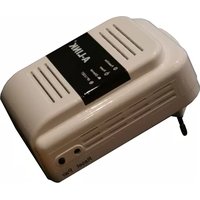
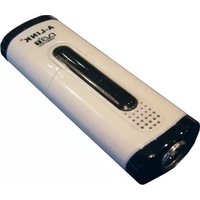

Brand : A-link
Model : BLUEUSB21
Category : Network card / adapter