
OV-85in1 - Console Overmax - Free user manual and instructions
Find the device manual for free OV-85in1 Overmax in PDF.


| Product Type | 32-bit gaming console |
| Brand | Overmax |
| Model | OV-85in1 |
| Included Games | 85 games (33 Amazing Games, 20 Bonus Games, 8 Sports Games, Music Games) |
| Processor | 32-bit |
| Controllers | 1 Classic Wireless Controller + 2 Wireless Controllers for 2 players |
| Sports Attachments | Baseball bat, tennis racket, ping pong paddles, golf club |
| Power Supply (Console) | AC adapter DC output 6V, 200mA or 4x AAA batteries (not included) |
| Power Supply (Classic Controller) | 2x AAA batteries (not included) |
| Power Supply (Wireless Controllers) | 6x AAA batteries total (not included) |
| Reception Angle | Approx. 30 degrees |
| Working Range | 1 to 4 meters |
| Controller Transmission Angle | Approx. 45 degrees |
| TV Connection | AV cable |
| Recommended Playing Distance | At least 1 meter from TV |
| Warranty | Valid with original purchase ticket; manipulation voids warranty |
| Safety Warning | Not for children under 3 years; contains small parts. Adult supervision required. |
Frequently Asked Questions - OV-85in1 Overmax
User questions about OV-85in1 Overmax
0 question about this device. Answer the ones you know or ask your own.
Ask a new question about this device
Download the instructions for your Console in PDF format for free! Find your manual OV-85in1 - Overmax and take your electronic device back in hand. On this page are published all the documents necessary for the use of your device. OV-85in1 by Overmax.
USER MANUAL OV-85in1 Overmax
Your electronic world
INSTRUKCJA OBSŁUGI User Manual
natural_image
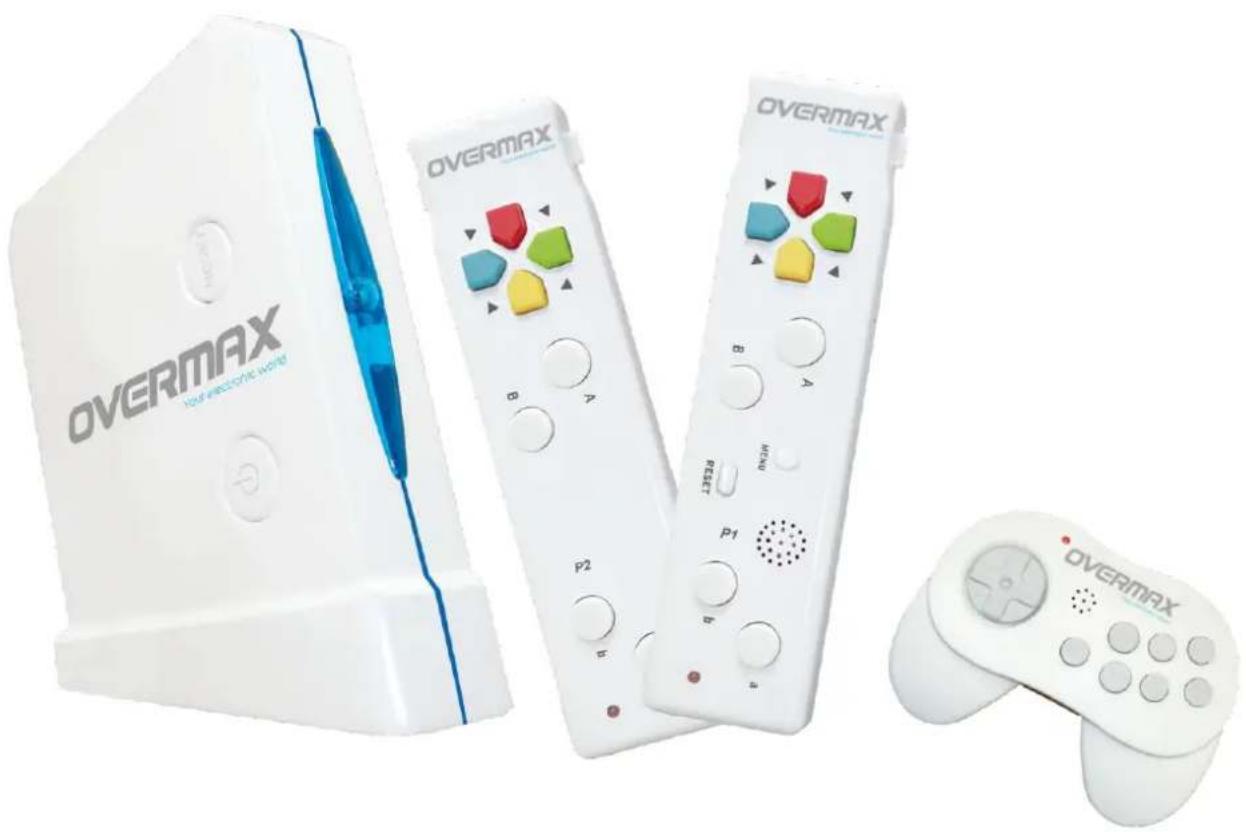
Product display of OVERMAX gaming consoles including a game controller, controllers, and a gaming controller (no visible text or symbols on main devices)OV- 85in1
1. ZALECANA ODLEGŁOŚĆ I KĄT PODCZAS GRY
Use the direction key to move the tank to all directions. Press “a” to shoot other tanks.
2.30 DEGREE:
- Main unit must be placed vertically and in font of the player/s
- Reception angle」60 degrees」vertical and horizontally
- Reception range」from 1 to 4 meters between main unit and player/s
2. ADDITIONAL ACCEESSORIES
The wireless controllers can be used with many different and fun accessories that engages the realistic feeling making the gameplay more complete and interesting. You Just need to select the appropriate accessory that you want to use in the game and then place it in your wireless controller. The following accessories are included in the box」Baseball Bat, Tennis Racket, PingPong Rackets, Golf Club
3. SECURITY & PRECAUTION WARNINGS
FOR THE USER & ENVIRONMENT
- Never leave a child connect or use the AC power adaptor in the connection power plug from home without adult supervision, it's not a toy
- Remember that you must remove the batteries of all the devices if you are not going to use them for along pe riod oftime
- Check all cables connections are made correctly before powering on the console
- Usethis device with the appropriate TV systemin or derto be working properly
- Try to stay as far as possible from the TV screen to avoid any damage and always put on the handstrap with the wireless controllers.
- Remember that you must adjust the contrast 」7 bright from your TV screen to get the best quality possible.
- Use the device in a wide room and without any obstacle near you for maximum security, and rest a bit each period of time
- Children must play and use equipment always supervised by an adult
- Space between players and between any objects or people around IS VERY IMPORTANT because this device is based in interaction and quick movements so you will avoid any damage
FOR BATTERIES AND ACCESSORIES
- Remember that you NEVER must recharge any non echa geable batteries
- Never leave children alone when charging batteries without adult supervision
- Do not remove batteries feom charger until they have been fully charged
- Never short circuit batteries or charger terminals to avoid any personal damage
-
Do not NEVER use various powering methods at the same time in your console!you must select between batteries or AC adopter but NEVER use both methods at the same time
-
Do not recommended for children under 3 years old because It's choking hazard and It contains small pieces
- You should use ONLY the supplied AC power adapter or one compatible with exactly the same tethnical features (voltage, power, etc)
- Keep the packaging in good condition because it's the best way to preserve the device in perfect state
Please check that the box contents are as follows:
1 x 32bit games console with games included
1 x Classic Wireless Controller
2 x wireless Controller for 2 players
1 x Sports set: golf club, tennis racket, pingpong rackets, baseball bat
1 x AV cable to connect to TV
1 x AC power adapter
Main Features:
- 32bit console and wireless controllers for maximum comfortability
- Reception angle from main unit is 30 degrees aprox
- Working range from 1 to 4 meters aprox
- Transmission angle from wireless and classic controllers is 45 degrees aprox
Product Warranty:
- Always save the original purchas ticket because you will be asked for it if you have any trouble with the device and need to replace it for another same or similar features model
- Any manipulation of any part of the device will avoid the product warranty automatically
4. REQUIREMENTS AND POWER INFORMATION
- Deluxe console - 4 x type AAA batteries (not included)
- Classic Controller - 2 x type AAA batteries (not included)
- Wireless Controllers -6x type AAA batteries (not included)
- Ac power adapter - DC output 6-200Ma,
Works with 4 x type AAA batteries (not included).
Please remove the batteries or disconnect the AC adapter if you are not going to use the device for a long period of time.
The handstrap prevents the controller from slipping away during gameplay. Make sure you have enough space and don't move it strongly.
5. INSTALLATION
Please follow the steps described in the same order to install and usd the Deluce 32
bit console:
- Connect the AV cable to your TV and then connect it to the Console
- Next, power on the console (POWER button) and put the handstrap if you are going to use the wireless controllers.
- You are ready to use the console and the games
85 in 1 game operating manual
33 Amazing Game:
1) Use the direction button to select the "33 Amazing Game" and press "A" or "a" to enter. Select the game by using the direction button and press "a" to enter the game.
2) Press "MANU" key to quit the game while playing
1. Shu Du:
1) Press direction key to select the level and press "a" to continue.
2) Press direction key to select Hints option and press "a" to continue.
3) Use the direction key to move cursor to the blank grid and press "a" to fix the position. Select the number by direction key and press "a" to enter the number into the grid and press "b" for return.
4) Rules: Each column & row should be filled by figure 1 to 9 without repeat
2.WAREHOUSE KEEPER;
1) Use direction key to select level and press "a" to enter
2) Use direction key to put the box on the hole. Press "b" to return one step
3.100 FLOORS:
1) Use direction key to move left & right to jump down on different supporter to avoid touching electric cable on top
2) On the score page, press "a" to start new game or press "b" to return main manual
4.BENTAL JEWEL:
1) Press "a" to change combination of the 3 falling gems and use director key to control the landing position.
2) Make 3 or more gems with same colour together in one line and the gems will be eliminated
5. EXTREME MEMORY: Remember the pictures and the position of the cards at a specified time
1) For the level with red & blue cards, one red card will be flipped over and you need to select the blue card with same picture to match. Wrong matching will lose half heart of energy and will gain half heart of energy after all cards are matched.
2) For the level with blue cards only, one card will be flipped over and you need to select the other blue card with same picture to match also.
- LINKING PETS: Use select key to link up two same pictures and press "a" to eliminate the pictures. Press "b" for hints.
7.SUB WARFARE: Use the direction key to move the warship. Press "a" to drop
bombs from the poop and press "b" to drop bombs from the bow.
8.COLOR STONE: Use direction key to move all the bricks and make the same colour bricks together. Press "b" to return one step and "a" to restart.
- HOMWARD JOURNEY: Use direction key to move the sheep to reach the flap. Each step should be stopped by obstacle. Otherwise, the sheep will go away from the field.
10.BUBBLE DESTROYER: Use direction key to move to dodge the jumping ball and press "a" to shoot the ball.
11.HARE FIGHTER: Use direction key to move. Press "a" to shoot the monster and press "b" to jump.
12.FREECELL:
1) Use direction key to move arrow cursor to select cards. Press "a" to select card and press again to release in the correct position. Line up the cards from K to A
2) Place any cards on the 4 open cells in the left upper corner and also open foundations in the right upper corner by ranking.
13.GOBANG: You use the black, move the direction key to place chess and try to make 5 chess to link for a line to win the game.
14.BALLOON SHOOTING: Use the direction key to move and press "a" to shoot the balloon.
15.UPSTAIRS BOUNCER: Hold the "a" key to save energy and release to jump up to upper layer. Catch the balloon to fly and press "a" to release.
16.PICK FAULT: Use direction key to point out the difference of 2 pictures. Each level will have 5 different points and press "b" for hints.
17.BLACK JACK:
1) Use direction to select your bet and press "b" to deal cards. Then, use direction key to select the option of stand, hit or double and press "a".
2. The card "A" can be count as 1 or eleven and 10 to K cards will count as 10.
18.MINE:
1) Use direction key to select new game or check scores. Press "a" to enter and press "b" to return.
2) Use direction key to select level. Press "a" to enter and press "b" to return
3) Press "a" to open the hidden number of bombs and will be game over when bomb is selected. Press "b" to make signs of bomb.
19.RALLY: Press "a" to accelerate the car and "b" to decelerate. Use direction key to control left right direction and need to be the top 3 ranking to enter next level.
20.GT RACING: Press "a" to accelerate the car and "b" to decelerate. Use direction key to control left right direction and need to be the top 3 ranking to enter next level.
21.PAIR MATCHING: Choose same items.
22.JUMPING MARY: Use direction key to control the jumping to dodge the monster and step over all the squares. Jump onto the yellow square will move upward
23.PARKING LOT:
1) Use direction key to move the hand to select the car and press "a" to control stop location.
2) Move any car to give a passageway for the car with arrow.
3) The car can be moved only horizontally or vertically according to the parking direction.
- DOGS: Press "a" to move the dog along the line direction and match all dogs with same colour circles.
25.MAZE COMBINATION:
1) Move the blocks to match with the upper picture
2) Use direction key to select the position arrow and press "a" to move the blocks on the same line.
26.PRECIPICE: Use direction key to put the pop-up road into the grid in order to build a crossing road.
27.BRICK BLASTER: Press "a" to shoot out the ball and use direction key to move the bar in left or right direction to rebound the ball to eliminate all the blocks in upper part.
28.MONKEYS:
1) Use direction key to move the monkey up & down in order to shoot the falling bananas to other side for small monkeys.
2) Keep shooting banana to each small monkey to keep them from running away.
29.COLLECT EGGS: Use direction key to move left & right to catch all the falling eggs.
30.MINIBEE: Use direction key to move left & right to dodge the falling pin and press "a" to shoot the upper bees.
31.ROLLING BOX:
1) Use direction key to roll the wooden block in order to drop into the hole.
2) To extend a new road, roll the block on the floor with "O" and roll the block to stand vertically on the floor with "X".
- CARTOON MATCH: Use direction key to move the arrow cursor and press "a" to move the block to another line to match a full picture to eliminate the blocks.
33.CUPS CHANGING: A chip is covered by one cup and will move fast together with other cups. Use direction key to select the cup with the chip and press "a" to open the cup
20 Bonus Games:
1) Use direction key to select the "20 Bonus Games" and press "a" or "A" to enter
2) Press "MANU" key to quit the game while playing
-
ROBOT WAR: Use the direction key to move the tank to all directions. Press "a" to shoot other tanks.
-
30 DEGREE: Press the left of direction key to accelerate the rolling speed. Press "a" or "b" to jump over the obstacles. Press "b" to dodge the flying birds. Press "a" or "b" to catch flying bananas.
3.PAO PAO:
1) Use direction key to keep left / right and press "a" to jump over the obstacles or getting gams.
2) Press both the right side of direction key and "a" to jump farther for longer obstacles.
4. DIAMOND FOREST:
1) Use direction key to move left and right and press "a" to draw one or more gems in same colour from upper
2) Use direction key to move left and right and press "b" to throw up the gems. 3 or more gems in same colours will be eliminated.
5.WEST COWBOY: Use direction key to dodge the bullets and press "a" to shoot the enemy.
6.BIG SHOT CHECKER:
1) You use the yellow chess. Use direction key to select the chess and the direct sign will be shown. Press "a" to move the chess
2) Press "b" to jump over the red chess and the red chess is eliminated.
7.HAPPY NIGHT:
1) Press “a” to jump to the top of cars. Continuous to press “a” can keep the bird flying but the energy bar will decrease. After landing on any top of cars, the energy bar will be fully filled.
2) When the energy bar drop to zero, the bird will fall down and game is over.
8.BUMPER BALLS: You use the balls in lower part. Use direction key to select shooting ball and keep holding "a" to select the shooting power. Release the "a", the ball will shoot to enemy's ball and push the balls falling out of bound.
- SEA FIGHT: Use direction key to select the moving direction for warship. Press both direction key and "a" to move warship or press "b" to fire. You can enter the swirl to move to other location.
- HIGHWAY RACING: Use direction key to control the ca and press "a" to accelerate. Hit the yellow car to add more fuel and hit the yellow icon to add more racing time.
11. TRACK RACING:
1) Use direction key to select your own car. Press "a" to enter and "b" to return.
2) Hold the "a" to accelerate your car and use direction key to control the car. Press "b" to release the catch power.
3) You should be the champion after 3 round in order to enter next level.
12.POCKET CHANGE: Base on the indication in left side, use the direct key to select correct coins within the limited time.
13.SLOT MACHINE:
1) Use direction key to select the betting line and press "a" to confirm. After selection, press "a" to start the wheel.
2) Refer to the chart for bonus points
14.BRAIN CHALLENGE:
1) Observe the sequence from the upper pictures and press "a" to select correct picture.
2) Use selection key to select the answer of missing picture.
3) According to the upper indication and calculate the figures. Press the direction key to answer.
4) After finished, check the score and press "a" to continue.
15.MINI SOCCER: Use direct key to kick the ball to shoot the coins of opposite side and also block the shooting ball from opposite side.
16.FROGGER: Use the direction key to control the frog to jump over the road and river.
17.TABLE FOOTBALL:
1) Use direction key to select the National team.
2) Use direction key to select your team formation.
3) You use the left team. Use direction key to block any shooting and also score a goal.
18.ARCHERY: Use direction key to move to aim the target. Hold "a" to select shooting power and release "a" to shoot the target.
19.ZUMA: Use direction key to move the shooting direction. Press "a" to shoot the ball to the pool with same colour balls. Over 3 same colour balls get together will be eliminated.
- BEER MASTER: Use the direction key to move to each line and press "a" to send beer to customer. Remember to move to collect back the beer up from being dropped off.
MUSICAL GAMES:
Choose anyone of 3 game blocks, press "A" or "a" enter game list screen, choose an game by direction button, then press "a" enter game. (Remark: all music games, they are same operating way)
- Press "A" or "a" enter first game screen.
- Press "a" button enter scene choose screen. Press "A" confirm scene.
- Press "a" button enter player choose screen. Press "A" for confirmed.
- Press "A" button for choose song list, Then press "A" enter game voice choose screen, an Press "A" for start games..
- In the screen, have 5 color buttons, they match product up/down/left/right and "b" buttons, hit these bottoms when the ball coming.
- Can return back to choose songlist during you play any songs.
8 SPORTS GAMES INSTRUCTIONS:
WARNING Always wear the controller's wrist strap
1.TENNIS: A game of tennis against the computer 1 player game. Hold and use the controller like a tennis racquet the game can be played with or without the attachment Controls
A=confirms selection; B=navigate menu back [DIRECTIONAL BUTTONS] to navigate round
the choices such as number of players, court type etc. To serve, Press [A] to toss the ball up. Then swing your controller when the ball is at the highest point. Hit the ball by timing your strokes well. You will achieve different strokes(smash, lob etc.) When
hitting the ball at different heights.
- GOLF: Around of golf, 1 player game. Hold and use the controller like a golclub the game can be played with or without the attachment.
Controls DIRECTIONAL BUTTONS=adjust shot selection
A=confirms selection hit the ball; B=navigate menu backwards overhead view
Press [A] and use the [DIRECTIONAL BUTTONS] to navigate round the choices on the menu. Use [A] to confirm each selection. Use [B] to navigate back to previous menu screen. Hitting the ball, press and hold down [A]. Swing your controller and release [A] button simultaneously to play the shot.
- BASEBALL: Practice your baseball batting skills. 1 player game. Hold and use the controller like a baseball bat. The game can be played with or without the attachment DIRECTIONAL BUTTONS=batting bowling select
A=confirms selection; B=navigate menu backwards
Press [A] and use the [DIRECTIONAL BUTTONS] to navigate round the choices on the menu. Use [A] to confirm each selection. Use [B] to navigate back to previous menu screen. When batting, select the type of shot using the [DIRECTIONAL BUTTONS] then press [A] to confirm. Swing the controller like a baseball bat to hit the ball.
4.BOXING: A test of your fitness in this boxing game. 1 player game both,2 controllers needed.
Controller P1=right arm; Controller P2=left arm
Press [A] and use the [DIRECTIONAL BUTTONS] to navigate round to choose your character and level of difficulty. Swing controllers P1 and P2 to pounch your opponent. Press [A] to guard.
- BASKETBALL: A free throw basketball shooting game. 1 or 2 players game DIRECTION BUTTONS=adjust position
A=aim shoot
Press [A] and use the [DIRECTIONAL BUTTONS] to navigate round the choices on the menu. Use [A] to confirm each selection. Use [B] to navigate back to previous menu screen. Use the [DIRECTIONAL BUTTONS] to move into the desired position. Press and hold [A] to aim. Release button [A] to shoot.
- TABLE TENNIS: Play table tennis against the computer or a friend 1 or 2 players game
Hold and use the controller like a table tennis paddle
A=confirms selection toss the ball; B=Navigate menu backwards
Press [A] and use the [DIRECTIONAL BUTTONS] to navigate round the choices on the Menu.
Use [A] to confirm each selection. Use [B] to navigate back to previous menu screen. To serve, press [A] to toss the ball up, Then swing the controller when the ball is at the highest point Hit the ball by timing your strokes well Hitting the ball at different heights and distances will result with different speed and stroke styles
- BOWLING: A game to test your bowling skills 1 or 2 players game
DIRECTIONAL BUTTONS=bowling position
A=confirm selection direction
Press [A] and use the [DIRECTIONAL BUTTONS] to navigate round the choices on the menu. Use [A] to confirm each selection, Use [B] to navigate back to previous menu screen. To bowl, make sure you are in the desired position by using the [DIRECTIONAL BUTTONS]. Press [A] to being the direction gauge, then press [A] again to confirm. Swing the controller as if you are bowling to play you turn
8. DARTS: A game of darts for 1 or 2 players
A=confirm selection
Press [A] and use the [DIRECTIONAL BUTTONS] to navigate round the choices on the Menu. Use [A] to confirm each selection. Use [B] to navigate back to previous menu screen. To aim, press [A] to stop the moving cursor on the desired number.
Press [A] again to confirm which area of that number you wish to hit. Press and hold [A] and the power gage will begin. Swing the controller in the same motion as you would throw a dart when the power is at the right point.
Český
1. DOPORUČENÁ VZDÁLENOST A ÚHEL HRY
Your electronic world

- INSTRUKCJA OBSŁUGI User Manual
- ZALECANA ODLEGŁOŚĆ I KĄT PODCZAS GRY
- DEGREE:
- ADDITIONAL ACCEESSORIES
- SECURITY & PRECAUTION WARNINGS
- FOR THE USER & ENVIRONMENT
- FOR BATTERIES AND ACCESSORIES
- Please check that the box contents are as follows:
- Main Features:
- Product Warranty:
- REQUIREMENTS AND POWER INFORMATION
- INSTALLATION
- bit console:
- in 1 game operating manual
- Amazing Game:
- Shu Du:
- 2.WAREHOUSE KEEPER;
- FLOORS:
- 4.BENTAL JEWEL:
- EXTREME MEMORY: Remember the pictures and the position of the cards at a specified time
- 12.FREECELL:
- 17.BLACK JACK:
- 18.MINE:
- 23.PARKING LOT:
- 25.MAZE COMBINATION:
- 28.MONKEYS:
- 31.ROLLING BOX:
- Bonus Games:
- 3.PAO PAO:
- DIAMOND FOREST:
- 6.BIG SHOT CHECKER:
- 7.HAPPY NIGHT:
- TRACK RACING:
- 13.SLOT MACHINE:
- 14.BRAIN CHALLENGE:
- 17.TABLE FOOTBALL:
- MUSICAL GAMES:
- SPORTS GAMES INSTRUCTIONS:
- DARTS: A game of darts for 1 or 2 players
- Český
- DOPORUČENÁ VZDÁLENOST A ÚHEL HRY
Brand : Overmax
Model : OV-85in1
Category : Console