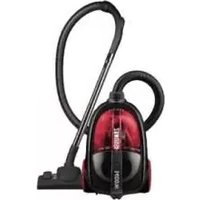
ZAN1800 - Vacuum Cleaner ZANUSSI - Free user manual and instructions
Find the device manual for free ZAN1800 ZANUSSI in PDF.


Pick your language and provide your email: we'll send you a specifically translated version.
| Product Type | Vacuum Cleaner |
| Brand | Zanussi |
| Model | ZAN1800 |
| Color | Black / Red (typical) |
| Dimensions (L x W x H) | 30 x 30 x 50 cm |
| Weight | 5 kg |
| Power Supply | 220-240 V, 50/60 Hz |
| Power Consumption | 1200 W |
| Suction Power | Adjustable, up to 250 air watts |
| Cord Length | 5 m |
| Dust Capacity | 2 L (bagless) |
| Filter Type | Washable HEPA filter |
| Noise Level | 75 dB |
| Accessories Included | Crevice tool, brush tool, upholstery nozzle |
| Floor Type | Hard floors and carpets |
| Suction Control | Electronic slider on handle |
| Overheat Protection | Yes, automatic shut-off |
| Maintenance | Empty dust container after each use; wash filter monthly |
| Repairability | Modular design; replaceable motor, filter, and hose |
| Safety Certifications | CE, RoHS |
| Warranty | 2 years (standard) |
Frequently Asked Questions - ZAN1800 ZANUSSI
How do I empty the dust container?
Press the release button on top of the container to remove it. Hold over a trash bin and press the bottom latch to empty. Rinse with water if needed and dry thoroughly before reattaching.
How often should I wash the filter?
For optimal performance, wash the HEPA filter under cold water every month. Allow it to air dry completely for 24 hours before reinstalling.
Why is my vacuum losing suction?
Common causes: a full dust container, a clogged filter, or blockage in the hose. Empty the container, wash the filter, and check the hose for obstructions.
Can I use this vacuum for pet hair?
Yes, the included brush tool is effective for pet hair on upholstery. For carpets, use the main floor head. Clean the brush roll regularly to prevent hair wrap.
What does the suction control slider do?
The slider on the handle lets you adjust suction power from low (for delicate rugs) to high (for deep cleaning carpets). Slide towards High for maximum power.
Is the vacuum suitable for hard floors?
Yes, it has a hard floor setting and a brush that can be turned off to avoid scratching. Use the hard floor mode for best results.
How do I replace the hose?
Disconnect the old hose from the vacuum body and the handle. Attach the new hose by aligning the connectors and pushing until they click. Ensure a tight fit.
What should I do if the vacuum overheats?
If the motor shuts off automatically, turn off and unplug the vacuum. Check for blockages and empty the dust container. Allow it to cool for 30 minutes before restarting.
Can I wash the dust container?
Yes, the dust container is washable. Remove it from the vacuum, wash with mild soap and water, and dry completely before reusing. Do not put in dishwasher.
Where can I find spare parts?
Spare parts such as filters, hoses, and brush rolls are available on the Zanussi website or authorized dealers. Use the model number ZAN1800 to find compatible parts.
User questions about ZAN1800 ZANUSSI
0 question about this device. Answer the ones you know or ask your own.
Ask a new question about this device
No questions yet. Be the first to ask one.
Download the instructions for your Vacuum Cleaner in PDF format for free! Find your manual ZAN1800 - ZANUSSI and take your electronic device back in hand. On this page are published all the documents necessary for the use of your device. ZAN1800 by ZANUSSI.
USER MANUAL ZAN1800 ZANUSSI
natural_image
Illustration of green trees with no text or symbolsZANUSSI
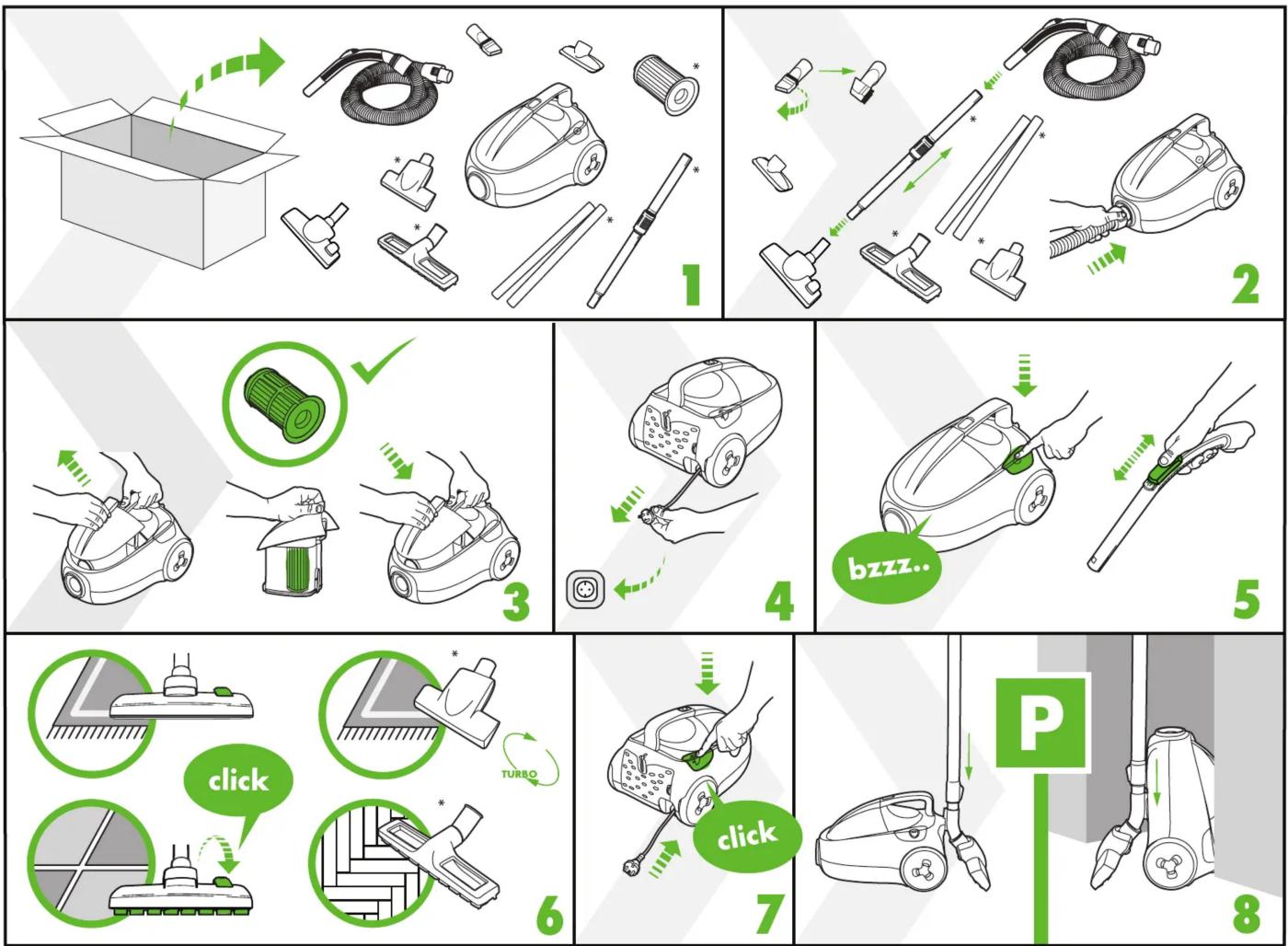
flowchart
graph TD
    A["Open Box"] --> B["Check Outer Washer"]
    B --> C["Check Inner Washer"]
    C --> D["Check Inner Washer"]
    D --> E["Check Inner Washer"]
    E --> F["Check Inner Washer"]
    F --> G["Check Inner Washer"]
    G --> H["Check Inner Washer"]
    H --> I["Check Inner Washer"]
    I --> J["Check Inner Washer"]
    J --> K["Check Inner Washer"]
    K --> L["Check Inner Washer"]
    L --> M["Check Inner Washer"]
    M --> N["Check Inner Washer"]
    N --> O["Check Inner Washer"]
    O --> P["Check Inner Washer"]
    P --> Q["Check Inner Washer"]
    Q --> R["Check Inner Washer"]
    R --> S["Check Inner Washer"]
    S --> T["Check Inner Washer"]
    T --> U["Check Inner Washer"]
    U --> V["Check Inner Washer"]
    V --> W["Check Inner Washer"]
    W --> X["Check Inner Washer"]
    X --> Y["Check Inner Washer"]
    Y --> Z["Check Inner Washer"]
    Z --> AA["Check Inner Washer"]
    AA --> AB["Check Inner Washer"]
    AB --> AC["Check Inner Washer"]
    AC --> AD["Check Inner Washer"]
    AD --> AE["Check Inner Washer"]
    AE --> AF["Check Inner Washer"]
    AF --> AG["Check Inner Washer"]
    AG --> AH["Check Inner Washer"]
    AH --> AI["Check Inner Washer"]
    AI --> AJ["Check Inner Washer"]
    AJ --> AK["Check Inner Washer"]
    AK --> AL["Check Inner Washer"]
    AL --> AM["Check Inner Washer"]
    AM --> AN["Check Inner Washer"]
    AN --> AO["Check Inner Washer"]
    AO --> AP["Check Inner Washer"]
    AP --> AQ["Check Inner Washer"]
    AQ --> AR["Check Inner Washer"]
    AR --> AS["Check Inner Washer"]
    AS --> AT["Check Inner Washer"]
    AT --> AU["Check Inner Washer"]
    AU --> AV["Check Inner Washer"]
    AV --> AW["Check Inner Washer"]
    AW --> AX["Check Inner Washer"]
    AX --> AY["Check Inner Washer"]
    AY --> AZ["Check Inner Washer"]
    AZ --> BA["Check Inner Washer"]
    BA --> BB["Check Inner Washer"]
    BB --> BC["Check Inner Washer"]
    BC --> BD["Check Inner Washer"]
    BD --> BE["Check Inner Washer"]
    BE --> BF["Check Inner Washer"]
    BF --> BG["Check Inner Washer"]
    BG --> BH["Check Inner Washer"]
    BH --> BI["Check Inner Washer"]
    BI --> BJ["Check Inner Washer"]
    BJ --> BK["Check Inner Washer"]
    BK --> BL["Check Inner Washer"]
    BL --> BM["Check Inner Washer"]
    BM --> BN["Check Inner Washer"]
    BN --> BO["Check Inner Washer"]
    BO --> BP["Check Inner Washer"]
    BP --> BQ["Check Inner Washer"]
    BQ --> BR["Check Inner Washer"]
    BR --> BS["Check Inner Washer"]
    BS --> BT["Check Inner Washer"]
    BT --> BU["Check Inner Washer"]
    BU --> BV["Check Inner Washer"]
    BV --> BW["Check Inner Washer"]
    BW --> BX["Check Inner Washer"]
    BX --> BY["Check Inner Washer"]
    BY --> BZ["Check Inner Washer"]



www.zanussi.com
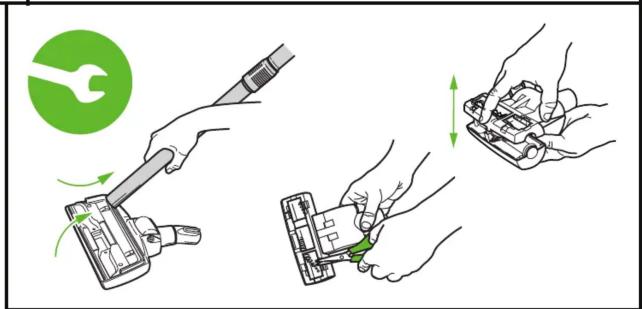
18xx 02 08 01 S1/1
. Certain modules only.
. Allen beside modelen
| 2017 | 2016 | |
| Costs per share: | ||
| Cost of sales | 0.45 | 0.43 |
| Rate of sales | 3.9% | 3.8% |
| 2017 | 2016 | |
| Costs per share: | ||
| Cost of sales | 0.45 | 0.43 |
| Rate of sales | 3.8% | 3.9% |
| 2017 | 2016 | |
| Costs per share: | ||
| Cost of sales | 0.45 | 0.43 |
| Rate of sales | 3.9% | 3.8% |
| 2017 | 2016 | |
| Costs per share: | ||
| Costs paid | 0.43 | 0.45 |
| Rate of compensation increase (expense) | (1.8)% | (1.9)% |

| S | # | H | h | h |
| 2017 | 2018 | 2019 | 2020 | 2021 |
| 2019 | 2020 | 2021 | 2022 | 2023 |
| 2020 | 2021 | 2022 | 2023 | 2024 |



Table of contents
Click a title to access it
Manual assistant
Powered by Anthropic
Waiting for your message
Product information
Brand : ZANUSSI
Model : ZAN1800
Category : Vacuum Cleaner