
DS-K1107AEK - Secure Access Control System Hikvision - Free user manual and instructions
Find the device manual for free DS-K1107AEK Hikvision in PDF.


| Product Type | Access Control Card Reader |
| Model | DS-K1107AEK |
| Brand | Hikvision |
| Processor | 32-bit high-speed processor |
| Communication Protocols | RS-485 (AES encrypted) or Wiegand (26-bit / 34-bit) |
| Card Types Supported | M1, non-M1, NFC |
| Tamper Protection | Built-in tamper-proof module |
| Material | PC+ABS |
| Waterproof / Dustproof | Yes (suitable for poor environments) |
| Operating Temperature | -20°C to 65°C |
| Power Supply | 12 VDC (±10%), non-switched linear recommended |
| Power Consumption | Less than 2 W (typical) |
| Dimensions (Approx.) | 115 mm × 45 mm × 20 mm (height × width × depth) |
| Weight (Approx.) | 0.15 kg |
| Indicator | Multi-color LED (red/green) and buzzer |
| Keypad | Yes, integrated |
| DIP Switch Configuration | 8-position DIP switch for address, protocol, card security |
| Cable Length (RS-485) | Up to 100 m (recommended) |
| Cable Type | RVVP 0.5 mm² or above |
| Installation | Wall mount with included plate and screws |
| Maintenance | Clean with soft dry cloth; no alkaline detergents |
| Spare Parts / Repairability | Contact dealer or service center; no user-serviceable parts |
| Safety Certifications | FCC Part 15 Class B, CE, ICES-3 (A) |
| Included Accessories | Mounting plate, screws, glove (optional) |
Frequently Asked Questions - DS-K1107AEK Hikvision
User questions about DS-K1107AEK Hikvision
0 question about this device. Answer the ones you know or ask your own.
Ask a new question about this device
Download the instructions for your Secure Access Control System in PDF format for free! Find your manual DS-K1107AEK - Hikvision and take your electronic device back in hand. On this page are published all the documents necessary for the use of your device. DS-K1107AEK by Hikvision.
USER MANUAL DS-K1107AEK Hikvision
DS-K1107A Series Card Reader
User Manual
Legal Informaon
© 2021 Hangzhou Hikvision Digital Technology Co., Ltd. All rights reserved.
About this Manual
The Manual includes instrucons for using and managing the Product. Pictures, charts, images and all other informaon hereinaer are for descripon and explanaon only. The informaon contained in the Manual is subject to change, without noce, due to rmware updates or other reasons. Please find the latest version of this Manual at the Hikvision website (hps://www.hikvision.com/).
Please use this Manual with the guidance and assistance of professionals trained in supporting the Product.
Trademarks
HIKVISION and other Hikvision's trademarks and logos are the properties of Hikvision in various jurisdicons.
Other trademarks and logos menoned are the properes of their respective owners.
Disclaimer
TO THE MAXIMUM EXTENT PERMITTED BY APPLICABLE LAW, THIS MANUAL AND THE PRODUCT DESCRIBED, WITH ITS HARDWARE, SOFTWARE AND FIRMWARE, ARE PROVIDED "AS IS" AND "WITH ALL FAULTS AND ERRORS". HIKVISION MAKES NO WARRANTIES, EXPRESS OR IMPLIED, INCLUDING WITHOUT LIMITATION, MERCHANTABILITY, SATISFACTORY QUALITY, OR FITNESS FOR A PARTICULAR PURPOSE. THE USE OF THE PRODUCT BY YOU IS AT YOUR OWN RISK. IN NO EVENT WILL HIKVISION BE LIABLE TO YOU FOR ANY SPECIAL, CONSEQUENTIAL, INCIDENTAL, OR INDIRECT DAMAGES, INCLUDING, AMONG OTHERS, DAMAGES FOR LOSS OF BUSINESS PROFITS, BUSINESS INTERRUPTION, OR LOSS OF DATA, CORRUPTION OF SYSTEMS, OR LOSS OF DOCUMENTATION, WHETHER BASED ON BREACH OF CONTRACT, TORT (INCLUDING NEGLIGENCE), PRODUCT LIABILITY, OR OTHERWISE, IN CONNECTION WITH THE USE OF THE PRODUCT, EVEN IF HIKVISION HAS BEEN ADVISED OF THE POSSIBILITY OF SUCH DAMAGES OR LOSS.
YOU ACKNOWLEDGE THAT THE NATURE OF THE INTERNET PROVIDES FOR INHERENT SECURITY RISKS, AND HIKVISION SHALL NOT TAKE ANY RESPONSIBILITIES FOR ABNORMAL OPERATION, PRIVACY LEAKAGE OR OTHER DAMAGES RESULTING FROM CYBER-ATTACK, HACKER ATTACK, VIRUS INFECTION, OR OTHER INTERNET SECURITY RISKS; HOWEVER, HIKVISION WILL PROVIDE TIMELY TECHNICAL SUPPORT IF REQUIRED.
YOU AGREE TO USE THIS PRODUCT IN COMPLIANCE WITH ALL APPLICABLE LAWS, AND YOU ARE SOLELY RESPONSIBLE FOR ENSURING THAT YOUR USE CONFORMS TO THE APPLICABLE LAW. ESPECIALLY, YOU ARE RESPONSIBLE, FOR USING THIS PRODUCT IN A MANNER THAT DOES NOT INFRINGE ON THE RIGHTS OF THIRD PARTIES, INCLUDING WITHOUT LIMITATION, RIGHTS OF PUBLICITY, INTELLECTUAL PROPERTY RIGHTS, OR DATA PROTECTION AND OTHER PRIVACY RIGHTS. YOU SHALL NOT USE THIS PRODUCT FOR ANY PROHIBITED END-USES, INCLUDING THE DEVELOPMENT OR PRODUCTION OF WEAPONS OF MASS DESTRUCTION, THE DEVELOPMENT OR PRODUCTION OF CHEMICAL OR BIOLOGICAL WEAPONS, ANY ACTIVITIES IN THE CONTEXT RELATED TO ANY NUCLEAR EXPLOSIVE OR UNSAFE NUCLEAR FUEL-CYCLE, OR IN SUPPORT OF HUMAN RIGHTS ABUSES.
IN THE EVENT OF ANY CONFLICTS BETWEEN THIS MANUAL AND THE APPLICABLE LAW, THE LATTER PREVAILS.
Data Protecon
During the use of device, personal data will be collected, stored and processed. To protect data, the development of Hikvision devices incorporates privacy by design principles. For example, for device with facial recognition features, biometrics data is stored in your device with encrypon method; for ngerprint device, only ngerprint template will be saved, which is impossible to reconstruct a ngerprint image.
As data controller, you are advised to collect, store, process and transfer data in accordance with the applicable data protecon laws and regulaons, including without limitaon, conducng security controls to safeguard personal data,
such as, implementing reasonable administrave and physical security controls, conduct periodic reviews and assessments of the eeciveness of your security controls.
Regulatory Informaon
FCC Informaon
Please take aenon that changes or modicaon not expressly approved by the party responsible for compliance could void the user's authority to operate the equipment.
FCC compliance: This equipment has been tested and found to comply with the limits for a Class B digital device, pursuant to part 15 of the FCC Rules. These limits are designed to provide reasonable protecon against harmful interference in a residential installaon. This equipment generates, uses and can radiate radio frequency energy and, if not installed and used in accordance with the instrucons, may cause harmful interference to radio communicaons.
However, there is no guarantee that interference will not occur in a parcular installaon. If this equipment does cause harmful interference to radio or television recepon, which can be determined by turning the equipment o and on, the user is encouraged to try to correct the interference by one or more of the following measures:
—Reorient or relocate the receiving antenna.
—Increase the separaon between the equipment and receiver.
—Connect the equipment into an outlet on a circuit dierent from that to which the receiver is connected.
—Consult the dealer or an experienced radio/TV technician for help.
The device must not be co-located or operang in conjuncon with any other antenna or transmier.
This equipment should be installed and operated with a minimum distance 20cm between the radiator and your body.
FCC Conditions
This device complies with part 15 of the FCC Rules. Operaon is subject to the following two conditions:
- This device may not cause harmful interference.
- This device must accept any interference received, including interference that may cause undesired operaon.
EU Conformity Statement

This product and - if applicable - the supplied accessories too are marked with "CE" and comply therefore with the applicable harmonized European standards listed under the RE Direcve 2014/53/EU, the EMC Direcve 2014/30/EU, the LVD Direcve 2014/35/EU, the RoHS Direcve 2011/65/EU.

2012/19/EU (WEEE direcve): Products marked with this symbol cannot be disposed of as unsorted municipal waste in the European Union. For proper recycling, return this product to your local supplier upon the purchase of equivalent new equipment, or dispose of it at designated collecon points. For more informaon see: www.recyclethis.info.

2006/66/EC (baery direcve): This product contains a baery that cannot be disposed of as unsorted municipal waste in the European Union. See the product documentaon for speci baery informaon. The baery is marked with this symbol, which may include leering to indicate cadmium (Cd), lead (Pb), or mercury (Hg). For proper recycling, return the baery to your supplier or to a designated
collecon point. For more informaon see: www.recyclethis.info.
Industry Canada ICES-003 Compliance
This device meets the CAN ICES-3 (A)/NMB-3(A) standards requirements.
Use only power supplies listed in the user instrucons:
| Model | Manufacturer | Standard |
| TS-A018-120015Ec | ShenzhenTransinTechnologiesCo., Ltd | CEE |
Applicable Models
This manual is applicable to the models listed in the following table.
| Series | Model |
| Card Reader | DS-K1107AM |
| DS-K1107AS | |
| DS-K1107AE |
Symbol Convenons
The symbols that may be found in this document are dened as follows.
| Symbol | Description |
 Note Note | Provides additional informaon to emphasize or supplement important points of the main text. |
 Caution Caution | Indicates a potentially hazardous situaon, which if not avoided, could result in equipment damage, data loss, performance degradaon, or unexpected results. |
 Danger Danger | Indicates a hazard with a high level of risk, which if not avoided, will result in death or serious injury. |
Safety Instrucons
- All the electronic operaon should be strictly compliance with the electrical safety regulaons, fire prevenon regulaons and other related regulaons in your local region.
- Please use the power adapter, which is provided by normal company. The power consumption cannot be less than the required value.
- Do not connect several devices to one power adapter as adapter overload may cause overheat or re hazard.
- Please make sure that the power has been disconnected before you wire, install or dismantle the device.
- When the product is installed on wall or ceiling, the device shall be rmly xed.
- If smoke, odors or noise rise from the device, turn o the power at once and unplug the power cable, and then please contact the service center.
-
If the product does not work properly, please contact your dealer or the nearest service center. Never aempt to disassemble the device yourself. (We shall not assume any responsibility for problems caused by unauthorized repair or maintenance.
-
Do not drop the device or subject it to physical shock, and do not expose it to high electromagnesm radiaon. Avoid the equipment installaon on vibraons surface or places subject to shock (ignorance can cause equipment damage).
- Do not place the device in extremely hot (refer to the specicaon of the device for the detailed operang temperature), cold, dusty or damp locaons, and do not expose it to high electromagnec radiaon. The appropriate temperature is -20^ to 65^ .
● The device cover for indoor use shall be kept from rain and moisture. - Exposing the equipment to direct sun light, low venlaon or heat source such as heater or radiator is forbidden (ignorance can cause re danger).
- Do not aim the device at the sun or extra bright places. A blooming or smear may occur otherwise (which is not a malfuncon however), and aecng the endurance of sensor at the same me.
- Please use the provided glove when open up the device cover, avoid direct contact with the device cover, because the acidic sweat of the ngers may erode the surface coang of the device cover.
- Please use a so and dry cloth when clean inside and outside surfaces of the device cover, do not use alkaline detergents.
- Please keep all wrappers aer unpack them for future use. In case of any failure occurred, you need to return the device to the factory with the original wrapper. Transportaon without the original wrapper may result in damage on the device and lead to additional costs.
- Improper use or replacement of the baery may result in hazard of explosion. Replace with the same or equivalent type only. Dispose of used baeries according to the instrucons provided by the baery manufacturer.
- If the card reader is powered by the controller, the power supply distance is recommended to be no longer than 100m. If the distance is longer than 100m, you are advised to power the card reader by external 12V (range: -%10 \~ +%10) DC power supply, which is nonswitched and linear.
- To guarantee the communicaon between the controller and the card reader, you must use RVVP cable above 0.5 to connect them.
- If the card reader is installed outside or in environment easy to permeable, it is advisable to install a waterproof shield.
- If you need to install several card readers, the distance among them must over 30cm.
- To reduce the noise in long distance transmission, the shield of cable should connect to the GND of both controller and card reader terminal.
- Please take care of your card and report card loss in me when card is lost.
- If you require a higher security level, use mulple authencaon modes.
- Mulple card types are supported. Please select an appropriate card type according to the card performance and the usage scenarios.
TABLE OF CONTENTS
Chapter 1 Introducon .... 1
1.1 Overview ...... 1
1.2 Indicator and Component ...... 2
Chapter 2 Installaon .... 3
2.1 Introducon for DIP Switch 3
2.2 Denion of Cable 4
2.3 Wiring Cables....5
2.4 Installing Card Reader 6
Chapter 3 Sound Prompt and Indicator....7
Chapter 1 Introducon
1.1 Overview
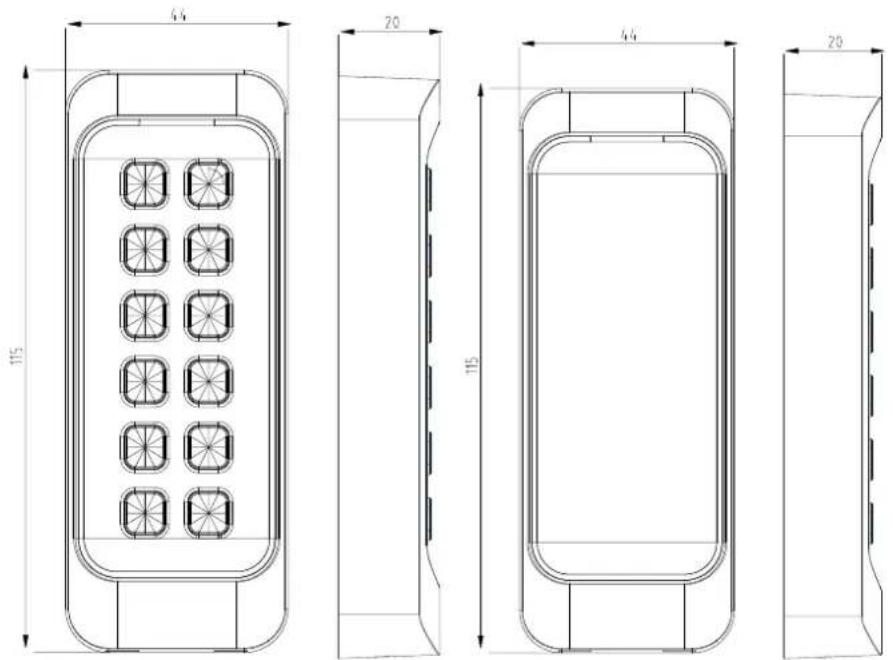
Figure 1-1 DS-K1107A Series Card Reader
DS-K1107A series card reader is a kind of high-performance product, with a 32 bit high-speed processor. It communicates with access controller via either RS-485 protocol (AES encrypted) or Wiegand protocol. And a build-in tamper-proof module helps to protect card reader from malicious damage. As to the physical appearance, the PC+ABS material makes water proof and dust proof possible in poor environment.
1.2 Indicator and Component
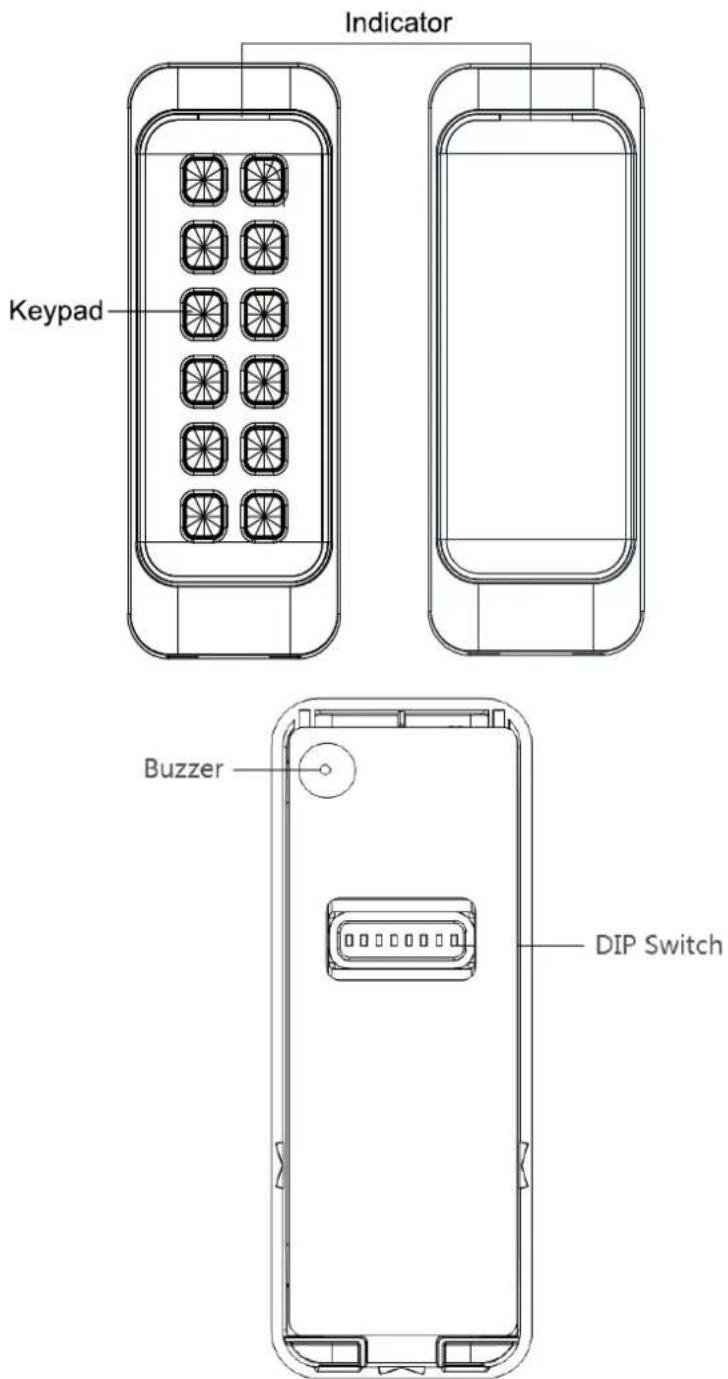
Figure 1-2 Indicator and Component
Chapter 2 Installaon
2.1 Introducon for DIP Switch
The DIP switch module is shown below. The No. of DIP switch from le to right is 1 \~ 8.
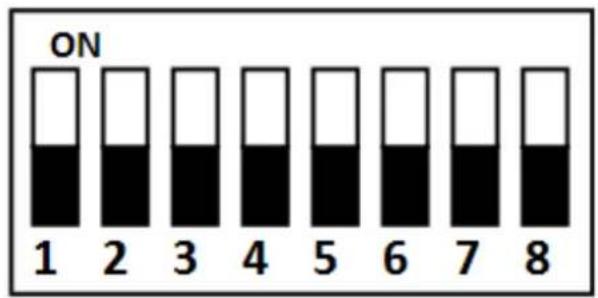
Figure 2-1 DIP Switch Module
Table 2-1 Descripon of DIP Switch
| Icon | Description |
 | Represent 1 in binary mode |
| [2ZZZ] | Represent 0 in binary mode |
For example, binary value of the following status is: 0000 1100.
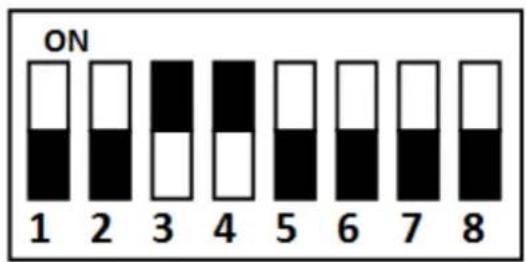
Figure 2-2 DIP Switch Module
Table 2-2 Descripon of DIP Switch
| No. | Description | DIP Switch Status |
| 1 ~ 4 | Address of RS-485 | 1: 10: 0 |
| 5 | Card Security Only available when Wiegand is enabled. Only available when Wiegand is enabled. | 1 Enable M1 card encryption function, enable non-M1 cardRecognition function, disable door open via NFC card.0: Disable M1 card encryption function, disable non-M1 cardRecognition function, enable door open via NFC card. |
| 6 | Wiegand protocol or RS-485 protocol. | 1: Wiegand protocol;0: RS-485 protocol. |
| 7 | Wiegand Protocol(available when No. 6 is 1) | 1: Wiegand protocol of 26-bit;0: Wiegand protocol of 34-bit. |
| 8 | Matched Resistance(available for RS-485 protocol) | 1: Enable;0: Disable. |
2.2 Denion of Cable
The descripon of 10 cables is shown below.
Table 2-3 Descripon of DIP Switch Descripon of Cable
| Color | Description |
| Orange | Red LED Control (available for Wiegand Protocol) |
| White | Wiegand W1 (available for Wiegand Protocol) |
| Green | Wiegand W0 (available for Wiegand Protocol) |
| Blue | RS-485- |
| Yellow | RS-485+ |
| Red | PWR (+12 VDC) |
| Black | GND |
| Gray | TAMPER (available for Wiegand Protocol) |
| Purple | Beep Control (available for Wiegand Protocol) |
| Brown | Green LED Control (available for Wiegand Protocol) |
2.3 Wiring Cables
Purpose:
Wire the cables between controller and card reader, thus to establish the communicaon between them.
Steps for RS-485 communicaon mode:
Step 1 Set the DIP switch of No. 6 as 0.
Step 2 Set the DIP switch of No. 1 \~ 4 for RS-485 address. For details, please refer to 2.1 Introducon for DIP Switch.
Step 3 Wire the cable between controller and card reader as shown below.
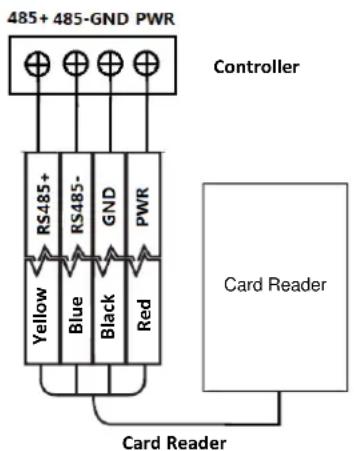
Figure 2-3 Wiring for RS-485 Communicaon Mode
Steps for Wiegand communicaon mode:
Step 1 Set the DIP switch of No. 6 as 1.
Step 2 Set the DIP switch of No. 5 and 7 for reading card mode and Wiegand protocol. For details, please refer to 2.1 Introducon for DIP Switch.
Step 3 Wiring the cable between controller and card reader as shown below.
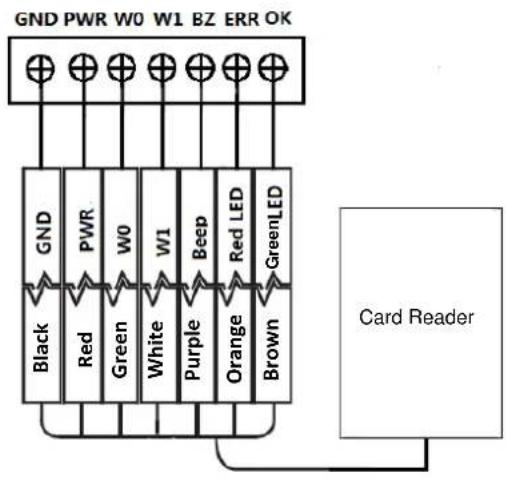
Figure 2-4 Wiring for Wiegand Communicaon Mode
2.4 Installing Card Reader
Before you start:
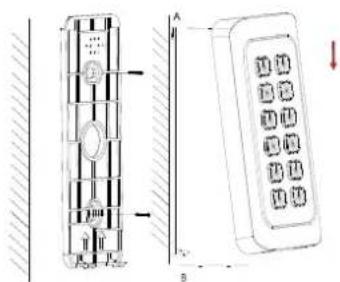
Set the DIP switch. For details, refer to 2.1 Introduction for DIP Switch. Installaon for DS-K1101/02/03/04 series card reader:
Step 1 Fix the plate on the wall or other places by using two screws (PA4×25-SUS). Make sure the arrows on the plate are upwards.
Step 2 Check whether the plate is xed and in the right direcon.
Step 3 Slide the card reader from the direcon A to B along the plate side until the boom matches the joint. Make sure the card reader is ghtly on the wall or other places.
Step 4 Drag and move the card reader to make sure it is xed
Chapter 3 Sound Prompt and Indicator
Aer the card reader is powered on, LED status indicator will turn green and ashing for 1 me. Then it will turn red and ashing for 3 mes. At last the buzzer will send out a beep sound indicang the starng up process is completed.
When using the card reader, it will send out dierent sounds prompt and the LED indicator to indicate dierent statuses. You can refer to tables below for detailed informaon.
Table 3-1 Descripon of Prompt Sound
| Sound Prompt | Description |
| One beep | Swiping card prompt |
| Pressing keys prompt | |
| Prompt for too long card No. input by pressing keys. | |
| Time out prompt for pressing keys or swiping card. | |
| For Card + Fingerprint authentication: prompt for pressing the fingerprint after swiping the card. | |
| Two rapid beeps | The operation of pressing keys or swiping card is valid. |
| Three slow beeps | The operation of pressing keys or swiping card is invalid. |
| Rapidly continuous beeps | Prompt for tamper-proof alarm. |
| Prompt for buzzer alarm. | |
| Slowly continuous beeps | The card reader is unencrypted. |
Table 3-2 Descripon of LED Indicator
| LED Indicator Status | Description |
| Green (flashing for 1 time), and red (flashing for 3 times) | The card reader is power on. |
| Flashing green | For Card + Password authentication: prompt for entering the password after swiping the card. |
| The operation of configuring the fingerprint. | |
| Solid green for 2s | The operation of pressing keys or swiping card is valid. |
| Solid red | Card reader is working normally. |
| Flashing red for 3 times | For RS-485 protocol: Registering failed or card reader is offline. |

See Far, Go Further
- DS-K1107A Series Card Reader
- Legal Informaon
- About this Manual
- Trademarks
- Disclaimer
- Data Protecon
- Regulatory Informaon
- FCC Informaon
- FCC Conditions
- EU Conformity Statement
- Applicable Models
- Symbol Convenons
- Safety Instrucons
- TABLE OF CONTENTS
- Chapter 1 Introducon .... 1
- Chapter 2 Installaon .... 3
- Chapter 3 Sound Prompt and Indicator....7
- Chapter 1 Introducon
- Overview
- Indicator and Component
- Chapter 2 Installaon
- Introducon for DIP Switch
- Denion of Cable
- Wiring Cables
- Purpose:
- Steps for Wiegand communicaon mode:
- Installing Card Reader
- Before you start:
- Chapter 3 Sound Prompt and Indicator
Brand : Hikvision
Model : DS-K1107AEK
Category : Secure Access Control System