EKI604-2 - Cooker Exquisit - Free user manual and instructions
Find the device manual for free EKI604-2 Exquisit in PDF.


| Product Type | Built-in Induction Hob |
| Model | EKI604-2 |
| Dimensions (W x D x H) | 590 x 520 x 66 mm |
| Built-in Hole Size (W x D) | 560 x 490 mm |
| Power Supply | 220-240 V ~ 50/60 Hz |
| Total Power Consumption | 5400 W |
| Number of Cooking Zones | 4 |
| Cooking Zone Diameters | 2 x 18 cm (1500 W, Boost 2000 W), 2 x 14 cm (1200 W, Boost 1500 W) |
| Heating Technology | Induction |
| Control Type | Touch controls with digital display |
| Boost Function | Yes, 5-minute boost per zone |
| Keep Warm Function | Two modes: ~42°C and ~70°C |
| Timer | Countdown timer up to 99 minutes with automatic zone shut-off |
| Pause Function | Yes, up to 30 minutes |
| Key Lock | Yes, locks controls except ON/OFF |
| Safety Features | Auto shut-off, over-temperature protection, small article detection, hot surface indicator |
| Cookware Compatibility | Magnetic base (induction-compatible), diameter >= 140 mm |
| Installation Type | Built-in, requires ventilation cutouts |
| Minimum Worktop Thickness | 30 mm |
| Minimum Clearance Above Hob | 600 mm |
| Warranty | See QR code or visit exquisitbenelux.nl |
Frequently Asked Questions - EKI604-2 Exquisit
User questions about EKI604-2 Exquisit
0 question about this device. Answer the ones you know or ask your own.
Ask a new question about this device
Download the instructions for your Cooker in PDF format for free! Find your manual EKI604-2 - Exquisit and take your electronic device back in hand. On this page are published all the documents necessary for the use of your device. EKI604-2 by Exquisit.
USER MANUAL EKI604-2 Exquisit
natural_image
Dark background with scattered white diamond symbols and small circular icons at bottom (no text or labels)flowchart
graph TD
    A["Live wire"] --> B["Ground"]
    B --> C["Neutral point"]
    C --> D["Ground"]

https://www.exquisitbenelux.nl
domestic and professional appliances

MULTIBRAND SALES & SERVICES
Instruction manual
Built-in Induction Hob
EKI604-2
INSTALLATION AND USER INSTRUCTIONS
Please read the instruction manual carefully before operating your new hob.
Congratulations on the purchase of your new Induction Hob.
We recommend that you spend some time to read this Instruction / Installation Manual in order to fully understand how to install correctly and operate it.
For installation, please read the installation section.
Read all the safety instructions carefully before use and keep this Instruction / Installation Manual for future reference.
Safety Warnings
Your safety is important to us. Please read this information before using your cooktop.
Installation
Electrical Shock Hazard
- Disconnect the appliance from the mains electricity supply before carrying out any work or maintenance on it.
- Connection to a good earth wiring system is essential and mandatory.
- Alterations to the domestic wiring system must only be made by a qualified electrician.
- Failure to follow this advice may result in electrical shock or death.
Cut Hazard
• Take care - panel edges are sharp.
- Failure to use caution could result in injury or cuts.
Important Safety Instructions
- Read these instructions carefully before installing or using this appliance.
- No combustible materials or products should be placed on this appliance at any time.
- Please make this information available to the person responsible for installing the appliance.
- In order to avoid a hazard, this appliance must be installed according to these instructions for installation.
- This appliance must be installed and earthed only by a suitably qualified person.
- This appliance should be connected to a circuit which incorporates an isolating switch, providing full disconnection from the power supply.
- Failure to install the appliance correctly could invalidate any warranty or liability claims.
Operation and Maintenance
Electrical Shock Hazard
- Do not cook on a broken or cracked cooktop. If the cooktop surface should break or crack, immediately switch off the appliance at the mains power supply (wall switch) and contact a qualified technician.
- Switch the cooktop off at the wall before cleaning or maintenance.
- Failure to follow this advice may result in electrical shock or death.
Health Hazard
- This appliance complies with electromagnetic safety standards.
• However, persons with cardiac pacemakers or other electrical implants (such as insulin pumps) must consult with their doctor or implant manufacturer before using this appliance to make sure that their implants will not be affected by the electromagnetic field. - Failure to follow this advice may result in death.
Hot Surface Hazard
- During use the appliance becomes hot. Care should be taken to avoid touching heating elements inside the oven.
- Do not let your body, clothing or any item other than suitable cookware contact the induction glass until the surface is cool.
- Metallic objects such as knives, forks, spoons and lids should not be placed on the hob surface since they can get hot.
- Keep children away.
- Handles of saucepans may be hot to touch. Ensure that the saucepan handles do not overhang other cooking zones that are switched on. Make sure children can't reach the cookware handles.
- Failure to follow this advice could result in burns and scalds.
Cut Hazard
- The razor-sharp blade of a cooktop scraper is exposed when the safety cover is retracted. Use with extreme care and always store safely and out of reach of children.
- Failure to use caution could result in injury or cuts.
Important Safety Instructions
- Never leave the appliance unattended when in use. Boil-over causes smoking and greasy spillovers may ignite.
- Never use your appliance as a work or storage surface.
- Never leave any objects or utensils on the appliance.
- Do not place or leave any magnetisable objects (e.g. credit cards, memory cards) or electronic devices (e.g. computers, MP3 players) near the appliance as they may be affected by its electromagnetic field.
- Never use your appliance for warming or heating the room.
• After use, always turn off the cooking zones and the cooktop as described in this manual (i.e. by using the touch controls). Do not rely on the pan detection feature to turn off the cooking zones when you remove the pans.
- Do not allow children to play with the appliance nor sit, stand or climb on it.
- Do not store items of interest to children in cabinets above the appliance. Children climbing on the cooktop could be seriously injured.
- Do not leave children alone or unattended in the area where the appliance is in use.
- Children or persons with a disability which limits their ability to use the appliance should have a responsible and competent person to instruct them in its use. The instructor should be satisfied that they can use the appliance without danger to themselves or their surroundings.
- Do not repair or replace any part of the appliance unless specifically recommended in the manual. All other servicing should be done by a qualified technician.
- Do not use a steam cleaner to clean your cooktop.
- Do not place or drop heavy objects on your cooktop.
- Do not stand on your cooktop.
- Do not use pans with jagged edges or drag pans across the induction glass surface as this can scratch the glass.
- Do not use scourers or any other harsh abrasive cleaning agents to clean your cooktop as these can scratch the induction glass.
•This appliance is intended to be used in a household or similar environments such as staff kitchen areas in shops, offices and other residential environments.
- If the supply cord is damaged, it must be replaced by a special cord or assembly available from the manufacturer or its service agent.
- WARNING: The appliance and its accessible parts become hot during use. Care should be taken to avoid touching heating elements.
Children less than 8 years of age should be kept away unless continuously supervised.
Children shall not play with the appliance, cleaning and user maintenance shall not be made by children without supervision.
- This appliance can be used by children aged from 8 years and above and persons with reduced physical, sensory or mental capabilities or lack of experience and knowledge if they have been given supervision or instruction concerning use of the appliance in a safe way and understand the hazards involved.
- WARNING: If the surface is cracked, switch off the appliance to avoid the possibility of an electric shock, for hob surfaces of glass-ceramic or similar material which protect live parts.
•The appliance is not intended to be operated by means of an external timer or separate remote-control system.
- CAUTION: The cooking process has to be supervised. A short term cooking process has to be supervised continuously.
- WARNING: In order to prevent tipping of the appliance, it must be stabilised prior to installation. Please refer to the installation instructions.
- WARNING: Use only hob guards designed by the manufacturer of the cooking appliance or indicated by the manufacturer of the appliance in the instructions for use as suitable or hob guards incorporated in the appliance. The use of inappropriate guards can cause accidents.
- This appliance incorporates an earth connection for functional purposes only.
- WARNING: Unattended cooking on a hob with fat or oil can be dangerous and may result in fire. NEVER try to extinguish a fire with water, but switch off the appliance and then cover flame e.g. with a lid or a fire blanket.
- WARNING: Danger of fire: do not store items on the cooking surfaces.

NOTICE: The crystallite glass is still hot after use, please do not touch!
TECHNICAL DATA
| Model Power supply | Power | Size (mm) | Built-in hole Size (mm) | |
| Heating area (180mm) | Heating area (140mm) | |||
| EKI604-2 220-240V 50/60Hz | 1500W 1200W(Boost 2000W) | (WBoost 1500W) | 590x520x66 | 560x490 |
PRODUCT OVERVIEW
Top View


flowchart
graph TD
    A["Switch 1"] --> B["Switch 5"]
    A --> C["Switch 1"]
    D[" meters"] --> E[" meters"]
    F[" meters"] --> G[" meters"]
    H[" meters"] --> I[" meters"]
    J[" meters"] --> K[" meters"]
    L[" meters"] --> M[" meters"]
    N[" meters"] --> O[" meters"]
    P[" meters"] --> Q[" meters"]
    R[" meters"] --> S[" meters"]
    T[" meters"] --> U[" meters"]
- Heating zone selection controls
- Power / Timer regulating key
- keylock control
- ON/OFF control
- Timer control
- Boost control
7.Pause/start key
8.Keep warm key
Before using your New Induction Hob
- Read this guide, taking special note of the 'Safety Warnings' section.
- Remove any protective film that may still be on your Induction hob.
Using the Touch Controls
- The controls respond to touch, so you don't need to apply any pressure.
- Use the ball of your finger, not its tip.
- You will hear a beep each time a touch is registered.
- Make sure the controls are always clean, dry, and that there is no object (e.g. a utensil or a cloth) covering them. Even a thin film of water may make the controls difficult to operate.
Choosing the right Cookware
- Only use cookware with a base suitable for induction cooking. Look for the induction symbol on the packaging or on the bottom of the pan.
-
You can check whether your cookware is suitable by carrying out a magnet test. Move a magnet towards the base of the pan. If it is attracted, the pan is suitable for induction.
• If you do not have a magnet: -
Put some water in the pan you want to check.
-
If "U" does not flash in the display and the water is heating, the pan is suitable.
- Cookware made from the following materials is not suitable: pure stainless steel, aluminium or copper without a magnetic base, glass, wood, porcelain, ceramic, and earthenware.
Do not use cookware with jagged edges or a curved base.
Make sure that the base of your pan is smooth, sits flat against the glass, and is the same size as the cooking zone. Use pans whose diameter is as large as the graphic of the zone selected. Using a pot a slightly wider energy will be used at its maximum efficiency. If you use smaller pot efficiency could be less than expected. Pot less than 140 mm could be undetected by the hob. Always centre your pan on the cooking zone.
Always lift pans off the Induction hob – do not slide, or they may scratch the glass.


To start cooking
- Touch the ON/OFF control.
After power on, the buzzer beeps once, all displays show “-” or “--”, indicating that the induction hob has entered the state of standby mode.
- Place a suitable pan on the cooking zone that you wish to use.
• Make sure the bottom of the pan and the surface of the cooking zone are clean and dry.
3. Touching the heating zone selection control, and a indicator next to the key will flash
4. Select a heat setting by touching the “-” or “+” control.
- If you don't choose a heat setting within 1 minute, the Induction hob will automatically switch off. You will need to start again at step 1.
- You can modify the heat setting at any time during cooking.

natural_image
Three hand-drawn diagrams showing a cooking step: adding a knob, adding a pot, and adding a button (no text or symbols)Automatic rapid heating
All cooking zones are fitted with a special mechanism that sets the cooking power to level 9 at the start of the cooking process, regardless of the actual power setting. After 120s, the cooking zone power switches back to the initially set level.
Automatic rapid heating can be activated on every cooking zone for any cooking power level except for level "9" and "P"
If the display flashes “∪” alternately with the heat setting
This means that:
- you have not placed a pan on the correct cooking zone or,
- the pan you're using is not suitable for induction cooking or,
- the pan is too small or not properly centred on the cooking zone.
No heating takes place unless there is a suitable pan on the cooking zone.
The display will automatically turn off after 1 minutes if no suitable pan is placed on it.
When you have finished cooking
- Touching the heating zone selection control that you wish to switch off
- Turn the cooking zone off by scrolling down to "0". Make sure the display shows "0", then show "H".
- Turn the whole cooktop off by touching the ON/OFF control.
- Beware of hot surfaces "H" will show which cooking zone is hot to touch. It will disappear when the surface has cooled down to a safe temperature. It can also be used as an energy saving function if you want to heat further pans, use the hotplate that is still hot.
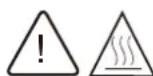
Note: When "H" is shown on display, although he hob is off, but the temperature of induction glass is still very high, do not let your fingers touch induction glass directly in case of scalds.
Note: After use, switch off the hob element by its control and do not rely on the pan detector.

Memory function
This function allows you to retrieve all cooking zone settings if the cooking hob was accidentally switched off.
Touch the on/off key to switch the cooking hob back on within 5 seconds after it has been switched off, all settings that were active just before the hob was switched off will be restored.
To pause cooking
To turn on
One or more cooking zones are active, touch pause/start key, the buzzer beeps once, all the displays will show " ! !".
To turn off
After pause function turned on, touch pause/start key again within 30 minutes, the hob will continue with the settings that were set before the pause.

NOTE:
- All of the buttons are inactive except for pause/start, lock and ON/OFF key while pausing.
- The cooking timers stop while pausing. When deactivating pause function, the countdown will continue.
- The pause function can only pause the hob for max. 30 minutes. If no any key are touched within 30 minutes, all of the active cooking zones are automatically switched off.
Locking the Controls
- You can lock the controls to prevent unintended use (for example children accidentally turning the cooking zones on).
- When the controls are locked, all the controls except the ON/OFF control are disabled.
To lock the controls:
Touch and hold the keylock control for 2s. The timer indicator will show "Lo".
To unlock the controls:
- Make sure the induction hob is turned on.
- Touch and hold the keylock control for 2s.
- You can now start using your induction hob.
When the hob is in lock mode, all controls are disabled, except the ON/OFF. You can always turn the induction hob off with the ON/OFF control in an emergency, but you would have to unlock the hob first in the next operation.

Over-Temperature Protection
A temperature sensor equipped can monitor the temperature inside the Induction hob. When an excessive temperature is monitored, the Induction hob will stop operation automatically.
Detection of Small Articles
When an unsuitable size or non-magnetic pan (e.g. aluminium), or some other small item (e.g. knife, fork, key) has been left on the hob, the hob automatically go on to standby in 1 minute. The fan will keep cooking down the induction hob for a further 2 minute.
Auto Shutdown Protection
Auto shut down is a safety protection function for your induction hob. It shut down automatically if ever you forget to turn off your cooking. The default working times for various power levels are shown in the below table:
| Power level | 1 | 2 | 3 | 4 | 5 | 6 | 7 | 8 | 9 |
| Default working timer (hour) | 8 | 8 | 8 | 4 | 4 | 4 | 2 | 2 | 2 |
When the pot is removed, the induction hob can stop heating immediately and the hob automatically switch off after 1 minutes.

People with a heart pace maker should consult with their doctor before using this unit.
Using the Timer
- You can set it to turn one cooking zone off after the set time is up.
- You can set the timer up to 99 minutes.
Setting the timer to turn one cooking zone off
Cooking zones set for this feature will:
- Touching the heating zone selection control that you want to set the timer for.
- Touch timer control, The minder indicator will start flashing and "30" will show in the timer display.
- Set the time by touching the or control of the timer
Hint: Touch the “-” or “+” control of the timer once will decrease or increase by 1 minute.
Touch and hold the "-" or "+" control of the timer will decrease or increase by 10 minutes. - Touching the “-”, to reduce the time outstanding to zero, or press the “timer control”, when the “00” shows in the minute display, the timer is cancelled.
- When the time is set, it will begin to count down immediately. The display will show the remaining time and the timer indicator flash for 5 seconds.
NOTE: The red dot next to power level indicator will illuminate indicating that zone is selected. - When cooking timer expires, the corresponding cooking zone will be switch off automatically.

Other cooking zone will keep operating if they are turned on previously.

Countdown timer
The countdown timer operates independently and it is not related to the operation of any cooking zone.
- Touch timer control, the minder indicator will start flashing and "30" will show in the timer display.
- Set the time by touching the "+" and "-" buttons. You can set the timer up to 99 minutes.
- When the time is set, it will begin to count down immediately.
- When countdown timer expires, the buzzer beeps 20 times to remind the user.
Keep warm
To turn on
- Touch the heating zone selection control that you wish to keep warm.
- Touch the "keep warm" key once to enter mode 1, the corresponding display will show "U"; in this case, food temperature is maintained at around 42^ .
- Touch the "keep warm" key twice to enter mode 2, the corresponding display will show "U"; in this case, food temperature is maintained at around 70^ .
- Actual temperature may depend on the type of cookware and amount of food.
To turn off
- Touch the heating zone selection control that you wish to turn off.
- In mode 2 state, touch the "keep warm" key again, the corresponding display shows"-", the keep warm function will be turned off.
- The keep warm function can work for max. 8h. If no any key are touched, the active cooking zones will be automatically switched off after 8h.
Boost control
During hob working, touching the heating zone selection control, then touching boost control, the buzzer beeps once, "P" will show in the display, the hob enters BOOST function, the power increases to be 1500W/2000W. BOOST function will run for 5 minutes, then quit automatically and the hob return previous running status. In BOOST mode, touching "BOOST" button, the hob quits BOOST function and then return previous running status.

Cooking Guidelines

Take care when frying as the oil and fat heat up very quickly, particularly if you're using PowerBoost. At extremely high temperatures oil and fat will ignite spontaneously and this presents a serious fire risk.
Heat Settings
The settings below are guidelines only. The exact setting will depend on several factors, including your cookware and the amount you are cooking. Experiment with the induction hob to find the settings that best suit you.
| Heat setting Suitability | |
| 1-2 | Delicate warming for small amounts of foodMelting chocolate, butter, and foods that burn quicklyGentle simmering Slow warming |
| 3-4 | Reheating Rapid simmering Cooking rice |
| 5-6 | Pancakes |
| 7-8 | Cooking pasta |
| 9 | Stir-frying Searing Bringing soup to the boil Boiling water |
Care and cleaning
- Everyday soiling on glass (fingerprints, marks, stains left by food of non-sugary spillovers on the glass).
1) Switch the power to the cooktop off;
2) Apply a cooktop cleaner while the glass is still warm (but not hot!)
3) Rinse and wipe dry with a clean cloth or paper towel.
4) Switch the power to the cooktop back on.
NOTE: ● When the power to the cooktop is switched off, there will be no hot surface indication but the cooking zone may still be hot! Take extreme care.
- Heavy-duty scourers, some nylon scourers and harsh/abrasive cleaning agents may scratch to check if your cleaner or scourer is suitable.
-
Never leave cleaning residue on the cooktop: the glass may become stained.
-
Boilovers, melts, and hot sugary spills on the glass
Remove these immediately with a fish slice, palette knife or razor blade scraper suitable for induction glass cooktops, but beware of hot cooking zone surfaces:
1). Switch the power to the cooktop off at the wall.
2). Hold the blade or utensil at a 30° angle and scrape the soiling or spill to a cool area of the cooktop.
3). Clean the soiling or spill up with a dish cloth or paper towel.
4). Follow steps 2 to 4 for everyday soiling on glass above.
NOTE: Remove stains left by melts and sugary food or spillovers as soon as possible. If left to cool on the glass, they may be difficult to remove or even permanently damage the glass surface.
- Cut hazard: then the safety cover is retracted, Use with extreme care and always store safely and out of reach of children.
- Spillovers on the touch controls
1). Switch the power to the cooktop off.
2). Soak up the spill
3). Wipe the touch control area with a clean damp sponge or cloth.
4). Wipe the arta completely dry with a paper towel.
5). Switch the power to the cooktop back on.
NOTE: The cooktop may beep and turn Itself off, and the touch controls may not function while there is liquid on them. Make sure you wipe the touch control area dry before turning the cooktop back on.
Hints and Tips
- The induction hob cannot be turned on.
May be there is no power: Make sure the induction hob is connected to the power supply and that it is switched on. Check whether there is a power outage in your home or area. If you've checked everything and the problem persists, call a qualified technician.
- The touch controls are unresponsive.
The controls are locked: Unlock the controls. See section using your induction cooktop for instructions.
- The touch controls are difficult to operate.
There may be a slight film of water over the controls or you may be using the tip of your finger when touching the controls: Make sure the touch control area is dry and use the ball of your finger when touching the controls.
- The glass is being scratched.
Tough-edged cookware. Unsuitable, abrasive scourer or cleaning products being used: Use cookware with flat and smooth bases. See choosing the right cookware. See “Care and cleaning”.
- Some pans make crackling or clicking noises.
This may be caused by the construction of your cookware (layers of different metals vibrating differently): This is normal, but the noise should quieten down or disappear completely.
- The induction hob makes a low humming noise when used on a high heat setting.
This is caused by the technology of induction cooking: This is normal, but the noise should quieten down or disappear completely when you decrease the heat setting.
- Fan noise coming from the induction hob.
A cooling fan built into your induction hob has come on to prevent the electronics from overheating. It may continue to run even after you're turned the induction hob off: This is normal and needs no action. Do not switch the power to the induction hob off at the wall while the fan is running.
- Pans do not become hot and appears "U" in the display.
The induction hob cannot detect the pan because it is not suitable for induction cooking. The induction hob cannot detect the pan because it is too small for the cooking zone or not properly centred on it: Use cookware suitable for induction cooking. See section ‘Choosing the right cookware’.
Centre the pan and make sure that its base matches the size of the cooking zone.
- The induction hob or a cooking zone has turned itself off unexpectedly, a tone sounds and an error code is displayed (typically alternating with one or two digits in the cooking timer display).
Technical fault: Please not down the error letters and numbers, switch the power to the induction hob off at the wall, and contact a qualified technician.
Failure Display and Inspection
If an abnormality comes up, the induction hob will enter the protective state automatically and display corresponding protective codes:
| Problem | Possible causes What to do | |
| The appliance does not work | Break in power supply | Please check the main power is normal; if the leakage protection switch is off; if there is a blown fuse, replace it with a new one; if the main power is normal, check if the plug is connect with socket appropriately; If the hob is wire connection type, disconnect the power, check if the wire is loose; disconnect the power, check if main plug is off; Exclude above reasons, should be appliance fault, send it to service center for repairing. |
| During heating, the unit stop work. | Delay off timer activates. | Please check if set delay off function. If set delay off function, the unit will stop once delay off time out. |
| U | No pan or pan unsuitable | No pan, please put proper pan. PCB synchronization or drive circuit fault, please send the appliance to service center for repairing. |
| E2 | Input power too low | Low voltage, voltage of the main power is less 180V. Please check if voltage of the main power is normal. Once voltage of the main power returns normal, re-start the unit. Voltage of PCB fault, please send the unit to service center for repairing. |
| E1 | Input power too high | High voltage, voltage of the main power exceeds 250V. Please check if voltage of the main power is normal. Once voltage of the main power returns normal, re-start the unit. Voltage of PCB fault, please send the unit to service center for repairing. |
| F3 | Thermistor of coil short circuit | Sensor of coil thermistor connection error. Or detection part of PCB coil thermistor failure, send to service center for repairing. |
| F4 | Thermistor of coil open circuit | |
| E5 | Too high temperature of IGBT thermistor. | Too high temperature of IGBT thermistor, air outlet is blocked. Open air outlet, re-start the unit. If still unsolved, it is possible that cooling fan connection error, cooling fan damaged, or drive circuit of fan failure, send to service center for repairing. IGBT temperature sensor open circuit /short circuit. Temperature detection part of PCB IGBT failure, send to service center for repairing. |
| E3 | Too high temperature of coil thermistor. | Too high temperature on induction glass surface, please check if there is no water in pan. After treatment, connect with power again. If still unsolved, it is possible that sensor of cooktop failure, send to service center for repairing. |
| F9 | IGBT thermistor short circuit | Senor of IGBT thermistor connection error. Or detection part of IGBT PCB sensor failure, send to service center for repairing. |
| FA | IGBT thermistor open circuit | |
The above are the judgment and inspection of common failures.
Please do not disassemble the unit by yourself to avoid any dangers and damages to the induction hob.
Installation
Selection of installation equipment
Cut out the work surface according to the sizes shown in the drawing.
For the purpose of installation and use, a minimum of 5 cm space shall be preserved around the hole.
Be sure the thickness of the work surface is at least 30mm. Please select heat-resistant work surface material to avoid larger deformation caused by the heat radiation from the hotplate. As shown below:

| L(mm) | W(mm) | H(mm) | D(mm) | A(mm) | B(mm) | X(mm) | |
| 590 520 | 66 | 60 | 560 490 | 50 min |
Under any circumstances, make sure the Induction cooker hob is well ventilated and the air inlet and outlet are not blocked. Ensure the Induction cooker hob is in good work state. As shown below

Note: The safety distance between the hotplate and the cupboard above the hotplate should be at least 600mm.
| A(mm) | B(mm) | C(mm) | D E | F | G | ||
| 600 | 50 min | 20 min | in Air intake | Air exit | ≥5mm | >35mm | <50mm |

Note: There must be have a 560x5mm holes on front of cooker top position E, to dissipate heat air.

After hob is installed to worktop, make sure the air flow hole is not blocked by worktop bottom
Before you install the hob, make sure that
- the work surface is square and level, and no structural members interfere with space requirements
- the work surface is made of a heat-resistant material
- if the hob is installed above an oven, the oven has a built-in cooling fan
- the installation will comply with all clearance requirements and applicable standards and regulations
- a suitable isolating switch providing full disconnection from the mains power supply is incorporated in the permanent wiring, mounted and positioned to comply with the local wiring rules and regulations.
The isolating switch must be of an approved type and provide a 3mm air gap contact separation in all poles (or in all active [phase] conductors if the local wiring rules allow for this variation of the requirements)
- the isolating switch will be easily accessible to the customer with the hob installed
- you consult local building authorities and by-laws if in doubt regarding installation
- you use heat-resistant and easy-to-clean finishes (such as ceramic tiles) for the wall surfaces surrounding the hob.
When you have installed the hob, make sure that
- the power supply cable is not accessible through cupboard doors or drawers
- there is adequate flow of fresh air from outside the cabinetry to the base of the hob
- if the hob is installed above a drawer or cupboard space, a thermal protection barrier is installed below the base of the hob
- the isolating switch is easily accessible by the customer
Before locating the fixing brackets
The unit should be placed on a stable, smooth surface (use the packaging). Do not apply force onto the controls protruding from the hob.
Adjusting the bracket position
Fix the hob on the work surface by screw 4 brackets on the bottom of hob(see picture) after installation.
Adjust the bracket position to suit for different table top thickness.
Cautions
- The induction hotplate must be installed by qualified personnel or technicians. We have professionals at your service. Please never conduct the operation by yourself.
- The hob will not be installed directly above a dishwasher, fridge, freezer, washing machine or clothes dryer, as the humidity may damage the hob electronics
- The induction hotplate shall be installed such that better heat radiation can be ensured to enhance its reliability.
- The wall and induced heating zone above the table surface shall withstand heat.
- To avoid any damage, the sandwich layer and adhesive must be resistant to heat.
Connecting the hob to the mains power supply

This hob must be connected to the mains power supply only by a suitably qualified person.
Before connecting the hob to the mains power supply, check that:
-
the domestic wiring system is suitable for the power drawn by the hob.
-
the voltage corresponds to the value given in the rating plate
-
the power supply cable sections can withstand the load specified on the rating plate.
To connect the hob to the mains power supply, do not use adapters, reducers, or branching devices, as they can cause overheating and fire.
The power supply cable must not touch any hot parts and must be positioned so that its temperature will not exceed 75^ C at any point.
Check with an electrician whether the domestic wiring system is suitable without alterations. Any alterations must only be made by a qualified electrician.
The power supply should be connected in compliance with the relevant standard.
The method of connection is shown below.

WARMING:
Close the cable clamp after making the electrical connection. Close the terminal board cover by twisting it down.


- If the cable is damaged or to be replaced, the operation must be carried out the by after-sale agent with dedicated tools to avoid any accidents.
- If the appliance is being connected directly to the mains an omnipolar circuit-breaker must be installed with a minimum opening of 3mm between contacts.
- The installer must ensure that the correct electrical connection has been made and that it is compliant with safety regulations.
- The cable must not be bent or compressed.
- The cable must be checked regularly and replaced by authorised technicians only.

DISPOSAL: Do not dispose this product as unsorted municipal waste. Collection of such waste separately for special treatment is necessary.
This appliance is labeled in compliance with European directive 2012/19/EC for Waste Electrical and Electronic Equipment (WEEE). By ensuring that this appliance is disposed of correctly, you will help prevent any possible damage to the environment and to human health, which might otherwise be caused if were disposed of in the wrong way.
The symbol on the product indicates that it may not be treated as normal household waste. It should be taken to a collection point for the recycling of electrical and electronic goods.
This appliance requires specialist waste disposal. For further information regarding the treatment, recover and recycling of this product please contact your local council, your household waste disposal service, or the shop where you purchased it.
For more detailed information about treatment, recovery and recycling of this product, please contact your local city office, your household waste disposal service or the shop where you purchased the product.
| Symbol Value Unit | |||
| Model identification | -- | EKI604-2 | |
| Type of hob | -- | Built-in hob | |
| Number of electric cooking zones and/or areas | -- | 4 | |
| Heating technology (induction cooking zones and cooking areas, radiant cooking zones, solid plates) | -- | Induction zones | |
| For circular cooking zones or area: diameter of useful surface area per electric heated cooking zone, rounded to the nearest 5 mm | ∅ | ∅ cooking zone I (front left) 18.0∅ cooking zone II (front right) 14.0∅ cooking zone III (rear left) 14.0∅ cooking zone IV (rear right) 18.0 | cm |
| For non-circular cooking zones or areas: length and width of useful surface area per electric heated cooking zone or area, rounded to the nearest 5 mm | L, W | N/A | cm |
| Energy consumption per cooking zone or area calculated per kg | EC_electric cooking | ∅ cooking zone I (front left) :186.6∅ cooking zone II (front right) :191.4∅ cooking zone III (rear left) :191.4∅ cooking zone IV (rear right) :204.8 | Wh/kg |
| Energy consumption for the hob calculated per kg | EC_electric hob | 193.6 | Wh/kg |
Warranty conditions
Dear user,
For our warranty conditions, please scan the QR code below or use the link underneath. At the bottom in the footer you will find our warranty conditions.

https://www.exquisitbenelux.nl
For questions regarding sales you can email to: verkoop@domest.nl
For questions regarding service you can email to: service@domest.nl
For other questions you can email to: info@domest.nl
We can also be reached by phone : +31(0)314 362244
DOMEST
domestic and professional appliances


- Instruction manual
- Built-in Induction Hob
- EKI604-2
- INSTALLATION AND USER INSTRUCTIONS
- Safety Warnings
- Installation
- Electrical Shock Hazard
- Cut Hazard
- Important Safety Instructions
- Operation and Maintenance
- Health Hazard
- Hot Surface Hazard
- PRODUCT OVERVIEW
- Before using your New Induction Hob
- Using the Touch Controls
- Choosing the right Cookware
- To start cooking
- Automatic rapid heating
- If the display flashes “∪” alternately with the heat setting
- When you have finished cooking
- Memory function
- To pause cooking
- NOTE:
- Locking the Controls
- Over-Temperature Protection
- Detection of Small Articles
- Auto Shutdown Protection
- Using the Timer
- Setting the timer to turn one cooking zone off
- Countdown timer
- Keep warm
- Boost control
- Cooking Guidelines
- Heat Settings
- Care and cleaning
- Hints and Tips
- Failure Display and Inspection
- Before you install the hob, make sure that
- When you have installed the hob, make sure that
- Before locating the fixing brackets
- Adjusting the bracket position
- Connecting the hob to the mains power supply
- WARMING:
- Warranty conditions
Brand : Exquisit
Model : EKI604-2
Category : Cooker