
Glory Days AGH380 - Air purifier Airthereal - Free user manual and instructions
Find the device manual for free Glory Days AGH380 Airthereal in PDF.


| Product Type | Air Purifier |
| Brand | Airthereal |
| Model | Glory Days AGH380 |
| CADR (Clean Air Delivery Rate) | 224 CFM (380 m³/h) |
| Coverage Area | Up to 380 sq. ft. (35 m²) based on CADR |
| Fan Speeds | 5 levels (Auto, 1-5, Sleep) |
| Filter Type | 3-in-1: Pre-filter, H13 True HEPA, Activated Carbon with Nano Mineral, Cold Catalyst, Photo Catalyst, Molecular Sieve |
| UV-C Light | Yes, wavelength 270-275 nm, bulb life approx. 50,000 hours |
| Dust Sensor | Laser PM2.5 Particles Sensor |
| Air Quality Indicator | Real-time PM2.5 display with color (Green/Orange/Red) |
| Timer | 1-24 hours (set in 1-hour increments) |
| Child Lock | Yes, hold Fan button 5 sec to lock/unlock |
| Auto Mode | Automatically adjusts fan speed based on air quality |
| Sleep Mode | Low noise and dimmed display |
| Noise Level | 22-49 dB |
| Power Supply | AC 120-240V to DC 24V adapter (6.5 ft cord) |
| Rated Power | 36W (Standby: 2W) |
| Operating Temperature | 15°F ~ 130°F (-10°C ~ 55°C) |
| Safety Features | Tip-over shut-off, child lock, polarized plug |
| Filter Replacement | Every 6-8 months; reset by holding Power button 5 sec |
| Maintenance | Clean plastic housing with soft damp cloth every 2 months |
| Certifications | ETL listed, CARB certified, conforms to UL Std. 867, CSA C22.2 No.187 |
| Warranty | 2-year limited manufacturer warranty |
| Replacement Filter Model | AGH380 (search B08HYRJGWG on Amazon) |
Frequently Asked Questions - Glory Days AGH380 Airthereal
User questions about Glory Days AGH380 Airthereal
0 question about this device. Answer the ones you know or ask your own.
Ask a new question about this device
Download the instructions for your Air purifier in PDF format for free! Find your manual Glory Days AGH380 - Airthereal and take your electronic device back in hand. On this page are published all the documents necessary for the use of your device. Glory Days AGH380 by Airthereal.
USER MANUAL Glory Days AGH380 Airthereal
IMPORTANT SAFETY INSTRUCTIONS 4
INSTALLATION INSTRUCTIONS 5
CONTROLS 6
OPERATION 7
MAINTENANCE 9
TROUBLESHOOTING 10
WARRANTY 12
COMPONENTS
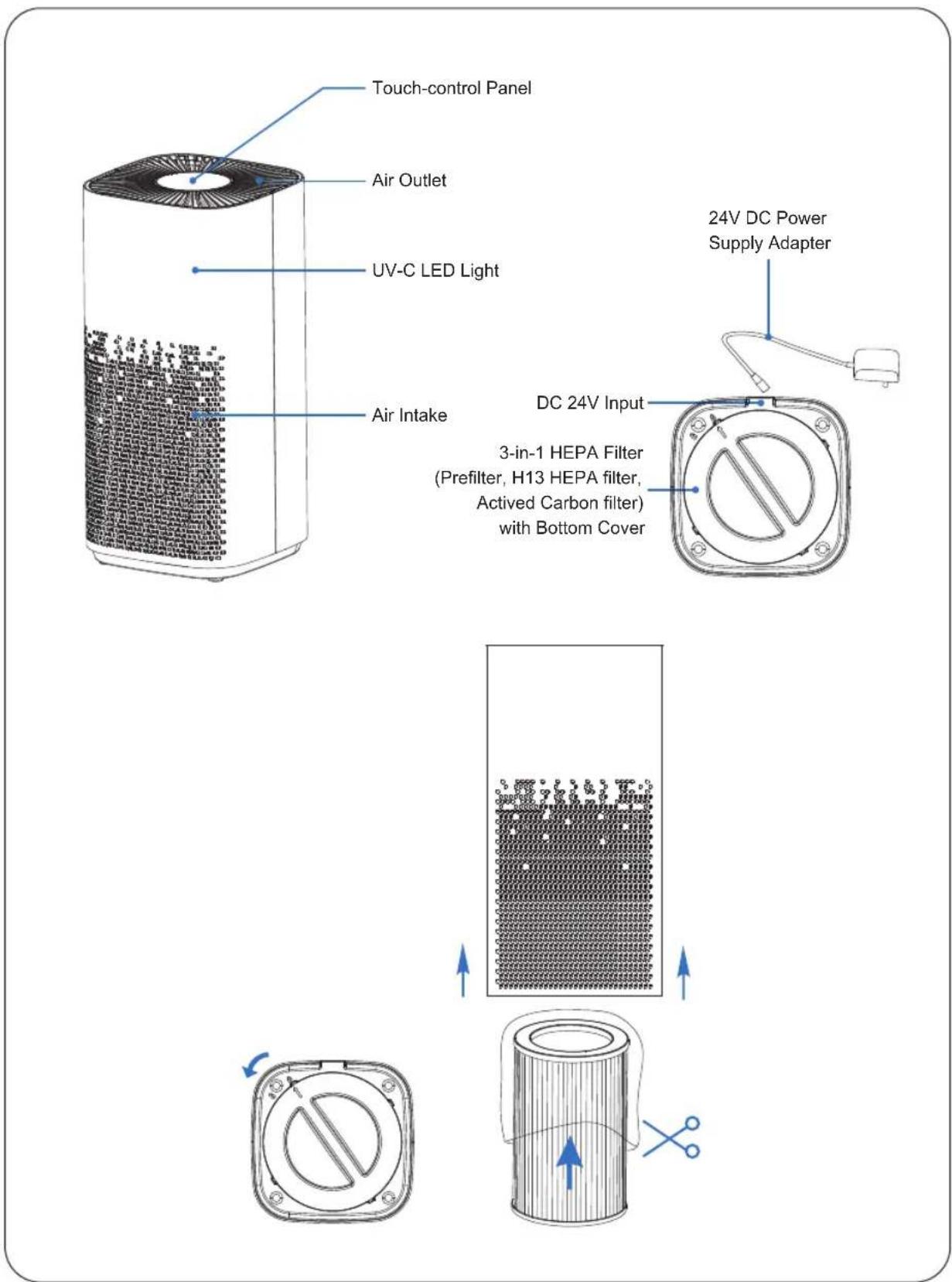
SPECIFICATIONS
| Model | AGH380 |
| CADR | 224CFM (380 m3/h) |
| Fan Speed | 5-Level |
| Dust Sensor | Laser PM2.5 Particles Sensor |
| Filter Structure | Pre-Filter, H13 Class True HEPA Filter, Activated Carbon Filter (attached with Nano Mineral, Cold Catalyst, Photo Catalyst and Molecular Sieve) |
| UV Light | UV-C LEDWavelength: 270-275nmBulb life: Approx. 50,000 hours |
| Noise Level | 22-49dB |
| Standby Power | 2W |
| Rated Power | 36W |
| Power Supply | AC 120-240V to DC 24VPower Adapter (Length: 2M/ 6.5ft) |
| Operating TEMP | 15°F ~ 130°F (-10°C ~ 55°C ) |

Intertek
5012499
COMFORMS TO UL STD.867
CERTIFIED TO CSA STD.C22.2 NO.187

CALIFORNIA
AIR RESOURCES BOARD
[CARB Certified]
OZONE DENSITY about HEPA AIR PURIFIER
This product complies with the maximum allowable concentration of ozone of 0.050 parts per million by volume (ppmv) in a 24-hour period.
The Health Canada Guideline 2010 recommends that the maximum exposure limit, based on an averaging time of 8 hours, is 0.020 ppmv or less when tested in a sealed, controlled room approximately 30 m ^3 .
IMPORTANT SAFETY INSTRUCTIONS
IMPORTANT:
Please read and comply with all of the instructions and warnings in the manual before using.
Failure to comply with the instructions and warnings provided herein may result in inaccurate results and/or damage to the product itself.
General Safety
Only use this air purifier as described in this manual.
- Ensure the plug fits properly into an AC power outlet.
- When not being used, turn the air purifier off and disconnect it from its power source by unplugging from the electrical outlet.
- DO NOT operate the unit if its cord or plug is damaged. It may result in damage to the unit or injury. It must be replaced by the manufacturer or a technician to avoid risks.
- NOT recommended to use an extension cord. If necessary, the extension cord should be the same size as the original one.
• Thoroughly dry your hands before operation. - DO NOT immerse the air purifier in water or liquids. It may result in damage to the appliance, electric shock, or fire.
- DO NOT use the air purifier outdoors. This appliance is designed for indoor use only.
- DO NOT use the air purifier in an enclosed space where flammable, combustible, or explosive gases are present.
- DO NOT use in an area where toxic vapors, flammable dust or oxygen tanks are present.
- DO NOT insert fingers or objects into the air outlet.
- Child supervision is required while the air purifier is on. Do not allow children to play on or near the air purifier.
Use & Care
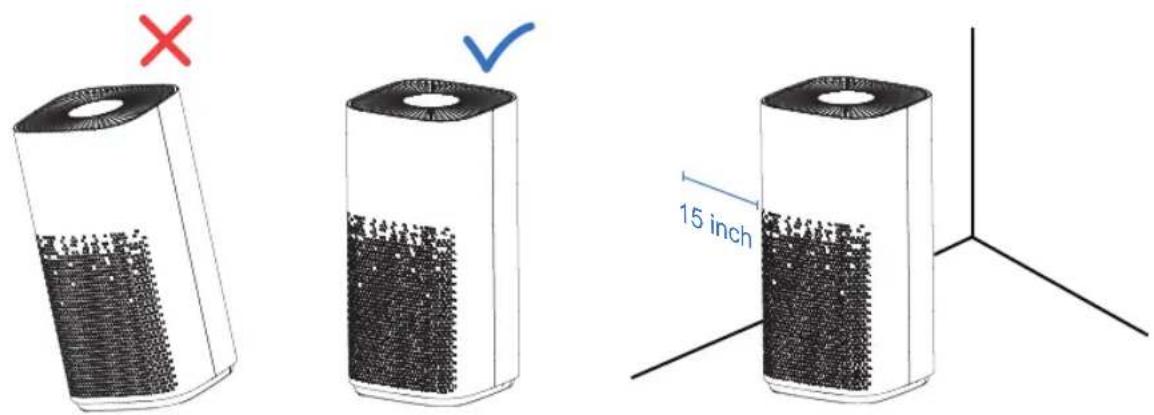
- Always make sure to place the air purifier on a flat, level surface before operation.
- Always allow 15 inches (38 cm) of clearance on all sides of the purifier.
- DO NOT ROUTE CORD UNDER FURNITURE OR APPLIANCES. Do not run the power cord under carpeting. Do not cover cord with throw rugs, runners or similar coverings. Place the power cord away from high traffic areas.
- DO NOT sit on or place anything on top of the purifier.
- DO NOT place the air purifier near sources of heat, such as stoves, ovens, radiators or computers.
- DO NOT use this appliance with indoor smoke-type insect repellents or in places with oily residues, burning incense or chemical fumes.
- DO NOT open the back shell while the air purifier is on. It will automatically turn off the unit.
• Always unplug the appliance from the power supply before servicing. - DO NOT clean the appliance with water or any other liquid to avoid electric shock or injury.
- DO NOT attempt to repair this device in any way or use any replacement components or parts to modify the air purifier. Contact Customer Support immediately if your appliance is no longer working.
- Only use Airthereal Glory Days AGH380 replacement filters for this unit.
- If you experience any problems while operating the air purifier, refer to the Troubleshooting section in the manual. If the problem is NOT solved, contact Customer Support.
- If the unit is damaged or NOT functioning properly, discontinue use and contact Customer Support.
INSTALLATION INSTRUCTIONS
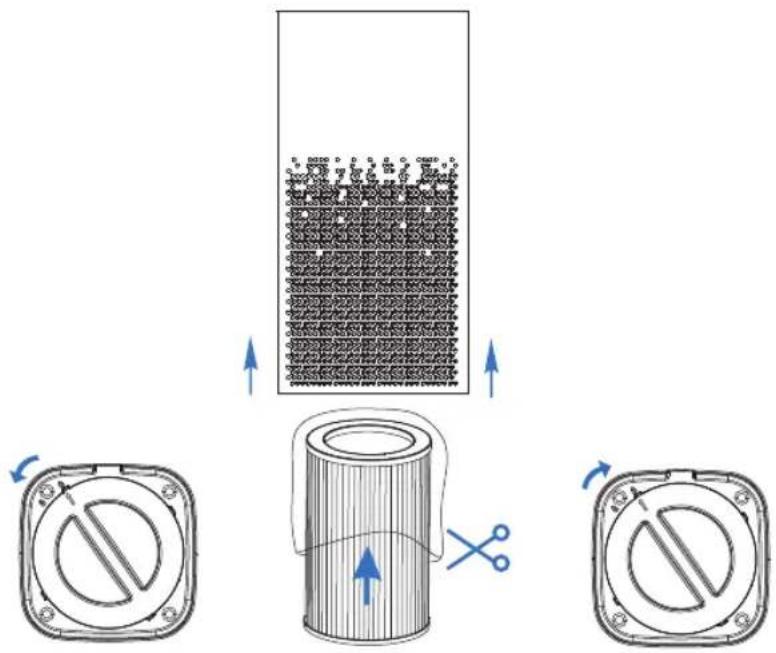
- Rotate the bottom cover of the air purifier and unwrap the plastic package of the HEPA filter.
- Reinstall the HEPA filter. (Note: the HEPA filter is with the Bottom Cover.) Close the bottom cover by rotating it clockwise.
- Place the air purifier on hard, flat surfaces.
NOTE:
Tip-Over Shut-Off
The AGH380 is equipped with a safety cut-off switch to power the unit off if it is knocked over. To reset, simply place the purifier in an upright position and turn ON it again.
- Place at least 15 inches away from TVs, radios, and other electronic products. Electromagnetic interference from certain electronics may cause product malfunction.
- Only use the unit on the firm and flat surfaces. Flimsy or slanted surfaces may result in abnormal noise and vibrations.
CONTROLS

Air Quality Indicator
The PM2.5 indicator shows the real-time PM2.5 value. After powering on, it takes about 15 seconds to activate the PM 2.5 Indicator. The air quality indicator will illuminate and display the real-time PM2.5 value and corresponding air quality indicator color.
| PM2.5 ( g/m^3 ) | AQI (EPA of USA) | Air Quality Indicator Color |
| 0.0-12.0 | 0-50 | Green (good) |
| 12.1-35 | 51-100 | Orange (moderate) |
| 35+ | 101+ | Red (unhealthy) |
Instant PM2.5 value is one of the core references for indoor air quality index (AQI).
Regarding the AQI, working modes, and lights indicators, Airthereal AGH380 Air Purifiers comply with EPA regulations.
For additional information, please reference the United States Environmental Protection Agency (EPA): https://cfpub.epa.gov/airnow/index.cfm?action=aqi_brochure.index#particle
OPERATION
1. Getting started
1.1 Insert the power cord into an electrical outlet.

natural_image
Illustration of a plug inserted into a wall socket connected to a cable, with a blue arrow indicating the cable's direction (no text or symbols present)WARNING
Follow these instructions to reduce the risk of serious injury or death and to reduce the risk of damaging the unit.
Please make sure the operating voltage is the same as the parametric label.
For American and Canadian users, our product will be equipped with a POLARIZED AC PLUG that will fit into the power outlet only one way. If the plug does not fit fully into the outlet, reverse the plug. If it still does not fit, contact qualified personnel to install the proper outlet.
After inserting into the power outlet, the control panel will light up for a second then the Power indicator

will be Red.
1.2 ⏻ Power On
- Press the button to process power.
- The Auto mode and UV functions will automatically turn on when the unit is first powered on.
- The Air Quality Indicator will flash for 15 seconds. Meanwhile, it starts to detect the PM2.5 value and display the number.
2. Modes
2.1 Ⓐ Auto Mode
- It goes into Auto Mode when power on or when you press the Fan Mode button and choose the Auto Mode.
- In Auto Mode, the Auto Mode indicator will glow and the unit will adjust the fan speed depending on the current air quality index.
- It will increase the fan speed automatically to improve air quality in the room until it returns to a healthy level.
2.2 Manual Mode
- Press the Fan button Ⓤ to enter the manual mode. Five fan speeds are available. Each press will cycle between Auto→1→2→3→4→5→Sleep Mode→Auto...
- When Manual Mode is selected, Auto Mode is automatically disabled.
NOTE: The air quality indicator changes according to the corresponding PM2.5 value.
3. ⓞ Timer
- Press the Timer button Ⓤ to select the timer length.
- Pressing the timer button will cycle through 1 hr → 2 hrs → 3 hrs → ... → 24 hrs → 0 hr etc. If the timer is set at 0 hr or the unit is restarted, the timer setting will be reset.
• There will be a 3 second delay after setting the timer.
4. UV Light
- The UV function will automatically turn on when the unit is first powered on. Press and hold the Timer button ⓞ for 5 seconds to deactivate the UV function if you don't need it.
- Press and hold the Timer button ⓞ for 5 seconds until the UV light glows to activate the UV function.
- UV-C refers to ultraviolet light with wavelengths between 200-280 nanometers (nm). It can be used for destroying harmful microorganisms in the air.
- Airthereal AGH380 Air Purifier has passed the stringent ETL testing requirements.
- The UV-C LED light is rated at 50,000 hours, or slightly longer than 5 years. There's no need to replace the UV light or perform maintenance.
5. Ⓗ Child Lock
- Press and hold the Fan button ⏻ for 5 seconds until the Child lock light glows. At this time, other buttons are unable to be used.
- Press and hold the Fan button Ⓤ for 5 seconds again to unlock.
MAINTENANCE
Know the 3-in-1 H13 HEPA Filter
When the replacement icon lights up (Filter icon 📋 keeps glowing), it is a reminder to check and change the air filter.
Recommend replacing the air filter every 6-8 months for optimal use, or according to your air filter status. It's time to replace the air filter when below symptoms appear:
- Increased noise
• Decreased airflow - Clogged filters
• Presence of odors from the unit
Purchase a new Airthereal Air Filter Replacement:
www.airthereal.com
Search on Amazon: AGH380 replacement filter / B08HYRJGWG
Only use Airthereal Glory Days AGH380 replacement filters for this unit.
Replace the Air Filter
Power off and unplug before operating.
Rotate the bottom cover counterclockwise and take out the old filter.
Unwrap a new filter.

Install a new filter in the unit and rotate the cover clockwise.
Power the unit on. Press and hold the Power button ⏻ for 5 seconds to reset the replacement reminder.
Unplug the power cord before cleaning.
Plastic housing should be cleaned with a soft cloth moistened with mild soap. Thoroughly remove soap film with a dry cloth.
For optimal maintenance, clean the unit every 2 months.
TROUBLESHOOTING
| Problem Cause | Solution | |
| No power or response. | The unit is not plugged into an electrical outlet. | Connect the plug to a powered electrical outlet. |
| The outlet is not working properly. | Try plugging the air purifier into a different outlet. | |
| The power adapter is damaged. | Immediately discontinue use and contact Customer Support. | |
| The air purifier is defective or malfunctioning. | ||
| Unpleasant Smell. | The filter may be too dirty if it's used for a long time. | Replace the filter. |
| Using the air purifier in moist conditions or water entered in the filter. | ||
| The air quality indicator always gets in red. | Dirty filters and room air is bad. | Replace the filter. |
| The numbers have been fluctuating from 3 to 12. | This PM2.5 sensor is very sensitive. | It means the air quality is good when the value is under 12. You need to pay attention when it goes higher than 35. |
| Any faulty display of the LED numbers. | Auto Mode has just been turned on. | Allow the air purifier to run for 5 seconds. They will change a stabilized status based on the detected air quality. |
| The unit is defective or malfunctioning. | Immediately discontinue use and contact Customer Support. | |
| Unusual noise while operating. | Dirty filters. | Replace the air filters as instructed in the Replace the Air Filters section. |
| Filters installed improperly. | Place the filter properly. Please refer to the Getting Started and Replacing the Air Filters section. | |
| The foreign object inside the unit. | Immediately discontinue use and contact Customer Support. DO NOT attempt to open the air purifier yourself. | |
| Flimsy or slanted surfaces resulting in an abnormal noise and vibrations. | Place the air purifier on hard, flat surfaces. | |
| Significantly reduced airflow. | Not enough space around the unit. | Ensure that there are at least 15 inches (38 cm) between the unit and other objects. |
| Poor air purification quality. | Surrounding area exceeds the applicable area. | DO NOT use the air purifier outdoors. This appliance is designed for indoor use only. |
| The air inlet or outlet is blocked. | Remove objects that block the air inlet or outlet. | |
| The filter is not properly placed in housing. | Properly place filter as noted in the Getting Started and Replacing the Filters section. |
WARRANTY
| Product Name Airthereal Glory Days AGH380 HEPA Air Purifier | |
| Series Glory Days | |
| Model AGH380 | |
| Manufacturer Warranty Period 2 | Years |
| Please keep your order receipt for future reference. | |
TERMS & POLICY
Quality has always been Airthereal's top priority. For your 100% hassle-free shopping experience, Airthereal provides a 2-year manufacturer's limited warranty for AGH380 Air Purifiers.
Online information: airthereal.com/pages/warranty
• What's covered?
Defects due to faulty materials and workmanship of the product.
• What's NOT covered?
- Damage caused by the owner when attempting to fix or altering the product by himself or herself.
- Damage caused by misuse, abuse, neglect, alterations, or unauthorized repair.
- Natural depreciation.
- Warranty Period
Warranty becomes effective since the date of the original purchase and will last for two (2) years.
• Who's covered?
This limited warranty is only effective for the original purchaser. It is NOT transferable.
• How to request warranty services?
To obtain the benefit of this warranty, please leave a message online (https://airthereal.com/pages/warranty), or send an email to support@airthereal.com. Our customer service will address your issue promptly
• What will Airthereal do?
- Repair the item.
- Replace the item if unrepairable.
- Refund the item under certain circumstances.
ALL EXPRESSED AND IMPLIED WARRANTIES, INCLUDING THE WARRANTY OF MERCHANTABILITY, ARE LIMITED TO THE PERIOD OF THE LIMITED WARRANTY.

DISPOSAL
This product must not be disposed of via normal household waste after its service life. It must be taken to a collection station that recycles electrical and electronic devices. The symbol on the product, the operating instructions, and the packaging indicate such disposal procedures. The materials are recyclable in accordance with their respective symbols. By means of re-use, material recycling, or any other form of recycling old appliances, you are making an important contribution to the protection of our environment.


- COMPONENTS
- SPECIFICATIONS
- [CARB Certified]
- OZONE DENSITY about HEPA AIR PURIFIER
- IMPORTANT SAFETY INSTRUCTIONS
- IMPORTANT:
- General Safety
- Only use this air purifier as described in this manual.
- Use & Care
- INSTALLATION INSTRUCTIONS
- NOTE:
- Tip-Over Shut-Off
- CONTROLS
- Air Quality Indicator
- OPERATION
- Getting started
- Insert the power cord into an electrical outlet.
- WARNING
- ⏻ Power On
- Modes
- Ⓐ Auto Mode
- Manual Mode
- ⓞ Timer
- UV Light
- Ⓗ Child Lock
- MAINTENANCE
- Replace the Air Filter
- Unplug the power cord before cleaning.
- TROUBLESHOOTING
- WARRANTY
- TERMS & POLICY
- • What's covered?
- • What's NOT covered?
- - Warranty Period
- • Who's covered?
- • How to request warranty services?
- • What will Airthereal do?
- DISPOSAL
Brand : Airthereal
Model : Glory Days AGH380
Category : Air purifier