SC-TM11039 - Toaster Scarlett - Free user manual and instructions
Find the device manual for free SC-TM11039 Scarlett in PDF.


| Product Type | Toaster |
| Brand | Scarlett |
| Model | SC-TM11039 |
| Dimensions (approx.) | 270 x 180 x 200 mm |
| Weight | 1.2 kg |
| Power Supply | 220-240 V ~ 50/60 Hz |
| Power Consumption | 750 W |
| Number of Slots | 2 |
| Browning Control | Adjustable browning levels (6 settings) |
| Functions | Toasting, reheating, defrosting, cancel |
| Additional Features | Self-centering bread guides, crumb tray, cool-touch housing |
| Cord Storage | Cord wrap underneath |
| Safety | Auto shut-off, non-slip feet, overheat protection |
| Cleaning | Removable crumb tray for easy cleaning |
| Materials | Stainless steel and plastic housing |
| Color | Silver and black |
Frequently Asked Questions - SC-TM11039 Scarlett
User questions about SC-TM11039 Scarlett
0 question about this device. Answer the ones you know or ask your own.
Ask a new question about this device
Download the instructions for your Toaster in PDF format for free! Find your manual SC-TM11039 - Scarlett and take your electronic device back in hand. On this page are published all the documents necessary for the use of your device. SC-TM11039 by Scarlett.
USER MANUAL SC-TM11039 Scarlett
natural_image
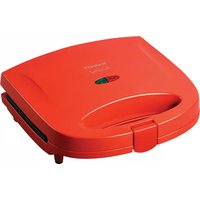
Red SCARLETT grater with a black handle and green logo (no visible text or symbols on the device itself)GB DESCRIPTION
- Case
- Handle lock
- Stay-cool handles
- Power indicator
- Heating indicator
UA ОПИС
- Please read these operating instructions carefully before connecting your device to the power supply, in order to avoid damage due to incorrect use.
- Before switching on the appliance for the first time please check if the technical specifications indicated on the unit correspond to the mains parameters.
- Incorrect operation and improper handling can lead to malfunction of the appliance and injuries to the user.
- The appliance is intended for use only in domestic aims. The unit is not intended for industrial and commercial use, and also for use in:
- kitchen area for the stuff of shops, offices and the other industrial places
- farm houses
– hotels, motels, rest homes and other similar places by residents.
• Do not use outdoors.
• Always unplug the appliance from the power supply before cleaning and when not in use.
- To prevent risk of electric shock and fire, do not immerse the appliance in water or any other liquids. If it has happened DO NOT TOUCH the appliance, unplug it immediately and check in a service center.
- Do not use product near water.
- Do not place the appliance or its parts close to open flame, cooking or other heating appliances.
- The appliance is not intended for use for physically, sensory or mental disabled person (including children) or for person with lack of life experience or knowledge, if only they are under supervision or have been instructed about the use of the unit by responsible person.
- This appliance can be used by children aged from 8 years and above and persons with reduced physical, sensory or mental capabilities or lack of experience and knowledge if they have been given supervision or instruction concerning use of the appliance in a safe way and understand the hazards involved.
Cleaning and user maintenance shall not be made by children unless they are older than 8 and supervised. Keep the appliance and its cord out of reach of children aged less than 8 years.
- Cleaning and user maintenance shall not be made by children without supervision.
- Children must be under control in order not to be allowed to play with the appliance.
- Do not leave the appliance switched on when not in use.
- Do not use other attachments than those supplied.
- In case of power cord is damaged, its replacement should be done by the manufacture or service department or the other high-skill person to avoid any danger.
- Do not attempt to repair, adjust or replace parts in the appliance. Check and repair the malfunctioning appliance in the nearest service center only.
- Keep the cord away from sharp edges and hot surfaces.
- Do not pull, twist, or wrap the power cord around the appliance.
- Do not move the appliance until it cools down completely.
- Never use sharp objects to take out sliced bread! When taking out sliced bread, be careful not to damage the heating wires.
- Do not touch any metal part of the outer surface of the appliance as it may heat to a very high temperature.
- Do not insert bread slices that are too thick or wrapped in aluminum foil to avoid electric shock or fire.
- ATTENTION: too long toasting may cause fire.
- Do not cover the toaster during operation.
- Toasts may burn, therefore do not use the toaster close to inflammable materials, such as curtains.
- When the temperature of accessible surfaces may be high.
• The appliance is not designed for use with external timer or separate remote control system.
- If the product has been exposed to temperatures below 0^ for some time it should be kept at room temperature for at least 2 hours before turning it on.
- The manufacturer reserves the right to introduce minor changes into the product design without prior notice, unless such changes influence significantly the product safety, performance, and functions.
- Manufacturing date is indicated on the unit and/or on packing as well as in accompanying documents in the following format XX.XXXX where first two figures XX is the month of production, and following four figures XXXX is the year of production.
INSTRUCITIONS FOR USE
- This appliance can be used for making toast, bacon, sausages, mini shawarma, cutlets. BEFORE THE FIRST USE
- When you turn on the device for the first time, new heating elements may emit a smell and small amount of smoke. This is not a malfunction. It is recommended to prepare a product for the first time that will not be eaten.
- Before to use this product for the first time grease the inner part of this appliance with oil.
- Turn the unit on and let it work within 8 minutes in a closed position.
- Unplug the appliance and wipe the inner part of the appliance softly with wet clean cloth. OPERATION
- Connect the appliance to electrical outlets; power light indicator will turn red.
- When the appliance reaches the operating temperature, the green ready-to-use indicator lights up, while the red indicator remains on, which means that cooking can begin. During operation, the green indicator will light up and go out, indicating that the heating element is switched on and off to maintain a constant heating temperature.
- Open the lid, place the prepared products according to the recipe on the work surfaces and close the lid tightly. A detailed description of the preparation can be found on the website in the "Recipes" section, or by clicking on the QR code located on the box of the device.
- ATTENTION! During operation do not touch the unit lid, it may be very hot.
- During the cooking process, please try not to lift the lid unnecessarily. Otherwise, due to the loss of heat inside the grill the steak will need to cook it longer, which increases the chances to overcook the meat.
- Open the lid and with a spatula, remove the finished product. So as not to damage the non-stick coatings do not use metal or sharp objects.
CARE AND CLEANING
- Ensure that the appliance is unplugged before cleaning.
- Let the unit cool down completely.
- Do not use abrasive materials or metal washcloths to clean the panels, housing and internal parts of the appliance, it may damage the non-stick coating and scratch the plastic.
STORAGE
- Switch off and unplug the appliance; let it cool down completely.
- Complete all requirements of chapter CARE AND CLEANING.
- Reel on the power cord.
- Keep the appliance in a dry cool place.
- If the toaster is not in use, keep it closed.

The symbol on the unit, packing materials and/or documentations means used electrical and electronic units should not be toss in the garbage with ordinary household garbage. These units should be pass to special receiving point.
For additional information about actual system of the garbage collection address to the local authority.
Valid utilization will help to save valuable resources and avoid negative work on the public health and environment which happens with incorrect using garbage.
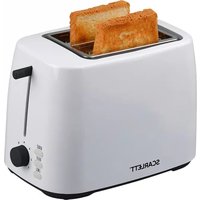
Brand : Scarlett
Model : SC-TM11039
Category : Toaster