
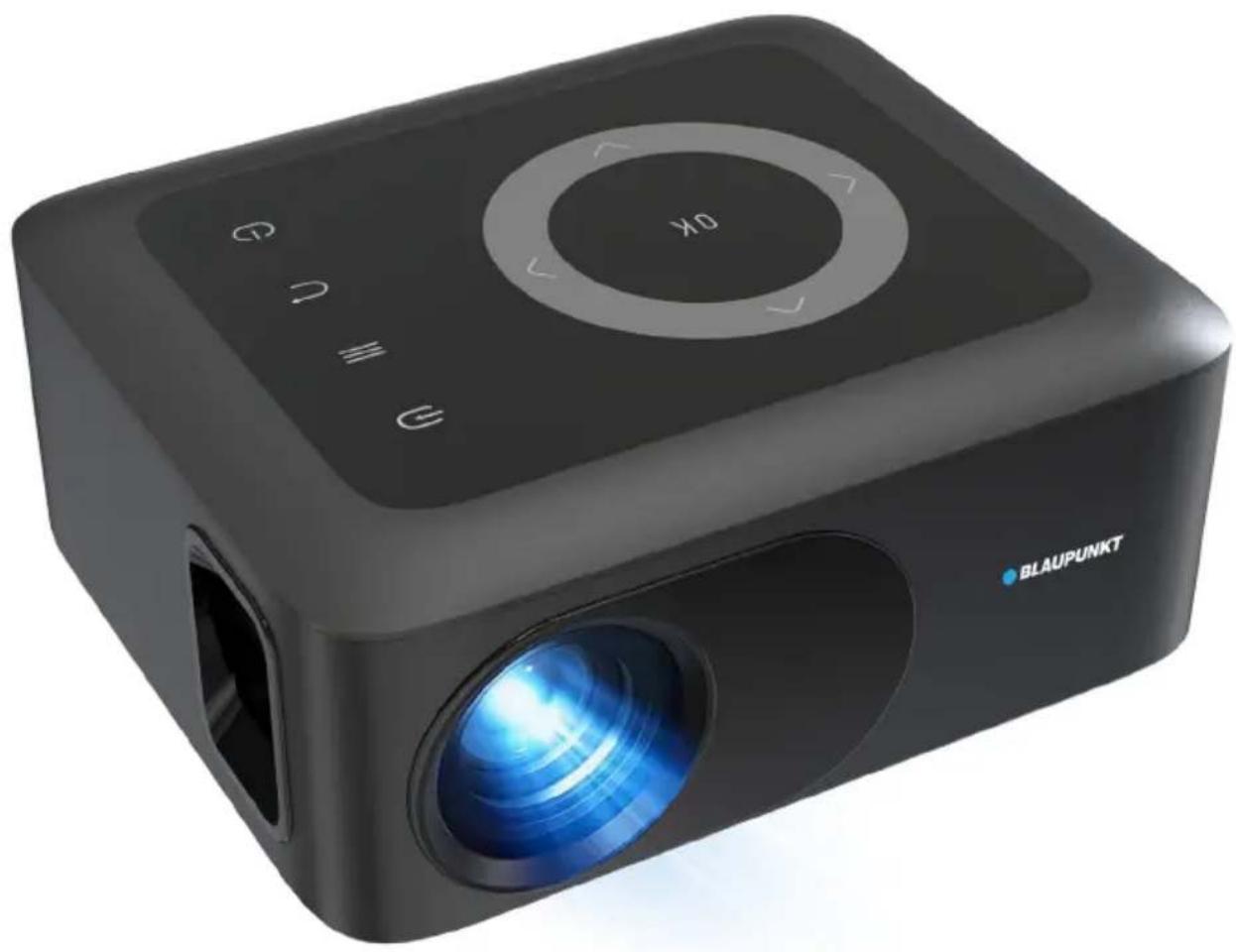
BP720B - Projector BLAUPUNKT - Free user manual and instructions
Find the device manual for free BP720B BLAUPUNKT in PDF.


| Product Type | Video Projector |
| Brand | Blaupunkt |
| Model | BP720B |
| Native Resolution | 1280 x 720 pixels |
| Supported Resolution | Up to 1080p Full HD |
| Brightness | 80 ANSI Lumens |
| Projection Size | Up to 120 inches (diagonal) |
| Aspect Ratio | 16:9, 4:3, AUTO |
| Keystone Correction | Manual trapezoidal adjustment |
| Focus Type | Manual focus knob |
| Inputs | HDMI, USB, Micro SD, AV IN (via AV OUT jack) |
| Outputs | Earphone jack (3.5mm) |
| Built-in Speaker | Yes (mono) |
| Power Supply | 24V DC, 1.75A (via included power adapter) |
| USB Power Output | 5V, max 500mA |
| Weight (Net) | 0.5 kg |
| Dimensions (W x D x H) | 145 x 122 x 62 mm |
| Remote Control | Yes (batteries not included) |
| Multimedia Playback (USB/Micro SD) | Video: AVI, FLV, RMVB, MKV, MP4, 3GP, MOV, MPG, MPEG, TS, TP, VOB; Audio: MP3, WMA, OGG, AAC, FLAC; Photo: JPG, PNG, BMP |
| Projection Modes | Front, Front Ceiling, Rear, Rear Ceiling |
| Included Accessories | User manual, Remote control, Power adaptor, Warranty card |
Frequently Asked Questions - BP720B BLAUPUNKT
User questions about BP720B BLAUPUNKT
0 question about this device. Answer the ones you know or ask your own.
Ask a new question about this device
Download the instructions for your Projector in PDF format for free! Find your manual BP720B - BLAUPUNKT and take your electronic device back in hand. On this page are published all the documents necessary for the use of your device. BP720B by BLAUPUNKT.
USER MANUAL BP720B BLAUPUNKT
720p HD Compact Projector - BP720B
CONTENTS
| General | Safety | |
| Product | Overview | |
| Remote | Control | |
| First | Time Setup | |
| Installation | 12 | |
| Home | Dashboard | |
| Settings | ||
| Picture | ||
| Sound | ||
| Option | ||
| Time | ||
| Specifications | 19 | |
| Customer | Helpline | Last |
4
10
1
1!
16
1:
18
GENERAL SAFETY
Read this manual thoroughly before you start using the Projector.
Store this manual, the completed warranty card, your receipt and the product packaging. The safety precautions instructions reduce the risk of fire, electric shock and injury when correctly complied to.
Please follow all instructions and take notice of all warnings.
IMPORTANT INFORMATION
- Only using furniture that can safely support the Products.
- Ensure the product is not overhanging the edge of the supporting furniture.
- Do not place the product on high furniture without securing both the furniture and the product to a stable support.
- Do not place the product on cloth or other conductive materials.
- Warn children of the dangers of climbing on furniture to reach the projector or its controls and to call for an adult to assist.
GENERAL SAFETY (CONT.)
IMPORTANT INFORMATION
- Do not expose this appliance to rain or moisture as it may result in fire or an electric shock hazard.
- Do not tamper, change, or modify the product in any way.
- Only use accessories outlined and recommended by the manufacturer.
- Please do not expose the product to splashing or water contact.
- Please do not place any object on top of the product, including objects filled with liquids such as vases.
Installation
Please follow the instructions when installing this product in accordance with the instruction manual. This product must be positioned in a sufficiently stable location; it can be potentially hazardous due to falling and can cause injury, particularly to children, if it is positioned incorrectly.
- Before installing this projector set, make sure your outlet voltage corresponds to the voltage stated on the product rating label.
- Do not use a damaged power cord, plug, or loose outlet. Doing so may cause an electric shock.
- Do not plug several devices into the same outlet. Doing so may cause the outlet to overheat and start a fire. Make sure the outlet is readily accessible during operation of the equipment.
- Do not bend, twist or kink the power adaptor excessively.
- Do not allow anything to rest on or roll over the power adaptor. Doing so may cause a fire or an electric shock.
- Do not run the power adaptor near heat-producing appliances such as radiators, stoves or irons. The excessive heat could melt the insulation and expose live wires, resulting in fire or electric shock.
- Unplug this Projector during lightning storms or when unused for long periods of time. Not doing so may result in fire or electric shock.
- Do not cover the ventilation openings of the product with items such as newspapers, tablecloths, curtains etc or insert objects into the slots available on the products. As this could result in the product temperature rising and could cause a fire.
- If you notice any unusual odors or smoke around the unit, immediately disconnect the unit from the outlet and contact the service center. Failure to do so may result in fire or electric shock.
- When not using the unit for long periods of time or when you are moving the unit please ensure to disconnect the power cord from the wall socket.
GENERAL SAFETY (CONT.)
- Please be aware that dust could accumulate over time on the unit and cause it to generate heat and or deteriorate insulation, which in turn may result in an electrical fire.
- The product is not intended for use by persons (including children) with reduced physical, sensory or mental capabilities, or young children of any age. They must be supervised by a person responsible for their safety.
- Batteries from the remote control must be only removed by an adult. The adult must ensure to keep them out of reach of infants and children. Seek medical attention immediately if a child has swallowed a battery.
- Batteries (battery pack or batteries installed) shall not be exposed to excessive heat such as sunshine, fire or the like.
- To maintain the product do not use any chemical or cleaning agent or wet cloth. Please only ensure to utilize a dry cloth to wipe it down from marks or dust and only after unplugging the product from the power socket.
- Please ensure to contact our call center for any repair or service required for the products.
! CAUTION !
DO NOT look directly into the projector lens. This can cause damage to a person's or children's eyes. Take all necessary precautions to make sure that no one looks into the lens while it is turned on.
MAKE SURE this projector is out of reach of children or babies so that they do not stand and look into the projector lens.
DO NOT cover the vents. The vents are needed to let out hot air. Placing objects near or covering the vents can cause the product to overheat and permanently damage the projector.
GENERAL SAFETY (CONT.)
Please make sure upon positioning this product, the place is:
- Not wet or damp and well ventilated.
- Away from direct sunlight or heaters.
- Away from splashes or food.
- Protected from excessive dust or grease.
- Do not install this equipment in a confined space such as a bookcase or similar unit.
- Do not install the projector near heat sources such as radiators, stoves, or other audio-visual equipment that produce heat.
- Do not place containers with liquids. If liquid falls inside the product, it may result in short-circuit, fire, or electric shock.
- Do not place small metallic objects on top of the unit. If a metal object falls inside the product, it may result in short-circuit, fire, or electric shock.
- Do not use or store flammable or combustible materials near the unit. Doing so may result in fire or explosion. Do not place any naked flame sources, such as lit candles, cigarettes, or incense sticks on top of the projector. Install the unit at a reasonable distance from the wall to ensure sufficient ventilation.

HIGH-DEFINITION MULTIMEDIA INTERFACE
HDMI, the HDMI logo and High-Definition Multimedia Interface are trademarks or registered trademarks of HDMI Licensing LLC.
PRODUCT OVERVIEW
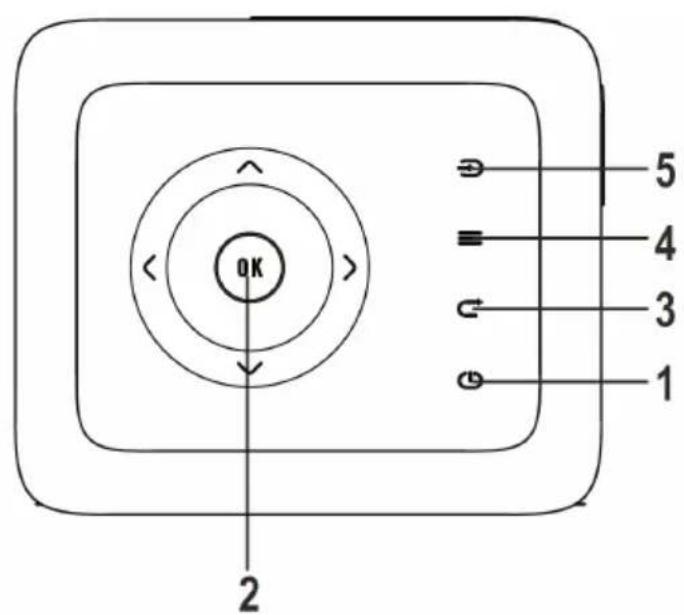
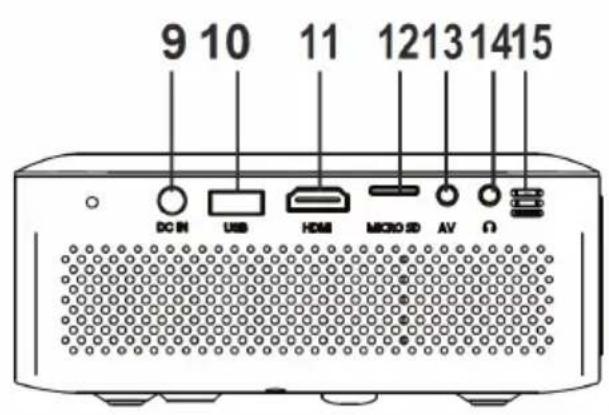
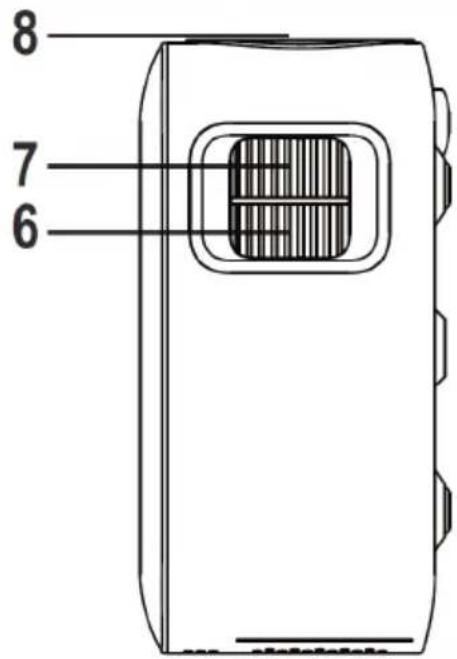
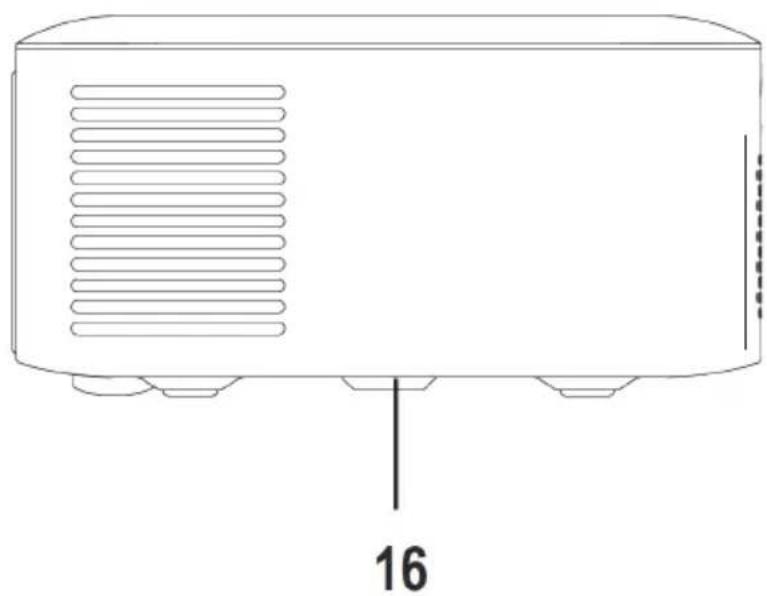
- POWER ⏻ Button
- NETVIGATOR Button
- RETURN ⬆ Button
- MENU ≡ Button
- SOURCE ← Button
- TRAPEZOIDAL ADJ. Knob
- FOCUS ADJ. Knob
- LENS
- DC IN jack
- USB Port
- HDMI
- MICRO SD
- AV OUT Jack
- EAR PHONE Jack
- IR Window
- ANGEL ADJ. Knob
PRODUCT OVERVIEW (Cont.)
![graph TD A["Source Press to change media source mode."] --> B["Menu Press to access on-screen menus and options."] B --> C["Back Press to return to a previous page or setting in the onscreen menus."] C --> D["Power Press to power on the projector. Press twice to power off the unit"] E["Arrows/OK Pre…](/content/2026/05/837635/images/ddf0ad9e08355e71012d62b0b6fc50f7b3ceba6e084dae019ec90241218aabb9.jpg)
REMOTE CONTROL
Your projector comes with a Remote Control to access and control your projector from a distance. (Batteries not included).
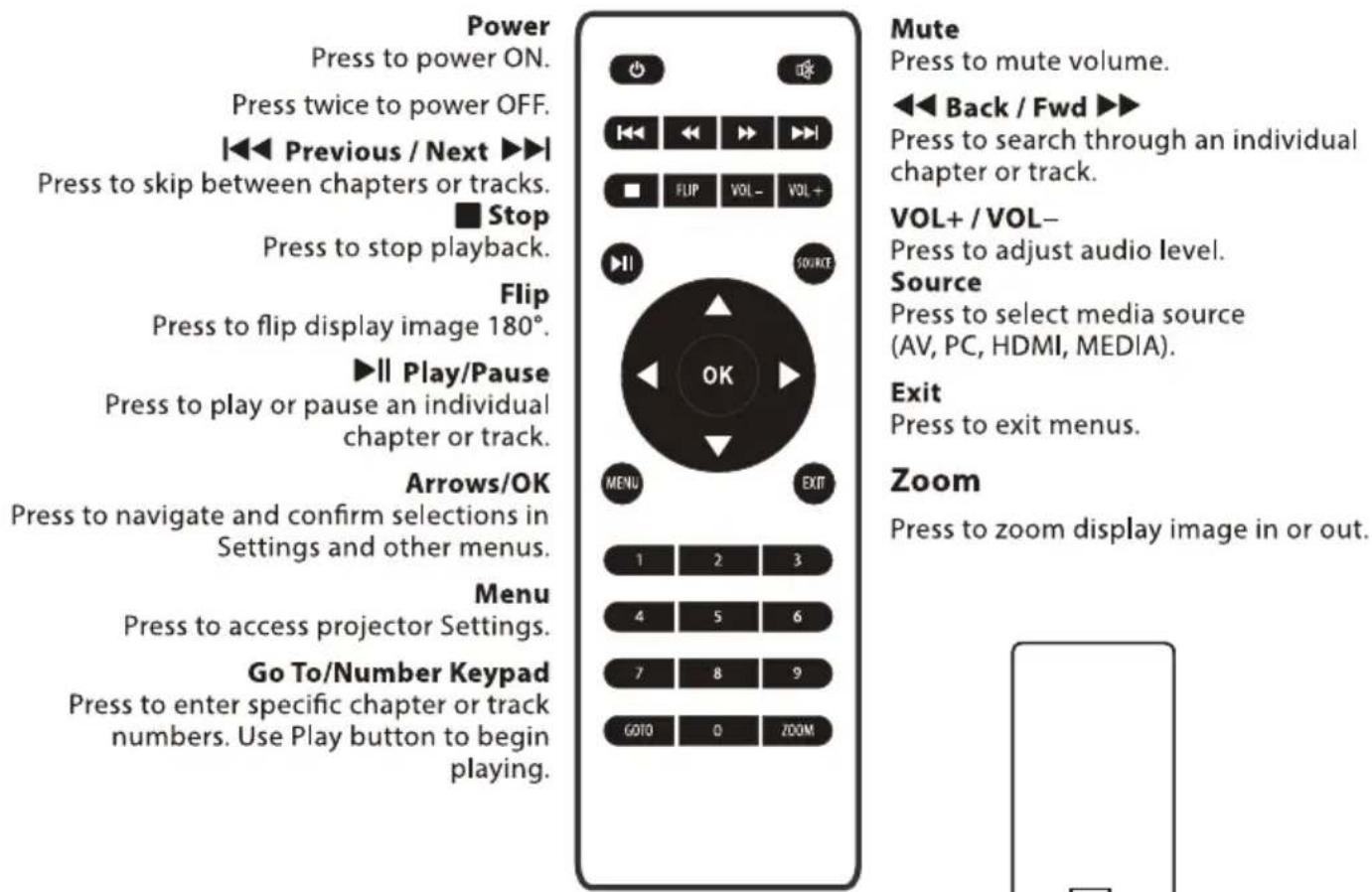
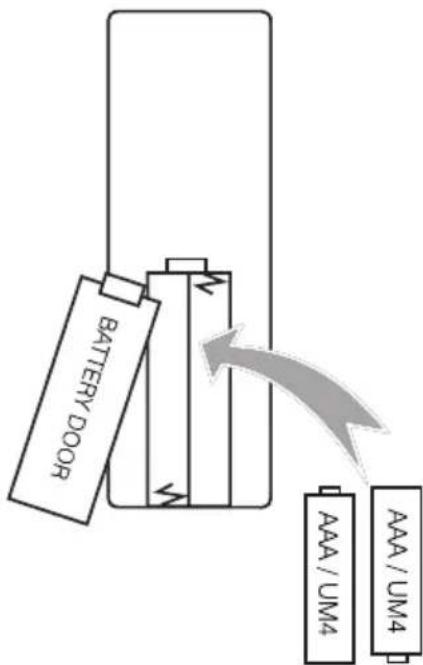
Using the Remote Control
- Do not mix old and new batteries in the remote.
- Do not use different types of battery.
- If you do not intend to use the unit for a long time, please remove batteries from the remote to avoid accident.
- Keep batteries away from children and pets.
- Never throw batteries into a fire.
- Do not drop or impact the remote control, as it will void the warranty immediately. The remote control operates effectively at a range of 5 to 6 meters.
- Do not expose the remote control sensor to bright light.
FIRST TIME SETUP
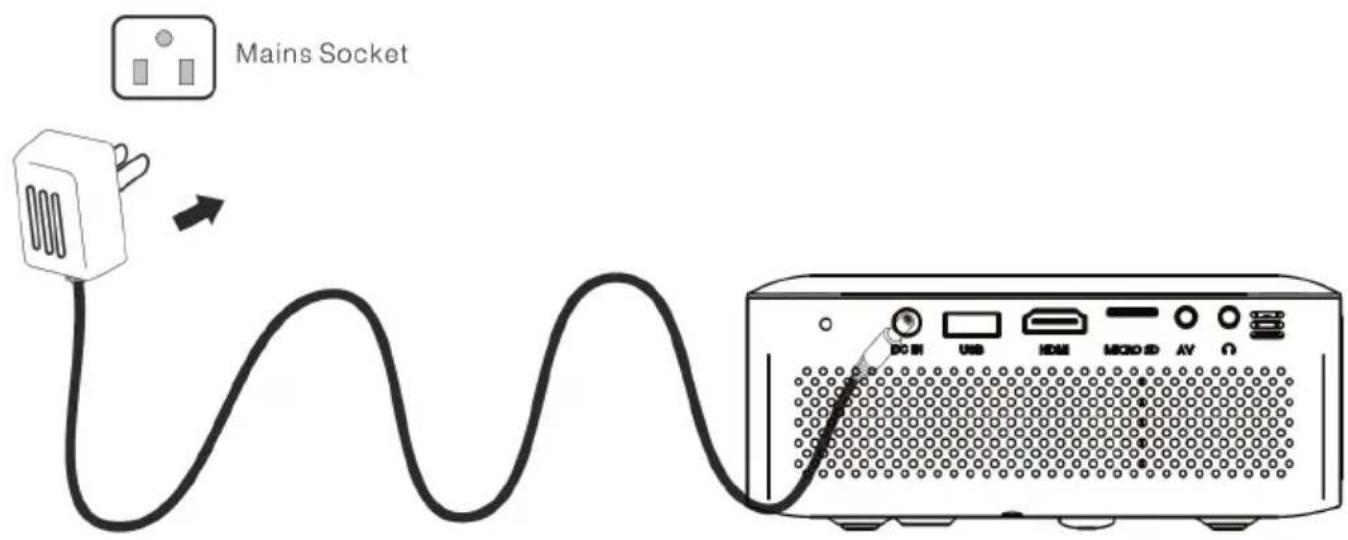
Make sure to place the projector on a flat and stable surface that is level, so that the projector projects the video/image onto the wall nice and straight.
- Plug the power adapter into the back of the unit (DC IN), and then plug the adapter end into the wall power socket.
INSTALLATION
DISTANCE BETWEEN PROJECTOR AND SCREEN
| Projection Distance | 1m | 2m | 3m |
| Projection Size | 30 inch | 68 inch | 98 inch |
| Light, brightness, etc. will affect the projection distance, this data is for reference only. | |||
| Projection Position | |||
| It is recommended to place the projector in front of the center of the screen. | |||
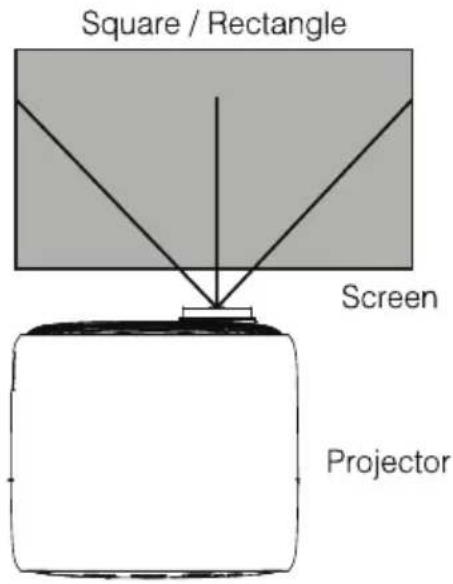
VIEWING OPTIONS
The projector can be used to project onto a wall or screen, mounted from the ceiling or on a table. When projecting from a rear position, a special screen will be needed (not included) to display the image. Be sure to aim the remote at the sensor on the front or rear of the projector.
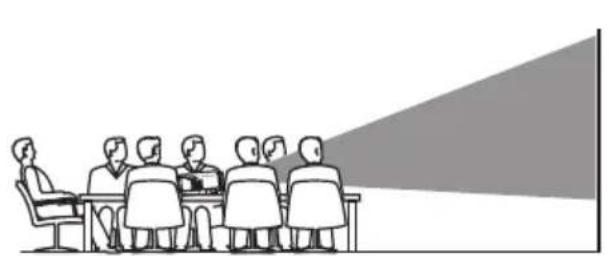
Front Table
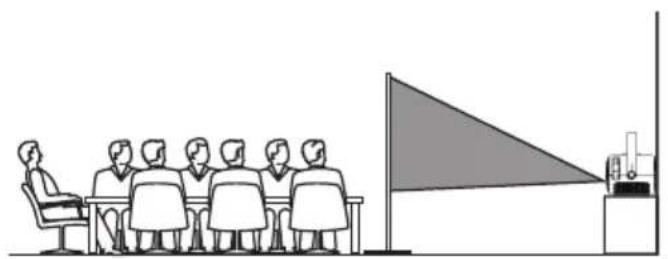
Rear Ceiling
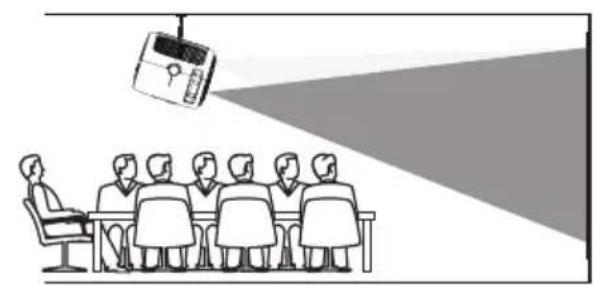
Front Ceiling
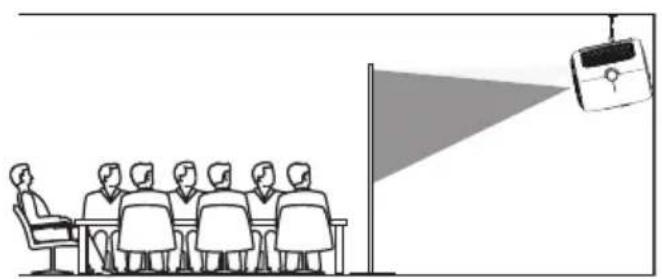
Rear Ceiling
INSTALLATION (Cont.)
When installing the projector on the ceiling, please purchase a projector mount recommended by an installation professional and follow the instructions that come with the mount.
Before installing the projector in the ceiling, please check to make sure the ceiling structure can support the weight of the projector and the mount. If in doubt, please ask the advice from an installation professional.
NOTE: Projector Mount and Screw(s) are not included.
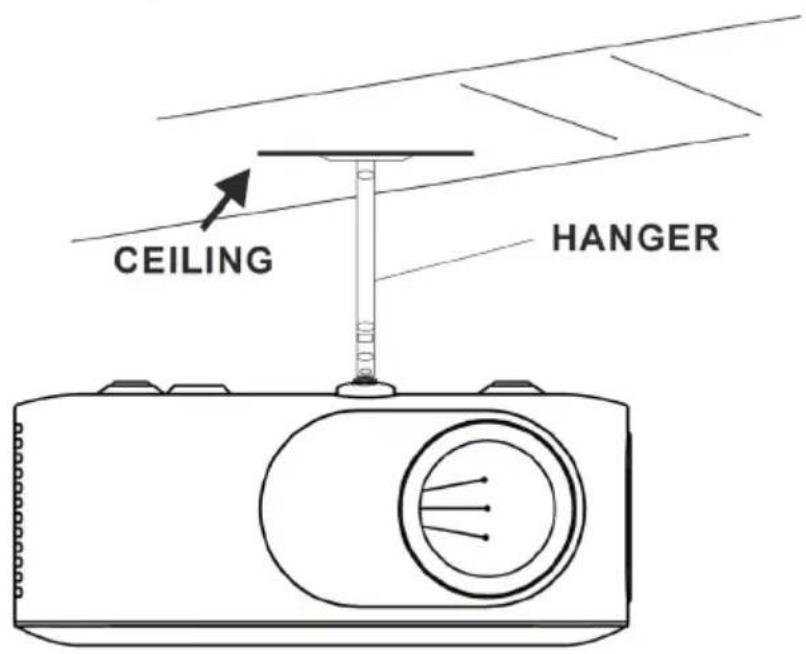
FIXED HANGER HOLE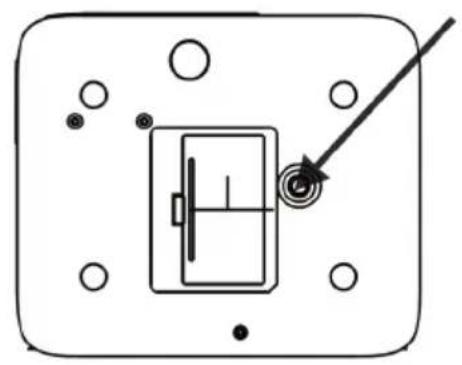
ADJUSTING FOCUS
As shown in the picture, adjust the lens focus wheel until you get a clear picture.
FOCUS ADJ. KNOB
Then sharpen the image by rotating the focus knob.
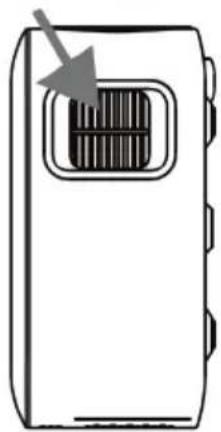
TRAPEZOIDAL ADJ. KNOB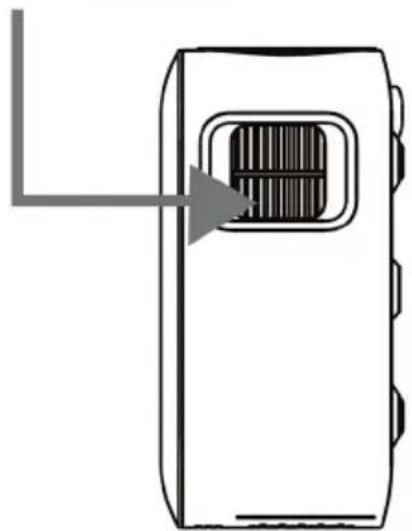
HOME DASHBOARD
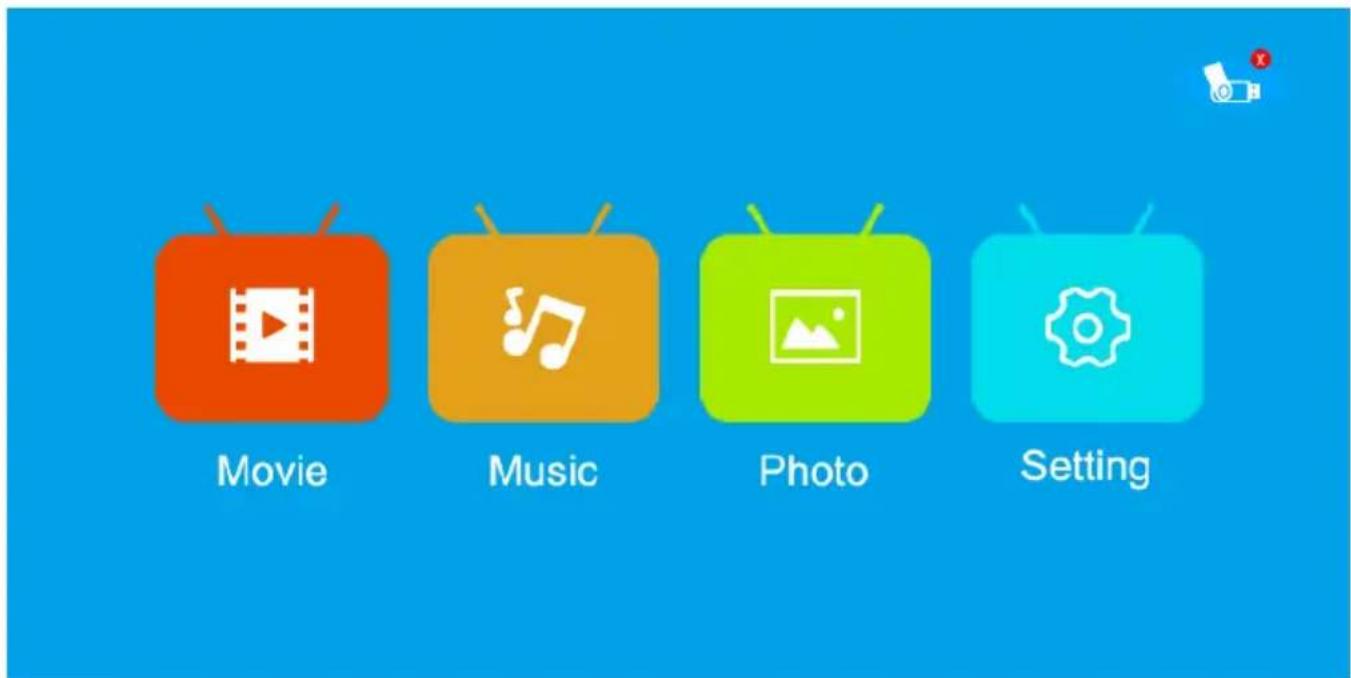
This dashboard above appears when you finish turning on your projector. From here you can select your file types to view depending on the device you want to project or other media devices and menu options.
SETTING - PICTURE
To access the setting PICTURE menu:
- Press the MENU button on the Remote Control.
- With the directional keys, press the RIGHT PICTURE settings.
- To navigate back to PICTURE/AUDIO/OPTION, with nothing selected, press the MENU button.
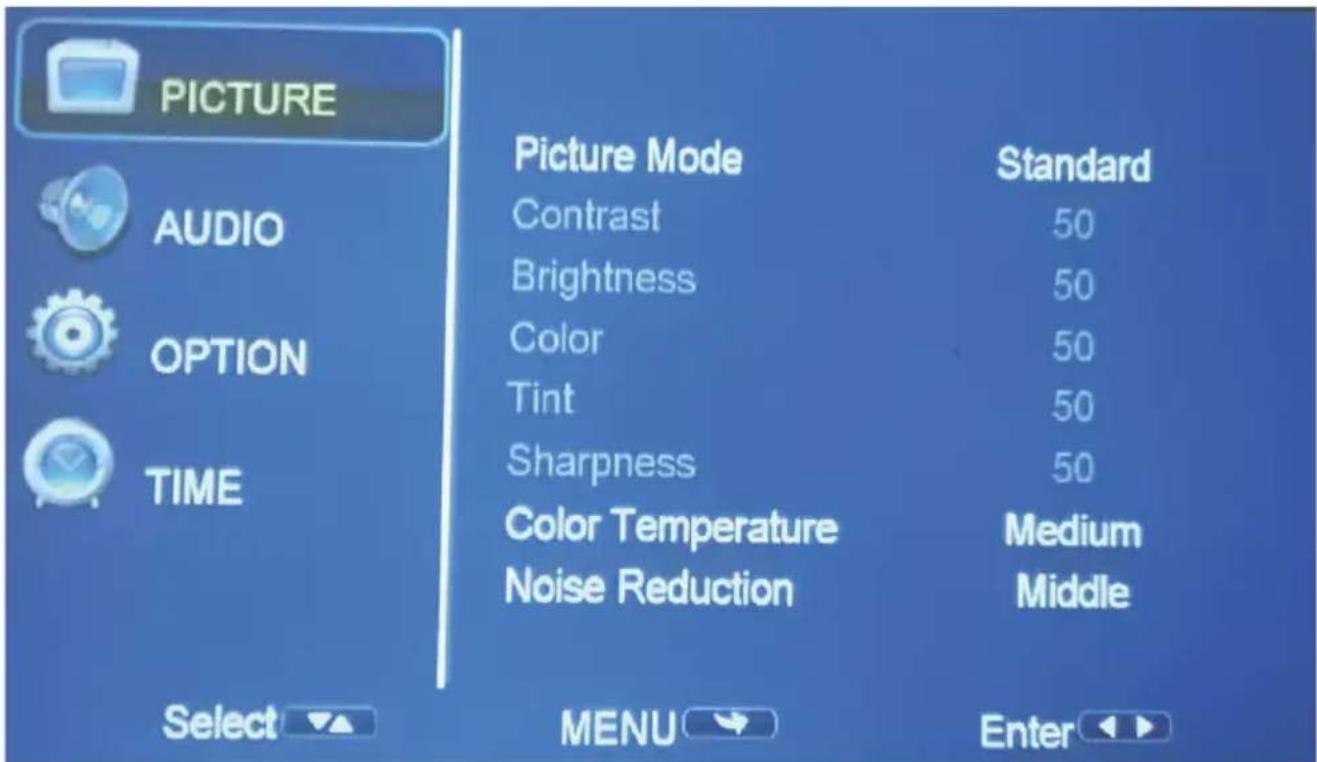
PICTURE MODES: Standard, Soft, Vivid, User (contrast, brightness, sharpness, colour).
COLOUR TEMP: Adjust between Medium, Cool, Warm.
NOISE REDUCTION: Off, Low, Middle, High, Default.
SETTING - AUDIO
To access the AUDIO menu:
- Press the MENU button on the remote control.
- Use the directional keys to navigate. Press the DOWN button to highlight AUDIO, then press the RIGHT arrow button to enter AUDIO settings.
AUDIO, Press the RIGHT >> arrow button to enter AUDIO settings.
- To navigate back to PICTURE/AUDIO/OPTION, with nothing selected, press the MENU button.
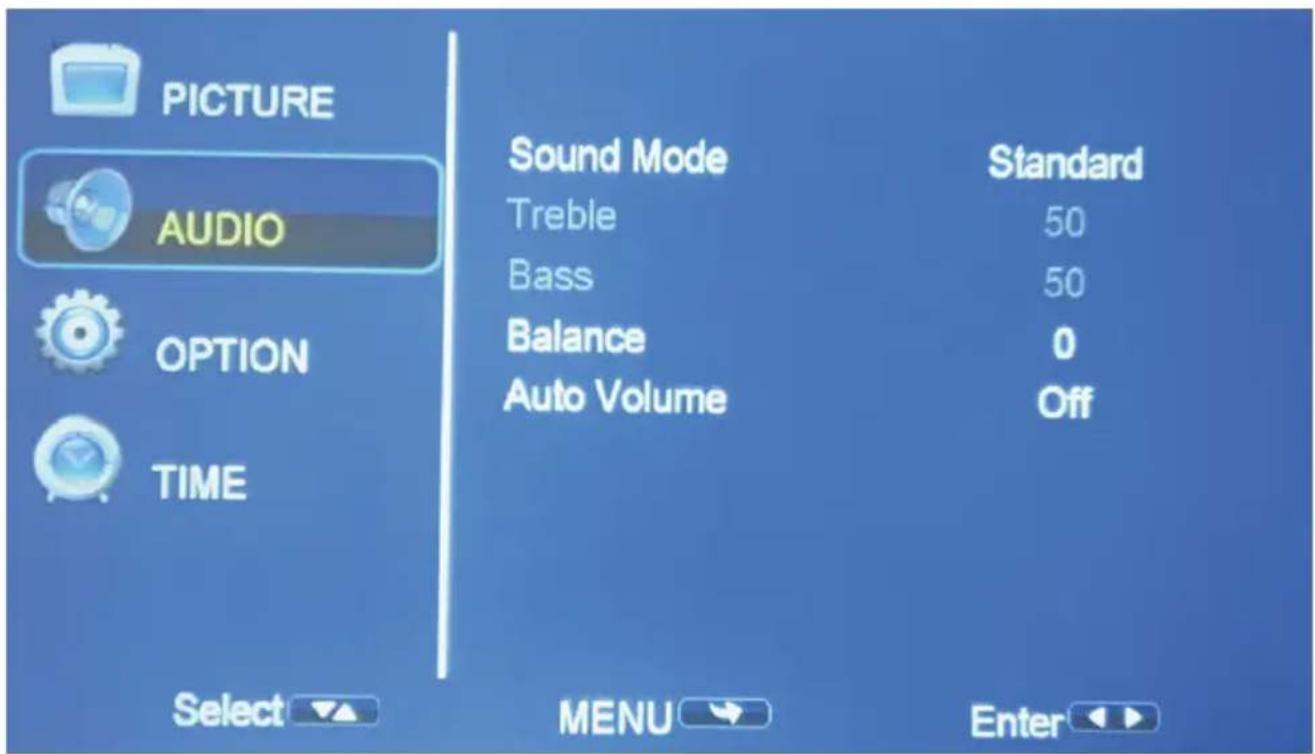
SOUND MODES: Standard, Music, Movie, Sports, User. When on User mode, you can adjust more settings such as Treble & Bass.
BALANCE: Adjust the audio balance of the left or right speaker.
SETTING - OPTION
To access the OPTION menu:
Press the MENU button on the remote control.
- Press the MENU button on the Remote Control.
- With the directional keys, press the DOWN (∨) button. When on OPTION, press the RIGHT (>) arrow button to enter OPTION settings.
- To navigate back to PICTURE/AUDIO/OPTION, with nothing selected, press the MENU button.
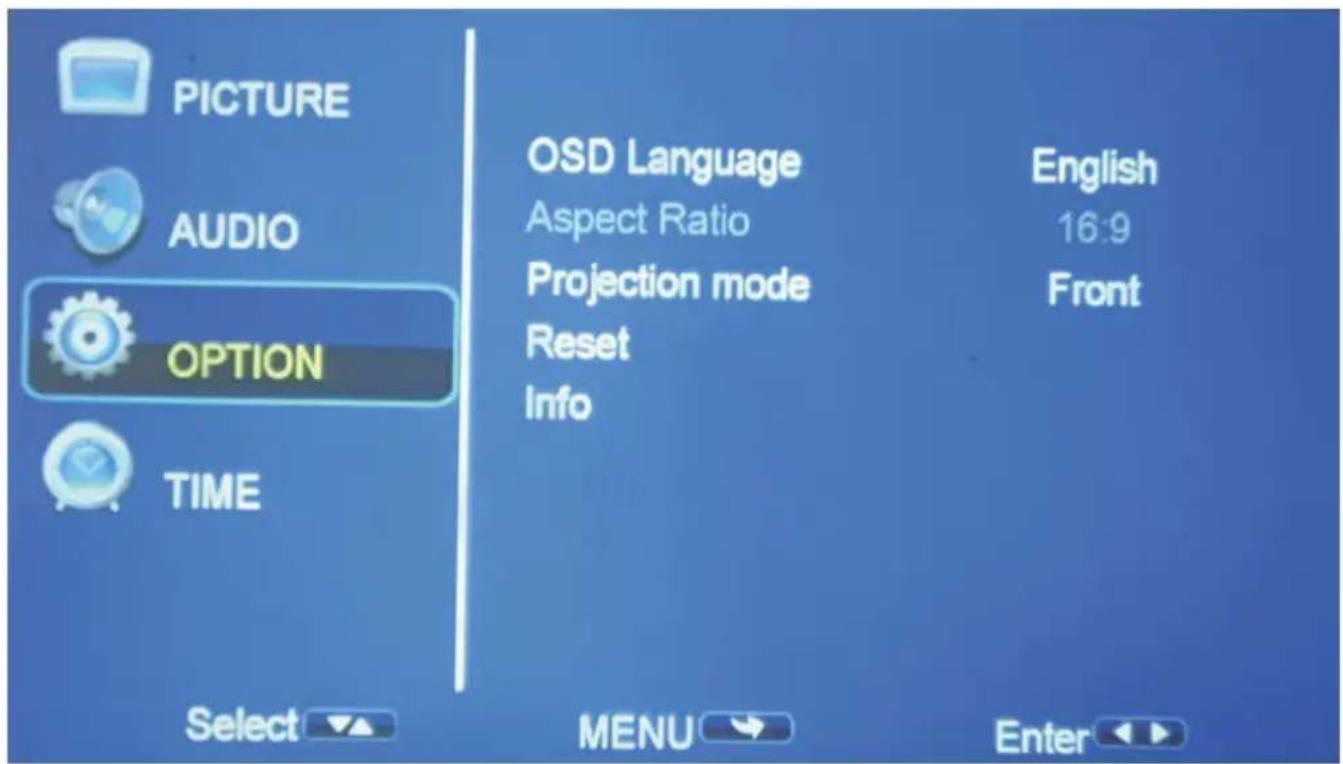
OSD LANGUAGE: Adjust between languages. English is the default.
ASPECT RATIO: Adjust the video aspect ratio.
PROJECTION MODE: Front, Front/Ceiling, Rear, Rear/Ceiling.
RESET: Press Yes to reset your projector settings and device.
INFO: Display information about the projector.
SETTING - TIME
To access the SETTING TIME menu:
- Press the MENU button on the remote control.
- With the directional keys, press the DOWN (√) button. When on TIME, press the RIGHT (➞) arrow button to enter TIME settings.
- To navigate back to PICTURE/SOUND/OPTION, with nothing selected, press the MENU button.
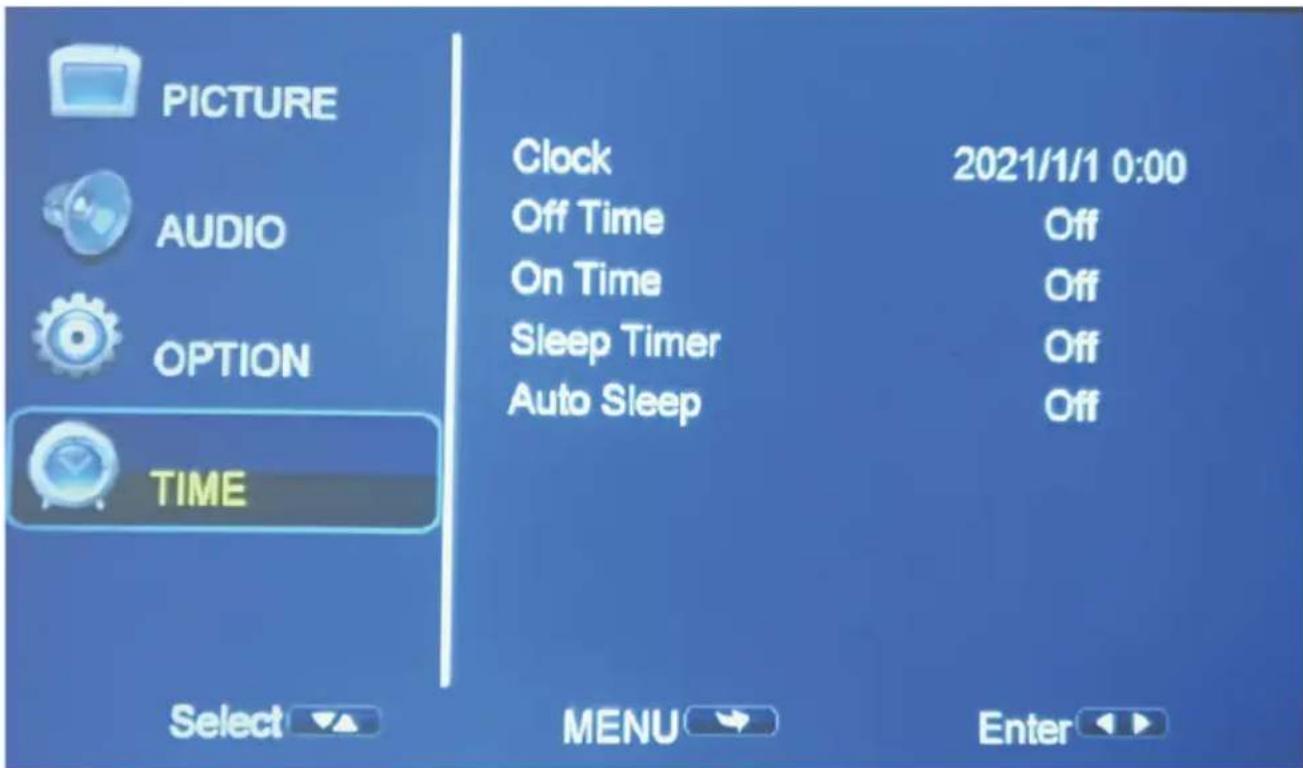
CLOCK: Select the time/date for your projector.
OFF TIME: In SETTING-TIME, select clock to set Day, Month, Year, Hour, and Minutes.
ON TIME: Select the turn-off time to Off, Once, Every day, Hour, and Minutes.
SLEEP TIMER: Select turn off time to Off, Once, Every day, Hour and Minutes.
AUTO SLEEP: Select auto sleep function to Off, 1 hour, 2 hours, 4 hours, 8 hours.
SPECIFICATIONS
| Resolution 1280 x 720 Native Resolution (supports up to 1080p Full HD) | ||
| Projection Size Up to 120" (inches) | ||
| Lumens 80 ANSI | ||
| Aspect Ratio 16:9, 4:3, AUTO | ||
| Multimedia Playback Format under USB Mode | Movie: AVI / FLV / RMVB / MKV / MP4 / 3GP / MOV / MPG / MPEG / TS / TP / VOB | |
| Music: MP3 / WMA / OGG / AAC / FLAC | ||
| Photo: JPG / PNG / BMP | ||
| Ratings 24VDC 1.75A | ||
| USB 5V | --- max. 500mA | |
| Dimensions 145 (w) × 122 (d) × 62 (h) mm | ||
| Weight | Net: 0.5 kg | |
| Gross: 0.75 kg | ||
| Accessories | 1 x Instruction Manual 1 x Remote Control | |
| 1 x Power Adaptor 1 x Warranty Card | ||
NOTE: This document is for reference only, the operation interface is subject to software.

BLAUPUNKT
CUSTOMER HELPLINE:
info@ayonz.com
DISTRIBUTED BY:
Ayonz Pty Ltd


- CONTENTS
- GENERAL SAFETY
- IMPORTANT INFORMATION
- GENERAL SAFETY (CONT.)
- INSTALLATION
- CAUTION
- PLEASE MAKE SURE UPON POSITIONING THIS PRODUCT, THE PLACE IS
- PRODUCT OVERVIEW
- PRODUCT OVERVIEW (CONT.)
- REMOTE CONTROL
- USING THE REMOTE CONTROL
- FIRST TIME SETUP
- DISTANCE BETWEEN PROJECTOR AND SCREEN
- VIEWING OPTIONS
- INSTALLATION (CONT.)
- ADJUSTING FOCUS
- FOCUS ADJ. KNOB
- HOME DASHBOARD
- SETTING - PICTURE
- SETTING - AUDIO
- TO ACCESS THE OPTION MENU
- SETTING - TIME
- SPECIFICATIONS
- BLAUPUNKT
Brand : BLAUPUNKT
Model : BP720B
Category : Projector