
Mirage Solo - VR headset LENOVO - Free user manual and instructions
Find the device manual for free Mirage Solo LENOVO in PDF.


| Product Type | VR Headset |
| Model | Lenovo VR-1541F (Mirage Solo) |
| Controller Model | Daydream Controller |
| Battery Type | Built-in rechargeable lithium-ion |
| Charging Port | USB Type-C |
| Wireless Connectivity | WLAN 802.11 a/b/g/n/ac, Bluetooth 2.4 GHz |
| Audio Jack | 3.5 mm |
| External Storage | microSD card slot (up to 256 GB) |
| Display | Dual lenses, adjustable IPD |
| Sensors | Proximity sensor |
| Operating System | Daydream (Android-based) |
| Weight | Approximately 500 g (headset only) |
| Dimensions (Headset) | Approx. 200 x 150 x 120 mm |
| Safe Play Area Radius | 0.8 m (view fades after 0.4 m movement) |
| Warranty | 1-2 years depending on region |
| Supported Age | 14 years and older |
| Cleaning Instructions | Wipe lenses with dry microfiber cloth; keep face padding clean and dry |
| Power Button | Press and hold to turn on/off |
| Adjustable Head Strap | Yes, with dial and quick release button |
| LED Indicators | White (on/standby), amber (charging), blinking amber (low battery) |
Frequently Asked Questions - Mirage Solo LENOVO
User questions about Mirage Solo LENOVO
0 question about this device. Answer the ones you know or ask your own.
Ask a new question about this device
Download the instructions for your VR headset in PDF format for free! Find your manual Mirage Solo - LENOVO and take your electronic device back in hand. On this page are published all the documents necessary for the use of your device. Mirage Solo by LENOVO.
USER MANUAL Mirage Solo LENOVO
Mirage Solo with Daydream
Safety, Warranty & Quick Start Guide

Read this guide carefully before using your product.
Reading before using your device Reading first - regulatory information
Device models equipped with wireless communications comply with the radio frequency and safety standards of any country or region in which it has been approved for wireless use. In addition, if your product contains a telecom modem, it complies with the requirements for connection to the telephone network in your country.
Be sure to read the Regulatory Notice for your country or region before using the wireless devices contained in your device. To obtain a PDF version of the Regulatory Notice, refer to the “Downloading publications” section below.
Getting support
To get support on network services and billing, contact your wireless network operator. To learn how to use your device and view its technical specifications, go to http://support.lenovo.com.
Downloading publications
Electronic versions of your publications are available from http://support.lenovo.com. To download the publications for your device, go to http://support.lenovo.com and follow the instructions on the screen.
Accessing your User Guide
Your User Guide contains detailed information about your device. To access your User Guide, go to http://support.lenovo.com and follow the instructions on the screen.
Legal notices
Lenovo and the Lenovo logo are trademarks of Lenovo in the United States, other countries, or both.
Other company, product, or service names may be trademarks or service marks of others.
All pictures and illustrations in this document are for reference only and may differ from the actual product.
Product overview
| Model Version | |
| Lenovo VR-1541F WLAN | |
| DG1CA/VAC-141B Bluetooth |
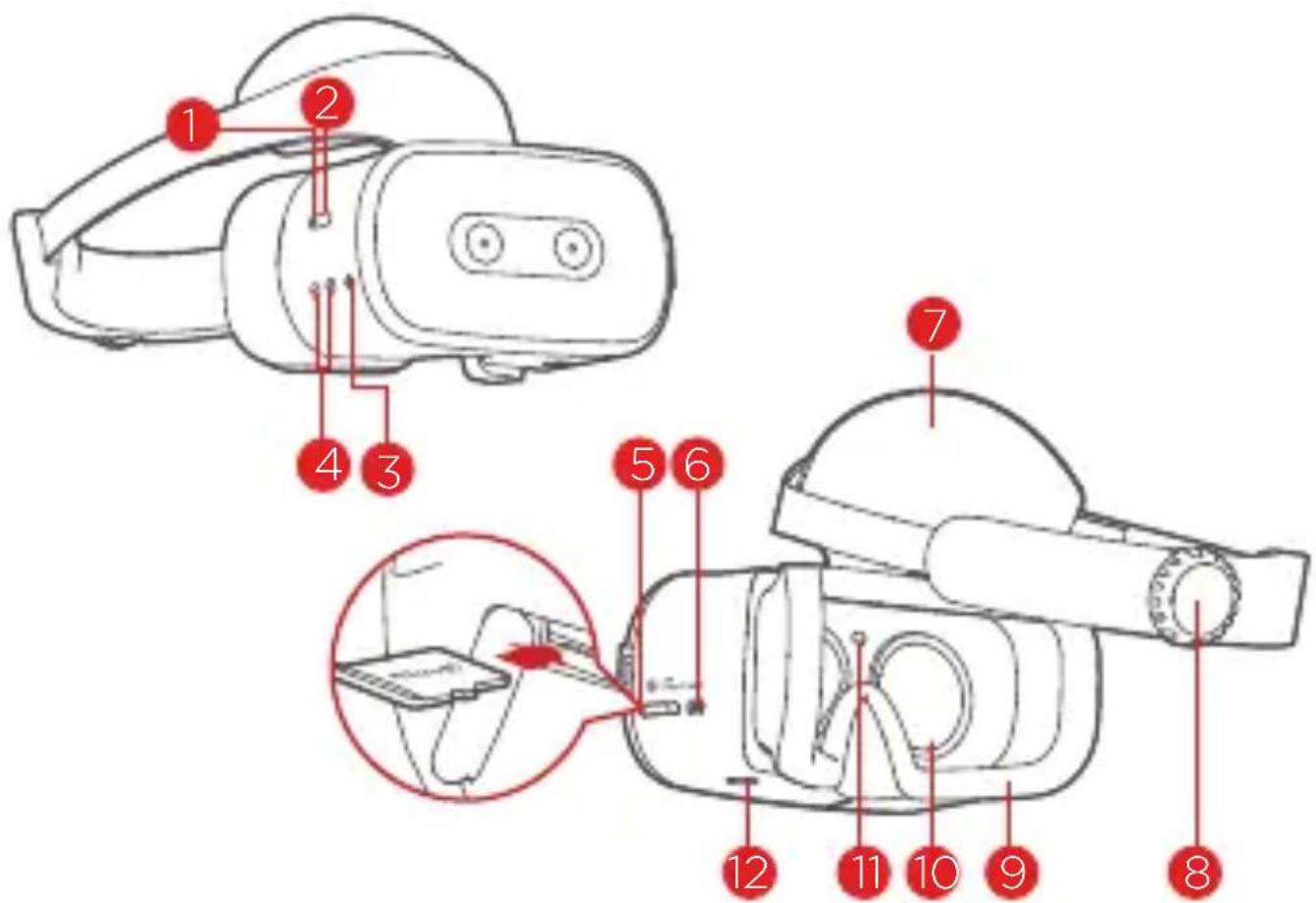
1 Power button
LED indicator
Audio jack
4 Volume buttons
5 microSD card slot
6 USB Type-C connector
7 Front head support
8 Adjustable dial
9 Face padding
10 Lenses
11 Proximity sensor
12 Quick release button
Use a microSD card (sold separately) for extra storage. Insert a microSD card into the slot as shown.
Controller
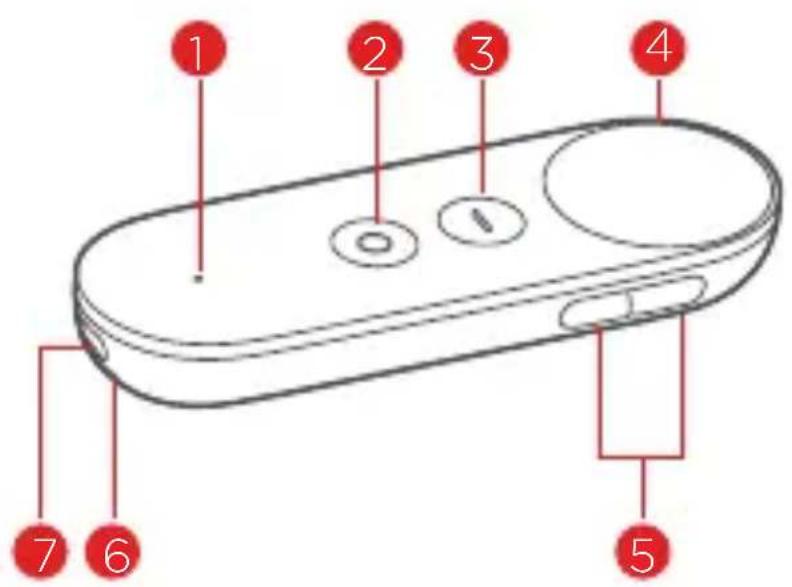
1 Status light
Daydream button
App button
4 Touchpad
5 Volume buttons Wr6 strap holes
7 Charging port
 | Press: Opens, selects, or activates whatever you press (similar to clicking with a mouse).Scroll: Swipe your finger to scroll through what's on the screen (similar to scrolling with a mouse). |
 | This button depends on the app you're using. For example, it might show menus, pause, go back, or change modes. |
 | Press to open the Daydream Dashboard.Press and hold to re-center your view and the cursor. |
Before you start
Charging
You may need to charge your headset and controller before using them.
Insert the charger into the charging port.
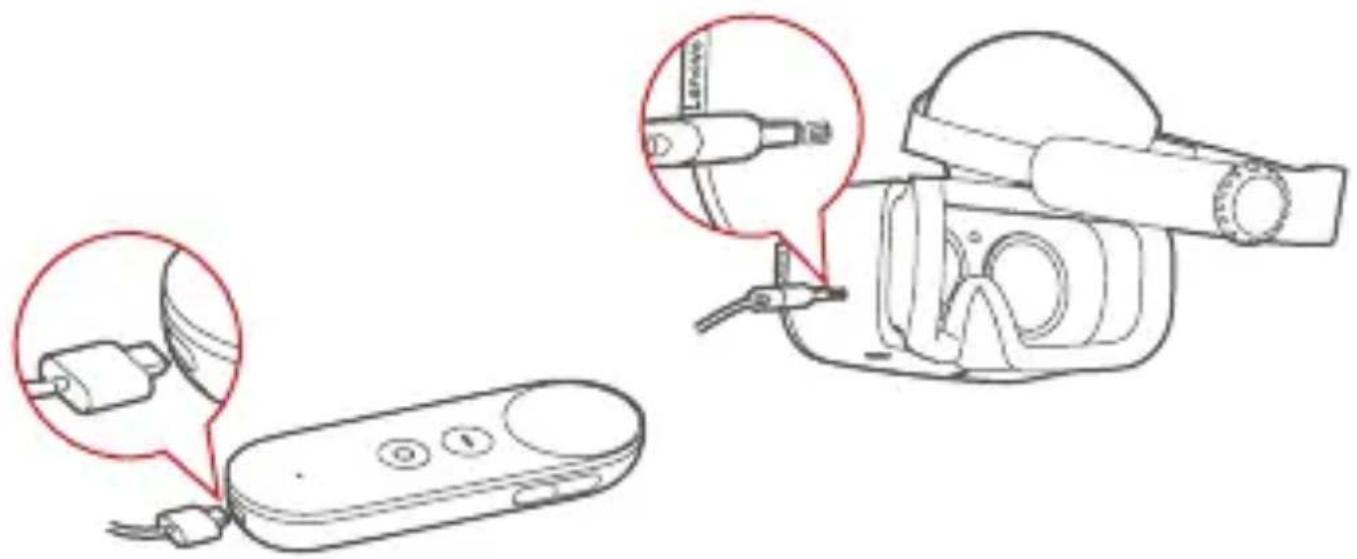
Headset LED indicator
| Headset status LED Indicator | |
| Starting up Pulsing white | |
| Shutting down Pulsing white | |
| Awake or in standby Solid white | |
| Sleeping Off | |
| Charging Solid amber | |
| Fully charged Solid white | |
| Low battery Blinking amber |
Setting up a safe play area for VR
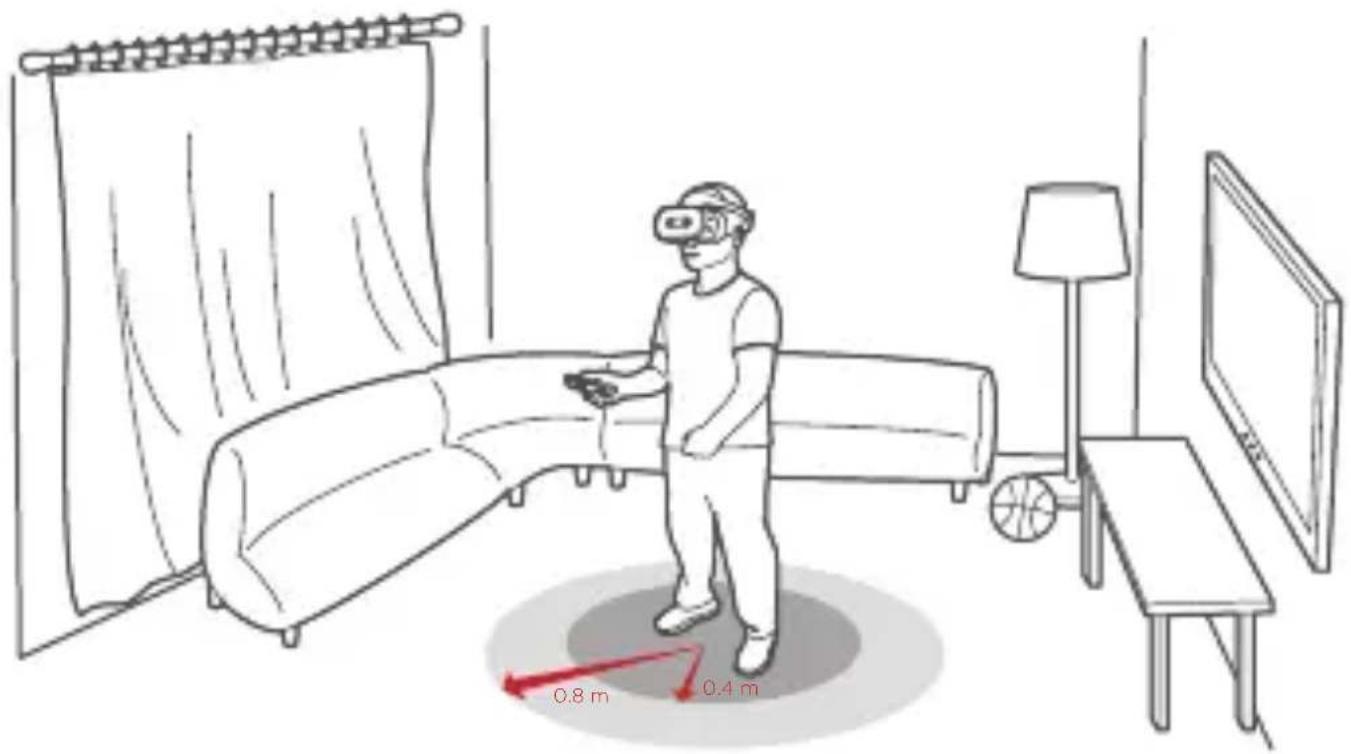
Clear the area directly around you of objects and furniture and always stay aware of your physical surroundings!
Put the device on your head in the center of your clear area whether seated or standing.
Always check your physical space by lifting the headset or partially lifting it and peaking to make sure you are still in your clear area before you start a session or manually recenter your view.
When you put the device on your head or when you manually recenter using the controller the device will use your position at that moment as the starting point and fade your view to prevent accidental walking if you move too far from this starting point.
Your view will fade anytime you move close to your arms distance away from your starting point. This play area is approximately 0.8 m in radius but you will see your view gently start to fade after about 0.4 m of movement toward the edge. When you notice your view starting to fade carefully move back towards the center of your clear area.
If you exit the safe play area, your view will be fully occluded. Carefully move back towards your original starting point while being aware of your surroundings.
Listen to all warnings in the headset and always stay aware of your physical surroundings.
Tell friends or family that when you're in VR you won't be aware of their presence and for them to stay a safe distance away.
Do not start sessions outside, near stairwells, drops or dangerous objects or environments. When you're in VR you are effectively asleep to the real world. Consider if the chosen play space is a place where you would feel comfortable falling asleep.
Putting on the headset
natural_image
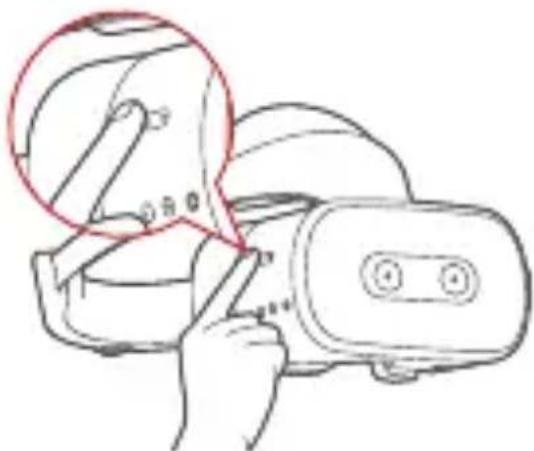
Line drawing of a hand using a VR headset to adjust the device (no text or symbols present)Press and hold the Power button until the LED indicator lights up.
You can connect the headphones to the headset before use.
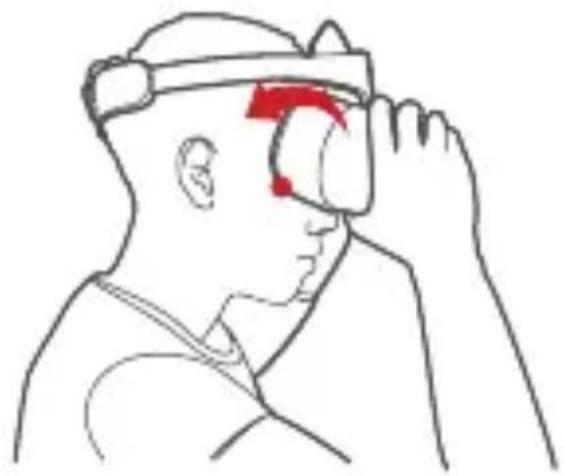
To ensure the clearest possible view, first make sure the lower part of the headset is pressed firmly against your face. Then, turn the upper part of the headset in the direction of the arrow until your forehead is resting against the foam cushioning.
natural_image
Line drawing of a person wearing a headlamp and pointing at the eye area (no text or symbols)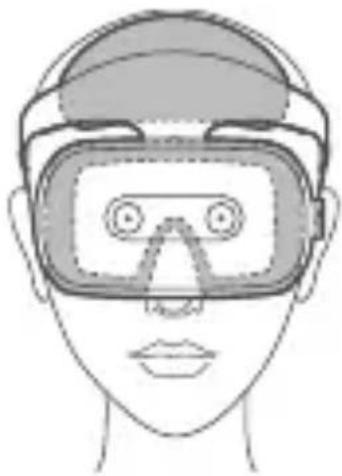
natural_image
Line drawing of a person wearing a VR headset (no text or symbols)Place the headset over your head so that it completely covers your eyes. Make sure you can see the screen clearly.
Adjust your headset for a better fit. Turn the adjustable dial until the headset fits firmly on your head.
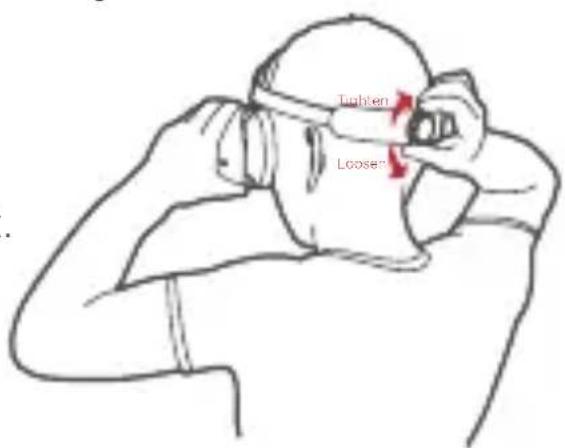
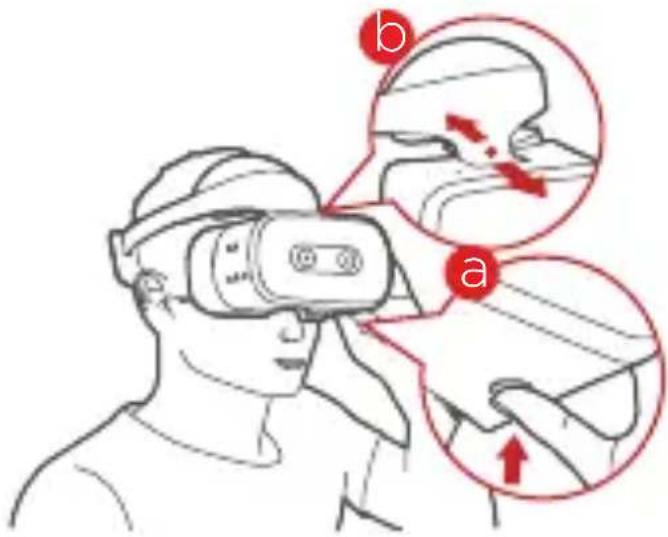
Press and hold the Quick release button and move the lenses forwards or backwards until you can see the screen clearly. Make sure the headset rests comfortably against your forehead and face.
To turn off: Press and hold the power button for 2 seconds.
Getting started
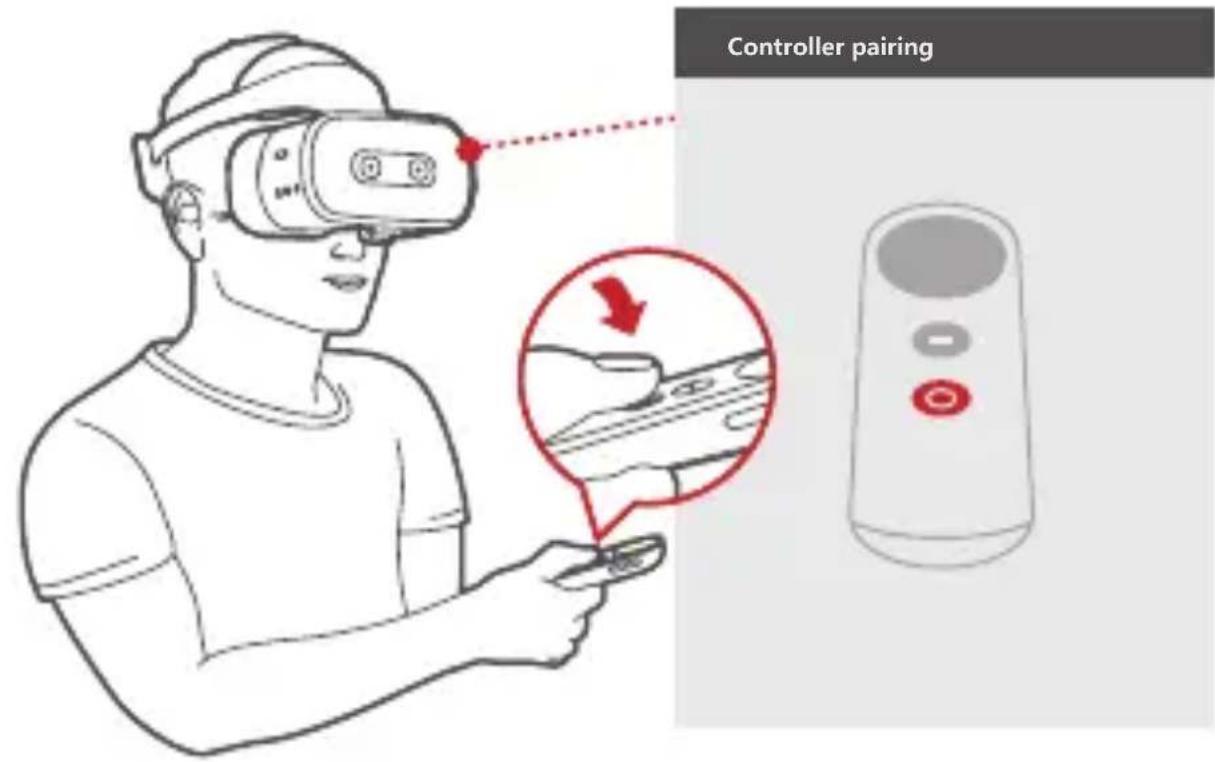
Pairing your controller
During setup, you will be asked to pair your controller. Have your controller with you and follow the on-screen steps. Use the controller to interact with objects in the VR world.
Connecting to the Internet
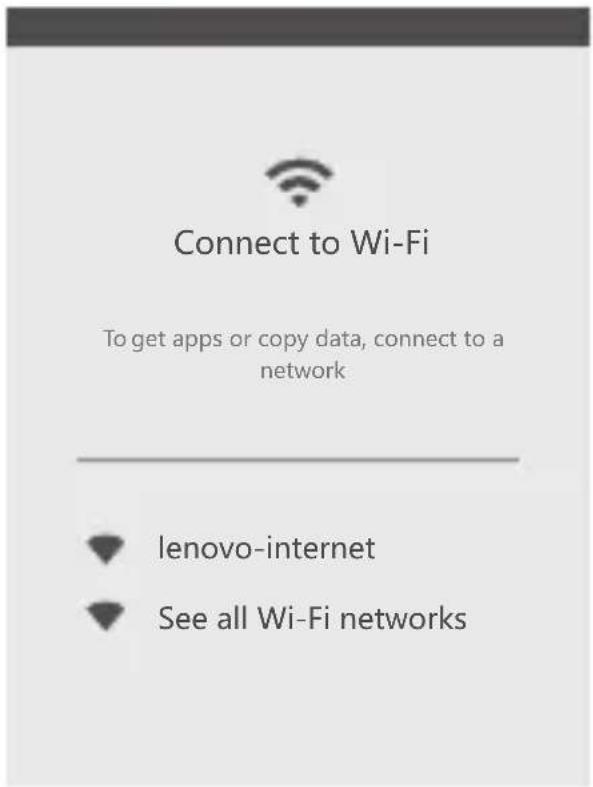
- Click and turn on the WLAN switch.
- Select an available WLAN network from the list to connect to the internet.
- Sign in with your Google Account.
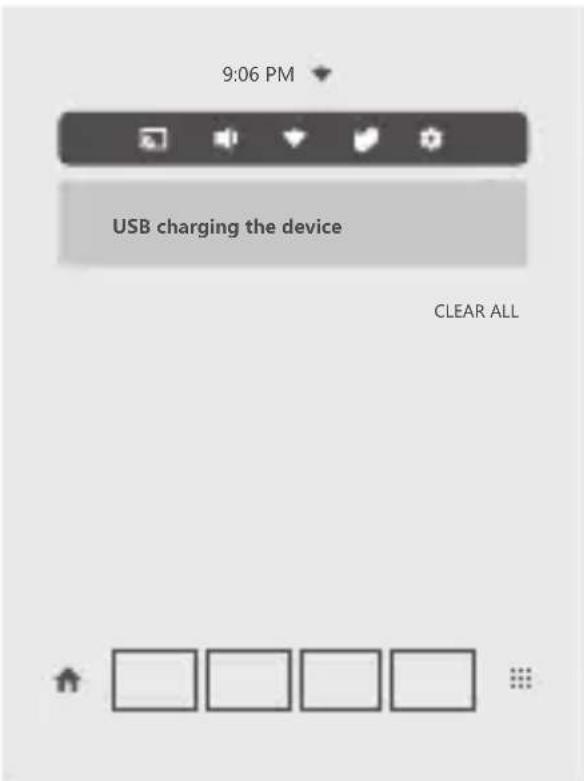
Selecting items
- Move your controller to point the cursor at an item.
- Click on the touchpad to select the item.
- Click ⚠️ to bring up the app menu.
- Click ↑ to go to the home screen.
Important safety and handling information Plastic bag notice
Danger: Plastic bags can be dangerous. Keep plastic bags away from babies and children to avoid danger of suffocation.
Built-in rechargeable battery notice
Danger: Do not attempt to replace the internal rechargeable lithium ion battery. Risk of explosion if the battery is replaced with an incorrect type. Contact Lenovo Support for factory replacement.
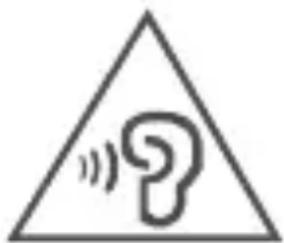
Caution about high volume usage
Warning: Exposure to loud noise from any source for extended periods of time may affect your hearing. The louder the sound, the less time is required before your hearing could be affected.
To protect your hearing:
- Limit the amount of time you use headsets or headphones at high volume.
- Avoid turning up the volume to block out noisy surroundings.
- Turn the volume down if you can't hear people speaking near you.
If you experience hearing discomfort, including the sensation of pressure or fullness in your ears, ringing in your ears or muffled speech, you should stop listening to the device through your headset or headphones and have your hearing checked.
natural_image
Warning symbol with a speech bubble inside a triangle (no text or numbers)To prevent possible hearing damage, do not listen at high volume levels for long periods.
Safety instructions for parents and adult supervisors
Your mobile device is not a toy. Not recommended for children under 14 years of age to play with it. As with all electrical products, precautions should be observed during handling and using of electrical products to reduce the risk of electric shock. If parents choose to allow children 14 or older to use the device, they should caution his or her child about the potential hazard while using and handling the mobile device.
Parents should inspect the mobile device (including the ac power adapter and the small part, as applicable) periodically for damage. Routinely check this mobile device to ensure that the device is working properly and is safe for children to use.
Health warnings
Pre-existing health conditions
Consult your doctor before using the product if you have any pre-existing medical conditions that may prevent you from having a safe VR experience. Such conditions include heart- and blood pressure-related ailments, and psychiatric disorders such as anxiety or post-traumatic stress. Pregnant or elderly individuals should also consult a physician before using the product.
Do not use the product if you are sick, tired, under the influence of drugs, alcohol or other intoxicants, or if you are feeling generally unwell. Use under these conditions may exacerbate any symptoms you are already experiencing.
Seizures
This product produces visual effects which include flashing lights. A small percentage of individuals may experience seizures, epileptic seizures, fainting, or severe dizziness when exposed to flashing lights or to certain light patterns, including people who have no history of these conditions. If you have a previous history of epilepsy, seizures, loss of awareness, or other symptoms linked to an epileptic condition, consult your doctor before using this product. Do not use the product if you are tired.
If you are supervising or watching someone else using the product, immediately stop them and consult a doctor if they experience any of the following:
- Convulsions
• Involuntary movements such as eye or muscle twitching
• Fainting or loss of awareness - Disorientation
- Altered vision
Motion sickness
VR products can cause motion sickness for some users. If you or anybody else using the product feel dizzy or become nauseous while playing, stop using the product and rest. Avoid operating heavy machinery, driving, or taking part in strenuous activities while symptoms persist.
Repetitive strain injuries and eyestrain
Follow these guidelines to avoid problems such as skin irritation, carpal tunnel syndrome, tendinitis, or eyestrain:
• Take regular breaks. Stretch your arms and legs and move about during this break to ensure proper circulation. The required length and frequency of breaks may vary for individuals.
- Avoid playing for too long. Over-exertion and fatigue increases the risk of injury.
- If your limbs, body, or eyes become sore or tired, or if you experience burning, numbness, stiffness, or tingling during use, stop and rest for a few hours before trying again.
• Make sure your skin stays clean and dry when using the product. Stop using the product if you experience any itching, swelling, eczema, or irritation of the skin. - If any of the above conditions or other conditions persist after use, stop using the product and consult your doctor. Avoid operating heavy machinery, driving, or taking part in strenuous activities while symptoms persist.
Physiological and psychological effects
VR can lead to intense experiences. They are immersive and can appear life-like to the user. As a result, you may experience physiological and psychological reactions to them as if they were real.
A common response to VR products is people trying to interact physically with simulated objects. However, these objects do not exist in the real world, and you may risk injury if you try to interact with them as if they do.
Intense content, such as violence, horror, or emotional content, can cause an adrenaline response. This can lead to increased heart rate and blood pressure, anxiety and panic attacks, fainting, or other serious reactions. In extreme cases, it can trigger PTSD attacks. Avoid using the product if you have a history of these types of reactions to real life events that are similar to the content depicted by the product.
Service and support information
The following information describes the technical support that is available for your product, during the warranty period or throughout the life of your product. Refer to the Lenovo Limited Warranty (LLW) for a full explanation of Lenovo warranty terms. See “Lenovo Limited Warranty notice” later in this document for details on accessing the full warranty.
Online technical support
Online technical support is available during the lifetime of a product at:
https://support.lenovo.com
Telephone technical support
You can get help and information from the Customer Support Center by telephone. Before contacting a Lenovo technical support representative, please have the following information available: model and serial number, the exact wording of any error message, and a description of the problem.
Your technical support representative might want to walk you through the problem while you are at your device during the call.
Worldwide Lenovo Support telephone list
Important: Telephone numbers are subject to change without notice. The most up-to-date telephone list for the Customer Support Center is always available at:
http://www.lenovo.com/support/phone
If the telephone number for your country or region is not listed, contact your Lenovo reseller or Lenovo marketing representative.
Warranty information
Lenovo Limited Warranty notice
This product is covered by the terms of the LLW, version L505-0010-02 08/2011. Read the LLW at http://www.lenovo.com/warranty/llw_02. You can read the LLW in a number of languages from this Web site. If you cannot view the LLW from the Web site, contact your local Lenovo office or reseller to obtain a printed version of the LLW. If you need support for this device, do not go back to your point of purchase. Please visit https://support.lenovo.com, where you will find answers to frequently asked questions, software updates and details on how to get in touch with us.
Warranty period and type of warranty service
| Country or region Warranty period | Type of warranty service | |
| United Kingdom, Israel, Australia, New Zealand | Parts and Labor - 1 yearBattery Pack - 1 year | 1,3 |
| Guatemala, Costa Rica, Venezuela, Peru, Uruguay, Ecuador, Colombia, Chile, Argentina, Indonesia, Vietnam, India, Malaysia, Thailand, Philippines, Singapore, Hong Kong, El Salvador, Taiwan, South Korea, Mexico | Parts and Labor - 1 yearBattery Pack - 1 year | 1,4 |
| Russia, Ukraine, Egypt, Lebanon, Morocco, South Africa, Tunisia, Mauritius, Mozambique, United Arab Emirates, Jordan, Kenya, Nigeria, Uganda, Ghana, Oman, Tanzania, Namibia | Parts and Labor - 1 yearBattery Pack - 1 year | 4 |
| United States of America, Canada, Japan | Parts and Labor - 1 yearBattery Pack - 1 year | 1,5 |
| Panama | Parts and Labor - 1 yearBattery Pack - 1 year | 2,4 |
| Brazil | Parts and Labor - 1 yearBattery Pack - 1 year | 2,5 |
| Spain, Switzerland, Portugal, Netherlands, Belgium, Sweden, Denmark, Norway, Finland, Estonia, Latvia, Lithuania, Iceland, France, Germany, Italy, Austria | Parts and Labor - 2 yearsBattery Pack - 1 year | 1,3 |
| Czech Republic, Hungary, Romania, Bulgaria, Greece, Croatia, Slovenia, Slovakia, Cyprus, Poland | Parts and Labor - 2 yearsBattery Pack - 1 year | 1,5 |
| Turkey | Parts and Labor - 2 yearsBattery Pack - 2 years | 3,4 |
| Saudi Arabia | Parts and Labor - 2 yearsBattery Pack - 2 years | 4 |
| Serbia | Parts and Labor - 2 yearsBattery Pack - 1 year | 1,4 |
* Excludes some components. 90-day limited warranty for power adapters, keyboards, plastics, and hinges.
Type of warranty service
- Customer Replaceable Unit ("CRU") Service
- On-site Service
- Courier or Depot Service
- Customer Carry-In Service
- Mail-in Service
- Customer Two-Way Mail-in Service
- Product Exchange Service
For a full explanation of the types of warranty service, refer to the full warranty.
See “Lenovo Limited Warranty notice” for details on accessing the full warranty.
EurAsia compliance mark
EAC
Environmental, recycling, and disposal information
General recycling statement
Lenovo encourages owners of information technology (IT) equipment to responsibly recycle their equipment when it is no longer needed. Lenovo offers a variety of programs and services to assist equipment owners in recycling their IT products. For information on recycling Lenovo products, go to http://www.lenovo.com/recycling.
Important battery and WEEE information
natural_image
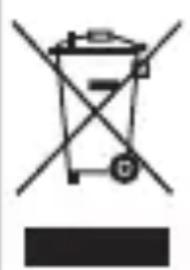
Symbol of a trash bin crossed with a diagonal line, no text or numbers presentBatteries and electrical and electronic equipment marked with the symbol of a crossed-out wheeled bin may not be disposed as unsorted municipal waste. Batteries and waste of electrical and electronic equipment (WEEE) shall be treated separately using the collection framework available to customers for the return, recycling, and treatment of batteries and WEEE. When possible, remove and isolate batteries from WEEE prior to placing WEEE in the waste collection stream. Batteries are to be collected separately using the framework available for the return, recycling, and treatment of batteries and accumulators.
Country-specific information is available at: http://www.lenovo.com/recycling
Recycling information for Japan
Recycling and disposal information for Japan is available at: http://www.lenovo.com/recycling/japan
Additional recycling statements
Additional information about recycling device components and batteries is in your User Guide. See “Accessing your User Guide” for details.
Battery recycling marks
Battery recycling information for Taiwan

natural_image
Abstract geometric pattern with interlocking shapes and a central cross (no text or symbols)Battery recycling information for the United States and Canada
US & Canada Only
Battery recycling information for the European Union
natural_image
Simple line drawing of a trash bin with crossed lines indicating no waste or plastic (no text or symbols)Energy efficiency mark

Restriction of Hazardous Substances Directive (RoHS)
India
RoHS compliant as per E-waste (Management) Rules.
European Union
Lenovo products sold in the European Union, on or after 3 January 2013 meet the requirements of Directive 2011/65/EU on the restriction of the use of certain hazardous substances in electrical and electronic equipment (“RoHS recast” or “RoHS 2”). For more information about Lenovo progress on RoHS, go to:
http://www.lenovo.com/social_responsibility/us/en/RoHS_Communication.pdf
Singapore
Lenovo products sold in Singapore, on or after June 1, 2017, meet the requirements of Government Gazette order No. S 263/2016 Restriction of Hazardous Substances in Electrical and Electronic Equipment in Singapore (“SG-RoHS”).
European Union compliance statement European Union conformity
EU contact: Lenovo, Einsteinova 21, 851 01 Bratislava, Slovakia

Compliance with the RE Directive
Lenovo PC HK Limited declares that the radio equipment type Lenovo VR-1541F is in compliance with Directive 2014/53/EU.
The full text of the EU declaration of conformity is available at the following internet address:
http://www3.lenovo.com/us/en/social_responsibility/EU_DoC_wireless_options
This radio equipment operates with the following frequency bands and maximum radio-frequency power:
| Model Name Frequency | Bands | Maximum Conducted Power (dBm) |
| Lenovo VR-1541F | 802.11a/b/g/n/ac2.4/5 GHz | <20 |
| Bluetooth 2.4 GHz | <20 |

The above information is for EU countries only. Please refer to the actual product for supported frequency bands in other countries.
Specific Absorption Rate information
YOUR MOBILE DEVICE MEETS INTERNATIONAL GUIDELINES FOR EXPOSURE TO RADIO WAVES.
Your mobile device is a radio transmitter and receiver. It is designed not to exceed the limits for exposure to radio waves (radio frequency electromagnetic fields) recommended by international guidelines. The guidelines were developed by an independent scientific organization (ICNIRP) and include a substantial safety margin designed to assure the safety of all persons, regardless of age and health.
The radio wave exposure guidelines use a unit of measurement known as the Specific Absorption Rate, or SAR. The SAR limit for mobile devices is 2 W/kg. Tests for SAR are conducted using standard operating positions with the device transmitting at its highest certified power level in all tested frequency bands. The highest SAR values under the ICNIRP guidelines for your device model are listed below:
| Maximum SAR for this model and conditions under which it was recorded. | ||||
| Europe 10 g SAR Limit (2.0 W/kg) | Lenovo VR-1541F | Head | WLAN, Bluetooth | 0.097 W/kg |
During use, the actual SAR values for your device are usually well below the values stated. This is because, for purposes of system efficiency and to minimize interference on the network, the operating power of your mobile device is automatically decreased when full power is not needed for the data connection.
The lower the power output of the device, the lower its SAR value.
If you are interested in further reducing your RF exposure then you can easily do so by limiting your usage or simply using a hands-free kit to keep the device away from the head.
The Bluetooth capability of this device can only be used for pairing with the controller. It cannot be paired with any other Bluetooth device.
© Copyright Lenovo 2018.
Reduce | Reuse | Recycle

V1.1_20180202
307001017239
MC
Printed in China
- Mirage Solo with Daydream
- Safety, Warranty & Quick Start Guide
- Reading before using your device Reading first - regulatory information
- Getting support
- Downloading publications
- Accessing your User Guide
- Legal notices
- Product overview
- Controller
- Before you start
- Charging
- Setting up a safe play area for VR
- Putting on the headset
- Getting started
- Pairing your controller
- Connecting to the Internet
- Selecting items
- Important safety and handling information Plastic bag notice
- Built-in rechargeable battery notice
- Caution about high volume usage
- Safety instructions for parents and adult supervisors
- Health warnings
- Pre-existing health conditions
- Seizures
- Motion sickness
- Repetitive strain injuries and eyestrain
- Physiological and psychological effects
- Service and support information
- Online technical support
- Telephone technical support
- Worldwide Lenovo Support telephone list
- Warranty information
- Lenovo Limited Warranty notice
- Type of warranty service
- EurAsia compliance mark
- EAC
- Environmental, recycling, and disposal information
- General recycling statement
- Important battery and WEEE information
- Recycling information for Japan
- Additional recycling statements
- Battery recycling marks
- Restriction of Hazardous Substances Directive (RoHS)
- European Union
- Singapore
- European Union compliance statement European Union conformity
- Compliance with the RE Directive
- Specific Absorption Rate information
Brand : LENOVO
Model : Mirage Solo
Category : VR headset