
HYM-100QR - DJ Equipment Ultimate Support - Free user manual and instructions
Find the device manual for free HYM-100QR Ultimate Support in PDF.


| Product Type | Laptop Stand / DJ Equipment Mount |
| Model | HYM-100QR (HyperMount QR) |
| Brand | Ultimate Support |
| Compatibility | Laptops, small mixers, groove production electronics, drum pad controllers |
| Mounting Options | 5/8" threaded microphone stand, APEX AX-48 Pro keyboard stand (with optional AX-48TA Thread Adapter), desktop (with included T-stand adapter) |
| Support Arms | Angle-adjustable telescoping arms with rubber bumpers |
| Second Tier | Height-adjustable, fits into five slots (front or back) |
| Quick Release System | Yes, for easy attachment/detachment from stand |
| Foldable | Yes, folds flat as one piece for portability |
| Dimensions (Folded) | Approximately 6 x 12 x 2 inches (15 x 30 x 5 cm) |
| Weight | Approximately 3 lbs (1.4 kg) |
| Material | High-strength plastic and steel components |
| Maximum Load | Up to 15 lbs (6.8 kg) |
| Warranty | Limited Lifetime Warranty |
| Maintenance | Wipe clean with dry cloth; avoid solvents |
| Safety | Ensure all knobs are tightened; do not exceed max load |
| Spare Parts | Contact support for replacement arms, bumpers, quick-release bottom piece |
| Included Accessories | T-stand adapter, cable management clips |
Frequently Asked Questions - HYM-100QR Ultimate Support
User questions about HYM-100QR Ultimate Support
0 question about this device. Answer the ones you know or ask your own.
Ask a new question about this device
Download the instructions for your DJ Equipment in PDF format for free! Find your manual HYM-100QR - Ultimate Support and take your electronic device back in hand. On this page are published all the documents necessary for the use of your device. HYM-100QR by Ultimate Support.
USER MANUAL HYM-100QR Ultimate Support
THE STRENGTH OF INNOVATION®
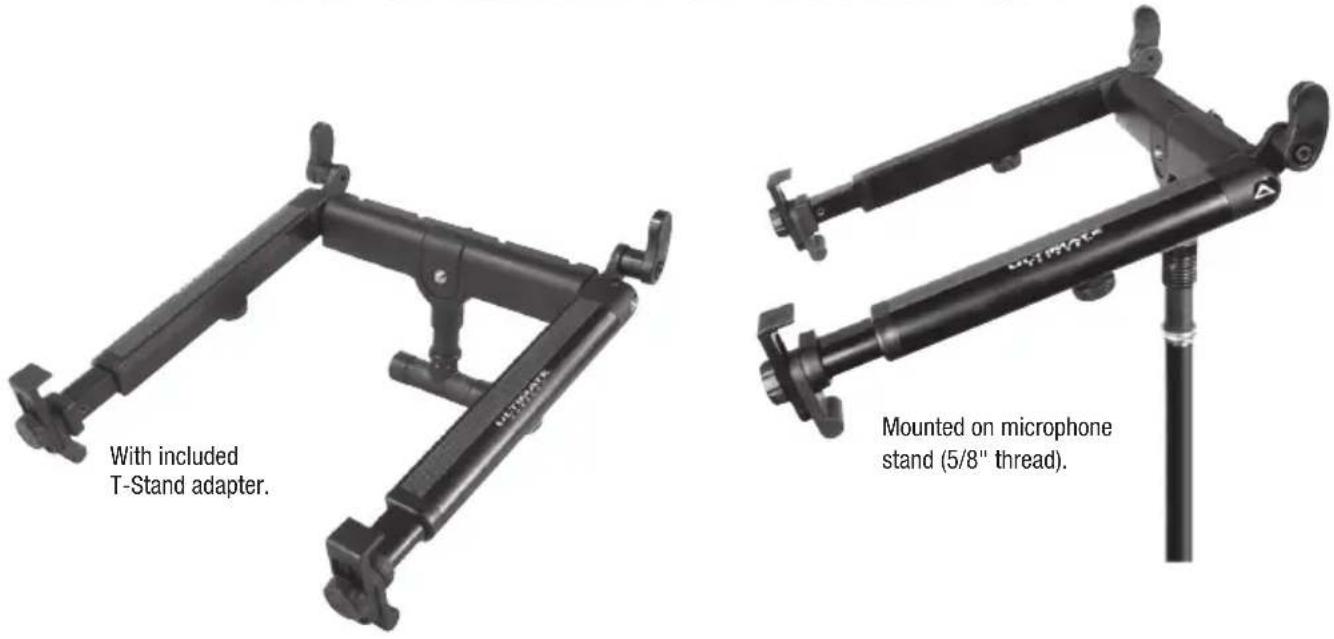
Mounted on microphone stand (5/8" thread).

natural_image
Black HyperStation VR headset with adjustable arm and base plate (no text or symbols visible on device body)HyperStation QR in standing position.
Product Manual
HyperStation QR
LPT-1000 QR, 17510
HyperMount QR
HYM-100 QR, 17511

HyperStation QR in folded position.
ULTIMATE
SUPPORT™
LIMITED LIFETIME WARRANTY

natural_image
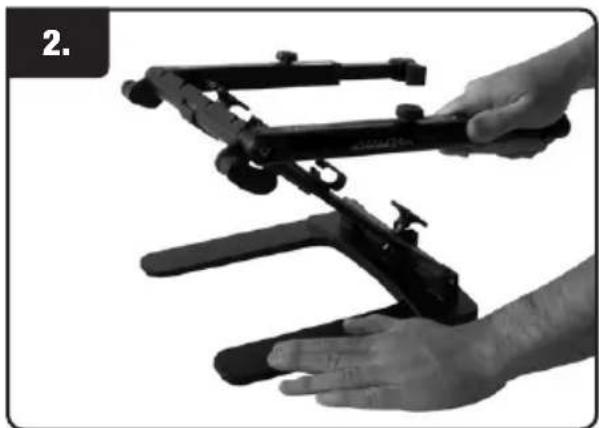
Close-up of hands assembling a black plastic tray device with visible mechanical components (no text or symbols)- Loosen both knobs
natural_image
Close-up of hands holding a black mechanical device with a handle, no visible text or symbols- While holding base, move stand into an upright position.

natural_image
Close-up of a hand adjusting a black mechanical component (no visible text or symbols)- Tighten base knob.

natural_image
Close-up of hands adjusting a black bicycle tripod frame (no visible text or symbols)- Swing arms around to the front and tighten upper knob when arms are in the desired angle.
natural_image
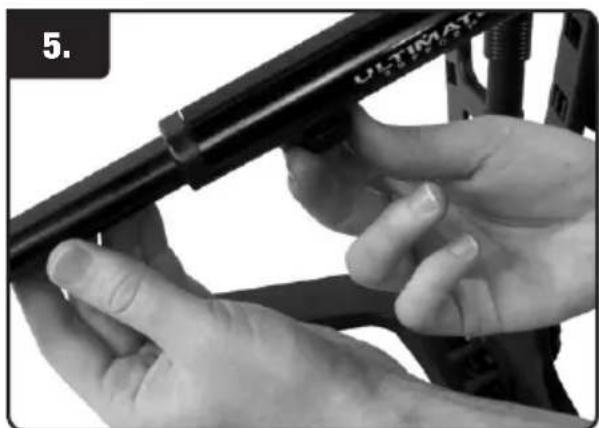
Close-up of hands adjusting a bicycle frame component (no visible text or symbols)- Loosen small arm knobs and adjust the arms to desired length.
natural_image
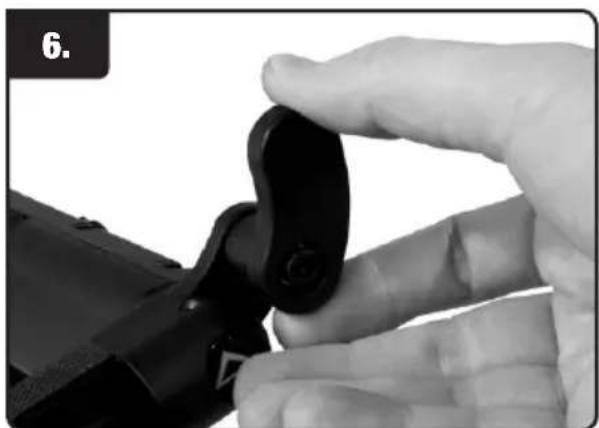
Close-up of a hand holding a black mechanical clip, no visible text or symbols- Adjust back bumper to desired angle. Angle will control the amount the screen tilts back.
Laptop Stand Instructions (Con.)

natural_image
Close-up of a hand holding a laptop on a stand, no visible text or symbols- Place computer into the support arms.
natural_image
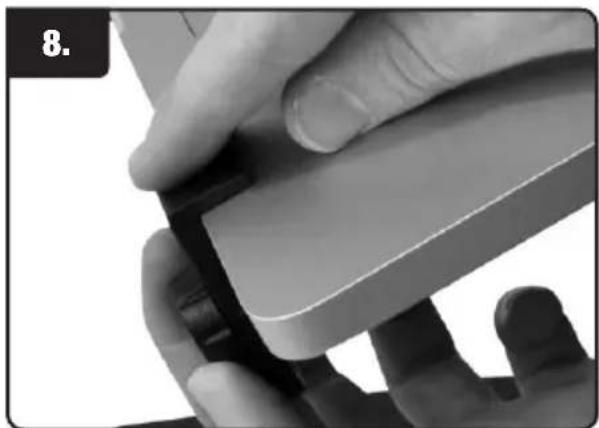
Close-up of a hand holding a small electronic device with a black clip, no visible text or symbols- Loosen front clamp and front bumper to secure laptop.
natural_image
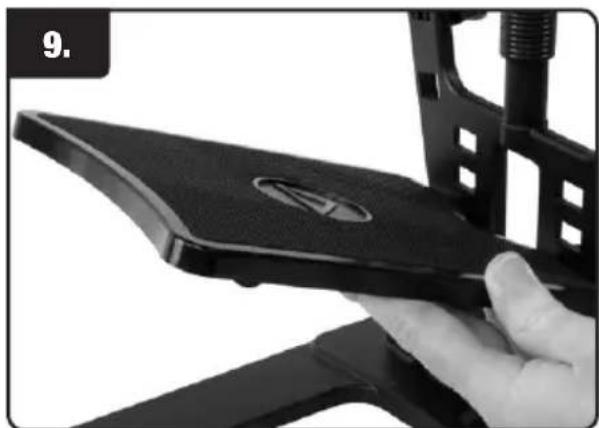
Close-up of a hand holding a black electronic device with a circular logo, partially installed by a mechanical bracket (no visible text or symbols)- While holding second tier at an angle, place into any of the five slots (front or back).

natural_image
Close-up of a hand adjusting black plastic clips on a mechanical component (no text or symbols visible)- Move the cable management clips to desired slots.
natural_image
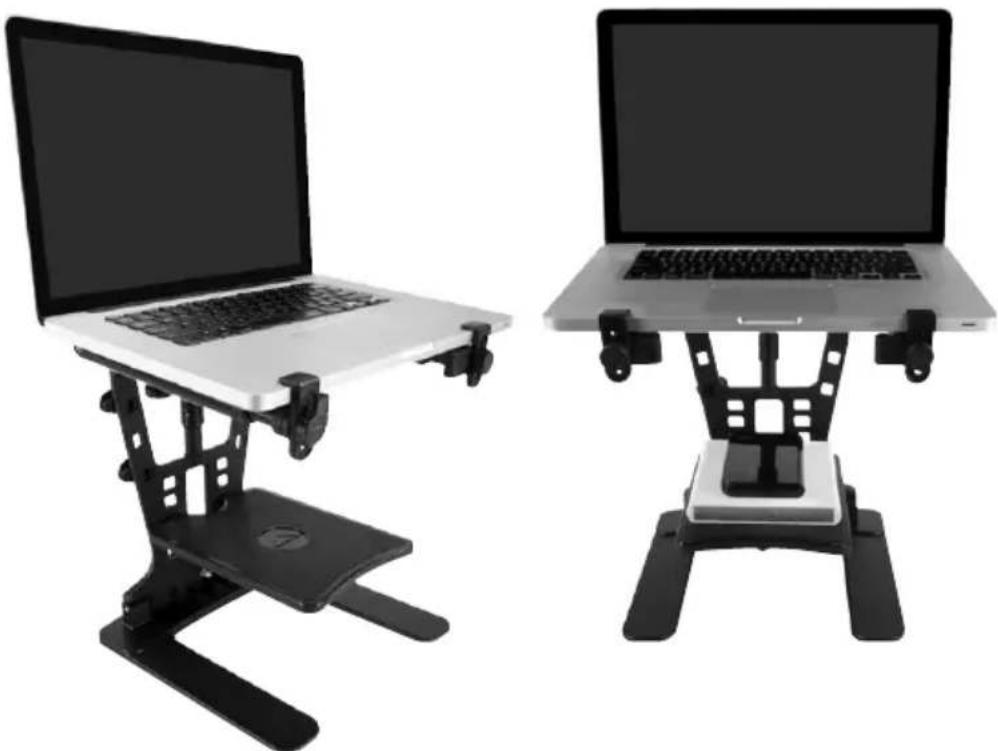
Two black-and-white photo displays of a laptop stand, one open and one closed, both with adjustable legs (no text or symbols visible)T-Stand Adapter Instructions (HyperStation QR & HyperMount QR)

natural_image
Close-up of a hand holding a black mechanical clamp or bracket (no text or symbols visible)- Loosen Knob, adjust rubber front foot down, while clamp is facing up, and tighten knob.

natural_image
Close-up of a hand holding a black Ultrasonic camera with attached sensors (no visible text or symbols)- Pull down on QuickRelease post to disengage support arms (for HyperStation QR).

natural_image
Close-up of hands assembling a black mechanical component with a watch (no visible text or symbols)- Place included T-Stand Adapter into open post.
natural_image
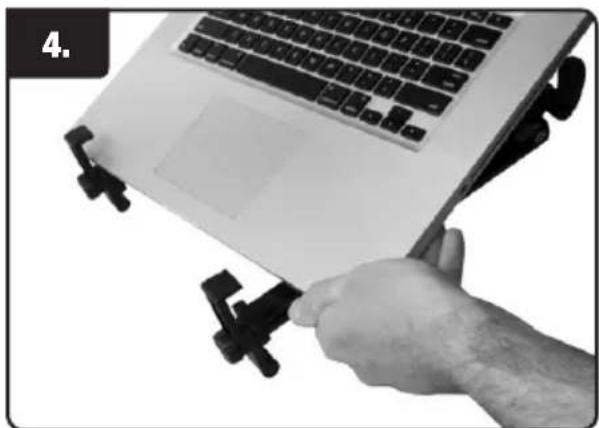
Hand holding a laptop with attached black clip accessories (no visible text or symbols)- Place laptop into position.
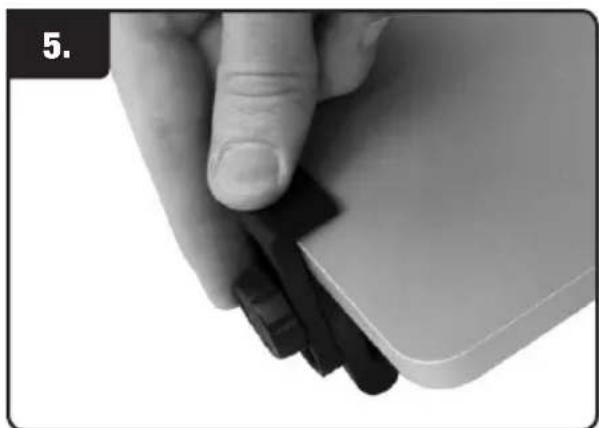
natural_image
Close-up of a hand holding a white electronic device with black buttons (no visible text or symbols)- Loosen knob and clamp laptop into place, then tighten knob.

natural_image
Exterior view of a modern laptop with visible keyboard and mouse (no text or symbols)Mic Stand Instructions (HyperStation QR & HyperMount QR)

natural_image
Close-up of a hand holding a black cylindrical device with a metallic tip, no visible text or symbols- Put QuickRelease bottom piece onto top of mic stand (5/8" thread).
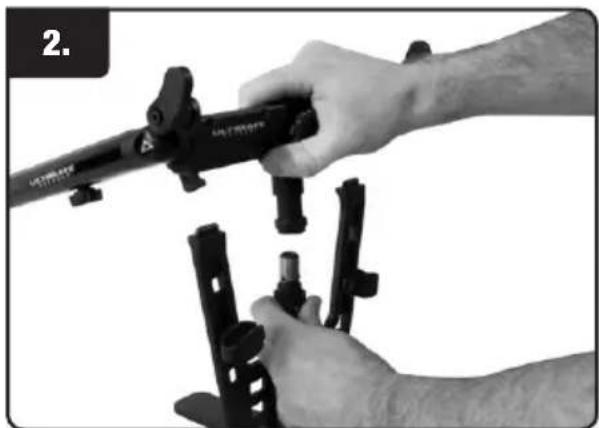
natural_image
Close-up of hands holding a black mechanical device with multiple pins (no visible text or symbols)- Pull down on QuickRelease post to disengage support arms (for HyperStation QR).

natural_image
Close-up of a hand holding a black Ultrasonic instrument with adjustment knobs (no visible text or symbols)- Pull down on QuickRelease bottom piece and place arms on top of mic stand, then release QuickRelease bottom piece to lock stand in place.

natural_image
Person using a laptop stand to press or install a device, no visible text or symbols- Place laptop into position.

natural_image
Close-up of a hand adjusting a black plastic clip on a white device (no text or symbols visible)- Loosen knob and clamp laptop into place, then tighten knob.
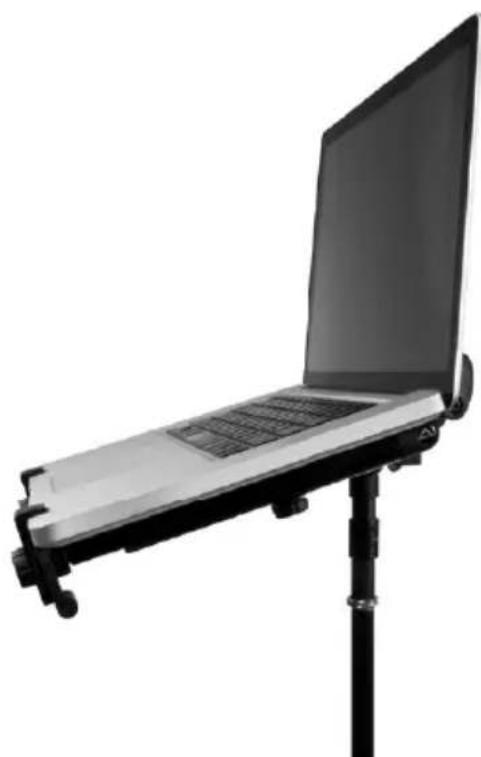
natural_image
Black-and-white photo of a laptop mounted on a stand with adjustable legs (no text or symbols visible)AX-48 Pro Laptop Mount Instruction (HyperStation QR & HyperMount QR)

natural_image
Close-up of a hand holding a black mechanical tool, no visible text or symbols- Screw QuickRelease bottom piece onto top of AX-48 Pro keyboard stand (must have optional AX-48TA Thread Adapter).
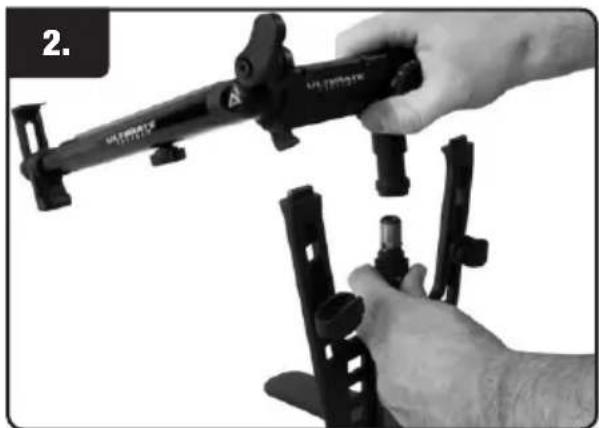
natural_image
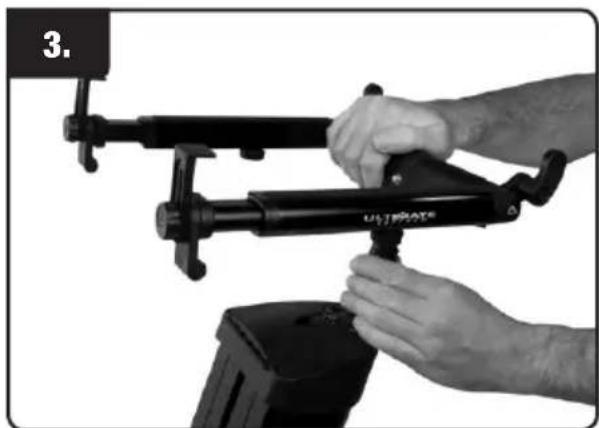
Close-up of a hand holding a Ultrasonic camera mount, with no visible text or symbols on the device itself.- Pull down on QuickRelease post to disengage support arms (for HyperStation QR).
natural_image
Close-up of hands operating a UJFROATE device with a black lever (no text or symbols visible)- Pull down on QuickRelease bottom piece and place arms on top of mic stand, then release QuickRelease bottom piece to lock stand in place
natural_image
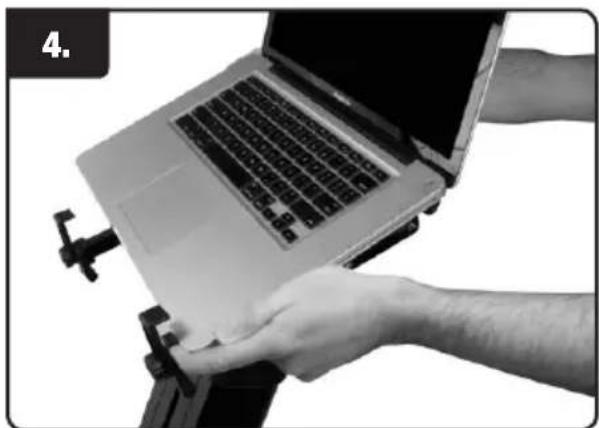
Close-up of hands operating a laptop on a stand, no visible text or symbols- Place laptop into position.

natural_image
Close-up of a hand holding a black plastic clip attached to a mechanical component (no visible text or symbols)- Loosen knob and clamp laptop into place, then tighten knob.

natural_image
Black robotic device with articulated arms and a laptop on top, isolated on white background (no text or symbols)HyperStation QR LPT-1000 QR, 17510
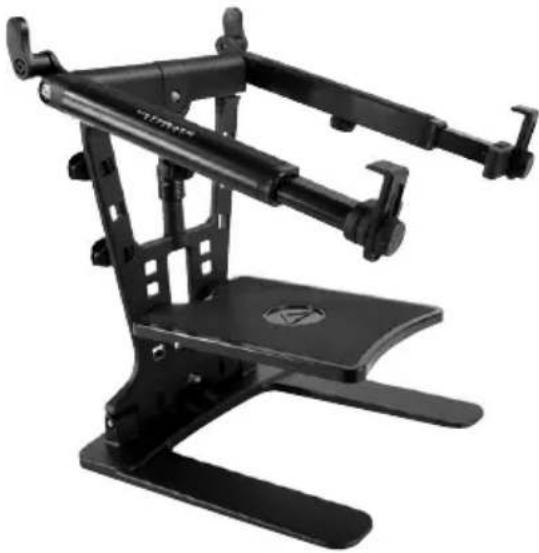
The HyperStation QR is a dynamic laptop stand for the working DJ and traveling musician. The HyperStation QR features angle-adjustable telescoping support arms that support laptops, small mixers, groove production electronics, drum pad controllers, and more and has a height-adjustable second tier. Mobile music production demands both portability and durability and the HyperStation QR delivers on both accounts. It folds down flat as one piece, fitting into just about any gig bag or backpack while being far more durable than typical wire frame laptop stands.
natural_image
Black mechanical device with articulated arms and a circular base (no visible text or symbols)HyperMount QR HYM-100 QR, 17511
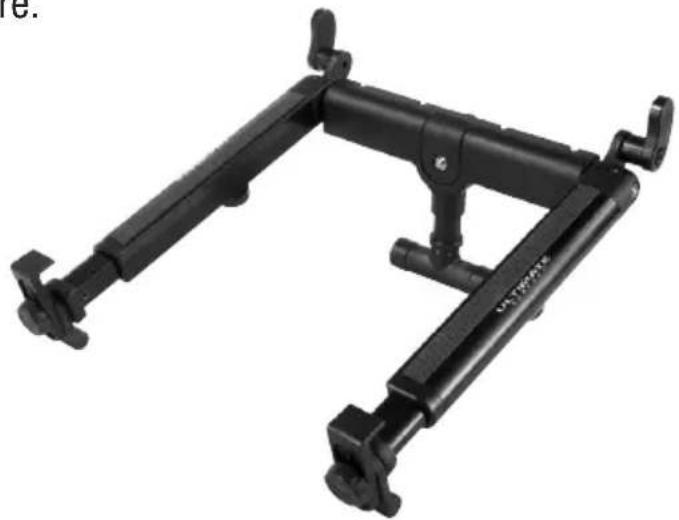
The HyperMount QR is a dynamic laptop stand that mounts to any 5/8" threaded stand – such as a microphone stand or an Ultimate Support APEX AX-48 Pro keyboard stand – but also sits on a desktop with the included T-stand adapter. The HyperMount QR features angle-adjustable telescoping support arms that support laptops, small mixers, groove production electronics, drum pad controllers, and more.
natural_image
Black adjustable tripod mount bracket with mounting feet and metal railings (no text or symbols visible)
natural_image
Circular button with a white upward-pointing triangle symbol on a black background (no text or symbols)Warranty Registration
Visit www.ultimatesupport.com for a quick and convenient process for registering your new Ultimate Support product. Warranty Registration and Proof of Purchase are required for warranty fulfilment. Full Limited Lifetime Warranty and Ultimate Protection Plus Premium Service and Support Plan details are available online under Music Gear & Instrument Stands / Customer Support.
ULTIMATE
SUPPORT
LIMITED LIFETIME WARRANTY
Ultimate Support products are constructed of the finest materials and designed and tested to stand up to the demanding lifestyle of the touring musician, gigging DJ, and working sound engineer. In the unlikely event that a product should fail due to manufacturing defect, Ultimate Support is pleased to repair or replace that product.
Please see www.ultimatesupport.com for more information.


- Product Manual
- Laptop Stand Instructions (Con.)
- T-Stand Adapter Instructions (HyperStation QR & HyperMount QR)
- Mic Stand Instructions (HyperStation QR & HyperMount QR)
- AX-48 Pro Laptop Mount Instruction (HyperStation QR & HyperMount QR)
- HyperStation QR LPT-1000 QR, 17510
- HyperMount QR HYM-100 QR, 17511
- Warranty Registration
- ULTIMATE
- SUPPORT
- LIMITED LIFETIME WARRANTY
Brand : Ultimate Support
Model : HYM-100QR
Category : DJ Equipment