KTCB3752 - Alarm Clock Kunft - Free user manual and instructions
Find the device manual for free KTCB3752 Kunft in PDF.


| Product Type | CD Boombox with Bluetooth, AM/FM Radio, Alarm Clock |
| Brand | Kunft |
| Model | KTCB3752 |
| Power Supply | AC 240V ~ 50Hz or 6 x C size batteries (1.5V each) |
| Output Power | 1 W x 2 (stereo) |
| Radio Frequency Range | AM 530-1600 KHz, FM 88-108 MHz |
| Disc Playback | Audio CD |
| Bluetooth | Yes, with pairing indicator (blue LED) |
| USB Playback | Yes, for MP3 files |
| AUX Input | 3.5mm jack |
| Headphone Output | 3.5mm jack (shared with AUX) |
| Controls | Volume, Tuning, Function select, Playback buttons (Play/Pause, Skip, Stop, Repeat, Random) |
| Display | LED display for track/time info |
| Antenna | FM telescopic antenna, internal AM antenna |
| Battery Operation | 6 x C size batteries (not included) |
| Operating Temperature | ≤ 35°C |
| Safety Features | Do not open cover; keep away from water; use only specified power supply |
| Cleaning | Switch off and unplug before cleaning; use dry soft cloth only |
| Warranty | 2 years for manufacturing defects |
| Package Contents | 1 x CD Boombox, 1 x Mains Power Cable, 1 x User Manual |
Frequently Asked Questions - KTCB3752 Kunft
User questions about KTCB3752 Kunft
0 question about this device. Answer the ones you know or ask your own.
Ask a new question about this device
Download the instructions for your Alarm Clock in PDF format for free! Find your manual KTCB3752 - Kunft and take your electronic device back in hand. On this page are published all the documents necessary for the use of your device. KTCB3752 by Kunft.
USER MANUAL KTCB3752 Kunft
natural_image
Black portable radio with antenna and control knobs, no visible text or symbols on device body
CD boombox with bluetooth
output 1 W x 2 USB port bluetooth function
kunft.®
CD boombox with bluetooth
KTCB3752
EN
Dear client,
Thank you for purchasing this product.
The quality of this appliance has been certified by several laboratory tests. This instructions manual is provided to simplify the use of the appliance as well as to guarantee a safe use.
Please read carefully the instructions and safety measures described in this manual.
We sincerely hope you will be satisfied when using your new appliance.
INDEX
- SAFETY INSTRUCTIONS....4
1.1. Power Supply ....5
1.2. Power Cord and Other Cables......6
1.3. Humidity and Water 6
1.4. Cleaning....6
1.5. General Precautions ...... 6
- OPERATING INSTRUCTIONS......8
2.1. Product Description.... 8
2.2. Using the product....9
- SPECIFICATIONS....11
- POST-SALE SERVICE....11
- ENVIRONMENTAL PROTECTION .....11
2
3
kunft®
1. SAFETY INSTRUCTIONS
| WARNING | ||
| Risk of Electric ShockDo Not Open | ||
| Warning: to avoid the risk of electric shock, do not remove the cover.The interior does not contain any parts that can be repaired by the user.Ask for assistance from the Customer Support Service. | ||
Important Warnings
Before using your appliance read these instructions manual carefully and keep it in a safe place as you may need to consult it in the future.
Before turning on your appliance, and to ensure a safe and correct operation, do not use if:
- It has fallen to the ground;
- You notice any evidence of damage;
- Any anomaly occurs during its operation.
To avoid hazards or deterioration of your appliance through incorrect use it is advisable to read these instructions thoroughly.
Your appliance should not be used for other purposes than the ones intended and solely for household use. Any damage resulting from using the appliance outside this scope,
CD boombox with bluetooth
KTCB3752
EN
any incorrect use, as well as any manual modifications to the product will not be covered and automatically voids the warranty.
Assistance
In case of malfunction, take your appliance to the Customer Support Service for assistance.
This appliance can be used by children from the age of 8 and by people with reduced physical, sensorial or mental capabilities and/or lack of experience and knowledge if they have been given instructions on using the appliance safely and if they understand the hazards involved. Children may not play with the appliance. Cleaning and maintenance must not be carried out by children without supervision.
These instructions are also available at www.suporteworten.pt
1.1. Power Supply
Make sure the main voltage is compatible with the appliance's. If this is not the case, please consult the Customer Support Service.
kunft.®
CD boombox with bluetooth
KTCB3752
EN
1.2. Power Cord and Other Cables
Do not tangle the cord or pull it to disconnect the appliance. Also, keep the cord away from warm surfaces.
Never use the appliance if it has a damaged cable or socket.
Take it to the Customer Support Service for replacement.
1.3. Humidity and Water
Do not use your appliance in humid places. Do not allow the appliance to become wet under any circumstances as this may be dangerous. To avoid fire hazard or electric shock do not expose your appliance to humidity or water. Furthermore, do not place your appliance under water (e.g. for cleaning).
1.4. Cleaning
Before cleaning, be sure to switch off the appliance and remove the plug from the main power supply. Always allow the unit to cool down before cleaning.
To clean the exterior of the product, use a dry soft cloth only.
1.5. General Precautions
- Please follow the instructions in the user manual which will help you to properly install and operate this product and enjoy its
advanced features. Please keep the instructions for future reference.
- Read all instructions before using the product.
- Maintenance and service operations are only to be carried out by authorized professionals.
- Any damage caused by manual modifications to the product is not covered by the warranty.
- If this product is used for other purposes than the ones originally intended, or if it is not correctly connected, the product may become damaged and the warranty will be voided.
kunft®
2. OPERATING INSTRUCTIONS
2.1. Product Description
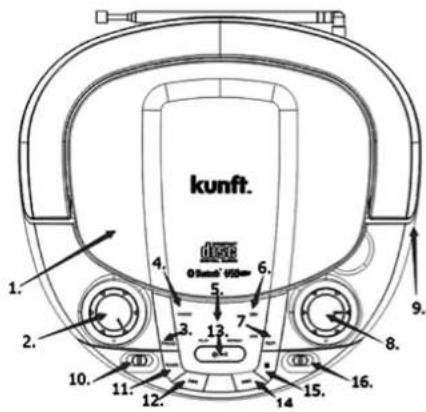
| 1. CD Compartment Playback for audio CD's | |
| 2. Volume Control Adjust volume | |
| 3. Program Creating a play list | |
| 4. Power indicator RED indicator when turned ON | |
| 5. LED Display Displays playback information | |
| 6. Bluetooth indicator BLUE indicator when turned ON | |
| 7. Repeat button Repeat options; | |
| 8. Radio tuning knob Radio station manual tuning | |
| 9. AUX and Headphone Input Connection for headphones or Auxiliary audio line in | |
| 10. Function switch Selector for Bluetooth / USB, AUX / CD and Radio | |
| 11. Random button Random playback | |
| 12. Previous Track Select previous track for playback | |
| 13. Standby / Play / Pause | Press and hold to power on / off, Press to Play or Pause music playback |
| 14. Next Track | Select next track for playback |
| 15. Stop | Stop playback |
| 16. Radio switch | Selector for AM, FM or FM ST. |
| 17. USB Socket | Insert USB drive for playback |
CD boombox with bluetooth
KTCB3752
EN
WHATS IN THE BOX
1 x CD BoomBox, 1 x Mains Power Cable, 1 x User Manual
2.2. Using the product
USING BATTERIES
- Disconnect the AC power cord from the AC inlet of the unit. Battery power is cut automatically by the cord while it is connected.
- When the volume decrease, or the sound distorts, replace all the batteries with new ones.
- Insert 6 x 1.5V(R14 / UM2 / C) batteries.
- Disconnect the AC cord and insert 6 x C size batteries into the battery compartment noting the correct polarity as shown inside the battery compartment.
RADIO RECEPTION
- For best reception, fully extend the FM antenna to receive FM stations.
- For AM reception, as the BoomBox has an internal AM antenna you may need to position for best reception.
RADIO OPERATION
- Switch selector to RADIO.
- Switch to either AM or FM or FM ST.
- Rotate the TUNING knob to tune to your desired radio station.
- Adjust the sound level by rotating the VOLUME control.
- Turn the radio off, by selecting OFF.
CD OPERATION
- Press and hold the Standby Button for more than 1 sec. to power on.
- Switch selector to AUX / CD.
- Insert a CD disc and close the CD door. The unit will start reading the disc and display the total number of tracks of the disc.
- To start playback, press the PLAY / PAUSE button.
- Adjust the VOLUME knob to the desired volume level.
- To stop playback, press the PLAY / PAUSE button.
SKIP MODE
- During Playback (or while paused), press the Next Track button to go to the next track.
- During Playback (or while paused), press the Previous Track button to go to the start of the current track.
kunft®
- During Playback mode, press the Previous Track button twice to go to the previous track.
MP3 / AUX IN CONNECTION
- Press and hold the Standby Button for more than 1 sec. to power on. Note: A 3.5mm audio jack cable is required (not supplied).
- Insert one side of the audio cable into the AUX line-out jack of your audio device and the other end into your BoomBox.
- Turn the BoomBox ON and slide the selector to the AUX / CD position.
- Turn your Audio device ON and begin playback.
BLUETOOTH MODE
- Press and hold the Standby Button for more than 1 sec. to power on.
- Switch selector to BT / USB. The BLUETOOTH POWER indicator will turn ON and the BLUETOOTH indicator will begin flashing (pairing mode).
- Turn the Bluetooth Function ON on your Bluetooth device, e.g. Mobile Phone or Tablet.
- Enable search or scan function to find your RCD-512.
- Select RCD-512 to pair the Boombox with your Bluetooth device. A confirmation chime will then sound and the Bluetooth indicator will turn to solid, rather than flashing.
- After successfully pairing, you can select the PLAY / PAUSE button on your Bluetooth device to play the music wirelessly from the Boombox.
REPEAT MODE
- Repeat one track: Press the REPEAT button once. The repeat LED indicator will turn ON and flash continuously. This single track will then be played repeated.
- Repeat all tracks: Press the REPEAT button twice. The repeat LED indicator will turn on (but not flash). The whole disc will then be played repeatedly.
- Cancel Repeat: Press the REPEAT button until the repeat LED indicator is turned off.
RANDOM PLAYBACK
- During playback, press the RAND button to Random playback.
- Press the RAND button again to cancel random playback mode.
USB OPERATION
- Press and hold the Standby Button for more than 1 sec. to power on.
- Switch selector to BT / USB.
CD boombox with bluetooth
KTCB3752
EN
- Insert a USB drive containing MP3 music into the USB slot. The Boombox will then start reading the USB and display the tracks contained.
[Playback will start automatically.] - Adjust the VOLUME knob to the desired volume level.
- To stop playback, and hold the Standby Button for more than 1 sec. to power off.
3. SPECIFICATIONS
Frequency Range: AM 530 -1600 KHz, FM 88 -108 MHz Power
Supply: AC 240V \~ 50Hz, or 6 x C size batteries
Operating Temperature: ≤ 35°C
4. POST-SALE SERVICE
KUNFT has designed this appliance in order to guarantee maximum reliability. However, if a problem occurs do not attempt to open the appliance - there is a risk of electrical shock. If you are not able to solve the problem, please contact the Customer Support Service of any Worten, Modelo or Continente store in order to be assisted. Worten Equipamentos para o Lar provides a 2-year warranty for manufacturing defects from the date of purchase of the appliance.
WARNING: any attempt to repair the appliance without contacting the manufacturer or seller will void the warranty.
All users must be familiar with these instructions. Knowing what could go wrong can help prevent problems from occurring.
5. ENVIRONMENTAL PROTECTION
In order to protect the environment, we strive to reduce the volume of packaging used, limiting it to three easily sorted materials: cardboard, paper and plastic. The appliance is manufactured using recyclable materials after disassembled by a specialized company. Please comply with local regulations concerning the recycling of all materials.
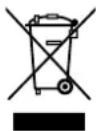
Attention: should be drawn to be the environmental aspects of battery disposal. Batteries shall not be exposed to excessive heat such as sunshine, fire or the like.
Worten hereby declares that this equipment (6655221 - Radio CD BOOMBOX KUNFT KTCB3752) is in compliance with Directive 2014/53/EU of the European Parliament and of the Council of 16 April 2014.
The full declaration is available at the following Internet address:
www.suporteworten.pt
kunft.®
radio CD com bluetooth
KTCB3752
ES
Estimado cliente:
CD boombox with bluetooth
output 1 W x 2
USB port
bluetooth function
is perfectly enough
KTCB3752
Imported, produced and distributed by:
- CD boombox with bluetooth
- kunft.®
- INDEX
- kunft®
- SAFETY INSTRUCTIONS
- Important Warnings
- Assistance
- Power Supply
- Power Cord and Other Cables
- Humidity and Water
- Cleaning
- General Precautions
- OPERATING INSTRUCTIONS
- Product Description
- WHATS IN THE BOX
- Using the product
- USING BATTERIES
- RADIO RECEPTION
- RADIO OPERATION
- CD OPERATION
- SKIP MODE
- MP3 / AUX IN CONNECTION
- BLUETOOTH MODE
- REPEAT MODE
- RANDOM PLAYBACK
- USB OPERATION
- KTCB3752
- SPECIFICATIONS
- POST-SALE SERVICE
- ENVIRONMENTAL PROTECTION
- Estimado cliente:
Brand : Kunft
Model : KTCB3752
Category : Alarm Clock