
Reader CR2300 - Barcode Reader Code - Free user manual and instructions
Find the device manual for free Reader CR2300 Code in PDF.


| Product Type | Barcode Reader |
| Brand | Code |
| Model | Reader CR2300 (CR2321) |
| Connectivity | Bluetooth, USB 2.0, RS232 |
| Wireless Range | Bluetooth (standard, typical 10 m) |
| Scan Technology | CMOS imager |
| Symbologies Supported (Default On) | Aztec, Codabar, Code 39, Code 93, Code 128, Data Matrix, Data Matrix Rectangle, GS1 DataBar, Interleaved 2 of 5, PDF417, QR Code, UPC/EAN/UPC-E |
| Symbologies Supported (Default Off) | Codablock F, Code 11, Code 32, Composite, Data Matrix Inverse, Han Xin Code, Hong Kong 2 of 5, IATA 2 of 5, Maxicode, Matrix 2 of 5, Micro PDF417, MSI Plessey, NEC 2 of 5, Pharmacode, Plessey, Straight 2 of 5, Telepen, Trioptic, Postal Codes |
| Battery Type | Rechargeable battery cartridge |
| Charging Method | Via charging station with 5VDC power supply |
| Power Input | 5VDC power supply (included) |
| Battery Status Indicator | Fuel gauge LEDs on reader |
| Reader Feedback | LED and sound indicators for power, connection, decode, configuration, and batch mode |
| Data Transfer Modes | Batch mode via Bluetooth or USB, USB downloader (HID) mode |
| Operating Range (Typical) | Up to 11 inches (280 mm) for 13 mil UPC |
| Dimensions | Refer to manual (images available in CR2300 dimensions section) |
| Weight | Not specified |
| Warranty | 1 year limited warranty on reader, charging station, modem, battery; 30 days on cables and power supplies |
| Maintenance | Clean window with soft, non-abrasive cloth moistened with water or mild detergent; avoid touching window |
| Compliance | FCC Part 15 Class B, CE (EN 55022/24, etc.), Industry Canada, EN 60950-1 safety |
| Included Items | CR2300 reader, USB cable, RS232 cable, charging station with embedded CodeXML modem, 5VDC power supply, battery cartridge |
Frequently Asked Questions - Reader CR2300 Code
User questions about Reader CR2300 Code
0 question about this device. Answer the ones you know or ask your own.
Ask a new question about this device
Download the instructions for your Barcode Reader in PDF format for free! Find your manual Reader CR2300 - Code and take your electronic device back in hand. On this page are published all the documents necessary for the use of your device. Reader CR2300 by Code.
USER MANUAL Reader CR2300 Code
natural_image
Illustration of a mechanical device with a cylindrical top and base, no visible text or symbolsMANUAL VERSION 04
RELEASE DATE: JULY 2014


Configuration Guidewww.codecorp.com YouTube.com/codecorporation
Statement of Agency Compliance

The Code Reader™ 2300 (CR2300) has been tested for compliance with FCC regulations and was found to be compliant with all applicable FCC Rules and Regulations.

IMPORTANT NOTE: To comply with FCC RF exposure compliance requirements, this device must not be co-located or operate in conjunction with any other antenna or transmitter.

CAUTION: Changes or modifications not expressly approved by the party responsible for compliance could void the user's authority to operate the equipment.
The CR2300 has been tested for compliance to CE standards and guidelines and was found to conform to applicable CE standards, specifically the EMC requirements EN 55024, ESD EN 61000-4-2, Radiated RF Immunity EN 61000-4-3, ENV 50204, EFT EN 61000-4-4, Conducted RF Immunity EN 61000-4-6, EN 55022, Class B Radiated Emissions, and Class B Conducted Emissions.
The CR2300 has been tested and certified in compliance with the Technical Regulations Conformity Certification of Specified Radio Equipment (ordinance of MPT N°.37. 1981), Article 2, Paragraph 1, Item 19.
Code voids product warranty if the hard case has been opened or tampered with in any way.
The CR2300 meets all safety and quality standards in accordance to EN 60950-1:2006/A11:2009/A1:2010.
CR2300 CodeXML® Modem FCC, Industry Canada and ICES Compliance
FCC
This device complies with part 15 of the FCC Rules. Operation is subject to the following two conditions: (1) This device may not cause harmful interference, and (2) this device must accept any interference received, including interference that may cause undesired operation.
NOTE: This equipment has been tested and found to comply with the limits for a Class B digital device, pursuant to part 15 of the FCC Rules. These limits are designed to provide reasonable protection against harmful interference in a residential installation. This equipment generates, uses and can radiate radio frequency energy and, if not installed and used in accordance with the instructions, may cause harmful interference to radio communications. However, there is no guarantee that interference will not occur in a particular installation.
If this equipment does cause harmful interference to radio or television reception, which can be determined by turning the equipment off and on, the user is encouraged to try to correct the interference by one or more of the following measures:
- Reorient or relocate the receiving antenna.
- Increase the separation between the equipment and receiver.
- Connect the equipment into an outlet on a circuit different from that to which the receiver is connected.
- Consult the dealer or an experienced radio/TV technician for help.
FCC Radiation Exposure Statement:
This equipment complies with FCC radiation exposure limits set forth for an uncontrolled environment. This equipment should be installed and operated with minimum distance 20cm between the radiator and your body.
Industry Canada
This device complies with Industry Canada licence-exempt RSS standard(s). Operation is subject to the following two conditions: (1) this device may not cause interference, and (2) this device must accept any interference, including interference that may cause undesired operation of the device.
This Class B digital apparatus complies with Canadian ICES-003.
Radiation Exposure Statement:
This equipment complies with IC radiation exposure limits set forth for an uncontrolled environment. This equipment should be installed and operated with minimum distance 20cm between the radiator and your body.
Copyright © 2014 Code Corporation.
All Rights Reserved.
The software described in this manual may only be used in accordance with the terms of its license agreement.
No part of this publication may be reproduced in any form or by any means without written permission from Code Corporation. This includes electronic or mechanical means such as photocopying or recording in information storage and retrieval systems.
NO WARRANTY. This technical documentation is provided AS-IS. Further, the documentation does not represent a commitment on the part of Code Corporation. Code Corporation does not warrant that it is accurate, complete or error free. Any use of the technical documentation is at the risk of the user. Code Corporation reserves the right to make changes in specifications and other information contained in this document without prior notice, and the reader should in all cases consult Code Corporation to determine whether any such changes have been made. Code Corporation shall not be liable for technical or editorial errors or omissions contained herein; nor for incidental or consequential damages resulting from the furnishing, performance, or use of this material. Code Corporation does not assume any product liability arising out of or in connection with the application or use of any product or application described herein.
NO LICENSE. No license is granted, either by implication, estoppel, or otherwise under any intellectual property rights of Code Corporation. Any use of hardware, software and/or technology of Code Corporation is governed by its own agreement.
The following are trademarks or registered trademarks of Code Corporation:
CodeXML ^® , Maker, QuickMaker, CodeXML ^® Maker, CodeXML ^® Maker Pro, CodeXML ^® Router, CodeXML ^® Client SDK, CodeXML ^® Filter, HyperPage, CodeTrack, GoCard, GoWeb, ShortCode, GoCode ^® , Code Router, QuickConnect Code, Rule Runner ^® , Cortex ^® , CortexRM, CortexMobile, Code, Code Reader, CortexAG, CortexStudio, CortexTools, Affinity ^® , CortexDecoder, CortexJPOS, and CortexOPOS.
All other product names mentioned in this manual may be trademarks of their respective companies and are hereby acknowledged.
The software and/or products of Code Corporation include inventions that are patented or that are the subject of patents pending. U.S. Patents: 6997387, 6942152, 7014113, 7070091, 7097099, 7353999, 7519239, 7621453, 8001550, 8011584.
The Code Reader software uses the Mozilla SpiderMonkey JavaScript engine, which is distributed under the terms of the Mozilla Public License Version 1.1. The Code Reader software is based in part on the work of the Independent JPEG Group.
Code Corporation, 12393 S. Gateway Park Place, Ste. 600, Draper, Utah 84020
www.codecorp.com
Table of Contents
1.0 - Included Items 5
2.0 - Set Up....6
3.0 - Battery Installation and Removal 6
4.0 - Fuel Gauge Battery Status Indicator....6
5.0 - Charging the CR2300 7
6.0 - Powering On/Off the Reader....7
7.0 - Scanning 7
8.0 - Establishing a Bluetooth Connection....8
9.0 - Transmitting Batch Data via Bluetooth Communication....9
10.0 - Transmitting Batch Data via USB Communication 9
11.0 - Wired Communication via USB Downloader Mode 10
12.0 - Reader Feedback....10
13.0 - Reading Ranges.... 11
14.0 - Symbologies Defaulted On 11
15.0 - Symbologies Defaulted Off.... 11
16.0 - Reader ID and Firmware Version.... 12
17.0 - CR2300 Dimensions.... 12
18.0 - Charging Station Dimensions 13
19.0 - CR2300 Maintenance 13
20.0 - Warranty....14
1.0 - Included if Ordered

natural_image
Illustration of a handheld electronic device with a screen and buttons (no text or symbols)CR2300
(Model #: CR2321)

USB 2.0 Cable

natural_image
Coiled cable with two connectors (no text or symbols visible)RS232 Cable

natural_image
Illustration of a mobile phone casing with buttons and a central display (no text or symbols)Charging Station Charging Station

natural_image
Illustration of a mobile phone with a screen and keypad (no text or symbols)with Embedded
CodeXML® Modem

natural_image
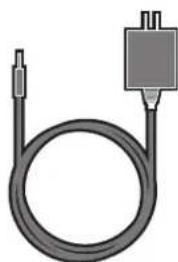
Coiled black cable with a small connector and a rectangular plug (no text or symbols)5VDC Power Supply

CodeXML® M3 Modem

natural_image
Exploded view diagram of a device showing internal components and mounting holes (no text or symbols)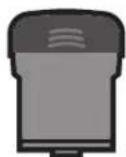
Battery Cartridge
2.0 - Set Up

natural_image
Illustration of a desktop computer with monitor, cable, and mouse (no text or symbols)
natural_image
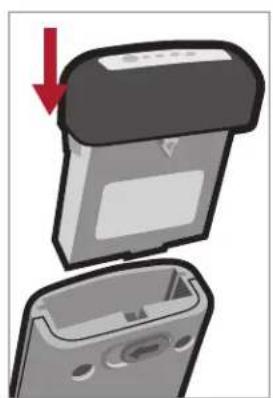
Illustration of a desktop computer connected to a power outlet via cable, with a monitor and switch nearby (no text or symbols)3.0 - Battery Installation and Removal
natural_image
Illustration of a device with a lid and internal casing, showing a red downward arrow (no text or symbols)
natural_image
Close-up of a device's front panel with a red arrow and circular mark highlighting a button (no text or symbols)4.0 - Fuel Gauge Battery Status Indicator

natural_image
Illustration of a finger pointing at a device with a circular button (no text or symbols)
Completely charge before initial use.
5.0 - Charging the CR2300

6.0 - Powering On/Off the Reader

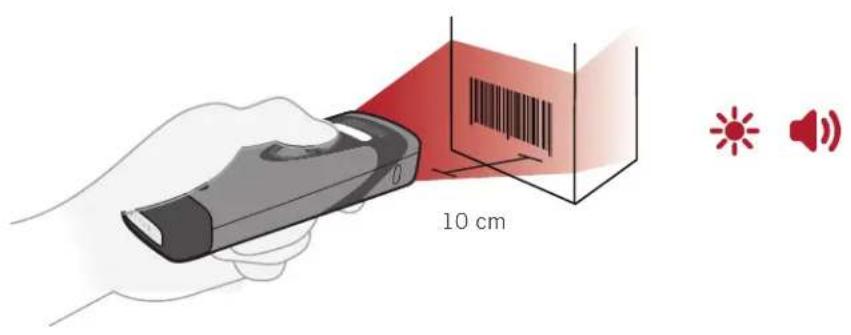
7.0 - Scanning
8.0 - Establishing a Bluetooth Connection


natural_image
Illustration of a handheld electronic device emitting red light from its tip, with no visible text or symbols.
①

natural_image
Illustration of a handheld device emitting red light, no text or symbols present②

natural_image
Illustration of a remote device and a digital device with red laser spikes (no text or symbols)③

natural_image
Illustration of a hand holding a remote control device with a red circular icon containing a starburst pattern, emitting sound waves (no text or symbols)9.0 - Transmitting Batch Data via Bluetooth Communication
①
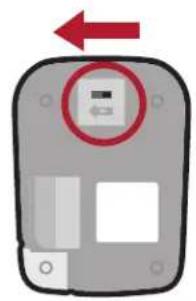
natural_image
Diagram of a device with a red arrow pointing to a circular component, no text or symbols presentScan the Batch Mode Enable - Log Only* configuration barcode to save scanned data to reader memory.
②


natural_image
Illustration of a handheld device with a red laser beam and a digital display, no text or symbols presentScan the Batch Mode Transfer All Data in Memory* configuration barcode to transfer data to the host device.
④

* Additional Batch Mode and Communication configuration options are available in the CR2300 Configuration Guide located at www.codecorp.com/files.php
10.0 - Transmitting Batch Data via USB Communication
①
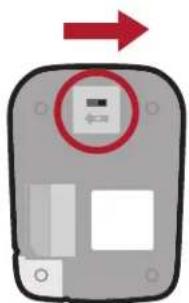
natural_image
Diagram of a device with a red arrow pointing to a circular component, no text or symbols presentScan the USB Keyboard Communication Mode* configuration barcode:
②
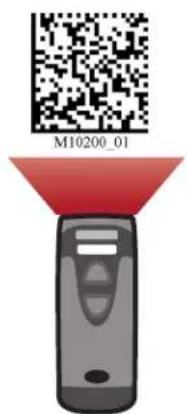
③
Scan the Batch Mode Enable - Send and Log* configuration barcode to save scanned data to reader memory:
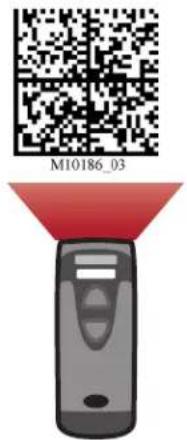
Open an application on the host device. Dock the reader into the charging station to transfer data to the host device.
④

natural_image
Illustration of a mechanical component with a cylindrical feature and mounting base (no text or symbols)* Additional Batch Mode and Communication configuration options are available in the CR2300 Configuration Guide located at www.codecorp.com/files.php
11.0 - Wired Communication via USB Downloader Mode
①

②
Open CortexTools™

natural_image
Illustration of a desktop computer with monitor and connected cable (no text or symbols)③
Scan USB Downloader (HID) Mode configuration barcode:

4

natural_image
Illustration of a mechanical component with a cylindrical shaft and mounting base (no text or symbols)12.0 - Reader Feedback
| Scenario LEDs on Reader Sound | |||
| CR2300 Successfully Powers Up |  | All LEDs Flash 1X | |
| CR2300 Successfully Connects with Host |  | Wireless Icon Flashes 1X | |
| CR2300 Unsuccessfully Connects with Host | - | 3X | |
| Successful Decode and Data Transfer |  | Good Read Indicator will Flash 1X | |
| Unsuccessful Decode and Data Transfer | - | 3X | |
| Configuration Code Successfully Decoded and Processed |  | Good Read Indicator will Flash 2X | |
| Configuration Code Unsuccessfully Decoded and Processed | - | 4X | |
| Batch Mode Enabled and No Data is Stored | - | Batch Icon Off | - |
| Batch Mode Enabled and Data Stored |  | Batch Icon Remains Solid | - |
| Memory Space for Batching is Full |  | Batch Icon Flashes 5 Times a Second | - |
| Batch Mode Enabled, Data Stored, and Reader is in Sleep Mode |  | Batch Icon Flashes Once Every 10 Seconds | - |
13.0 - Reading Ranges
| CR2300 Performance | |
| Test Barcode Min Inches (mm) Max Inches (mm) | |
| 4 mil Code 39 1.6" (40 mm) 3.1" (78 mm) | |
| 7.5 mil Code 39 1.3" (34 mm) 7.2" (182 mm) | |
| 9.5 mil Code 128 0.6" (15 mm) 8.3" (212 mm) | |
| 10.5 mil UPC 0.8" (20 mm) 9.0" (228 mm) | |
| 13 mil UPC 1.1" (28 mm) 11.0" (280 mm) | |
| 5 mil Data Matrix 1.7" (43 mm) 3.0" (76 mm) | |
| 6.3 mil Data Matrix 1.3" (33 mm) 4.1" (104 mm) | |
| 10 mil Data Matrix 0.8" (20 mm) 6.5" (165 mm) | |
| 20.8 mil Data Matrix 1.1" (28 mm) 13.5" (343 mm) | |
Note: All samples were high quality barcodes and were read along a physical center line at a 10^ angle. Default AGC settings were used. Accuracy= +/- 10%.
14.0 - Symbologies Defaulted On 15.0 - \$
The following are symbologies that have a default of ON. To turn symbologies on or off, scan the symbology barcodes located in the CR2300 Configuration Guide located on our website at http://www.codecorp.com.
Aztec
Codabar
Code 39
Code 93
Code 128
Data Matrix
Data Matrix Rectangle
All GS1 DataBar
Interleaved 2 of 5
PDF417
QR Code
UPC/EAN/UPC-E
mbologies Defaulted Off
The following are symbologies that have a default of OFF. To turn symbologies on or off, scan the symbology barcodes located in the CR2300 Configuration Guide located on our website at http://www.codecorp.com.
Codablock F
Code 11
Code 32
Composite
Data Matrix Inverse
Han Xin Code
Hong Kong 2 of 5
IATA 2 of 5
Maxicode
Matrix 2 of 5
Micro PDF417
MSI Plessey
NEC 2 of 5
Pharmacode
Plessey
Straight 2 of 5
Telepen
Trioptic
Postal Codes
16.0 - Reader ID and Firmware Version
To find out the Reader ID and Firmware version, open a text editor program (i.e., Notepad, Microsoft Word, etc.) and read the Reader ID and Firmware configuration barcode.
Reader ID and Firmware

A text string indicating the firmware version and CR2300 ID number will be displayed. example: Xap/i06760456none0020094903A06000000700070016006200O02cd(13.2.18) (see below):
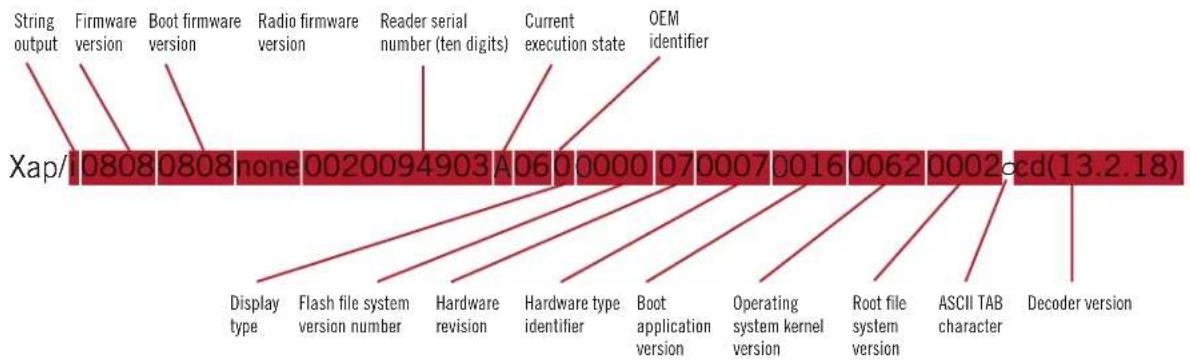
Note: Code will periodically release new firmware for CR2300 readers. For information on latest firmware visit our website at www.codecorp.com/codesupport.php.
17.0 - CR2300 Dimensions

18.0 - Charging Station Dimensions


19.0 - CR2300 Maintenance
The CR2300 device needs only a minimum of maintenance to operate. A few tips are given below for maintenance suggestions.
Cleaning the CR2300 Window
CR2300 window should be clean to allow the best performance of the device. The window is the clear plastic piece inside the head of the reader. Do not touch the window. Your CR2300 uses CMOS technology that is much like a digital camera. A dirty window may stop the CR2300 from reading barcodes.
If the window becomes dirty, clean it with a soft, non-abrasive cloth or a facial tissue (no lotions or additives) that has been moistened with water. A mild detergent may be used to clean the window, but the window should be wiped with a water moistened cloth or tissue after using the detergent.
Technical Support and Returns
For returns or technical support visit www.codecorp.com/codesupport.php.
20.0 - Warranty\*
The CR2300 carries a one year limited warranty as described herein. Charging Stations, Modems and Batteries carry a one year limited warranty. Cables and Power Supplies carry a 30 day limited warranty.
Limited Warranty. Code warrants each Code product against defects in materials and workmanship under normal use for the Warranty Coverage Term applicable to the product as described at www.codecorp.com/legal/warranty/term.php. If a hardware defect arises and a valid warranty claim is received by Code during the Warranty Coverage Term, Code will either: i) repair a hardware defect at no charge, using new parts or parts equivalent to new in performance and reliability; ii) replace the Code product with a product that is new or refurbished product with equivalent functionality and performance, which may include replacing a product that is no longer available with a newer model product; or ii) in the case of failure with any software, including embedded software included in any Code product, provide a patch, update, or other work around. All replaced products become the property of Code. All warranty claims must be made using Code's RMA process.
Exclusions. This warranty does not apply to: i) cosmetic damage, including but not limited to scratches, dents, and broken plastic; ii) damage resulting from use with non-Code products or peripherals, including batteries, power supplies, cables, and docking station/cradles; iii) damage resulting from accident, abuse, misuse, flood, fire or other external causes, including damage caused by unusual physical or electrical stress, immersion in fluids or exposure to cleaning products not approved by Code, puncture, crushing, and incorrect voltage or polarity; iv) damage resulting from services performed by anyone other than a Code authorized repair facility; v) any product that has been modified or altered; vi) any product on which the Code serial number has been removed or defaced. If a Code Product is returned under a warranty claim and Code determines, in Code's sole discretion, that the warranty remedies do not apply, Code will contact Customer to arrange either: i) repair or replace the Product; or ii) return the Product to Customer, in each case at Customer's expense.
Non Warranty Repairs. Code warrants its repair/replacement services for ninety (90) days from the date of shipment of the repaired/replacement product to the Customer. This warranty applies to repairs and replacements for: i) damage excluded from the limited warranty described above; and ii) Code Products on which the limited warranty described above has expired (or will expire within such ninety (90) day warranty period). For repaired product this warranty covers only the parts that were replaced during the repair and the labor associated with such parts.
No Extension of Term of Coverage. Product that is repaired or replaced, or for which a software patch, update, or other work around is provided, assumes the remaining warranty of the original Code Product and does not extend the duration of the original warranty period.
Software and Data. Code is not responsible for backing up or restoring any of software, data, or configuration settings, or reinstalling any of the foregoing on products repaired or replaced under this limited warranty.
Shipping and Turn Around Time. The estimated RMA turn-around time from receipt at Code's facility to shipment of the repaired or replaced product to Customer is ten (10) business days. An expedited turn-around time may apply to products covered under certain CodeOne Service Plans. Customer is responsible for shipping and insurance charges for shipping Code Product to Code's designated RMA facility and repaired or replaced product is returned with shipping and insurance paid by Code. Customer is responsible for all applicable taxes, duties, and similar charges.
Transfer. If a customer sells a covered Code Product during the Warranty Coverage Term, then that coverage may be transferred to the new owner by written notification from the original owner to Code Corporation at:
CodeOne Service Center
12393 South Gateway Park Place, Suite 600
Draper, UT 84020 USA
Limitation on Liability. Code's performance as described herein shall be Code's entire liability, and the Customer's sole remedy, resulting from any defective Code product. Any claim that Code has failed to perform its warranty obligations as described herein must be made within six (6) months of the alleged failure. Code's maximum liability related to its performance, or failure to perform, as described herein shall be limited to the amount paid by Customer for the Code product that is subject to the claim. In no event will either party be liable for any lost profits, lost savings, incidental damage, or other economic consequential damages. This is true even if the other party is advised of the possibility of such damages.
EXCEPT AS MAY BE OTHERWISE PROVIDED BY APPLICABLE LAW, THE LIMITED WARRANTIES DESCRIBE HEREIN REPRESENT THE ONLY WARRANTIES CODE MAKES WITH RESPECT TO ANY PRODUCT. CODE DISCLAIMS ALL OTHER WARRANTIES, WHETHER EXPRESSED OR IMPLIED, ORAL OR WRITTEN, INCLUDING WITHOUT LIMITATION IMPLIED WARRANTIES OF MERCHANTABILITY, FITNESS FOR A PARTICULAR PURPOSE AND NON-INFRINGEMENT.
THE REMEDIES DESCRIBED HEREIN REPRESENT CUSTOMER'S EXCLUSIVE REMEDY, AND CODE'S ENTIRE RESPONSIBILITY, RESULTING FROM ANY DEFECTIVE CODE PRODUCT.
CODE SHALL NOT BE LIABLE TO CUSTOMER (OR TO ANY PERSON OR ENTITY CLAIMING THROUGH CUSTOMER) FOR LOST PROFITS, LOSS OF DATA, DAMAGE TO ANY EQUIPMENT WITH WHICH THE CODE PRODUCT INTERFACES (INCLUDING ANY MOBILE TELEPHONE, PDA, OR OTHER COMPUTING DEVICES), OR FOR ANY SPECIAL, INCIDENTAL, INDIRECT, CONSEQUENTIAL OR EXEMPLARY DAMAGES ARISING OUT OF OR IN ANY MANNER CONNECTED WITH THE PRODUCT, REGARDLESS OF THE FORM OF ACTION AND WHETHER OR NOT CODE HAS BEEN INFORMED OF, OR OTHERWISE MIGHT HAVE ANTICIPATED, THE POSSIBILITY OF SUCH DAMAGES.
* Warranty periods are North America specific.


- Statement of Agency Compliance
- CR2300 CodeXML® Modem FCC, Industry Canada and ICES Compliance
- FCC
- FCC Radiation Exposure Statement:
- Industry Canada
- Radiation Exposure Statement:
- Table of Contents
- - Included if Ordered
- - Set Up
- - Battery Installation and Removal
- - Fuel Gauge Battery Status Indicator
- - Establishing a Bluetooth Connection
- - Transmitting Batch Data via Bluetooth Communication
- - Transmitting Batch Data via USB Communication
- - Wired Communication via USB Downloader Mode
- - Reader Feedback
- - Reading Ranges
- - Symbologies Defaulted On 15.0 - \$
- mbologies Defaulted Off
- - Reader ID and Firmware Version
- - CR2300 Dimensions
- - Charging Station Dimensions
- - CR2300 Maintenance
- Cleaning the CR2300 Window
- Technical Support and Returns
- - Warranty\*
Brand : Code
Model : Reader CR2300
Category : Barcode Reader