CR900FD - Barcode Reader Code - Free user manual and instructions
Find the device manual for free CR900FD Code in PDF.


Pick your language and provide your email: we'll send you a specifically translated version.
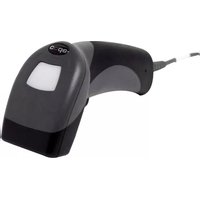
| Product Type | Barcode Reader |
| Brand | Code |
| Model | CR900FD |
| Dimensions (approx.) | 170 x 70 x 100 mm |
| Weight | Approx. 150 g |
| Power Supply | USB powered or rechargeable battery |
| Scanning Type | 1D and 2D barcodes |
| Connectivity | USB or Bluetooth (depending on version) |
| Scan Engine | Laser or camera-based (not specified) |
| Reading Distance | Up to 30 cm typical |
| Supported Symbologies | UPC, EAN, Code 39, Code 128, QR, Data Matrix, PDF417 |
| Interface | USB HID or serial emulation |
| Housing Material | ABS plastic |
| Drop Resistance | 1.5 m onto concrete (typical) |
| IP Rating | IP54 (dust and splash) |
| Operating Temperature | 0°C to 50°C |
| Storage Temperature | -20°C to 60°C |
| Maintenance | Clean lens with soft dry cloth; avoid solvents |
| Safety | Complies with laser safety class 1 or 2 (if laser) |
| Spare Parts | USB cable, battery (if applicable), manual |
| Warranty | 1 year limited warranty (typical) |
Frequently Asked Questions - CR900FD Code
How do I set up the CR900FD barcode reader for the first time?
Connect the device to your computer via USB. Install any required drivers if prompted. The reader should be recognized as a HID keyboard device. Point the reader at a barcode and press the trigger to scan.
Can the CR900FD read 2D barcodes like QR codes?
Yes, the CR900FD is capable of reading both 1D and 2D barcodes, including QR codes, Data Matrix, and PDF417.
What should I do if the scanner beeps but no data appears?
Ensure the cursor is in a text field. Check if the scanner is in the correct mode (e.g., keyboard wedge). Try scanning a test barcode from the manual. If the issue persists, restart your computer.
How do I clean the CR900FD scanner?
Use a soft, lint-free cloth slightly dampened with water or a mild glass cleaner. Wipe the scanning window gently. Do not use abrasive materials or harsh chemicals.
Is the CR900FD compatible with my POS system?
The reader emulates a USB keyboard, so it works with any system that accepts keyboard input. It may require configuration for specific interfaces, but generally plug-and-play.
What is the maximum scanning distance?
Typical reading distance is up to 30 cm for standard barcodes. For high-density codes, distance may be shorter.
Can I use the CR900FD wirelessly?
If your model supports Bluetooth, you can pair it wirelessly. Otherwise, it connects via USB cable.
How do I reset the CR900FD to factory defaults?
Scan the 'Reset to Factory Defaults' barcode found in the user manual. This will restore all settings to original.
What barcodes are supported by the CR900FD?
It supports common symbologies: UPC, EAN, Code 39, Code 128, Code 93, Codabar, Interleaved 2 of 5, QR Code, Data Matrix, PDF417, and more.
How do I replace the battery?
If your model has a rechargeable battery, remove the battery cover, disconnect the old battery, and insert a new compatible battery. Charge fully before first use.
User questions about CR900FD Code
0 question about this device. Answer the ones you know or ask your own.
Ask a new question about this device
No questions yet. Be the first to ask one.
Download the instructions for your Barcode Reader in PDF format for free! Find your manual CR900FD - Code and take your electronic device back in hand. On this page are published all the documents necessary for the use of your device. CR900FD by Code.
USER MANUAL CR900FD Code


Manual assistant
Powered by Anthropic
Waiting for your message
Product information
Brand : Code
Model : CR900FD
Category : Barcode Reader