
VP52 - Detector FLIR - Free user manual and instructions
Find the device manual for free VP52 FLIR in PDF.


| Product Type | Non-Contact AC Voltage Detector |
| Brand | FLIR |
| Model | VP52 |
| Voltage Detection Range | 50 V to 1000 V AC |
| Frequency Range | 50/60 Hz |
| Detection Method | Non-contact (capacitive coupling) |
| Indication | Visual (LED) and audible (buzzer) |
| Flashlight | High-brightness white LED |
| Auto Power Off | Yes, after approx. 10 minutes |
| Power Supply | 2 x AAA alkaline batteries (1.5 V) |
| Battery Life | Approx. 15 hours continuous use |
| Dimensions (L x W x H) | 155 x 30 x 25 mm (6.1 x 1.2 x 1.0 in) |
| Weight (with batteries) | Approx. 58 g (2.0 oz) |
| Safety Rating | CAT III 1000 V, CAT IV 600 V |
| IP Rating | IP54 (dust and splash resistant) |
| Operating Temperature | -10 °C to 50 °C (14 °F to 122 °F) |
| Storage Temperature | -20 °C to 60 °C (-4 °F to 140 °F) |
| Standards Compliance | IEC 61010-1, IEC 61326-1 |
| Maintenance & Cleaning | Wipe with a damp cloth; do not use solvents or abrasives |
| Spare Parts & Repairability | No user-serviceable parts; contact authorized service center |
| Included Accessories | User manual, 2 x AAA batteries |
Frequently Asked Questions - VP52 FLIR
User questions about VP52 FLIR
0 question about this device. Answer the ones you know or ask your own.
Ask a new question about this device
Download the instructions for your Detector in PDF format for free! Find your manual VP52 - FLIR and take your electronic device back in hand. On this page are published all the documents necessary for the use of your device. VP52 by FLIR.
USER MANUAL VP52 FLIR
User's manual FLIR VP50/VP52
Non-contact AC voltage detector

natural_image
Line drawing of a handheld electronic device with ports and buttons (no text or symbols)User's manual FLIR VP50/VP52
Table of contents
1 Disclaimers...
1.1 Copyright.
1.2 Quality assurance ....
1.3 Documentation updates ....
1.4 Disposal of electronic waste.
2 Safety information....2
3 Introduction 5
4 Description 6
4.1 Meter parts....6
5 Operation....7
5.1 Modes....8
5.2 Basic operation ....
5.3 Work light 9
5.4 Indication of low battery level.
5.5 Auto power off . . . . . . . . . . . . . . . . . . . . . . . . . . . . . . .
6 Maintenance....10
6.1 Cleaning and storage.
6.2 Battery replacement ....
7 Technical specifications ....
7.1 System specifications ....
7.2 Environmental specifications.
8 Technical support ....12
9 FLIR Limited Lifetime Warranty ....
1.1 Copyright
© 2013, FLIR Systems, Inc. All rights reserved worldwide. No parts of the software including source code may be reproduced, transmitted, transcribed or translated into any language or computer language in any form or by any means, electronic, magnetic, optical, manual or otherwise, without the prior written permission of FLIR Systems.
The documentation must not, in whole or part, be copied, photocopied, reproduced, translated or transmitted to any electronic medium or machine readable form without prior consent, in writing, from FLIR Systems.
Names and marks appearing on the products herein are either registered trademarks or trademarks of FLIR Systems and/or its subsidiaries. All other trademarks, trade names or company names referenced herein are used for identification only and are the property of their respective owners.
1.2 Quality assurance
The Quality Management System under which these products are developed and manufactured has been certified in accordance with the ISO 9001 standard.
FLIR Systems is committed to a policy of continuous development; therefore we reserve the right to make changes and improvements on any of the products without prior notice.
1.3 Documentation updates
Our manuals are updated several times per year, and we also issue product-critical notifications of changes on a regular basis.
To access the latest manuals and notifications, go to the Download tab at:
http://support.flir.com
It only takes a few minutes to register online. In the download area you will also find the latest releases of manuals for our other products, as well as manuals for our historical and obsolete products.
1.4 Disposal of electronic waste

natural_image
Simple line drawing of a trash bin with no text or symbols
As with most electronic products, this equipment must be disposed of in an environmentally friendly way, and in accordance with existing regulations for electronic waste.
Please contact your FLIR Systems representative for more details.
2 Safety information
Note
Before operating the device, you must read, understand, and follow all instructions, dangers, warnings, cautions, and notes.
Note
FLIR Systems reserves the right to discontinue models, parts or accessories, and other items, or to change specifications at any time without prior notice.
Note
Do not try to repair this unit. There are no user serviceable parts.
Note
Remove the batteries if the device is not used for an extended period of time.

WARNING
Do not operate the device if you do not have the correct knowledge. Formal qualifications and/or national legislation for the electrical inspections can apply. Incorrect operation of the device can cause damage, shock, injury or death to persons.

WARNING
Before you use the unit, always do a test of the Voltage Detector on a known live circuit to make sure that it operates correctly. There is a risk of electrocution if you do not do this. Injury to persons can occur.

WARNING
Make sure that you keep your hands and fingers on the body of the probe and away from the probe tip. There is a risk of electrocution if you do not do this. Injury can occur.

WARNING
Do not put the unit near high temperatures or in areas of high humidity. This can cause damage to the instrument.

WARNING
Do not use the unit if it is wet or if there is damage to it. Injury to persons can occur.

WARNING
Do not apply more than the rated voltage between the probe tip and the ground. This can cause damage to the instrument and injury to persons.

WARNING
Do not operate with the case open. Injury to persons can occur.

WARNING
Do not use the instrument before you have done a test of it on a known circuit. Injury to persons can occur.

WARNING
Do not try to use the instrument as an AC voltage detector if the batteries are weak or bad. This can cause damage to the instrument.

WARNING
Make sure that children cannot touch the device. The device contains dangerous objects and small parts that children can swallow. If a child swallows an object or a part, speak with a physician immediately. Injury to persons can occur.

WARNING
Do not let children play with the batteries and/or the packing material. These can be dangerous for children if they use them as toys.

WARNING
Do not touch expired or damaged batteries without gloves. Injury to persons can occur.

WARNING
Do not cause a short-circuit of the batteries. This can cause damage to the instrument and can cause injury to persons.

WARNING
Do not put the batteries into a fire. Injury to persons can occur.

CAUTION
Do not use the device for a procedure that it is not made for. This can cause damage to the protection.

This symbol, adjacent to another symbol or terminal, indicates that the user must refer to the manual for further information.

This symbol, adjacent to a terminal, indicates that, under normal use, hazardous voltages may be present.

Double insulation.

LISTED UL listing is not an indication or a verification of the accuracy of the meter
3 Introduction
Congratulations on your purchase of the FLIR VP50/VP52 non-contact AC voltage detector. Proper use and care of this meter will provide many years of reliable service.
The portable, rugged FLIR VP50/VP52 can detect the presence of AC voltage at an electrical outlet, junction strip, circuit, or other device without actually touching the device under test (FLIR VP50: Minimum excitation voltage is 90 V AC; FLIR VP52: Minimum excitation voltage is 190 V AC). The FLIR VP50/VP52 includes a high-sensitivity mode that can be used to detect low-level AC voltage signals down to a minimum of 24 V AC. The vibrating and visual cues alert the user to the presence of AC voltage. The bright built-in light systems permit operation in dimly lit areas.
4 Description
4.1 Meter parts
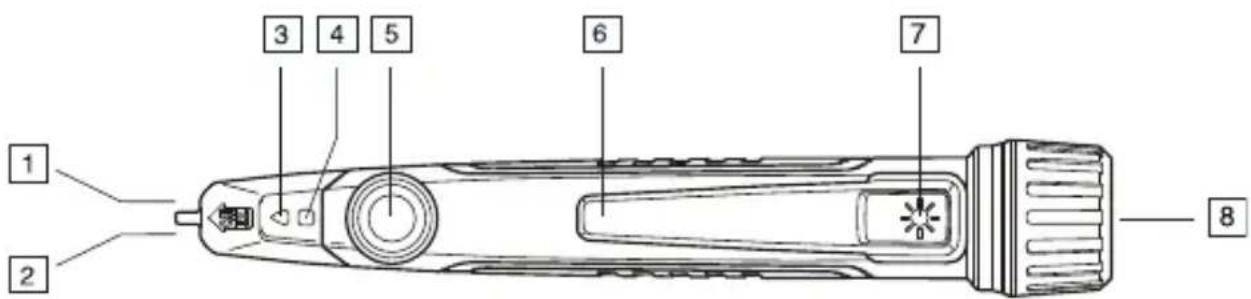
Figure 4.1 Meter parts
- AC voltage sensor.
- Tip light.
- Alarm indicator.
- Status indicator.
- Power button.
- Pocket clip.
- Work light button.
- Work light and cover for battery compartment.
5 Operation
Note
Do not try to repair this unit. There are no user serviceable parts.

WARNING
Do not use the instrument before you have done a test of it on a known circuit. Injury to persons can occur.

WARNING
Do not try to use the instrument as an AC voltage detector if the batteries are weak or bad. This can cause damage to the instrument.

WARNING
Before you use the unit, always do a test of the Voltage Detector on a known live circuit to make sure that it operates correctly. There is a risk of electrocution if you do not do this. Injury to persons can occur.

WARNING
Make sure that you keep your hands and fingers on the body of the probe and away from the probe tip. There is a risk of electrocution if you do not do this. Injury can occur.

WARNING
Do not put the unit near high temperatures or in areas of high humidity. This can cause damage to the instrument.

WARNING
Do not use the unit if it is wet or if there is damage to it. Injury to persons can occur.

WARNING
Do not apply more than the rated voltage between the probe tip and the ground. This can cause damage to the instrument and injury to persons.

WARNING
Do not operate with the case open. Injury to persons can occur.
5.1 Modes
The meter operates in two different modes: Normal mode and High-sensitivity mode. The excitation voltage required to activate the meter alarm is much lower in High-sensitivity mode.
- In Normal mode, the minimum excitation voltage is 90 V AC (FLIR VP50)/190 V AC (FLIR VP52).
- In High-sensitivity mode, the minimum excitation voltage is 24 V AC.
5.2 Basic operation
-
Press and hold the power button for at least 2 seconds to switch on the meter. The meter vibrates briefly and the tip light turns on. The status indicator should be solid green, indicating a proper working condition. If the status indicator is flashing amber through the triangle, replace the batteries. If the status indicator is flashing red, the meter is experiencing a malfunction—contact FLIR Systems for service.
-
Once powered on, press the power button to toggle between High-sensitivity mode and Normal mode.
Note
Test on a known live circuit before testing on an uncertain circuit.
- In Normal mode, the status indicator illuminates a solid green color.
-
In High-sensitivity mode, the status indicator illuminates a solid amber color through the square.
-
Hold the AC voltage sensor very close to the voltage source.
- If voltage is present, the meter vibrates and the alarm indicator flashes.
- In Normal mode, the alarm indicator flashes red.
- In High-sensitivity mode, the alarm indicator flashes an amber color.
- To switch off the meter, press and hold down the power button for at least 2 seconds. The status LED and the tip light turn off.
5.3 Work light
To turn the work light on or off, press and hold the work light button for 2 seconds.
5.4 Indication of low battery level
When the battery voltage falls below 2.4 V DC, the amber status LED starts flashing. After 1 minute of flashing, the meter automatically turns off.
5.5 Auto power off
When using the meter in Normal mode or High sensitivity mode, the meter turns off after 3 minutes of inactivity. Press the power button to prevent the meter from turning off. The auto power off time-out is then reset.
The work light turns off after 30 minutes. This can not be prevented by pressing any button.
6 Maintenance
6.1 Cleaning and storage
Clean the meter with a damp cloth and mild detergent; do not use abrasives or solvents.
If the meter is not to be used for an extended period, remove the batteries and store them separately.
6.2 Battery replacement
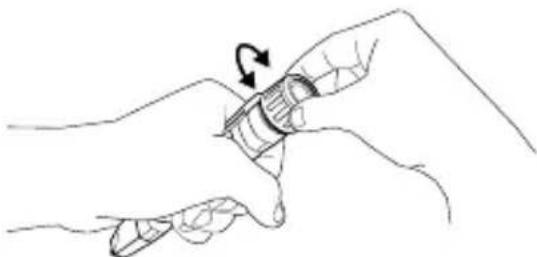
- Switch off the meter before attempting to replace the batteries.
- Unscrew the head of the meter.
natural_image
Line drawing of a hand holding a pen with an arrow indicating rotation (no text or symbols)- Replace the two standard AAA batteries, observing correct polarity.
- Secure the battery compartment cover.
7 Technical specifications
7.1 System specifications
| Dimensions 29 mm × 26 mm × 156 | mm(1.1" × 1.0" × 6.1") |
| Weight 0.20 kg (0.44 lb), including batteries | |
| Battery life 7 hours continuous with | the work light off |
| Battery type 2 × AAA (LR03) | |
| Agency approvals CE, UL/cUL | |
| FLIR VP50 excitation voltage 90 V | AC minimum |
| FLIR VP52 excitation voltage 190 V | AC minimum |
| Voltage ranges 90 to 1000 V (FLIR | VP50)190 to 1000 V (FLIR VP52)24 to 1000 V in high sensitivity mode (FLIR VP50 and FLIR VP52) |
| Detection distance 0 to 5 cm | |
| Category rating | CAT IV-1000 V |
| Frequency range | 45 - 65 Hz |
| Built-in work light | Yes |
| Vibrating indication | Yes |
| Off switch | Yes |
7.2 Environmental specifications
| Operating temperature | 0°C to 60°C (-32°F to 140°F) |
| Storage temperature | -40°C to 90°C (-40°F to 194°F) |
8 Technical support
| Website http://www.flir.com/test | |
| Technical support T&MSupport@flir.com | |
| Repairs Repair@flir.com |
9 FLIR Limited Lifetime Warranty
See http://support.flir.com/warranty for the FLIR Limited Lifetime Warranty that applies to this product.
A note on the technical production of this publication
This publication was produced using XML — the eXtensible Markup Language. For more information about XML, please visit http://www.w3.org/XML/
A note on the typeface used in this publication
This publication was typeset using Linotype Helvetica™ World. Helvetica™ was designed by Max Miedinger (1910–1980)
LOEF (List Of Effective Files)
T501023.xml; en-US; AD; 9134; 2013-09-25
Corporate Headquarters
FLIR Systems, Inc.
27700 SW Parkway Ave.
Wilsonville, OR 97070
USA
Telephone: +1-503-498-3547
Website
http://www.flir.com
Customer support
http://support.flir.com
Publ. No.: T559851
Release: AD
Commit: 9134
Head: 9134
Language: en-US
Modified: 2013-09-25
Formatted: 2013-09-25

- User's manual FLIR VP50/VP52
- Table of contents
- Disclaimers...
- Safety information....2
- Introduction 5
- Description 6
- Operation....7
- Maintenance....10
- Technical specifications ....
- Technical support ....12
- FLIR Limited Lifetime Warranty ....
- Copyright
- Quality assurance
- Documentation updates
- Disposal of electronic waste
- Safety information
- Note
- WARNING
- CAUTION
- Introduction
- Description
- Meter parts
- Operation
- Modes
- Basic operation
- Work light
- Indication of low battery level
- Auto power off
- Maintenance
- Cleaning and storage
- Battery replacement
- Technical specifications
- Technical support
- FLIR Limited Lifetime Warranty
- A note on the technical production of this publication
- A note on the typeface used in this publication
- LOEF (List Of Effective Files)
- Corporate Headquarters
- Website
- Customer support
Brand : FLIR
Model : VP52
Category : Detector