
Innkeeper 2 - Hi-Fi System JK Audio - Free user manual and instructions
Find the device manual for free Innkeeper 2 JK Audio in PDF.


| Product Type | Digital Hybrid for analog telephone lines |
| Brand | JK Audio |
| Model | Innkeeper 2 |
| Dimensions (H x W x D) | 1.75 x 7.3 x 19 in (4.5 x 18.6 x 48.3 cm) |
| Weight | 7.2 lb (3.2 kg) |
| Power Supply | Internal, 100-240 VAC, 50-60 Hz, 0.8 A |
| Power Cord | Detachable North American power cord included |
| DSP Technology | 16-bit digital signal processor |
| Auto-Answer | Switchable on/off per line, selectable ring count |
| Auto Null Algorithm | Proprietary, achieves >50 dB trans-hybrid loss |
| Conferencing | 2-line conference (Innkeeper 2 only) |
| Test Tone Generator | 1 kHz tone for line and output jacks |
| Display | Backlit LCD, 2x20 characters |
| Keypad | Alpha-numeric with multi-tap for text entry |
| Phone Book | 50 entries, speed dial, 20-digit max per entry |
| Call History | Stores up to 16 numbers |
| Audio Inputs | Balanced female XLR: 20 kΩ impedance, -4 dBu nominal, +10 dBu max; Master Send (XLR) and 2 Send inputs |
| Audio Outputs | Balanced male XLR: 200 Ω impedance, -4 dBu nominal, +10 dBu max; 2 Caller outputs |
| Phone Line Connection | RJ11C, single line analog telephone line |
| Aux Phone Jack | RJ11C for call setup/dialing |
| Monitor Handset Jacks | Front panel, for electret handset (not included) |
| Remote Control | RS-232 via DB9 on included RIU, or optional RIU-IP web interface |
| Screw Terminal Block | 10-pin for remote off-hook/on-hook control and status per line |
| Frequency Response | 160 Hz - 3400 Hz ±3 dB |
| Total Harmonic Distortion | 0.4% THD @ 12 dBu |
| Signal-to-Noise Ratio (No Caller) | 92 dB |
| Signal-to-Noise Ratio (During Call) | 49 dB |
| Isolation | 1500 VAC |
| Ringer Equivalence Number (REN) | 0.8B |
| Operating Temperature | -20°C to +40°C |
| Warranty | 1 year limited (defective workmanship/materials) |
| Cleaning | Use only a soft dry cloth |
| Safety | Do not expose to rain or moisture; use only No. 26 AWG or larger telecom line cord; do not defeat grounding plug |
Frequently Asked Questions - Innkeeper 2 JK Audio
User questions about Innkeeper 2 JK Audio
0 question about this device. Answer the ones you know or ask your own.
Ask a new question about this device
Download the instructions for your Hi-Fi System in PDF format for free! Find your manual Innkeeper 2 - JK Audio and take your electronic device back in hand. On this page are published all the documents necessary for the use of your device. Innkeeper 2 by JK Audio.
USER MANUAL Innkeeper 2 JK Audio

innkeeper 2/4™
Digital Hybrid
User Guide
Welcome
Thank You
Thank you for purchasing a JK Audio innkeeper 2/4 Digital Hybrid. Please read this guide for instructions on setting up and using your new product.
Getting Assistance
If you have technical or application questions,
call us M-F: 8:30am-5:00pm (CT)
In the US & Canada (Toll-Free)
800-552-8346
All other countries:
815-786-2929
Email us at:
support@jkaudio.com
Or check out our FAQ section for answers to common questions.
Warnings & Safety Precautions
- Read and keep these instructions.
- Follow all instructions.
- Clean only with a soft dry cloth.
- Refer all servicing to qualified service personnel.
- Heed all warnings.

Warning: Do not install near any heat sources such as radiators, heat registers, stoves, or other apparatus (including amplifiers) that produce heat.

Warning: Do not defeat the safety purpose of the three-prong grounding type plug. If the provided plug does not fit into your outlet, consult an electrician for replacement of the obsolete outlet.

Warning: Do not use this unit if the electrical power cord is frayed or broken. The power cord should be routed so that it is not likely to be walked on or pinched by items placed upon or against it.

To reduce the risk of fire: Use only No. 26 AWG or larger telecommunication line cord.

To reduce the risk of fire or electric shock: Do not expose this apparatus to rain or moisture.
Contents
| Overview 1 | |
| Getting to know your innkeeper 2/4 | |
| 2 Controls & Indicators | 2 |
| 4 Inputs & Outputs | |
| Screw Terminal Block | 5 |
| Getting Connected | 6 |
| Menu Navigation | 8 |
| Serial Port Interface | 10 |
| Conference | 12 |
| Optional Remote Control 13 | |
| FAQs 14 | |
| Technical Information 15 | |
Limited Warranty
The innkeeper 2/4 is covered by a 1 year warranty to be free from defective workmanship and materials. To obtain service, contact JK Audio by phone or email for return authorization. Once authorized, you will carefully pack and ship the faulty product and all accessories to us. You will pay for shipping to us and we will pay for return back to you.
This warranty does not cover damages due to accident, weather, fire, flood, earthquake, misuse, unauthorized repairs or modifications, or damages occurred in shipping, only defective workmanship or materials.
There are no expressed or implied warranties which extend beyond the warranty here made.
Features
Features
| 16 bit DSP Technology |
| Auto-Answer (Switchable On/Off) |
| Proprietary Auto Null Algorithm (50 dB null) |
| Conferencing (innkeeper 2 only) |
| 1 kHz Tone Generator |
| Menu with Backlit LCD Display |
| Alpha-Numeric Keypad |
| Memory/Speed Dial |
| Send XLR Line Inputs (2/4) |
| Master Send XLR |
| Caller XLR Line Outputs (2/4) |
| Monitor Handset Jacks |
| Remote Control via RS-232 |
| RIU-IP Remote IP Interface |
| Send and Caller Signal Level LEDs |
| Send and Caller Volume Controls |
What's in the Box?
| Detachable North AmericanPower Cord |
| Remote Interface Unit |
| Flat RJ50 Cable | ||
| RJ11 Phone Cords | inn2 | inn4 |
| 2 | 4 | |
Introducing the innkeeper 2/4™
Innkeeper 2 and innkeeper 4 will allow you to send and receive audio over analog telephone lines. While this may seem like a simple task that any telephone can do, the challenge is getting the best quality audio from such a miserable audio path.
What is a Digital Hybrid?
The innkeeper 2/4 digital hybrids connect audio signals to a standard analog telephone line without the variations in quality found with analog hybrids. The main function of a hybrid is to bring in the caller's voice from the phone line as clear and clean as possible. In the real world, when you send your voice down the telephone line it has a tendency to bleed over into the caller's audio. The hybrid must adapt to the phone line in order to properly separate transmit and receive audio. We use a 16 bit DSP (Digital Signal Processor) to continuously monitor the phone line and local audio signals to deliver excellent trans-hybrid loss, also known as separation. Our dual-convergence algorithm can achieve excellent separation, typically exceeding 50 dB.
Ready to go?
The innkeeper 2/4 controls and connectors are clearly marked and ready for operation. If this is your first exposure to a hybrid, we suggest that you read the entire manual to allow you to take advantage of all these features.
Any Questions?
Before you pick up the phone... Please thumb through the rest of this manual. You might find those deep technical questions are covered on later pages.
Getting to Know Your innkeeper 2/4
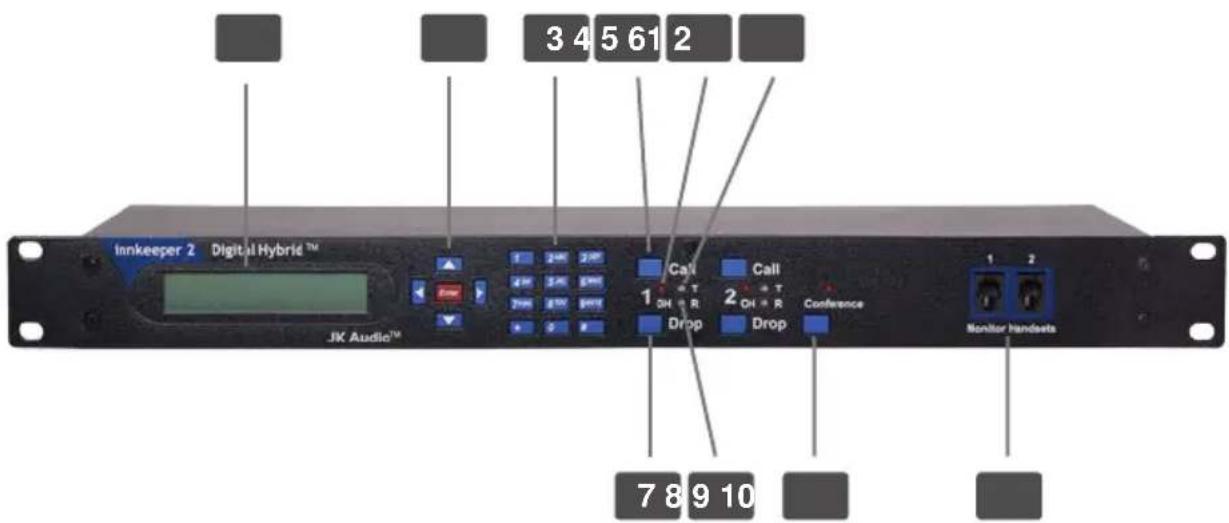
Controls & Indicators
1. Menu Display
Backlit LCD, 2x20 characters.
2. Directional Control Pad
Navigate the menu. Press
3. Numeric Keypad
Manually enter menu selection codes or dial a number when a line is off-hook.
4. Call Buttons
Takes the corresponding line off-hook; press this button to answer a call, dial the number displayed from the Phone Book or direct a call from your aux phone through the hybrid.
5. OH LED
Lit when the corresponding line is off-hook or on line with a call. Also functions as a ring indicator and will flicker when ring voltage is present on the corresponding phone line.
6. Transmit LED
Bi-color Transmit LED will light green when audio is being sent down the corresponding phone line at -20 dB or greater signal level.
LED will change to red to indicate clipping at -3 dB.
7. Drop Buttons
Press this button to drop (hang up) a call or place the corresponding phone line on-hook.
Indicators Cont'd
8. Receive LED
Bi-color Receive LED will light green when audio is received from the corresponding phone line at -20 dB or greater signal level.
LED will change to red to indicate clipping at -3 dB.
9. Conference Button
Conference lines 1 & 2 together when both lines are off-hook.
This feature is available on innkeeper 2 only.
10. Monitor Handset Jacks
Connect an Electret type handset for communication on the corresponding phone line.
Transmit Signals
The goal is to drive the phone line at high enough levels to avoid phone line noise, but not so loud as to cause excessive clipping. Adjust your
Receive Signals
The innkeeper 2/4 menu will allow you to adjust individual Caller output levels in 1 dB increments over a +/-10 dB range to give you the best signal level at your equipment. The Caller level control in the menu will not change what you see on the Receive LED.
Auto-Answer
The Auto-Answer feature can be activated through the innkeeper 2/4 menu. You may select which phone lines will have auto-answer enabled as well as how many rings before autoanswer. When Auto-Answer is enabled, you can still take calls manually using the call button. When finished, you can either drop the call manually or allow the call to auto-disconnect. Innkeeper 2/4 will look for a CPC disconnect signal or ROH message from the phone company to determine when a call has disconnected. This can take up to a minute.
Getting to Know Your innkeeper 2/4
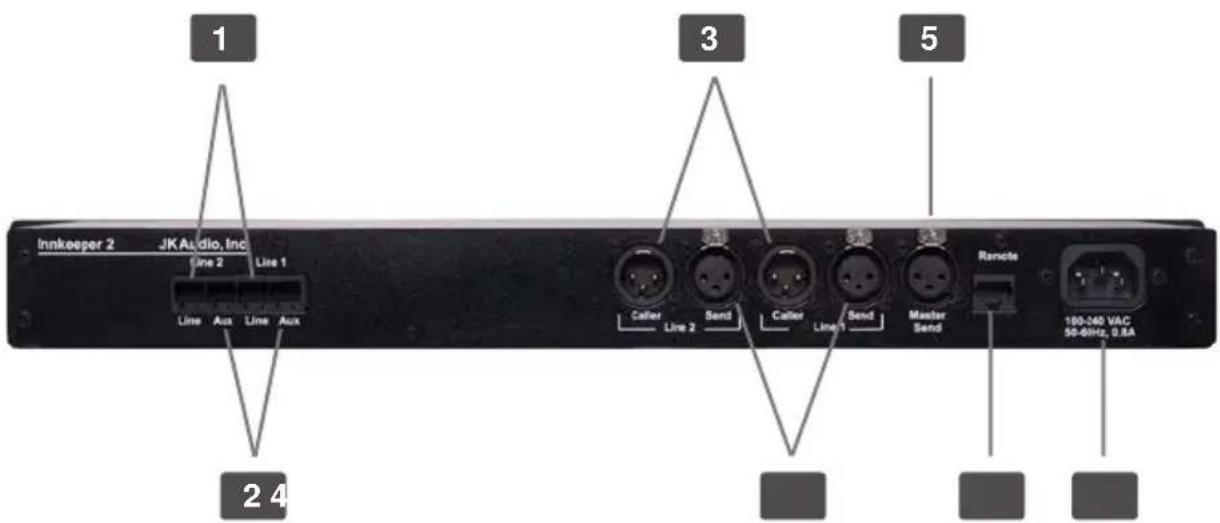
Inputs & Outputs
1. Phone Line
Connect to a standard, single line, analog telephone line.
2. Aux Phone
Connect a single line analog telephone for call setup / dialing, or producer call screening. Telephones connected will only work with the corresponding phone line.
3. Caller Output
Male balanced line level XLR output contains only the callers voice from the corresponding phone line.
4. Send Input
Female balanced line level XLR input for signals going into the corresponding telephone line. Mic or line level input.
5. Master Send
Female balanced line level XLR input sends audio to any or all of the phone lines based upon controls set within the menu.
6. Remote Control Jack
10 pin RJ-50 modular jack for connection to:
A. JK Audio RIU Remote Interface (Included). See page 5.
B. JK Audio RIU-IP Remote Interface. See page 13.
C. JK Audio Concierge Switch Core (Not compatible with innkeeper 4.)
7. Power Jack
Universal AC power input for 100-240 Volt, 50-60 Hz supply current.
Remote Interface Unit
The 10 pin RJ-50 jack on the back of the innkeeper 2/4 provides a proprietary connection to the supplied Remote Interface Unit (RIU). The RIU has a Screw Terminal Block (see below) and a DB9 RS-232 serial port (see page 10). A flat RJ50 cable is included to connect the RIU to the innkeeper 2/4.
Screw Terminal Block
The Screw Terminal Block includes an Off-Hook signal pin and a Call/Drop control pin for each phone line channel. The OH signal pin is current limited to 50 mA, 5 VDC. The control pin toggles the corresponding phone line off-hook/on-hook with a connection/break from ground.
This terminal block was designed to allow remote off-hook/on-hook control and status for each phone line. The innkeeper 2 model also provides on/off control and status for the Conference feature. Use only the included RJ-50 cable to connect the RIU to the
Connecting the Line OH Control pin to the Ground pin will take the line off-hook, breaking this contact will release the line and disconnect the call.
The OH Status pin will provide 5V, 50mA current when the corresponding line is off-hook. You can use this pin to drive a relay, light an LED, etc.
Terminal Block Pinout
| 1 2 3 | 4 5 6 7 | 8 9 10 | |||||||
| GRD L | 1-ST L1-CNT | L2-ST L2-CNT | L3-ST L3-CNT | L4-ST L4-CNT | GRD |
Terminal Description
| 1: Ground |
| 2: Line 1: OH Status Signal |
| 3: Line 1: OH Control |
| 4: Line 2: OH Status Signal |
| 5: Line 2: OH Control |
| 6: Line 3: OH Status Signal |
| 7: Line 3: OH Control |
| 8: Line 4: OH Status Signal |
| 9: Line 4: OH Control |
| 10: Ground |
Getting Connected
Setting Up
Although each application will require a slightly different setup, following is a general cable connection setup and explanation.
Note: The following steps apply to both innkeeper 2 and innkeeper 4
- Connect the supplied RJ-11 phone line cable(s) between the jack marked
and your wall jack(s). Be sure this jack supports standard single line analog telephone operation. The innkeeper 2/4 will not work with "dry pair" phone line connections. - You may want to connect an auxiliary telephone to the innkeeper 2/4
jack so you can dial out and set up calls.
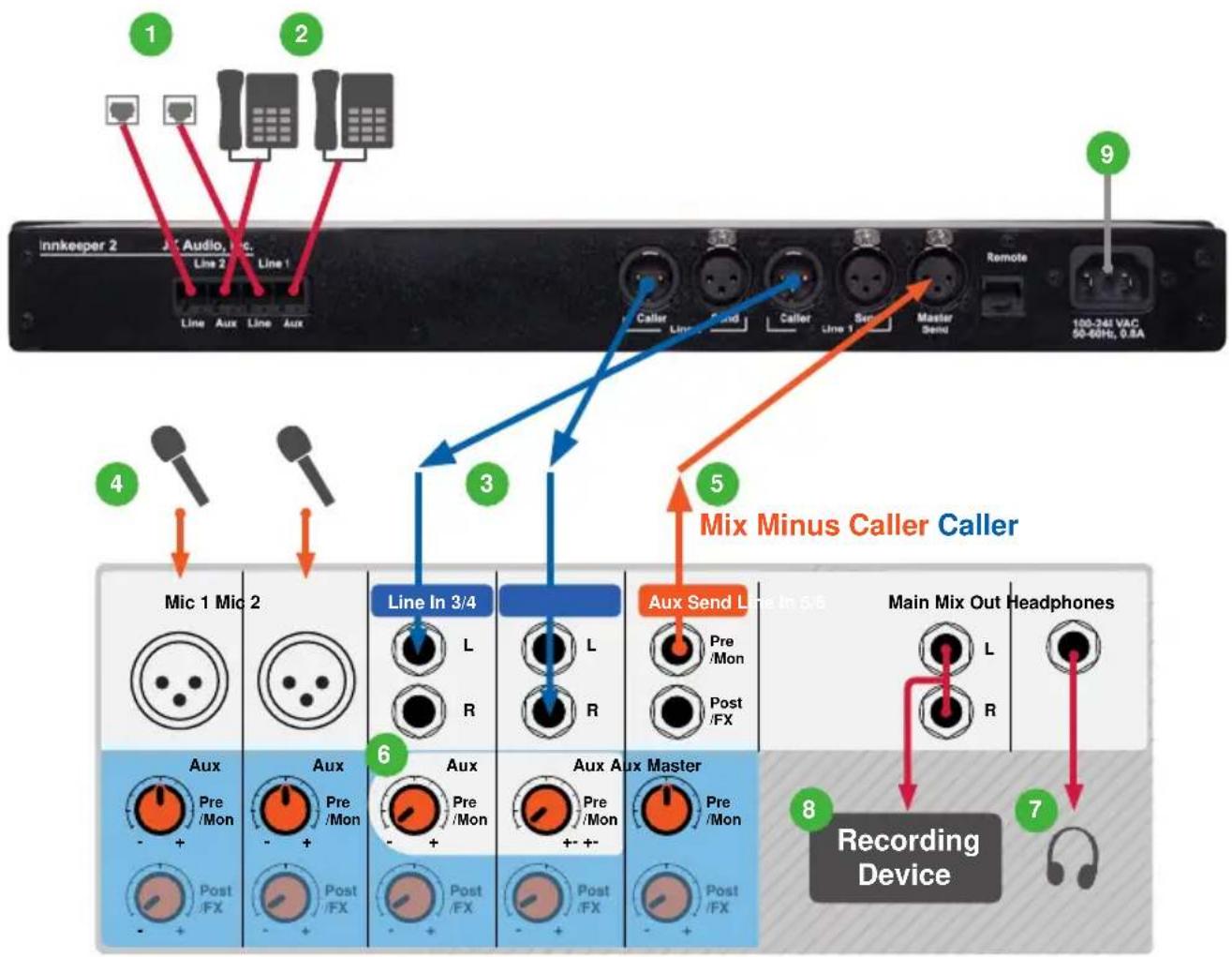
Connecting to a Mixer (Mix Minus Caller)
Note: A mix-minus signal is an audio signal that contains a mix of your local microphones plus any other audio, minus the Caller's own voice. Sending the Caller's audio back to the Broadcast Host will cause an echo, or feedback.
- Connect the innkeeper 2/4
output(s) to any Line input(s) on the mixer. Local audio and audio from alternate phone lines will not be present on these jacks.
Note: innkeeper 2 has the ability to send isolated caller audio, mixed caller audio, or mixed caller and local audio from the Caller XLR depending on selections made in the Conferencing menu.
-
Connect your microphone(s) to the mic inputs on your mixer.
-
Connect the mixer's Mix-Minus bus or Aux Send output (this may be labeled FX or Mon but any Aux bus will work) to the
input on innkeeper 2/4.
Note: Audio will be sent down either or both phone lines based upon your selections in the menu. Each caller output jack will contain audio only from its corresponding phone line. If the
- If your mixer doesn't have a mix-minus bus: Whichever input channel you have the
connected to, turn the corresponding Aux control to minimum. All Aux controls for other channels should be set for audio sent to the phone line. Each Aux Send bus is completely separate from all other outputs, so these Aux controls will not affect what is heard on the Main outputs or on any other Aux buses.
Tip: Using an Aux Send bus that is Pre-Fader allows you to control the levels of each channel to the main output without affecting what is sent to the phone line.
- Connect your headphones to the mixer.
- Use Main Outputs to send audio to recording device or broadcasting equipment inputs.
Getting Connected
flowchart
graph TD
    A["1: Inkeeper 2 Audio, Line 1"] --> B["Line 2"]
    B --> C["Aux"]
    C --> D["Line 1"]
    D --> E["Aux"]
    E --> F["Line In 3/4"]
    F --> G["L R"]
    G --> H["Aux"]
    H --> I["L R"]
    I --> J["Aux"]
    J --> K["Aux"]
    K --> L["Main Mix Out Headphones"]
    L --> M["L R"]
    M --> N["Recording Device"]
    style A fill:#f9f,stroke:#333
    style N fill:#ccf,stroke:#333
Completing Setup
- Connect the supplied AC cable to an AC power outlet.
Auxiliary Telephone
An auxiliary telephone provides you with an easy way to dial out or set up your calls. innkeeper 2/4 will disconnect the auxiliary telephone when you press the
To use an auxiliary phone equipped with a "Hold" feature to place or screen a call, first set up the call and place the call on hold. When you are ready to take the call on innkeeper 2/4, press the
Your phone will operate as a normal telephone anytime you are in Drop mode. Leaving the hybrid connected between the wall jack and your telephone will not affect normal use of your phone. Audio will only pass through the hybrid when you press the
Menu Navigation
Backlit Menu Display and Controls
The innkeeper 2/4 menu is controlled by the directional arrows, alpha numeric keypad and
Phone Book (1) A 50 entry name and number phone book for storing speed dial numbers. Each entry only has a maximum of 20 digits.
Phone Book View (1,1) Allows you to view name and phone numbers of added entries. You may dial the selected entry from this menu by simply pressing the Call button on any phone line.
Phone Book Add Entry (1,2) You may add new entries from this menu. After pressing
See page 10 for multi-tap key legend.
Phone Book Delete Entry (1,3) Entries may be deleted individually from this menu. You will be prompted to confirm delete of an entry.
Phone Book Clear (1,4) Press enter from this menu to clear all phone book entries. You will be prompted to confirm your intent to clear the entire phone book before deletion.
Call History (2) Calls you place will automatically be entered into the Call History menu. The Call History menu will hold up to 16 numbers.
Call History View (2,1) Allows you to view name and phone numbers of automatically added entries. You may dial the selected entry from this menu by simply pressing the
Call History Clear (2,2) Press
Config. (3) This menu allows you to control Auto-Answer, Auto-Disconnect, Audio Levels, Master Send, Calibration and Restore Factory Default or Custom Settings.
Config. Auto-Answer (3,1) Here you can configure Auto-Answer.
Config. Auto-Answer On/Off (3,1,1) This menu allows you to turn Auto-Answer on and off for each line independently or for all lines.
Config. Auto-Answer Ring Count (3,1,2) Select the number of rings before the unit auto-answers on each line individually or on all lines.
Config. Audio Levels (3,2) Audio levels for each phone line input and output can be set here. The Audio Levels menu allows you to adjust levels of audio in 1dB increments over a +/- 10dB range. You may adjust the levels of the Send inputs as well as the Caller outputs.
Config. Audio Levels Send (3,2,1) Send input levels can be set for each line individually or all lines. These settings affect the independent Send input as well as the Master Send for the selected line(s).
Config. Audio Levels Caller (3,2,2) Caller output levels can be set here for each line independently or all lines.
Config. Master Send (3,3) This menu gives you the ability to turn the Master Send on or off for each line individually or all phone lines.
Config. Calibration (3,4) Here you can send a 1kHz test tone down the phone line(s) and the output jacks. You may turn the tone on or off for each line individually or for all lines. This is not required for setting the null. This tone is only for your convenience in setting your equipment audio levels.
Conference (3,5) innkeeper 2 Only This menu allows you to configure settings for the Conference feature. (see page 11).
Conf. Send Mix Mode (3,5,1) innkeeper 2 Only Configure the Send Mix Mode to "Send Mix" default or "No Mix" (page 11).
Conf. Caller Mix Mode (3,5,2) innkeeper 2 Only Configure the Caller Mix Mode to "No Mix" default, "Caller Mix" or "Full Mix Minus" (page11).
Config. Presets (3,6) With this menu you can save and restore custom presets or reset the unit to factory default presets.
Config. Presets - Default (3,6,1) Here you may restore factory default presets. You will be prompted to confirm Factory Reset after selecting thisoption.
Config. Presets - Custom (3,6,2) Here you may save and restore custom presets based upon your current configuration.
Menu Navigation
Multi-Tap Key Legend
These character sets are active only when entering the Name of your phone book entry. While entering the phone number you will not have access to alpha characters.
| Control Keys: < Clear last character | |
| > Next/Accept current character | |
| * Shift (press before each uppercase entry) | |
| # Space | |
| Character Keys: 1 . @ ? ! - / , & : | | |
| 2 a b c 2 | |
| 3 d e f 3 | |
| 4 g h i 4 | |
| 5 j k l 5 | |
| 6 m n o 6 | |
| 7 p q r s 7 | |
| 8 t u v 8 | |
| 9 w x y z 9 |
ASCII Command Remote Control
The ASCII commands listed on the following page can be entered through the serial port on your computer by using the DB9 connector on the RIU.
Any terminal emulation program on your computer, such as HyperTerminal, can be accessed using these parameters:
| Baud Rate Data Bits Stop Bits | Parity | Flow Control | |
| 9600 | 8 | 1 | None |
All commands begin with the '/' character, and will be automatically executed on next '/' or
The line number is set to '1' by default and is changed by using the 'Lx' parameter with the specified control command.
x = Specifies the line number (1 to 4).
v = Parameter value for the command.
s = Digit string used in manual dialing mode (up to 20 digits).
Status information is automatically returned during incoming state changes for the specified line number for the following line conditions: on-hook, off-hook, incoming ring, and line hold.
Serial Remote Control Commands
| Command Name v Parameter / Description | |||
| /? Help | Returns command help menu to user screen. | ||
| /AT or // Version | Returns product version and status. | ||
| /BRv Baud RateControl | v = 09600Requires firmware v3.4 or later.v = 1115.2k | ||
| /CF Configuration Returns product series type and option configuration. | |||
| /LxST | Line State | Returns state information for line 'x'.On-hook = 0, Off-hook = 1, Ring = 2 | |
| Esc Escape Clears / escapes current command before execution. | |||
| /VBn(+) VerboseMode | v = 0OFFEcho Off & Unsolicited Responses Off.v = 1LEVELEcho Off & Abbrev. Responses Active.v = 2LEVEL 2Echo On & Expanded Responses Active.v = 3MAX ONEcho On & All Responses Active.v = +Turns On Line Termination Char /'. | ||
| /LxCL Call Line | Off-hook line control for each line. | ||
| /LxDR | Drop Line | On-hook line control for each line. | |
| /LxAAv | Auto-Answer | v = 0OFFTurns Auto-Answer Off for each line.v = 1ONTurns Auto-Answer On for each line. | |
| /LxARv | Ring Count | Set auto-answer ring count for each line. | |
| /LxHDv | Line Hold | Place line on hold or release line. | |
| /LxSLv | Send Level | Set send audio level for specified line from -10 to +10dBu. | |
| /LxRLv | Receive Level | Set receive audio level for specified line from -10 to +10dBu | |
| /LxDls | Dial | Take line off-hook and dial phone number. | |
| /LxMSv | Master Send | Activate/deactivate master send for each line. | |
| /LxTTv | Test Tone | v = 0OFFTurns Test Tone Off.v = 1SENDTransmit 1 kHz tone into phone line.v = 2RECEIVETransmit 1 kHz tone to Caller XLR. | |
| /LxFL | Flash Hook | Flash hook | |
| • Conference feature only available on innkeeper 2 • | |||
| /CNv | Conference | v = 0OFFDeactivate conference mode.v = 1ONActivate conference mode. | |
Conference (innkeeper 2 Only)
innkeeper 2 Conference
One press of the
innkeeper 2 Advanced Conference Options
The factory default conference mode provides both callers with a mix of Line 1
Send Mixes
A. Send = Mixed (default)
Line 1
B. Send = Not Mixed
Line 1
Receive Mixes
A. Caller = No Mix (default)
Caller 1's voice/audio will only be on the Line 1
B. Caller = Caller Mix
Callers 1 and 2 voice will be mixed on both
C. Caller - Full Mix Minus
A full mix of all audio on each of the caller XLR outputs, minus the
Optional Remote Interface
RIU-IP (Sold Separately)
This remote control interface was designed for use with innkeeper 1rx as well as JK Audio innkeeper 2 and innkeeper 4 digital hybrids. This unit contains a web server which allows the user to send and receive control data through their web browser. RIU-IP can be connected to the user's computer NIC card for direct control, to a switch or hub for network control, or to an Ethernet port with internet access for control from anywhere in the world.
RIU-IP Features and capabilities when used with innkeeper 2/4:
- RJ-45 Ethernet port
• RS-232 remote control port with simple ASCII protocol
• No external power required - Indication of incoming ring per line
- On-Hook and Off-Hook
- Place call on hold or release hold.
- Dial (number) (line).
-
Auto-Answer: On / Off, set ring count
-
Test tone start / stop per line
• Audio level - Send and Receive - Master Send on/off
- Phone Book updates
• Conference Mode on/off (innkeeper 2 only)
FAQs
FAQs
- Can I plug a mic into one of the female XLR jacks?
No, these are Line-Level inputs only.
- How do I adjust signal levels?
Use menu settings to change input and output levels ±10dB .
- How do I know what firmware my innkeeper 2/4 is running on and how can I update it?
Contact support@jkaudio.com for possible firmware updates.
- What happens to the phone connection if power is momentarily interrupted?
FCC and International telecom rules require that we drop the connection if power is lost for any period of time. We strongly suggest that you use a low cost, computer style UPS system if uninterrupted service is required.
- Does the innkeeper 2/4 use a line polarity reversal to drop a call automatically?
No, innkeeper 2/4 does not use line polarity reversal as means of dropped-call detection.
- I want to store an entry for a conference call that has a passcode. I can enter the number into the Phone Book but it is not dialing correctly. Why won't it dial the number entered?
Each entry only has a maximum of 20 digits.
The Phone Book will allow you to enter more than the 20 digits maximum displayed in the LCD when storing a number. However, only the digits displayed in the LCD are what the INN2/4 will dial.
- I mistakenly called the wrong Phone Book entry. As the number was dialing, the Drop button would not drop the line. Is there a way to cancel the dialing process?
No, the buttons on the innkeeper 2/4 are unresponsive until the unit finishes dialing the number. Once the number has been dialed completely, the innkeeper's controls become responsive again.
Specifications
Input Impedance / Level
| Balanced Female XLR: | 20k ohms /500 mV RMS; -4 dBu nom.; +10 dBu max |
| Output | |
| Balanced Male XLR: | 200 ohms / 500 mV RMS; -4 dBu nom.;+10 dBu max; Caller Only |
| Handset: | Front panel handset jacks biased forelectret handset (not included) |
| Misc | |
| Distortion: 0.4% THD @ 12 dBu | |
| Frequency Response: 160 Hz - 3400 Hz (+/- 3 dB) | |
| S/N Ratio (No Caller): 92 dB | |
| S/N Ratio (During Call): 49 dB | |
| Phone Line: RJ11C | |
| Aux Phone: RJ11C | |
| Ringer: 0.8B REN | |
| Impedance: 600 ohms nom. | |
| Isolation: 1500 VAC | |
| Remote Control: | ASCII RS-232 (DB9) |
| Screw Terminal I/O | |
| IP Web Server (optional) | |
| Recommended Operating Temperature: | -20°C to +40°C |
| Power: 120-240 VAC 50-60 Hz power supply (internal) | |
| Size: 1.75" x 7.3" x 19" (4.5 x 18.6 x 48.3 cm) | |
| Weight: 7.2 lbs (3.2 kg) | |
Block Diagram
Block Diagram
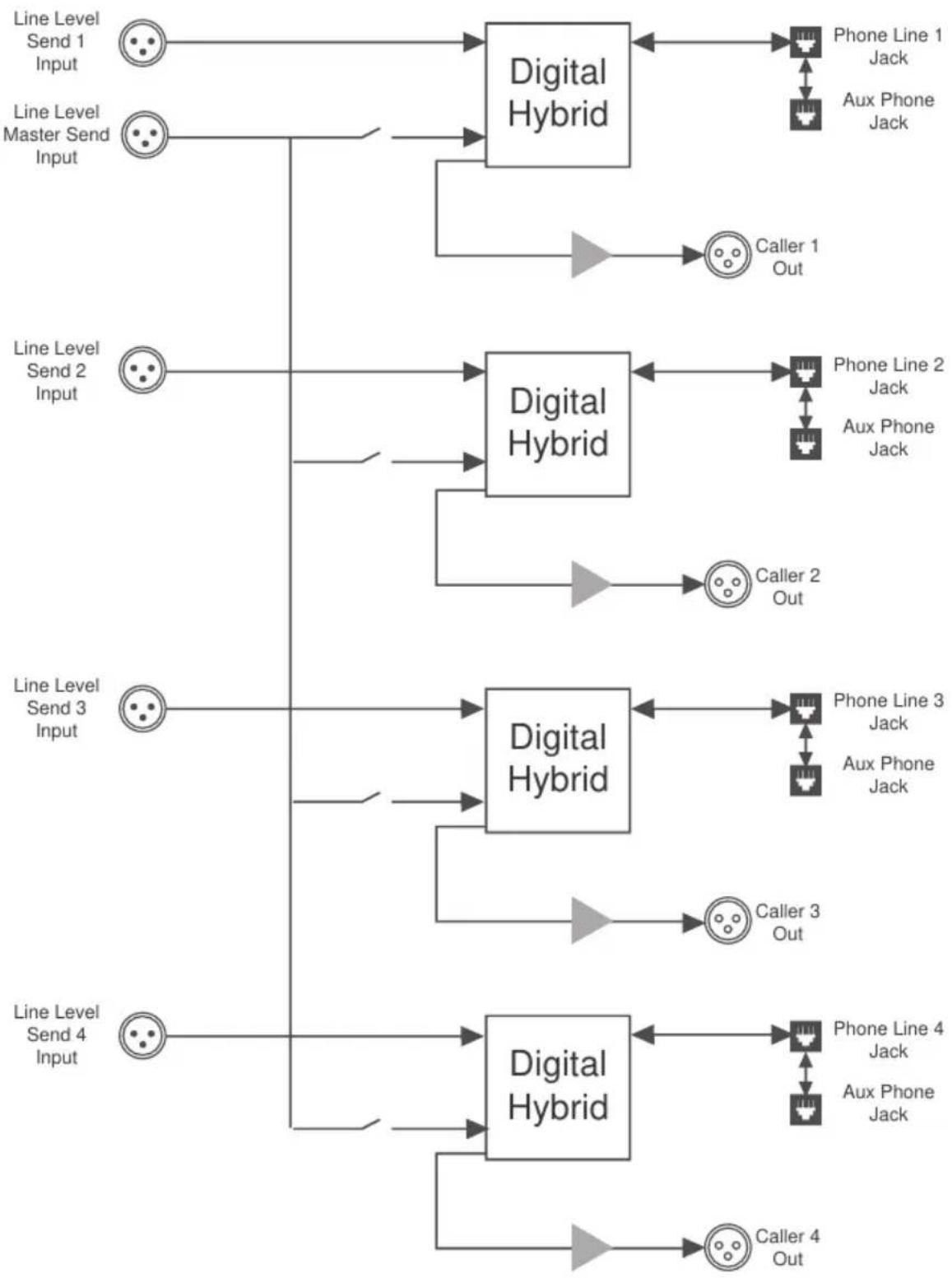
flowchart
graph TD
    A["Line Level Send 1 Input"] --> B["Digital Hybrid"]
    C["Line Level Master Send Input"] --> B
    D["Line Level Send 2 Input"] --> E["Digital Hybrid"]
    F["Line Level Send 3 Input"] --> G["Digital Hybrid"]
    H["Line Level Send 4 Input"] --> I["Digital Hybrid"]
    B --> J["Phone Line 1 Jack"]
    B --> K["Aux Phone Jack"]
    E --> L["Phone Line 2 Jack"]
    E --> M["Aux Phone Jack"]
    G --> N["Phone Line 3 Jack"]
    G --> O["Aux Phone Jack"]
    I --> P["Phone Line 4 Jack"]
    I --> Q["Aux Phone Jack"]
    J --> R["Caller 1 Out"]
    K --> S["Caller 2 Out"]
    L --> T["Caller 3 Out"]
    M --> U["Caller 4 Out"]
Declaration of Conformity
| Manufacturer's Name: | JK Audio, Inc. |
| Manufacturer's Address: | 1311 E 6 ^th StreetSandwich, Illinois 60548 USA |
| Declares that the product: | |
| Product Name: | innkeeper 2/4 Two-Line/Multi-Line Digital Hybrid |
| Model Numbers: | innkeeper 2/4 |
| Conforms to the following Product Specifications: | |
| Safety: | EN 60950 / AS/NZS 60950:2000CAN/CSA-C22.2 No. 60950-01-03 |
| ESD: | EN 55024:1998; EN 61000-3-2; EN 61000-3-3 |
| Emissions: | EN 55022:1998AS/NZS CISPR 22 (2002)FCC Part 15, Subpart BICES-003 |
| Telecom: | AS/ACIF S002:2001FCC CFR 47, Part 68 |
| The product herewith complies with the requirements of the following Directives and carries the CE marking accordingly: | |
| LVD 2006/95/EC (Safety)R&TTE 1999/5/EC (Telecom)EMC 89/336/EEC (EMC)RoHS Directive 2015/863 | |
| The Technical File containing supporting documentation is maintained at: | |
| JK Audio, Inc (Corporate Headquarters)Compliance Manager1311 E 6th StreetSandwich, Illinois 60548 USA815-786-2929 phone815-786-8502 fax | |
FCC Registration
FCC Registration
Your new JK Audio product has been registered with the Federal Communications Commission (FCC). This product complies with the standards in Part 68 of the FCC rules.
1. Connection and use with the nationwide telephone network
The FCC requires that you connect this telephone equipment to the national telephone network through a USOC RJ-11C modular telephone jack. This equipment may not be used with Party Line Service or Coin Telephone Lines. This equipment is hearing aid compatible.
2. Information for the telephone company
Upon request from your local telephone company, you are required to provide the following information:
A. The "line" to which you will connect the telephone equipment (that is, your telephone number), and
B. The telephone equipment's FCC registration number. This can be found on the bottom of your telephone equipment, and,
C. The ringer equivalence number (REN) for this equipment. The REN is used to determine the quantity of devices which will be connected to the telephone line. Excessive RENs on the telephone line may result in the devices not ringing in response to an incoming call. In most, but not all areas, the sum of the RENs should not exceed 5.0. To be certain of the number of devices that may be connected to the line, as determined by the total RENs, contact the local telephone company.
3. Repair Instructions
If it is determined that your telephone equipment is malfunctioning, the FCC requires that it not be used and that it be unplugged from the modular outlet until the problem has been corrected. Repairs to this telephone equipment can only be made by the manufacturer or its authorized agents or by others who may be authorized by the FCC. For repair procedures, follow the instructions outlined under the warranty section of the manual.
4. Rights of the telephone company
If telephone equipment is causing harm to the network, the telephone company may temporarily discontinue your telephone service. If possible, they'll notify you before they interrupt service. If advanced notice isn't practical, you'll be notified as soon as possible. You'll be given the opportunity to correct the problem, and you'll be informed of your right to file a complaint with the FCC. Your telephone company may make changes in its facilities, equipment, operations or procedures that could affect the proper functioning of your JK Audio product. If such changes are planned, you'll be notified by your telephone company.
FCC Part 15 Subpart A Compliance
This equipment has been tested and found to comply with the limits for a Class A digital device, pursuant to Part 15 of the FCC Rules. These limits are designed to provide reasonable protection against harmful interference when the equipment is operated in a commercial environment. This equipment generates, uses, and can radiate radio frequency energy and, if not installed and used in accordance with the instruction manual, may cause harmful interference to radio communications. Operation of this equipment in a residential area is likely to cause harmful interference in which case the user will be required to correct the interference at his/her own expense.
Changes or modifications not expressly approved by JK Audio can void the user's authority to operate the equipment.
innkeeper 2/4™
Digital Hybrid
CE
User Guide Version 4/16/22
JK Audio, Inc.
1311 E 6th St.
Sandwich, IL 60548
United States
Telephone: 815.786.2929
Toll Free: 1.800.jkaudio
Fax: 815.786.8502
www.jkaudio.com
© 2022 JK Audio, Inc. All rights reserved.
- innkeeper 2/4™
- Welcome
- Thank You
- Getting Assistance
- Warnings & Safety Precautions
- Limited Warranty
- Features
- Introducing the innkeeper 2/4™
- What is a Digital Hybrid?
- Ready to go?
- Any Questions?
- Getting to Know Your innkeeper 2/4
- Controls & Indicators
- Menu Display
- Directional Control Pad
- Numeric Keypad
- Call Buttons
- OH LED
- Transmit LED
- Drop Buttons
- Indicators Cont'd
- Receive LED
- Conference Button
- Monitor Handset Jacks
- Transmit Signals
- Receive Signals
- Auto-Answer
- Inputs & Outputs
- Phone Line
- Aux Phone
- Caller Output
- Send Input
- Master Send
- Remote Control Jack
- Power Jack
- Remote Interface Unit
- Screw Terminal Block
- Getting Connected
- Setting Up
- Connecting to a Mixer (Mix Minus Caller)
- Completing Setup
- Auxiliary Telephone
- Menu Navigation
- Backlit Menu Display and Controls
- Multi-Tap Key Legend
- ASCII Command Remote Control
- Conference (innkeeper 2 Only)
- innkeeper 2 Conference
- innkeeper 2 Advanced Conference Options
- Send Mixes
- Receive Mixes
- Optional Remote Interface
- RIU-IP (Sold Separately)
- RIU-IP Features and capabilities when used with innkeeper 2/4:
- FAQs
- Block Diagram
- FCC Registration
- Connection and use with the nationwide telephone network
- Information for the telephone company
- Repair Instructions
- Rights of the telephone company
- FCC Part 15 Subpart A Compliance
Brand : JK Audio
Model : Innkeeper 2
Category : Hi-Fi System