
DFG NF 50K - Multimeter PCE Instruments - Free user manual and instructions
Find the device manual for free DFG NF 50K PCE Instruments in PDF.


| Product Type | Digital Force Gauge (Multimeter) |
| Model | PCE-DFG NF 50K |
| Maximum Force | 0 ... 50,000 N (5,000 kg) |
| Resolution | 0.05 kN |
| Accuracy | 0.1% of full scale |
| Units | N, kg, lb, KPa |
| Display | 2.8" TFT graphical display |
| Sampling Rate | 6 ... 1600 Hz (device), 6 ... 800 Hz (software) |
| Memory | 100 measurements (reports); up to 1 curve saved |
| Alarm Modes | Within, beyond, fracture, off |
| Power Supply | Rechargeable Ni-MH 6V, 1600 mAh battery; Mains adaptor 12 VDC 1A |
| Battery Life | Up to 10 hours continuous use |
| Charging Time | 8 to 10 hours |
| Interfaces | USB, Input/Output port (12 V, 50 mA) |
| Dimensions (Device) | 162 x 82 x 41 mm |
| Weight (Device) | 325 g |
| Load Cell Weight | 92 g |
| Load Cell Material | Stainless Steel 17-4PH, IP 65 |
| Operating Conditions | -10 ... +50 °C; 5 ... 95% RH, non-condensing |
| Protection Class | IP 54 (device) |
| Delivery Contents | Force gauge, dynamometric cell, case, USB cable, mains adaptor, software, user manual, calibration certificate |
| Care and Cleaning | Clean with damp cloth, pH-neutral cleaner. No abrasives or solvents. |
| Safety Notes | Do not use in explosive atmospheres; for impact tests, max measurable value should be twice the impact load; wear mask and gloves during impact tests; do not bend or twist test head. |
| Spare Parts / Repairability | Only qualified PCE Instruments personnel should open the case. Use only PCE Instruments accessories or equivalent. |
| Warranty | See General Business Terms at pce-instruments.com |
| Disposal | Batteries: not household waste; return to collection points. Devices: follow EU directive 2012/19/EU or local regulations. |
Frequently Asked Questions - DFG NF 50K PCE Instruments
User questions about DFG NF 50K PCE Instruments
0 question about this device. Answer the ones you know or ask your own.
Ask a new question about this device
Download the instructions for your Multimeter in PDF format for free! Find your manual DFG NF 50K - PCE Instruments and take your electronic device back in hand. On this page are published all the documents necessary for the use of your device. DFG NF 50K by PCE Instruments.
USER MANUAL DFG NF 50K PCE Instruments
User manuals in various languages (français, italiano, español, português, nederlands, türk, polski, русский, 中文) can be downloaded here:
www.pce-instruments.com
1 Safety notes....14
2 Specifications....15
2.1 Technical specifications ....15
2.2 Delivery contents....17
3 System description....17
3.1 Device....17
3.2 Interfaces....18
3.3 Display....19
3.4 Function keys....20
4 Getting started....20
4.1 Power supply 20
4.2 Settings....21
5 Operation 25
5.1 Measurement....25
6 Maintenance 25
6.1 Storage....25
7 Warranty....26
8 Disposal 26
Please read this manual carefully and completely before you use the device for the first time. The device may only be used by qualified personnel and repaired by PCE Instruments personnel.
Damage or injuries caused by non-observance of the manual are excluded from our liability and not covered by our warranty.
- The device must only be used as described in this instruction manual. If used otherwise, this can cause dangerous situations for the user and damage to the meter.
- The instrument may only be used if the environmental conditions (temperature, relative humidity, ...) are within the ranges stated in the technical specifications. Do not expose the device to extreme temperatures, direct sunlight, extreme humidity or moisture.
- The case should only be opened by qualified PCE Instruments personnel.
- Never use the instrument when your hands are wet.
- You must not make any technical changes to the device.
- The appliance should only be cleaned with a damp cloth. Use only pH-neutral cleaner, no abrasives or solvents.
- The device must only be used with accessories from PCE Instruments or equivalent.
- Before each use, inspect the case for visible damage. If any damage is visible, do not use the device.
- Do not use the instrument in explosive atmospheres.
- ATTENTION: For impact tests, the maximum measurable value of the force gauge should be twice as high as the applied impact load.
- When doing impact tests, wear a mask and protective gloves to avoid injuries.
- Do not use the test stand when it is bent or damaged. Dropping can cause injuries.
- This device only measures tensile and compressive forces. The test head must not be bent or twisted.
• Overloading, excessive impact loads or applied forces other than tensile and compressive forces can cause damage to the sensor.
- Do not press the keys with pointed objects.
- Keep the force gauge away from water, oil and other liquids.
- Store the meter in a cool, dry place without any occurrence of vibration.
- Wire the ports as described in this manual. Non-observance of the instructions can cause circuit failure or problems with your computer.
- Make sure that the mains adaptor is securely connected to the power outlet as otherwise short circuits and thus electric shocks and fire can occur.
- When the battery is fully charged, remove the mains adaptor immediately to avoid overheating, fire or accidents.
- Non-observance of the safety notes can cause damage to the device and injuries to the user.
We do not assume liability for printing errors or any other mistakes in this manual.
We expressly point to our general guarantee terms which can be found in our general terms of business.
If you have any questions please contact PCE Instruments. The contact details can be found at the end of this manual.
Safety symbols
Safety-related instructions the non-observance of which can cause damage to the device or personal injury carry a safety symbol.
| Symbol | Designation / description | |
 | General warning signNon-observance can cause damage to the device and injuries to the user. | |
 | Warning: electrical voltageNon-observance can cause electric shock. | |
2 Specifications
2.1 Technical specifications
| Specification | Value / version | |||
| Model | PCE-DFGNF 0,5K | PCE-DFGNF 1K | PCE-DFGNF 2K | PCE-DFGNF 5K |
| Max. | 0 ... 500 N | 0 ... 1.000 N | 0...2.000 N | 0...5.000 N |
| Resolution | 0,05 N | 0,1 N | 0,2 N | 0,5 N |
| Cell weight | 18 g | 18 g | 58 g | 58 g |
| Connection | 3 m / Hirschmann ELST 5012 PG7 | |||
| Cell | Stainless Steel 17-4PH / IP 65 | |||
| Device dimensions | 162 x 82 x 41 mm | |||
| Device weight | 325 g | |||
| Specification | Value / version | |||
| Model | PCE-DFGNF 10K | PCE-DFGNF 20K | PCE-DFGNF 50K | |
| Max. | 0 ... 10.000 N | 0 ... 20.000 N | 0...50.000 N | |
| Resolution | 0,01 kN | 0,02 kN | 0,05 kN | |
| Cell weight | 58 g | 92 g | 92 g | |
| Connection | 3 m / Hirschmann ELST 5012 PG7 | |||
| Cell | Stainless Steel 17-4PH / IP 65 | |||
| Device dimensions | 162 x 82 x 41 mm | |||
| Device weight | 325 g | |||
Further versions on request
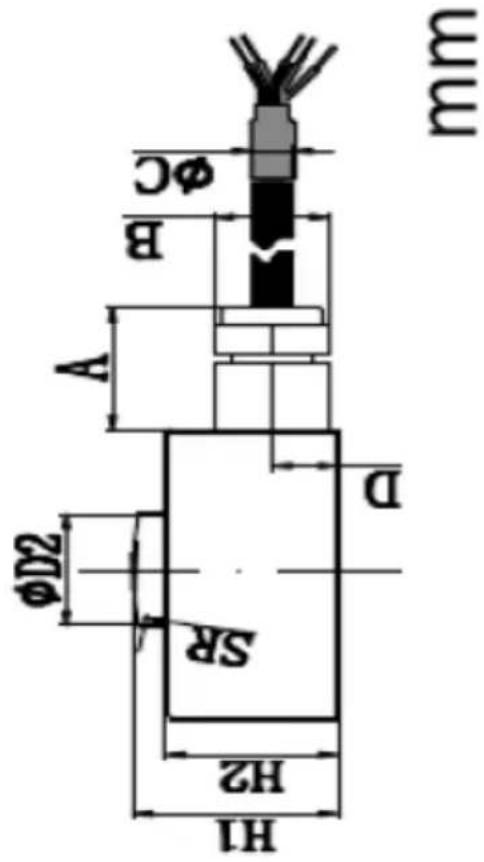
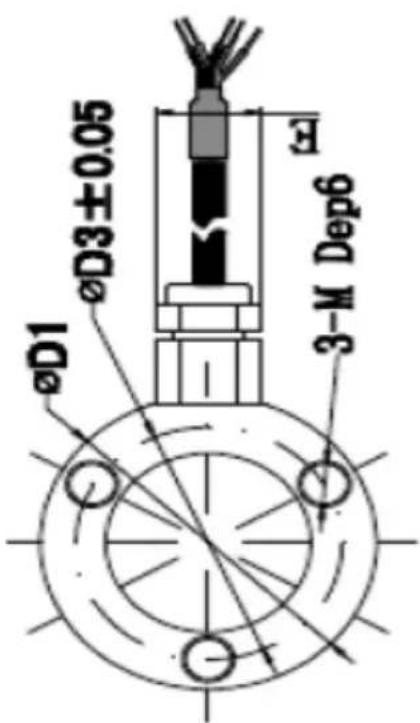
| Load Cell | Max. | D1 | D2 | D3 | H1 | H2 | SR | A | B | C | D | E | M | |
| PCE-DFG NF 0,5K | PCE-C-R20 3MLFC 0,5k-H12 | 500 N / 50 kg | ∅ 20 | ∅ 2,5 | ∅ 15,5 | 12 | 10 | 10 | 7,5 | 5 | 2 | 4,5 | 5,7 | M3 |
| PCE-DFG NF 1K | PCE-C-R20 3MLFC 1k-H12 | 1.000 N / 100 kg | ∅ 20 | ∅ 2,5 | ∅ 15,5 | 12 | 10 | 10 | 7,5 | 5 | 2 | 4,5 | 5,7 | M3 |
| PCE-DFG NF 2K | PCE-C-R32 3MLFC 2k-H16 | 2.000 N / 200 kg | ∅ 32 | ∅ 8 | ∅ 25,4 | 16 | 13,5 | 16 | 13 | 9 | 3 | 5,3 | 10 | M5 |
| PCE-DFG NF 5K | PCE-C-R32 3MLFC 5k-H16 | 5.000 N / 500 kg | ∅ 32 | ∅ 8 | ∅ 25,4 | 16 | 13,5 | 16 | 13 | 9 | 3 | 5,3 | 10 | M5 |
| PCE-DFG NF 10K | PCE-C-R32 3MLFC 10k-H16 | 10 kN / 1.000 kg | ∅ 32 | ∅ 8 | ∅ 25,4 | 16 | 13,5 | 16 | 13 | 9 | 3 | 5,3 | 10 | M5 |
| PCE-DFG NF 20K | PCE-C-R38 3MLFC 20k-H16 | 20 kN / 2.000 kg | ∅ 38 | ∅ 11 | ∅ 30 | 16 | 14 | 50 | 13 | 9 | 3 | 5,2 | 10 | M5 |
| PCE-DFG NF 50K | PCE-C-R38 3MLFC 50k-H16 | 50 kN / 5.000 kg | ∅ 38 | ∅ 11 | ∅ 30 | 16 | 14 | 50 | 13 | 9 | 3 | 5,2 | 10 | M5 |
General specifications
| Specification | Value |
| Accuracy | 0.1 % f. s. |
| Units | N, kg, lb, KPa |
| Display | 2.8" TFT graphical display |
| Alarm modes | within, beyond, fracture, off |
| Sampling rate | 6 ... 1600 Hz device6...800 Hz software |
| Memory | 100 measurements |
| Power supply | Ni-Hi rechargeable battery6 V, 1600 mAhBattery life10 hours |
| Mains adaptor | 12 VDC 1 A; |
| Outputs | Communication via USBOutput port 12 V, 50 mA |
| Operating conditions | -10 ... +50 °C; 5 ... 95 % RH, non-condensing |
| Protection class | IP 54 |
2.2 Delivery contents
1 x force gauge PCE-DFG NF
1 x dynamometric cell
1 x case
1 x USB cable
1 x mains adaptor
1 x software
1 x user manual
1 x calibration certificate
3 System description
3.1 Device
Version with internal dynamometric cell
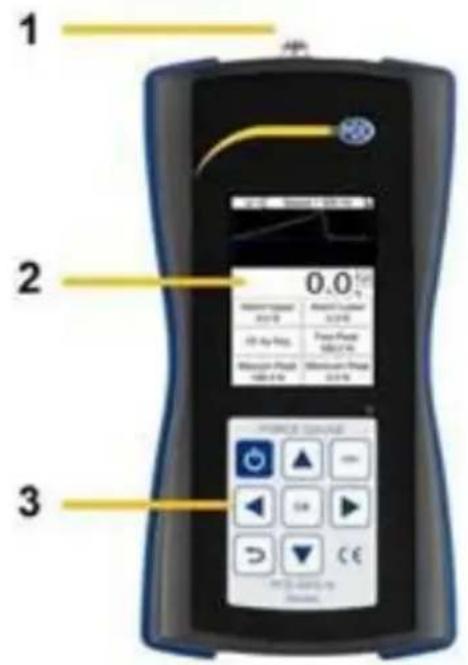
1 Connection
2 Display
3 Keypad
3.2 Interfaces
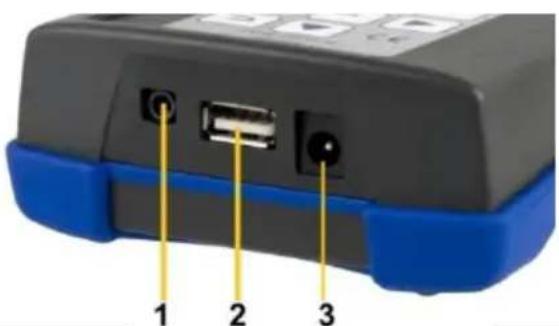
1 Input / output interface
2 USB interface
3 Power connection
| 1 2 5 3 4 3 | Housing socket 1 green / S+ 2 white / S- 3 red / E+ 4 black / E- 5 GND |

Circuit diagram of output port
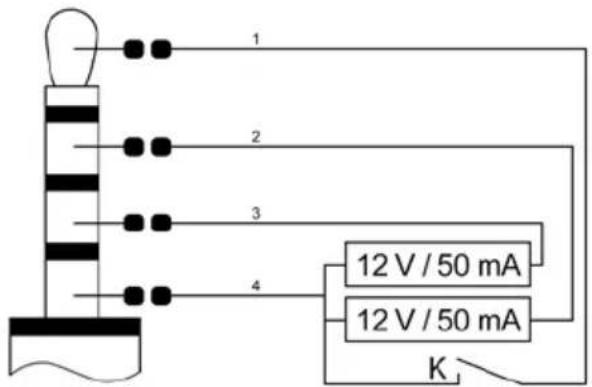
1 Switch of external input / output
2 Output lower limit
3 Output upper limit
4 GND
3.3 Display
In measurement mode
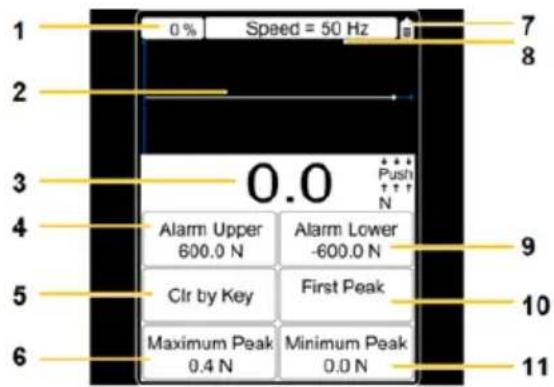
1 memory usage
2 measurement curve
3 force value
4 upper alarm value
5 clear by key
6 maximum peak
7 battery level indicator
8 set sampling rate
9 lower alam value
10 first peak
11 minimum peak
3.4 Function keys
| Key | Designation | Function | |||||
| Single measurement mode | Capture mode | Online measurement mode | Memory and query mode | Menu mode | |||
 | On / Off | Switch off | - | Switch off | - | - | |
 | Back | - | Close capture mode | - | Exit | Exit / close parameter settings | |
 | Zero | Zero setting | - | Zero setting | - | - | |
 | Up | - | - | - | Up | Up | |
 | Down | Activate memory and query mode | - | - | Switch to upper window | Down | |
 | OK | Open parameter settings | Stop capturing | - | Show report and reading | Confirm parameter setting | |
 | Left | Start curve capturing | - | Start curve capturing | Move flashing number left by one digit | ||
 | Right | Delete peak value | - | Delete peak value | Move flashing number right by one digit | ||
4 Getting started
4.1 Power supply
The PCE-DFG NF is equipped with a rechargeable 1600 mAh 6 V Ni-Hi battery that should only be charged by means of the mains adaptor which is included in the standard delivery.
Charging can take 8 to 10 hours and should only be started when the battery is completely flat. Excessively frequent or long-time charging shortens the battery life.
When the battery is fully charged, it will last up to 10 hours of continuous use. The device can also be used during charging. The battery can be charged approx. 500 times.
4.2 Settings
When you are in measurement mode, press the OK key to enter the settings screen which is divided into 2 pages:
Page 1 Page 2
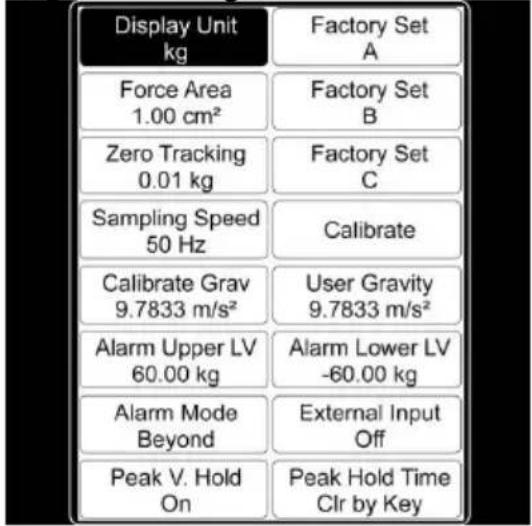
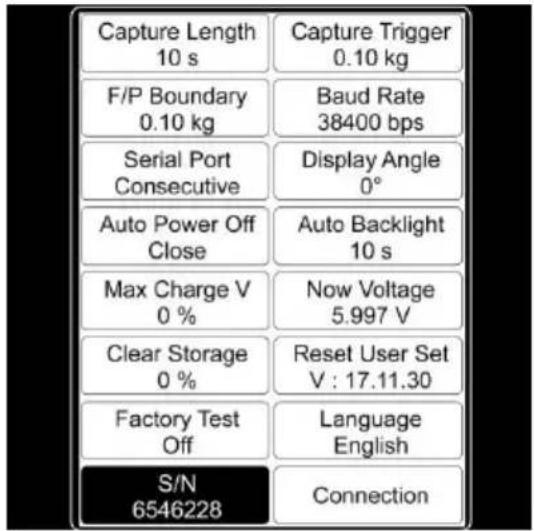
In order to change settings, select the menu item with the arrow keys and confirm with the OK key. The values can then be changed by means of the arrow keys. Then press "OK" to confirm the settings or the Back key to discard.
| Function | Description page 1 |
| Display Unit | The display unit can be set to: „N“, „kg“, „lb“ or „KPa“ |
| Force Area | The force area can be set to a value between 999.99cm^2 and 0.01cm^2 and is included in the calculation if the display unit selected is „kPA“(important for the accuracy). |
| Zero Tracking | For zero tracking, you can set:„Off“, „0.1 N“, „0.2 N“, „0.3 N“, „0.4 N“, „0.5 N“Values below the value set are automatically excluded before the zero point stabilises. After stabilisation of the reading, the sampling rate will be 1 x per second. Deviations from the measured value which are below the set value are automatically excluded in order to keep the displayed values. |
| Sampling Speed | You can set how many measurements are taken per second. A value between 6 and 1600 Hz can be set here.Note: The higher the sampling rate, the lower the accuracy will be. Higher sampling rates are suitable for dynamic measurements whereas lower sampling rates are more suitable for static and slow measurements. |
| Calibrate Grav | Enter the gravity at the place of calibration. |
| Alarm Upper | The upper alarm can be set to +/- 9999.9. |
| Alarm Mode | You can choose "Within" (within alarm limit), "Beyond" (outside alarm limit), "Fracture" (overload alarm) or "Off".If you select "Within" or "Beyond", the display will show information on the alarm.If you select "Fracture", Alarm Upper LV and Alarm Lower LV will automatically be set to "Fracture Alarm" and „Fracture Stop of Peak".Set these two parameters. When the force reaches the fracture alarm value or when the sample breaks, the display will show some information on the alarm. |
| Peak V. Hold | You can select „On“ or “Off”. If "Off" is selected, the peak value will not be indicated in the display. |
| Factory Set A | Only relevant for customer service. |
| Factory Set B | Only relevant for customer service. |
| Factory Set C | Only relevant for customer service. |
| Calibrate | Press OK to start the calibration. The calibration result will have a considerable influence on the accuracy of measurement. There are two possibilities to calibrate the meter:1. Entering saved data:The user enters the saved calibration data. The calibration is done without any other devices or weights.2. Standard calibration:The force gauge is calibrated by means of the calibration stand or calibration weight. |
| User Gravity | Here, you can set the gravity at the place of use. The value can be between 9.700 and 9.900 N/kg. This parameter is used for the gravity correction. The following formula must be used for this:Displayed value = reading + reading x (gravitation place of calibration – gravitation place of use) |
| Alarm Lower | The lower alarm can be set to +/- 9999.9. |
| External Input | You can select "On" or "Off". If "On" is selected, the external switch can be switched on and the force gauge enters curve capture mode.Note: The capturing duration depends on the sampling rate.Capturing duration in seconds = number of recorded data / sampling rate |
| Peak Hold Time | You can select "Clr by Key" or certain periods between 1 and 60 seconds. If "Clr by Key" is selected, the peak value will not be changed until the "Arrow Right key or the "Zero Set" button is applied. If a period between 1 and 60 seconds is selected, the peak value will automatically be measured again after the set time has passed. The peak value can also be re-measured by applying the "Arrow Right key or the "Zero Set" button. |
| Function | Description page 2 |
| Capture Length | You can set a value between 1 and 1280 seconds. This value represents the duration of curve capturing in capture mode which depends on the sampling rate:Sampling rate 60 Hz: 1 ~ 1280 secondsSampling rate 12 Hz: 1 ~ 640 secondsSampling rate 25 Hz: 1 ~ 320 secondsSampling rate 50 Hz: 1 ~ 160 secondsSampling rate 100 Hz: 1 ~ 80 secondsSampling rate 200 Hz: 1 ~ 40 secondsSampling rate 400 Hz: 1 ~ 20 secondsSampling rate 800 Hz: 1 ~ 10 secondsSampling rate 1600 Hz: 1 ~ 5 seconds |
| F/P Boundary | You can set a value between 1 and 99999. This setting is used during peak value measurement to determine the first peak value. When you press the Arrow Right key, a new peak value measurement will start. Meanwhile, the values peak-to-peak (Vmax), valley-to-peak (Vmin) and new peak (Vnew) are updated continuously. For example, if 10 is set as the criterion, Vmax or Vmin will be counted as the first peak value when the absolute value of (Vmax - Vnew) or (Vmin - Vnew) is above 10. |
| Serial Port | This port is used to control the real-time data transfer. The following parameters can be set:Prohibit: The real-time data transfer of the serial interface is prohibited.Key/Order: A single output will take place when you press the Up key or when an output command is received. When the force gauge is connected to a computer, the programmes on the computer will automatically disable the output function.Change: A single output will take place when the measuring data change.Stabilize: A single output will take place when the reading stabilises.Consecutive: The measuring data are transferred without interruption. |
| Auto Power Off | This function reduces the energy consumption. The force gauge will automatically power off when it has not been used for a certain period of time. |
| Max Charge V | This window shows the maximum voltage of the battery. |
| Clear Storage | Here, you can delete saved measurement reports and curves.Important information:When the memory is full, all data will automatically be deleted to enable new data to be saved. |
| Factory Test | Only relevant for customer service. |
| S/N | This window shows the serial number of the device which cannot be changed. |
| Capture Trigger | Here, you can set a value between -99999 and +99999. The range of values depends on the set unit. This parameter stipulates the condition that triggers the capturing when the force gauge is in curve capture mode. When the maximum number of data has been recorded or capturing was discontinued early, a capture report is created and saved. The curve is deleted when you leave capture mode. |
| Baud Rate | The baud rate for the serial interface can be set to a value between 4800 and 230400 bps.This setting will only be effective after restarting the force gauge.Note: To make sure that all data are retrieved when the device is connected to a computer, the baud rate should be set as follows:12 Hz: ≥9600 bps25 Hz: ≥14400 bps50 Hz: ≥19200 bps100 Hz: ≥28800 bps200 Hz: ≥38400 bps400 Hz: ≥57600 bps800 Hz: ≥115200 bps1600 Hz: ≥230400 bpsDue to the limited speed of serial interfaces, some data get lost when transferred to a PC if the sampling rate is higher than 800 Hz. The readings will, however, not get lost in the device. |
| Display Angle | Here, you can set the display angle. You can select 0 or 180 °. |
| Auto Backlight | This function also reduces the energy consumption. The brightness of the display backlight will automatically be turned off when the meter has not been used for a certain period of time. |
| Now Voltage | This window shows the current battery level. |
| Reset | You can reset the device to factory default settings, e. g. if you have made an incorrect setting or if other problems with the settings occurred. |
| Language | In this window, you can change the output language. English or German can be selected. |
| Connection | In this window, you can see the circuit diagram of the input port (see chapter 3.2). |
5 Operation
5.1 Measurement
Connect the sensor to the force gauge.
Switch on the device by pressing the On / Off key. You are now in the measurement window. Start by checking the battery level in the upper right corner. If the battery level is low, charge the device using the mains adaptor that comes with the device. For charging, it does not matter if the device is switched on or off. It is possible to make measurements during charging. When the device is fully charged, a notification will appear on the display. You should then disconnect the device from the power supply immediately.
You can now set the parameters. Press “OK” when you are in measurement mode to enter the settings window. Set the unit, the force area, zero tracking, the sampling speed, fracture alarm, the upper and lower limit alarm, the Peak Hold function, the capture trigger as well as the capture length (duration). Press the Back key to return to measurement mode.
To start your measurement, attach the device to a suitable test stand. Press the Zero key and the Arrow Right key. You can now take a direct measurement or capture a curve. If you make a direct measurement, the force will be measured in real time, as well as the peak values and further parameters. These will not be saved. The previously measured values will be lost when a new measurement is taken. If you want to capture a curve, enter capture mode by pressing the “Arrow Left” key when you are in measurement mode. The measurement will start automatically as soon as the trigger condition is met. The measurement ends if you press “OK” or when the set capture duration has been reached. The measurement will return peak values, measurement curves and further parameters.
These will be saved. Only one curve with the associated values can be saved. You can retrieve the saved data by pressing the "Query" button. The curve will be deleted when the force gauge is re-started or when a new measurement is taken. A maximum of 100 reports can be saved if no curve is saved. These can also be retrieved by pressing the "Query" button.
Press the Back key to get back to the measurement window. To switch off the device, press the On/Off key. Remove the sensor if you have a device with an external sensor and clean the force gauge. It is recommended to store the device in its original carrying case.
6 Maintenance
6.1 Storage
Please charge the battery before storing the meter for a longer period of time and store the device as well as, if applicable, the external sensors and the accessories in the packaging / carrying case the PCE-DFG NF comes with to protect the technical components.
7 Warranty
You can read our warranty terms in our General Business Terms which you can find here: https://www.pce-instruments.com/english/terms.
8 Disposal
For the disposal of batteries in the EU, the 2006/66/EC directive of the European Parliament applies. Due to the contained pollutants, batteries must not be disposed of as household waste. They must be given to collection points designed for that purpose.
In order to comply with the EU directive 2012/19/EU we take our devices back. We either re-use them or give them to a recycling company which disposes of the devices in line with law.
For countries outside the EU, batteries and devices should be disposed of in accordance with your local waste regulations.
If you have any questions, please contact PCE Instruments.

PCE Instruments contact information
Germany France Spain
PCE Deutschland GmbH PCE Instruments France EURL PCE Ibérica S.L.
Im Langel 4 23, rue de Strasbourg Calle Mayor, 53
D-59872 Meschede 67250 Soultz-Sous-Forets 02500 Tobarra (Albacete)
United States of America
PCE Americas Inc.
711 Commerce Way suite 8
Jupiter / Palm Beach
33458 FL
USA
Tel: +1 (561) 320-9162
Fax: +1 (561) 320-9176
info@pce-americas.com
www.pce-instruments.com/us
United Kingdom Italy
PCE Instruments UK Ltd
Unit 11 Southpoint Business Park
Ensign Way, Southampton
Hampshire
United Kingdom, SO31 4RF
Tel: +44 (0) 2380 98703 0
Fax: +44 (0) 2380 98703 9
info@industrial-needs.com
www.pce-instruments.com/english
PCE Italia s.r.l.
Via Pesciatina 878 / B-Interno 6
55010 Loc. Gragnano
Capannori (Lucca)
Italia
www.pce-instruments.com/dutch www.pce-instruments.com/chile
Chile
PCE Instruments Chile S.A.
RUT: 76.154.057-2
Santos Dumont 738, local 4
Comuna de Recoleta, Santiago, Chile
Tel.:+56 2 24053238
Fax: +56 2 2873 3777
info@pce-instruments.cl
Hong Kong
PCE Instruments HK Ltd.
Unit J, 21/F., COS Centre
56 Tsun Yip Street
Kwun Tong
Kowloon, Hong Kong
Tel: +852-301-84912
jyi@pce-instruments.com
www.pce-instruments.cn
China
PCE (Beijing) Technology
1519 Room, 4 Building
Men Tou Gou Xin Cheng,
Men Tou Gou District
102300 Beijing
China Tel: 0212 471 11 47
Tel: +86 0755-32978297
lko@pce-instruments.cn
www.pce-instruments.cn
Turkey
Pehlivan Sok. No.6/C
www.pce-instruments.com/turkish
User manuals in various languages (français, italiano, español, português, nederlands, türk, polski, русский, 中文) can be downloaded here: www.pce-instruments.com Specifications are subject to change without notice.
- Safety symbols
- Specifications
- Technical specifications
- Delivery contents
- System description
- Device
- Interfaces
- Display
- Function keys
- Getting started
- Power supply
- Settings
- Operation
- Measurement
- Maintenance
- Storage
- Warranty
- Disposal
- PCE Instruments contact information
- Germany France Spain
- United States of America
- United Kingdom Italy
- Chile
- Hong Kong
- China
- Turkey
Brand : PCE Instruments
Model : DFG NF 50K
Category : Multimeter