
EB9008 - Scale Coline - Free user manual and instructions
Find the device manual for free EB9008 Coline in PDF.


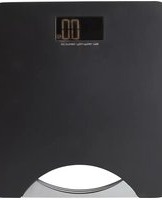
| Product Type | Bathroom Scale |
| Brand | Coline |
| Model | EB9008 |
| Capacity | 180 kg (396 lb) |
| Division / Sensitivity | 100 g (0.1 kg / 0.2 lb) |
| Power Supply | 1x CR2032 (3V) battery |
| Display Type | Digital LCD |
| Memory | Up to 80 weight records |
| Weight Comparison | Arrow indicators (up/down) |
| Auto Shut-off | Yes (when you step off) |
| Overload Protection | Yes, displays "ERR" |
| Low Battery Indicator | "Lo" on display |
| Unit Selection | kg / lb (switch on bottom) |
| Activation | Touch-activated (light foot pressure) |
| Zero Reset | Automatic |
| Material | Tempered glass platform |
| Cleaning Instructions | Damp cloth, no harsh chemicals |
| Storage | Keep dry, remove battery if not in use for long time |
| Acclimatization | Allow 24 hours before first use if cold |
Frequently Asked Questions - EB9008 Coline
User questions about EB9008 Coline
0 question about this device. Answer the ones you know or ask your own.
Ask a new question about this device
Download the instructions for your Scale in PDF format for free! Find your manual EB9008 - Coline and take your electronic device back in hand. On this page are published all the documents necessary for the use of your device. EB9008 by Coline.
USER MANUAL EB9008 Coline
natural_image
Exterior view of a modern office building (no signage)Model EB9008
English 3
Svenska 7
Norsk 11
Suomi 15
Bathroom Scale
Article number: 34-7283
Model: EB9008
Please read the entire instruction manual before using and save it for future use.
We apologise for any text or photo errors and any changes of technical data.
If you have any questions concerning technical problems please contact our Customer Service Department (see address on reverse.)
Product Description
• Memory for previous weight records
- Capacity: 180 kg
- Sensitivity: 100 g
• Activate the scale by a light touch of the foot
• Automatic reset to zero
• Automatic shutdown
• Overload indicator
Battery
The battery pack underneath holds 1x CR2032 (3 V) battery (+ pole facing the battery cover). Remove the isolating plastic tag between the battery and the battery holder before first use.
How to change battery: Carefully push the lock tag outward so that the battery loosens, push a new battery (CR2032) down into the holder.
When the battery needs changing "Lo" appears on the display.


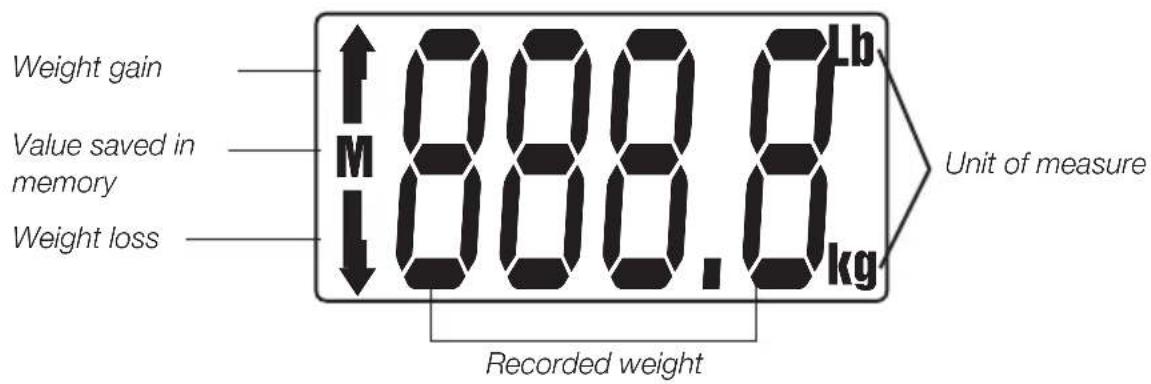
Display
If the display shows strange symbols or if the scale does not shut itself off, try to reset it to factory presetting: Remove the batteries and wait at least 3 seconds and then put the batteries back.
Use
Warning! Bare in mind that the glass is slippery when wet, make sure that it is dry before standing on the scale.
- Place the scale on a firm, even surface (avoid placing the scale on a mat or other soft surface).

natural_image
Simple line drawing of a flat rectangular object on a surface (no text or symbols)-
Activate the scale by using a little light foot pressure, after a few seconds "0.0" will appear on the display, the scale is now ready for use.
-
Carefully mount the scale, with feet evenly spaced, weight evenly distributed between both legs and between heel and toes. Remain stationary until the display shows a steady reading during a few seconds. The display blinks when reading is done.
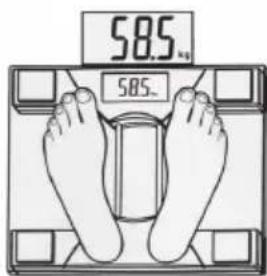
- The read weight is automatically saved in the memory when the display blinks, the memory can save up to 80 weight records.
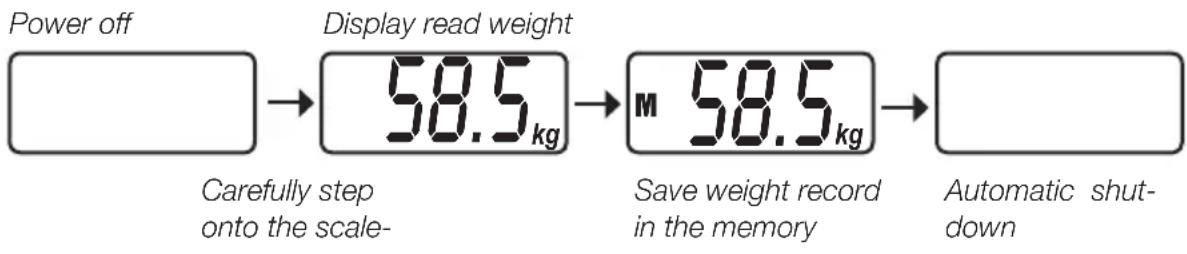
flowchart
graph LR
    A["Power off"] --> B["Display read weight 58.5 kg"]
    B --> C["Save weight record in the memory 58.5 kg"]
    C --> D["Automatic shutdown"]
    style A fill:#fff,stroke:#000
    style D fill:#fff,stroke:#000
- The scale have a selector on the bottom with a choice of : Kg-Lb.

Display in KG or Lb
- The scale compares the most recent record with previous saved records and shows with an arrow up/down if the weight is greater/lesser then the last read weight or the most previous.
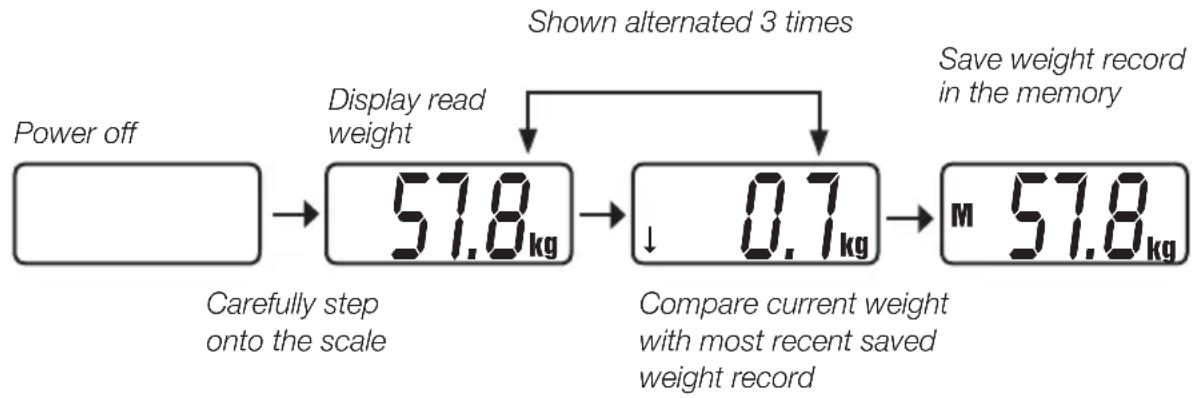
flowchart
graph LR
    A["Power off"] --> B["57.8 kg"]
    B --> C["0.7 kg"]
    C --> D["M 57.8 kg"]
    B --> E["Display read weight"]
    C --> F["Compare current weight with most recent saved weight record"]
    style B fill:#f9f,stroke:#333
    style C fill:#ccf,stroke:#333
    note right of B: Shown alternated 3 times
    note left of C: Save weight record in the memory
    note right of C: Carefully step onto the scale
    note right of C: Compare current weight with most recent saved weight record
- If the scale is overloaded "ERR" will appear on the display.

Indication that the weighing failed
If problems occur during the weighing so that the weighing is not shown correctly a "C" will show on the display. Redo the weighing.

Automatic shutdown
The scale automatically shuts off when you step off of it.
Helpful suggestions!
- This product is a precision instrument and should be handled with care and protected from blows and rough treatment.
- Place the scale in the same place every time you weigh yourself.
- The scale need to be placed on a hard, even surface for accurate reading, uneven surfaces help create inaccurate readings.
- Weigh yourself without clothing at the same time of day, preferably in the morning before breakfast. Place your feet in the same place every time you weigh yourself.
- The display rounds up/down to the nearest 100 g.
- Clean the scale using a damp cloth as and when required don't let water run into the scale. Never use strong solvents or detergents.
- Keep the scale away from water and splashes, the electronics can be damaged.
- Do not store the scale on it's side because the display will be on all the time and the batteries will soon discharge.
• Take the batteries out if the scale is not to be used for a long time. - The scale can be affected by changes in temperature and by being moved. Inaccurate readings may occur if the scale is too cold when used. Allow the scale to stand and acclimatise for approx. 24 hours before using it for the first time.
Protect the environment
Sort your waste and recycle products instead of throwing them away. Electrical and electronic products marked with the recycling symbol should be handled according to local environmental regulations.
Personvåg
natural_image
Simple line drawing of a flat rectangular object on a surface (no text or symbols)natural_image
Simple line drawing of a flat rectangular object on a surface (no text or symbols)natural_image
Simple line drawing of a flat rectangular object on a surface with two small supports (no text or symbols)For consumer contact, please visit
www.clasohlson.co.uk and click on
customer service.
INTERNET www.clasohlson.co.uk

Brand : Coline
Model : EB9008
Category : Scale