
G-245 - Beard trimmer Coline - Free user manual and instructions
Find the device manual for free G-245 Coline in PDF.


| Product Type | Rechargeable Multitrimmer Grooming Set |
| Brand | Coline |
| Model Number | G-245 |
| Power Supply (Input) | 230 V AC, 50 Hz |
| Power Supply (Output) | 3.0 V DC, 1000 mA |
| Charging Time | 12 hours (first charge 24 hours) |
| Operating Time | 50 minutes |
| Number of Cutter Heads | 5 (beard, hair, precision, shaving, nose/ear) |
| Number of Comb Attachments | 7 (3, 6, 9, 12 mm for hair; 4, 6, 8 mm for beard) |
| Blade Material | Stainless Steel |
| Charging Indicator | Yes (lights up during charging) |
| Charging Station | Included |
| Cleaning Brush | Included |
| Water Resistance | Not waterproof; do not expose to moisture |
| Safety Features | Not for outdoor use; keep away from children under 8 |
| Usage | For private use only |
| Disposal | Recycle according to local regulations; battery removal required |
| Battery Type | Rechargeable (integrated, 3.0 V DC) |
Frequently Asked Questions - G-245 Coline
User questions about G-245 Coline
0 question about this device. Answer the ones you know or ask your own.
Ask a new question about this device
Download the instructions for your Beard trimmer in PDF format for free! Find your manual G-245 - Coline and take your electronic device back in hand. On this page are published all the documents necessary for the use of your device. G-245 by Coline.
USER MANUAL G-245 Coline
natural_image
Illustration of a black-and-white electric toothbrush with a power button and adjustment knob (no text or symbols)Art. No.: Model. No:
18-4532
34-9949
G-245
G-245
English 3
Svenska 7
Norsk 11
Suomi 15
Deutsch 19
Multitrimmer
Art.no 18-4532 Model G-245
34-9949
G-245
Please read the entire instruction manual before using the product and save it for future reference. We reserve the right for any errors in text or images and any necessary changes made to technical data. If you have any questions regarding technical problems please contact our Customer Services.
Safety
- Note: Do not expose the product to moisture or water.
- The mains lead should be checked regularly. Never use the product if the mains lead or plug is damaged.
- The mains lead cannot be replaced. If the mains lead is damaged the product must be disposed of according to local ordinances.
- The charging station should be placed on an even surface.
- Never place the charging station where it might be knocked into the wash basin/bath.
- Never place the charging station close to sources of high temperature such as cookers or fireplaces.
- The charging station should not be exposed to moisture.
- The charging station must not be used outdoors.
- Never handle the charging station with wet or moist hands.
- Only use the supplied charger.
- Do not expose the product to moisture or water.
- Always unplug the charging station from the wall socket when the charging station is not in use.
- This product can be used by children aged from 8 years and above if they have been given supervision or instruction concerning use of the product in a safe way and if they understand the hazards involved. Cleaning and user maintenance shall not be made by children unless they are older than 8 and supervised.
- Keep the product and its cord out of reach of children aged less than 8 years.
- Products can be used by persons with reduced physical, sensory or mental capabilities or lack of experience and knowledge if they have been given supervision or instruction concerning use of the product in a safe way and understand the hazards involved.
• Children shall not play with the product. - Store the product in a dry, frost-free location.
- This product is designed exclusively for private use.
Product description
Rechargeable multitrimmer grooming set with stainless steel blades, 5 cutter heads, 7 comb attachments, charging indicator, charging station and cleaning brush.
Accessories
Hair trimmer

Four comb attachments for trim lengths of 3, 6, 9 and 12 mm.
Beard trimmer

natural_image
Illustration of a hair comb with three blades and a stylus (no text or symbols)Three comb attachments for trim lengths of 4, 6 and 8 mm.
Precision trimmer

natural_image
Simple line drawing of a bulb-like object with two circular cutouts (no text or symbols)For shaping beards and sideburns.
Shaving head

natural_image
3D rendered image of a gray cylindrical object with a textured top and side protrusions (no text or symbols)For smooth, close-to-skin shaving.
Nose and ear hair trimmer

natural_image
Simple illustration of a dark, teardrop-shaped object with a small protrusion at the top (no text or symbols)For hard-to-reach areas.
Charging
The multitrimmer must be charged before initial use or if it has not been used for an extended period. A fully charged battery will last up to 50 minutes.
- Make sure that the product is switched off (power switch set to OFF) before inserting it into the charging station. The trimmer will not charge if the power switch is set to the ON position.
- Connect the charger to a wall socket.
- The charging indicator on the multitrimmer will light up when charging is in progress. The normal charging time is 12 hours after which the charger should be disconnected.
- Before initial use the appliance should be charged for 24 hours. Thereafter, for 12 hours at a time.
- Do not store the multitrimmer permanently in the charging station.
- Unplug the charger from the power point when charging is complete.
Operation
Changing the cutter head
There are 5 interchangeable cutter heads: beard trimmer, precision trimmer, nasal hair trimmer, shaving head and hair trimmer.
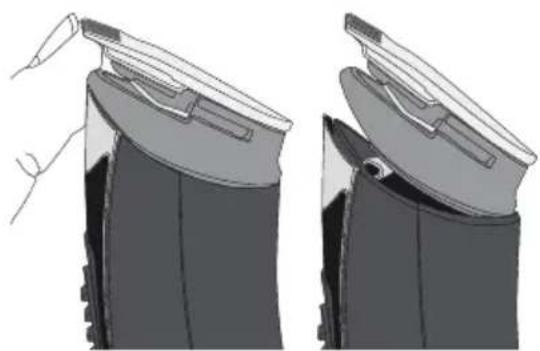
natural_image
Illustration of a hand holding a device with a lid, showing front and side views (no text or symbols)To detach the cutter head, carefully push it upwards until it comes off.

natural_image
Two-step illustration of a device being held, showing front and side views (no text or symbols)To attach the cutter head, push it onto the body of the multitrimmer until it clicks into place.
Using the guide comb attachments

natural_image
Two-step diagram showing a device being open, with arrows indicating the process (no text or symbols present)Click the comb attachment down over the cutter head.
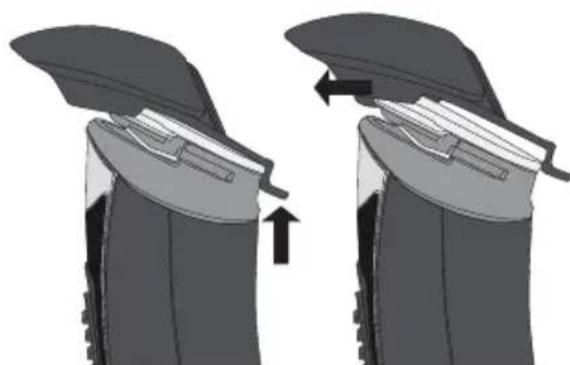
natural_image
Two-step diagram showing a device being lifted or locked, with arrows indicating the process (no text or symbols present)To remove the comb attachment, slide it up and off.
Care and maintenance
• Make sure the product is switched off before cleaning it.
- Remove the cutter head by pressing out the top portion with your thumb. The cutter head should now click loose from the multitrimmer.
- Use the included cleaning brush to remove any hair remnants.
- Lubricate the blades with a drop of oil after cleaning them.
- Click the cutter head back into place again.
- Never use solvents to clean the appliance.
Disposal
This product should be disposed of in accordance with local regulations. If you are unsure how to proceed, contact your local authority.
Note:
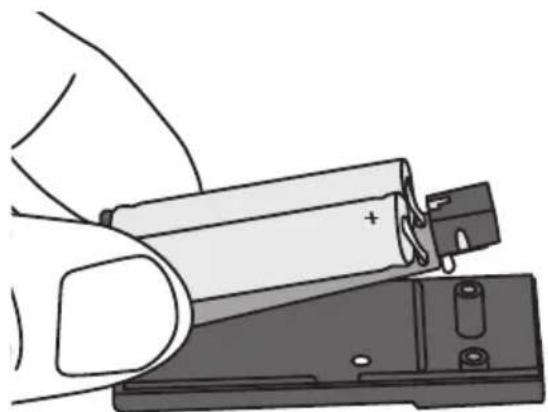
In most cases, waste electronics should be taken to a recycling centre; electric shavers, for example should be taken back in one piece with the battery still inside. Certain countries and regions however, require that waste electronics and batteries are handled separately. This is how to remove the batteries from the battery pack of the multitrimmer.
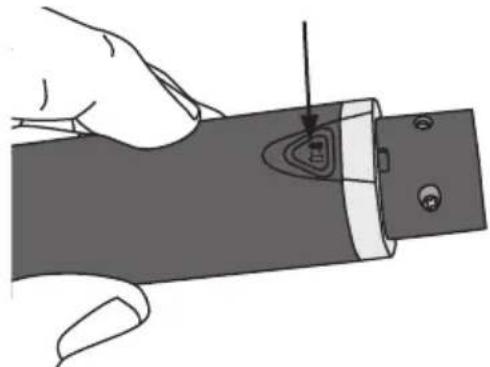
natural_image
Illustration of a hand holding a cylindrical object with a pointed tip and internal contour lines (no text or symbols)- Detach the battery pack from the trimmer.
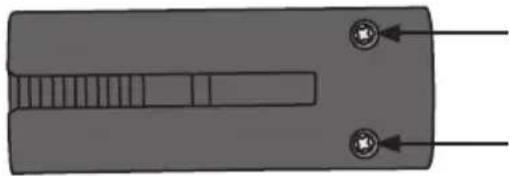
natural_image
Pure diagram of a mechanical component with two circular ports and internal channels, no text or symbols present.- Remove the screws holding the battery pack together.

natural_image
Illustration of a hand holding a battery next to a switch (no text or symbols)- Open the battery pack and remove the batteries.

natural_image
Illustration of a hand holding a battery with a plug inserted (no text or symbols visible)- Cut the wires connecting the batteries to the electronics at the point marked by the arrow in the figure above.
Specifications
Power supply AC/DC mains adaptor in: 230 V AC, 50 Hz
out: 3.0 V DC, 1000 mA
Charging time 12 hours
Operating time 50 minutes
Multitrimmer
Art.nr 18-4532 Modell G-245
34-9949
G-245
natural_image
Illustration of a hairbrush and a small electric shaver (no text or symbols)natural_image
Simple line drawing of a bulb-like object with two circular cutouts (no text or symbols)natural_image
Simple illustration of a gray cylindrical container with a flat lid (no text or symbols)För vanlig rakning.
natural_image
Simple illustration of a dark, teardrop-shaped object with a metallic clip on top (no text or symbols)natural_image
Two-step illustration of a hand holding a device, showing front and side views (no text or symbols)natural_image
Two-step illustration of a device being held, showing front and side views (no text or symbols)natural_image
Diagram showing two stages of a mechanical component with arrows indicating process direction (no text or symbols)natural_image
Two-step diagram showing a device being lifted or compressed, with no visible text or symbols.natural_image
Illustration of a hand holding a cylindrical object with a pointed tip and internal features (no text or symbols)
natural_image
Pure diagram of a mechanical component with two circular ports and internal channels (no text or symbols)- Tryck ut batteripacket ur trimmern. 2. Skruva ur skruvarna som håller ihop batteripacket.
natural_image
Illustration of a hand inserting a battery into a device (no text or symbols visible)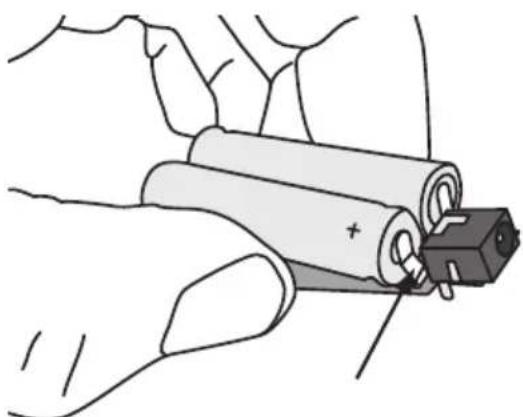
natural_image
Illustration of a hand holding a battery with a plug inserted (no text or symbols)ut: 3,0 V DC, 1000 mA
Laddtid 12 timmar
Batteritid 50 minuter
Multitrimmer
Art.nr. 18-4532 Modell G-245
34-9949
G-245
Les brukerveiledningen nøye før produktet tas i bruk, og ta vare på den for framtidig bruk.
natural_image
Illustration of a hairbrush with multiple teeth and a small head (no text or symbols)natural_image
Simple line drawing of a bulb-like object with two circular cutouts (no text or symbols)natural_image
Simple 3D illustration of a gray plastic container with a textured top (no text or symbols)For vanlig barbering.
natural_image
Simple illustration of a dark, teardrop-shaped object with a metallic clip at the top (no text or symbols)natural_image
Illustration of a hand holding a device with a lid, showing two views of the device (no text or symbols present)natural_image
Two-step illustration of a device being held, showing front and side views (no text or symbols)natural_image
Two-step diagram showing a mechanical component being folded or retained, with arrows indicating the process (no text or symbols present)natural_image
Diagram showing two mechanical components with arrows indicating movement or assembly (no text or symbols)natural_image
Illustration of a hand holding a cylindrical object with a pointed tip and internal contour lines (no text or symbols)
natural_image
Pure diagram of a mechanical component with two circular features and internal channels (no text or symbols)natural_image
Illustration of a hand holding a battery next to an open electrical switch (no text or symbols visible)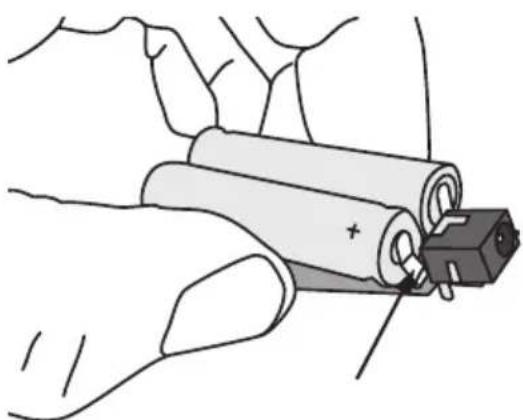
natural_image
Illustration of a hand holding a battery with a plug inserted (no text or symbols visible)natural_image
Illustration of a hairbrush with multiple teeth and a small head (no text or symbols)natural_image
Simple line drawing of a bulb-like object with two circular cutouts (no text or symbols)natural_image
Simple 3D illustration of a gray mechanical component with a textured top and side brackets (no text or symbols)natural_image
Simple illustration of a dark, teardrop-shaped object with a thin protrusion (no text or symbols)natural_image
Illustration of a hand holding a device with a lid, showing two views of the device (no text or symbols present)natural_image
Two-step diagram showing a device being open, with no visible text or symbolsnatural_image
Diagram showing two stages of a mechanical or electrical component with arrows indicating movement (no text or symbols present)
natural_image
Diagram showing two mechanical components with arrows indicating movement or assembly (no text or symbols)natural_image
Illustration of a hand holding a mechanical component with a pointed tool inserted (no text or symbols visible)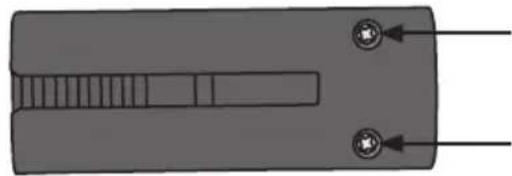
natural_image
Pure diagram of a mechanical component with two circular features and internal channels (no text or symbols)natural_image
Illustration of a hand holding a battery with a switch, no text or symbols present
natural_image
Illustration of a hand holding a battery with a plug inserted (no text or symbols)natural_image
Illustration of a hairbrush and a circular brush tool (no text or symbols)natural_image
Simple line drawing of a bulb-like object with two circular cutouts (no text or symbols)natural_image
Simple illustration of a gray cylindrical container with a flat lid (no text or symbols)natural_image
Simple illustration of a dark, teardrop-shaped object with a metallic clip on top (no text or symbols)natural_image
Illustration of a hand holding a device with a lid, showing two views of the device (no text or symbols present)natural_image
Two-step diagram showing a device being open, with no visible text or symbolsnatural_image
Diagram showing two stages of a device or device opening, with arrows indicating process direction (no text or symbols present)natural_image
Two-step diagram showing a device being lifted or locked, with arrows indicating the process (no text or symbols present)natural_image
Illustration of a hand holding a cylindrical device with a small inset showing internal components (no text or symbols)natural_image
Pure diagram of a mechanical component with two circular ports and internal channels (no text or symbols)natural_image
Illustration of a hand inserting a battery into a device (no text or symbols visible)natural_image
Illustration of a hand holding a battery with a plug inserted (no text or symbols)10 - 13 Market Place
Kingston Upon Thames
Surrey
KT1 1JZ
DEUTSCHLAND
KUNDENSERVICE
Brand : Coline
Model : G-245
Category : Beard trimmer