
KOHSPB 60603 - Oven KITCHENAID - Free user manual and instructions
Find the device manual for free KOHSPB 60603 KITCHENAID in PDF.


| Product Type | Built-in Electric Oven |
| Model | KOHSPB 60603 |
| Brand | KitchenAid |
| Functions | 17 cooking functions including Traditional, Forced Air, Grill, Turbo Grill, Defrost, Keep Warm, Yoghurt, Rising, Slow Cooking, Eco Forced Air, Bread/Pizza, Automatic Cleaning, Fast Preheating |
| Control Type | Electronic with rotary knobs (Function, Browse) and push buttons (Back, OK) |
| Cleaning | Pyrolytic automatic cleaning (two high-temperature cycles) |
| Meat Probe | Included |
| Rotisserie | Included (may vary by model) |
| Display | Digital text display with time and function indicators |
| Power Source | Electric, 220-240V, 50Hz |
| Power Consumption | Approx. 3.0 kW |
| Dimensions (W x H x D) | 595 x 595 x 550 mm (estimated standard built-in) |
| Weight | Approx. 35 kg |
| Accessories Included | Wire shelf, drip tray, baking tray, meat probe, rotisserie, sliding rack guides |
| Number of Shelf Levels | 5 |
| Oven Capacity | Not specified in manual |
Frequently Asked Questions - KOHSPB 60603 KITCHENAID
User questions about KOHSPB 60603 KITCHENAID
0 question about this device. Answer the ones you know or ask your own.
Ask a new question about this device
Download the instructions for your Oven in PDF format for free! Find your manual KOHSPB 60603 - KITCHENAID and take your electronic device back in hand. On this page are published all the documents necessary for the use of your device. KOHSPB 60603 by KITCHENAID.
USER MANUAL KOHSPB 60603 KITCHENAID
“ Cooking gestures are invisible ingredients. They turn inspiration into emotions and emotions into a masterpiece. It’s all about artisanality, that’s why we take it so seriously. ”
Thanks for choosing
3 صفحة AR
EN....pag. 8
IT....pag. 13
KZ 18 бет
PL....str. 23
RO....pag. 28
RU
UK
“ Cooking gestures are invisible ingredients. They turn inspiration into emotions and emotions into a masterpiece. It’s all about artianality that’s why we take it so seriously. ”
شکرا لääctیارك
اقراً جميع地说يمات
السلامة بعناية قبل
استخدامجهاز.

لوحة التحكم
“ Cooking gestures are invisible ingredients. They turn inspiration into emotions and emotions into a masterpiece. It’s all about artianality that’s why we take it so seriously.”
Thanks for choosing
KitchenAid FOR THE WAY IT'S MADE
Quick Guide

THANK YOU FOR BUYING A KITCHENAID PRODUCT
In order to receive a more complete assistance, please register your product on www.kitchenaid.eu/register

Before using the appliance carefully read the Safety Instruction.
Oven Parts and Features
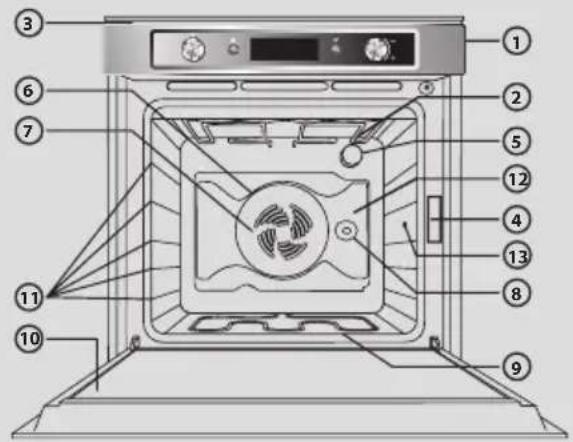
- Control panel
- Upper heating element/grill
- Cooling fan (not visible)
- Data plate (please do not remove)
- Lamp
- Circular heating element (not visible)
- Fan
- Rotisserie (if supplied)
- Lower heating element (not visible)
- Door
- Position of shelves (the level is shown on the front of the oven)
- Rear wall
- Meat probe connection
Control Panel
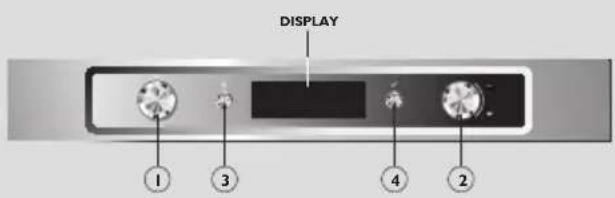
- Function knob: to switch the oven on/off and select the various functions
- Browse knob: to navigate through the suggested menus on the display and change the pre-set values
- ☑ Back button: to return to the previous screen
- OK button: to confirm and activate selected functions
Getting Started and Daily Oven Use
The first time you switch on your new oven, you will need to set the language and the time of day. Turn the Browse knob to scroll through the list of available languages. Once you have found your language of choice, press the button to confirm. Immediately after, "12:00" will flash on the display indicating that you should set the time of day. To do so, turn the Browse knob until the display shows the correct time of day, then press the button to confirm.
DAILY OVEN USE
1. Switching on the oven and selecting a function

By turning the Function knob, you will switch on the oven and see all of the possible functions and their related submenus on the display. If the parameters correspond with what you would like, press the button to confirm. To change the parameter on the display, turn the Browse knob until you see the value you would like then press the button to confirm.
2. Selecting Special Functions

flowchart
graph LR
    A["Input Image"] --> B["Circular Component"]
    B --> C["WARM19 Component"]
    C --> D["FRO"]
Turn the Functions knob to the SPECIAL FUNCTIONS symbol: DEFROST will appear on the display as the first special function. Turn the Browse knob to scroll through the list of functions.
Once you have found the function you desire, press the √ button to confirm.
For more details, please refer to the Instructions for Use Manual or www.kitchenaid.eu.
Table of Functions
| Traditional: T / Special: S / Grill: G Food Type Shelves Levels/Accessories | ||||
| T | Switching Off | To interrupt the cooking cycle and switch off the oven | ||
| T | Lamp | To switch on/off the lamp inside the oven | ||
| S | Defrost | Any | 1 | 3 |
| S | Keep Warm | Any dish that has just been cooked | 1 | 3 |
| S | Yoghurt | Ingredients for yoghurt | 1 | 1 / Drip tray |
| S | Rising | Sweet or savoury dough | 1 | 2 |
| S | Slow Cooking | Meat | 1 | 3 / Meat probe |
| S | Slow Cooking | Fish | 1 | 3 |
| S | Eco Forced Air | Roasts, stuffed meat | 1 | 3 / Meat probe |
| TConventional | Any | 1 | 3 | |
| Pizza, sweet or savoury pies with juicy fillings | 1 | 1 or 2 | ||
| TConvection Bake | Meat, filled cakes (cheese cake, strudel, fruit pie), stuffed vegetables | 1 | 3 | |
| TForced Air | Various dishes simultaneously | 1 | 3 | |
| 2 | 1, 4 | |||
| 3 | 1, 3, 5 | |||
| G | Grill | Meat, steak, kebabs, sausages, vegetables, bread | 1 | 4 or 5 / Drip tray |
| G | Turbo Grill | Large pieces of meat, poultry | 1 | 1 or 2 / Drip tray, Rotisserie |
| TSettings | To set the language, time of day, display brightness, volume of the acoustic signal and energy savings | |||
| S Bread/Pizza | Two programmes with default settings | |||
| T | Automatic Cleaning | Two cycles of very high temperature automatic cleaning (about 500°). | ||
| T | Fast Preheating | Use this function to rapidly preheat the oven | ||
Please refer to the Instructions for Use Manual or www.kitchenaid.eu for more information on the cooking functions.
Accessories
| Wire shelf | Food can be cooked directly on this shelf or the shelf can be used as support for cookware, baking pans or any oven safe container. |
| Drip tray | By inserting this tray under the wire shelf, you can collect cooking juices; you can also cook meat, fish, vegetables, flat bread, etc. directly on the tray. |
| Baking tray | Bread or pastry dishes can be cooked on this tray, as well as roasted meat, fish en papillote, etc. |
| Meat Probe Accessory | This accessory is useful for measuring the internal temperature of the food during cooking. |
| Rotisserie (if supplied) | Poultry and large pieces of meat are cooked uniformly with this accessory. |
| Sliding rack guides (if supplied) | These guides make it easy to insert and remove shelves and trays. |
Please Note: The number of oven accessories may vary depending on the model purchased. It is possible to purchase accessories separately from the Customer Service Center.
MEAT PROBE ACCESSORY
The meat probe included with your oven allows you to measure the precise temperature on the inside of the food during cooking so your dishes are cooked to perfection.
You can programme the internal temperature that you desire for the dish you are preparing. We suggest that the meat probe be used as outlined in the Instructions for Use Manual or at www.kitchenaid.eu
Cleaning
Before cleaning your appliance, please ensure that it is cold and disconnected from the electricity grid. It is best to avoid the use of steam cleaning equipment, steel wool pads, abrasive cloths and corrosive detergents that could damage the appliance.
Troubleshooting
If you experience problems in operating your oven:
- First check that there is an electrical current and that the oven is properly connected to the electricity grid;
- Switch off the oven then switch it back on to see if the problem is solved;
- If you see an "F" immediately followed by an error code on the display, contact your nearest Customer Service Center.
It will be necessary to provide the following information to the technician: the precise type and model of the oven, the assistance code (visible on the right-hand inside edge when the oven door is open) and the error code that appears on the display. This information will enable the technician to immediately identify the type of intervention required.
If the oven needs to be repaired, we suggest you refer to an Authorised Technical Service Center.
Please refer to our website www.kitchenaid.eu for complete instructions for use. In addition, you will find a lot more useful information about your products, such as inspiring recipes created and tested by our brand ambassadors or the nearest KitchenAid cookery school.
Light Pyro Oven
“ Cooking gestures are invisible ingredients. They turn inspiration into emotions and emotions into a masterpiece. It’s all about artianality that’s why we take it so seriously.”
“ Cooking gestures are invisible ingredients. They turn inspiration into emotions and emotions into a masterpiece. It’s all about artianality that’s why we take it so seriously.”
Тандауыңызга ракмет
KitchenAid FOR THE WAY IT'S MADE

KITCHENAID ӨHIMIH САТЫП АЛФАНЫНЫЗ УШИН РАҚМЕТ
“ Cooking gestures are invisible ingredients. They turn inspiration into emotions and emotions into a masterpiece. It’s all about artianality that’s why we take it so seriously.”
Dziękujemy za wybór
KitchenAid FOR THE WAY IT'S MADE
Skrócony poradnik

DZIEKUJEMY ZA ZAKUP PRODUKTU KITCHENAID
“ Cooking gestures are invisible ingredients. They turn inspiration into emotions and emotions into a masterpiece. It’s all about artianality that’s why we take it so seriously.”
“ Cooking gestures are invisible ingredients. They turn inspiration into emotions and emotions into a masterpiece. It’s all about artisanality that’s why we take it so seriously.”
“ Cooking gestures are invisible ingredients. They turn inspiration into emotions and emotions into a masterpiece. It’s all about artianality that’s why we take it so seriously.”

- Quick Guide
- THANK YOU FOR BUYING A KITCHENAID PRODUCT
- Oven Parts and Features
- Control Panel
- Getting Started and Daily Oven Use
- DAILY OVEN USE
- Switching on the oven and selecting a function
- Selecting Special Functions
- Accessories
- MEAT PROBE ACCESSORY
- Cleaning
- Troubleshooting
- Light Pyro Oven
- KITCHENAID ӨHIMIH САТЫП АЛФАНЫНЫЗ УШИН РАҚМЕТ
- Skrócony poradnik
- DZIEKUJEMY ZA ZAKUP PRODUKTU KITCHENAID
Brand : KITCHENAID
Model : KOHSPB 60603
Category : Oven