KM0929 - Smartphone Krüger&Matz - Free user manual and instructions
Find the device manual for free KM0929 Krüger&Matz in PDF.


| Product Type | Feature phone (clamshell) |
| Brand | Krüger&Matz |
| Model | KM0929 |
| Display Size | 2.8 inches |
| Display Resolution | 240 x 320 pixels |
| Camera Resolution | 0.3 megapixels |
| Internal Memory | 32 MB |
| Memory Card Support | microSD, up to 16 GB |
| SIM Card Type | Dual SIM (full-size + microSIM) |
| Bluetooth Version | 2.1 |
| Battery Capacity | 1000 mAh |
| Talk Time | Up to 5 hours |
| Standby Time | Up to 300 hours |
| Charger Input | 100-240 V, 50/60 Hz |
| Charger Output | 5 V / 500 mA |
| Dimensions (Closed) | 107 x 59 x 19 mm |
| Dimensions (Opened) | 205 x 52 x 21 mm |
| Weight (with battery) | 108.5 g |
| Key Features | SOS button, torch, FM radio, file manager |
| Included Accessories | Docking station, charger, user manual |
| Maintenance | Keep dry, clean with soft cloth, avoid extreme temperatures |
| Safety | Do not disassemble; use only authorized service centers |
| Spare Parts / Repairability | Contact authorized service center for parts and repairs |
| Certification | CE compliant with 2014/53/EU |
Frequently Asked Questions - KM0929 Krüger&Matz
User questions about KM0929 Krüger&Matz
0 question about this device. Answer the ones you know or ask your own.
Ask a new question about this device
Download the instructions for your Smartphone in PDF format for free! Find your manual KM0929 - Krüger&Matz and take your electronic device back in hand. On this page are published all the documents necessary for the use of your device. KM0929 by Krüger&Matz.
USER MANUAL KM0929 Krüger&Matz
natural_image
Line drawing of a smartphone case with an upward arrow indicating motion (no text or symbols)DE
flowchart
graph TD
    A["SIM 1"] --> B["SIM1"]
    C["SIM 2"] --> D["Signal Link"]
    D --> E["Device 1"]
    D --> F["Device 2"]
2
Owner's manual Owner's manual
Krüger&Matz
SAFETY INSTRUCTIONS
- In case of losing or stealing the phone, contact your network carrier about locking the SIM card. Taking action immediately will increase chances to avoid unauthorized use. To secure the phone from unauthorized use, set the SIM card PIN number and set up the phone password.
- It is forbidden to use the phone while driving, if it requires holding the phone near your ear. If it is necessary to use the phone, use headset or earphones.
- Do not use the phone while onboard in a plane. During flights it must be shut down or set into airplane mode.
- Turn off the phone in places where using it is forbidden or may cause danger.
- Do not expose the phone to high or low temperatures.
- Do not expose the device to moisture. Submerging the device in the water may lead to damage.
- Use of this device near medical apparatuses may cause interference in their operation. Pay attention while using your smartband near medical apparatuses such as pacemakers, hearing aids and some other electronic medical devices.
- Any repair of this device can be carried out in qualified and authorized service point exclusively. Any attempts to repair this device on your own, may hold the risk of permanent device damage and lose of warranty.
-
Do not use accessories which are not specifically designed and recommended by the phone manufacturer.
-
Producer does not claim responsibility of damages or injuries caused by inappropriate device use and handling.
- The phone may not include all of the feature that are listed in this owner's manual due to network settings or network carrier setting. Do not rely solely on this phone in emergency situations. If there are any doubts, please consult your network carrier.
PRODUCT DESCRIPTION
- Incoming / missed call indicator
- Unread text message indicator
- Charging indicator
- Ear speaker
- Display
- Navigation buttons
- Function buttons
- Calls buttons
- Quick contact button
- Messages menu button
- Numeric keypad
- Volume buttons
- Camera
- Flash diode
- SOS button
- Speaker
- Earphone jack
- Micro USB socket

Krüger&Matz
Owner's manual Owner's manual
Krüger&Matz

SIM CARDS AND MEMORY CARD INSTALLATION
- Open the battery compartment.
- Take out the battery.
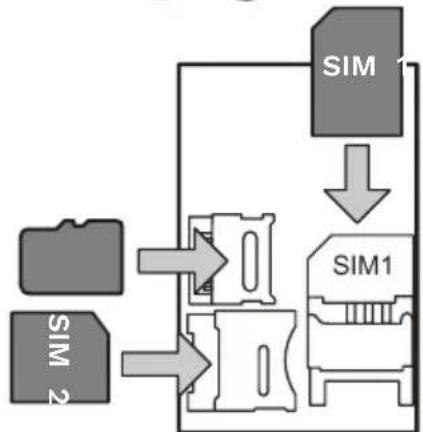
- Slide SIM cards into proper slots (SIM1 is full-sized SIM, SIM2 is microSIM).
-
Unlock the memory card slot by sliding it to the left and lift the bracket. Install the memory card and lock the bracket by sliding it to the right.
-
Insert the battery (note the correct placement of pins).
- Close the battery compartment cover.

natural_image
Line drawing of a flat electronic device with an upward arrow indicating motion (no text or symbols)
flowchart
graph TD
    A["SIM 1"] --> B["SIM1"]
    C["SIM 2"] --> D["Signal Flow Arrow"]
    D --> E["Signal Flow Arrow"]
    style A fill:#999,stroke:#333
    style B fill:#ccc,stroke:#333
    style C fill:#999,stroke:#333
    style D fill:#ccc,stroke:#333
    style E fill:#999,stroke:#333
EN
EN
Krüger&Matz
Owner's manual Owner's manual
Krüger&Matz
CHARGING
- Connect the micro USB plug to the docking station.
- Connect the USB plug to the power supply.
- Slide the phone into the docking station.
- Make sure that the pins of the docking station are making contact with the phone pins.
- The phone can also be charged directly, without the docking station.
Caution: disconnect the charger after finished charging or take out the phone from the docking station. Otherwise the battery may be damaged.
TURNING ON
To turn on the phone, press and hold the end call button.
MAIN SCREEN NOTIFICATION ICONS
| Network signal level for SIM 1 / SIM 2 | |
| RM, RM- | Roaming for SIM 1 / SIM 2 |
| Battery level | |
| Unread text message | |
| Missed call | |
| Alarm enabled |
| Memory card inserted | |
| General mode active | |
| Silent profile active | |
| Meeting profile active | |
| Outdoor profile active | |
| Bluetooth enabled |
NAVIGATING THE MENU
- Function on the left corresponds to left function button.
- Function on the right corresponds to right function button.
- Function on the middle corresponds to middle navigation button.
- To change the volume, use the volume buttons (while calling or playing music).
- Navigation buttons open assigned shortcuts (while on the main screen).
TORCH
To turn on/off the torch, press and hold the button (only while on the main screen).
EN
Krüger&Matz
Owner's manual Owner's manual
Krüger&Matz
MAKING PHONECALLS
To dial the number, while in main screen, use the numeric keypad and press the make call button. To end the call, press the end call button.
SOS BUTTON
Press and hold the SOS button for 5 seconds to send the text or make a call to defined numbers. Alarm sound will also be played.
OPERATION
Contacts
In the Contacts menu, there is a contacts list and contact search bar. To search a contact, input the name with keypad. To make a phone call, press the green button.
Messages
- To write a message select the Write message option. Write a message and press the Options button. Select Send to and choose if you want to input number manually or select a contact from the Contacts list. Press the Options button and select the Send option.
- To switch between capital and small letters, press the # button.
- To view messages, select menu: Inbox, Drafts, Outbox, and Sent.
- Settings: changing the messaging settings.
Call logs
- Call menu allows for viewing missed, dialed, received and rejected calls.
- To clean all of these lists, select the Delete call history option!
Multimedia
• Camera allows for taking pictures.
• Video recorder allows for shooting videos.
• Audio player allows for listening to music.
• Video player allows for watching videos.
• Sound recorder allows for recording voice.
- Image viewer allows for viewing taken pictures. To navigate between pictures, press the up and down button.
- FM Radio allows for listening to radio stations. Connecting the headphones is requires. This works as an antenna. To turn the radio on or off, press the middle function button. Options menu allows for managing and saving radio stations.
- File manager: allows for browsing the files on internal memory and memory card.
Settings
- Profiles: editing and activating sound profiles.
- Phone settings:
- Date and time: set the date and time
• Language: set the phones language
• Display: change the backlight, wallpaper backlight time.
• Airplane mode: enabling and disabling airplane mode.
• Auto power on/off: change the hour of automatic power on and off.
Krüger&Matz
• Auto power on/off: set the schedule of powering the phone on and off.
- Shortcuts: change the shortcuts on the main screen.
- SMS / missed calls / charging indicator: turning on or off the indicators on the clamshell.
- Dual SIM settings: enable or disable activity of each SIM card.
- Call settings: changing the settings of dialing and receiving calls (only for advanced users).
- Speed dial: assigning contacts to speed dialing (press and hold the key to call assigned contact).
- SOS Settings: change the settings of SOS button.
- SOS Status: turn on or off the SOS button
- SOS numbers: add the numbers to call after pressing the SOS button.
- SOS SMS ON/OFF: turn on or off sending the text message after pressing the SOS button.
- SOS SMS: edit the emergency SMS.
- Warning tone: turn on or off the warning sound after pressing the SOS button.
- Security: change the phone password, PIN code and Black list (Default security password is: 1122).
• To change or disable PIN code for the SIM card, select the card and choose changing or disabling the code.
• To secure the phone by requiring the password while turning on the phone, select the Phone lock (default password is 0000 and changing it is recommended).
• Network settings: select network searching mode (automatic or manual).
Owner's manual Owner's manual
Krüger&Matz
- Bluetooth:
• Power: turn on or off the Bluetooth - Visibility: turn on/off visibility to other devices.
• Devices: search for new devices nearby.
• Search audio devices: search for audio devices nearby.
• My name: name of the device, that will appear to other devices. - Advanced: change the audio path while Bluetooth is connected and storage path.
- Restore factory settings: set the settings to factory values. Use this function if the phone freezes or does not work properly.
Tools
- Calendar: allows for browsing days of month
- Alarm: turn on and edit the alarms.
- Calendar: allows for browsing days of month and adding tasks.
- Calculator: allows for making simple calculations.
- Torch: turn on and off.
- STK: SIM toolkit.
EN
EN
Krüger&Matz
Owner's manual Owner's manual
Krüger&Matz
TROUBLESHOOTING
| Problem Possible solution | |
| The device cannot be turned on | Charge the battery or check the connection between the battery and the phone. Take out and insert the battery. |
| SIM card error | Clean the pins of the SIM card. If this problem keeps occurring, contact your network carrier. |
| Can't make a phone call | Check the network signal. If it is too low, go to a place with stronger signal. If this problem keeps occurring, contact your network carrier. |
EN
SPECIFICATION
- Main display: 2,8"
- Main display resolution: 240 x 320 px
- Camera: 0,3 Mpx
- Internal memory: 32 MB
- microSD card slot (max. 16 GB)
• 2 SIM cards support - Bluetooth 2.1
• Talk time: up to 5 h
• Standby time: up to 300 h - Battery capacity: 1000 mAh
- AC charger:
- Input: 100 - 240 V; 50/60 Hz
• Output: 5 V / 500 mA - Weight: 108,5 g (with battery)
- Dimensions with closed clamshell: 107 x 59 x 19 mm
- Dimensions with opened clamshell: 205 x 52 x 21 mm
- In set: docking station, charger, user's manual
EN
Krüger&Matz
Owner's manual
Instrukcja obsługi
Krüger&Matz
Lechpol Electronics Leszek Sp.k. hereby declares that mobile phone KM0929 is consistent with directive 2014/53/EU.
Full text of the EU Declaration of Conformity is available at following Internet address: www.lechpol.pl.

English
Correct Disposal of This Product (Waste Electrical & Electronic Eq


(Applicable in the European Union and other European countries with separate collection systems) This marking shown on the product or its literature indicates that it should not be disposed with other household wastes at the end of its working life. To prevent possible harmtotheenvironmentorhumanhealthfromuncontrolled waste disposal, please separate this from other types of wastes and recycle it responsibly to promote the sustainable reuse of material resources. Household users should contact either the retailer where they purchased this product, or their local government office, for details of where and how they can take this item for environmentally safe recycling. Business users should contact their supplierand checkthetermsand conditions of the purchase contract. This product should not be mixed with other commercial wastes for disposal.
Made in China for Lechpol Electronics Leszek Sp.k., ul. Garwolińska 1, 08-400 Miętne.
KWESTIE BEZPIECZEŃSTWA
www.krugermatz.com
Krüger&Matz is a registered trademark


- Owner's manual Owner's manual
- Krüger&Matz
- SAFETY INSTRUCTIONS
- PRODUCT DESCRIPTION
- SIM CARDS AND MEMORY CARD INSTALLATION
- EN
- CHARGING
- TURNING ON
- MAIN SCREEN NOTIFICATION ICONS
- NAVIGATING THE MENU
- TORCH
- MAKING PHONECALLS
- SOS BUTTON
- OPERATION
- Contacts
- Messages
- Call logs
- Multimedia
- Settings
- Tools
- SPECIFICATION
- English
- Correct Disposal of This Product (Waste Electrical & Electronic Eq
- KWESTIE BEZPIECZEŃSTWA
Brand : Krüger&Matz
Model : KM0929
Category : Smartphone