RUX-H02 - Remote control ALPINE - Free user manual and instructions
Find the device manual for free RUX-H02 ALPINE in PDF.


| Product Type | Remote Control (Remote Commander) |
| Brand | Alpine |
| Model | RUX-H02 |
| Compatible Models | iLX-507, iLX-F509, iLX-F511, i509 |
| Battery Type | CR2032 (coin cell) |
| Controls | Rotary Knob (volume up/down; press+rotate for subwoofer or bass level) |
| LED Indicator | Yes, lights on connection/operation |
| Connection | Bluetooth; pair via Device List on Display Audio |
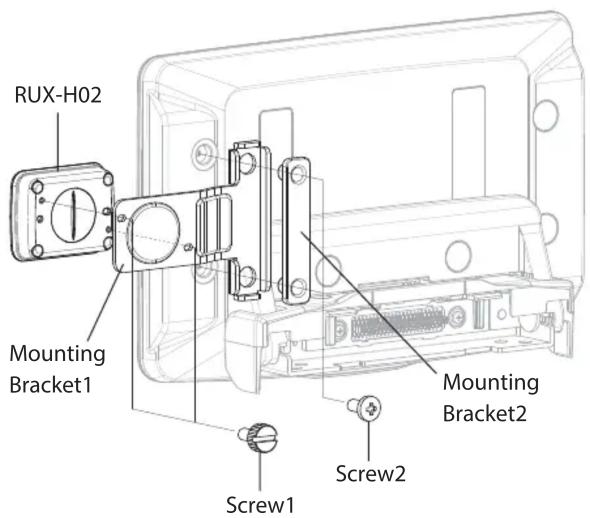
| Mounting | Optional bracket mount (left/right side) with screws or double-sided tape |
| Cleaning | Soft lint-free cloth or cotton swab with mild detergent/water |
| Safety Warnings | Keep batteries away from children; do not disassemble; avoid distraction while driving |
| Battery Polarity | Positive (+) side up |
| Auto Reconnect | Yes, when Display Audio turns on and knob is operated |
| Operating Environment | Avoid direct sunlight, water, moisture, excessive dust |
| Included Accessories | Mounting Bracket1, Mounting Bracket2, Screw1, Screw2, Battery (CR2032) |
Frequently Asked Questions - RUX-H02 ALPINE
User questions about RUX-H02 ALPINE
0 question about this device. Answer the ones you know or ask your own.
Ask a new question about this device
Download the instructions for your Remote control in PDF format for free! Find your manual RUX-H02 - ALPINE and take your electronic device back in hand. On this page are published all the documents necessary for the use of your device. RUX-H02 by ALPINE.
USER MANUAL RUX-H02 ALPINE
This product connects to the following models.
iLX-507/iLX-F509/iLX-F511/i509
And This product can also be mounted on the iLX-F509/F511. Check P3 for details.

WARNING
This symbol means important instructions. Failure to follow them can result in serious injury or death.
DO NOT DISASSEMBLE OR ALTER.
Doing so may result in an accident, fire or electric shock.
KEEP SMALL OBJECTS SUCH AS BATTERIES OUT OF THE REACH OF CHILDREN.
Swallowing them may result in serious injury. If swallowed, consult a physician immediately.
DO NOT OPERATE ANY FUNCTION THAT TAKES YOUR ATTENTION AWAY FROM SAFELY DRIVING YOUR VEHICLE.
Any function that requires your prolonged attention should only be performed after coming to a complete stop. Always stop the vehicle in a safe location before performing these functions. Failure to do so may result in an accident.
KEEP THE VOLUME AT A LEVEL WHERE YOU CAN STILL HEAR OUTSIDE NOISE WHILE DRIVING.
Failure to do so may result in an accident.
Do not ingest battery, Chemical Burn Hazard.
The remote commander contains a coin/ button cell battery. If the coin/ button cell battery is swallowed, it can cause severe internal burns in just 2 hours and can lead to death. Keep new and used batteries away from children. If the battery compartment does not close securely, stop using the product and keep it away from children. If you think batteries may have been swallowed or placed inside any part of the body, seek immediate medical attention.

CAUTION
This symbol means important instructions. Failure to follow them can result in injury or material property damage.
DO NOT MIX NEW BATTERIES WITH OLD BATTERIES. INSERT WITH THE CORRECT BATTERY POLARITY.
Risk of explosion if battery is replaced by an incorrect type. Dispose of used batteries according to the instructions. When inserting the batteries, be sure to observe proper polarity (+ and −) as instructed.
Handling Precautions
Do not drop or apply shock to the unit. It may get permanently damaged.
Keep the unit away from water and moisture, direct sun and heat, and excessive dust.
Never use scouring pads, steel wool, abrasive powders or harsh chemical agents, such as lye solution, for cleaning.
Clean with a soft, lint-free cloth or cotton swab slightly dampened with a mild solution of detergent and water.
Do not operate this unit in a manner that could distract you from driving safely.
Installation of Remote Control Holder
Do not leave the remote control mounted on the holder, if it is direct sunlight. Remove the remote control from the holder and put it in the glove compartment.
If double-sided adhesive tape cannot install the holder securely, use screws.
When mounted to the Display Audio, do not press the unit hard to operate it. The Display Audio may be damaged.
Attachment
| RUX-H02 Mounting Bracket1 Mounting Bracket2 | ||
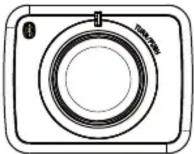 x1 x1 x1 x1 x1 x1 | 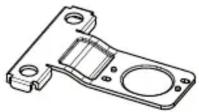 x1 x1 x1 x1 x1 x1 |  |
| Battery Screw1 Screw2 | ||
 (CR2032)x1 x2 x2 (CR2032)x1 x2 x2 |  x1 x2 x2 x1 x2 x2 |  |
Location of Controls
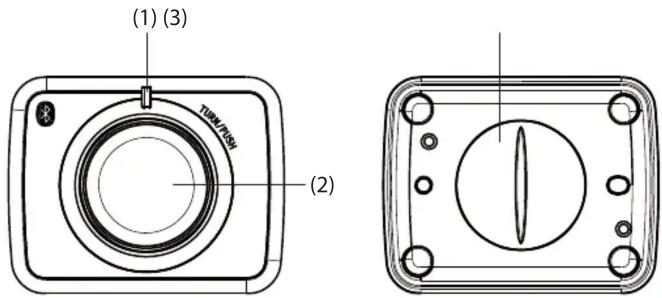
(1) LED Indicator
It turns on when the unit is connected/operated.
(2) Rotary Knob
To turn the volume up and down, respectively.
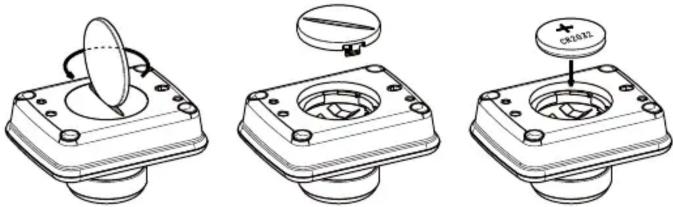
(3) Lid
Turn counter-clockwise to open the lid.
Connecting the unit
- Insert the battery using the following procedure:
* Ensure the positive (+) side faces up as shown in the illustration below.
natural_image
Three technical line drawings of a mechanical component with a circular component inserted into a housing, showing different mounting states (no text or symbols present)When the battery is set, the unit enters the connection standing-by mode. While the LED is flashing, perform the procedure in Step 2.
If the LED turns off while performing the procedure in Step 2, press the Rotary Knob. The LED starts flashing again.
- Follow this procedure to connect the RUX-H02 to the Display Audio unit.
1) Select [Setup].
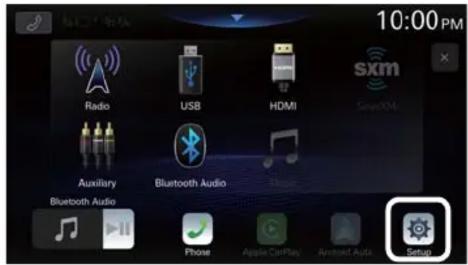
2) Select [Device], then [Device List].
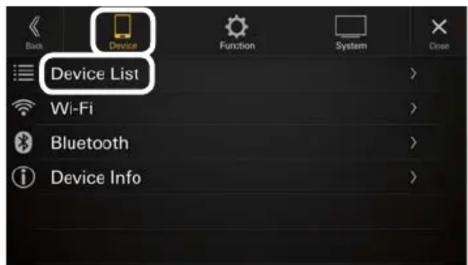
3) Select [Add New Device].
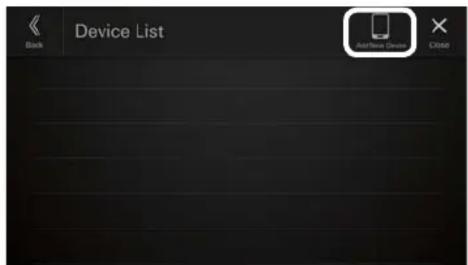
4) Select [ALPINE KNOB].
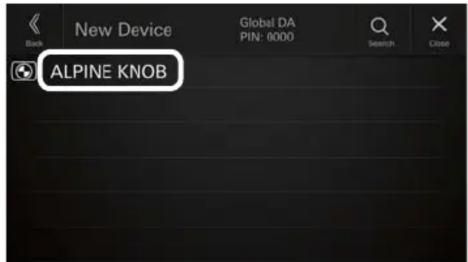
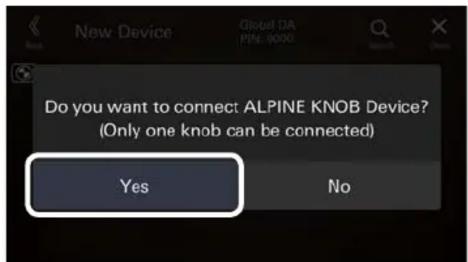
5) Select [YES] when the screen below is displayed.
MEMO
When the Display Audio is off for a certain period of time, the unit is disconnected.
The unit is reconnected automatically when the Display Audio is turned on and the Rotary Knob is operated.
* It may take some time for the unit to reconnect in some situations.
Operating the unit
- The unit supports the following operation:
· Turning the Rotary Knob: Volume up/down - When the subwoofer is connected and setting is turned on in the Sound Menu of the Display Audio, the following operation is supported.
- Turning the Rotary Knob while pressing it: Turn the subwoofer volume level up/down
- When the subwoofer is not connected and setting is turned off in the Sound Menu, Bass volume level adjustment in the Bass/Treble function of the Display Audio is enabled.
- Turning the Rotary Knob while pressing it: Bass volume level up/down
If the device does not function after making a connection, follow the procedure on page 2 to replace the battery and then try reconnecting.
Mounting example
- The enclosed mounting bracket can be used to mount the unit to iLX-F509/F511. (The unit can be mounted on the left or right side).