
Fuzion LRF TM25-384 - Thermometer AGM - Free user manual and instructions
Find the device manual for free Fuzion LRF TM25-384 AGM in PDF.


| Product Type | Thermal Monocular with Laser Rangefinder |
| Model | Fuzion LRF TM25-384 |
| Brand | AGM |
| Sensor Resolution | 384 × 288 pixels |
| Display Resolution | 1024 × 768 OLED |
| Magnification | 1x – 8x digital zoom |
| Objective Lens Diameter | 25 mm |
| Detection Range (Human) | Up to 1200 m |
| Laser Rangefinder Range | Up to 800 m |
| Field of View | 10.5° × 7.9° |
| Refresh Rate | 50 Hz |
| Battery Type | CR123A (2x) or rechargeable 18650 (1x) |
| Battery Life | Up to 6 hours continuous operation |
| Dimensions (L × W × H) | 220 × 78 × 65 mm |
| Weight (without batteries) | 480 g |
| Operating Temperature Range | -20°C to +55°C |
| Storage Temperature Range | -40°C to +70°C |
| Waterproof Rating | IP67 (submersible up to 1 m for 30 min) |
| Main Features | Wi-Fi, video recording, image capture, stadiametric rangefinder |
| Cleaning Instructions | Clean lens with soft cloth; avoid solvents; store in dry case |
| Included Accessories | Carrying case, lens cap, USB cable, cleaning cloth, user manual |
Frequently Asked Questions - Fuzion LRF TM25-384 AGM
User questions about Fuzion LRF TM25-384 AGM
0 question about this device. Answer the ones you know or ask your own.
Ask a new question about this device
Download the instructions for your Thermometer in PDF format for free! Find your manual Fuzion LRF TM25-384 - AGM and take your electronic device back in hand. On this page are published all the documents necessary for the use of your device. Fuzion LRF TM25-384 by AGM.
USER MANUAL Fuzion LRF TM25-384 AGM
natural_image
Line drawing of a mounted optical device with lens, aperture, and screen (no text or symbols)FUZION LRF
FUSION THERMAL & OPTICAL
BI-SPECTRUM MONOCULAR
WITH LASER RANGEFINDER
© 2021 AGM Global Vision, LLC. All rights reserved.
This documentation is subject to change without notice.
No parts of this manual, in whole or in part, may be copied, photocopied, translated, or transmitted by any electronic medium or in machine-readable form without the prior written permission of AGM Global Vision, LLC.
If you have questions that are not covered in this manual, or need service, contact AGM Global Vision customer support for additional information prior to returning a product.
AGM Global Vision, LLC
173 West Main Street
PO Box 962
Springerville, AZ 85938
Tel. 928.333.4300
support@agmglobalvision.com
www.agmglobalvision.com
EXPORT INFORMATION
Buyer acknowledges that all products supplied by AGM Global Vision, LLC are subject to U.S. export control laws, including, but not limited to, the Export Administration Regulations, the International Economic Emergency Powers Act, and various U.S. embargoes and sanctions. AGM Global Vision products may not be exported, re-exported, or transferred contrary to U.S. export control laws. In particular, AGM Global Vision products may not be exported, re-exported, or transferred to prohibited countries, individuals, organizations, or entities, including but not limited to those individuals and entities listed on the List of Specially Designated Nationals and Blocked Persons administered or maintained by the U.S. Office of Foreign Assets Control ("OFAC"), the various lists maintained by the Bureau of Industry and Security of the Department of Commerce, and the U.S. State Department and Buyer represents and warrants that neither Buyer nor any of its officers, directors, or employees are on such lists. Distribution or resale by Buyer to such countries, individuals, organizations, or entities is expressly prohibited. Buyer has and will maintain a positive process to ensure compliance with this Section.
FCC INFORMATION
Please take attention that changes or modification not expressly approved by the party responsible for compliance could void the user's authority to operate the equipment.

This equipment complies with FCC/IC RSS-102 radiation exposure limits set forth for an uncontrolled environment.
FCC compliance: This product has been tested and found to comply with the limits for a Class B digital device, pursuant to Part 15 of
the FCC Rules. These limits are designed to provide reasonable protection against harmful interference in a residential installation. This product generates, uses, and can radiate radio frequency energy and, if not installed and used in accordance with the instructions, may cause harmful interference to radio communications. However, there is no guarantee that interference will not occur in a particular installation. If this product does cause harmful interference to radio or television reception, which can be determined by turning the equipment off and on, the user is encouraged to try to correct the interference by one or more of the following measures:
— Reorient or relocate the receiving antenna.
— Increase the separation between the equipment and receiver.
- Connect the equipment into an outlet on a circuit different from that to which the receiver is connected.
- Consult the dealer or an experienced radio/TV technician for help.
FCC Conditions
This device complies with part 15 of the FCC Rules. Operation is subject to the following two conditions:
- This device may not cause harmful interference.
- This device must accept any interference received, including interference that may cause undesired operation.
EU CONFORMITY STATEMENT

This product and - if applicable - the supplied accessories too are marked with "CE" and comply therefore with the applicable harmonized European standards listed under the EMC Directive 2014/30/EU, the RoHS Directive 2011/65/EU
2012/19/EU (WEEE directive): Products marked with this symbol cannot be disposed of as unsorted municipal waste in the European Union. For proper recycling, return this product to your local supplier upon the purchase of equivalent new equipment, or dispose of it at designated collection points. For more information see: www.recyclethis.info
2006/66/EC (battery directive): This product contains a battery that cannot be disposed of as unsorted municipal waste in the European Union. See the product documentation for specific battery information. The battery is marked with this symbol, which may include lettering to indicate cadmium (Cd), lead (Pb), or mercury (Hg). For proper recycling, return the battery to your supplier or to a designated collection point. For more information see: www.recyclethis.info
INDUSTRY CANADA ICES-003 COMPLIANCE
This device meets the CAN ICES-3 (B)/NMB-3(B) standards requirements.
LIST OF CONTENTS
TITLE
Safety Summary 5
1. GENERAL INFORMATION 7
1.1 System Description 7
1.2 Key Features 8
1.3 Standard Components 8
2. OPERATING INSTRUCTIONS 9
2.1. Basic Operations 9
2.2 Main Function 14
2.3 Client Software Introduction 20
3. MAINTENANCE 21
3.1 Maintenance 21
3.2 Troubleshooting 22
4. WARRANTY INFORMATION 23
4.1 Warranty Information and Registration 23
5. SPECIFICATIONS 25
5.1 Specifications 25
SAFETY SUMMARY
- Read and follow all instructions
- Read all warnings
- Only use the attachments/accessories specified by the manufacturer
- All service must be provided by the manufacturer
WARNING:
This product contains natural rubber latex, which may cause potentially fatal allergic reactions! If you are allergic to latex, it is important that you strictly avoid exposure to products that contain it.
WARNINGS AND CAUTIONS:
Transportation
- Keep the device in original or similar packaging while transporting it.
- Keep all wrappers after unpacking them for future use. In case of any failure occurred, you need to return the device to the factory with the original wrapper. Transportation without the original wrapper may result in damage on the device and the company shall not take any responsibilities.
- DO NOT drop the product or subject it to physical shock. Keep the device away from magnetic interference.
Power Supply
- The battery charger and power adapter are included in the package. The input voltage for the supplied battery charger should meet the limited power source (5 VDC, 2 A).
- Make sure the plug is properly connected to the power socket.
- DO NOT connect multiple devices to one power adapter, to avoid overheating or fire hazards caused by overload.
Battery
- Improper use or replacement of the battery may result in explosion hazard. Replace with the same or equivalent type only. The battery type is 18650 with the protection board, and the battery size should be within 19 ~mm × 70 ~mm . The rated voltage and capacity are 3.6 VDC/3.35 Ah (12.06 Wh). Dispose of used batteries in conformance with the instructions provided by the battery manufacturer.
- For long-term storage of the battery, make sure it is fully charged every half year to ensure the battery quality. Otherwise, damage may occur.
- Do not charge other battery types with the supplied charger. Confirm there is no flammable material within 2 m of the charger during charging.
- DO NOT place the battery near heating or fire source. Avoid direct sunlight.
- DO NOT swallow the battery to avoid chemical burns.
- DO NOT place the battery in the reach of children.
- The device can not be charged, please use the supplied charger to charge the battery.
- Please purchase the adapter by yourself. The using environment of the adapter should be consistent with that of the device.
Maintenance
- If the product does not work properly, please contact your dealer or the nearest service center. We shall not assume any responsibility for problems caused by unauthorized repair or maintenance.
- Wipe the device gently with a clean cloth and a small quantity of ethanol, if necessary.
- If the equipment is used in a manner not specified by the manufacturer, the protection provided by the device may be impaired.
- Clean the lens with soft and dry cloth or wiping paper to avoid scratching it.
Using Environment
- Make sure the running environment meets the requirement of the device. The operating temperature shall be -20°C to 55°C (-4°F to 131°F), and the operating humidity shall be 95% or less.
- DO NOT expose the device to extremely hot, cold, dusty, corrosive, saline-alkali, or damp environments.
- This device can only be safely used in the region below 2000 meters above the sea level.
- Avoid equipment installation on vibratory surface or places subject to shock (neglect may cause equipment damage).
- DO NOT aim the lens at the sun or any other bright light.
NOTES:
- The detector spectral band provides better visibility through smoke, dust, rain, smog, etc.
- Infrared radiation does not travel through glass. As a result, the monocular does not detect objects if they are behind glass windows or other barriers.
EMERGENCY:
If smoke, odor, or noise arises from the device, immediately turn off the power, unplug the power cable, and contact the service center.
LASER EMERGENCY:
When any laser equipment is in use, make sure that the device lens is not exposed to the laser beam, or it may burn out. The laser radiation emitted from the device can cause eye injuries, burning of skin or inflammable substances. Before enabling the light supplement function, make sure no human or inflammable substances are in front of the laser lens. Do not place the device where minors can fetch it.
1 GENERAL INFORMATION
1.1 SYSTEM DESCRIPTION
The AGM Fuzion LRF Handheld Thermal & Optical Bi-spectrum Monocular is equipped with 12μm high sensitivity thermal detector, ultra-low light optical detector, 1024×768 OLED display and eyepiece with a large field of view. The device can quickly detect hiding objects even under extreme environments such as smoke, fog, rain, snow, etc. It can be widely applied to scenarios including patrol, search and rescue, drug interdiction, and suspect apprehension. Due to its waterproof capability the device performs well even in severe weather conditions and challenging environments.
The Fuzion LRF's user-friendly interface, comfortable and ergonomic operating controls makes adoption and application incredibly simple. The monocular offers three different variants of image view: thermal, visible light, and fusion that can be easily adapted depending on different environmental conditions. This high-tech monocular is equipped with a laser rangefinder for measurement of target distance.


FIGURE 1-1. MAIN PARTS
TABLE 1-1. MAIN PARTS
| ITEM DESCRIPTION ITEM DESCRIPTION | |
| 1 Body 7 Operation Wheel | |
| 2 Laser Range Finder 8 Eyepiece | |
| 3 Optical Lens 9 USB Type-C Interface | |
| 4 Lens Cap 10 Battery Cover | |
| 5 Thermal Lens Focus Ring 11 Battery Compartment Lock | |
| 6 Control Buttons | 12 Tripod Screw |
1.2 KEY FEATURES
• Bi-spectrum image fusion and object highlight
• Detail enhancement and target recognition
- Selection of thermal view channel, visible light channel, or both them combined
- 12 μm, 35 mK NETD high sensitivity thermal detector
• 1x, 2x, 4x, 8x digital zoom
• Digital image processing technology
• Ultra-low illumination optical channel
• 1920×1080 optical resolution
• Built-in eye-safe laser rangefinder
• 1024×768 resolution, 0.39-inch OLED display
• Video recording and snapshot, built-in EMMC (16 GB)
- Wi-Fi hotspot
- Standby mode
- Up to 5 hours continuous running
- Waterproof
• Limited 3-Year Warranty
1.3 STANDARD COMPONENTS
The standard components are shown in Figure 1-2 and listed in Table 1-2.
The ITEM NO. column indicates the number used to identify items in Figure 1-2.
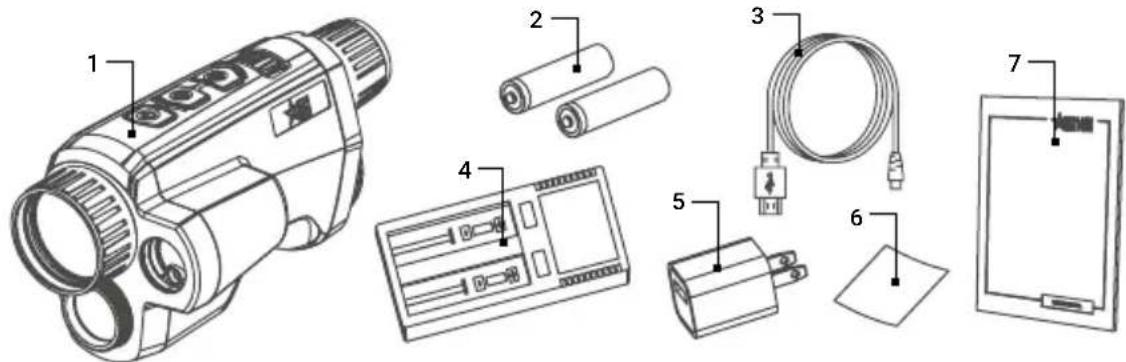
FIGURE 1-2. STANDARD COMPONENTS
TABLE 1-2. STANDARD COMPONENTS
| ITEM DESCRIPTION QUANTITY | |
| 1 Monocular 1 | |
| 2 18650 Rechargeable Battery 2 | |
| 3 USB Cable 1 | |
| 4 Battery Charger 1 | |
| 5 Power Adapter 1 | |
| 6 Lens Cloth 1 | |
| 7 User Manual 1 | |
2 OPERATING INSTRUCTIONS
2.1. BASIC OPERATIONS
2.1.1 UNPACKING
The following steps must be completed prior to each mission.
- Open the carrying case, remove the monocular, and verify that all components are included.
- Inspect the monocular for any obvious evidence of damage to the optical surfaces, body, eyecup, operation buttons, etc. Ensure that all optical surfaces are clean and ready for use. Clean all optical surfaces with a lens tissue.
2.1.2 BATTERY INSTALLATION
- Press and push the battery compartment lock (A), rotate the battery cover (B) anticlockwise until the marks on the battery cover and the device (C) are aligned, and disassemble the battery cover.
- Insert the battery (D) into the battery compartment with the positive mark inward.
- Align the marks on the battery cover and the device, and put the battery cover on the battery.
- Rotate the battery cover clockwise to fix it.
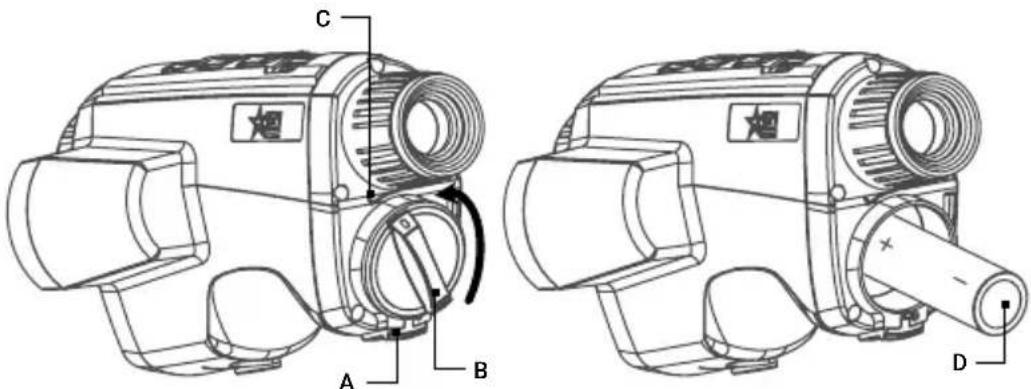
FIGURE 2-1. BATTERY INSTALLATION
NOTE:
Remove the battery from the battery compartment if the device is not used for a long time.
2.1.3 CONTROLS AND INDICATION
The Fusion controls are shown in Figures 2-2 and are defined in Tables 2-2.
Each button is responsible for some functions selected by short press or long press (hold) the button. Pushing a button for 2+ second is considered "long press" (hold).

FIGURE 2-2. CONTROLS AND INDICATION
TABLE 2-1. CONTROLS AND INDICATOR FUNCTIONS
| ITEM CONTROLS FUNCTIONS | ||
| 1 POWER BUTTON | Press: Standby mode/Wake up device.Hold: Power ON/OFF. | |
| 2 MEASURE BUTTON | Press: Capture image.Hold: Measure the distance with laser. | |
| 3 MENU BUTTON | Press: Palettes.Hold: Enter/Exit the menu. | |
| 4 OPERATION WHEEL | Adjusts the digital zoom.Selects the functions in menu mode. | |
| 5 POWER INDICATOR Indicate the power ON/OFF. | ||
NOTE:
Press the MEASURE button ⏻ and MENU button Ⓜ at the same time to start or stop recording.
2.1.4 POWER ON AND OFF
Power On
When the battery is enough, hold the POWER button ⏻ to power on the device. Refer to the figure below for the main view of the monocular display.
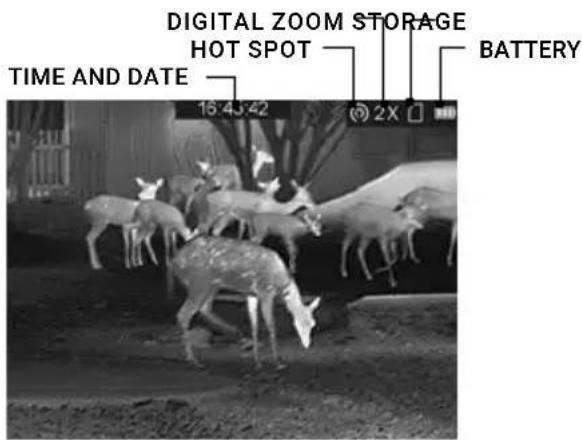
FIGURE 2-3. THE DISPLAY MAIN VIEW
Power Off
When the device is turned on, hold the POWER BUTTON ⏻ to power off the device.
NOTE
See the battery icon on the device display for the electricity quantity. Icon means the battery is fully charged, and icon means that the battery is low.

When the low power note shows, charge the battery.
In the "Auto Power Off" menu you can set the time for the automatic shutdown of the device as required (OFF / 30 min. / 45 min.).
2.1.5 STANDBY MODE
In the view mode, press the button. After a few seconds, the display will turn off. Press the button again to exit the Standby mode.
2.1.6 THERMAL VIEW OBSERVATION
- Power on the device.
- Hold the device and make sure the eyepiece covers your eye.
- Adjust the diopter adjustment ring until the OSD text or image is clear.
- Point the device towards the target of the view. Bring the object into focus by rotate the objective focus ring.
NOTE:
You must perform the focus adjustment before any further use of the riflescope.
- Set palette, brightness, contrast, scene mode and FFC (Flat Field Correction), to display the best image effect.
2.1.7 PALETTE SETTINGS
You can select different palettes to display the same scene in different effects. Press 📂 live view interface to switch palettes.
TABLE 2-2. PALETTE SETTINGS
| PALETTE DESCRIPTION | |
| OPTICAL The image of optical channel is displayed in this mode. | |
| WHITE HOT | The hot part is white-colored in view. The higher the temperature is, the lighter the color is. |
| BLACK HOT | The hot part is black-colored in view. The higher the temperature is, the more black the color is. |
| RED HOT | The hot part is red-colored in view. The higher the temperature is, the redder the color is. |
| FUSION | From high temperature to low temperature, the image is colored in from white, yellow, red, pink to purple. |
| IMAGE FUSION | Fuse the optical image with the thermal image. The fused image with clear edge is displayed in this mode. |
NOTE
When the palette is set as image fusion, you can adjust the fusion level according to the actual observation distance to obtain better image fusion effect (see 2.2 for details).
2.1.8 DIGITAL ZOOM
In the live view interface, rotate the operation wheel to switch the digital zoom of the device (1x, 2x, 4x, or 8x). The image magnification value is displayed on the screen:
- AGM Fuzion LRF TM25-384: 2.5x, 5x, 10x, 20x
- AGM Fuzion LRF TM35-384: 3.5x, 7x, 14x, 28x
- AGM Fuzion LRF TM35-640: 2x, 4x, 8x, 16x
- AGM Fuzion LRF TM50-640: 3x, 6x, 12x, 24x
2.1.9 VIDEO RECORDING / IMAGE CAPTURE
Video Recording
In the live view interface, press ⏻ and Ⓜ buttons at the same time to start recording.
The left top of image displays the information of recording time.
Press ⏱ and Ⓜ buttons at the same time again to stop recording.
Snapshot Capturing
In the main live view interface, press ⏱ button to capture picture.

natural_image
Night street scene with illuminated buildings and a person walking, no visible text or symbols- When capturing succeeds, the image freezes for 1 second and a prompt shows on the display.
- For exporting captured pictures, refer to Export Files.
2.1.10 CONNECTING THE DEVICE
- Open the cable interface cover.
- Connect the device and PC to copy/delete files.
2.1.11 FILE EXPORT
- Connect the thermal monocular to your PC with USB cable and open the detected disk.
-
Open computer disk and select the disk of device. Go to the DCIM folder and find the folder named after the capture year and month. For example, if you capture a picture or record a video on June 2021, go to DCIM -> 202106 to find the picture or video.
-
Select and copy the videos to PC and play the file with the player.
-
Select and copy the snapshots to PC and view the files.
-
Disconnect the device from your PC.
NOTE:
- The device displays images when you connect it to PC. But functions such as recording, capturing and hot spot are disabled.
- When you connect the device to PC for the first time, it installs the drive program automatically.
2.2 MAIN FUNCTIONS
Rotate the operation wheel to move between menu items. The active element is highlighted in orange. Press Ⓜ button to select menu item or change an option. Hold Ⓝ button to exit the menu.

FIGURE 2-5. THE MAIN MENU
TABLE 2-3. MENU FUNCTION
| MENU ITEM SYMBOL OPTION FUNCTION | |||
| CONTRAST |  | 5 Levels of contrast | Adjust the image contrast. |
| BRIGHTNESS |  | 5 Levels of brightness | Adjust the image brightness. |
| SCENE MODE |  | Recognition | Switch between the Recognition mode and Jungle mode. |
 | Jungle | ||
| TRIGGER CALIBRATION |  | --- | Performs the correction as preset FFC mode. |
| FFC |  | Auto / Manual / External | Select the Flat Field Correction (FFC) mode. |
| CVBS |  | OFF | Turn on and off the CVBS Output function to view the video on CVBS monitor. |
 | ON | ||
| FUSION LEVEL |  | <26m, 26~53m, >53m | Switch fusion level. |
| DPC |  | --- | Correct dead pixel manually. |
| BURNING PREVENTION |  | ON | Turn on and off the Burn Prevention function. |
 | OFF | ||
| LANGUAGE |  | 17 Languages | Select the language of interface. |
| VERSION |  | --- | View the firmware version number and serial number. |
| RESTORE |  | --- | Restore the device to defaults. |
| TIME SYNC. |  | Time Format / Time / Date | Set the time and date. |
| OSD |  | ON | Enable or disable OSD. |
 | OFF | ||
| MEASURE |  | --- | Enter distance measurement mode. |
| AUTO POWER OFF |  | OFF/30 min/ 45 min | Set the automatic shutdown time. |
| HOT TRACKING |  | OFF | Enable/disable hot spot mark (marking the spot of highest temperature). |
 | ON | ||
| NETWORK |  | OFF | Enable or disable the Wi-Fi hotspot. |
 | Hotspot | ||
2.2.2 CONTRAST ADJUSTMENT
- Hold Mutton to go to the menu.
- Rotate the wheel to select ⏻ Contrast menu item and press ⏻ button to adjust the image contrast. You can select one of five levels of the contrast.
2.2.3 BRIGHTNESS ADJUSTMENT
- Hold 📂 button to go to the menu.
- Rotate the wheel to select ☐ Brightness menu item and press Ⓜtton to adjust the brightness.
You can select one of five levels of the brightness to adjust the image lighter or darker.
2.2.4 SCENE MODE
You can select proper Scene Mode according to environment temperature to improve the display effect.
-
Hold Ⓜ button to go to the menu.
-
Rotate the wheel to select Ⓞ / ▲ Scene Mode menu item ( is default option) and press Ⓜ switch scene.
Recognition mode (○) improves an image so that the object edge is more distinct.
Jungle mode (▲) is more suitable for hunting environment because of the highlight function of small objects.
- Hold Ⓜ to save settings and exit.
When the palette is set as image fusion, you can adjust the fusion level according to the actual observation distance to obtain better image fusion effect.
- Hold Ⓜ button to go to the menu.
- Rotate the wheel to select Ⓞ menu item.
- Press Ⓜ to switch fusion level.
2.2.6 TRIGGER CALIBRATION
Trigger Calibration performs the correction of nonuniformity of display in the mode preset in the FFC menu.
- Hold Ⓜ button to show the menu.
- Rotate the wheel to select ○ menu item and press Mio trigger the calibration.
- Hold Ⓜ button to exit.
2.2.7 FFC (FLAT FIELD CORRECTION)
Flat Field Correction (FFC) function can correct nonuniformity of display.
- Hold Ⓜ button to show the menu.
- Rotate the wheel to select ⏻ menu item and press Ⓞ switch the FFC mode between Manual, Auto and External.
Manual: Enter Trigger Calibration in the menu and press Ⓜ button to correct the nonuniformity of display (refer to section 2.2.6).
Auto: The monocular performs FFC automatically when switching on or rebooting the camera.
External: Cover the lens cap, then enter Trigger Calibration in the menu and press Ⓜ button to correct the nonuniformity of display (section 2.2.6).
- Hold Ⓜ button to exit.
2.2.8 CVBS OUTPUT
You can view the video on CVBS monitor, to get a better and clear image, more convenient to check the detail.
- Connect the USB-CVBS cable to USB port of thermal monocular and to monitor's CVBS port.
NOTE:
USB-CVBS cable need to be purchase separately.
NOTE:
CVBS Output function doesn't support hot plug, so please connect the cable before power on.
- Hold Ⓜ button to show the menu.
- Select CVBS menu item and press 📂 button to turn on or turn off the CVBS video output.
2.2.9 DEFECTIVE PIXELS CORRECTION
Defective Pixels Correction (DPC) function can correct the defective pixels on the screen which are not performed as expected.
Before you start switch the palettes mode to White Hot mode.
- Hold Ⓜ button to show the menu.
- Rotate the wheel to select DPC menu item, and press enter the DPC setting interface.
- Press Ⓜ to switch the moving direction of the cursor, and rotate the wheel to move the cursor until it reaches the defective pixel.
- Press ⏻ to correct the defective pixel.
NOTE:
When Holding ☐ in the DPC interface, the menu at the bottom of the interface can be mirrored to the top of the interface.
The selected defective pixel can be magnified and displayed at the bottom right of the interface.
2.2.10 BURNING PREVENTION
This function can prevent damage to the thermal sensor from the sun or other high temperature bright light source. When enabling this function, the shield will close until the environment turns to normal.
- Hold Ⓜ button to go to the menu.
- Rotate the wheel to select 🤊 menu item and press Ⓜ button to enable or disable the Burn Prevention function.
NOTE:
When the burn-prevention function is disabled, the shield won't be forced to close in such conditions.
2.2.11 LANGUAGE SETTING
You can select different languages of user interface.
- Hold Ⓜ button to show the menu.
- Rotate the wheel to select ☐a Language menu item and press Ⓞ button to select the language.
- Rotate the wheel to select the language as required, and press Ⓜ to confirm.
2.2.12 VIEW DEVICE INFORMATION
- Hold 📂 button to show the menu of device.
- Select ⓘ Version menu item and press Ⓞ button. You can view the device information such as firmware version, and serial number.
2.2.13 RESTORE DEVICE
You can reset the settings of device.
-
Hold Ⓜ button to show the menu of device.
-
Select ☐ Restore menu item and press Ⓞ button to restore the device to defaults according to the prompt.
2.2.14 TIME SYNCHRONIZATION
- Hold ⓂMutton to show the menu.
- Rotate the wheel to select ⏻ menu and press ⏻ button to enter the Time Sync.
- Press Ⓜ to switch the time system, and rotate the wheel to select the time and date to be synchronized.
- Press Ⓜ and rotate the wheel to set the time and date, and press Ⓜ again to finish the setting.
- Hold Ⓜ to save settings and exit.
2.2.15 OSD
- Hold ⓂMutton to go to the menu.
- Rotate the wheel to select ☐ / menu item and press button to switch the OSD mode.
When OSD (On-Screen Display) is on the information such as time, date, Wi-Fi hotspot activation, digital zoom, storage memory status, and battery status displays in top right corner of viewfinder.
2.2.16 DISTANCE MEASUREMENT
The device can detect the distance between the target and the observation position with laser.
NOTE:
When measuring the distance, keep the hand and the position steady. Otherwise, the accuracy may be affected.

natural_image
Black-and-white photo of a deer in a forest setting, no visible text or symbolsFIGURE 2-6. DISTANCE MEASUREMENT RESULT
- Hold Mutton to show the menu.
- Rotate the wheel to select ✦ menu item and press ⏚ button to enable Laser Ranging.
- Hold Ⓜ to return to the live view interface.
- Aim the cursor at the target and hold the ⏻ key to measure the target distance.
The distance measurement result is displayed at the upper right of the image.
2.2.17 AUTO POWER OFF
You can set the time for the automatic shutdown of the device as required.
- Hold Ⓜ button to show the menu of device.
- Rotate the wheel to select ⏻ Auto Power Off menu item and press ⏻ Button to select OFF, 30 min or 45 min.
2.2.18 HOT TRACKING
The device can detect the highest temperature spot in the scene and mark it on display.
- Hold Ⓜ button to show the menu.
- Select / and press Mitton to enable/disable hot spot mark (marking the spot of highest temperature).
When the hot spot mark is enabled, the -+ mark displays in the spot of the highest temperature. When the scene changes, the -mark moves.
2.2.19 NETWORK CONFIGURATION
Connect your phone to the Wi-Fi hotspot of the monocular, you can configure the parameters and realize functions of the device.
- Hold Ⓜ button to show the menu.
- Select Ⓞ menu item to enable Wi-Fi hotspot function.
- Turn on the WLAN and connect to the Wi-Fi hotspot.
- Hotspot Name: Wlan-IPTS Serial No.
- Hotspot Password: Last 9 digits of Serial No.
- Search the client software on App Store (iOS System) or Google Play ^TM (Android System) to download and install the app. T-Vision APP is recommend.
- Open the APP and connect your phone with the device. You can view the interface of monocular on your phone.
NOTE:
When the power is less than 15%, the Wi-Fi hotspot function will be turned off automatically.
2.3 CLIENT SOFTWARE INTRODUCTION
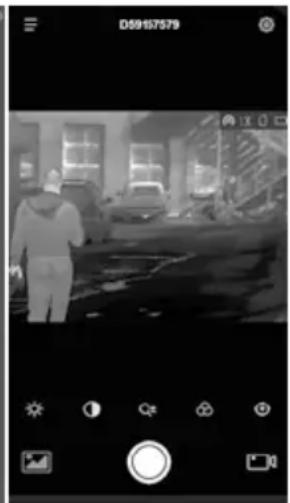
We recommend using T-Vision software. Install the client software on your mobile phone first, and then connect your phone to the hotspot of the monocular. Refer to section 2.2.19 for details of hotspot connection.
NOTE:
The device password is set by user at first activation. If the password was lost or forgotten, it can be reset. To make a reset, provide the following action:
- Hold Ⓜ button to show the menu of device.
- Move the cursor to ☐ menu item and press the button ☑ restore all parameters to default settings.
- Run the app and connect the phone or tablet with the device.
- If the device is inactivated, set the password and activate it. If the device is activated, enter the password to add it to the app.
- When the device is added, the live view can be seen. You can view the interface of the monocular on the software. User can change such image parameters as brightness, contrast, zoom, palettes directly via phone or tablet as well as record video on phone/tablet memory.


![Enter Device Password Device [Fuzlon LRF] ****** Cancel Confirm](/content/2026/05/831651/images/702a792fe20c8fb94ab83244c54ae2a224491ae37a4787487167259e25281949.jpg)
natural_image
Black-and-white photo of a person walking past a building with cars and streetlights (no visible text or symbols)FIGURE 2-7. CLIENT SOFTWARE
3 MAINTENANCE
3.1 MAINTENANCE
3.1.1 CLEANING PROCEDURES
- Gently brush off any dirt from the body of the device using a clean, soft cloth.
- Moisten the cloth with fresh water and gently wipe down the external surfaces (except lenses).
- Dry any wet surfaces (except lenses) using another dry, clean, soft cloth.
- Using a lens brush, carefully remove all loose dirt from the lenses.
- Dampen a cotton swab with ethanol and slowly, gently wipe down the lenses. Clean the glass surfaces using circular movements, starting from the center of the lens and moving out towards the edge, without touching the lens holder. Change the cotton swab after each circular stroke. Repeat this step until the glass surfaces are clean.
- Clean the accessories with a soft brush (or cloth) dampened with soap and water.
3.1.2 LASER MAINTENANCE
It is not necessary to maintain the laser regularly. If the laser does not work, the laser assembly needs to be replaced in the factory under warranty.
CAUTION:
Use of controls or adjustments or performance of procedures other than those specified herein may result in hazardous radiation exposure.
3.1.3 PREPARING FOR EXTENDED STORAGE
CAUTION:
Thoroughly dry each item before placing them into the storage case.
To prepare the monocular for extended storage:
- Clean the monocular and accessories.
- Place all items into the storage case.
3.1.4 UPDATING THE DEVICE FIRMWARE
- Download the firmware update package to your PC and unzip it.
- Connect the thermal device to your PC with USB cable.
- Turn on the thermal device.
-
Open the detected disk (USB drive) in file manager program. Copy the unzipped .dav file and paste it to the root directory of the device.
-
Turn off the device.
- Turn on the device. After a while, the firmware update process will start automatically. During the update, the screen will display the inscription "Upgrading ...". The update process will be completed when the inscription "Upgrading ..." goes out.
Repeat steps 4-6 for each updating file.
- Turn off the device and disconnect it from your PC.
3.2 TROUBLESHOOTING
Table 3-1 lists the most common malfunctions that may occur with your equipment. Perform the tests, inspections, and corrective actions in the order they appear in the table.
This table does not list all the malfunctions that may occur with your device, or all of the tests, inspections, and corrective actions that may be necessary to fix them. If the equipment malfunction is not corrected by the suggested actions, or a problem occurs that is not listed in this table, please contact AGM Global Vision's Customer Support center or your retailer.
TABLE 3-1. TROUBLESHOOTING
| MALFUNCTION CORRECTIVE ACTION | |
| The monocular fails to activate. | 1. Batteries are missing or improperly installed. Insert batteries or install correctly.2. Batteries are dead. Replace the batteries.3. Batteries, surfaces or contacts are dirty or corroded. Clean the contact. |
| Device power indicator is off. | Examine whether the device is off-battery. |
| The image of the monocular is not clear. | Perform the monocular adjustment referring to section 2.1. |
| Wi-Fi is not found. | Examine whether the Wi-Fi function is turned on. If not, go to OSD menu and turn on Wi-Fi. |
| Capturing or recording fails. | Examine the items below:1. Whether the device is connected to your PC and disabled the capturing and recording.2. Whether the storage space is full.3. Whether the device is low-battery. |
| The PC cannot identify the monocular. | Examine the items below:1. Whether the device is connected to your PC with standard USB cable.2. If you use other USB cables, make sure the cable length is no longer than 1 m. |
4 WARRANTY INFORMATION
4.1 WARRANTY INFORMATION AND REGISTRATION
4.1.1 WARRANTY INFORMATION
This product is guaranteed to be free from manufacturing defects in material and workmanship under normal use for a period of three (3) years from the date of purchase. In the event that a defect covered by the warranty below occurs during the applicable period stated above, AGM Global Vision, at its discretion, will either repair or replace the product; such action on the part of AGM Global Vision shall be the full extent of AGM Global Vision's liability, and the Customer's sole and exclusive reparation. This warranty does not cover a product if it has been (a) used in ways other than its normal and customary manner; (b) subjected to misuse; (c) subjected to alterations, modifications or repairs by the Customer or by any party other than AGM Global Vision without prior written consent of AGM Global Vision; (d) is the result of a special order or categorized as "close-out" merchandise or merchandise sold "as-is" by either AGM Global Vision or the AGM Global Vision dealer; or (e) merchandise that has been discontinued by the manufacturer and either parts or replacement units are not available due to reasons beyond the control of AGM Global Vision. AGM Global Vision shall not be responsible for any defects or damage that in AGM Global Vision's view are a result from the mishandling, abuse, misuse, improper storage or improper operation of the device, including use in conjunction with equipment that is electrically or mechanically incompatible with, or of inferior quality to, the product, as well as failure to maintain the environmental conditions specified by the manufacturer. This warranty is extended only to the original purchaser. Any breach of this warranty shall be enforced unless the customer notifies AGM Global Vision at the address noted below within the applicable warranty period.
The customer understands and agrees that except for the foregoing warranty, no other warranties written or oral, statutory, expressed or implied, including any implied warranty of merchantability or fitness for a particular purpose, shall apply to the product. All such implied warranties are hereby and expressly disclaimed.
4.1.2 LIMITATION OF LIABILITY
AGM Global Vision will not be liable for any claims, actions, suits, proceedings, costs, expenses, damages, or liabilities arising out of the use of this product. Operation and use of the product are the sole responsibility of the Customer. AGM Global Vision's sole undertaking is limited to providing the products and services outlined herein in accordance with the terms and conditions of this Agreement. The provision of products sold and services performed by AGM Global Vision to the Customer shall not be interpreted, construed, or regarded, either expressly or implied, as being for the benefit of or creating any obligation toward any third party of legal entity outside AGM Global Vision and the Customer; AGM Global Vision's obligations under this Agreement extend
solely to the Customer. AGM Global Vision's liability hereunder for damages, regardless of the form or action, shall not exceed the fees or other charges paid to AGM Global Vision by the customer or customer's dealer. AGM Global Vision shall not, in any event, be liable for special, indirect, incidental, or consequential damages, including, but not limited to, lost income, lost revenue, or lost profit, whether such damages were foreseeable or not at the time of purchase, and whether or not such damages arise out of a breach of warranty, a breach of agreement, negligence, strict liability, or any other theory of liability.
4.1.3 PRODUCT REGISTRATION
In order to validate the warranty on your product, the customer must complete and submit AGM Global Vision PRODUCT REGISTRATION FORM on our website (www.agmglobalvision.com/customer-support).
4.1.4 OBTAINING WARRANTY SERVICE
To obtain warranty service on your unit, the End-user (Customer) must notify the AGM Global Vision service department via e-mail. Send any requests to support@agmglobalvision.com to receive a Return Merchandise Authorization number (RMA). When returning any device, please take the product to your retailer, or send the product, postage paid and with a copy of your sales receipt, to AGM Global Vision's service center at the address listed above. All merchandise must be fully insured with the correct postage; AGM Global Vision will not be responsible for improper postage or merchandise that becomes lost or damaged during shipment. When sending product back, please clearly write the RMA# on the outside of the shipping box. Please include a letter that indicates your RMA#, the Customer's Name, a Return Address, reason for the return, contact information (valid telephone numbers and/or an e-mail address), and proof of purchase that will help us to establish the valid start date of the warranty. Product merchandise returns that do not have an RMA# listed may be refused, or a significant delay in processing may occur. Estimated Warranty service time is 10-20 business days. The End-user/Customer is responsible for postage to AGM Global Vision for warranty service. AGM Global Vision will cover return postage/shipping after warranty repair to the End-user/Customer only if the product is covered by the aforementioned warranty. AGM Global Vision will return the product after warranty service by domestic UPS Ground service and/or domestic mail. Should any other requested, required, or international shipping methods be necessary, the postage/shipping fee will be the responsibility of the End-user/Customer.
For service, repair or replacement, please contact:
AGM Global Vision, LLC
173 West Main Street
PO Box 962
Springerville, AZ 85938
Tel. 928.333.4300
support@agmglobalvision.com
www.agmglobalvision.com
5 SPECIFICATIONS
5.1 SPECIFICATIONS
| FUZION LRFTM25-384 | FUZION LRFTM35-384 | FUZION LRFTM35-640 | FUZION LRFTM50-640 | |
| Detector Type | 12 μm VOxUncooled Focal Plane Arrays | 12 μm VOxUncooled Focal Plane Arrays | 12 μm VOxUncooled Focal Plane Arrays | 12 μm VOxUncooled Focal Plane Arrays |
| Resolution 384 × 288 384 × 288 640 × 512 640 × 512 | ||||
| Refresh Rate 50 Hz 50 Hz 50 Hz 50 Hz | ||||
| Response Waveband | 8 μm to 14 μm 8 μm to 14 μm 8 μm to 14 μm 8 μm to 14 μm | |||
| Thermal Lens Focal Length | 25 mm 35 mm 35 mm 50 mm | |||
| Aperture F1.0 F1.0 F1.0 F1.2 | ||||
| Field of View (HxV) | 10.5° × 7.9° 7.5° × 5.7° 12.5° × 10° 8.8° × 7° | |||
| Magnification | 2.5x - 20x | 3.5x - 28x | 2x - 16x | 3x - 24x |
| Digital Zoom | 1x, 2x, 4x, 8x | 1x, 2x, 4x, 8x | 1x, 2x, 4x, 8x | 1x, 2x, 4x, 8x |
| Observation Distance | 1,250 m 1,750 m 1,750 m 2,500 m | |||
| Monitor | 1024×768,0.39 in, OLED,50Hz | 1024×768,0.39 in, OLED,50Hz | 1024×768,0.39 in, OLED,50Hz | 1024×768,0.39 in, OLED,50Hz |
| FFC (Flat Field Correction) | Auto, Manual,ExternalCorrection | Auto, Manual,ExternalCorrection | Auto, Manual,ExternalCorrection | Auto, Manual,ExternalCorrection |
| Palettes | Black Hot, WhiteHot, Red Hot,Fusion, Visible,Image Fusion | Black Hot, WhiteHot, Red Hot,Fusion, Visible,Image Fusion | Black Hot, WhiteHot, Red Hot,Fusion, Visible,Image Fusion | Black Hot, WhiteHot, Red Hot,Fusion, Visible,Image Fusion |
| Highest Temperature Spot Tracking | Yes | Yes | Yes | Yes |
| Scene Mode | Jungle, Recognition | Jungle, Recognition | Jungle, Recognition | Jungle, Recognition |
| Optical Image Sensor | 1/2" Progressive Scan CMOS, 1920×1080 @25fps | 1/2" Progressive Scan CMOS, 1920×1080 @25fps | 1/2" Progressive Scan CMOS, 1920×1080 @25fps | 1/2" Progressive Scan CMOS, 1920×1080 @25fps |
| Optical Sensor Wavelength | 400-1000 nm | 400-1000 nm | 400-1000 nm | 400-1000 nm |
| Optical Module Lens Focal Length | 22 mm | 22 mm | 22 mm | |
| Distance Measurement | Laser Rangefinder: up to 600 m, ±1 m accuracy | Laser Rangefinder: up to 600 m, ±1 m accuracy | Laser Rangefinder: up to 600 m, ±1 m accuracy | Laser Rangefinder: up to 600 m, ±1 m accuracy |
| Laser Wavelength | 905 nm | 905 nm | 905 nm | |
| Laser Safety Class | Class 1 Class 1 Class 1 Class 1 | |||
| Hotspot Yes Yes Yes | ||||
| Sleep Mode Yes Yes Yes | ||||
| Built-in Storage 16 GB EMMC 16 GB EMMC 16 GB EMMC | ||||
| Record Video | On-board video recording | On-board video recording | On-board video recording | On-board video recording |
| Capture Snapshot | Yes Yes Yes Yes | |||
| CVBS Output Yes (via USB) Yes (via USB) Yes (via USB) | ||||
| Battery Type | One 18650 rechargeable battery (removable) | One 18650 rechargeable battery (removable) | One 18650 rechargeable battery (removable) | One 18650 rechargeable battery (removable) |
| Battery Operating Time | Up to 5 hours continuous running (@25°C, WiFi and CVBS off); Up to 3 hours continuous running (@25°C, WiFi and CVBS on) | Up to 5 hours continuous running (@25°C, WiFi and CVBS off); Up to 3 hours continuous running (@25°C, WiFi and CVBS on) | Up to 5 hours continuous running (@25°C, WiFi and CVBS off); Up to 3 hours continuous running (@25°C, WiFi and CVBS on) | Up to 5 hours continuous running (@25°C, WiFi and CVBS off); Up to 3 hours continuous Running (@25°C, WiFi and CVBS on) |
| Battery Capacity Display | Yes Yes Yes Yes | |||
| Power | 5 VDC/2 A, USB Type-C interface. Supports external power supply | 5 VDC/2 A, USB Type-C interface. Supports external power supply | 5 VDC/2 A, USB Type-C interface. Supports external power supply | 5 VDC/2 A, USB Type-C interface. Supports external power supply |
| Working Temperature | -20°C to 55°C (-4°F to 131°F) | -20°C to 55°C (-4°F to 131°F) | -20°C to 55°C (-4°F to 131°F) | -20°C to 55°C (-4°F to 131°F) |
| Protection Level | IP67 (Waterproof) | IP67 (Waterproof) | IP67 (Waterproof) | IP67 (Waterproof) |
| Dimensions | 161×87×74 mm (6.3×3.4×2.9 in) | 168×87×74 mm (6.6×3.4×2.9 in) | 168×87×74 mm (6.6×3.4×2.9 in) | 184×87×74 mm (7.2×3.4×2.9 in) |
| Weight (w/o batteries) | 510 g (1.12 lb) | 520 g (1.15 lb) | 520g (1.15 lb) | 548g (1.21 lb) |
*All data subject to change without notice.
AGM Global Vision, LLC
MAIN OFFICE
173 West Main Street
PO Box 962
Springerville, AZ 85938
USA
Tel. +1.928.333.4300
info@agmglobalvision.com
www.agmglobalvision.com
EUROPEAN OFFICE
6 Andrey Lyapchev Blvd
Sofia, P.C. 1756
Bulgaria
Tel. +35.988.746.4377
(technical support)
info@agmglobalvision.eu
www.agmglobalvision.eu



- FUZION LRF
- EXPORT INFORMATION
- FCC INFORMATION
- FCC Conditions
- EU CONFORMITY STATEMENT
- INDUSTRY CANADA ICES-003 COMPLIANCE
- LIST OF CONTENTS
- TITLE
- Safety Summary 5
- GENERAL INFORMATION 7
- OPERATING INSTRUCTIONS 9
- MAINTENANCE 21
- WARRANTY INFORMATION 23
- SAFETY SUMMARY
- WARNING:
- WARNINGS AND CAUTIONS:
- Transportation
- Power Supply
- Battery
- Maintenance
- Using Environment
- NOTES:
- EMERGENCY:
- LASER EMERGENCY:
- GENERAL INFORMATION
- SYSTEM DESCRIPTION
- KEY FEATURES
- STANDARD COMPONENTS
- OPERATING INSTRUCTIONS
- BASIC OPERATIONS
- UNPACKING
- BATTERY INSTALLATION
- NOTE:
- CONTROLS AND INDICATION
- POWER ON AND OFF
- Power On
- Power Off
- NOTE
- STANDBY MODE
- THERMAL VIEW OBSERVATION
- PALETTE SETTINGS
- DIGITAL ZOOM
- VIDEO RECORDING / IMAGE CAPTURE
- Video Recording
- Snapshot Capturing
- CONNECTING THE DEVICE
- FILE EXPORT
- MAIN FUNCTIONS
- CONTRAST ADJUSTMENT
- BRIGHTNESS ADJUSTMENT
- SCENE MODE
- TRIGGER CALIBRATION
- FFC (FLAT FIELD CORRECTION)
- CVBS OUTPUT
- DEFECTIVE PIXELS CORRECTION
- BURNING PREVENTION
- LANGUAGE SETTING
- VIEW DEVICE INFORMATION
- RESTORE DEVICE
- TIME SYNCHRONIZATION
- OSD
- DISTANCE MEASUREMENT
- AUTO POWER OFF
- HOT TRACKING
- NETWORK CONFIGURATION
- CLIENT SOFTWARE INTRODUCTION
- MAINTENANCE
- MAINTENANCE
- CLEANING PROCEDURES
- LASER MAINTENANCE
- CAUTION:
- PREPARING FOR EXTENDED STORAGE
- UPDATING THE DEVICE FIRMWARE
- TROUBLESHOOTING
- WARRANTY INFORMATION
- WARRANTY INFORMATION AND REGISTRATION
- WARRANTY INFORMATION
- LIMITATION OF LIABILITY
- PRODUCT REGISTRATION
- OBTAINING WARRANTY SERVICE
- SPECIFICATIONS
- AGM Global Vision, LLC
- Andrey Lyapchev Blvd
Brand : AGM
Model : Fuzion LRF TM25-384
Category : Thermometer