
MuteMate 2x2 - Uncategorized Kopul - Free user manual and instructions
Find the device manual for free MuteMate 2x2 Kopul in PDF.


| Product Type | Microphone Mute/Talk Switch |
| Input Connector | 3-pin XLR female |
| Output Connector | 3-pin XLR male |
| Microphone Compatibility | Dynamic and condenser microphones (with phantom power) |
| Mode Selectors | Talk/Mute switch; Dynamic/Condenser switch |
| Material | Steel |
| Dimensions (H × W × D) | 2 × 2.3 × 2.4 in (5.1 × 5.9 × 6.2 cm) |
| Weight | 6.9 oz (197 g) |
| Power Source | 3 V CR 1220 lithium battery (for indicator LED) |
| Battery Type | CR 1220 (3V lithium) |
| Operating Modes | Push-to-talk (momentary talk) and push-to-mute (momentary mute) |
| Mounting Options | Desktop use with nonslip rubber feet; permanent installation via mounting holes |
| Recommended Use | Live sound, recording, broadcast, online conferencing |
| Cleaning Instructions | Clean with a soft, dry cloth only |
| Safety Precautions | Keep away from water and flammable gases/liquids; avoid high sound levels to prevent hearing loss |
| Warranty | One-year limited warranty |
| Signal Booster Compatibility | Compatible with mic activators (e.g., Cloudlifter) when set to Condenser mode |
| Battery Replacement | Unscrew chassis, replace CR1220 battery |
Frequently Asked Questions - MuteMate 2x2 Kopul
User questions about MuteMate 2x2 Kopul
0 question about this device. Answer the ones you know or ask your own.
Ask a new question about this device
Download the instructions for your Uncategorized in PDF format for free! Find your manual MuteMate 2x2 - Kopul and take your electronic device back in hand. On this page are published all the documents necessary for the use of your device. MuteMate 2x2 by Kopul.
USER MANUAL MuteMate 2x2 Kopul
Microphone Mute/ Talk Switch
User Manual

kopul®
MUTEMATE-2X2

natural_image
Abstract red geometric shape with white and black edges (no text or symbols)Thank you for choosing Kopul.
Kopul's MUTEMATE 2X2 for dynamic and condenser microphones functions as a momentary mute button so an audience, recording talent, or online conferees won't hear coughs or side conversations.
With the flip of a switch, it becomes a momentary talk button that activates the microphone while the button is pressed.
The MuteMate features 3-pin XLR connectors for mic input and signal output to a recorder, sound system, or audio workstation. Nonslip rubber feet make the MuteMate a handy desktop accessory or foot switch. Mounting holes can be used for more permanent installation on podiums, walls, or workstations.
Precautions
- Please read and follow these instructions, and keep this manual in a safe place.
- Exposure to high sound levels can cause permanent hearing loss. Avoid listening at high volumes for extended periods of time.
- Keep this product away from water and any flammable gases or liquids.
- Clean this product with only a soft, dry cloth.
- All images are for illustrative purposes only.
Overview
natural_image
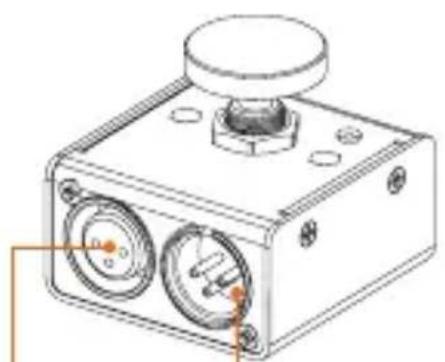
Technical line drawing of a mechanical device with two circular components and a central knob (no text or symbols)3-pin XLR female:
Mic input
3-pin XLR male:
Output to mixing board, audio interface, computer mic input, or sound system.
natural_image
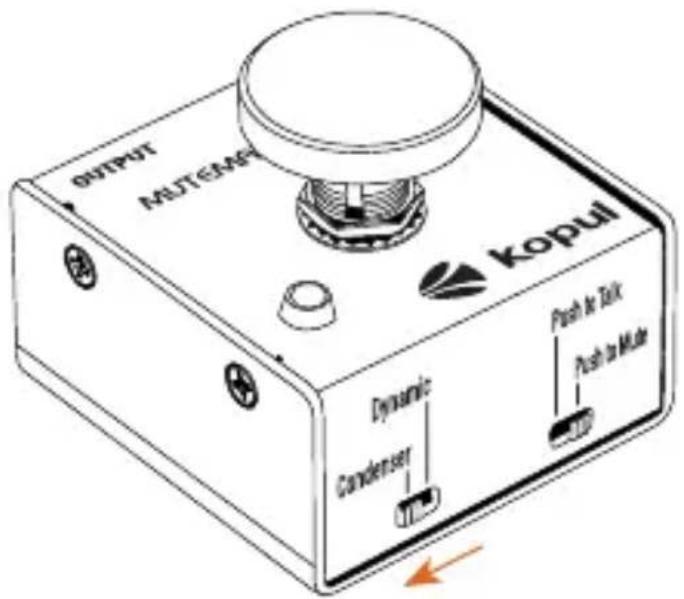
Technical line drawing of a mechanical component with mounting holes and a central hub (no text or symbols)Push to talk:
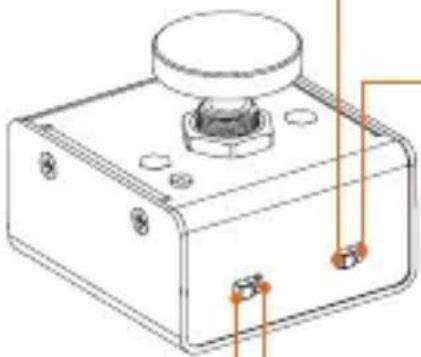
Press and hold to talk. When not pressed, the mic is muted.
Push to mute:
Press and hold to mute. When not pressed, the mic is on.
Dynamic: For dynamic microphones.
Condenser: For condenser microphones that use phantom power.
Operating the MUTEMATE-2X2
Switching from a Condenser to a Dynamic Microphone:
- Move the selector from Condenser to Dynamic.
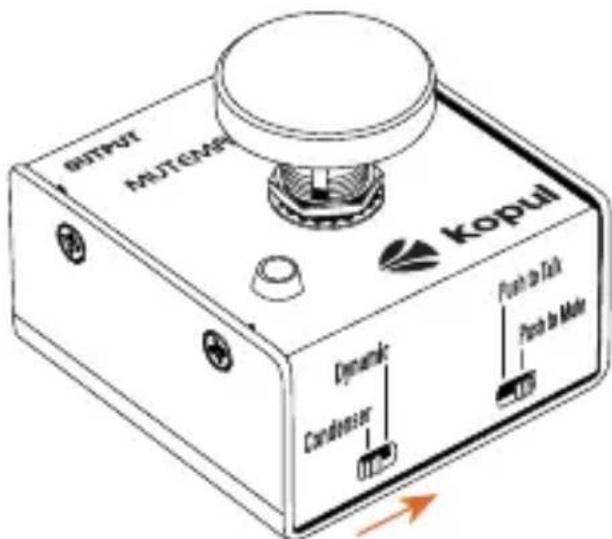
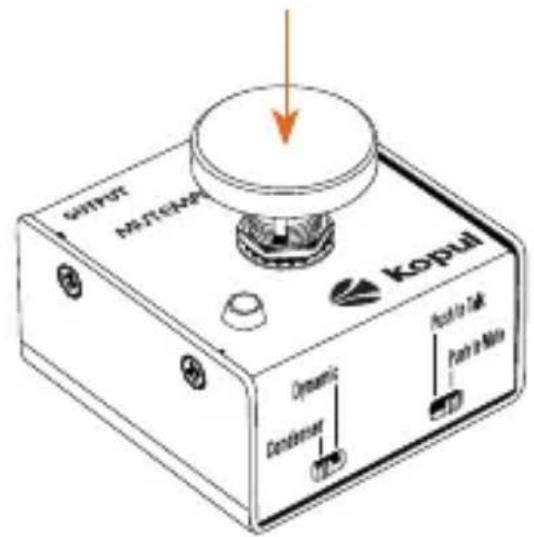
- Then press and hold the mute button for 30 seconds before resuming operation.
This will dissipate the stored phantom power and prevent noise like popping when activating the button.
Using a Signal Booster for Low-Output Dynamic and Ribbon Microphones:
When using a mic activator, like the Cloudlifter, or an inline mic preamplifier like the Polsen Single-Channel Mic Preamp:
Connect the microphone to the signal booster. Then connect the signal booster to the MUTEMATE-2X2.
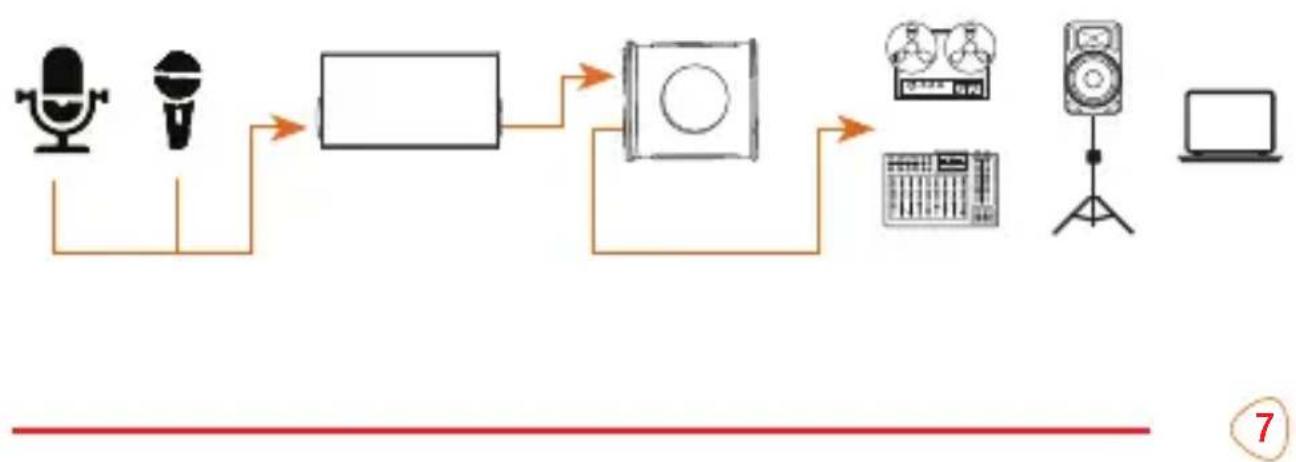
flowchart
graph LR
    A["Speaker"] --> B["Block"]
    B --> C["CD/DVD"]
    C --> D["Audio/Video Device"]
    D --> E["Laptop"]
Important! Make sure the MUTEMATE-2X2's selector switch is set to Condenser mode when using it with a signal booster connected to a dynamic or ribbon microphone.
Replacing the Battery
The indicator LED is powered by a 3 V CR 1220 lithium battery.
When the battery runs low, the indicator light does not turn on when the button is pressed.
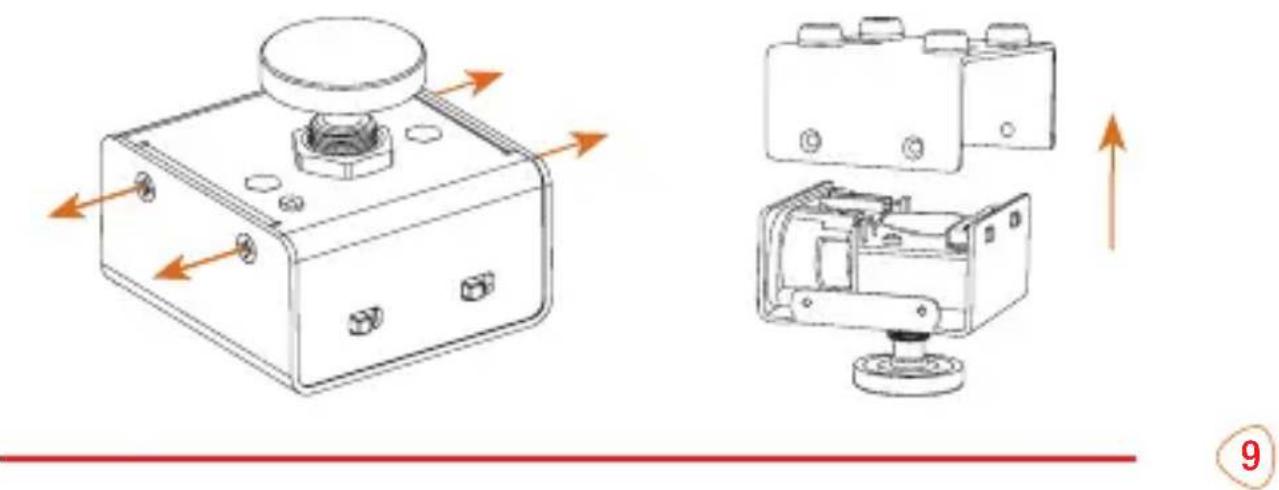
Replace the battery following these steps:
- Unscrew the four side screws and remove the chassis.
natural_image
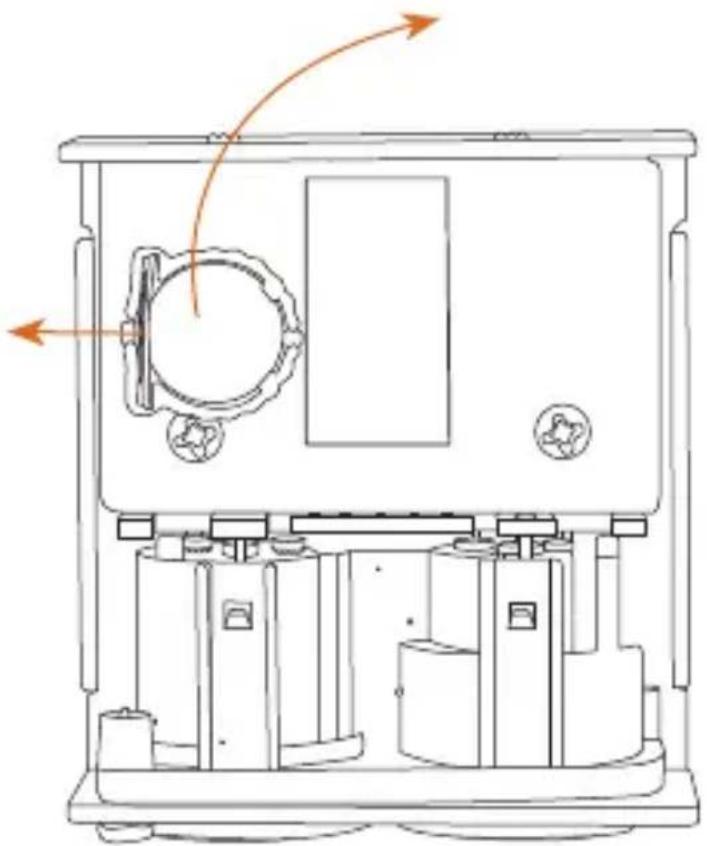
Technical line drawings of a mechanical device with internal components and directional arrows (no text or symbols)- Pull back the tension bar with your finger, and the battery will pop up.
- Remove the battery, place a new CR 1220 3V lithium battery into the battery slot, and press it down until it clicks into place. Unscrew the four side screws and remove the chassis.
natural_image
Technical line drawing of a mechanical device with internal components and directional arrows (no text or symbols)Specifications
Connector 1
3-pin XLR female input
Connector 2
3-pin XLR male output
Selector Switches
Talk/Mute
Dynamic mic/Condenser mic
Material
Steel
Dimensions (H × W × D)
2 × 2.3 × 2.4 in. (5.1 × 5.9 × 6.2 cm)
Weight
6.9 oz. (197 g)
Battery Type
CR 1220 3V lithium battery
One-Year Limited Warranty
This KOPUL product is warranted to the original purchaser to be free from defects in materials and workmanship under normal consumer use for a period of one (1) year from the original purchase date or thirty (30) days after replacement, whichever occurs later. The warranty provider's responsibility with respect to this limited warranty shall be limited solely to repair or replacement, at the provider's discretion, of any product that fails during normal use of this product in its intended manner and in its intended environment. Inoperability of the product or part(s) shall be determined by the warranty provider. If the product has been discontinued, the warranty provider reserves the right to replace it with a model of equivalent quality and function.
This warranty does not cover damage or defect caused by misuse, neglect, accident, alteration, abuse, improper installation or maintenance. EXCEPT AS PROVIDED HEREIN, THE WARRANTY PROVIDER MAKES NEITHER ANY EXPRESS WARRANTIES NOR ANY IMPLIED WARRANTIES, INCLUDING BUT NOT LIMITED TO ANY IMPLIED WARRANTY OF MERCHANTABILITY OR FITNESS FOR A PARTICULAR PURPOSE. This warranty provides you with specific legal rights, and you may also have additional rights that vary from state to state.
To obtain warranty coverage, contact the Kopul Customer Service Department to obtain a return merchandise authorization ("RMA") number, and return the defective product to Kopul along with the RMA number and proof of purchase. Shipment of the defective product is at the purchaser's own risk and expense.
For more information or to arrange service, visit www.kopulcables.com or call Customer Service at 212-594-2353. Product warranty provided by the Gradus Group. www.gradusgroup.com KOPUL is a registered trademark of the Gradus Group. © 2023 Gradus Group LLC. All Rights Reserved.
- Microphone Mute/ Talk Switch
- Thank you for choosing Kopul.
- Precautions
- Overview
- Push to talk:
- Push to mute:
- Operating the MUTEMATE-2X2
- Switching from a Condenser to a Dynamic Microphone:
- Using a Signal Booster for Low-Output Dynamic and Ribbon Microphones:
- Replacing the Battery
- Replace the battery following these steps:
- Specifications
- One-Year Limited Warranty
Brand : Kopul
Model : MuteMate 2x2
Category : Uncategorized