PSI-USB - Uncategorized Kopul - Free user manual and instructions
Find the device manual for free PSI-USB Kopul in PDF.


| Product Type | Passive Direct Box (USB to Balanced Analog) |
| Brand | Kopul |
| Model | PSI-USB |
| Input Connector | USB Type B (Female) |
| Output Connectors | 2x 3-Pin Balanced XLR |
| Power Source | USB Bus-Powered (4.5–5.5 V) |
| Frequency Response | 20 Hz – 20 kHz |
| Dynamic Range | 92 dB |
| Sample Rate | 48 kHz |
| Bit Depth | 16 bit |
| Maximum Output Level | +6 dB |
| Signal-to-Noise Ratio | -72 dB |
| Output Impedance | 600 Ω |
| Stereo/Mono Switch | Yes |
| Enclosure Material | Metal |
| Dimensions (L × W × H) | 3 × 2.5 × 1.5 in (7.6 × 6.3 × 3.8 cm) |
| Weight | 0.4 lb (181 g) |
| Included Cable | USB-A to USB-B |
| Safety Precautions | Keep away from water, flammable gases/liquids; avoid prolonged high-volume listening |
| Cleaning Instructions | Clean with soft, dry cloth only |
| Warranty | One-Year Limited |
| Compatible Systems | Windows and Mac (plug and play) |
| Special Features | Transformer isolated, high-resolution DAC, stereo/mono selectable |
Frequently Asked Questions - PSI-USB Kopul
User questions about PSI-USB Kopul
0 question about this device. Answer the ones you know or ask your own.
Ask a new question about this device
Download the instructions for your Uncategorized in PDF format for free! Find your manual PSI-USB - Kopul and take your electronic device back in hand. On this page are published all the documents necessary for the use of your device. PSI-USB by Kopul.
USER MANUAL PSI-USB Kopul
natural_image
Abstract red geometric shape with white and black edges (no text or symbols)Thank you for choosing Kopul.
The Kopul PSI-USB is a passive direct box that's powered by your computer's USB port. It converts your computer's digital audio to a balanced analog signal that can be sent to a PA system or a broadcast or mixing console. This plug and play device is simple to connect to your system, and gives you the option of outputting a stereo or two-channel mono signal.
Transformer isolated balanced stereo XLR outputs, and high-resolution digital to analog converters deliver superior sound quality that's free of noise, RF and EM interference, and ground hum.
Precautions⚠️
- Please read and follow these instructions, and keep this manual in a safe place.
- Exposure to high sound levels can cause permanent hearing loss. Avoid listening at high volumes for extended periods of time.
- Keep this product away from water and any flammable gases or liquids.
- Clean this product with only a soft, dry cloth.
- All images are for illustrative purposes only.
Overview
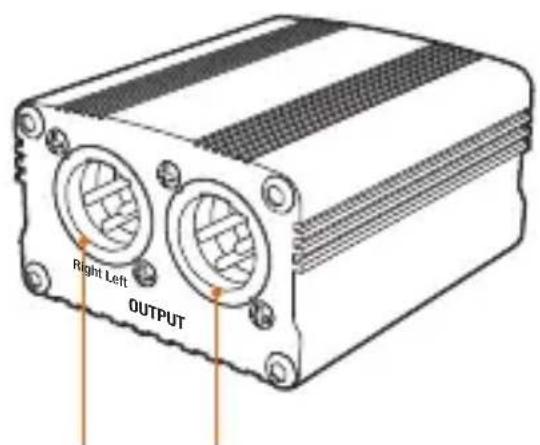
Right and Left 3-pin balanced XLR output
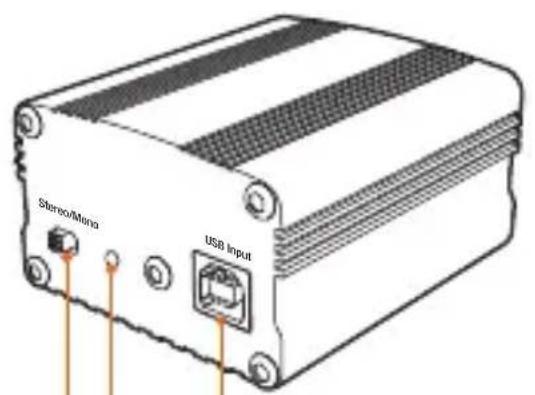
USB balanced input Power indicator LED Stereo/Mono switch
Also Included:
USB-A to USB-B cable
Making Audio Connections
Computer Audio - USB
Before making any audio connections, make sure your computer audio is not playing, and the audio system's volume is turned down.
Use the included cable to connect the PCI-USB to a computer.
If your computer has only a USB-C port available, use a USB-C to USB-A adapter to make the connection.
The power indicator will illuminate when the connection is made, and the PCI-USB will be ready to use.
Analog Audio - XLR
Use balanced 3-pin XLR cables to output the analog audio signal from the PCI-USB to a PA system, mixing console, or recorder.
Computer Audio Settings
To rout your computer's audio to the PSI-USB, follow these steps.
Windows Computers
- Open Windows Settings.
- Select System from the menu.
- Select Sound from the menu bar.
- Under the Output menu, click on the drop-down menu, and select USB Audio Device.
- Close the Settings window.
Mac Computers
- Open the System Preferences
- Select the Sound preferences.
- Click on Output, and select USB Audio Device in the list.
- Close the System Preferences window.
The Stereo/Mono Switch
Mono
Select Mono to sum the computer's stereo signal to mono. The PSI-USB outputs two mono channels. This is useful if you're using only one PA speaker, simultaneously sending the signal to two separate audio systems, or using two PA speakers placed far apart.
Stereo
Select Stereo to output the computer audio on two channels. This is ideal for outputting a stereo mix, or two discrete channels, to two channels of a recorder or mixing board.
Connecting Computer Audio to a PA System
Use the PSI-USB to send your computer's audio to a PA system. Follow the diagram below.
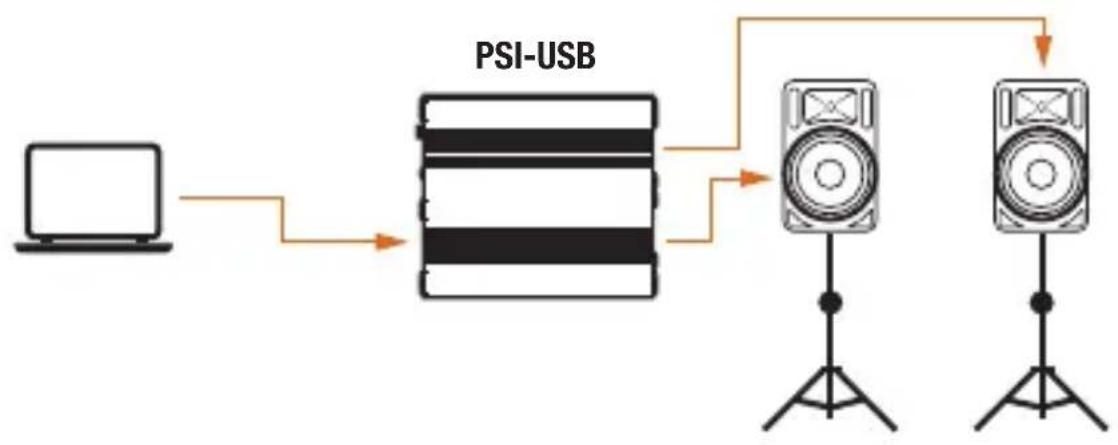
flowchart
graph LR
    A["Laptop"] --> B["PSI-USB"]
    B --> C["Speaker 1"]
    B --> D["Speaker 2"]
    C --> E["Speaker 3"]
    D --> E
Using Computer Audio for Recording
Send prerecorded or sequenced tracks to a mixing board or recorder.
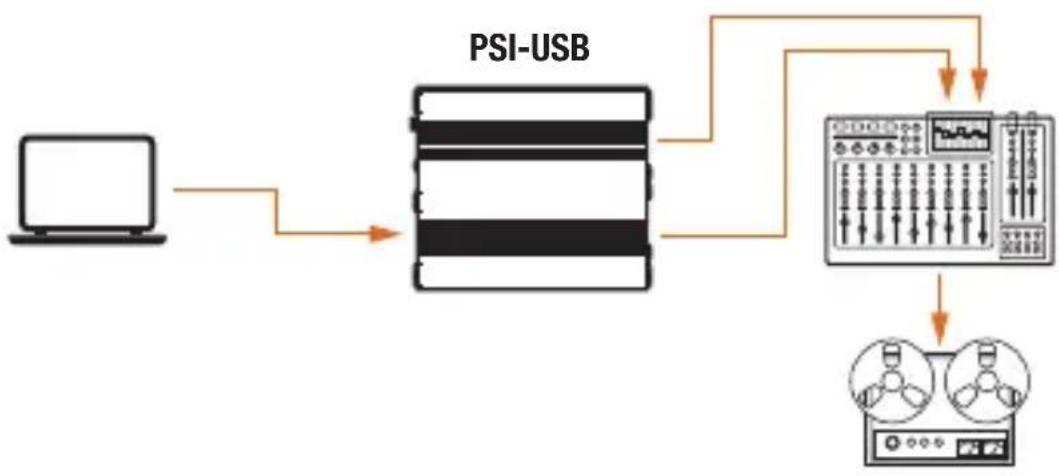
flowchart
graph TD
    A["Laptop"] --> B["PSI-USB"]
    B --> C["Oscilloscope"]
    C --> D["Speaker 1"]
    C --> E["Speaker 2"]
Adding Computer Audio to a Video Presentation
Use the PSI-USB to add narration or dialog to your video presentation. Follow the diagram below.
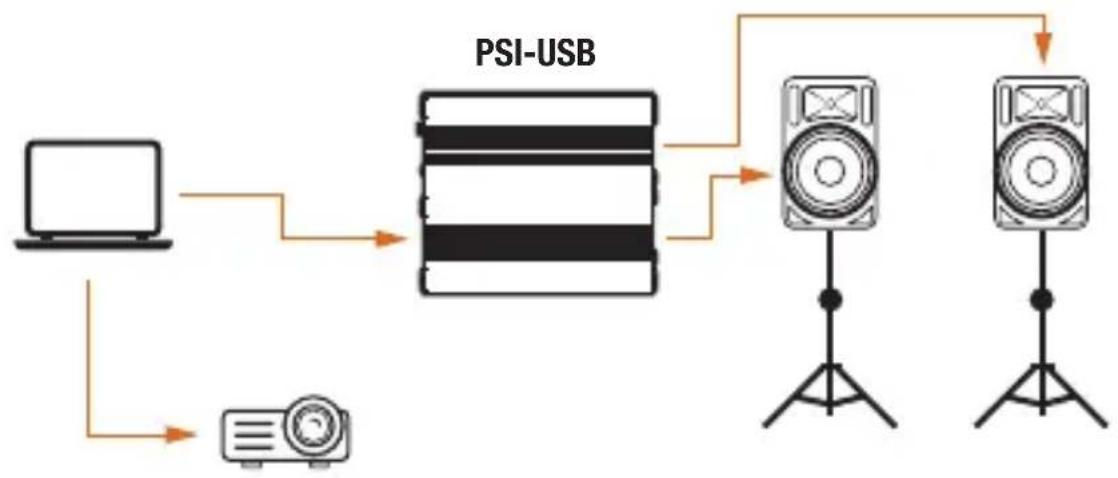
flowchart
graph TD
    A["Laptop"] --> B["PSI-USB Module"]
    C["Pod"] --> B
    B --> D["Speaker 1"]
    B --> E["Speaker 2"]
    D --> F["Speaker 3"]
    E --> F
Specifications
USB 2.0
Frequency Range 20 Hz to 20 kHz
Dynamic Range 92 dB
Sample Rate 48 kHz
Bit Depth 16 bit
Input Connectors USB Type B female
Output Connectors 3-pin XLR (×2)
Output Impedance 600 Ω
Maximum Output +6 dB
Signal to Noise Ratio -72 dB (-3 dBr) @ 1 kHz
Attenuation Switch No
Stereo/Mono Switch Yes
Power Requirements 4.5 to 5.5 V
Dimensions (L × W × H) 3 × 2.5 × 1.5 in. (7.6 × 6.3 × 3.8 cm)
Enclosure Metal
Weight 0.4 lb. (181 g)
One-Year Limited Warranty
This KOPUL product is warranted to the original purchaser to be free from defects in materials and workmanship under normal consumer use for a period of one (1) year from the original purchase date or thirty (30) days after replacement, whichever occurs later. The warranty provider's responsibility with respect to this limited warranty shall be limited solely to repair or replacement, at the provider's discretion, of any product that fails during normal use of this product in its intended manner and in its intended environment. Inoperability of the product or part(s) shall be determined by the warranty provider. If the product has been discontinued, the warranty provider reserves the right to replace it with a model of equivalent quality and function.
This warranty does not cover damage or defect caused by misuse, neglect, accident, alteration, abuse, improper installation or maintenance. EXCEPT AS PROVIDED HEREIN, THE WARRANTY PROVIDER MAKES NEITHER ANY EXPRESS WARRANTIES NOR ANY IMPLIED WARRANTIES, INCLUDING BUT NOT LIMITED TO ANY IMPLIED WARRANTY OF MERCHANTABILITY OR FITNESS FOR A PARTICULAR PURPOSE.
This warranty provides you with specific legal rights, and you may also have additional rights that vary from state to state.
To obtain warranty coverage, contact the Kopul Customer Service Department to obtain a return merchandise authorization ("RMA") number, and return the defective product to Kopul along with the RMA number and proof of purchase. Shipment of the defective product is at the purchaser's own risk and expense.
For more information or to arrange service, visit www.kopulcables.com or call Customer Service at 212-594-2353. Product warranty provided by the Gradus Group. www.gradusgroup.com
KOPUL is a registered trademark of the Gradus Group. © 2022 Gradus Group LLC. All Rights Reserved.

KOPUL ^+ A Grade Group Brand
GG1

kopul®
- Thank you for choosing Kopul.
- Precautions⚠️
- Overview
- Also Included:
- Making Audio Connections
- Computer Audio - USB
- Analog Audio - XLR
- Computer Audio Settings
- Windows Computers
- Mac Computers
- The Stereo/Mono Switch
- Mono
- Stereo
- Connecting Computer Audio to a PA System
- Using Computer Audio for Recording
- Adding Computer Audio to a Video Presentation
- Specifications
- One-Year Limited Warranty
- kopul®
Brand : Kopul
Model : PSI-USB
Category : Uncategorized