
EZ-PH1 - Receiver RDL - Free user manual and instructions
Find the device manual for free EZ-PH1 RDL in PDF.


| Product Type | Receiver |
| Brand | RDL |
| Model | EZ-PH1 |
| Dimensions (W x H x D) | 4.5 x 1.2 x 3.2 inches |
| Weight | 3.5 oz (99 g) |
| Power Supply | 2 x AAA batteries (not included) |
| Battery Life | Up to 12 hours of continuous use |
| Frequency Range | 2.4 GHz ISM band |
| Operating Range | Up to 100 feet (30 meters) line of sight |
| Audio Output | 3.5 mm stereo headphone jack |
| Signal Type | Digital wireless audio |
| Number of Channels | 1 (fixed) |
| LED Indicators | Power on/off, battery low, signal reception |
| Controls | Power button, volume dial |
| Housing Material | ABS plastic |
| Compliance | FCC, CE, RoHS |
| Operating Temperature | 32°F to 104°F (0°C to 40°C) |
| Storage Temperature | 14°F to 122°F (-10°C to 50°C) |
| Humidity | 10% to 90% non-condensing |
| Maintenance | Keep dry; clean with a soft, dry cloth |
| Safety Precautions | Do not expose to extreme heat or water |
| Spare Parts / Repairability | Battery compartment door available; professional repair recommended |
| Included Accessories | None (receiver unit only) |
| Warranty | 1 year limited |
Frequently Asked Questions - EZ-PH1 RDL
User questions about EZ-PH1 RDL
0 question about this device. Answer the ones you know or ask your own.
Ask a new question about this device
Download the instructions for your Receiver in PDF format for free! Find your manual EZ-PH1 - RDL and take your electronic device back in hand. On this page are published all the documents necessary for the use of your device. EZ-PH1 by RDL.
USER MANUAL EZ-PH1 RDL
INSTALLATION AND OPERATION MANUAL
EZ-PH1
Model numbers: EZ-PH1 includes power supply with North American plug EZ-PH1X includes worldwide power supply (specify plug)
Stereo Phono Preamplifier

RDL EZ Series products provide the highest level of value to A/V professionals and A/V users who demand professional quality. For long-term performance, quality and value, you have made the EZ choice. EZ products are made in the USA by RDL, the inventor of application-specific modules bringing decades of experience as the world's leading manufacturer of high-reliability performance products to the A/V industry. Visit the RDL website for hundreds of professional A/V products made in the USA by RDL.

RDL® Radio Design Labs
www.rdlnet.com
Decades of Performance, Quality and Value
RDL • 659 N. 6th Street • Prescott, AZ • USA 86301 • Sales: 800-281-2683 • 928-443-9391 Tech Support: 800-933-1780 • 928-778-3554 • RDL Europe Sales & Support: (31) 20-6238-983
EZ-PH1
Stereo Phono Preamplifier
- Phono Input on Gold-Plated RCA Jacks
• Line Output on Gold-Plated RCA Jacks - Front-Panel GAIN Trimmer for Each Channel
• Dual-LED VU Meter for Each Channel - RIAA Equalization
• Turntable Grounding Screw Provided
The EZ-PH1 is a stereo phono preamplifier with front-panel volume trimmers and audio level metering. Stereo RCA jacks and a grounding screw are provided on the rear panel for connecting a turntable tone arm. The input is preamplified with RIAA equalization to feed the line output RCA jacks. Left and right channel front-panel LED VU metering facilitates adjustment of the level trimmers. The EZ-PH1 is ideal to add phono inputs to mixers and amplifiers with line inputs, or for direct connection to recording decks for dubbing records onto other media. It is used in clubs, educational facilities, homes and studios.
TYPICAL APPLICATION
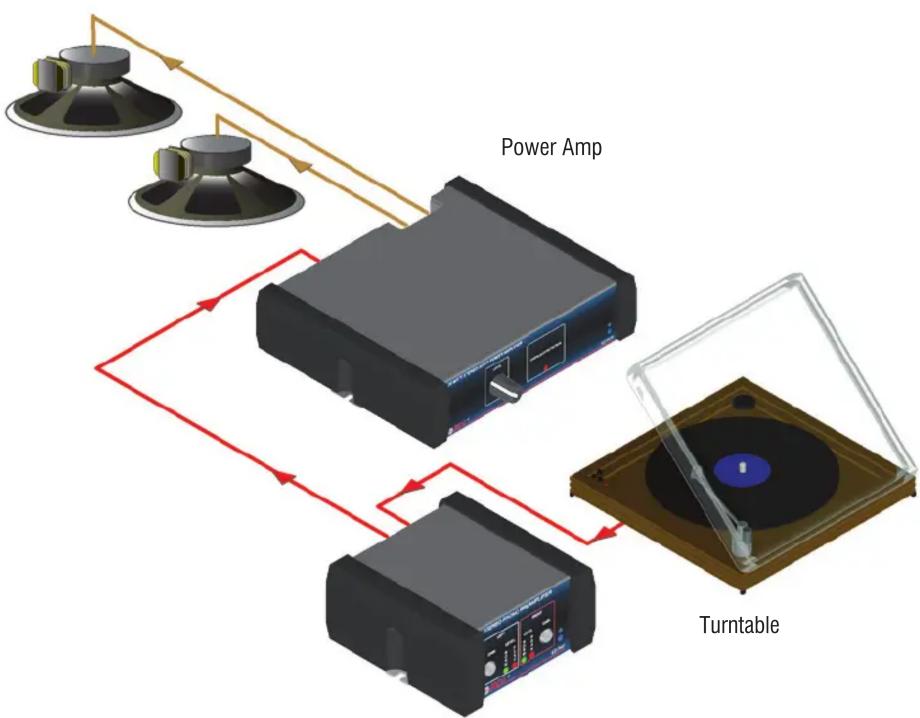
flowchart
graph TD
    A["Speaker"] --> B["Power Amp"]
    C["Speaker"] --> B
    D["Speaker"] --> B
    B --> E["Turntable"]
    E --> F["Power Amp"]
    style A fill:#f9f,stroke:#333
    style C fill:#f9f,stroke:#333
    style D fill:#f9f,stroke:#333
    style E fill:#ccf,stroke:#333
    style F fill:#cff,stroke:#333
EZ-PH1

SERIES
Made in USA by RDL

POWER CONNECTION

FIXED MOUNTING RUBBER FEET ATTACHMENT


natural_image
Close-up of a black electronic device with a circular button and a yellow arrow pointing to it, no visible text or symbols.Recess
Bottom View of chassis
Peel backing and stick the 4 rubber feet to chassis in recesses provided.
SELECTED MOUNTING ACCESSORIES Complete accessory listing available at: rdlez.com
EZ-RA6
Rack Adapter for 6 Increments of 1/6 Rack Width

natural_image
Front panel of a black rack-mounted server or rack unit with mounting holes and ventilation slots (no visible text or symbols)EZ-CC6
Component Chassis for 6 Increments of 1/6 Rack Width

natural_image
Exterior view of a black rectangular electronic device with ventilation slots and ventilation grilles (no text or symbols visible)EZ-SMB1
Surface Mount Bezel for 1/6 Rack Width Products

EZ-UCB2
Under-Counter Brackets 1/6 or 1/3 Rack Width

EZ-DC1
Desktop Chassis 1/6 Rack Width

natural_image
Two gray plastic electronic components with no visible text or symbolsEZ-SD1
Storage Drawer 1/6 Rack Width Holds Adapters and Cables Mounts in EZ-CC6 and EZ-RA6

Use In Place of Filler Panel
Holds Adapters and Cables
Mounts in EZ-CC6 and EZ-RA6
TYPICAL PERFORMANCE
Input: 47 kΩ on stereo RCA jacks
Input Level: -18 dBV max.
Gain: OFF to +55 dB (1 kHz)
Output: -10 dBV nominal on stereo RCA jacks
Equalization: RIAA
Frequency Response: 20 to 20 kHz (±0.75 dB referred to RIAA curve)
Crosstalk: < -75 dB (1 kHz)
THD+N: < 0.05% (20 to 20 kHz, 36 dB gain)
Noise: < -74 dB (36 dB gain, 1 kHz), < -80 dB (36 dB gain, 1 kHz, "A-weighted")
24 Vdc power supply current: 30 mA (idle), 45 mA (max.)
Power supply input voltage: 100 to 240 VAC
Warranty: 3 Years; contact RDL technical support department for assistance
Case dimensions: 2.9" (7.4 cm)W x 3" (7.6 cm)D
Mounting size: 1/6 rack width
CE
891-1570
Copyright © 2009 Radio Design Labs, Inc. RDL, Radio Design Labs and the RDL logo are registered trademarks of Radio Design Labs, Inc. Data reflects product at publication time, subject to change without notice. "Made in USA" applies to all EZ products except power supplies.
Brand : RDL
Model : EZ-PH1
Category : Receiver