
Check Mate CM-130 - Sound Level Meter Galaxy Audio - Free user manual and instructions
Find the device manual for free Check Mate CM-130 Galaxy Audio in PDF.


| Product Type | Mini Sound Level Meter |
| Brand | Galaxy Audio |
| Model | Check Mate CM-130 |
| Measurement Range | 40 dB to 130 dB |
| Frequency Range | 125 Hz to 8 kHz |
| Frequency Weighting | A and C weighting |
| Time Weighting | FAST (125 ms) and SLOW (1 second) |
| Display | 4-digit LCD with 0.5 dB resolution |
| Accuracy | ±2 dB (at 94 dB @ 1 kHz reference) |
| Microphone | 1/2 inch electret condenser microphone |
| Power Supply | One 9V battery (006P, IEC 6F22, or NEDA 1604) |
| Battery Life | Approximately 110 hours (alkaline) |
| Dimensions | 9.1 x 2.1 x 1.3 inches (23.1 x 5.3 x 3.3 cm) |
| Weight | 170 g (0.37 lbs) including battery |
| Operating Temperature | 0°C to 40°C (32°F to 104°F) |
| Operating Humidity | 10% to 90% RH |
| Storage Temperature | -10°C to 60°C (14°F to 140°F) |
| Storage Humidity | 10% to 75% RH |
| Level Ranges | 4 ranges: 40-70, 60-90, 80-110, 100-130 dB |
| MAX Hold Function | Captures and holds maximum noise level |
| Calibration | Via CAL potentiometer; recommended annually |
| Alarm Indication | "OVER" or "UNDER" when out of range |
| Maintenance | Wipe with dry cloth; do not use abrasives or solvents |
| Safety | Use only as specified; repairs by qualified personnel |
| Accessories Included | 9V battery, instruction manual, carrying case |
Frequently Asked Questions - Check Mate CM-130 Galaxy Audio
User questions about Check Mate CM-130 Galaxy Audio
0 question about this device. Answer the ones you know or ask your own.
Ask a new question about this device
Download the instructions for your Sound Level Meter in PDF format for free! Find your manual Check Mate CM-130 - Galaxy Audio and take your electronic device back in hand. On this page are published all the documents necessary for the use of your device. Check Mate CM-130 by Galaxy Audio.
USER MANUAL Check Mate CM-130 Galaxy Audio
316.263.2852 FAX 316.263.0642
www.galaxyaudio.com
Instruction
Manual

CM-130
CE
329-00 DEC 2002
MINI SOUND LEVEL METER
CONTENTS
TITLE
I. Safety Information...... 1
II. General Description.... 1
III. Specifications....2-3
IV. Controls.... 4-5
V. Calibration Procedures....6
VI. Measurement Preparation......7
VII. Operating Precautions.... 7
VIII. Measurement....7-8
I. Safety Information
Read the following safety information carefully before attempting to operate or service the meter.
Use the meter only as specified in this manual; otherwise, the protection provided by the meter may be impaired.
▶ Environment Conditions
① Altitude up to 2000 meters
② Relative humidity 90% max.
③ Operation Ambient 0 to 40°C
▶ Maintenance & Clearing
① Repairs or servicing not covered in this manual should only be performed by qualified personnel.
② Periodically wipe the case with a dry cloth. Do not use abrasives or solvents on this instrument.
➤ Safety symbols

Complies with EMC
When servicing, use only specified replacement parts.
II. General Description
To ensure that you can get the most from the Mini Sound Level Meter, we recommend that you read and follow the manual carefully before use.
☐ Range from 40dB to 130dB at frequencies between 125Hz and 8 KHz.
☐ Display with 0.5dB steps on a 4-digit LCD.
☐ Two equivalent weighted sound pressure levels, A and C.
III. Specifications
Frequency Range: 125Hz to 8KHz
Measuring Level Range: 40dB to 130dB
Frequency Weighting: A/C
Microphone: 1/2 inch electret condenser microphone
Display: LCD
Digital Display: 4 digit
Resolution: 0.5dB
Display Update: 2 times/sec.
Time Weighting:
FAST 125ms
SLOW 1 second
Level Ranges:
Range1: 40 dB to 70 dB
Range2: 60 dB to 90 dB
Range3: 80 dB to 110 dB
Range4: 100 dB to 130 dB
Accuracy: ±2dB(under reference conditions 94dB@1kHz )
Dynamic Range: 30 dB
Alarm Function: “OVER” is displayed when the input is more than the upper limit of the range.
"UNDER" is displayed when the input is less than the lower limit of the range.
MAX Hold function: Holds readings of the maximum value.
Power Supply: One 9V battery
006P or IEC 6F22 or NEDA 1604.
Power Life: Approximately 110 hours
(Alkaline Battery)
Operation Temperature: 0 to 40°C (32 to 104°F)
Operation Humidity: 10 to 90% RH
Storage Temperature: -10 to 60°C (14 to 140°F)
Storage Humidity: 10 to 75% RH
Dimensions: 9.1" L ×2.1" W ×1.3" H
23.1 cm ×5.3 cm ×3.3 cm
Weight: 170g (0.37 lbs) (including battery)
Accessories: 9V battery, instruction manual, and carrying case.
IV. Controls
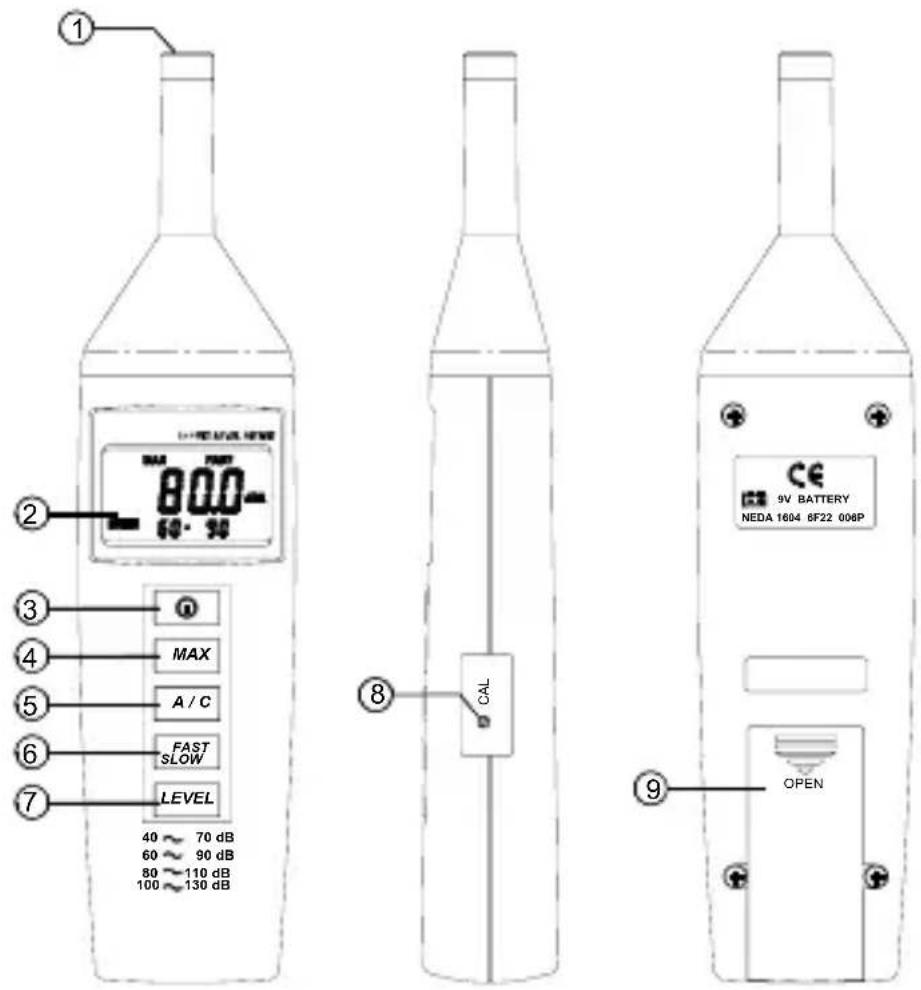
① Microphone
1/2 inch Electret Condenser microphone
② Display

③ Power Button
The ① button turns the sound level meter ON or OFF.
④ MAX Hold button
Press the MAX button to enter the maximum recording mode. Select the proper level range before using MAX to ensure that read value would not exceed the measurement range. Press again to exit the MAX mode.
Note: If the sound level or A-C weight are changed, the MAX mode will clear.
⑤ Frequency Weighting Select Button
A: A-Weighting for general sound level measurements
C: C-Weighting for checking the low-frequency content of noise
(If the C-Weighted level is much higher than the A-weighted level, then there is a large amount of low-frequency noise.)
⑥ Time Weighting Select Button.
FAST: for normal measurements SLOW: for checking average level of fluctuating noise
⑦ Level Range Control Button
Each time the level button is pressed, the level range will cycle through the “Range1”, “Range2”, “Range3”, and “Range4”, levels.
⑧ CAL Potentiometer
Calibration control for level calibration adjustment.
⑨ Battery Cover
V. Calibration Procedures
Using a standard Acoustic Calibrator (94dB, 1KHz sine wave)
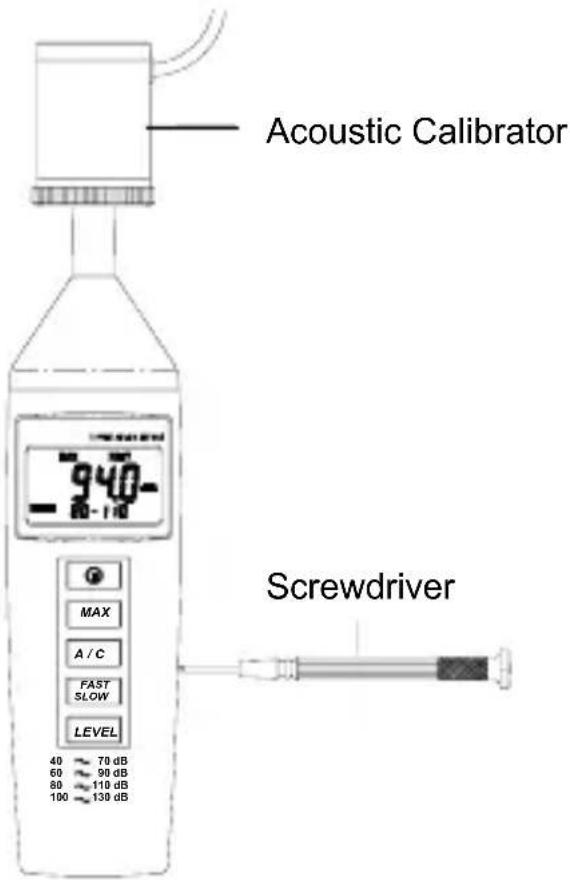
(1) Make the following switch settings.
Display: dBA
Time Weighting: FAST
Measurement Mode: MAX Mode function disable.
Level Range: 80 to 110dB
(2) Insert the microphone housing carefully into the insertion hole of the calibrator.
(3) Turn on the calibrator and adjust the CAL potentiometer of the meter until the level display indicates the desired level. The meter is calibrated before shipment. We recommend recalibration annually.
VI. Measurement Preparation
(1) Battery Loading
Remove the battery cover on the back and install one 9V Battery.
(2) Battery Replacement
When the battery voltage drops below that required for reliable operation, the low battery symbol 📄 will appear, indicating it is time to replace the battery.
VII. Operating Precautions
(1) Calibrate the instrument before operation if the instrument has not been used for a long period of time.
(2) Do not store or operate the instrument in high temperature and high humidity environments.
(3) Keep the microphone dry and avoid severe vibration.
(4) Remove the battery from the instrument, and store in a low humidity environment when not in use.
VIII. Measurement
(1) Open the battery cover and install a 9V battery in the battery compartment.
(2) Turn power ON and select the desired response time and weighting. If the sound source consists of short bursts, or the meter is only catching sound peaks, set response to FAST. To measure average sound levels, use the SLOW setting.
Select A-weighting for general noise sound level and C-weighting for measuring sounds with high low frequency content.
(3) Select desired level.
(4) Hold the instrument comfortably in your hand and point the microphone at the suspected noise source. Read the sound pressure level from the display.
(5) When MAX (maximum hold) mode is chosen, the instrument captures and holds the maximum noise level values indefinitely. The MAX function operates on all settings, regardless of the response time, weighting, or range.
Press the MAX button again to clear the MAX reading. The "MAX" symbol will disappear.
(6) Turn OFF the instrument and remove the battery when not is use.

Brand : Galaxy Audio
Model : Check Mate CM-130
Category : Sound Level Meter