
CM-C200 - Sound Level Meter Galaxy Audio - Free user manual and instructions
Find the device manual for free CM-C200 Galaxy Audio in PDF.


| Product Type | Sound Level Meter Calibrator (SPL Calibrator) |
| Model | CM-C200 |
| Brand | Galaxy Audio |
| Standards Compliance | ANSI S1.40-1984, IEC 60942-2003 Class 2 |
| Calibration Levels | 94 dB and 114 dB re 20 µPa |
| Output Frequency | 1000 Hz ± 2% |
| Accuracy | ± 0.5 dB (under reference conditions) |
| Total Harmonic Distortion (THD) | < 3% |
| Microphone Compatibility | 1-inch directly, 1/2-inch via included adapter |
| Power Source | One 9V battery (006P, IEC 6F22, NEDA 1604) |
| Battery Life | Approximately 40 hours (alkaline) |
| Battery Status Indication | Green LED (good), Red LED (low - replace) |
| Dimensions | 4.4 x 2.4 x 1.7 in (113 x 63 x 44 mm) |
| Weight | Approximately 0.41 lb (186.4 g) including battery |
| Operating Temperature | 32 to 140 °F (0 to 40 °C) |
| Operating Humidity | 10 to 90% RH |
| Operating Altitude | Up to 6562 ft (2000 m) |
| Storage Temperature | 14 to 122 °F (-10 to 50 °C) |
| Storage Humidity | 0 to 70% RH |
| Included Accessories | Instruction manual, carrying pouch, 9V battery, 1/2-inch microphone adapter |
| Maintenance | Wipe with dry cloth; do not use abrasives or solvents |
| Safety | Use only as specified; repairs by qualified personnel only |
Frequently Asked Questions - CM-C200 Galaxy Audio
User questions about CM-C200 Galaxy Audio
0 question about this device. Answer the ones you know or ask your own.
Ask a new question about this device
Download the instructions for your Sound Level Meter in PDF format for free! Find your manual CM-C200 - Galaxy Audio and take your electronic device back in hand. On this page are published all the documents necessary for the use of your device. CM-C200 by Galaxy Audio.
USER MANUAL CM-C200 Galaxy Audio
1. Safety Information......1
Environment Conditions....1
Maintenance & Cleaning....1
Safety symbols....1
2. Description ...... 2
3. Features....2
4. Specifications....2
Output sound pressure levels....2
Output frequency....2
Reference conditions....2
Influence of ambient conditions....2
Total Harmonic Distortion(THD)....2
Accuracy of sound pressure level....2
Power....2
Battery life....2
Battery test ....3
Dimensions....3
Weight....3
Operating conditions....3
Storage temperature & humidity....3
Accessories.... 3
5. Nomenclature And Function......4
6. Operating Preparation......5
7. Calibration Procedure....5
1. Safety Information
Read the following safety information carefully before attempting to operate or service the meter.
Use the meter only as specified in this manual; otherwise, the protection provided by the meter may be impaired.
Environment Conditions
■ Altitude up to 6562ft. (2000 meters)
■ Relative humidity 90% max.
■ Operation Temperature 32° - 140°F (0° to 40 °C)
Maintenance & Cleaning
Repairs or servicing not covered in this manual should only be performed by qualified personnel.
Periodically wipe the case with a dry cloth. Do not use abrasives or solvents on this instrument.
Safety symbols
Comply with EMC
When servicing, use only specified replacement parts.
2. Description
This sound level calibrator is used to calibrate sound level meters and other sound measurement equipment. You can calibrate 1 inch diameter microphones directly, and 1/2 inch microphones by using the 1/2 inch adaptor supplied with the calibrator.
3. Features
Conforms to ANSI S1.40-1984 and IEC 60942-2003
Class 2.
Calibration levels of 94dB and 114dB.
Fits the 1-inch and 1/2-inch diameter microphones.
4. Specifications
Output sound pressure levels:
94dB and 114dB re 20 uPa under reference conditions.
Output frequency: 1000Hz +/- 2%
Reference conditions:
Temperature: 74^ F (23°C)
Relative humidity: 50%
Atmospheric pressure: 1013hpa
Influence of ambient conditions:
Temperature coefficient: 0.005dB/°C
Humidity coefficient: 0.005dB/%RH
Total Harmonic Distortion (THD): <3%
Accuracy of sound pressure level: +/- 0.5dB
Power: one 9V battery 006P or IEC 6F22 or NEDA 1604.
Battery life: approx.40 hours.(Alkaline Battery)
Battery test:
Internal circuitry continuously checks the condition of battery.
The calibrator should not be operated when the green LED turns to red, which means that the battery voltage has fallen below acceptable range.
Dimensions:
4.4"(L) × 2.4"(W) × 1.7"(H), 113mm(L) × 63mm(W) × 44mm (H)
Weight: approx. .41lbs. (186.4g) (including battery)
Operating conditions:
32 - 140°F (0 - 40°C), 10 - 90%RH, 650 - 1080hpa
Storage temperature & humidity:
14 - 122°F (-10 - 50°C), 0 - 70%RH
Accessories:
Instruction manual, carrying pouch, 9V battery, 12 " microphone adapter.
5. Nomenclature And Functions
natural_image
Simple diagram showing a numbered circle connected to a laptop (no text or symbols)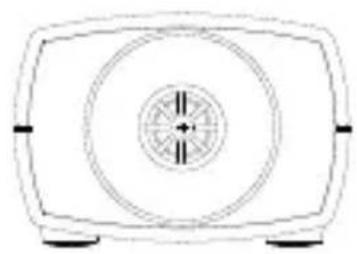
natural_image
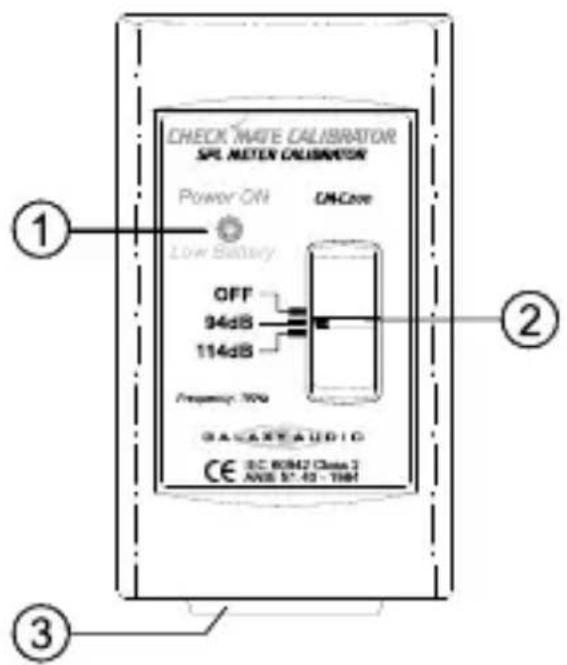
Simple line drawing of a rectangular fan or vent with a central circular dial and side connectors (no text or symbols)① Power and low battery indicator LED.
② Power and output level select switch.
③ Transducer assembly 1-inch cavity for microphone insertion.
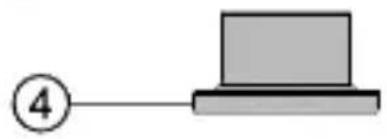
④ 1/2-inch microphone adapter.
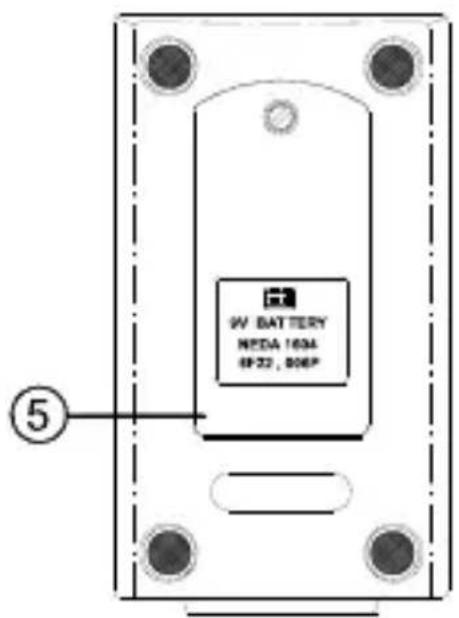
⑤ Battery cover.
6. Operating Preparation
(1) Remove battery cover and install a 9V Battery in the battery compartment.
(2) To quickly check the operation of the sound level calibrator:
(a) Slide the power switch from OFF to the 94dB position and listen for the 1 kHz audible tone. A green LED indicates a good battery. A red LED indicates the battery is low and should be replaced.
(b) Change the switch from 94dB to 114dB and listen for the 20dB increase in the level of the tone. This position is best for calibrating in noisy environments.
7. Calibration Procedure

flowchart
graph LR
    A["Device 1"] --> B["Main Module"]
    B --> C["940 timer"]
    C --> D["Control Button"]
    D --> E["AVG"]
    D --> F["SWI"]
    D --> G["NMT"]
    D --> H["CLK"]
    D --> I["RECL"]
    I --> J["LEVEL"]
    J --> K["Power"]
    style A fill:#f9f,stroke:#333
    style B fill:#ccf,stroke:#333
    style C fill:#cfc,stroke:#333
    style D fill:#fcc,stroke:#333
    style E fill:#ffc,stroke:#333
    style F fill:#fcc,stroke:#333
    style G fill:#ffc,stroke:#333
    style H fill:#fcc,stroke:#333
    style I fill:#ffc,stroke:#333
    style J fill:#fcc,stroke:#333
    style K fill:#ffc,stroke:#333
    style L fill:#fcc,stroke:#333
(1) The cavity of the calibrator will accommodate a 1-inch diameter microphone.
(2) When a calibration is performed on an instrument with a 1/2-inch microphone, the 1/2-inch microphone adaptor will have to be inserted by gently pushing it all the way into the cavity.
(3) If 94dB is selected on the calibrator, then choose a level range on the instrument under test to a range having 100dB as it's upper limit.
If 114dB is selected on the calibrator, choose a range with an upper limit of 120dB. The instrument may be set to FAST or SLOW response and C or A weighting.
(4) Insert the microphone of the of the instrument being calibrated all the way into the cavity of the calibrator. Hold the two together so that the instrument remains straight into the calibrator during the test.
(5) Read the level on the instrument under test and adjust the sensitivity control for the correct indication of the sound level calibrator level selected in step 3.
(6) When the calibrator is not in use, please switch OFF the power to save the battery.
CAUTION!
Ambient sources of noise or vibration can cause a false calibration indication. This can be especially significant at the lower 94dB level.
Instruction Manual
CHECK MATE CALIBRATOR SPL METER CALIBRATOR CM-C200

MAKERS OF THE ORIGINAL HOT SP T PERSONAL MONITOR
601 E. Pawnee Wichita, KS 67211
800.369.7768
FAX 316.263.0642
www.galaxyaudio.com

- Safety Information......1
- Description ...... 2
- Features....2
- Specifications....2
- Nomenclature And Function......4
- Operating Preparation......5
- Calibration Procedure....5
- Safety Information
- Environment Conditions
- Maintenance & Cleaning
- Safety symbols
- Description
- Features
- Specifications
- Dimensions:
- Operating conditions:
- Storage temperature & humidity:
- Accessories:
- Nomenclature And Functions
- Operating Preparation
- Calibration Procedure
- CAUTION!
- Instruction Manual
- CHECK MATE CALIBRATOR SPL METER CALIBRATOR CM-C200
Brand : Galaxy Audio
Model : CM-C200
Category : Sound Level Meter