
SWP2-10SMF - Switch YAMAHA - Free user manual and instructions
Find the device manual for free SWP2-10SMF YAMAHA in PDF.


| Product Type | Network Switch |
| Brand | Yamaha |
| Model | SWP2-10SMF |
| Ports | 10 x Gigabit Ethernet (10/100/1000Base-T) |
| Form Factor | Desktop or Rackmount (brackets included) |
| Dimensions (W x D x H) | approximately 200 x 130 x 44 mm |
| Weight | approximately 0.8 kg |
| Power Supply | External AC adapter, input 100-240V, output 12V DC, 1A |
| Switching Capacity | 20 Gbps |
| MAC Address Table | 8K entries |
| Management Features | Web-based management, SNMP, VLAN support, QoS |
| Operating Temperature | 0°C to 40°C |
| Humidity | 10% to 90% non-condensing |
| LED Indicators | Power, Link/Activity per port |
| Cooling | Fanless (silent operation) |
| Mounting Options | Desktop placement or 19-inch rackmount with included brackets |
| Safety Certifications | CE, FCC, RoHS |
| Maintenance and Cleaning | Disconnect power before cleaning; use dry cloth; avoid liquids |
| Spare Parts and Repairability | Power adapter available separately; no user-serviceable parts inside; contact Yamaha support |
| General Information | Plug-and-play installation; firmware upgrade via web interface; default IP address 192.168.0.1 |
Frequently Asked Questions - SWP2-10SMF YAMAHA
User questions about SWP2-10SMF YAMAHA
0 question about this device. Answer the ones you know or ask your own.
Ask a new question about this device
Download the instructions for your Switch in PDF format for free! Find your manual SWP2-10SMF - YAMAHA and take your electronic device back in hand. On this page are published all the documents necessary for the use of your device. SWP2-10SMF by YAMAHA.
USER MANUAL SWP2-10SMF YAMAHA
The above warning is located on the top of the unit.
Explanation of Graphical Symbols
The lightning flash with arrowhead symbol within an equilateral triangle is intended to alert the user to the presence of uninsulated “dangerous voltage" within the product's enclosure that may be of sufficient magnitude to constitute a risk of electric shock to persons.
The exclamation point within an equilateral triangle is intended to alert the user to the presence of important operating and maintenance (servicing) instructions in the literature accompanying the product.
IMPORTANT SAFETY INSTRUCTIONS
1 Read these instructions.
2 Keep these instructions.
3 Heed all warnings.
4 Follow all Instructions.
5 Do not use this apparatus near water.
6 Clean only with dry cloth.
7 Do not block any ventilation openings. Install in accordance with the manufacturer's instructions.
8 Do not install near any heat sources such as radiators, heat registers, stoves, or other apparatus (including amplifiers) that produce heat.
9 Do not defeat the safety purpose of the polarized or grounding-type plug. A polarized plug has two blades with one wider than the other. A grounding type plug has two blades and a third grounding prong. The wide blade or the third prong are provided for your safety. If the provided plug does not fit into your outlet, consult an electrician for replacement of the obsolete outlet.
10 Protect the power cord from being walked on or pinched particularly at plugs, convenience receptacles, and the point where they exit from the apparatus.
11 Only use attachments/accessories specified by the manufacturer.
12 Use only with the cart, stand, tripod, bracket, or table specified by the manufacturer, or sold with the apparatus. When a cart is used, use caution when moving the cart/apparatus combination to avoid injury from tip-over.
13 Unplug this apparatus during lightning storms or when unused for long periods of time.
14 Refer all servicing to qualified service personnel. Servicing is required when the apparatus has been damaged in any way, such as power-supply cord or plug is damaged, liquid has been spilled or objects have fallen into the apparatus, the apparatus has been exposed to rain or moisture, does not operate normally, or has been dropped.

WARNING
TO REDUCE THE RISK OF FIRE OR ELECTRIC SHOCK, DO NOT
EXPOSE THIS APPARATUS TO RAIN OR MOISTURE.
PRÉCAUTIONS CONCERNANT LA SÉCURITÉ
- IMPORTANT NOTICE: DO NOT MODIFY THIS UNIT! This product, when installed as indicated in the instructions contained in this manual, meets FCC requirements. Modifications not expressly approved by Yamaha may void your authority, granted by the FCC, to use the product.
- IMPORTANT: When connecting this product to accessories and/or another product use only high quality shielded cables. Cable/s supplied with this product MUST be used. Follow all installation instructions. Failure to follow instructions could void your FCC authorization to use this product in the USA.
- NOTE: This product has been tested and found to comply with the requirements listed in FCC Regulations, Part 15 for Class "A" digital devices. Compliance with these requirements provides a reasonable level of assurance that your use of this product, in a commercial environment, will not result in harmful interference with other electronic devices. However, operation of this product in a residential area is likely to cause interference in some form. In this case you, the user, bear the responsibility of correcting this condition.
This product generates/uses radio frequencies and, if not installed and used according to the instructions found in the users manual, may cause interference harmful to the operation of other electronic devices. Compliance with FCC regulations does not guarantee that interference will not occur in all installations. If this product is found to be the source of interference, which can be determined by turning the product "OFF" and "ON", please try to eliminate the problem by using one of the following measures:
Relocate either the product generating the interference or the device that is being affected by the interference.
Utilize power outlets that are on different branch (circuit breaker or fuse) circuits or install AC line filter/s.
In the case of radio or TV interference, relocate/reorient the antenna. If the antenna lead-in is 300 ohm ribbon lead, change the lead-in to co-axial type cable.
If these corrective measures do not produce satisfactory results, please contact the local retailer that is authorized to distribute this type of product. If you can not locate the appropriate retailer, please contact Yamaha Corporation of America, Electronic Service Division, 6600 Orangethorpe Ave, Buena Park, CA90620
The above statements apply ONLY to those products distributed by Yamaha Corporation of America or its subsidiaries.
(class A)
COMPLIANCE INFORMATION STATEMENT (Supplier's declaration of conformity procedure)
Responsible Party: Yamaha Corporation of America
Address: 6600 Orangethorpe Ave. Buena Park CA 90620
Telephone: 714-522-9011
Type of Equipment: L2 Switch
Model Name: SWP2-10MMF, SWP2-10SMF
This device complies with Part 15 of the FCC Rules.
Operation is subject to the following two conditions:
1) this device may not cause harmful interference, and
2) this device must accept any interference received including interference that may cause undesired operation.
PRECAUTIONS
PLEASE READ CAREFULLY BEFORE PROCEEDING
Please keep this manual in a safe place for future reference.
This product is designed for audio network. Do not use for any purposes other than the one intended. Those who are unfamiliar with handling or those who can not handle according to this manual such as children, should be supervised by responsible persons to ensure safety.

WARNING
Always follow the basic precautions listed below to avoid the possibility of serious injury or even death from electrical shock, short-circuiting, damages, fire or other hazards. These precautions include, but are not limited to, the following:
If you notice any abnormality
- If any of the following problems occur, immediately turn off the power switch and disconnect the electric plug from the outlet.
- The power cord or plug becomes frayed or damaged.
- Unusual smells or smoke are emitted.
- Some object, or water has been dropped into the product.
- Cracks or other visible damage appear on the product.
Then have the product inspected or repaired by qualified Yamaha service personnel.
Power supply/Power cord
- Do not place the power cord near heat sources such as heaters or radiators, and do not excessively bend or otherwise damage the cord, place heavy objects on it, or place it in a position where anyone could walk on, trip over, or roll anything over it.
- Only use the voltage specified as correct for the product. The required voltage is printed on the name plate of the product.
- Use only the supplied power cord/plug. If you intend to use the product in an area other than in the one you purchased, the included power cord may not be compatible. Please check with your Yamaha dealer.
- Check the electric plug periodically and remove any dirt or dust which may have accumulated on it.
- Make sure to fully insert the electric plug to prevent electric shocks or fire.
- This product receives power from multi sources. When setting

up the product, make sure that the AC outlet you are using is easily accessible. If some trouble or malfunction occurs, immediately disconnect the all plugs from the outlet.

- Remove the electric plug from the outlet when the product is not to be used for extended periods of time.
- Do not touch the product or the electric plug during an electrical storm.
- Be sure to connect to an appropriate outlet with a protective grounding connection. Improper grounding can result in electrical shock, fire, or damage.
- If you plan to connect a powered device that complies with the IEEE802.3 at standards, use a CAT5e or higher-grade cable. Failure to observe this precaution could result in a fire or malfunction.
Do not open
- This product contains no user-serviceable parts. Do not attempt to disassemble the internal parts or modify them in any way.
Water warning/Fire warning
- Do not expose the product to rain, use it near water or in damp or wet conditions, or place on it any containers (such as vases, bottles or glasses) containing liquids which might spill into any openings.
- Never insert or remove an electric plug with wet hands.
- Do not place any burning items or open flames near the product, since they may cause a fire.
Hearing loss
- When turning on the AC power in your audio system, always turn on the power amplifier LAST, to avoid hearing loss and speaker damage. When turning the power off, the power amplifier should be turned off FIRST for the same reason.

CAUTION
Always follow the basic precautions listed below to avoid the possibility of physical injury to you or others. These precautions include, but are not limited to, the following:
Power supply/Power cord
- When removing the electric plug from the product or an outlet, always hold the plug itself and not the cord. Pulling by the cord can damage it.
Location and connection
- Do not place the product in an unstable position or a location with excessive vibration, where it might accidentally fall over and cause injury.
- Do not block the vents. This product has ventilation holes at the sides to prevent the internal temperature from becoming too high. In particular, do not place the product on its side or upside down. Inadequate ventilation can result in overheating, possibly causing damage to the product(s), or even fire.
- When installing the product:
- Do not cover it with any cloth.
- Do not install it on a carpet or rug.
- Make sure the top surface faces up; do not install on its sides or upside down.
-
Do not use the product in a confined, poorly-ventilated location.
Inadequate ventilation can result in overheating, possibly causing damage to the product(s), or even fire. -
If the product is mounted in an EIA standard rack, carefully read the section "Rack mounting" on page 6. Inadequate ventilation can result in overheating, possibly causing damage to the product(s), malfunction, or even fire.
- Do not place the product in a location where it may come into contact with corrosive gases or salt air. Doing so may result in malfunction.
- Before moving the product, remove all connected cables.
Maintenance
- Remove the power plug from the AC outlet when cleaning the product.
Handling caution
- Do not insert your fingers or hands in any gaps or openings on the product (vents, panel, etc.).
- Do not rest your weight on the product or place heavy objects on it.
- This product uses class 1 lasers. Do not look into the tip of an optical fiber or into an optical connector. Doing so may damage your eyes.
Backup battery
- Do not replace the backup battery by yourself. Doing so may cause an explosion and/or damage to the product(s). When the backup battery needs to be replaced, contact your Yamaha dealer and have qualified Yamaha service personnel replace the backup battery.
NOTICE
To avoid the possibility of malfunction/ damage to the product, damage to data, or damage to other property, follow the notices below.
Handling and maintenance
- Do not use the product in the vicinity of a TV, radio, mobile phone, or other electric products. Otherwise, the product, TV, or radio may generate noise.
- Do not expose the product to excessive dust or vibration, or extreme cold or heat (such as in direct sunlight, near a heater, or in a car during the day), in order to prevent the possibility of panel disfiguration, unstable operation, or damage to the internal components.
- Condensation can occur in the product due to rapid, drastic changes in ambient temperature—when the product is moved from one location to another, or air conditioning is turned on or off, for example. Using the product while condensation is present can cause damage. If there is reason to believe that condensation might have occurred, leave the product for several hours without turning on the power until the condensation has completely dried out.
- Do not place vinyl, plastic or rubber objects on the product, since this might discolor the panel.
- When cleaning the product, use a dry and soft cloth. Do not use paint thinners, solvents, cleaning fluids, or chemical-impregnated wiping cloths.
- Drain all static electricity from your clothing and body before handling the device. Static electricity can damage the device. Touch an exposed metal part of the host device or other grounded object beforehand.
- Do not install the product in a location where magnetic fields are strong. Otherwise, it might cause the product to malfunction.
- Do not connect any noise generating devices on the same power line as the product. Failure to observe this precaution could result in a malfunction or damage to the product.
- Do not locate any connected LAN cables close to the power cord. Otherwise, high voltage might be induced, resulting in malfunction.
- A 1000BASE-T connection will require an Enhanced Category 5 (CAT5e) or better LAN cable.
- Do not connect this product to public Wi-Fi and/or Internet directly. Only connect this product to the Internet through a router with strong password-protections. Consult your router manufacturer for information on security best practices.
Rack mounting
This unit is rated for operation at ambient temperatures ranging from 0 to 40 degrees Celsius. When mounting the unit with other SWP2 unit(s) or other device(s) in an EIA standard equipment rack, internal temperatures can exceed the specified upper limit, resulting in impaired performance or failure. When rack mounting the unit, always observe the following requirements to avoid heat buildup:
- When mounting the unit in a rack with devices such as power amplifiers that generate a significant amount of heat, leave more than 1U of space between the SWP2 and other equipment. Also either leave the open spaces uncovered or install appropriate ventilating panels to minimize the possibility of heat buildup.
- To ensure sufficient airflow, leave the rear of the rack open and position it at least 10 centimeters from walls or other surfaces. If you've installed a fan kit, there may be cases in which closing the rear of the rack will produce a greater cooling effect. Refer to the rack and/or fan unit manual for details.
Saving data
- This unit has a built-in backup battery that maintains time information for the data. When the backup battery runs down, the time information will be initialized, causing incorrect time information to be recorded in the log. If this occurs, contact your dealer or a Yamaha customer service center to have the backup battery replaced. The life span of the backup battery is approximately 10 years, but this may vary depending on the conditions of use. Set the clock after replacing the battery. Data maintained by the backup battery:
- Time information.
Information
About copyrights
- Copying of the software or reproduction of this manual in whole or in part by any means is expressly forbidden without the written consent of the manufacturer.
About functions/data bundled with the product
- This is a class A product. Operation of this product in a residential environment could cause radio interference.
- This product is a class 1 laser product. It is compliant with IEC/EN 60825-1, IEC/EN 60825-2, FDA 21 CFR 1002.10, and 1040.10. IEC 60825-1:2014
- Factory: Axcen Photonics Corporation 6F., No.119, Baozhong Rd., Xindian Dist., New Taipei City 231, Taiwan (R.O.C.)
About this manual
- The illustrations as shown in this manual are for instructional purposes only.
- Windows is a registered trademark of Microsoft® Corporation in the United States and other countries.
- The company names and product names in this manual are the trademarks or registered trademarks of their respective companies.
- Software may be revised and updated without prior notice.
About disposal
- This product contains recyclable components. When disposing of this product, please contact the appropriate local authorities.
Open source software used in this product
- Please refer to Yamaha Pro Audio website for the details of licensing article. https://www.yamahaproaudio.com/
Software license agreement
The product firmware revision number can be updated.
Updating the firmware revision is considered an indication of agreement to the Yamaha network product software license agreement. Before updating the firmware revision, be sure to carefully read the Yamaha network product software license agreement.
If you cannot agree to the terms in the Yamaha network product software license agreement, do not update the firmware revision. Even in the case of negligence, Yamaha accepts no responsibility for any customer losses caused by the software, unless such disclaimer is specifically prohibited by an applicable law or regulation.
Yamaha Network Product Software License Agreement
http://www.rtpro.yamaha.co.jp/RT/docs/firmware/license/
LICENSE

Information for users on collection and disposal of old equipment:


This symbol on the products, packaging, and/or accompanying documents means that used electrical and electronic products should not be mixed with general household waste. For proper treatment, recovery and recycling of old products, please take them to applicable collection points, in accordance with your national legislation.
By disposing of these products correctly, you will help to save valuable resources and prevent any potential negative effects on human health and the environment which could otherwise arise from inappropriate waste handling.
For more information about collection and recycling of old products, please contact your local municipality, your waste disposal service or the point of sale where you purchased the items.
For business users in the European Union:
If you wish to discard electrical and electronic equipment, please contact your dealer or supplier for further information.
Information on Disposal in other Countries outside the European Union:
This symbol is only valid in the European Union. If you wish to discard these items, please contact your local authorities or dealer and ask for the correct method of disposal.
(weee_eu_en_02)
The model number, serial number, power requirements, etc., may be found on or near the name plate, which is at the top of the unit. You should note this serial number in the space provided below and retain this manual as a permanent record of your purchase to aid identification in the event of theft.
Model No.
Serial No.
(top_en_01)
Contents
Introduction 9
Features 9
Included items 9
Option item....9
Related software 9
Settings and password 9
Documentation 10
Terms 10
Controls and Functions 11
Front panel 11
Rear panel....13
Status Indicator Display 14
If the LED mode is [LINK/ACT] 14
If the LED mode is [STATUS]....14
If the LED mode is [VLAN] 14
If the LED mode is [OFF] 14
SWP2 Initialization 14
Using the Web GUI to restore factory settings ....14
Using commands to restore factory settings .....15
Pressing the key during startup to restore factory settings....15
VLAN Use Cases 16
Redundant Dante connections .....16
Separating control signals from audio signals.....16
Specifications 17
Introduction
Thank you for choosing the Yamaha SWP2-10MMF, or SWP2-10SMF L2 switch.
To take full advantage of the superior functions and performance offered by the SWP2, and to enjoy years of trouble-free use, be sure to read this owner's manual carefully before operation.
This owner's manual is intended to be read by audio networking personnel.
Features
- Recommended settings for Dante are provided
Recommended settings (such as QoS, EEE, and IGMP Snooping) for stable operation of the Dante network can be specified with only DIP switch. The 10GBASE-SR/LR ports support 10 gigabit, allowing operation without fear of insufficient bandwidth even on a Dante network that is set to a sampling frequency of 96 kHz.
• VLAN presets provided
Three types of preset VLAN settings are provided, allowing a more stable network to be constructed by dividing audio signals and control signals with a single SWP2 unit. The user can also customize the settings.
- Visualize the network status
The "Yamaha Audio Network Monitor" Windows application allows you to monitor the status of the network and the Dante devices. The unit's indicators also show which VLAN is connected to which port.
- Hardware that supports safety and peace of mind
All models can be rack-mounted. In consideration of temporary setups or other environments in which cables are liable to be pulled out, etherCON and opticalCON are provided as standard. In addition to an AC IN jack with V-lock, an XLR-4-32 type EXT DC INPUT jack is also provided. Redundant power can be provided by using a PA-700 or other external power supply (+24 V).
Included items
- SWP2 Owner's Manual (this book)
• Power cord (three-pin plug)
Option item
• PA-700 (AC adaptor)
* This can be connected to the rear panel [EXT DC INPUT] jack and used as a backup for the internal power supply.
Related software
If you are using VLAN, connect the computer to the VLAN 1 port.
- Yamaha Audio Network Monitor (Windows application)
This is used to monitor the entire network, including SWP2 data as well as all Dante devices on the Dante network.
Download this application from the following website. https://www.yamahaproaudio.com/
- Web GUI
Use this to view or edit the settings of SWP2 units on the network from a web browser.
Access the Web GUI from the Yamaha Audio Network Monitor.
Settings and password
SWP2 settings can be checked or changed via the Web GUI. They can also be checked/changed using commands. For more details, refer to "Technical Data" or "Command References."
The user name, password, or administrative password may need to be entered to check or change settings.
The factory default user name, password, and administrative password settings are indicated below.
• Firmware: Rev. 2.03.15 or later
| User name | admin |
| Password | admin |
| Administrative password | admin |
• Firmware: Rev. 2.03.14 or earlier
| User name | None (not set) |
| Password | None (not set) |
| Administrative password | None (not set) |
Documentation
In addition to this manual, the following documentation for the SWP2 is available.
- Yamaha Audio Network Monitor User's Guide (PDF)
This explains installation, settings, and usage of the "Yamaha Audio Network Monitor" Windows application.
• Command References (PDF)
This explains the commands used when making settings from the command line of a computer.
• Technical Data (HTML)
This explains details of the SWP2's functions.
These documents can be downloaded from the links in the product page of the following website. https://www.yamahaproaudio.com/
Terms
• VLAN
This stands for Virtual Local Area Network. A virtual network is constructed separately from the physical connections. When there are multiple networks of differing types, setting up a VLAN allows a logically separate network to be constructed that shares the same physical switches.
A VLAN can be either a "Port-based VLAN" which constructs groups using a physical connection for each port, or a "Tag VLAN" which differentiates VLAN groups by assigning a tag to each Ethernet frame. In the case of a port-based VLAN, each VLAN requires a connection to communicate with another switch. Using a tag VLAN allows multiple VLANs to be combined into a single trunk connection (cable) that connects switches, ensure that the total amount of data does not exceed 1 Gbps for the LAN ports or 10 Gbps for the 10GBASE-SR/LR ports. The VLAN preset A and B of the SWP2 use tag VLAN.
- Link aggregation
Link aggregation is a function that bundles multiple LAN/SFP+ ports that connect network devices, and treats them as a single logical interface in order to expand the communication bandwidth. A group that is bundled using link aggregation is called a link aggregation group (LAG).
Link aggregation is a technology that is useful when multiple communications are occurring. The communications can be distributed between the aggregated connections by using a load balancing function. Since load balancing distributes the load according to IP address, we recommend that you fix the IP addresses of each device in order to stabilize load balancing.
Even if a problem occurs on one of the LAN/SFP+ ports that are bundled by link aggregation, so that this port is unable to communicate, communication will continue via the remaining ports.
- Trunk
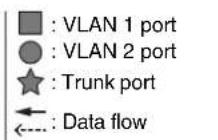
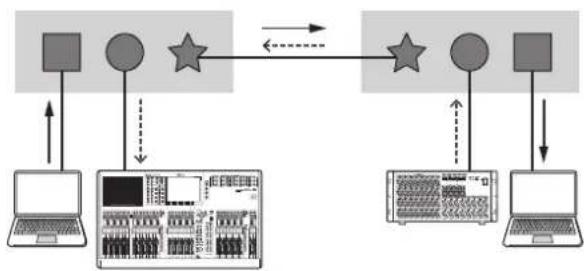
This function adds tags to multiple VLANs so that they can be transmitted and received via a single connection. When one SWP2 transmits VLAN 1 data via the trunk connection, the SWP2 unit that receives this will transmit the data only to the port that corresponds to its own VLAN 1.
Communication speed for a metal trunk connection on the SWP2's VLAN preset B is 1 Gbps per cable. If there is only one cable, and the total bandwidth passing through the trunk connection exceeds 1 Gbps, packets will be delayed or dropped. Some of the SWP2's VLAN presets enable link aggregation of the trunk connection. If the bandwidth will exceed 1 Gbps for a LAN port or 10 Gbps for a 10GBASE-SR/LR port, or if you want to provide redundancy to guard against cable breakage, you should use two trunk cables.
flowchart
graph TD
    A["Input Device"] --> B["Central Component"]
    B --> C["Output Device 1"]
    B --> D["Output Device 2"]
    C --> E["Output Device 3"]
    D --> F["Output Device 4"]
    style A fill:#f9f,stroke:#333
    style B fill:#ccf,stroke:#333
    style C fill:#cfc,stroke:#333
    style D fill:#fcc,stroke:#333
    style E fill:#ffc,stroke:#333
    style F fill:#cfc,stroke:#333
Controls and Functions
Front panel
The explanation here is based on the SWP2-10MMF.

① LAN ports
These are etherCON (RJ-45) ports for connecting Ethernet cables (CAT5e or better is recommended).
A cable with an RJ-45 connector can also be connected.
All ports support 1000BASE-T, 100BASE-TX, and 10BASE-T.
2 10GBASE-SR ports (SWP2-10MMF)/10GBASE-LR ports (SWP2-10SMF)
This is an opticalCON DUO port for connecting an optical fiber cable. LC Duplex connectors can also be connected.
If you use a cable with an LC Duplex connector, fasten the dust cap attached to the cable connector to prevent dust from adhering when the cable is not in use.
NOTE
- Use an opticalCON DUO optical fiber cable made by Neutrik Corporation. Since optical fiber cables are vulnerable to being bent or pulled, you can reduce the occurrence of problems by using a cable that has a strong sheath and is equipped with a locking mechanism.
- The SWP2-10MMF can use GI-type multi-mode fiber cables that have a core diameter of approximately 50~ m and cladding diameter of approximately 125~ m . The maximum length between devices is 300~m .
- The SWP2-10SMF can use SM-type single-mode fiber cables with a core diameter of approximately 9 µm and a cladding diameter of approximately 125 µm. The maximum length between devices is 10 km.
- In some cases, the specifications might not be satisfied because of the optical fiber cables that are used and the conditions of installation.
- Link up is possible only for 10GBASE-SR/LR between the same standards. 10GBASE-SR/LR can not link up with 1000BASE optical standards.
Cleaning
Correct communication might not be possible if debris and/or dust has adhered to the ends of optical fiber cables or the ports. Clean the equipment regularly by using commercially available optical fiber cleaning products.
③ LED mode indicators
This indicates what the status indicators are showing.
④ [LED MODE] button
This switches what the status indicators are showing.
⑤ Status indicators
These indicate the status of each port. The displayed content depends on the mode. For details on the display in each mode, refer to “Status Indicator Display.”
6 DIP switches
These specify startup settings for the unit.
Set the DIP switches when the power is turned off.
The settings are not applied if you change the setting while the power is on.
The switch illustrations indicate the up/down position as follows.
| Switch position | Status |
| Represent a status with switch toggled up. | |
| Represent a status with switch toggled down. |
- Switch 1 (CONFIG)
Specifies whether the unit's settings are optimized for a Dante network or are set by the user.
| Switch position | Option Functions | |
| DANTE | The unit starts up with settings optimized for a Dante network. This setting is read only. | |
| USER | The unit starts up with user settings. This setting can be read or written; when you change the setting, the unit starts up the next time as well with that setting. | |

Caution when using this unit together with another manufacturer's switch
Dante supports both IGMP V2 and V3, but you must set all switches in the same network to operate using the same version.
If the SWP2 starts up with DANTE settings, it operates using IGMP V3. In this case, if the network includes even one switch that is operating with IGMP V2, problems such as dropouts in the sound might occur.
- Switch 2 and 3 (VLAN PRESET)
Specifies the VLAN preset that is used when switch 1 is in the [DANTE] position. This setting is ignored if switch 1 is set to [USER].
If you change the settings via the web GUI or a command, the settings are applied temporarily but is not stored; the next time the unit starts up, it returns to the VLAN preset setting.
| Switch position | Option Functions |
| NORMAL | |
| A | |
| B | |
| C |
In the tables, "1," "2," "Tr1," and "Tr2" respectively indicate VLAN 1, VLAN 2, trunk (LAG1), and trunk (LAG2).
For an explanation of VLAN, trunk, link aggregation, and LAG, refer to "Terms" on page 10. For details, you can download technical reference material (HTML).
| VLAN PRESET | Rear panel ports | ||||||
| 1 | 2 | 3 | 4 | 5 | 6 | ||
| N | O | R | M | A | L | 1 | |
| A | ( | * | 1 | ) | 1 | 2 | 2 |
| B | ( | * | 1 | ) | 1 | 2 | 2 |
| C | ( | * | 2 | ) | 2 2 2 | ||
| VLAN PRESET | Front panel ports | |||||
| 7 | 8 | 9 | 1 | 0 | 1 | |
| N O | R | M | A | L | 1 | |
| A (*1) | 1 1 | 2 | 2 | Tr1 | Tr1 | |
| B (*1) | 1 | 2 | Tr1 | Tr1 | Tr2 | Tr2 |
| C (*2) | 1 1 | 2 2 | 2 | |||
(*1) In the VLAN presets, the IGMP Snooping function is turned on except for VLAN 2 in presets A and B, preventing multicast communication such as Dante's multicast flow from being forwarded to unnecessary routes. For this reason, in the case of A or B you should use the VLAN 1 port for audio signals such as Dante, and use the VLAN 2 port for control signals.
(*2) If you use setting C, connect the computer that is using Yamaha Audio Network Monitor to the VLAN 1 port.
⑦ [CONSOLE (RS-232C)] port
This is an RJ-45 port used to specify commands. Use an RJ-45/DB-9 console cable to connect this to the RS-232C port (COM port) of your computer. Use an RJ-45/DB-9 console cable that is wired as described in "Specifications."
8 [POWER] indicator
This is lit when the SWP2 is powered-on.
Rear panel

9 Grounding screw
Since the included power cord has a three-pin plug, this unit will be appropriately grounded if the AC outlet is grounded. In some cases, you may be able to reduce hum noise and interference noise by connecting this screw to ground as well.
10 AC IN connector
Connect the included power cord here. First connect the power cord to this unit, and then connect the power supply plug to an AC outlet; the SWP2's internal power supply turns on.
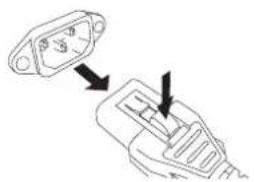
The supplied AC power cord features a V-lock mechanism via a latch, which prevents the power cord from coming off accidentally.
Insert the cable plug all the way until it locks in securely.
Press the latch button on the plug to disconnect the power cord.
natural_image
Diagram showing two connected electrical plug connectors with arrows indicating connection (no text or symbols)⑪ [EXT DC INPUT] connector
This is an XLR-4-32 type jack for supplying an external power supply (+24 V) as a backup for the SWP2's internal power supply.
Connect a Yamaha PA-700 AC adaptor or an equivalent product recommended by Yamaha.
![YAMAHA SWP2-10SMF - ⑪ [EXT DC INPUT] connector - 1](/content/2026/05/830547/images/47acc2fd2fb414964088a54a3f09a37523207bacacb0a97570d114609309f662.jpg)
CAUTION
- Before connecting the external power supply, you must turn off the external power supply. Failing to do so may cause electrocution or malfunctions.
- EXT DC INPUT connector is intended to be supplied by Power Supply certified with "Limited Power Source" or "LPS" and rated 24 Vdc.
NOTE
- If an external power supply is connected, the SWP2 will operate normally when its internal power supply and the external power supply are on, as well as when only one is on.
- If both power supplies are on, and one of them is interrupted during operation, the unit will continue to operate normally.
12 LAN ports
These are etherCON (RJ-45) ports for connecting Ethernet cables (CAT5e or better is recommended).
A cable with an RJ-45 connector can also be connected.
All ports support 1000BASE-T, 100BASE-TX, and 10BASE-T.
Status Indicator Display
If the LED mode is [LINK/ACT]
The status indicators show each port's link status and connection status.
| Indicator Illumination Status | ||
| Upper | Lit green Link is established. (LINK) | |
| Flashing green | Data is being transferred. (ACT) | |
| Unlit Link is lost. | ||
| Lower | Lit green | Connected with 1000BASE-T or 10GBASE-SR/LR. |
| Lit orange Connected with 100BASE-TX. | ||
| Unlit Connected with 10BASE-T. | ||
If the LED mode is [STATUS]
The status indicators show the loop-related port's status.
| Indicator Illumination Status | ||
| Upper and lower | Flashing orange | Loop was detected and communication was halted, or an abnormality in the opticalCON light reception level was detected. |
| Unlit | Loop not detected. Or loop was detected, but communication is not halted. | |
If the LED mode is [VLAN]
The status indicators show the VLAN ID and trunk. If DIP switch 1 is upward ([DANTE]), VLAN 1 is shown by the upper indicator and the lower indicator unlit. VLAN 2 is shown by the upper indicator lit green and the lower indicator unlit. Trunk is shown by upper and lower indicators lit orange.
-: Unlit, G: Lit green, O: Lit orange
| Indicators | 1 | VLAN ID low → high | Trunk | |||||
| Upper | - | G | O | - | - | G | O | O |
| Lower | - | - | - | G | O | O | G | O |
NOTE
- If a number of VLANs that cannot be completely displayed above is specified, the upper and lower indicators are lit green.
- If multiple VLAN IDs are specified for the same port, the upper and lower indicators are lit orange.
If the LED mode is [OFF]
All status indicators are unlit.
SWP2 Initialization
Settings can be reinitialized to factory default settings by the following three methods.

CAUTION
Do not switch off the SWP2 during initialization. Doing so could cause a product failure.
NOTICE
- Settings cannot be reinitialized if the administrative password is still the default setting. Use Web GUI or command operations to change the administrative password.
- All communications are temporarily disabled immediately after reinitialization.
NOTE
- The Web GUI can also be used to export current settings before they are reinitialized. For more details, refer to "Technical Data."
- If reinitialization fails, have the unit inspected by the dealer that sold the unit or by contacting the Yamaha customer service support center.
Using the Web GUI to restore factory settings
- Log in to the Web GUI via the Yamaha LAN Monitor.
-
Click the [Management] tab → [Maintenance] → [Restart and initialize], in that order.
The "Restart and initialize" screen is displayed. -
In the "Initialize" section, click the [Next] button.
The "Initialize" screen is displayed.
- Enter the administrative password and then click the [OK] button.
The "Check executed content" screen is displayed.
- Check the settings and then click the [Execute] button.
The settings are restored to factory settings and the SWP2 unit is restarted.
Using commands to restore factory settings
Factory settings can be restored using the [CONSOLE] port or a Telnet or SSH client. The following describes how to restore factory settings via the [CONSOLE] port.
Preparing the computer
Terminal software is required for controlling the computer serial (COM) port. Before starting, configure the terminal software parameter settings as indicated below.
| Parameter Value | |
| Data transmission speed 9600 | bps |
| Character bit length 8 | |
| Parity check None | |
| Number of stop bits 1 | |
| Flow control Xon/Xoff |
- Connect an RJ-45/DB-9 console cable between the computer and SWP2 unit.
- Turn on the power to the SWP2 unit.
A startup message is displayed on the computer console screen.
- Press the
key.
The software will wait for the user name to be entered.
- Enter the user name and press the
key.
The software will wait for the password to be entered.
- Enter the password and press the
key.
A command prompt will appear when the password is successfully authenticated.
- Enter "enable" and press the
key.
That will enable EXEC mode privileges.
7.Enter "cold start" and press the
The software will wait for the administrative password to be entered.
- Enter the administrative password and press the
key.
The settings are restored to factory settings and the SWP2 unit is restarted.
Pressing the key during startup to restore factory settings
Factory settings can be restored by pressing the uppercase key during SWP2 startup.
Make sure the terminal software parameter settings are already configured as indicated in "Using commands to restore factory settings" above.
- Connect an RJ-45/DB-9 console cable between the computer and SWP2 unit.
- Unplug the SWP2 power cord and plug it back in.
That restarts the SWP2 unit.
NOTE
The following steps are the same even if the SWP2 unit was restarted using command operations.
- Within one second after "BootROM Ver." appears on the computer console screen, press the uppercase key.
The initialization confirmation screen is displayed.
- Press the
key.
The settings are restored to factory settings and the SWP2 unit is restarted.
VLAN Use Cases
Redundant Dante connections
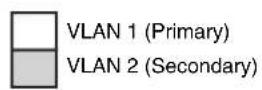
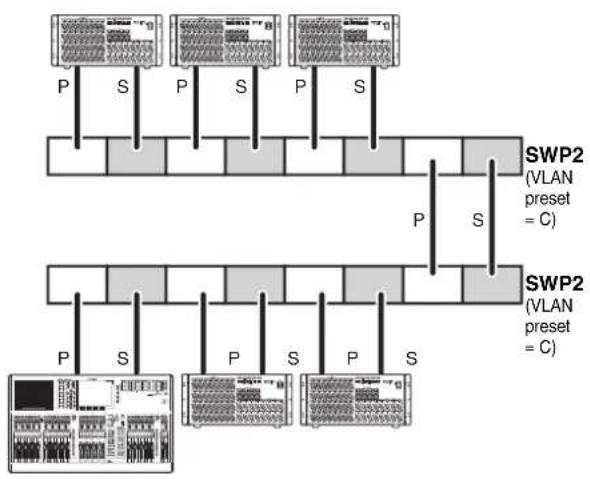
This case double the cables between devices as a safeguard against cable breakage. This diagram shows a setup using VLAN preset C.
flowchart
graph TD
    subgraph_Top_1["SWP2 (VLAN preset = C)"]
        A1["P"] --> B1["S"]
        A2["P"] --> B2["S"]
        A3["P"] --> B3["S"]
        A4["P"] --> B4["S"]
        A5["P"] --> B5["S"]
        A6["P"] --> B6["S"]
        A7["P"] --> B7["S"]
        A8["P"] --> B8["S"]
        A9["P"] --> B9["S"]
        A10["P"] --> B10["S"]
        A11["P"] --> B11["S"]
        A12["P"] --> B12["S"]
        A13["P"] --> B13["S"]
        A14["P"] --> B14["S"]
        A15["P"] --> B15["S"]
        A16["P"] --> B16["S"]
        A17["P"] --> B17["S"]
        A18["P"] --> B18["S"]
        A19["P"] --> B19["S"]
        A20["P"] --> B20["S"]
        A21["P"] --> B21["S"]
        A22["P"] --> B22["S"]
        A23["P"] --> B23["S"]
        A24["P"] --> B24["S"]
        A25["P"] --> B25["S"]
        A26["P"] --> B26["S"]
        A27["P"] --> B27["S"]
        A28["P"] --> B28["S"]
        A29["P"] --> B29["S"]
        A30["P"] --> B30["S"]
        A31["P"] --> B31["S"]
        A32["P"] --> B32["S"]
        A33["P"] --> B33["S"]
        A34["P"] --> B34["S"]
        A35["P"] --> B35["S"]
        A36["P"] --> B36["S"]
        A37["P"] --> B37["S"]
        A38["P"] --> B38["S"]
        A39["P"] --> B39["S"]
        A40["P"] --> B40["S"]
        A41["P"] --> B41["S"]
        A42["P"] --> B42["S"]
        A43["P"] --> B43["S"]
        A44["P"] --> B44["S"]
        A45["P"] --> B45["S"]
        A46["P"] --> B46["S"]
        A47["P"] --> B47["S"]
        A48["P"] --> B48["S"]
        A49["P"] --> B49["S"]
        A50["P"] --> B50["S"]
        A51["P"] --> B51["S"]
        A52["P"] --> B52["S"]
        A53["P"] --> B53["S"]
        A54["P"] --> B54["S"]
        A55["P"] --> B55["S"]
        A56["P"] --> B56["S"]
        A57["P"] --> B57["S"]
        A58["P"] --> B58["S"]
        A59["P"] --> B59["S"]
        A60["P"] --> B60["S"]
        A61["P"] --> B61["S"]
        A62["P"] --> B62["S"]
        A63["P"] --> B63["S"]
        A64["P"] --> B64["S"]
        A65["P"] --> B65["S"]
        A66["P"] --> B66["S"]
        A67["P"] --> B67["S"]
        A68["P"] --> B68["S"]
        A69["P"] --> B69["S"]
        A70["P"] --> B70["S"]
        A71["P"] --> B71["S"]
        A72["P"] --> B72["S"]
        A73["P"] --> B73["S"]
        A74["P"] --> B74["S"]
        A75["P"] --> B75["S"]
        A76["P"] --> B76["S"]
        A77["P"] --> B77["S"]
        A78["P"] --> B78["S"]
        A79["P"] --> B79["S"]
        A80["P"] --> B80["S"]
        A81["P"] --> B81["S"]
        A82["P"] --> B82["S"]
        A83["P"] --> B83["S"]
        A84["P"] --> B84["S"]
        A85["P"] --> B85["S"]
        A86["P"] --> B86["S"]
        A87["P"] --> B87["S"]
        A88["P"] --> B88["S"]
        A89["P"] --> B89["S"]
    end
    subgraph Bottom_1
        C1["SWP2 (VLAN preset = C)"]
    end
    subgraph Bottom_2
        D1["SWP2 (VLAN preset = C)"]
    end
Separating control signals from audio signals
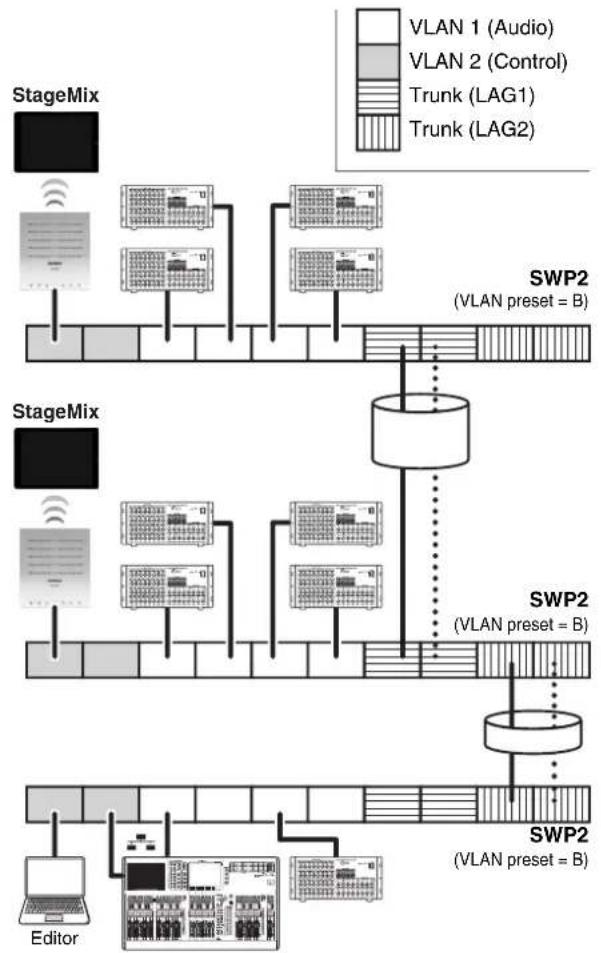
This case logically separates control signals such as for Editor or StageMix from Dante's audio signals, making the network more stable. This diagram shows a setup using VLAN preset B.
If VLANs are not used, and control signals and audio signals flow across the same network, the two will compete for communication bandwidth. In order to prevent such an effect, we recommend that you use VLANs to separate the control signal and audio signal networks.
flowchart
graph TD
    subgraph StageMix
        A["Editor"] --> B["SWP2 (VLAN preset = B)"]
    end
    subgraph SWP2
        C["Editor"] --> D["SWP2 (VLAN preset = B)"]
    end
    A --> E["StageMix"]
    B --> E
    C --> E
    D --> E
    E --> F["SWP2 (VLAN preset = B)"]
    style A fill:#f9f,stroke:#333
    style B fill:#ccf,stroke:#333
    style C fill:#cfc,stroke:#333
    style D fill:#fcc,stroke:#333
    style E fill:#ffc,stroke:#333
    style F fill:#fcc,stroke:#333
Specifications
General specifications
| Parameter SWP2-10MMF SWP2-10SMF | ||
| Number of LAN ports(1000BASE-T/100BASE-TX/10BASE-T, etherCON connector) | 10 | |
| Number of SFP+ ports(10GBASE-SR, opticalCON DUO connector) | 2 | 0 |
| Number of SFP+ ports(10GBASE-LR, opticalCON DUO connector) | 0 | 2 |
| Console port 1 (RJ-45) | ||
| Automatic negotiation Available | ||
| Auto MDI/MDI-X Available | ||
| DIP switches CONFIG, VLAN PRESET | ||
| Indicators (Front) POWER, LED MODE × 4 | ||
| PORT × 10 × 2*1, SFP+ × 2 × 2 | ||
| Operating temperature range 0 to 40°C | ||
| Storage temperature range -20 to 60°C | ||
| Power supply (AC IN inlet) | AC100 V – 240 V, 50/60 Hz, Internal power supply (no power switch)Power supply inlet: locking type | |
| Power supply (EXT DC INPUT inlet) | 24 VDC±2 V, 0.78 A, XLR-4-32 type Connector | |
| Maximum power consumption(Wattage, Current) | 21 W, 0.35 A | |
| Heat dissipation 18.5 kcal/h | ||
| Body material Metal case, no fan | ||
| Hazardous substances management | RoHS compliant | |
| Dimensions (W x H x D) | 480 × 44 × 362 mm (18-7/8' × 1-3/4' × 14-1/4") | |
| Weight (excluding accessories) | 4.5 kg (9.9 lbs) | |
| Accessories | Power cord, Owner's manual | |
| Option item | PA-700 (AC adaptor) | |
*1 The LED MODE button allows the PORT indicators to be switched between indicating LINK/ACT-SPEED, STATUS, or VLAN.
Interface specifications
| Terminal Format Level Connector | |||
| 1-10 *1 | IEEE802.3 10BASE-T/100BASE-TX/1000BASE-T | *3 | etherCON CAT5e |
| 11, 12 *2 | IEEE802.3ae 10GBASE-SR 10GBASE-LR | opticalCON | |
| CONSOLE (RS-232C) – RS-232C | RJ-45 | *4 | |
| EXT DC INPUT – | – XLR-4-32 type | *5 | |
*1 These terminals support AutoMDI/MDI-X
*2 Conforming cable: SWP2-10MMF: GI-type multi-mode fiber cables with a core diameter /cladding diameter of approximately 50 µm/125 µm. Maximum cable length: 300 m
SWP2-10SMF: SM-type single-mode fiber cables with a core diameter /cladding diameter of approximately 9 µm/125 µm. Maximum cable length: 10 km
*3 10GBASE-SR: SWP2-10MMF, 10GBASE-LR: SWP2-10SMF
*4 For the pin assignments, refer to "Connector pin assignments"
*5 Pin 4=+24 VDC, pin 1=GND, pins 2 and 3=N.C.
External power supply requirements: 24 VDC±2 V, 0.78 A
Connector pin assignments
CONSOLE (RS-232C)
| Signal | RJ45 | D-SUB 9 |
| 9 | ||
| RTS | 1 | 8 |
| DTR | 2 | 6 |
| TxD | 3 | 2 |
| GND | 4 | 5 |
| GND | 5 | |
| RxD | 6 | 3 |
| DSR* | 7 | 4 |
| CTS* | 8 | 7 |
| 1 |
* These signals are not used on the SWP2.
Dimensions
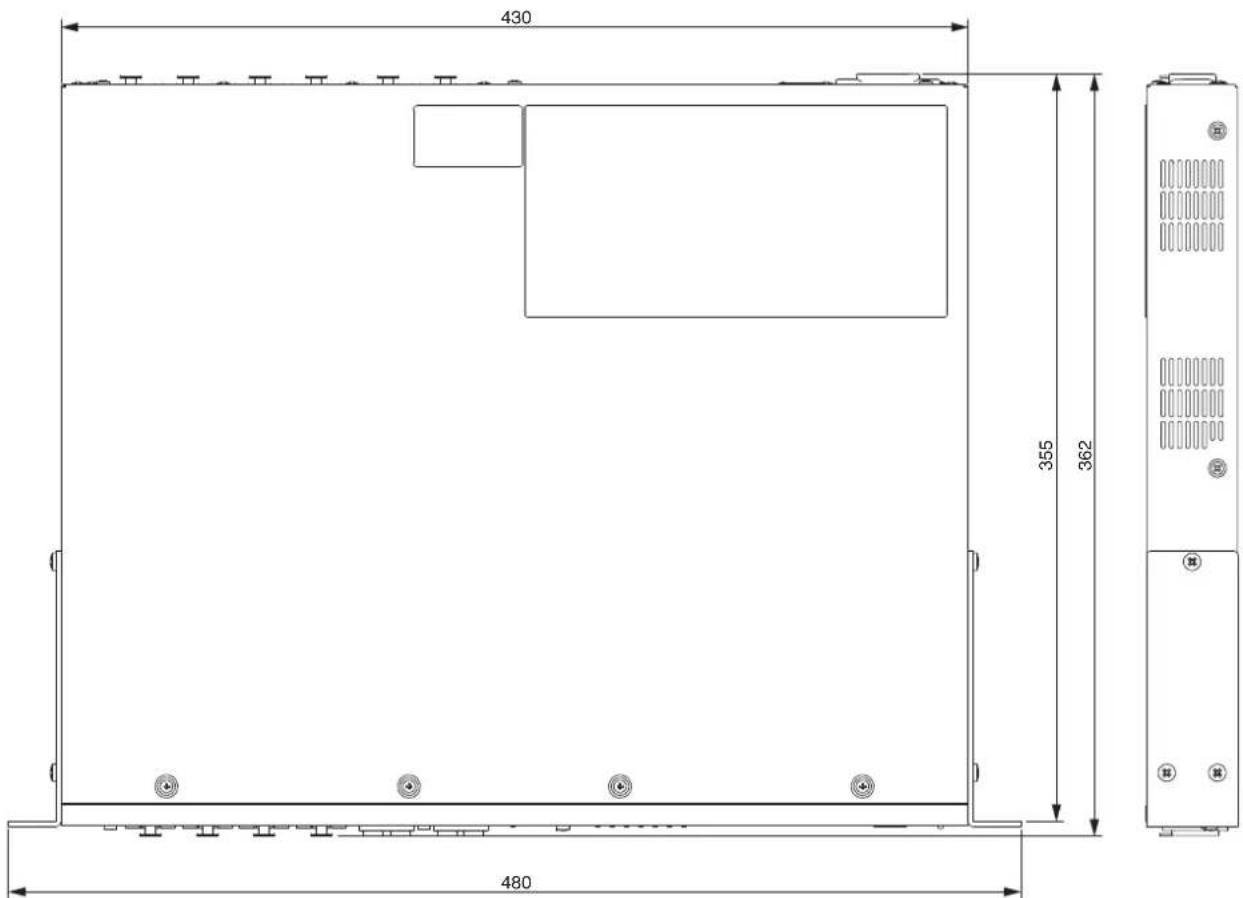

Unit: mm
* The contents of this manual apply to the specifications as of the firmware Rev. 2.03.15. To obtain the latest manual, access the Yamaha website then download the manual file.
Important Notice: Guarantee Information for customers in European Economic Area (EEA) and Switzerland
| Important Notice: Guarantee Information for customers in EEA* and SwitzerlandFor detailed guarantee information about this Yamaha product, and Pan-EEA* and Switzerland warranty service, please either visit the website address below (Printable file is available at our website) or contact the Yamaha representative office for your country. * EEA: European Economic Area | English |
| Wichtiger Hinweis: Garantie-Information für Kunden in der EWR* und der SchweizFür nähere Garantie-Information über dieses Produkt von Yamaha, sowie über den Pan-EWR*- und Schweizer Garantieservice, besuchen Sie bitte entweder die folgend angegebene Internetadresse (eine druckfähige Version befindet sich auch auf unserer Webseite), oder wenden Sie sich an den für Ihr Land zuständigen Yamaha-Vertrieb. *EWR: Europäischer Wirtschaftsraum | Deutsch |
| Remarque importante: informations de garantie pour les clients de l’EEE et la SuissePour des informations plus détaillées sur la garantie de ce produit Yamaha et sur le service de garantie applicable dans l’ensemble de l’EEE ainsi qu’en Suisse, consultez notre site Web à l’adresse ci-dessous (le fichier imprimable est disponible sur notre site Web) ou contactez directement Yamaha dans votre pays de résidence. * EEE : Espace Economique Européen | Français |
| Belangrijke mededeling: Garantie-informatie voor klanten in de EER* en ZwitzerlandVoor gedetailleerde garantie-informatie over dit Yamaha-product en de garantieservice in heel de EER* en Zwitzerland, gaat u naar de onderstaande website (u vind een afdrukbaar bestand op onze website) of neemt u contact op met de vertegenwoordiging van Yamaha in uw land. * EER: Europese Economische Ruimte | Nederlands |
| Aviso importante: información sobre la garantia para los clientes del EEE* y SuizaPara una información detallada sobre este producto Yamaha y sobre el soporte de garantía en la zona EEE* y Suiza, visite la dirección web que se incluye más abajo (la version del archivo para imprimir esta disponible en nuestro sitio web) o póngase en contacto con el representante de Yamaha en su país. * EEE: Espacio Económico Europeo | Español |
| Avviso importante: informazioni sulla garanzia per i clienti residenti nell’EEA* e in SvizzeraPer informazioni dettagliate sulla garanzia relativa a questo prodotto Yamaha e l’assistenza in garanzia nei paesi EEA* e in Svizzera, potete consultare il sito Web all’indirizzo riportato di seguito (è disponibile il file in formato stampabile) oppure contattare l’ufficio di rappresentanza locale della Yamaha. * EEA: Area Economica Europea | Italiano |
| Aviso importante: informações sobre as garantias para clientes da AEE* e da SuíçaPara obter uma informação pormenorizada sobre este produto da Yamaha e sobre o serviço de garantia na AEE* e na Suíça, visite o site a seguir (o arquivo para impressão está disponível no nosso site) ou entre em contato com o escritório de representação da Yamaha no seu país. * AEE: Área Econômica Européia | Português |
| Σημαντική σημείωση: Πληροφορίες εγγύησης για τους πελάτες στον ΕΟΧ* και ΕλβετίαΓια λεπτομερείς πληροφορίες εγγύησης σχετικά με το παρόν προϊόν της Yamaha και την κάλυψη εγγύησης σε όλες τις χώρες του ΕΟΧ και την Ελβετία, επισκεφτείτε την παρακάτω ιστοσελίδα (Εκτυπώσιμη μορφή είναι διαθέσιμη στην ιστοσελίδα μοςζ) ή απευθυνθείτε στην αντιπροσωπεία της Yamaha στη χώρα σος. * ΕΟΧ: Ευρωταικός Οικονομικός Χώρος | Ελληνικά |
| Viktigt: Garantiinformation för kunder i EES-området* och SchweizFör detaljerad information om denna Yamahaprodukt samt garantiservice i hela EES-området* och Schweiz kan du antingen besöka nedanstående webbaddress (en utskriftsvänlig fil finns på webbplatsen) eller kontakta Yamahas officiella representant i ditt land. * EES: Europeiska Ekonomiska Samarbetsområdet | Svenska |
| Viktig merknad: Garantiinformasjon for kunder i E∅S* og SveitsDetaljert garantiinformasjon om dette Yamaha-produktet og garantiservice for hele E∅S-området* og Sveits kan fås enten ved å besøke nettadressen nedenfor (utskriftsversjon finnes på våre nettisider) eller kontakte kontakte Yamaha-kontoret i landet der du bor. *E∅S: Det europeiske økonomiske samarbeidsområdet | Norsk |
| Vigtig oplysning: Garantioplysninger til kunder i E∅O* og SchweizDe kan finde detaljerede garantioplysninger om dette Yamaha-produkt og den fælles garantiserviceordning for E∅O* (og Schweiz) ved at besøge det websted, der er angivet nedenfor (der findes en fil, som kan udskrives, på vores websted), eller ved at kontakle Yamahas nationale repræsentationskontor i det land, hvor De bor. * E∅O: Det Europæiske ∅konomiske Område | Dansk |
| Tärkeå ilmoitus: Takuutiedot Euroopan talousalueen (ETA)* ja Sveitsin asiakkailleTämän Yamaha-Suoteleen sekä ETA-alueen ja Sveitsin takuata koskevat yksitylskohtaiset tiedot saatte alla olevasta nettiosoitteesta. (Tulostettava tiedosto saatavissa sivustollamme.) Voitte myös ottaa yhteyttä paikalliseen Yamaha-edustajaan. *ETA: Euroopan talousalue | Suomi |
| Waźne: Warunki gwarancyjne obowiązujące w EOG* i SzwajcariiAby dowiedzieć się więcej na temat warunków gwarancyjnych tego produktu firmy Yamaha i serwisu gwarancyjnego w całym EOG* i Szwajcarii, należy odwiedzić wskazaną poniżej stronę internetową (Pilk gotowy do wydruku znajduje się na naszej stronie internetowej) lub skontaktować się z przedstawicielstwem firmy Yamaha w swoim kraju. * EOG — Europejski Obszar Gospodarczy | Polski |
| Duležité oznámení: Záruční Informace pro zákazníky v EHS* a ve ŠvýcarskuPodrobné záruční informace o tomto produktu Yamaha a záručním servisu v celém EHS* a ve Švýcarsku naleznete na niže uvedené webové adrese (soubor k tisku je dostupný na našich webových stránkách) nebo se műžete obrátit na zastoupení firmy Yamaha ve své zemi. * EHS: Evropsky hospodářský prostor | Česky |
| Fontos figyelmeztefés: Garancia-információk az EGT* területén és Švájcban élő vásárlók számáraA jelen Yamaha termékre vonatkozó részletes garancia-információk, valamint az EGT*-re és Švájcra kiterjedő garanciális szolgáltatás tekintetében keresse fel webhelyünket az alábbi címen (a webhelyen nyomtatható fájt is talál), vagy pedig lépjen kapcsolatba az országában működő Yamaha képviseleti irodával. * EGT: Európai Gazdasági Těrség | Magyar |
| Oluline márkus: Garantiiteave Euroopa Majanduspiirkonna (EMP)* ja Šveitsi klientideleTápsema teabe saamiseks selle Yamaha toote garantii ning kogu Euroopa Majanduspiirkonna ja Šveitsi garantiiteeninduse kohta, külastage palun veebisaiti alljärgneval aadressil (meie saldil on saadaval prinditav fall) vöi pöörduge Tele regiooni Yamaha esinduse poole. * EMP: Euroopa Majanduspiirkond | Eesti keel |
| Svarīgs pazipojums: garantijas informácija klientiem EEZ* un ŠveicēLai saqemtu detalizētu garantijas informáciju par šo Yamaha produktu, kā arī garantijas apkalošanu EEZ* un Šveicē, lūdzu, apmekléjiet zemāk norādīto tīmekļa vietnes adresi (tīmekļa vietně ir pieejams drukājams fails) vai sazinieties ar jūsu valsti apkalojošo Yamaha pārstāvniecību. * EEZ: Europas Ekonomikas zona | Latviešu |
| Dèmesio: informacija dél garantijos plrkėjams EEE* Ir ŠveicarijojeJei reikia išsamios informacijos apie ši „Yamaha“ produktą ir jo techninę priežiūrą visoje EEE* ir Šveicarijoje, apsilankykite mūsų svetainėje toliau nurodytu adresu (svetainėje yra spausdintinas failás) arba kreipkitės i „Yamaha“ asttovybę savo šaliai. * EEE – Europos ekonominė erdvė | Lietuviu kalba |
| Dôležité upozomenie: Informácie o záruke pre zákaznikov v EHP* a ŠvajčiarskuPodrobné informácie o záruke týkjájúce sa tohto produktu od spoločnosti Yamaha a garančnom servise v EHP* a Švajčiarsku nájdete na webovej stránke nížšie (na našej webovej stránke je k dispozicii súbor na tlač) alebo sa obrätte na zástupcu spoločnosti Yamaha vo svojej krajine. * EHP: Európsky hospodářsky priestor | Slovenčina |
| Pomembno obvestilo: Informacije o garanciji za kupce v EGP* in ŠviciZa podrobnejše informacije o tem Yamahinem izdelku ter garancijskem servisu v celotnem EGP in Švici, obiščite spletno mesto, ki je navedeno spodaj (natisljiva datoteka je na voljo na našem spletnem mestu), ali se obrmite na Yamahinga predstavnika v svoji državi. * EGP: Evropski gospodarski prostor | Slovenščina |
| Важно съобщение: Информация за гаранцията за клиенти в ЕИП* и ШеейцарияЗа подробна информация за гаранцията за този продукт на Yamaha и гаранционното обслужване в паневропейската зона на ЕИП* и Шеейцария или посетете посочения по-долу уеб сайт (на нашия учеб сайт ima файл за печат), илисе свържете с представителния офис на Yamaha във вашата страна. * ЕИП: Европейско ikonomическо пространство | Български език |
| Notificare importante: Informatii despre garanție pentru clienții din SEE* și ElvețiaPentru informații detaliate privind acest produs Yamaha și serviciul de garantie Pan-SEE* și Elveția, vizitați site-ul la adresa de mai jos (fișierul imprimabil este disponibil pe site-ul nostru) sau contactați biroul reprezentanței Yamaha din țara dumneavoastră. * SEE: Spațiul Economic European | Limba română |
| Važna obavijest: Informacije o jamstvu za države EGP-a i ŠvicarskeZa detaljne informacije o jamstvu za ovaj Yamahin proizvod te jamstvenom servisu za cijeli EGP i Švicarsku, molimo Vas da posjetite web-stranicu navedenu u nastavku ili kontaktirate ovlaštenog Yamahinog dobavljača u svojoj zemlji. * EGP: Europski gospodarski prostor | Hrvatski |
https://europe.yamaha.com/warranty/
Yamaha Worldwide Representative Offices
English
For details on the product(s), contact your nearest Yamaha representative or the authorized distributor, found by accessing the QR code below.
Deutsch
Yamaha Downloads https://download.yamaha.com/