
RoboStar W600 - Vacuum Cleaner TESLA - Free user manual and instructions
Find the device manual for free RoboStar W600 TESLA in PDF.


| Product Type | Robotic Vacuum Cleaner |
| Model | RoboStar W600 |
| Brand | Tesla |
| Dimensions (L x W x H) | 32 x 32 x 7.6 cm |
| Weight | 2.8 kg |
| Battery Type | Lithium-ion |
| Battery Capacity | 2600 mAh |
| Runtime | Up to 120 minutes |
| Charging Time | Approx. 5 hours |
| Dustbin Capacity | 0.5 L |
| Suction Power | 2000 Pa |
| Navigation System | Gyroscope + Random |
| Sensors | Anti-drop, bumper, cliff sensors |
| Cleaning Modes | Auto, Edge, Spot, Scheduled |
| App Control | Yes (Wi-Fi, via Tesla Home app) |
| Voice Control | Compatible with Amazon Alexa and Google Assistant |
| Filter Type | HEPA filter |
| Main Brush | Rolling brush with anti-tangle |
| Side Brushes | 2 side brushes |
| Power Supply | AC 100-240V, 50/60Hz, DC 14.4V |
| Accessories Included | Charging dock, power adapter, side brushes, HEPA filter, cleaning tool |
| Maintenance | Clean dustbin after each use, wash filter every 2 weeks, replace brushes every 6 months |
| Safety Features | Auto shut-off on low battery, overheat protection, drop detection |
Frequently Asked Questions - RoboStar W600 TESLA
User questions about RoboStar W600 TESLA
0 question about this device. Answer the ones you know or ask your own.
Ask a new question about this device
Download the instructions for your Vacuum Cleaner in PDF format for free! Find your manual RoboStar W600 - TESLA and take your electronic device back in hand. On this page are published all the documents necessary for the use of your device. RoboStar W600 by TESLA.
USER MANUAL RoboStar W600 TESLA
natural_image
Line drawing of a simple electrical device with a rectangular box, coiled cable, and power outlet (no text or symbols)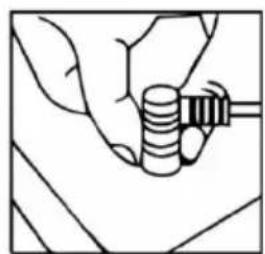
natural_image
Line drawing of a hand holding a cylindrical object with a handle, no text or symbols presentnatural_image
Line drawing of a rectangular electronic device with coiled cable and power outlet (no text or symbols)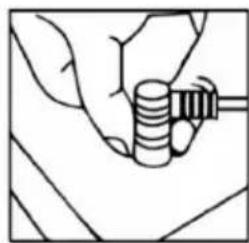
natural_image
Line drawing of a hand holding a cylindrical object with a handle, no text or symbols presentĎALSIE REŽIMY POHYBU
natural_image
Line drawing of a medical device with cable and plug, alongside a hand holding a coiled tube (no text or symbols)GWARANCJA NIE OBEJMUJE:
natural_image
Technical line drawings of three electronic components: a rectangular case, a circular component with a handle, and a square frame (no text or symbols)natural_image
Line drawing of a medical device with cable and plug, alongside a hand holding a coiled tube (no text or symbols)natural_image
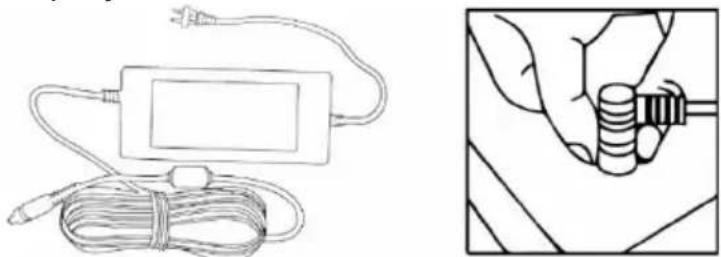
Technical line drawings of three electronic components: a multi-chamber drive, a handheld device with a circular component, and a rectangular display unit (no text or symbols)- Električni kabel priključite na električni pretvornik, priključite aparat na vhodni priključek in na koncu priključite vtič v električno vtičnico.
natural_image
Line drawing of a power cord connected to a rectangular device and a hand holding a coiled cable (no text or symbols)VAŽNA SIGURNOSNA UPOZORENJA
natural_image
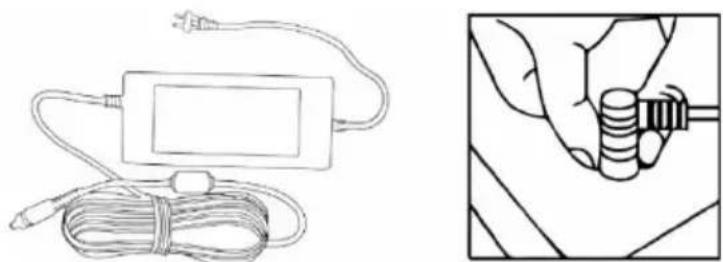
Three technical line drawings of electronic components: a flat case, a handheld device with a circular button, and a square frame with a circular button (no text or symbols)- Spojite kabel za napajanje na adapter za napajanje, spojite aparat na ulaz za napajanje i na kraju priključite adapter na električnu mrežu.
natural_image
Line drawing of a medical device with cable and plug, alongside a hand holding a coiled spring (no text or symbols)- Montirajte sigurnosnu vezicu na odgovarajuće mjesto, za osiguranje možete upotrijebiti vakuumski držač i zatim prilagodite duljinu kako biste osigurali aparat od pada. Pazite da duljina kabela i vezice ne ograničava kretanje aparata po prozoru.
POČETAK (START)
natural_image
Three technical line drawings showing a device with a fan, a hand holding a button, and a circular component mounted on a base (no text or symbols)natural_image
Illustration of a simple electrical device with wires and a close-up of its cable being inserted (no text or symbols)natural_image
Line drawing of a rectangular electronic device with coiled cable and power outlet (no text or symbols)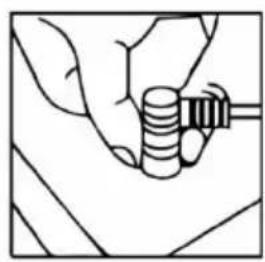
natural_image
Line drawing of a hand holding a coiled spring or spring component (no text or symbols)thank you for choosing the TESLA RoboStar W600.
Please read the rules of safe use carefully before using this appliance and follow all usual safety rules.
IMPORTANT SAFETY WARNINGS
This appliance is a complex electromechanical device, please note the following instructions:
- Do not use the appliance in extremely hot or cold environments (below 0°C or above 40°C).
- Pour only clean distilled water into the water tank.
- The appliance may be used to clean exterior windows if properly secured and if it is not windy, raining or snowing.
- Avoid splashing the vacuum cleaner or its interior with liquid which could damage it.
- Make sure the appliance is connected to a power supply, as the appliance has a backup battery which charges during use.
- Do not use the appliance on cracked glass, on wet or greasy windows, or on a window with glass thinner than 4 mm.
- Do not use on horizontally mounted glass, the appliance will not work properly.
- Do not use the appliance unless it is firmly attached to the glass or exhibits visible signs of damage, and do not place the appliance in water or other liquids. The appliance is not waterproof.
- Be careful not to damage the power cord. Do not pull or carry the appliance by the power cord, do not use it as a handle, do not crush the power cord by closing a window on it or place heavy weights on the power cord. Keep the power cord away from hot surfaces.
- Do not use the appliance if the power cord is damaged.
- Do not use the appliance if it is not working properly, has fallen, is damaged or has come into contact with water.
• If the battery needs to be replaced, contact the TESLA service department. - Use only original accessories which are designed for this model.
- Use only the accessories provided by the manufacturer of the appliance to charge it. Use of non-original accessories could cause damage to the appliance, electric shock or fire.
- Do not touch parts which are plugged into the mains if you have wet hands.
- Do not leave the appliance unattended in the presence of children.
- Do not open or repair the appliance. You run the risk of electric shock and loss of the warranty.
- Keep the appliance out of the reach of flammable and volatile substances.
- The manufacturer and the importer to the European Union is not liable for any damage caused by operation of the appliance such as injury, scalding, fire or damage to other items, etc.
PACK CONTENTS
Carefully check that you have unpacked all of the accessories supplied. We recommend keeping the original cardboard box, user manual and packaging materials for the duration of the warranty period.
DESCRIPTION
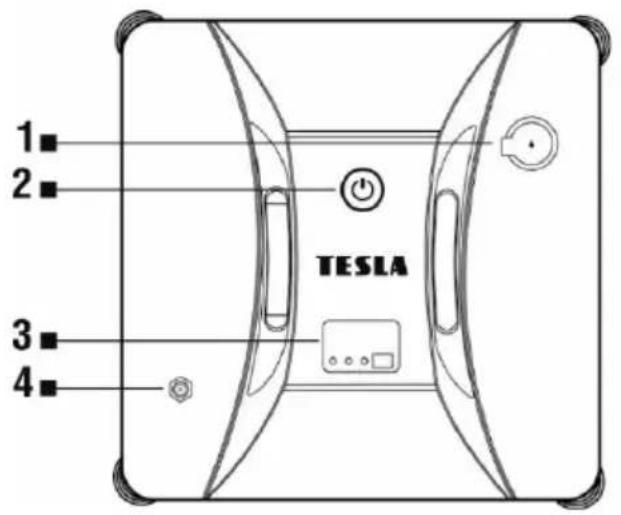
1 Water reservoir
2 START/PAUSE/STOP control button
3 Operation indicator
4 Power input
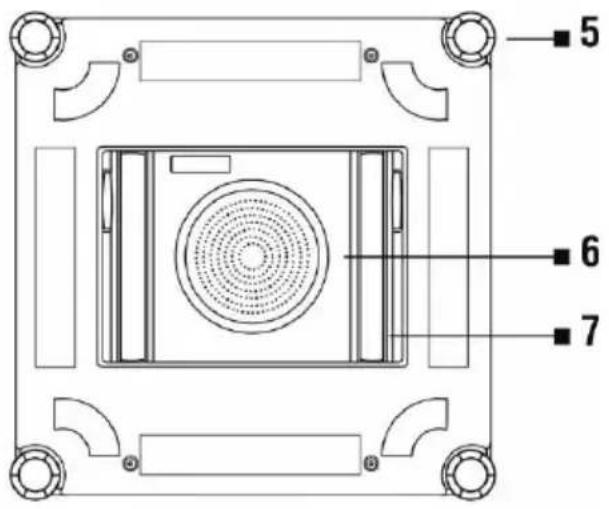
5 Edge detection sensor
6 Fan
7 Caterpillar track
If the operation indicator is lit with a:
BLUE LED: the appliance is working properly
GREEN LED: the appliance's battery is charged
ORANGE LED: the appliance is charging
RED LED: an appliance error or power failure has occurred
REMOTE CONTROL
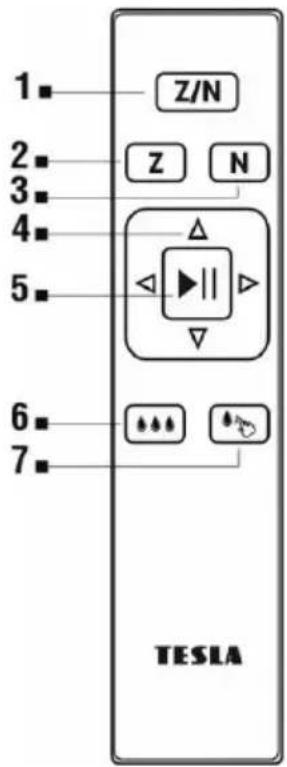
1 Cleaning in "ZN" mode
2 Cleaning in "Z" mode (right/left)
3 Cleaning in "N" mode (up/down)
4 Manual mode - directional movement buttons
5 Start/Pause cleaning/Automatic mode
6 Automatic water spray
(in "Z" mode when the appliance is moving to the right)
7 Manual water spray
IMPORTANT WARNING!
Always charge the internal backup battery first before using the appliance. If the battery is not charged, the appliance may not work for safety reasons. When the battery is fully charged, the LED will be permanently lit green.
BEFORE FIRST USE
- WARNING! The appliance is able to clean glass mounted at an angle from both sides, but may not work properly; in this case, a person should be nearby to help in case of a problem.
- Do not use the appliance on a window with glass thinner than 4 mm.
• The appliance can be used on framed and frameless windows larger than 50 x 50 cm. - If the window is too dirty, clean a small part first and place the appliance on this part before starting the cleaning process.
- Make sure there is a gap of at least 10 cm between the glass and obstacles in the room (curtains or furniture).
- Please read the manufacturer's cleaning instructions before using the appliance on glass with an uneven surface (frosted, textured, coated, patterned or coated glass, or tiles). The appliance manufacturer is not liable for any damage caused by improper use on such a surface, the appliance may not work properly.
-
Only use the appliance with clean distilled water to avoid build-up of scale and clogging of the water jets. Do not add any cleaning agents which may cause foaming, streaking or clogging of the water jets. If the window is so dirty that this is required, you can use a small amount of a high-quality, low-foaming, low-alcohol window cleaner to dampen the cleaning cloth or the window surface.
-
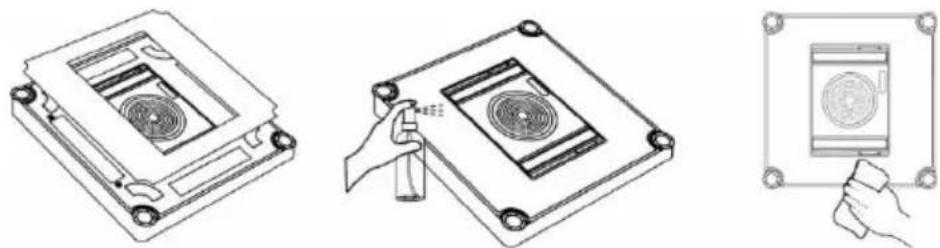
Gently dampen the cleaning cloth with clean water. Turn the appliance bottom side up and attach the cleaning cloth to it, white part down, blue part up. If you wet the cleaning cloth too much, the appliance may slip when moving, fall or not work properly.
Make sure that the cleaning cloth does not cover any of the sensors.
natural_image
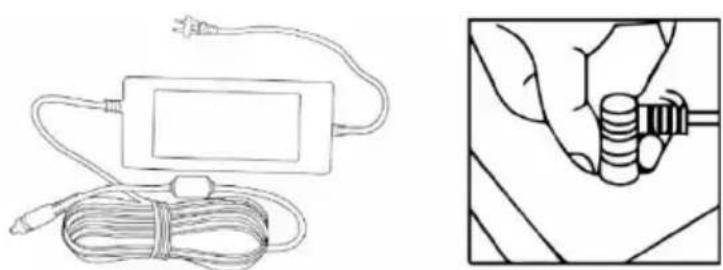
Technical line drawings of three electronic components: a rectangular case, a circular component with internal structure, and a square display unit (no text or symbols)- Connect the power cord to the power adapter, connect the appliance to the power input and finally plug the power adapter into the mains.
natural_image
Line drawing of a medical or electrical device with coiled cable and plug, alongside a hand holding a coiled spring (no text or symbols)- Install the safety cable in a suitable place, you can use a suction cup to secure it and adjust its length to secure the appliance against falling. Make sure that the length of the power cord or rope does not restrict the movement of the appliance on the window.
START
- Connect the appliance to the mains. Do not disconnect it from the power supply while cleaning.
- Place the appliance on the glass in the middle of the window, at least 8 cm from the window
frame. Press the control button on the appliance for a few seconds.
- The appliance is successfully attached to the window surface when the LED starts to glow permanently blue. It is then safe to select the cleaning mode.
AUTOMATIC MODE
Press the control button on the appliance or the control button on the remote control.
OTHER MOVEMENT MODES
- Cleaning mode in a "Z" shape is suitable for wide windows. In this mode, the automatic water spray will work when the appliance is moving to the right. When used on a narrow window, automatic spraying may not be functional.
- Cleaning mode in an "N" shape is suitable for tall windows.
- Cleaning mode in a "ZN" shape is a combined mode suitable for all windows. In this mode, the automatic water spray will work when the appliance is moving to the right.
- You can also control the appliance manually with the directional arrows "right, left, up, down".
SPRAYING WATER ONTO THE SURFACE WHICH IS TO BE CLEANED
- After pressing the button, water will automatically be sprayed at an interval of 10 seconds. Water spray is functional in "Z" or "ZN" mode when the appliance is moving to the right.
- After pressing the button, water will be sprayed once. Only use when the appliance is moving to the right.
PAUSING CLEANING
Press the button on the body of the appliance or use the button on the remote control. In the event of a power failure, the appliance operation indicator will flash blue/red and the appliance will operate using the backup battery for approximately 10 minutes.
SWITCHING THE APPLIANCE OFF
When cleaning has finished, the appliance returns to the place where the cleaning started and alerts you that it has finished with an audible signal.
- Press and hold the button for a while.
The appliance will stop creating a vacuum and can be removed from the window.
- Remove the safety cable and suction cup.
- Disconnect the appliance from the mains.
- Drain the residual water from the appliance.
MAINTENANCE
WARNING! We recommend that you perform regular maintenance to ensure the most efficient cleaning.
LACK OF MAINTENANCE MAY CAUSE DAMAGE TO THE APPLIANCE AND LOSS OF THE WARRANTY.
Before performing cleaning and maintenance, switch off the appliance by holding down the button and disconnect it from the mains.

- Turn the appliance over and remove the cleaning cloth. Soak it in warm water for 2 minutes, wash it by hand with a mild detergent and allow it to dry completely before reattaching.
- Regular washing of the cleaning cloth will prolong its life. If the cleaning cloth wears out or no longer fits properly in the Velcro area, replace it with a new one to ensure the best cleaning effect.
- Wipe the top cover of the appliance with a soft, dry cloth. Wipe the bottom of the appliance, the fan cover and the edge detection sensor.
CLEANING THE CATERPILLAR TRACKS
If the caterpillar tracks are dirty or wet, the appliance will not work properly on the window and the tracks may slip.
Turn the appliance over, connect the power supply and press the directional button on the remote control three times with the appliance switched off Clean the dust from both tracks gradually with a damp cloth. You can move the tracks along using the button on the remote control. After cleaning the caterpillar tracks, dry them thoroughly before using them again.
WARRANTY REPAIR
For warranty repair, contact the dealer where you purchased the TESLA product.
THE WARRANTY DOES NOT APPLY TO:
- use of the appliance for purposes other than those it was designed for
• regular wear and tear of the appliance - failure to observe the "IMPORTANT SAFETY WARNINGS" and other instructions contained in the user manual
• electromechanical or mechanical damage to the appliance caused by improper use - damage caused by natural elements such as water, fire, static electricity or power surges, etc.
• damage caused by unauthorised repair
• appliances with an illegible serial number - the battery, if the battery capacity drops after more than 6 months of use (warranty on battery capacity is 6 months)
DECLARATION OF CONFORMITY
We, INTER-SAT LTD, org. složka, declare that this appliance complies with the basic requirements and other relevant provisions of the standards and regulations relevant to the given type of equipment.

This product meets the requirements of the European Union.
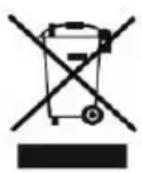
When this crossed-out wheeled bin symbol is attached to a product it means that the product is covered by European Directive 2002/96/EC. Please obtain information about the local separate collection system for electrical and electronic products. Please act in accordance with your local regulations and do not dispose of your old products together with your regular household waste. Correct disposal of your old product helps to prevent potential negative consequences for the environment and human health.
Due to the fact that the product is subject to development and improvement, we reserve the right to alter the user manual. The current version of this user manual can always be found at www.tesla-electronics.eu.
Design and specifications may be subject to change without prior notice, printing errors reserved.
- ĎALSIE REŽIMY POHYBU
- GWARANCJA NIE OBEJMUJE:
- VAŽNA SIGURNOSNA UPOZORENJA
- POČETAK (START)
- IMPORTANT SAFETY WARNINGS
- PACK CONTENTS
- IMPORTANT WARNING!
- BEFORE FIRST USE
- START
- AUTOMATIC MODE
- OTHER MOVEMENT MODES
- SPRAYING WATER ONTO THE SURFACE WHICH IS TO BE CLEANED
- PAUSING CLEANING
- SWITCHING THE APPLIANCE OFF
- MAINTENANCE
- CLEANING THE CATERPILLAR TRACKS
- WARRANTY REPAIR
- THE WARRANTY DOES NOT APPLY TO:
- DECLARATION OF CONFORMITY
Brand : TESLA
Model : RoboStar W600
Category : Vacuum Cleaner