
Vispo - Juicer Overmax - Free user manual and instructions
Find the device manual for free Vispo Overmax in PDF.


| Product Type | Juicer |
| Brand | Overmax |
| Model | Vispo |
| Juicing Type | Centrifugal |
| Power Consumption | 800 W |
| Voltage | 220-240 V, 50 Hz |
| Dimensions (L x W x H) | 26 x 20 x 30 cm |
| Weight | 3.5 kg |
| Juice Jug Capacity | 1 L |
| Pulp Container Capacity | 1.5 L |
| Feeding Tube Diameter | 75 mm |
| Number of Speeds | 2 |
| Speed Settings | Low, High |
| Safety Features | Safety lock, non-slip feet |
| Dishwasher Safe Parts | Juice jug, pulp container, lid, filter basket |
| Maintenance | Clean immediately after use; filter brush included |
| Spare Parts | Filters, jugs, lids available separately |
| Reparability | Motor base repairable; user-replaceable parts |
| Warranty | 2 years |
| Included Accessories | Cleaning brush, recipe booklet |
Frequently Asked Questions - Vispo Overmax
User questions about Vispo Overmax
0 question about this device. Answer the ones you know or ask your own.
Ask a new question about this device
Download the instructions for your Juicer in PDF format for free! Find your manual Vispo - Overmax and take your electronic device back in hand. On this page are published all the documents necessary for the use of your device. Vispo by Overmax.
USER MANUAL Vispo Overmax
natural_image
Modern kitchen brush maker with black handle and blue liquid, pouring liquid from a glass cup (no text or symbols visible)Vispo
slow juicer
EN PL DE

natural_image
Solid green vertical rectangle with no text, symbols, or patternsINTRODUCTION
Dear customer!
Thank you for placing trust in us and choosing Overmax Home.
We provide you with a product perfect for everyday use thanks to the use of high-quality materials and modern solutions.
We are sure that the product will satisfy your requirements as it has been designed with utmost care. Before you use the product, please read this manual carefully.
Should you have any remarks or questions concerning the product, please contact us:
Please read this manual before you start using the device to see all its functions and use them in accordance with intended use. A failure to follow these notes may raise the fire risk, electric shock risk and bodily injuries risk.
- Connect the device to the network with voltage 230 V only.
- Do not repair or modify the device. Only an authorized service technician is allowed to perform these operations.
- Do not switch the device on if you have noticed any damage. It applies to a wire and plug as well.
- Before you use the device, make sure all elements have been properly assembled.
- Do not use the device if it acts up, has been dropped or wetted, gets overheated easily, has discoloration, is deformed, emits abnormal sounds, odors and when other atypical phenomena occur. Contact the manufacturer's authorized service center.
- Never leave the plugged device unattended.
- This device is not a toy. Do not let your children play with it and keep out of reach of children.
- The device must operate at room temperature. Do not use the device if the temperature is low or high. Before you switch the device on, leave it at the room temperature for at least 30 minutes.
-
Use the device away from sources of heat, high temperatures, hot surfaces, direct sunlight, source of ignition, naked flame, oils and sharp edges.
-
Do not use the device in the inflammable, explosive or toxic atmosphere.
-
Do not use chemicals to clean the device.
-
If you do not use the device for a long period of time, unplug it.
-
The device is intended for home use only. Do not use it outdoors.
-
Do not hold the wire to pull or move the device. Do not place any items on the wire. Do not pull the wire through sharp edges of walls and furniture and do not wrap it too tight.
-
Unplug the device after every use. To do so, pull a plug, never a wire.
-
Do not use the device and do not touch a plug if your hands are wet.
-
Do not immerse the device in water or other liquids. Do not use near water.
-
Before you start cleaning or moving the device, switch it off and unplug.
-
Position the device on a flat and horizontal surface, and avoid slopes. Do not place the device on soft surfaces.
-
Do not place any items on the device.
-
Do not use the device for other purposes than designed.
-
When the device is in operation, do not put your fingers in the feeder.
-
Do not use the device longer than 5 minutes without breaks as it may lead to internal damage to the device.
-
Before you start cleaning or changing covers, always unplug the device.
DEVICE DESCRIPTION
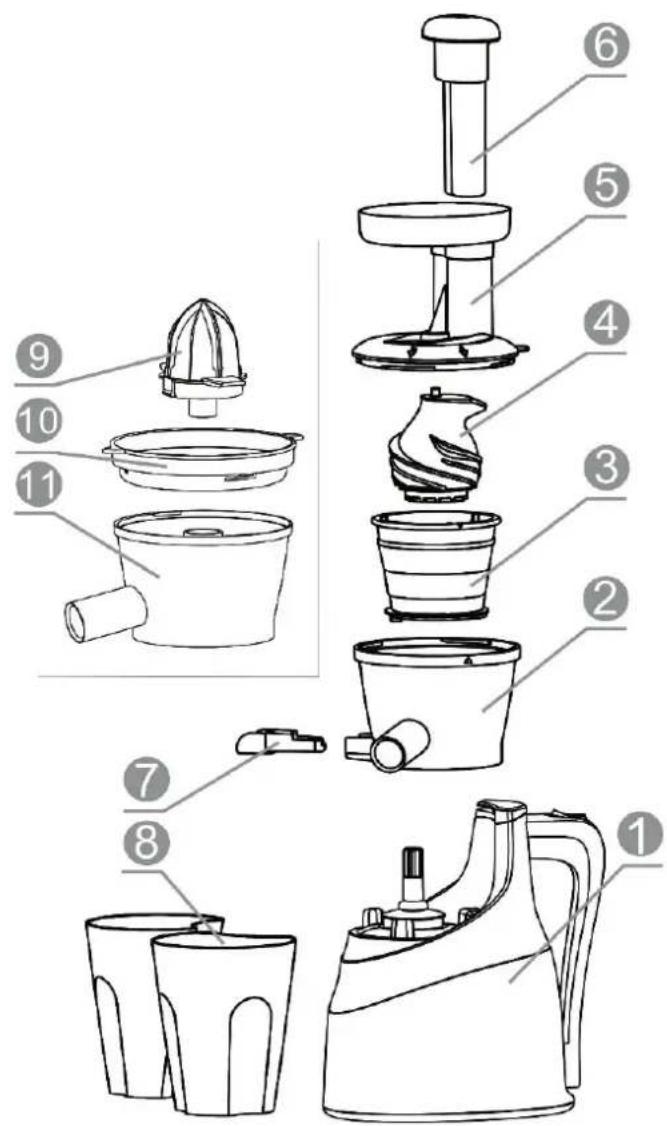
- Squeezer base
- Tank
- Filter
- Warm
- Fruits and vegetables feeder
- Pusher
- Pulp outlet
- Juice and waste (pulp) tanks
- Citrus squeezer
- Filter
- Tank
FRUITS AND VEGETABLES WORM SQUEEZER
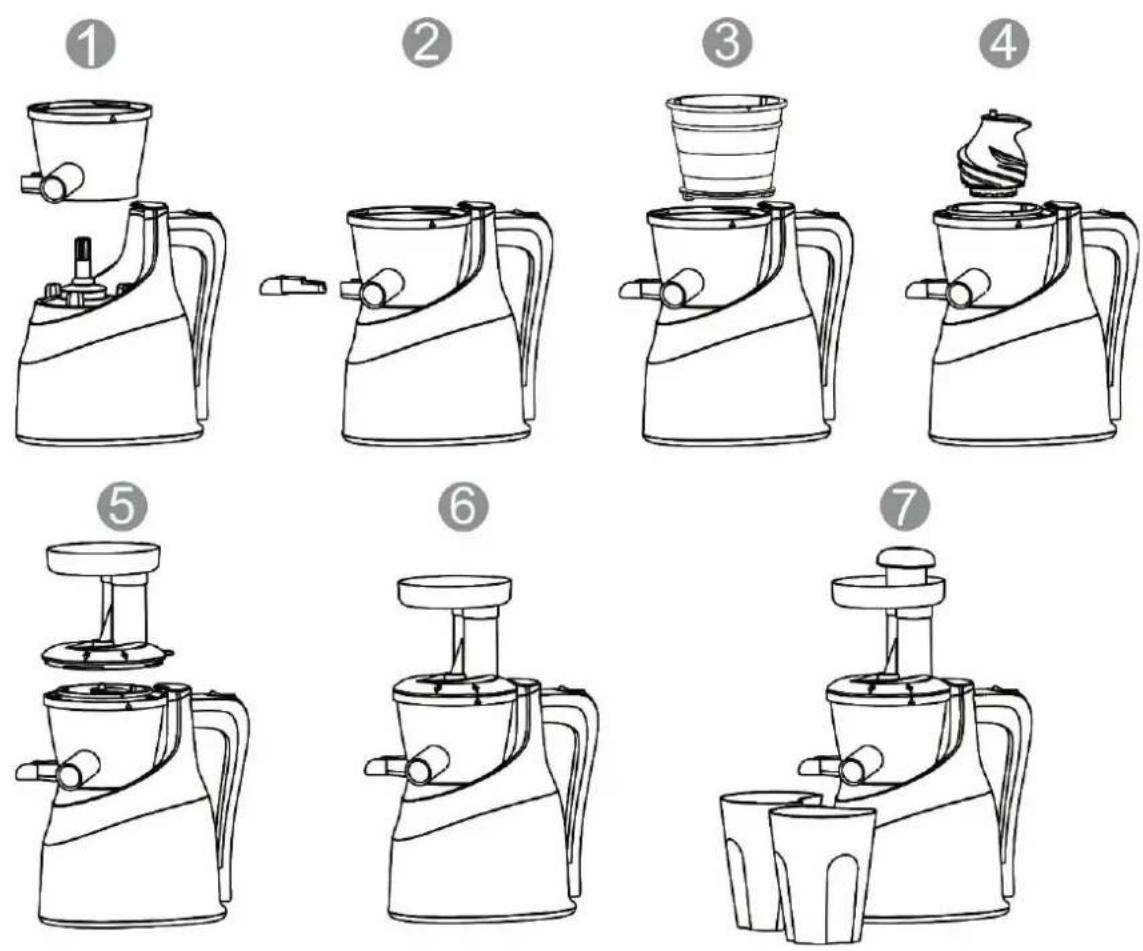
- Put the tank on the base.
- Insert the pulp outlet in the relevant hole of the tank.
- Insert the filter in the tank and adjust it to a relevant position.
- Insert a worm.
- Put the feeder on the tank and rotate it to the right until locked in place.
- Switch the device on - to do so, set "ON".
- Place clean and cut vegetables or fruits in the feeder and press with a pusher gently.
CITRUS SQUEEZER
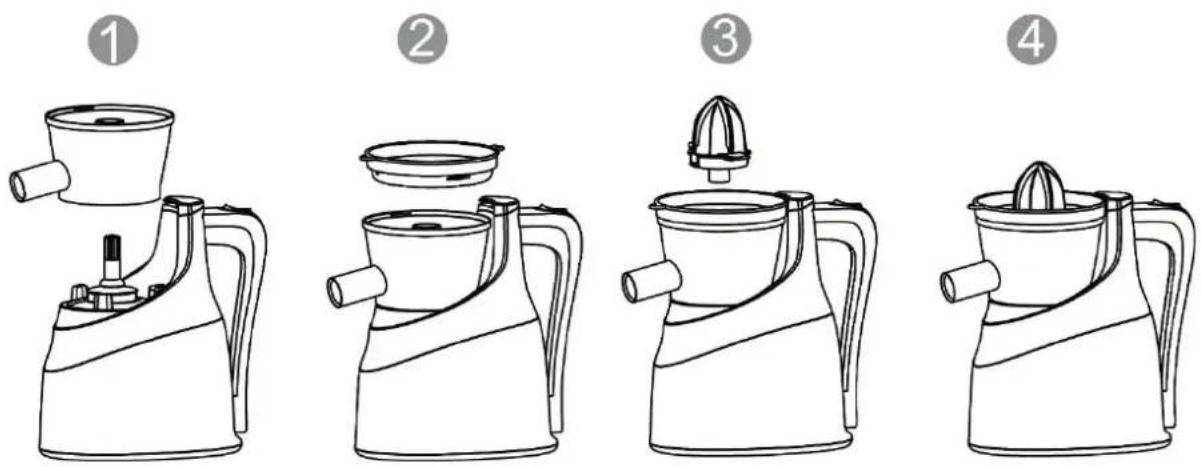
- Put the tank on the base.
- Insert the filter and rotate it to the right until locked in place.
- Put the citrus squeezer.
- Halve a fruit and put on the squeezer, turn the device on with "ON" switch.
- Hold and gently press the piece of the fruit.
REMARKS ON SQUEEZING JUICE AND USING THE DEVICE
-
The switch has three positions
-
„O“ – device is off,
- „ON“ – device is on,
-
„R“ – device is on with reversed engine rotations.
-
This device is intended solely to squeeze fruits and vegetables.
- Do not use fruits and vegetables which contain little juice, e.g. bananas.
- Wash fruits and vegetables carefully.
- Before the use, remove fruit seeds and hard peel.
- The device is not intended to grind nuts, seeds, etc. because they may damage elements of the device.
- To have juice, do not use fruits and vegetables with fibers.
-
Make sure the device is not clogged. If the feeder and tank are full, deactivate, unplug and clean the device.
-
Do not put fingers or other items into the feeder. If the feeder is full, use the pusher or another piece of fruit or vegetable to unblock the input. Finally, deactivate, unplug and clean the device.
- If the device is clogged between the filter and pusher, switch the key into "R" position to return the piece of fruit or vegetable.
- The device must not be used longer than for 5 minutes without breaks. Let the device cool down after 3-4 cycles.
CLEANING AND MAINTENANCE
- Before you start cleaning, unplug the device and let it cool down.
- Put the filter in water and clean with a brush. Use soft cloth to wash tanks, worm, pusher and feeder.
- Use a gently wetted cloth to wash the base. Do not immerse the base in water or other liquids
- Dry all elements off before they are used again.
The pictures are for reference only. The real design of products may differ from pictures presented.
WPROWADZENIE
Drogi Kliencie!
Warranty conditions:
- The Overmax Home brand with its registered office at Dziadoszańska 10, 61-248 Poznań, Poland guarantees that the equipment is operational in accordance with the technical-operating conditions described in the manual.
- The warranty is granted for a 24 months period from the date of sale. If the Buyer is a company (VAT invoice), the warranty is granted for a 12-month period.
- The warranty is valid in the country of purchase.
- Revealed manufacturing defects shall be removed during the warranty period free of charge by the Authorised Manufacturer Service.
- Any defects or damages discovered and reported within the warranty period will be removed free of charge within 21 working days, but in justifiable cases (for instance, spare parts must be brought from abroad) this period may be extended by another 30 days.
- Any defects or damages to the equipment should be reported and delivered to the service site immediately after being revealed.
- Warranty for LCD displays, touch screens, and batteries is 6 months from the date of purchase. In case of displays of a diagonal ranging from 2.5" to 10.1", the presence of up to 3 incorrect pixels (white, black, green, red or blue) is acceptable.
- Accessories included with the devices (e.g. Chargers, remote controls, keyboards, mice, earphones, cables) are under 3 month warranty from the date of purchase.
- In case of an unjustified complaint (complaint of efficient equipment or the mechanically damaged one), the person who reports the complaint will be charged for transportation cost.
- The customer is entitled to replacement of the equipment to another with the same or similar specifications if the service determines that the removal of defects is not possible.
- The service is not responsible for any loss of data.
- The warranty will be respected only if the customer attaches (to the faulty device) a damage description, all of the accessories received at the moment of the equipment purchase, and proof of purchase containing the date of sale.
- The warranty does not cover: mechanical, electrical, thermal or intentional damages and defects caused by them, as well as any defects and disadvantages arising from the use of the device that do not affect its proper operation, damages resulted from improper usage or non-compliance of the instructions described in the manual. This also applies to signal fading due to the distance from the transmitter, poor antenna installation and damages of the equipment, due to fact, that it has not been delivered to the service in a safe container.
- The Service may refuse to repair products in case of damage to the warranty seal or any traces of unauthorised repair.
-
If the fault is not covered by the manufacturer's warranty, paid repair may be offered by the Service.
-
All reclaimed items are checked by the Authorised Service for correct operation.
- Neither BrandLine Group Sp. z o. o. nor the Authorised Service is responsible for any damages or losses arising from the inability to use the device being repaired.
- The equipment that has not been collected from the service site within 3 months can be charged with storage cost appropriate to the storage time.
- Delivery of the equipment which is incomplete or lacks of proper packaging, is equivalent to the failure of the warranty conditions by the Buyer, and it can provide a basis to refusal of the repair or extension of the repair period.
- In case of sending a product for repair, when no defect is found, the expenses for the expert assessment shall be fully borne by the consumer.
- If a product (sent for repair) works properly, and the reason of its invalid operation is a low battery, the consumer shall bear the cost of the expert assessment.
- The product warranty shall not exclude, limit or suspend the Customer rights resulting from the guarantee.
Warunki gwarancji:
BrandLine Group Service – Support
List of Authorized Service Centers:
www.overmax.eu/en/service
Declaration of Conformity
Product details
For the following
Product : slow juicer
Date of issue: 05.2017

Declaration & Applicable standards
We, BrandLine Group Sp. z o.o., hereby declare under our sole responsibility that the of the above referenced product complies the following directives:
EN 60335-2-14 : 2006 + A1: 2008 + A11: 2012
EN 60335-1:2012
EN 62233: 2008
EN 1186-1: 2002
EN 1186-2: 2002
RoHS Directive 2011/65/EU

BrandLine Group Sp. z o.o.
natural_image
Solid green vertical rectangle with no text, symbols, or patterns

- Vispo
- INTRODUCTION
- DEVICE DESCRIPTION
- FRUITS AND VEGETABLES WORM SQUEEZER
- CITRUS SQUEEZER
- REMARKS ON SQUEEZING JUICE AND USING THE DEVICE
- CLEANING AND MAINTENANCE
- WPROWADZENIE
- Warranty conditions:
- Warunki gwarancji:
- BrandLine Group Service – Support
- List of Authorized Service Centers:
- Declaration of Conformity
- Product details
- Declaration & Applicable standards
Brand : Overmax
Model : Vispo
Category : Juicer