
MR1801 - Kitchen scale Maestro - Free user manual and instructions
Find the device manual for free MR1801 Maestro in PDF.


| Product Type | Digital Kitchen Scale |
| Model | MR1801 |
| Brand | Maestro |
| Dimensions (W x D x H) | 200 x 150 x 20 mm |
| Weight | 250 g |
| Maximum Capacity | 5 kg |
| Minimum Weight | 1 g |
| Graduation | 1 g |
| Units of Measurement | g, kg, lb, oz |
| Display Type | LCD |
| Power Supply | 2 x AAA batteries (not included) |
| Auto-Off Time | 2 minutes of inactivity |
| Tare Function | Yes |
| Overload Indicator | Yes |
| Low Battery Indicator | Yes |
| Platform Material | Tempered glass |
| Housing Material | ABS plastic |
| Cleaning | Wipe with a damp cloth; do not immerse in water |
| Safety Features | Overload protection, non-slip feet |
| Spare Parts / Accessories | Batteries not included; no other spare parts available |
| Repairability | Not user-serviceable; contact customer support |
| Warranty | 1 year limited warranty |
| Manual Languages | DE, EN, PL, RO, RU, UK |
Frequently Asked Questions - MR1801 Maestro
User questions about MR1801 Maestro
0 question about this device. Answer the ones you know or ask your own.
Ask a new question about this device
Download the instructions for your Kitchen scale in PDF format for free! Find your manual MR1801 - Maestro and take your electronic device back in hand. On this page are published all the documents necessary for the use of your device. MR1801 by Maestro.
USER MANUAL MR1801 Maestro
natural_image
Digital kitchen scale with a glass bowl and digital display showing 0.0°C, no visible text or symbols on the device itself.Dear customer, we thank you for purchase of goods

Functionality, design and conformity to the quality standards guarantee to you reliability and convenience in use of this device.
Please read and comply with these original instructions prior to the initial operation of your appliance and store them for later use of subsequent owners.
These household scales are designed for weighting of food products
Under condition of observance of user regulations and a special-purpose designation, a parts of appliance do not contain unhealthy substances.
Technical specifications
Model: MR 1801
Battery 1 battery (CR2032) 3V
Max weight capacity 5 kg
Scale of division 1 g
Protective class III
Protection class IPX0
Appliance specifications
Units of measure: lb, oz, g, kg
Ultra slim frame.
Precision measuring sensor
Automatic switch-on/switch-off while adding and removing weight.
Battery replacement and overload indicator.
Low-voltage power supply makes this appliance highly safe in use.
Use and care
- The glass platform will be slippery when it is wet. Keep it dry.
- Avoid placing scales onto or near electric stoves or close to other heating devices.
- DO NOT strike, shock or drop the scale.
- Treat the scale with care as it is a precise instrument.
- Clean the scale with a damp cloth and avoid water getting inside the scale. DO NOT use chemical/abrasive/cleaning agents.
- Keep the scale in cool place with dry air.
Picture 1
-
Always keep your scale in horizontal position.
-
If failed to turn on the scale, check whether battery is installed, or battery power is low. Insert or replace new battery.
-
If there is error on display or can not turn off the scale for a long time, please take off the battery for about 3 seconds, then install it again to remove soft-fault. If you can not resolve the problem, please contact your dealer for consultation.
-
Do not use it for commercial purpose.
Power
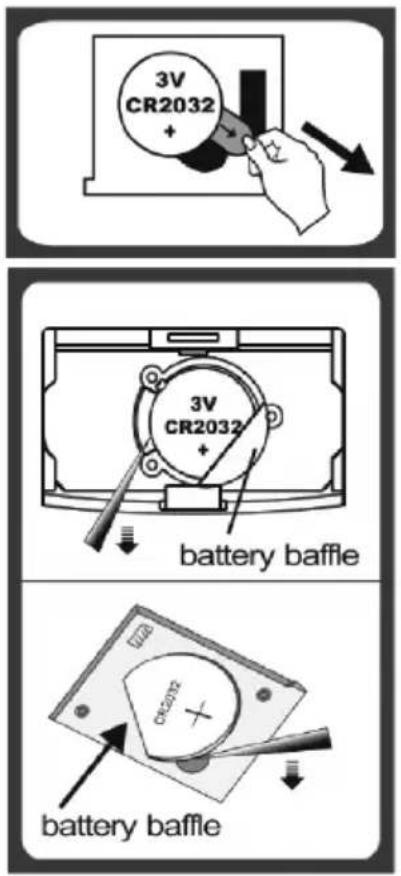
To insert the batteries, open the cover battery compartment and install batteries observing the polarity.
Battery replacement
Open the battery compartment. Remove the old batteries/ Install new observing the polarity.
Weighting step
-Below the weight indicator, press «ON / OFF /ZERO» key to power on, the scale will show zero "0" on the display after 2 seconds.
-Place the container on the scales, LCD will show the weight of container.
Press the "ON/OFF" key again to power off.
Error display
-When the screen shows "LO", it means that the power is low, please change the batteries as soon as possible.
-When the scales are overloaded, "EEEE" will appear on the display.
EN
-When the scales are overloaded(more than 5200g), "O-Ld" will appear on the display. (Model 1801).
Environmental protection
Old appliances contain valuable materials that can be recycled. Please arrange for the proper recycling of old appliances. Please dispose your old appliances using appropriate collection systems.
Subject to technical modifications!
RO/MD
Made in P.R.C. for Maestro
Brand : Maestro
Model : MR1801
Category : Kitchen scale