
FM Transmitter - Audio accessory TOMTOM - Free user manual and instructions
Find the device manual for free FM Transmitter TOMTOM in PDF.


| Product Type | FM Transmitter (Car Audio Accessory) |
| Brand | TomTom |
| Model | FM Transmitter |
| Dimensions (approx.) | 60 x 30 x 20 mm |
| Weight (approx.) | 30 g |
| Power Source | 12V DC (cigarette lighter socket) |
| Transmission Type | FM radio frequency (88.1–107.9 MHz) |
| Audio Input | 3.5 mm auxiliary cable |
| Supported Audio Sources | Smartphones, MP3 players, tablets |
| Number of Preset Frequencies | 4 (adjustable) |
| Display | LED digital frequency display |
| Built-in Microphone | No |
| USB Charging Port | Yes (5V/1A output) |
| Hands-Free Calling | Not supported |
| Bluetooth Connectivity | No |
| Noise Reduction | Basic interference reduction |
| Operating Temperature | 0°C to 40°C |
| Installation | Plug into car charger socket |
| Maintenance | Wipe with a dry cloth; avoid liquids |
| Safety Cautions | Do not disassemble; avoid short circuits |
| Spare Parts | None (non-replaceable parts) |
| Repairability | Not user-serviceable; replace if faulty |
| Package Contents | FM Transmitter, 3.5mm audio cable, manual |
| Warranty | 1 year limited |
Frequently Asked Questions - FM Transmitter TOMTOM
User questions about FM Transmitter TOMTOM
0 question about this device. Answer the ones you know or ask your own.
Ask a new question about this device
Download the instructions for your Audio accessory in PDF format for free! Find your manual FM Transmitter - TOMTOM and take your electronic device back in hand. On this page are published all the documents necessary for the use of your device. FM Transmitter by TOMTOM.
USER MANUAL FM Transmitter TOMTOM
TomTom FM Transmitter Mount
Using your FM Transmitter Mount
You can transmit all sound from your GO to your car radio using your TomTom FM Transmitter Mount, for example:
- Spoken instructions
- Hands-free phone calls
• Music stored on your GO - Music stored on your iPod, if the iPod is connected to your GO using the TomTom iPod Connect Cable.
Note
- Make sure your GO has at least version 6.522 of the TomTom application.
To update the application, connect your GO to your computer and use TomTom HOME. - To get the best performance from your FM Transmitter Mount, use the Car Charger to power your GO.
- Using your car radio, you can tune either to your GO or to a radio station.
- If you drive into an area where a radio station transmits on the frequency you are using for the FM Transmitter Mount, you may have to change the frequency you use.
TomTom FM Transmitter Mount
EN
Getting started
To start using your FM Transmitter Mount, do the following:
- On your car radio, find a frequency that is not being used by a radio station. You will use this frequency for your FM Transmitter Mount.
- Attach the FM Transmitter Mount to the windshield in your car, then dock your GO.
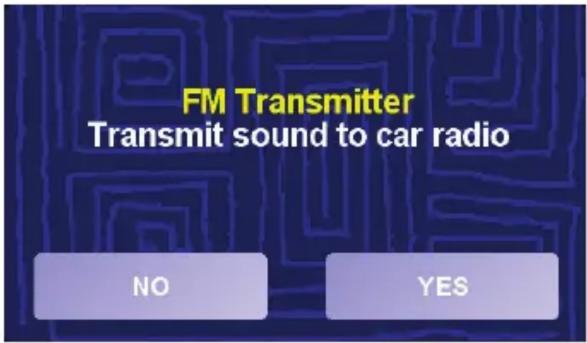
If you are in the Driving View, your GO asks if you want to transmit sound to your car radio.
If your GO does not ask you this question, do one of the following:
- Tap the FM Transmitter button shown in the Driving View.
-
In the Main Menu tap Change preferences, then tap Speaker preferences.
-
Tap Yes.
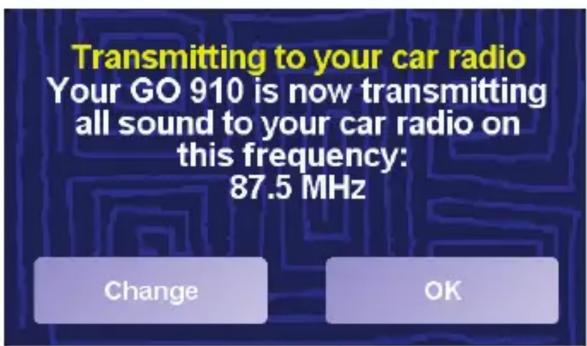
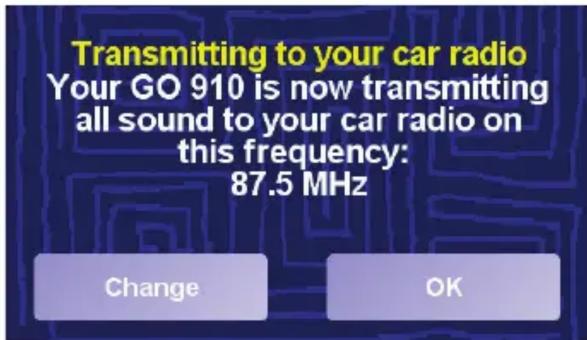
Your FM Transmitter Mount immediately start to transmit sound to your car radio at a set frequency.
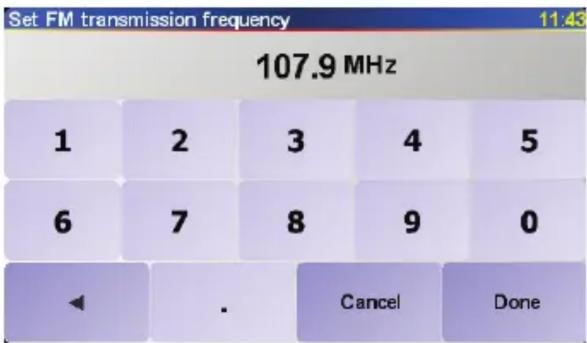
- Tap Change. Enter the frequency you found on your car radio in step 1, then tap Done.
TomTom FM Transmitter Mount
Your GO confirms the new frequency that you selected and repeats the last spoken instruction.
5. Tap OK.
Whenever your GO is docked on the FM Transmitter Mount, this button is shown in the Driving View.
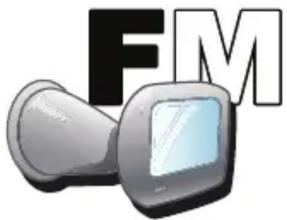
Tap this button at any time to start or stop the FM Transmitter Mount transmitting sound, and to change the frequency that the Mount is using.
Note: If you drive into an area where a radio station transmits on the frequency you are using for the FM Transmitter Mount, you may have to change the frequency you use.
Tips
- You cannot search automatically for a frequency that is not being used by a radio station. You need to search manually on your car radio.
- When you search for a frequency not being used by a radio station, try to find one that has no interference at all. Any noise that you can hear from a radio station will interfere with the reception.
- When you find a frequency, store it in your radio so that you can find it again easily.
TomTom FM Transmitter Mount
EN
Changing the frequency
You may have to change the frequency that the FM Transmitter is using to transmit sound.
For example, if you drive into an area where a radio station interferes with the frequency you are using, you may not be able to hear the sound from your GO clearly.
If this happens, change the frequency that the FM Transmitter Mount is using:
- On your car radio, find a frequency that is not being used by a radio station. You will use this frequency for your FM Transmitter Mount.
-
On your GO, do one of the following:
-
Tap the FM Transmitter button shown in the Driving View.
-
In the Main Menu tap Change preferences, then tap Speaker preferences.
-
Tap Yes.
- Select a different frequency, then tap Done.
Your GO confirms the new frequency that you selected.
- Tap OK.
Stop transmitting
-
To stop transmitting sound to your car radio, do one the following:
-
Tap the FM Transmitter button shown in the Driving View.
- In the Main Menu tap Change preferences, then tap Speaker preferences.
Your GO asks if you want to continue to transmit sound to your car radio.
2. Tap No.
Your GO stops transmitting sound to your car radio.
Brand : TOMTOM
Model : FM Transmitter
Category : Audio accessory