
Carbon - Scooter ALPHA - Free user manual and instructions
Find the device manual for free Carbon ALPHA in PDF.


| Product Type | Electric Scooter |
| Brand | Alpha |
| Model | Carbon Gen III |
| Power | 300 W |
| Battery Voltage | 30 V |
| Battery Capacity | 10.4 Ah |
| Max Speed | 25 km/h |
| Max Range | 27 km |
| Display | Colour Backlit LED |
| Tyre Size | 6.5 inches |
| Max Load | 120 kg |
| Recommended Minimum Age | 7 years (estimate based on manual: 8 years) |
| Charging Time | Approximately 4 hours |
| Charger Input | 240 V AC |
| Approvals | UL, CE, RoHS |
| Colour | Black |
| Safety Features | Front light, brake, cruise control, horn (if applicable) |
| Folding Mechanism | Yes, with locking switch |
| Maintenance | Wipe with soft dry cloth; store in cool dry place; charge battery every 3 months during storage |
| Spare Parts Availability | Available via QR code scan |
Frequently Asked Questions - Carbon ALPHA
User questions about Carbon ALPHA
0 question about this device. Answer the ones you know or ask your own.
Ask a new question about this device
Download the instructions for your Scooter in PDF format for free! Find your manual Carbon - ALPHA and take your electronic device back in hand. On this page are published all the documents necessary for the use of your device. Carbon by ALPHA.
USER MANUAL Carbon ALPHA
Electric Scooter
Alpha
Carbon Gen III
Appearance may vary slightly
User Manual
[Revision 8.0 August 2022]
Please note that there must be forward momentum for the motor to activate.
Safety
Safety messages are designed to alert you to possible dangers or hazards that could cause death, injury or equipment or property damage if not understood or followed. Safety messages have the following symbols:

You WILL be KILLED or SERIOUSLY INJURED if you do not follow instructions.
It is vital that you read and understand this user manual before using the product, including safety warnings, and any assembly and operating instructions. Keep the manual for future reference.
Safety precautions and recommendations detailed here must be fully understood and followed to reduce the risk of injury, fire, explosion, electrical hazard, and/or property damage.
Safety information presented here is generic in nature – some advice may not be applicable to every product. The term "equipment" refers to the product, be it electrical mains powered, battery powered or combustion engine powered.
- Before Use - If you are not familiar with the safe operation/handling of the equipment or are in any way unsure of any aspect of suitability or correct use for your application, you should complete training conducted by a person or organization qualified in safe use and operation of this equipment, including fuel/electrical handling and safety.
- Do NOT operate the equipment in flammable or explosive environments, such as in the presence of flammable liquids, gases or dust. The equipment may create sparks or heat that may ignite flammable substances.
- Keep clear of moving parts.
• Equipment may be a potential source of electric shock or injury if misused. - Do NOT operate the equipment if it is damaged, malfunctioning or is in an excessively worn state.
- Do NOT allow others to use the equipment unless they have read this manual and are adequately trained.
- Keep packaging away from children - risk of suffocation! Operators must use the equipment correctly. When using the equipment, consider conditions and pay due care to persons and property.
General Work Area Safety
• Work areas should be clean and well it.
- Do not operate the equipment if bystanders, animals etc are within operating range of the equipment or the general work area.
- If devices are provided for connecting dust extraction / collection facilities, ensure these are connected and used properly. Dust collection can reduce dust-related hazards.

You CAN be KILLED or SERIOUSLY INJURED if you do not follow instructions.

You CAN be INJURED if you do not follow instructions or equipment damage may occur.
General Personal Safety
- Wear appropriate protective equipment when operating, servicing, or when in the operating area of the equipment to help protect from eye and ear injury, poisoning, burns, cutting and crush injuries. Protective equipment such as safety goggles, respirators, non-slip safety footwear, hard hat, hearing protection etc should be used for appropriate equipment / conditions. Other people nearby should also wear appropriate personal protective equipment. Do not wear loose clothing or jewellery, which can be caught in moving parts. Keep hair and clothing away from the equipment.
- Stay alert and use common sense when operating the equipment. Do not overreach. Always maintain secure footing and balance.
- Do not use the equipment if tired or under the influence of drugs, alcohol or medication.
- This equipment is not intended for use by persons with reduced physical, sensory or mental capabilities.
General Fuel Safety
- Petrol/fuel/gasoline is extremely flammable – keep clear of naked flames or other ignition sources.
- Do not spill fuel. If you spill fuel, wipe it off the equipment immediately – if fuel gets on your clothing, change clothing.
- Do NOT smoke near fuel or when refuelling.
• Always shut off the engine before refuelling. - Do NOT refuel a hot engine.
- Open the fuel cap carefully to allow any pressure build-up in the tank to release slowly.
• Always refuel in well ventilated areas.
• Always check for fuel leakage. If fuel leakage is found, do not start or run the engine until all leaks are fixed.
General Carbon-Monoxide Safety
- Using a combustion engine indoors CAN KILL IN MINUTES. Engine exhaust contains carbon-monoxide – a poison you cannot smell or see.
- Use combustion engines OUTSIDE only, and far away from windows, doors and vents.
General Equipment Use and Care
- The equipment is designed for domestic use only.
- Handle the equipment safely and carefully.
- Before use, inspect the equipment for misalignment or binding of moving parts, loose components, damage or any other condition that may affect its operation. If damaged, have the equipment repaired by an authorised service centre or technician before use.
- Prevent unintentional starting of the equipment - ensure equipment and power switches are in the OFF position before connecting or moving equipment. Do not carry equipment with hands or fingers touching any controls. Remove any tools or other items that are not a part of the equipment from it before starting or switching on.
- Do not force the equipment. Use the correct equipment for your application. Equipment will perform better and be safer when used within its design and usage parameters.
- Use the equipment and accessories etc. in accordance with these instructions, considering working conditions and the work to be performed. Using the equipment for operations different from those intended could result in hazardous situations.
- Always keep equipment components (engines, hoses, handles, controls, frames, housings, guards etc) and accessories (cutting tools, nozzles, bits etc) properly maintained. Keep the equipment clean and, where applicable, properly lubricated.
- Store the equipment out of reach of children or untrained persons. To avoid burns or fire hazards, let the equipment cool completely before transporting or storing. Never place or store the equipment near flammable materials, combustible gases or liquids etc.
- The equipment is not weather-proof, and should not be stored in direct sunlight, at high ambient temperatures or locations that are damp or humid.
- Do not clean equipment with solvents, flammable liquids or harsh abrasives.
- For specific equipment safety use and care, see Equipment Safety.
General Electrical Safety
- Inspect electrical equipment, extension cords, power bars, and electrical fittings for damage or wear before each use. Repair or replace damaged equipment immediately.
- Ensure all power sources conform to equipment voltage requirements and are disconnected before connecting or disconnecting equipment.
- When wiring electrically powered equipment, follow all electrical and safety codes.
- Wherever possible, use a residual current device (RCD).
- High voltage / high current power lines may be present. Use extreme caution to avoid contact or interference with power lines. Electrical shock can be fatal.
General Electrical Safety
- Electrically grounded equipment must have an approved cord and plug and be connected to a grounded electrical outlet.
- Do NOT bypass the ON/OFF switch and operate equipment by connecting and disconnecting the electrical cord.
- Do NOT use equipment that has exposed wiring, damaged switches, covers or guards.
- Do NOT use electrical equipment in wet conditions or in damp locations.
- Do NOT use electrical cords to lift, move or carry equipment.
- Do NOT coil or knot electrical cords, and ensure electrical cords are not trip hazards.
General Service Information
- The equipment must be serviced or repaired at authorised service centres by qualified personnel only.
- Replacement parts must be original equipment manufacturer (OEM) to ensure equipment safety is maintained.
- Do NOT attempt any maintenance or repair work not described in this manual.
- After use, the equipment and components may still be hot – allow the equipment to cool and disconnect spark plugs and/or electrical power sources and/or batteries from it before adjusting, changing accessories or performing repair or maintenance.
- Do NOT adjust while the equipment is running.
- Perform service related activities in suitable conditions, such as a workshop.
- Replace worn, damaged or missing warning/safety labels immediately.
Electric Scooter Safety
Riding can be a hazardous activity. Certain conditions may cause the equipment to fail without fault of the manufacturer. The product can and is intended to move, and it is therefore possible to lose control, fall-off and/or get into dangerous situations that no amount of care, instruction or expertise can eliminate. If such things occur, you can be seriously injured or die, even when using safety equipment and other precautions. RIDE AT YOUR OWN RISK AND USE COMMON-SENSE. FAILURE TO USE COMMON-SENSE AND HEED ALL SAFETY WARNINGS AND RECOMMENDATIONS INCREASES RISK OF INJURY. USE THE PRODUCT ONLY WITH APPROPRIATE CAUTION AND SERIOUS ATTENTION TO SAFE OPERATION.
Appropriate Rider Use and Parental Supervision
- The recommended minimum rider age of 8 years is an estimate only, and can be affected by the rider's size, weight or skills. Any rider unable to adequately understand the controls or techniques required to ride the product should not attempt to ride it. A parent's decision to allow his or her child to ride this product should be based on the child's maturity, skill and ability to follow rules.
- DO NOT EXCEED THE WEIGHT LIMIT OF 120KGS. Rider weight does not necessarily mean a person's size is appropriate to fit or maintain control of the product, moreover the ability of the product to safely support the loads placed on it due to rider weight.
Acceptable Riding Practices and Conditions
- Always check and obey any local laws or regulations which may affect the locations where the product may be used. Ride defensively. Watch out for potential obstacles that could catch the wheels or force you to swerve suddenly or lose control. Avoid pedestrians etc who may enter your path and respect the rights and property of others.
- The product is meant to be used on private property and on closed courses and not on public streets or pavements. Do not ride in any areas where pedestrian or vehicle traffic is present.
- Do not activate the product unless you are in a suitable environment for safe riding.
• The product is not for indoor use. - This product was manufactured for performance and durability but are not impervious to damage. Stunts or other aggressive riding can overstress and damage the product, and the rider assumes all risks associated with how the product is looked after.
- Be careful and know your limitations. Risk of injury increases as the degree of riding difficulty increases. The rider assumes all risk associated with aggressive riding activity.
- Maintain a hold on the handlebars at all times.
- Never carry passengers or allow more than one person at a time to ride the product.
- Never use near steps, drops or bodies of water, such as swimming pools.
- Keep your fingers and other body parts away from the wheels and all other moving components.
- Never use headphones or a phone when riding.
- Never hitch the product to another vehicle or person.
- Do not ride the product in rain or wet conditions and never immerse the product in water – electrical components may be damaged by water or create other possible unsafe conditions.
- Bumpy, slippery, uneven or rough surfaces may increase risks.
- Do not touch the brakes or electric motor when in use and/or immediately after riding as they can become very hot.
- Do not ride at night or when visibility is limited.
Proper Riding Attire
- Always wear proper protective equipment, such as an approved safety helmet (with chin strap securely buckled), elbow and knee pads. A helmet may be legally required by local law or regulation in your area. A long-sleeved shirt, long pants and gloves are recommended. Always wear closed shoes (preferably lace-up shoes with rubber soles), never ride barefoot or in sandals or thongs, and keep shoelaces tied and out of the way of the wheels, motor and drive system.
Battery and Charging
- The supplied charger should be regularly examined for damage to the electrical cord, plug, enclosure and other parts. If any damage or malfunction occurs, do NOT use the charger again until it has been repaired or replaced.
- Use only with the recommended charger.
- Use caution when charging.
- The charger is not a toy and should be operated by adults only.
- Do not operate the charger near flammable materials.
- Do not clean or perform any maintenance on the product when it is being charged.
Safety Symbols
The product may have safety warning labels attached to it, explained below. Understand the symbols on your product and their meanings. If any stickers become unreadable, unattached etc., replace them.
 Flammable Material HazardFlammable liquids, gases or substances etc may present.Avoid ignition sources and open flames. Danger of fire. Flammable Material HazardFlammable liquids, gases or substances etc may present.Avoid ignition sources and open flames. Danger of fire. |  Read User ManualRead and fully understand product safety warnings, operation, procedures etc before using the product. Read User ManualRead and fully understand product safety warnings, operation, procedures etc before using the product. |  Use Hand ProtectionWear appropriate hand protection and take due care as the product or use of the product may present hand hazards. Use Hand ProtectionWear appropriate hand protection and take due care as the product or use of the product may present hand hazards. |  Carbon-Monoxide HazardDo not use the product in confined areas or without adequate ventilation. Carbon-monoxide poisoning can be fatal. Carbon-Monoxide HazardDo not use the product in confined areas or without adequate ventilation. Carbon-monoxide poisoning can be fatal. |
 Electrocution / Electrical Shock HazardHigh voltage or high current electricity may be present or required by the product. Take due care when handling electrical products, cables, plugs and leads. Electrical shock can be fatal. Electrocution / Electrical Shock HazardHigh voltage or high current electricity may be present or required by the product. Take due care when handling electrical products, cables, plugs and leads. Electrical shock can be fatal. |  Toxic Fumes / Dust HazardUsing the product or by-products from use may produce fumes, smoke or particles that could be harmful if inhaled. Wear appropriate breathing protection and have adequate ventilation. Toxic Fumes / Dust HazardUsing the product or by-products from use may produce fumes, smoke or particles that could be harmful if inhaled. Wear appropriate breathing protection and have adequate ventilation. |  Explosive Material HazardCombustible liquids, gases or substances etc may be present.Avoid ignition sources and open flames. Danger of explosion. Explosive Material HazardCombustible liquids, gases or substances etc may be present.Avoid ignition sources and open flames. Danger of explosion. |  Cutting / Amputation HazardThe product may have blades, edges or mechanical devices that can cause severe cut injury to fingers, limbs etc. Take due care when handling and using the product. Cutting / Amputation HazardThe product may have blades, edges or mechanical devices that can cause severe cut injury to fingers, limbs etc. Take due care when handling and using the product. |
 Crush HazardThe product may have blades, edges or mechanical devices that can cause severe crush injury to fingers, limbs etc. Take due care when handling and using the product. Crush HazardThe product may have blades, edges or mechanical devices that can cause severe crush injury to fingers, limbs etc. Take due care when handling and using the product. |  Single Operator OnlyThe product must be operated by a single person only. More than one person operating the product may introduce additional hazards. Single Operator OnlyThe product must be operated by a single person only. More than one person operating the product may introduce additional hazards. |  Use Face ProtectionWear appropriate full-face protection and take due care as the product or use of the product may present face and eye hazards. Use Face ProtectionWear appropriate full-face protection and take due care as the product or use of the product may present face and eye hazards. |  Use Foot ProtectionWear appropriate foot protection and take due care as the product or use of the product may present foot hazards. Use Foot ProtectionWear appropriate foot protection and take due care as the product or use of the product may present foot hazards. |
 Use Eye / Ear / Head ProtectionWear appropriate eye and / or ear and / or head protection and take due care as the product or use of the product may present eye, hearing and head hazards. Use Eye / Ear / Head ProtectionWear appropriate eye and / or ear and / or head protection and take due care as the product or use of the product may present eye, hearing and head hazards. | 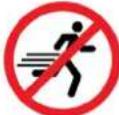 Running HazardDo not run on or near the product as doing so may present a fall hazard. Running HazardDo not run on or near the product as doing so may present a fall hazard. |  Diving HazardDo not dive into the product as doing so may present a neck / head injury hazard. Diving HazardDo not dive into the product as doing so may present a neck / head injury hazard. |  Adult Supervision RequiredAlways supervise children and other users of a product to prevent drowning or injury. Adult Supervision RequiredAlways supervise children and other users of a product to prevent drowning or injury. |
 Skin Penetration / Puncture HazardThe product may produce pressure, emit liquids or objects that can cause severe injury to fingers, limbs, blood etc. Take due care when handling and using the product. Skin Penetration / Puncture HazardThe product may produce pressure, emit liquids or objects that can cause severe injury to fingers, limbs, blood etc. Take due care when handling and using the product. | 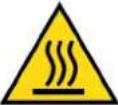 Hot Surface HazardBe aware that the product may produce high temperatures and hot surfaces that can cause burn injuries. Hot Surface HazardBe aware that the product may produce high temperatures and hot surfaces that can cause burn injuries. |  Flying Debris HazardBe aware that the product or use of the product may present hazards produced by flying debris. Wear appropriate clothing and protective devices. Flying Debris HazardBe aware that the product or use of the product may present hazards produced by flying debris. Wear appropriate clothing and protective devices. |  Moving Parts HazardBe aware that the product contains or uses mechanical devices that move or rotate. Always wait for moving parts to stop fully before handling the product, adjusting, maintenance etc. Moving Parts HazardBe aware that the product contains or uses mechanical devices that move or rotate. Always wait for moving parts to stop fully before handling the product, adjusting, maintenance etc. |
 Carbon-Monoxide HazardDo not use the product in confined areas or without adequate ventilation. Carbon-monoxide poisoning can be fatal. Carbon-Monoxide HazardDo not use the product in confined areas or without adequate ventilation. Carbon-monoxide poisoning can be fatal. |  Pull HazardBe aware that the product contains or uses mechanical devices that can pull in objects and can cause severe injury to fingers, limbs etc. Take due care when handling and using the product. Pull HazardBe aware that the product contains or uses mechanical devices that can pull in objects and can cause severe injury to fingers, limbs etc. Take due care when handling and using the product. | 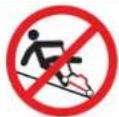 Slope / Fall Injury HazardBe aware that using the product on sloping surfaces or in slippery conditions may present additional dangers from falls and contact with blades, moving parts, hot surfaces etc. Slope / Fall Injury HazardBe aware that using the product on sloping surfaces or in slippery conditions may present additional dangers from falls and contact with blades, moving parts, hot surfaces etc. |  "Slam Dunk" WarningDo NOT attempt "slam dunk" manoeuvres as this may result in severe injury due to falling, product breakage or collapse etc. "Slam Dunk" WarningDo NOT attempt "slam dunk" manoeuvres as this may result in severe injury due to falling, product breakage or collapse etc. |
 Electrocution / Electrical Shock Hazard - OutdoorHigh voltage or high current electricity may be present or required by the product. Do NOT use in rain, damp or wet conditions. Electrical shock can be fatal. Electrocution / Electrical Shock Hazard - OutdoorHigh voltage or high current electricity may be present or required by the product. Do NOT use in rain, damp or wet conditions. Electrical shock can be fatal. |  Electrocution / Electrical Shock Hazard - DisconnectHigh voltage or high current electricity may be present or required by the product. Always disconnect the product from the electrical supply before handling the product, adjusting, maintenance etc. Electrocution / Electrical Shock Hazard - DisconnectHigh voltage or high current electricity may be present or required by the product. Always disconnect the product from the electrical supply before handling the product, adjusting, maintenance etc. |  Power Line Electrocution HazardHigh voltage / high current power lines may be present. Use extreme caution to avoid contact or interference with power lines. Electrical shock can be fatal. Power Line Electrocution HazardHigh voltage / high current power lines may be present. Use extreme caution to avoid contact or interference with power lines. Electrical shock can be fatal. |  "Kick-Back" HazardHigh level of "kick-back" hazard that can cause the machine to suddenly rotate towards operator. Kick-back injury can be fatal. "Kick-Back" HazardHigh level of "kick-back" hazard that can cause the machine to suddenly rotate towards operator. Kick-back injury can be fatal. |
 Winch Operator Position HazardDo NOT stand between winch and load. Do NOT use winch to move people. Winch Operator Position HazardDo NOT stand between winch and load. Do NOT use winch to move people. |  Winch Lift HazardDo NOT LIFT load vertically. Use machine to PULL only. Winch Lift HazardDo NOT LIFT load vertically. Use machine to PULL only. | 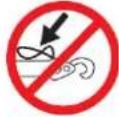 Cable HazardEnsure that load bearing cable is not kinked or knotted. Cable HazardEnsure that load bearing cable is not kinked or knotted. |  Winch Cable HazardEnsure that there is a minimum number of cable coils on winching mechanism. Winch Cable HazardEnsure that there is a minimum number of cable coils on winching mechanism. |
 Winch Hook HazardCarry hook to load – do NOT throw or run. Winch Hook HazardCarry hook to load – do NOT throw or run. |  Flash / Blinding HazardWear appropriate eye protection for welding. Direct exposure to weld arcs may cause permanent eye injury. Flash / Blinding HazardWear appropriate eye protection for welding. Direct exposure to weld arcs may cause permanent eye injury. |  Laser HazardLaser may be in use – do NOT look directly at laser or allow others to. Laser HazardLaser may be in use – do NOT look directly at laser or allow others to. |
Table of Contents
Safety 2
Safety Symbols....5
Parts Identification 8
Parts List 9
Assembly....10
Accessories 10
Left and Right Handles....10
Brake 11
Accelerator....11
Protective Film 12
Operation....13
Control Panel....13
Connecting the Charger ....14
Unfolding the Scooter 14
Folding the Scooter....15
Maintenance....16
Cleaning and Storage....16
Battery Maintenance....16
Troubleshooting ....17
Specifications 18
Parts Identification

| No. | Name | No. | Name | No. | Name |
| 1 | Display | 14 | Screw | 27 | Screw |
| 2 | Screws | 15 | Motor cover | 28 | Slide block |
| 3 | Front light | 16 | Wheel fork | 29 | Motor cover |
| 4 | Accelerator | 17 | Motor | 30 | Fold axis |
| 5 | Tube body | 18 | Kickstand | 31 | Screw |
| 6 | Handlebar tube | 19 | Handlebar grip | 32 | Mud cap |
| 7 | Handlebar grip | 20 | Handlebar tube | 33 | Rear wheel axis |
| 8 | Battery | 21 | Brake | 34 | Fixer |
| 9 | Slide lock | 22 | Gland | 35 | Anti-skid pad |
| 10 | Dirt-proof boot | 23 | Top connector | 36 | Rear wheel |
| 11 | Gasket | 24 | Charging mouth | 37 | Pedal |
| 12 | Screw | 25 | Slide lock | ||
| 13 | Nether connector | 26 | Controller | ||
Parts List

natural_image
Black and white icon of crossed wrench and screwdriver (no text or symbols)Spare parts available for purchase, scan QR code below:

Assembly
Accessories

Left and Right Handles

- Insert the left handle into the socket and rotate it in an anti-clockwise direction until it's tight and secure.
- Insert the right handle into the socket and rotate it in a clockwise direction until it's tight and secure.
Brake

Adjust the tightness of the brake with the M4 screwdriver.
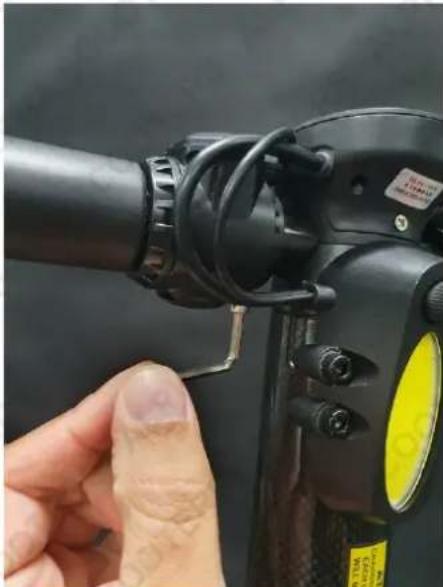
Accelerator
natural_image
Close-up of a hand adjusting a black cylindrical device with a yellow circular sensor (no visible text or symbols)Adjust the accelerator with the M4 screwdriver.
Protective Film

natural_image
Close-up of a hand holding a black mechanical component, no visible text or symbols
natural_image
Close-up of a robotic arm holding a transparent plastic clip, with no visible text or symbolsCarefully remove protective film (Step 1 and Step 2).
Operation

ATTENTION: Monitor battery usage when in use, the scooter may suddenly slow down as the battery charge reduces.
Control Panel
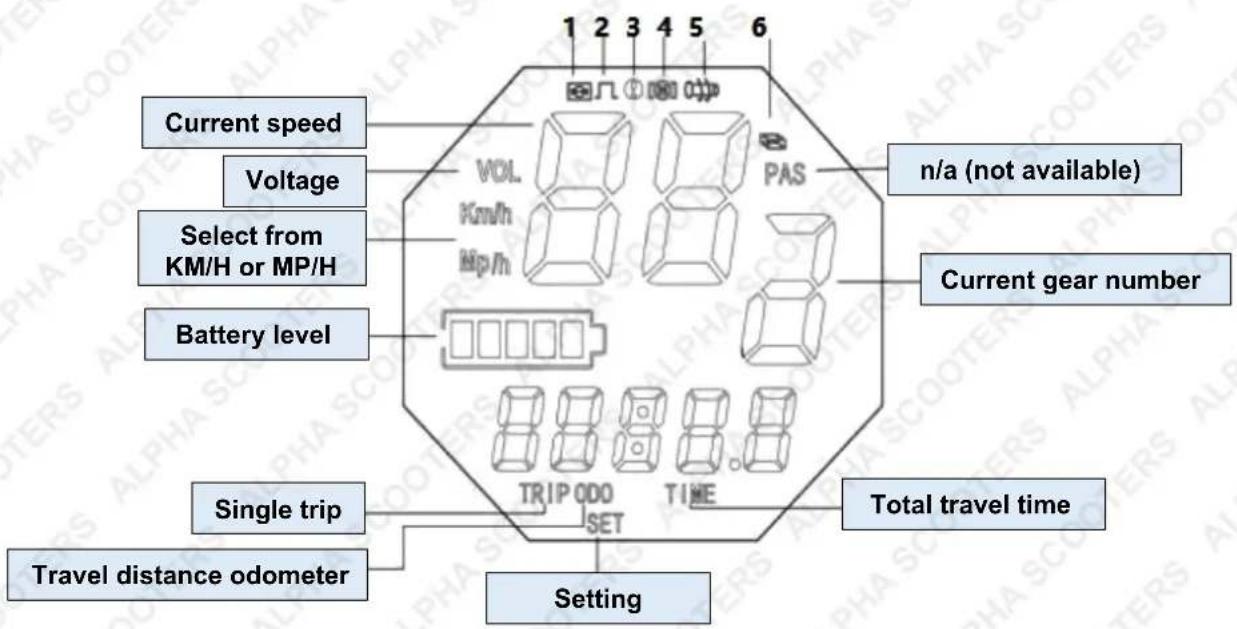
- N/A (not available in the 6.5" wheel unit)
- Cruise control ON/OFF
- Brake
- Motor error
- Throttle error
- Control module error

Standard display layout when the power is ON
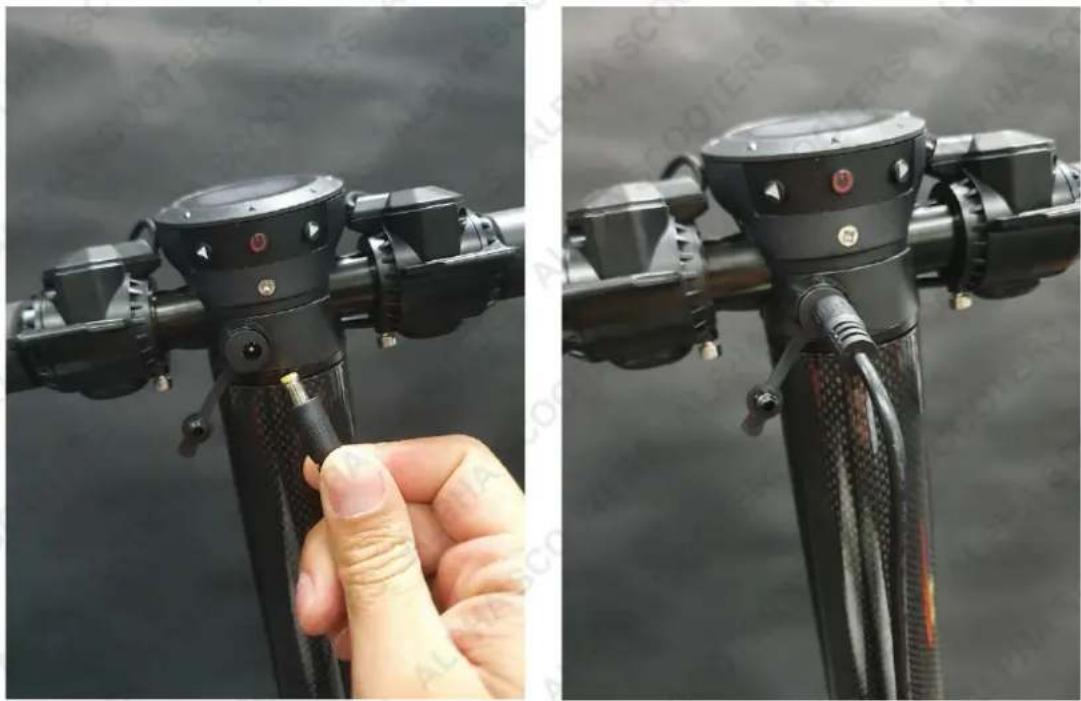
Connecting the Charger
natural_image
Close-up of a hand adjusting a black bicycle head lever, showing adjustment knobs and adjustment knobs (no text or symbols visible)NOTE: Please ensure the pins in the charger are lined up as shown above. Typical charge time is 4 hours.
Unfolding the Scooter
- Position the scooter body in an upright, standing position and press the folding switch, as shown below.

natural_image
Close-up of a hand interacting with a black wheeled scooter or mobility platform (no visible text or symbols)
natural_image
Black electric scooter with four wheels and a yellow handle, displayed against a white background with faint watermark text (no readable signage or symbols on the scooter body)- Lower down the scooter footboard.
- Unfolding is complete once you hear a 'click' sound.
Folding the Scooter
- Press the folding switch, as shown below. If it is tight, please push the battery tube forward a little and then press the folding switch.
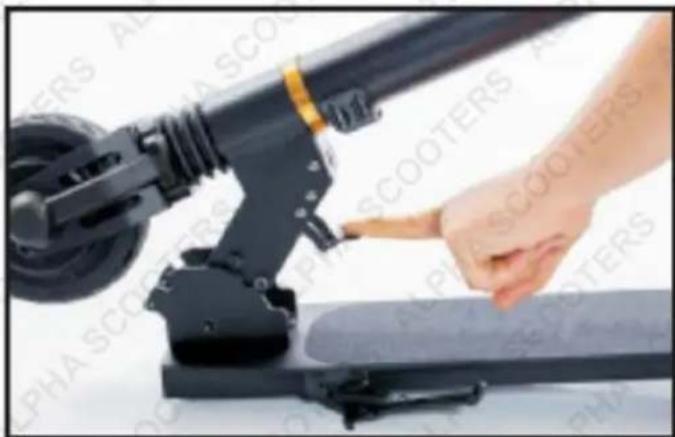
natural_image
Close-up of a hand interacting with a black electric scooter base, no visible text or symbols
natural_image
Black electric scooter with wheels and a yellow handle, displayed against a white background with faint watermark text (no readable signage or symbols on the scooter itself)- Fold down the steering pole.
- Folding is complete once you hear a 'click' sound.
Maintenance
Cleaning and Storage
- If stains appear on the surface of the scooter, wipe with a soft wet cloth. For stubborn stains, you can wipe Clean the scooter using a soft dry cloth only.
- Do NOT use chemicals, solvents, abrasives or any form of liquid to clean the scooter as this may damage the electronics or surface finishes.
- Store the scooter indoors in a cool, dry place. It is recommended to keep the scooter covered when not in use.
- Store at temperatures between -23^ (-10°F) and 45^ (113°F). Avoid storage areas that are subject to large temperature variations.
- When storing for extended periods, discharge and recharge the batteries every 3 months.
Battery Maintenance
- Never modify the electrical system. Alterations could cause a fire resulting in serious injury and could also damage the electrical system.
- Charge with the supplied or recommended charger only. Use of the wrong charger could cause a fire or explosion resulting in serious injury.
- Battery charging must be performed by adults only. Never allow children to charge the battery.
- Ensure the voltage and frequency of the charger is compatible with mains electrical supply.
• Use the battery charger in dry locations only.
• The battery must be charged before first use.
NOTE: A fully-charged battery will run out of stored power after 90 – 120 days in standby mode. Stored power will run out after 20 – 50 days in standby mode if the battery is not fully charged. If you don't charge the battery in time, it may cause damage to the battery due to excessive discharge; this damage is irreversible. Any battery damage caused by failure to charge in a timely manner will result in a failure to charge in the future and can become irreparable. This will also void the warranty coverage.
Non-professionals should not be allowed to open the battery, otherwise it can potentially cause grave accidents via electric shocks or short circuiting.
Troubleshooting
| Malfunction | Possible Cause | Possible Solution |
| Scooter not running or was running but suddenly stopped | Under-charged batteryDead battery.Battery charger not working.Motor electrics or switches damaged / faulty. | Charge the battery and ensure battery charging and care procedures are followed.Vehicle battery no longer holding charge or serviceable. Have battery checked by authorised service centre.Have charger professionally checked. If not working – replace.Seek diagnosis and repair from authorised service centre. |
| Short run time | Under-charged battery. | Charge the battery and ensure battery charging and care procedures are followed. |
| Scooter runs sluggishly. | Unsuitable riding conditions. | Vehicle being overloaded or used on unsuitable surfaces. Unload vehicle (120kg max.) and/or use on suitable surface. |
| Scooter turns on and off intermittently. | Main body electrics or switches damaged / faulty. | Seek diagnosis and repair from authorised service centre. |
| LCD display shows “LL” | The scooter is locked. | Turn the unit OFF and hold the Power button for about 6 seconds until the screen restarts itself. |
Specifications
| Power | 300W |
| Current | 10.4Ah |
| Battery Voltage | 30V |
| Input Voltage | 240V AC |
| Max Speed | 25km/h |
| Max Range | 27km |
| Display | Colour Backlit LED |
| Approvals | UL, CE, RoHS |
| Colour | Black |
| Tyre Size | 6.5 inches |
| Max Load | 120kg |
| Min. Recommended Age | 7 |
| Power Plug | Australian Standard |
Note: This product is intended for use on safe, dry, smoothly paved or hard surfaces. We strongly recommend the use of safety equipment. Refer to local regulations regarding where electric scooters are permitted to be used.

Some experts believe that the incorrect or prolonged use of almost any product may cause serious injury or death. To help reduce your risk of serious injury or death, refer to the information below. For more information, see www.datastreamserver.com/safety
- Consult all documentation, packaging and product labelling before use. Note that some products feature documentation available online. It is recommended to print and retain the documentation.
■ Before each use, check the product for loose/broken/damaged/missing parts, wear or leaks (if applicable). Never use a product with loose/broken/damaged/missing parts, wear or leaks.
■ Products must be inspected and serviced (if applicable) by a qualified technician every 6 months. This is based on average residential use by persons of average size and strength, and on a property of average metropolitan size. Use beyond these recommendations may require more frequent inspections/servicing.
■ Ensure that all users of the product have completed a suitable industry recognised training course before being allowed access to the product.
The product has been supplied by a general merchandise retailer that may not be familiar with your specific application or description of application. Be sure to attain third-party approval from a qualified specialist for your application before use, regardless of any assurances from the retailer or its representatives.
This product is not intended for use where fail-safe operation is required. As with any product (for example, automobile, computer, toaster), there is the possibility of technical issues that may require the repair or replacement of parts, or the product itself. If the possibility of such failure and the associated time it may take to rectify could in any way inconvenience the user, business or employee, or financially affect the user, business or employee, then the product is not suitable for your requirements. This product is not intended for use where incorrect operation or a failure of any kind, including but not limited to, a condition requiring product return, replacement, parts replacement or service by a technician may cause financial loss, loss of employee time or an inconvenience requiring compensation.
If this product has been purchased in error when considering the information presented here, contact the retailer directly for details of their returns policy, if required.

topia.com.au




- Electric Scooter
- Alpha
- Carbon Gen III
- User Manual
- Safety
- General Work Area Safety
- General Personal Safety
- General Fuel Safety
- General Carbon-Monoxide Safety
- General Equipment Use and Care
- General Electrical Safety
- General Service Information
- Electric Scooter Safety
- Appropriate Rider Use and Parental Supervision
- Acceptable Riding Practices and Conditions
- Proper Riding Attire
- Battery and Charging
- Safety Symbols
- Table of Contents
- Safety 2
- Parts Identification 8
- Parts List 9
- Assembly....10
- Operation....13
- Maintenance....16
- Troubleshooting ....17
- Specifications 18
- Parts Identification
- Parts List
- Assembly
- Accessories
- Left and Right Handles
- Brake
- Accelerator
- Protective Film
- Operation
- Control Panel
- Connecting the Charger
- Unfolding the Scooter
- Folding the Scooter
- Maintenance
- Cleaning and Storage
- Battery Maintenance
- Some experts believe that the incorrect or prolonged use of almost any product may cause serious injury or death. To help reduce your risk of serious injury or death, refer to the information below. For more information, see www.datastreamserver.com/safety
Brand : ALPHA
Model : Carbon
Category : Scooter