
WZ 1200 - Detector Techno Line - Free user manual and instructions
Find the device manual for free WZ 1200 Techno Line in PDF.


| Product Type | Multi-Purpose Detector |
| Brand | Techno Line |
| Model | WZ 1200 |
| Operating Voltage | 9 V, max. 1 mW |
| Battery Type | 6LR61 (9 V block) |
| Beam Detection Depth | max. 19 mm ± 3 mm |
| Metal Detection Depth | max. 30 mm ± 13 mm |
| Void Detection Depth | max. 38 mm ± 5 mm |
| AC Voltage Detection Depth | max. 50 mm (230 V~50 Hz) |
| Functions | Beam (STUD), Metal (METAL), Void (DEEP), AC Voltage (AC) |
| Display | LC display with intensity bars and voltage sign |
| Automatic Shut-down | After 1 minute of inactivity |
| Battery Replacement Indicator | Battery symbol appears when low |
| Calibration | Press PUSH button to calibrate; keep pressed during search |
| Scope of Delivery | 1 x Multi-Purpose Sensor, 1 x Instruction Manual |
| Cleaning | Clean with soft dry cloth only |
| Operating Conditions | Avoid extreme temperatures, direct sunlight, dust, humidity |
| Safety | Not for use by children without supervision; do not open or tamper |
| Battery Safety | Use non-rechargeable batteries only, observe polarity, remove when not in use |
| Disposal | Dispose according to local regulations for electrical devices and batteries |
Frequently Asked Questions - WZ 1200 Techno Line
User questions about WZ 1200 Techno Line
0 question about this device. Answer the ones you know or ask your own.
Ask a new question about this device
Download the instructions for your Detector in PDF format for free! Find your manual WZ 1200 - Techno Line and take your electronic device back in hand. On this page are published all the documents necessary for the use of your device. WZ 1200 by Techno Line.
USER MANUAL WZ 1200 Techno Line
natural_image
Technical line drawing of a mobile phone casing with labeled component (no text or symbols beyond label)Abb. A:
flowchart
graph TD
    A["7"] --> B["4"]
    C["8"] --> D["↑"]
    E["9"] --> F["↓"]
    B --> G["STUD METAL DEEP AC"]
    D --> G
    F --> G
    G --> H["14"]
    G --> I["13"]
    G --> J["12"]
    G --> K["11"]
Abb. B:
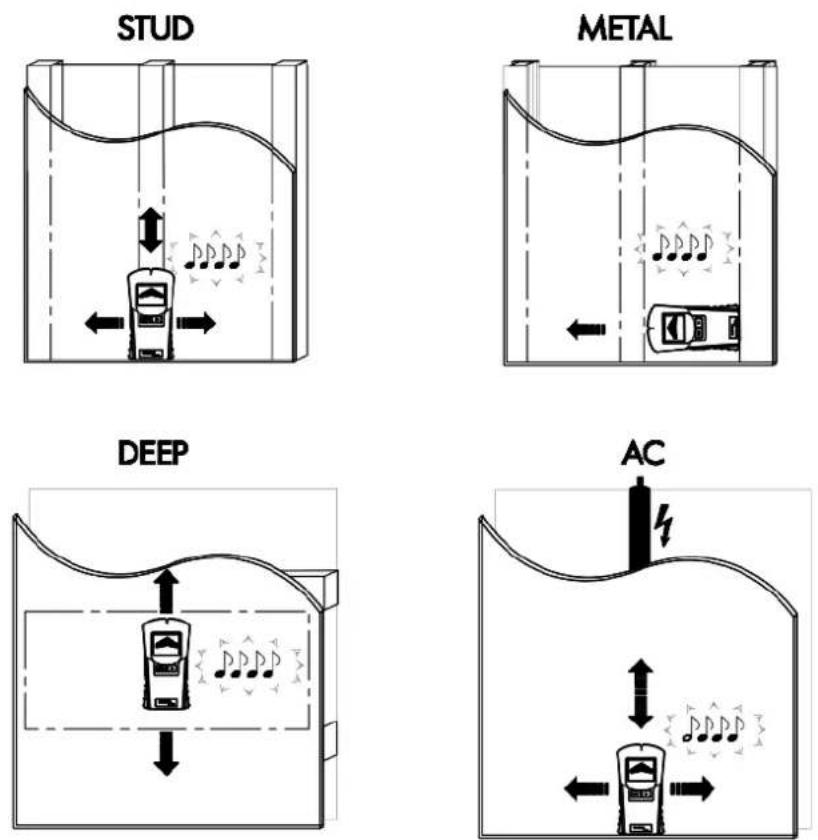
Abb. C:



(1) Messkopf
(2) Anzeige
Please read the manual carefully and familiarize yourself with the functions of the unit before using it. Retain these instructions for future reference and pass them on together with the device when you pass on the device to other users.
Scope of delivery:
1 x Multi-Purpose Sensor 1 x Instruction manual
Technical Data
Operating voltage: 9 V, max. 1 mW Battery type: 6LR61 (9 V block)
Detector depths:
Beam (STUD): max. 19 mm ± 3 mm Metal (METAL): max. 30 mm ± 13 mm Voids (DEEP): max. 38 mm ± 5 mm
AC voltage (AC): max. 50 mm (only with lines which carry 230 V\~50 Hz)
Product Overview
natural_image
Technical line drawing of a mobile phone casing with labeled component '6' (no text or symbols beyond label)Fig. A:
flowchart
graph TD
    A["7"] --> B["4"]
    C["8"] --> D["↑"]
    E["9"] --> F["↓"]
    G["STUD"] --> H["METAL"]
    I["DEEP"] --> J["AC"]
    K["10"] --> L["14"]
    K --> M["13"]
    K --> N["12"]
    K --> O["11"]
Fig. B:
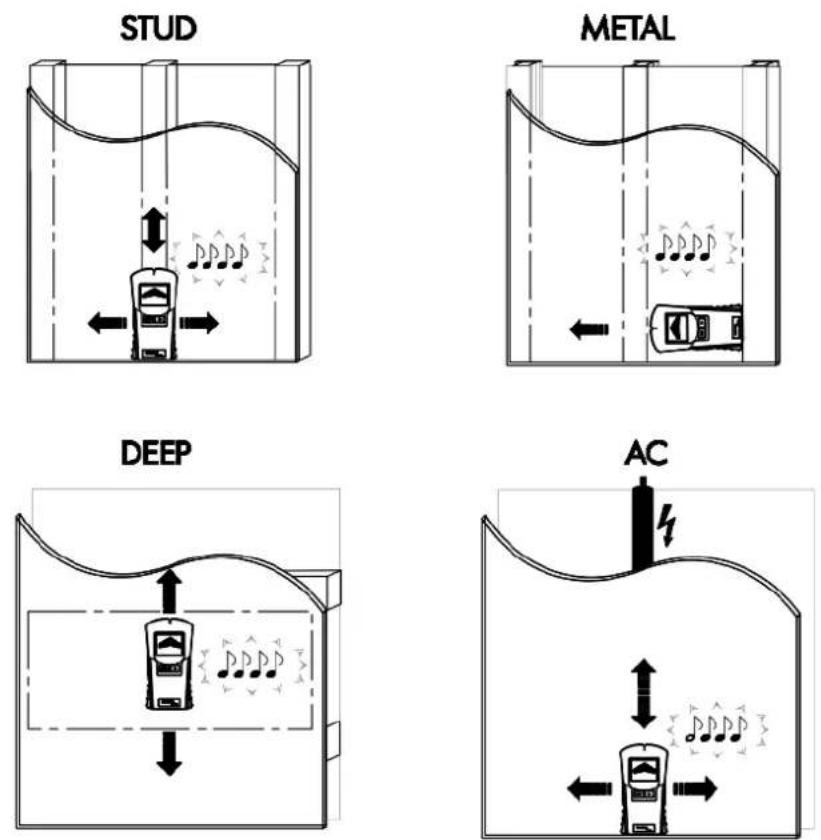
Fig. C:
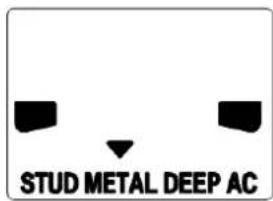
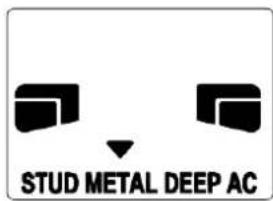



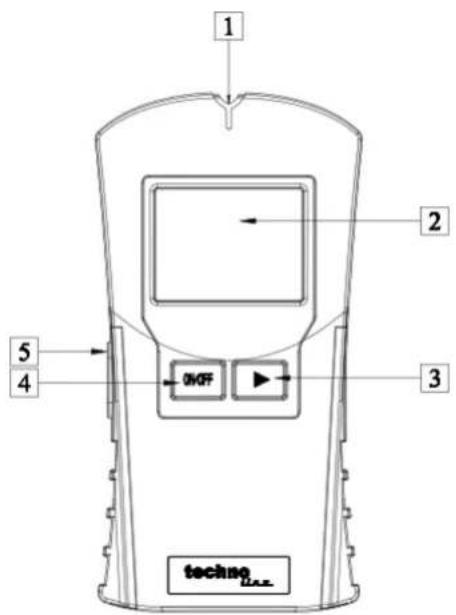
(1) Measuring head
(2) Display
(3) Selection button (▶)
(4) ON / OFF button
(5) PUSH button ("Measure")
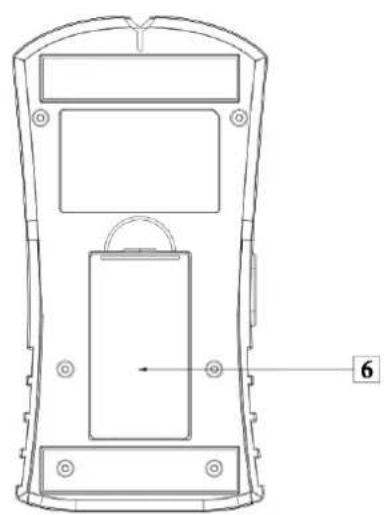
(6) Battery compartment
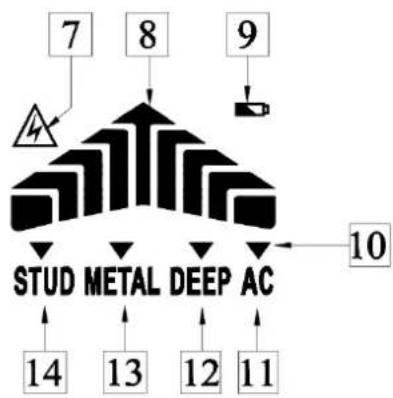
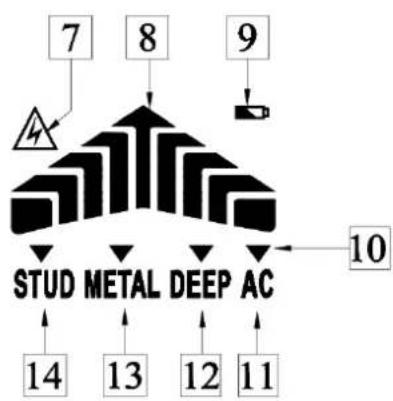
(7) Voltage sign (

(8) Intensity display ( )

(9) Battery symbol

(10) Selection arrow (▼)
(11) AC voltage search (AC)
(12) Void search (DEEP)
(13) Metal search (METAL)
(14) Beam search (STUD)
General safety information
This unit can be used by children aged 8 years and above and persons with reduced physical, sensory or mental capabilities or lack of experience and knowledge if they are supervised and have been instructed concerning the safe use of the appliance and have understood the resulting risks. Children should never play with the device. Cleaning and user maintenance must not be performed by children without supervision.
Intended use
This multi-purpose detector is designed for locating metal or wooden beams, metal objects, voids and electrical lines. This device is solely intended for private use.
Before using
Before initial use, remove the protective film from the device display (2) and insert the enclosed battery.
Inserting / changing the battery
If the battery symbol (9) appears in the display, the inserted battery is almost drained and must be replaced. Empty batteries can falsify the measured result.
To insert the battery proceed as follows:
- Open the battery compartment cover on the back of the device. You can remove the used battery more easily with the aid of the material strip, which is inside the battery compartment (6). Just pull on the material strip.
- Remove the used battery.
- Plug the contacts of the 9 V block battery on the contacts of the profiled plug. Make sure you fit the batteries the right way round. This is specified by the profiled shape of the contacts. Also ensure without fail that the material strip is underneath the battery.
- Insert the battery in the battery compartment and close the cover again, so that it audibly latches into place.
Switching on and off /Automatic shut-down
- Briefly press the ON/OFF button (4) to switch the device on or off.
Note: If you do not press any button for one minute after the device has been switched on, the device automatically switches off.
Start-up
- Briefly press the ON/OFF button (4) to switch the device on (Fig. A). A selection of menu points appears at the bottom of the display (2): (Fig. A)
- The selection arrow (▼) (10) is over the menu point for Beam search (STUD) (14), when the device is switched on. Bring the selection arrow over the desired menu point by repeatedly pressing the selection button (▶) (3). The meaning of the individual menu points are:
STUD: Wooden beam search
METAL; Metal search
DEEP. Void search
AC: Power line search
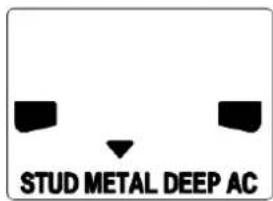
- Guide the detector over a location on the surface to be examined, where you know that there is no object, which you are looking for. Then press the PUSH button (5) and keep it pressed down. Guide the detector, with the underside flat, over the surface to be examined. It is possible that during this some short signal tones may sound. These are however without any meaning, so long as no intensity display (8) appears in the device display (Fig. B).
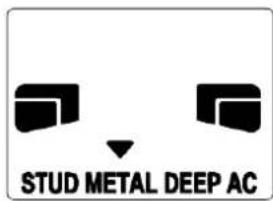
- If there is an object, for which the search is activated, in the vicinity of the detector, several bars appear at first on the intensity display. As proximity to the search object increases, the number of bars increases on the intensity display (Fig. C).
- If the detector is exactly over the search object, a continuous signal tone sounds.
- In the case of a search for a power line, the voltage sign (A) (7) also appears in addition to the intensity display.
Tips on measurement
- The calibration button must remain pressed during the entire search process (calibration and search).
-
If you calibrate too closely to the object or directly on the object, the calibration can fail. If the calibration fails, the LC display shows the full intensity (Fig. C) and a long beeping tone sounds or can’t search any object in the wall. Move and hold the device several centimeters further to the right or left of the previous surface and recalibrate. Start the search process.
-
Repeat several times to ensure the detection accuracy.
- Incorrect measurements can occur depending on the nature of the examined wall. Check therefore before every measurement the position of a known wooden or metal beam, of a known void or a known power line. If these are not detected by the device, the substrate is not suitable for a search with this device.
- Avoid touching the LC display during measurements as it may affect the accuracy of the device.
- Please note that power lines can also be located as metal or as beams. Always use the additional voltage search, so that you can exclude any incorrect interpretations.
- Please note that metal beams are also detected in the Beam search "STUD "function. If you find a beam and you want to be sure that it is not a metal beam (or for example a water pipe), use the additional Metal search "METAL".
- Depending on the wall thickness and material, it is possible that the detector may signal a finding, before it is over the material. In this case mark the start and end of the signalled area at the indentation of the measuring head. The middle of the sought object lies in the middle between the two markings.
- Please note that metal objects are located more readily the easier they can be magnetized. This means that iron is detected at a significantly greater distance than copper for example.
- Please note that power lines can only be detected as such, if they are carrying voltage. Light switches must always therefore be switched on, so that the conductor is carrying voltage. All the fuses must similarly be inserted or switched on.
- Please note that only voltages of 230 V \~50 Hz are detected.
Cleaning and Care
The device should only be cleaned on the outside with a soft dry cloth.
Precautions
- Do not subject the unit to excessive force or shock.
- Do not expose the unit to extreme temperatures, direct sunlight, dust or humidity.
- Do not immerse in water.
- Avoid contact with any corrosive materials.
- Do not dispose this unit in a fire as it may explode.
- Do not open the inner back case or tamper with any components of this unit.
Batteries safety warnings
- Don't use rechargeable batteries.
• Install batteries correctly by matching the polarities (+/-). - Remove exhausted batteries immediately.
- Remove batteries when not in use.
- Do not recharge and do not dispose of batteries in fire as the batteries may explode.
- Ensure batteries are stored away from metal objects as contact may cause a short circuit.
- Avoid exposing batteries to extreme temperature or humidity or direct sunlight.
- Keep all batteries out of reach from children. They are a choking hazard.
Use the product only for its intended purpose!
Consideration of duty according to the battery law

Old batteries do not belong to domestic waste because they could cause damages of health and environment. You can return used batteries free of charge to your dealer and collection points. As end-user you are committed by bring back needed batteries to distributors and other collecting points!
Consideration of duty according to the law of electrical devices
This symbol means that you must dispose of electrical devices separated from the General household waste when it reaches the end of its useful life. Take your unit to your local waste collection point or recycling centre. This applies to all countries of the European Union, and to other European countries with a waste collection system.
- Abb. C:
- Scope of delivery:
- Technical Data
- Detector depths:
- Product Overview
- General safety information
- Intended use
- Before using
- Inserting / changing the battery
- To insert the battery proceed as follows:
- Switching on and off /Automatic shut-down
- Start-up
- Tips on measurement
- Cleaning and Care
- Precautions
- Batteries safety warnings
- Consideration of duty according to the battery law
- Consideration of duty according to the law of electrical devices
Brand : Techno Line
Model : WZ 1200
Category : Detector