
BT-3284R - Mp3 player MAJESTIC - Free user manual and instructions
Find the device manual for free BT-3284R MAJESTIC in PDF.


| Product Type | MP3 Player |
| Brand | Majestic |
| Model | BT-3284R |
| Display | 1.8-inch LCD screen |
| Storage Capacity | 8 GB internal (expandable via microSD up to 32 GB) |
| Supported Audio Formats | MP3, WMA, WAV, FLAC |
| Battery Type | Rechargeable lithium-ion (300 mAh) |
| Battery Life | Up to 12 hours of music playback |
| Charging | Micro USB (5V, 500mA) |
| Dimensions (W x H x D) | 60 x 40 x 12 mm |
| Weight | 35 g |
| Connectivity | 3.5 mm headphone jack, micro USB |
| Additional Features | FM radio, voice recording, playlist support |
| Controls | Physical buttons (play/pause, volume, next/previous) |
| Language Support | Multi-language menu (English, French, Spanish, etc.) |
| Operating System | Proprietary firmware (no OS) |
| Safety | Low-volume warning, auto power-off after idle |
| Cleaning | Use a soft, dry cloth; avoid liquids |
| Spare Parts & Repairability | Battery and microSD slot are replaceable; screen replacement available through service center |
| General Information | User manual included; supports drag-and-drop file transfer |
Frequently Asked Questions - BT-3284R MAJESTIC
User questions about BT-3284R MAJESTIC
0 question about this device. Answer the ones you know or ask your own.
Ask a new question about this device
Download the instructions for your Mp3 player in PDF format for free! Find your manual BT-3284R - MAJESTIC and take your electronic device back in hand. On this page are published all the documents necessary for the use of your device. BT-3284R by MAJESTIC.
USER MANUAL BT-3284R MAJESTIC
MANUALE D'ISTRUZIONI
(CR) www.newmajestic.com
MADE IN CHINA

of electrical and electronic equipments)

Smaltimento batterie / Battery disposal
INFORMAZIONE AGLI UTENTI DI APPARECCHIATURE DOMESTICHE

Thank you for purchasing our digital MP3 player. Before you use this player, please read through this manual book, so you can operate it correctly.
Caution
1) Avoid using MP3 player in a very cold or hot place.
2) Do not put the MP3 player in the water.
3) Do not knock or beat the MP3 player
4) Do not use the MP3 player during driving or riding a bike
5) Please do not open the MP3 player by yourself if you are not professional people.
Description of the parts
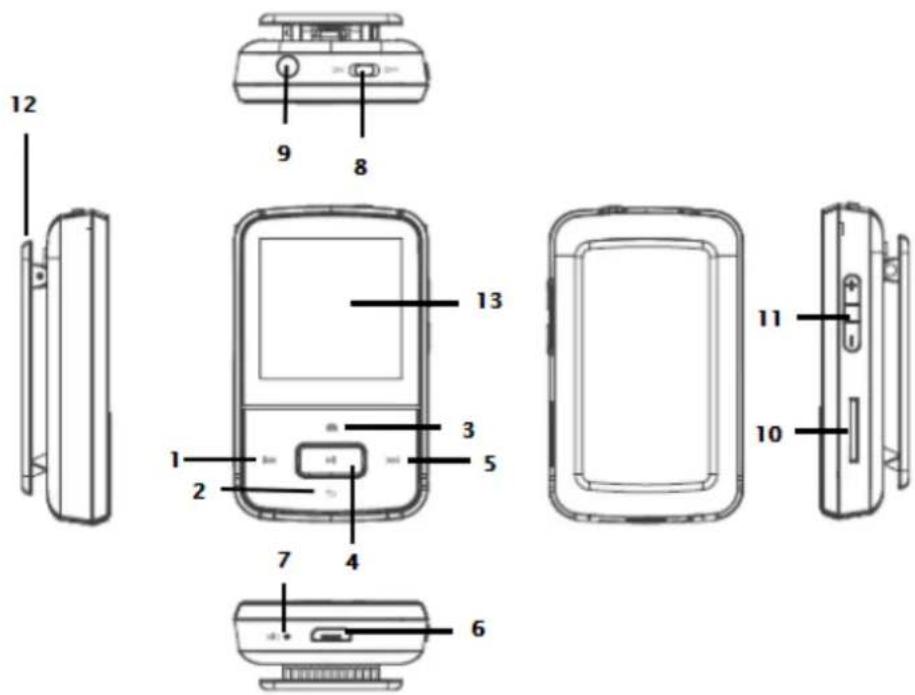
| 1 | PRE | Previous song / scrolling menu / long press during playback to rewind. |
| 2 | RETURN | Move in the menu towards down/return to previous menu (during playback)/back to playback mode (from main menu only)/keep pressed to go back to main menu |
| 3 | OPTIONS | Move in the menu towards up/keep pressed to lock or unlock the keys/ display the options (during playback |
| 4 | PLAY | Play / Pause / confirm/long press to turn on/off standby mode |
| 5 | NEXT | Next song / scrolling menu / long press during playback to fast forward. |
| 6 | MicroUSB port | |
| 7 | Microphone | |
| 8 | ON/OFF switch | |
| 9 | Phone jack | Jack 3.5mm to insert earphones. |
| 10 | microSD slot | All files are stored and played from microSD card, if the card is not inserted it will not be possible to start music playback. |
| 11 | VOL+/- | |
| 12 | Clip | |
| 13 | Display | |
DISPLAY
| 1 2 3 0015/0048 Made in Italy 0:00:11 0:02:02 12 5 11 6 10 9 8 | 1 | Played track number |
| 2 | Total tracks number | |
| 3 | Battery status | |
| 4 | Played track name | |
| 5 | Track total time | |
| 6 | EQ | |
| 7 | Next track | |
| 8 | Shuffle mode | |
| 9 | Playback status (Play/Pause) | |
| 10 | Previous track | |
| 11 | Playback mode | |
| 12 | Track elapsed time |
Tracks insertion by computer
This player uses a microSD card.
When the unit is OFF insert a microSD card in the slot on the side of the unit, then connect the MP3 player to the USB port of your PC, by using supplied USB cable.
After windows have installed the player you will find it under computer as removable USB.
Copy your files from the computer into this MP3 player.
When transfer is complete you can disconnect the unit from PC and remove the USB cable.
Note: during computer connection the battery will be charged.
It is possible to use the player during charging by pressing OPTIONS button after connected to power source. By using the player during charge it is not possible to find it under computer as removable USB.
TURN ON/OFF AND VOLUME ADJUSTMENT
To turn on the unit move the switch to ON.
For standby long press PLAY button until the logo appears on screen.
To turn on from standby mode long press PLAY button until the logo appears on screen.
To turn off the unit move the switch to OFF.
To decrease or increase volume press VOL- or VOL+.
KEYS LOCK
To lock the keys keep pressed OPTIONS, button until the keys lock icon appears.
To unlock the keys keep pressed OPTIONS, button until the keys unlock icon appears.
MAIN MENU
After turning on the unit main menu will be displayed with 7 functions (Music, Recording, Pictures, Documents, Folder, Settings and Bluetooth).
By using PRE/NEXT buttons it is possible to move to the desired function. Pressing PLAY it will start the desired function. When a function is open it is possible to press PRE key to go back to previous menu or press NEXT key to confirm the selection.
It is possible to go back to main menu by keeping pressed RETURN key (from whatever screen).
MUSIC
Please insert earphones in the slot, then push power switch to ON state, select music menu.
After choosing the mode between All tracks, Artist, Album, Genre or Playlist, select desired track and press PLAY to start playback.
Long press OPTIONS key during playback to select:
- playback mode (Not repeat/Repeat 1/Repeat all/Intro) and turn on Shuffle
- EQ settings (choose between Off/Rock/Funk/Hip Hop/Jazz/Classic/Techno/Custom)
- Bookmark allows to move to a specific point in the played track (it is possible to add, recall or delete a bookmark)
- add or remove the track to one of the available playlist
- delete track from microSD
- set timer for device auto turn off (standby)
During playback it is possible to press PLAY key to pause. Press PRE/NEXT to switch to previous/next track.
During playback long press PRE/NEXT to rewind/fast forward inside the track.
To exit music mode keep pressed RETURN key.
RECORDING
By this function it is possible to record vocal notes in MP3/WAV format.
To start recording choose “Start recording”. To pause or restart recording press PLAY. To store the recording press RETURN key and confirm.
After starting recording function it is possible to view the list of recordings done and choose the format (WAV/MP3) and bitrate.
To exit recording mode keep pressed RETURN key.
PICTURE
In picture mode it allows to play JPEG/BMP/GIF files saved in the microSD card. Select the file by OPTIONS/RETURN keys from the list of compatible files and confirm with PLAY. Pressing PLAY it is possible to start/stop slideshow. Pressing OPTIONS key during picture display (in pause mode) it
is possible to change display brightness, manage slideshow options and delete pictures. To exit keep pressed RETURN key.
Documents
By this function it is possible to view text files in TXT format.
FOLDER
By this mode it is possible to browse the folders inside memory card and start playback of the compatible files.
SETTINGS
By this menu, selectable from main screen, it is possible to modify the unit settings. Select desired option with RETURN/OPTIONS keys and confirm with PLAY key.
To exit settings keep pressed RETURN key.
| Audio | EQIt allows to set a limit beyond which the volume cannot be increased further. Use volume keys to adjust the limit and confirm with PLAY. |
| Display | Brightness: allows to adjust the brightness level of display |
| Turn off: allows to set the time after which display can turn off automatically if no key is pressed (“always on” option allows to keep display always on) | |
| Energy saving | allows to set the time after that the player will be off automatically if not in use (set OFF to turn off the function) |
| Turn off timer | Allows to set a timer (from 1 to 99 minutes) to make the unit turn off automatically (choose OFF to turn off the function). The function will be automatically disabled by turning off the unit. |
| Language | Chinese/English/German/Italian |
| Info | Display the status of microSD card |
| Display the firmware information | |
| Format | Allows to format microSD card |
| Restore to factory settings | Restore the unit to factory settings |
BLUETOOTH
Bluetooth option allows to connect Bluetooth audio devices. Verify that the device we want to pair is set as “visible from other devices” and that Bluetooth is ON, then enter Bluetooth menu of the player, turn on Bluetooth from menu “Bluetooth status” and start searching for device by “Search” option. After having detected the device select it pressing PLAY and choose “pair device”.
To start playback choose "All tracks", browse files from microSD and select the desired track.
NOTE: in Bluetooth mode it is possible to play only WAV, WMA, APE, FLAC, MP3 formats.
NOTE: in Bluetooth mode it is not possible to view and play Playlist.
NOTE: it is not guarantee the compatibility with all Bluetooth audio devices.
Battery charging
The player has a built-in rechargeable battery which can be charged by using USB cable connecting to PC. The charging status of the battery will be shown on display. To charge the unit turn on the PC and connect to it by using the supplied USB cable. The player should charge completely in about 4 hours (the charging time depends on the battery charging status).
Trouble shooting
| No power | Check if the battery have enough power.Check if the power switch is not OFF. |
| No sound from the Earphone | Make sure the volume is not at the 0 level.Make sure the earphone is connecting with the player correctly.Make sure the earphone is clean.The damaged player may have some kind of noise or even cannot have audio output.Make sure your downloaded files are not damaged and that are supported by the player. |
| Can not download File | Check if the USB connection is ok.Check if there is available space in memory. |
| Battery discharge quickly | Decrease display backlight time and brightnessListening music at high volume may affect battery lifetime |
Specifications:
| Model | BT 3284R MP3 |
| Size | 5,8 (H) x 3,5 (L) x 1,7 (D) cm |
| Display | 1.5" 128*128 LCD display |
| USB transfers rate: | USB2.0 (High Speed) |
| Power supply | Built-in rechargeable battery 300mAh |
| Supported card | microSD memory card up to 64GB |
| Supported formats: | MP3 bit rate 8KBPS-320KBPS |
| WMA bit rate 5Kbps-384Kbps | |
| OGG bit rate Q0-Q10 (20Kbps-499Kbps) | |
| FLAC bit rate L0-L8 (1000Kbps-1200Kbps) | |
| WAV | |
| Lack fidelity | <+_0.25% |
| Frequency range: | 20HZ-20KHZ |
| SNR | L: 96.6dB – R:96.1dB |
| MIC recording format | MP3/WAV |
| Supported picture format | JPG/BMP/GIF |
| Operate system: | Windows XP/Vista/7/8/10 |
| Operate Temperature: | From -5 to 40 centigrade |
Note: SPECIFICATIONS AND FEATURES MAY BE CHANGED FOR PRODUCT IMPROVEMENT WITHOUT PRIOR NOTICE
INFORMATION TO USERS OF DOMESTIC EQUIPMENT
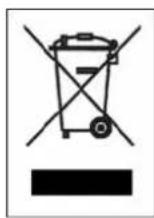
Pursuant to Art. 25, Paragraph 1 of the Legislative Act N. 49 14th March 2014, "Implement of the Directives 2011/65 / EU and 2012/19 / EU concerning the reduction of the use of hazardous substances in electrical and electronic equipment, as well as waste disposal".
The crossed bin symbol on the appliance or on its packaging indicates that the product at the end of its useful life must be collected separately from other waste. The user must, therefore, dispose the equipment at the end of its life to the appropriate electronic and electro technical waste centers, or return it to the retailer at the time of purchase of a new type of equivalent equipment, one by one.
Appropriate separate disposal for the subsequent start-up of the disused equipment for recycling, treatment and compatible environmental disposal helps to avoid possible negative effects on the environment and health and favours the re-use and / or recycling of the materials it is composed the equipment.
The illegal disposal of the product by the user involves the application of the penalties referred to in current laws.
Any rechargeable batteries or rechargeable batteries contained in the device must be disposed separately in the appropriate expired batteries bins.
Battery disposal

Disposal of expired batteries must take place at the appropriate recycling centers or according to local authority. Batteries in compliance with the 2013/56 / EC directive.

- MANUALE D'ISTRUZIONI
- INFORMAZIONE AGLI UTENTI DI APPARECCHIATURE DOMESTICHE
- CAUTION
- DISPLAY
- TRACKS INSERTION BY COMPUTER
- NOTE: DURING COMPUTER CONNECTION THE BATTERY WILL BE CHARGED
- TURN ON/OFF AND VOLUME ADJUSTMENT
- KEYS LOCK
- MAIN MENU
- MUSIC
- RECORDING
- PICTURE
- DOCUMENTS
- FOLDER
- SETTINGS
- BLUETOOTH
- BATTERY CHARGING
- INFORMATION TO USERS OF DOMESTIC EQUIPMENT
- BATTERY DISPOSAL
Brand : MAJESTIC
Model : BT-3284R
Category : Mp3 player