
Premium HT 700 WiFi - Heating FAKIR - Free user manual and instructions
Find the device manual for free Premium HT 700 WiFi FAKIR in PDF.


| Product Type | Fan Heater |
| Model | Premium HT 700 WiFi |
| Brand | Fakir |
| Dimensions (H x W x D) | 0.57 x 0.23 x 0.20 m |
| Weight | Approx. 2.2 kg |
| Power Supply | 220-240 V ~ 50 Hz |
| Heating Stages | 1300 W / 2000 W |
| Protection Class | II |
| Power Cord Length | Approx. 1.6 m |
| Thermostat Range | 5 °C to 35 °C |
| Display | LED |
| Timer | 12-hour auto-off timer |
| Modes | Heating I, Heating II, ECO mode |
| Oscillation | Swing function |
| Control | Manual, Remote Control, WiFi App (Fakir HEAT) |
| WiFi Standard | 802.11 b/g/n |
| Remote Control Battery | 1x CR2032 (not included) |
| Safety Features | Overheating protection, tip-over switch |
| Cleaning | Dry or slightly moist cloth; vacuum dust from vents |
| Scope of Delivery | Main unit, remote control, instruction manual |
Frequently Asked Questions - Premium HT 700 WiFi FAKIR
User questions about Premium HT 700 WiFi FAKIR
0 question about this device. Answer the ones you know or ask your own.
Ask a new question about this device
Download the instructions for your Heating in PDF format for free! Find your manual Premium HT 700 WiFi - FAKIR and take your electronic device back in hand. On this page are published all the documents necessary for the use of your device. Premium HT 700 WiFi by FAKIR.
USER MANUAL Premium HT 700 WiFi FAKIR
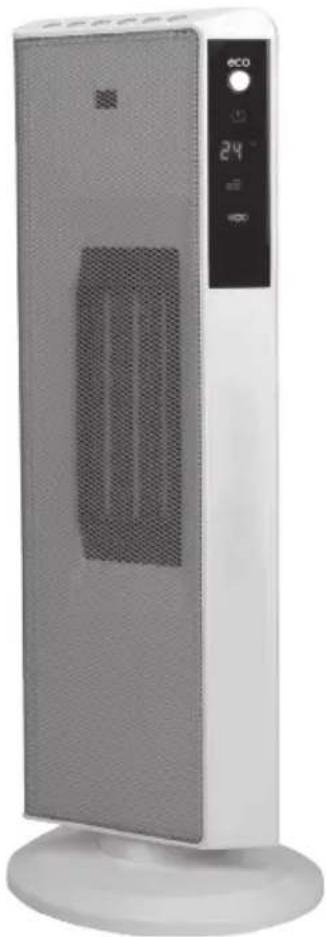
premium | HT 700WiFi
natural_image
White portable electric heater with gray ventilation grille and digital display (no visible text or symbols)Bedienungsanleitung
Heizlüfter
de - DE
Inhaltsverzeichnis
Allgemeines

natural_image
Simple line drawing of an open box with a black upward arrow on the lid (no text or symbols)
Hinweis!
natural_image
Symbol of a waste bin with no text or labels
natural_image
White portable electric heater with gray ventilation grille and digital display (no visible text or symbols)Instructions for use
Fan heater
en - EN
Table of content
General
Information about the operating instructions 3
Liability 3
Notices in the operating instructions 3
Safety
CE Declaration of Conformity 4
Intended use 4
Unauthorized use 4
WARNING! Children! 5
ATTENTION! Electric current! 8
In case of danger 9
Dispatch 9
In case of defects 9
Overview
Technical data 11
Scope of delivery 11
Main features .... 11
Assembly
Unpacking 12
Installing the appliance 12
Minimum clearance distances.... 13
Battery 13
Operating
Switching on / off 14
Temperature control / heating stations 14
ECO function 15
Digital 12h timer 15
Wi-Fi 16
After use
Cleaning and maintenance 18
Security systems
Overheating protection and tip over switch 19
Troubleshooting 20
Disposal 22
Warranty 23
Notes 24
Information about the operating instructions
Thank you, for choosing a Fakir fan heater premium | HT 700 WiFi. The fan heater was developed and manufactured to guarantee a trouble free operation for many years.
These operating instructions are intended to enable the safe and proper handling and operation of the appliance.
Read these operating instructions carefully before using the appliance for the first time.
Keep the operating instructions in a safe place. Include these operating instructions when passing the appliance on to another user.
Liability
We will accept no liability for damages resulting from failure to comply with the operating instructions.
We cannot assume any liability in case the appliance is used for other purposes than its intended use or handled, repaired or serviced improperly.
Notices in the operating instructions

WARNING!
Indicates notices which, if ignored, can result in risk of injury or death.

WARNING!
Indicates notices of risks that can result in damage to the appliance.

NOTICE!
Emphasizes tips and other useful information in the operating instructions.
CE Declaration of Conformity
The appliance fulfils the requirements of the Appliance and Product Safety Law -ProdSG-, and Energy-related Products Act -EVPG -, as well as the EU Directives 2014/30/EC "Electromagnetic Compatibility", 2014/35/EC "Low-Voltage-Directive, 2001/95/EC "General product safety", 2011/65/EC "RoHS-Directive". 2009/125/EG "Eco design Directive".
Fakir reserves the right to change design and equipment
Intended use
This appliance may only be used for private residences rooms.
It is not suitable for commercial use.
The appliance is only suitable as additional heating during the transitional period and has not been designed for permanent heating.
The appliance may only be used in the upright position.
Any other use is considered unauthorized and is prohibited.
Unauthorized use
The examples of unauthorized use listed here can result in malfunctions, damage to the appliance or personal injury:

WARNING! Children!
- This appliance may be used only by children from the age of 8 years and over, persons with limited physical, sensory or mental capacities or by persons lacking in experience and / or knowledge, if they will be supervised, or they have been properly instructed with regard to safe use of the appliance and they are aware of the possible resulting risks.
• Children should not play with the device. - Cleaning and maintenance may not be carried out by children without supervision.
- Keep plastic packaging foils away from children - danger of suffocation!

WARNING! Children!
• Children under the age of 3 years must be kept away from the appliance, unless they are constantly supervised.
- This appliance is not designed to be used by persons (in-cluding children) with limited physical, sensory or mental capacities or by persons lacking in experience and/or knowledge, unless they are supervised by someone who is responsible for their safety or have received instructions on how to use the appliance.
- Children should be supervised to ensure that they do not play with the appliance.
- Keep packaging films away from children - danger of suffocation!
- Children from 3 years onwards and younger than 8 years may switch on and off the appliance only, if they are supervised or have been instructed in the safe use of the appliance and the resulting dangers, provided that the appliance is placed in its normal position of use or is installed.
- Children from 3 years onwards and younger than 8 years may not insert the plug into the socket, adjust the appliance, clean the appliance and / or perform user maintenance.
- The appliance must not be left unattended during operation.

WARNUNG!
DO NOT USE THIS HEATER IN THE IMMEDIATE SURROUNDINGS OF A BATH, A SHOWER OR A SWIMMING POOL.

WARNING!
Caution - Some parts of the product may become very hot and could cause burns. Special care is required when children and vulnerable persons are present.

WARNING!
Damage to appliance from rain and dirt: never use or store the appliance outdoors.
The device must not be used in bathroom, shower, swimming pool or other humid rooms.

WARNING!
The appliance must not be built into and used in vehicles as it requires special components (e.g. protected heating elements, stronger motors, reinforced anchorage of the components for shock protection, etc.) which must not be used in vehicles. Using the appliance in vehicles of any kind (e.g. site trailers, elevators, camping trailers, motor vehicles, and cabins) and similar closed quarters is prohibited.

Warning! Danger of overheating and fire
- WARNING of fire hazard! The appliance must not be installed or operated in garages or rooms prone to fire such as stables, wooden sheds, etc. This also applies to rooms where highly flammable vapors or dust can easily form.
- WARNING of fire hazard! The room intended to heating must not be used for storing highly flammable materials (e.g. gas, solvents, aerosol cans, etc) or highly combustible materials (e.g. wood, paper, etc). Keep such materials away from the appliance.
- Danger of fire and explosion! Never use the appliance in the vicinity of explosive or flammable materials.
• Install the appliance such that the distance to other adjacent objects is at least 50 cm and combustible objects cannot catch on fire. Installing the appliance behind doors is prohibited. - The appliance must not be covered by towels, curtains or other objects.
- Danger from overheating! Always keep the openings of the appliance free and do not cover them with a towel or other objects.
- Make sure that the minimum distances are observed. The air flow must not be obstructed by any objects.
- Surface appliances acting as heat deflectors can reach temperatures in excess of 60^ C.
- Remember that the appliance will remain hot for some time after it has been switched off.

Attention!
To prevent any risks caused by accidentally resetting the temperature limiter, refrain from using the appliance as an external switching device, such as a time switch, and do not supply the appliance with power or connect it to a current circuit that is regularly switched on and off by your power company.
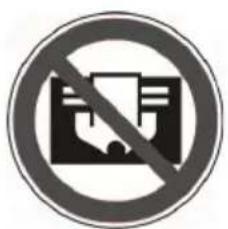

WARNING! Do not cover!
In order to avoid overheating, do not cover the heater.

ATTENTION! Electric current!
- Incorrect voltage can destroy the appliance. Operate the appliance only if the voltage specified on the rating plate corresponds to the voltage in your household.
- The socket must be protected with a 16 A automatic circuit breaker.
- Use only extension cords designed for the power input of the appliance.
- When operating the appliance, unwind the power cord completely.
- The power cord must not lie on top of the appliance during operation.
- The appliance must not be placed or installed directly underneath a wall socket.
- The appliance is not suitable to be connected to any fixed lines.
- Never immerse the appliance in water or other liquids and protect it from rain and moisture.

WARNING! Danger of electric shock!
- Never touch the plug with wet hands.
- When unplugging the appliance, always pull directly on the plug and never on the power cord.
- Do not kink, pinch or run over the power cord and do not expose it to heat sources.
- If the power cord of this appliance is damaged, it must be replaced by the manufacturer or the manufacturer's customer service department or a person with similar qualifications to prevent any hazards.
- Do not put the appliance in operation if you detect any visible damage on the housing, if the power cord is defective or if you suspect a defect (e.g. after a drop).
- Do not use any damaged extension cords.
Safety

In case of danger
In case of danger or accident, unplug the appliance immediately.
Dispatch
Send the appliance in the original package or a similar, wellpadded package to prevent damage to the appliance.
In case of defects
WARNING!
Never operate a defective appliance or an appliance with a defective power cord. There is a danger of electric shock.
Before contacting our service department, check to see if you can eliminate the problem yourself. > see Chapter “Troubleshooting”.

Notice!
If you were not able to eliminate a problem yourself, please contact an authorized Fakir / nilco service center or a trained technician in your country.
Service-Hotline (within Germany)
01805 325474
14 Cent / Minute
from the wire-line network of the Deutsche Telekom.
Before calling, have the article no. and appliance / model name at hand. This information can be found on the rating plate of the appliance.

WARNING!
Repairs and maintenance may be carried out only by trained specialists (e.g. an authorized Fakir service center). Only Fakir original replacement parts may be used for repairs and maintenance. For further information, see: Troubleshooting.Unauthorized repairs and maintenance pose a danger for the user.
EN
Overview
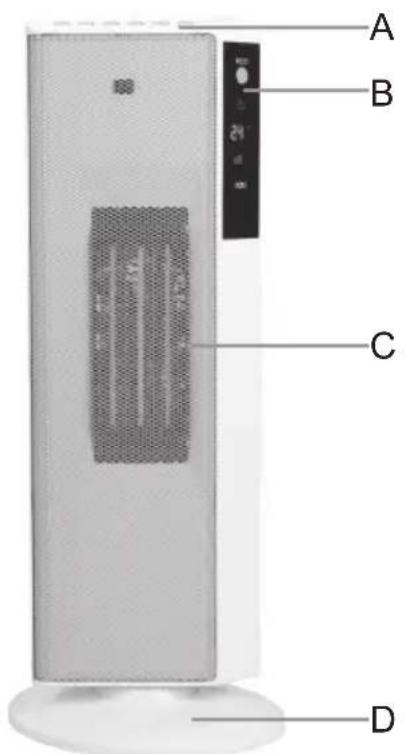
A Operating
B Display and ECO button
C Air outlett
D Base
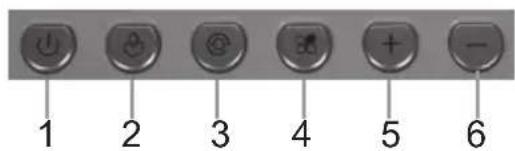
buttons
E Wifi button
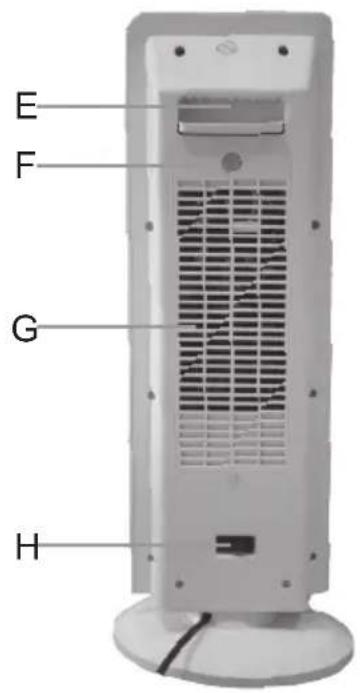
D Handle
F Air inlet
H Power switch
- ON/OFF button
- Heating button
- Swing button
- Menu button
- PLUS button
-
MINUS button
-
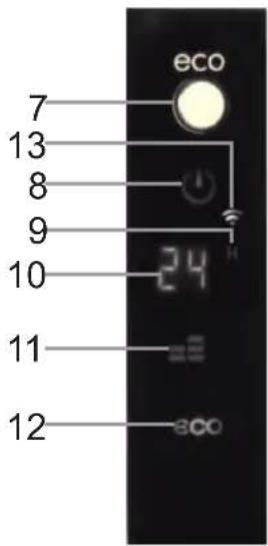
ECO Button
-
Power indicator
. 9. °C and hour indicator
10. Temperature display
11. Heating I and II
12. ECO indicator
- WiFi indicator
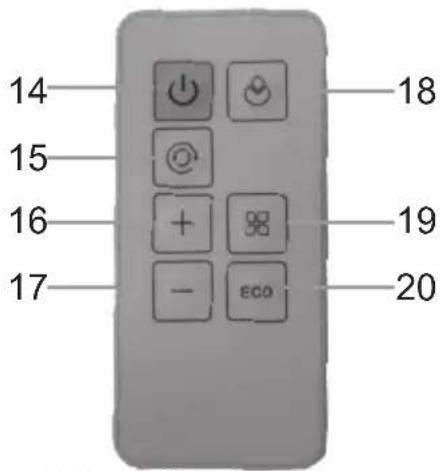
- ON/OFF button
- Swing button
- PLUS button
-
MINUS button
-
Manu button
-
Heating button
- ECO button
Technical Data
Model premium | HT 700 WiFi
Referenc no. 62 11 006
Mains voltage 220 - 240 V \~ 50 Hz
Heating stages 1300 / 2000 W
Protection class II
Dimensions H × W × D 0,57 × 0,23 × 0,20 m
Power cord approx. 1,6 m
Weight approx. 2,2 kg
Scope of delivery
1 pc. Master device
1 pc. Remote control
1 pc. Instructions for use
Main features
The fan heater has the following features:
• Electronic ambient thermostat 5 - 35 °C
- LED display
- two heat settings
- ECO function
- Swing
• Auto-OFF with 12h Timer
- Remote control and WiFi App
Unpacking
Unpack the appliance and check the contents for completeness (see „Scope of delivery“). If you detect a damage from transport, contact your retail dealer immediately.
natural_image
Simple line drawing of an open box with a black arrow indicating upward motion (no text or symbols)
NOTICE!
Keep the packaging for storage and future transports (e.g. for moves, service).

WARNING!
Never use a defective appliance.

WARNING!
Prior to assembly, make sure that the mains plug is unplugged. If the mains plug is plugged in, the appliance could accidentally be switched on, resulting in injuries.
Installing the appliance

ATTENTION!
Make sure that the unit is places on an even, stable and dry surface.
- Make sure that the unit is places on an even, stable and dry surface.
- Use only extension cords designed for the power input of the appliance.
- Power cord completely unwind and connect the power cord into an outlet.
Minimum clearance distances
! ATTENTION!
Make sure that the device is not operated near furniture, curtains or other flammable objects. Keep a minimum distance to other objects, walls and ceilings. These distances are required for a free flow of air. Install the appliance such that the distance to other adjacent objects is at least 50 cm and combustible objects
Battery
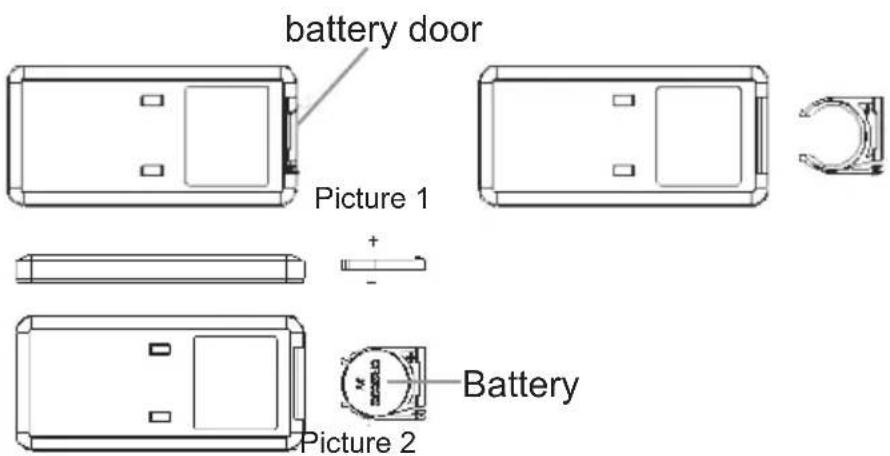
- Pull out the battery door. (Picture1)
- Insert the battery to the tray of the door (Picture 2). Pay attention to the battery polarity!
- Push the battery door into the remote control.
Switching on / off
- Plug into the mains socket.
- Turn on the main switch [H] in position „I“.
- The appliance emits a beep The Power indicator [8] comes on and remains visible while the appliance is powered.
- If the Power indicator is not displayed, be sure that the appliance is on a horizontal surface.
-
Press the ON/OFF button [1] ⏻ to turn the appliance ON. It begins heating the room according to the last used settings.
-
Press the heating Button [4] 🧑 button to select one of the following heating stations:
$$ \begin{array}{l} \text {Heating I =} \ \text {Heating II =} \end{array} $$
-
To distribute the air flow over a wider surface, press the swing [3] button. The appliance starts swinging to the right and left. To stop the appliance in the desired position, simply press the swing [3] button again.
-
To turn the appliance off, press the ON/OFF button [1] ⏻. The display may visualize a countdown for about 10 seconds. (cool down) and the stand-by indicator [8] is displayed.
Temperature control / heating stations
- The desired temperature can be selected by pressing the menu button [4] two times. The °C indicator [10] is displayed and the temperature display is flashing.
-
By pressing the buttons PLUS [5] and MINUS [6] you can adjust the tempertute between 5 and 35 °C. The blinking target temperature is shown for some second. After 5 sek. the temperature display switches to the actually ambiente temperatur.
-
Press the heating Button [2] 📍 button to select one of the following heating stations:
$$ \begin{array}{l} \text {Heating I =} \ \text {Heating II =} \end{array} $$
Operating

Temperature control / heating stations
The appliance starts now to heating up the room. If the ambient temperature rerached the desired temperature the heating and fan switch off. If the ambient temperature is fallen below the desired temperature the appliance is heating aggain.
The ambient temperature is displayed the whole time.
ECO function
This function is available in Heating I and II. To activate this function press the ECO button [7]. The ECO icon [12] will be displayed.
The ECO function will compare the target temperature, with the current ambient temperature, and it will automatically select the most appropriate heating level to guarantee an optimum comfort level while reducing the energy consumption.
While the ECO function is ON, the appliance may switch automatically to a lower or higher heating level, even several time. The corresponding heating level is always shown on the display.
Digital 12 h timer
This function can be activated from any operating mode (normal operating mode or ECO mode).
Auto-off:
With the appliance ON, press the menu button [4] once. The hour indicator [9] is displayed and the temperature display flashing "00".
To set the timer, use the adjustment buttons PLUS [6] and MINUS [6] (01 - 02 - 03 - ... - 12 h). The time is shown for some second. After 5 sek. the timer display switches to the actually ambiente temperatur.
The appliance continuous heating. When the programmed time is reached, the appliance goes OFF automatically and the stand-by indicator [8] is displayed.
WiFi
This fan heater is equipped with a WiFi modul. This allows you to control this fan heater with a app. For this you need a Wi-Fi network (802.11 b/g, 802.11 b/g/n) and a Android or IOS device (Windows Phone is not supported). Should you have problems with the settings on your mobile device, please contact the Support of the device manufactur.
- At first, install please the Fakir HEAT app. You can find these in the Android Play Store and the Apple Store, where you can search for „Fakir HEAT“.
- Now connect your mobile device to your Wireless home network and switch the mobile data connection off.
- Make sure that the heater is within range of your wireless network and switch it on (please refer Switching On/Off). If you turn on the heater for the first time, the WiFi symbol [13] flashing quickly. Was the heater already connected with another Wireless Netwerk, press the WiFi button [F] on the back of the heater for a few seconds. The WiFi symbol [13] starts to flash quickly.
- Now open the Fakir HEAT app. And tap „Add the New Device“.
- In the field „SSID„ is the name of the wireless network should now already available with which you are connected. In the field „Password „ please enter your Wireless security key.
- Now tap the right arrow. The binding between fan heater and Wireless Router can take up to 150 seconds. If the connection was successfully set it will automatically appears the user interface.
If the connection is not successful, please repeat all the steps! Should this not lead to success, please visit us at our website by using the link below. There you will receive further help and troubleshooting.
Now switch the mobile data connection on again.
If the connection is set up correctly, you have now access with a 3G/4G data connection from anywhere in the world to your heater.
An illustrated guide of the app can be found at :
or simply use this QR code :

Cleaning and maintenance

WARNING!
WARNING! Before conducting any maintenance or cleaning, switch off and unplug the appliance. If the mains plug is plugged in, the appliance could accidentally be switched on, resulting in injuries. Allow the appliance to cool down.

ATTENTION!
Clean the appliance only with a dry or slightly moist cloth. Do not use any cleaning agents, abrasives or alcohol. These damage the housing.

ATTENTION!
Regularly inspect the unit for dust inside the unit, clean it with a vacuum cleaner or compressed air.

ATTENTION!
Fan heaters that have not been in use for an extended period of time, must be checked by a trained technician before being put back in operation or prior to every heating period. The same applies if the appliance shows dirt on the inside.

ATTENTION!
Before storing the appliance in a dustproof environment, allow the appliance to cool off and wind up the power cord.
Overheating protection and tip over switch
The heater has a safety system that in the cases described below will automatically shutdown.
It is equipped with a tip over switch which switches off the heating fan with a too big inclination, in every direction. Should this be the case, put the device again on a horizontal surface.
The heating fan starts in STAND-BY.
Also it is equipped with several overheat safety cut-outs which turns off the appliance in the event of a technical fault or if the heater is not being used properly.
If the cut-out has been activated, turn the main switch [H] to the "0" position, unplug the power cord from the wall outlet, and remedy the fault or ensure that the heater is being properly used. The overheat safety cut-out is reactivated after a short cooling down period, and the heater can once again be operated. (see „Switching on / off“)

ATTENTION!
Always ensure that there is adequate minimum distances. The outflowing air must not be obstructed by any object.

WARNING!
If you notice a defect several times, unplug the power cord from the wall outlet and proceed in accordance with section „Troubleshooting“ in the following chapter.
Dear Customer:
Our products are subjected to stringent quality controls. If this appliance should nevertheless fail to function properly, this is a matter of regret for us. Before contacting the authorized Fakir service center, check to see if you can eliminate the problem yourself.

WARNING!
Switch off and unplug the appliance before beginning troubleshooting. This will prevent the appliance from accidentally being switched on.

NOTICE!
If you were not able to eliminate a problem yourself, please contact an authorized Fakir service center or a trained technician in your country.
Service-Hotline (within Germany)
01805 325474
14 Cent / Minute
from the wire-line network of the Deutsche Telekom.
Before calling, make sure to have the following information:
Appliance / model designation including 7-digit article number e. g. Art. no. 62 58 006 and date of manufacture e.g 2016-05 (This information can be found on the rating plate of the appliance.)
or the 7-digit replacement part number.

ATTENTION!
Repairs and maintenance may be carried out only by trained specialists (e.g. an authorized Fakir service center). Only Fakir original replacement parts may be used for repairs and maintenance. Unauthorized repairs and maintenance pose a danger for the user.
| Fault Possible cause | Solution | |
| Device does not heat. | Plug is not plugged. Connector plug. | |
| Device is not turned on. Switch on the unit with heating stages. | ||
| The socket does not have electricity. | Try a different outlet. | |
| Temperature is set too low. Higher temperature. | ||
| No heat setting selected. Turn heat setting. | ||
| Fan is not running. Temperature is set too low. Raise the temperature.ECO function active? | ||
| Appliance heats up slightly. | Heating only at level I. Heater switch to heating II. | |
| Overheating. Device is defective. Switch off the mains plug.Report and remove errors in service hotline. | ||
To report problems with the device,s WiFi connection or Fakir HEAT App visit our Help page under www.fakir.de/download/wifi-app.html or follow the QR Code.

natural_image
Symbol of a trash bin with a crossed-out wheel and no text or numbers presentWhen the appliance has reached the end of its service life, in particular when malfunctions start occurring render the appliance unserviceable by pulling the mains plug out of the socket and cutting off the mains lead.
Dispose of the appliance in accordance with the applicable environmental regulations for your country.

natural_image
Recycling symbol with three chasing arrows forming a triangle (no text or labels)Do not dispose of electrical equipment with the household refuse. Take the appliance to a central recycling facility.
The packaging of the appliance is made of recyclable materials. Sort the packaging material and recycle accordingly.
For information about recycling, please contact your local authorities or your retail dealer.
You can dispose used dust bags and filters in the household waste system.
This appliance complies with the Directive 2012/19/EG-WEEE-Directive.
We provide a warranty for the appliance subject to the following conditions:
- The purchaser's main place of residence is in the EU and the appliance was bought from a dealer located in Germany.
-
We undertake to repair the appliance free of charge, including free shipping if it becomes defective due to a material or assembly error within 24 months (within 12 months if used commercially or used for self-employed professional purposes) and if notification of the defect is given within the warranty period. A pre-condition of our warranty is that the appliance always treated properly. The warranty terms start on the date of purchase.
-
Parts that are subject to normal wear (e.g. drive belts, batteries, brushes, filters) do not fall under the terms of the warranty.
-
The warranty will lapse if the appliance is modified or repaired by persons we have not authorised. Also no to third party spare parts or accessories may be used.
-
The main focus of the warranty is on performing repairs or exchanging defective parts. Repairs on site can only be demanded for large stationary appliances. When making a warranty claim, the invoice or purchase receipt from the dealer stating the date of purchase must be presented.
-
If a repair fails and the damage or defect cannot be rectified even after a second attempt, the appliance will be replaced with one of the same value. If neither repair nor replacement is possible, the customer is entitled to return the device and demand reimbursement of the purchase price. In the event that the appliance is exchanged or the purchase price reimbursed, a usage fee may be raised for the period that the appliance was in use.
-
Warranty work does not extend the warranty period or mark the start of a new warranty period. The warranty term for installed spare parts ends at the same time as the warranty period for the whole appliance.
-
The contractual and/or statutory regulations relating to the correction of faults is not affected by the provisions of the warranty.
Valid from 1st June 2014


- premium | HT 700WiFi
- Bedienungsanleitung
- Heizlüfter
- Inhaltsverzeichnis
- Allgemeines
- Hinweis!
- Table of content
- General
- Safety
- Overview
- Assembly
- Operating
- After use
- Security systems
- Information about the operating instructions
- Liability
- Notices in the operating instructions
- WARNING!
- NOTICE!
- CE Declaration of Conformity
- Intended use
- Unauthorized use
- WARNING! Children!
- WARNUNG!
- Warning! Danger of overheating and fire
- Attention!
- WARNING! Do not cover!
- ATTENTION! Electric current!
- WARNING! Danger of electric shock!
- In case of danger
- Dispatch
- In case of defects
- Service-Hotline (within Germany)
- EN
- Unpacking
- Installing the appliance
- Minimum clearance distances
- ! ATTENTION!
- Battery
- Switching on / off
- Temperature control / heating stations
- ECO function
- Digital 12 h timer
- Auto-off:
- WiFi
- Cleaning and maintenance
- Overheating protection and tip over switch
- Before calling, make sure to have the following information:
- We provide a warranty for the appliance subject to the following conditions:
Brand : FAKIR
Model : Premium HT 700 WiFi
Category : Heating