
9500E - Uncategorized DOMETIC - Free user manual and instructions
Find the device manual for free 9500E DOMETIC in PDF.


| Product Type | Cassette Awning for Recreational Vehicles |
| Power Supply | 12 VDC |
| Control | Wireless Remote Control (CR2430 battery), Vibration Sensor (2 AAA batteries) |
| Main Functions | One-touch open/close, intermediate stop, LED light dimming/brightening, automatic retract via vibration sensor |
| Safety Features | Ignition interlock, pinch hazard warnings, crush hazard warnings, fire hazard warnings, automatic close during windy conditions |
| Maintenance | Clean fabric with mild soap/bleach solution, lubricate moving parts with silicone spray, replace remote and sensor batteries as needed |
| Spare Parts | Vinyl Liquid Patch (VLP) part #3314216.000 for fabric repair |
| Warranty | Limited One-Year Warranty (www.dometic.com/warranty) |
| Compatibility | RVs with straight sides and over-cab extension |
| Certifications | Complies with ANSI/NFPA 70, NFPA 1192 (USA), CSA C22.1, CSA Z240 (Canada) |
Frequently Asked Questions - 9500E DOMETIC
User questions about 9500E DOMETIC
0 question about this device. Answer the ones you know or ask your own.
Ask a new question about this device
Download the instructions for your Uncategorized in PDF format for free! Find your manual 9500E - DOMETIC and take your electronic device back in hand. On this page are published all the documents necessary for the use of your device. 9500E by DOMETIC.
USER MANUAL 9500E DOMETIC
IMPORTANT SAFETY INSTRUCTIONS AND DOCUMENT SYMBOLS. 2
A. Recognize Safety Information.... 2
B. Understand Signal Words 2
C. Supplemental Directives....2
D. General Safety Messages 2
OPERATION 3
A. Opening And Closing The Awning 3
B. Programming The Remote Control.... 4
C. Programming The Vibration Sensor 5
D. Resetting The Receiver 6
E. Testing The Awning Before Travel.... 6
F. Closing The Awning Using An Auxiliary Power Method....7
G. Closing The Awning Manually 8
ADJUSTMENTS....9
A. Adjusting The Vibration Sensor 9
B. Adjusting The Awning Open/Close Limits 10
MAINTENANCE 10
A. Changing The Batteries In The Remote 11
B. Changing The Batteries In The Vibration Sensor....11
C. Maintaining The Hardware 11
D. Maintaining The Fabric 12
TROUBLESHOOTING 13
A. Awning Motor And Remote 13
B. Vibration Sensor.... 14
WARRANTY 15

Read these instructions carefully. These instructions MUST stay with this product.
REVISION D
Form No. 3316982.000 3/19
(French 3316984.000_D)
©2019 Dometic Corporation
LaGrange, IN 46761
USA & CANADA
SERVICE OFFICE
Dometic Corporation
1120 North Main Street
Elkhart, IN 46514
SERVICE CENTER &
DEALER LOCATIONS
Visit:
www.Dometic.com
INTRODUCTION
This cassette awning (hereinafter referred to as "awning," or "product") is designed and intended for use on a Recreational Vehicle (hereinafter referred to as "RV") with straight sides. It is especially well-suited for RVs with an over-cab extension where there is not sufficient surface for a bottom mounting bracket. Use these instructions to ensure the correct operation of the product.
Dometic Corporation reserves the right to modify appearances and specifications without notice.
IMPORTANT SAFETY INSTRUCTIONS AND DOCUMENT SYMBOLS
This manual has safety information and instructions to help you eliminate or reduce the risk of accidents and injuries.
A. Recognize Safety Information

This is the safety alert symbol. It is used to alert you to potential physical injury hazards. Obey all safety messages that follow this symbol to avoid possible injury or death.
B. Understand Signal Words
A signal word will identify safety messages and property damage messages, and will indicate the degree or level of hazard seriousness.
WARNING
indicates a hazardous situation that, if NOT avoided, could result in death or serious injury.
CAUTION
indicates a hazardous situation that, if NOT avoided, could result in minor or moderate injury.
NOTICE
is used to address practices NOT related to physical injury.

Indicates additional information that is not related to physical injury.
C. Supplemental Directives

Read and follow all safety information and instructions to avoid possible injury or death.
Read and understand these instructions before use and maintenance of this product.
Incorrect operation and maintenance of this product can lead to serious injury.
The installation MUST comply with all applicable local or national codes, including the latest edition of the following standards:
U.S.A.
• ANSI/NFPA70, National Electrical Code (NEC)
• ANSI/NFPA 1192, Recreational Vehicles Code
CANADA
• CSA C22.1, Parts I & II, Canadian Electrical Code
• CSA Z240 RV Series, Recreational Vehicles
D. General Safety Messages
WARNING
Failure to obey the following warnings could result in death or serious injury:
- This product MUST be serviced by a qualified service technician.
- Do NOT modify this product in any way. Modification can be extremely hazardous.
- Frequently examine product for imbalance (uneven fit, sagging, loose parts), and for signs of wear or damage to wiring (if applicable) and other critical parts. Do NOT use product if adjustments or repairs are necessary.

Critical parts may include awning fabric, cables, arm assemblies, etc.
- Disconnect product from power supply (if applicable), and do NOT operate product when maintenance (such as window cleaning) is being carried out in the vicinity.
- Do NOT allow anyone (including children) with reduced physical, sensory or mental capabilities, or lack of experience and knowledge to use this product, unless they have been given supervision or instruction (concerning use of this product) by a person responsible for their safety.
- Do NOT allow children to play with product or with fixed controls (if applicable).
- Keep remote controls (if applicable) away from children.
- Do NOT add any devices or accessories to this product except those specifically authorized in writing by Dometic Corporation.
IMPORTANT SAFETY INSTRUCTIONS AND DOCUMENT SYMBOLS
⚠ WARNING IMPACT OR CRUSH HAZARD. NEVER leave an open awning unattended. Keep awning stowed (closed) when snow, heavy rain, wind, and severe weather conditions are expected.
- IMPACT OR CRUSH HAZARD. Do NOT allow water to pool, snow to accumulate, or heavy debris on awning fabric. Do NOT hang or place anything on awning. The awning will become unstable, and could bend or collapse.
- FIRE HAZARD. Keep sources of heat and fire (barbecue grills, portable heater, etc.) away from awning.
⚠️CAUTION Failure to obey the following cautions could result in injury:
- PINCH HAZARD. Maintain a horizontal distance of at least 16" between fully open awning and any permanent object.
Do NOT face awning toward permanent objects that may interfere with awning operation.
- PINCH HAZARD. Keep CLEAR of arm assemblies while awning is open. If awning is equipped with a vibration sensor, arm assemblies will automatically close against back rail during windy conditions.
NOTICE This product is for use with 12 VDC only.
OPERATION
A. Opening And Closing The Awning
WARNING PINCH HAZARD. Keep CLEAR of arm assemblies while closing awning. Arm assemblies will close against back rail. Failure to obey this warning could result in death or serious injury.
CAUTION PINCH HAZARD. Maintain a horizontal distance of at least 16" between fully open awning and any permanent object. Failure to obey this caution could result in injury.
NOTICE Do NOT allow awning fabric to rest on rafters. Wind will cause awning fabric to rub against arm assemblies which could result in premature wear and abrasions.
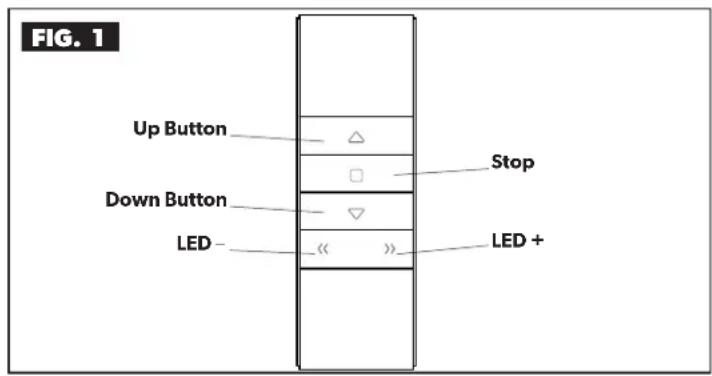
- Press the UP and DOWN awning remote buttons to retract and extend the awning.
| BUTTON FUNCTION | |
| Up Retracts the awning (one touch) | |
| Stop Stops the awning at an intermediate position | |
| Down Extends the awning (one touch) | |
| LED – Dims LED light(s) | |
| LED + Brightens LED light(s) |
If the awning does NOT perform as indicated or fabric edges are sagging when extended, refer to "Troubleshooting" on page 14.
OPERATION
B. Programming The Remote Control
⚠ WARNING IMPACT OR CRUSH HAZARD. Make sure the awning retract button and the awning extend button operate the awning in the intended direction. Failure to obey this warning could result in death or serious injury.

Complete each programming step within four seconds of the previous step to keep the receiver in pairing mode. If the receiver resets, restart the programming process.
- Disconnect all power to the receiver and wait 10 seconds before reconnecting to begin the programming process.
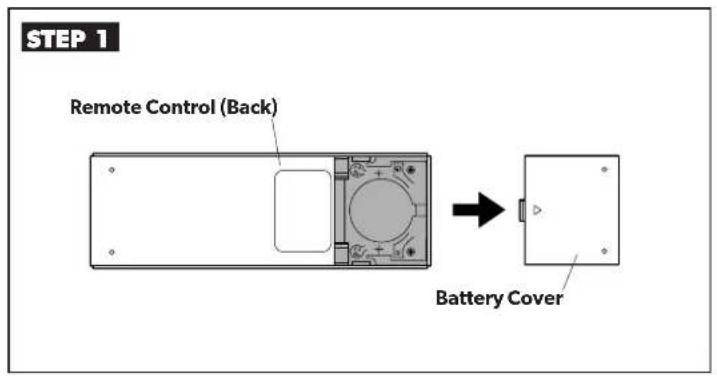
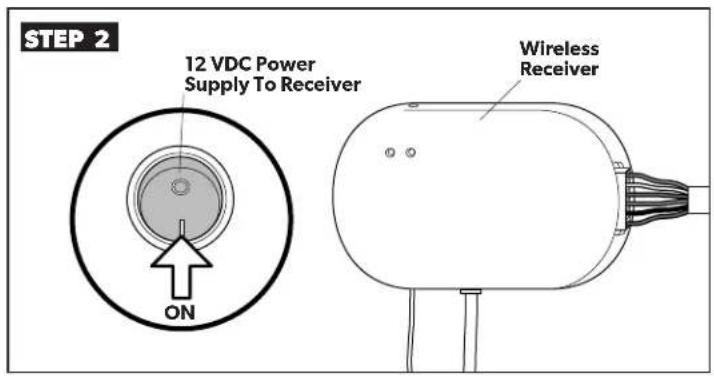
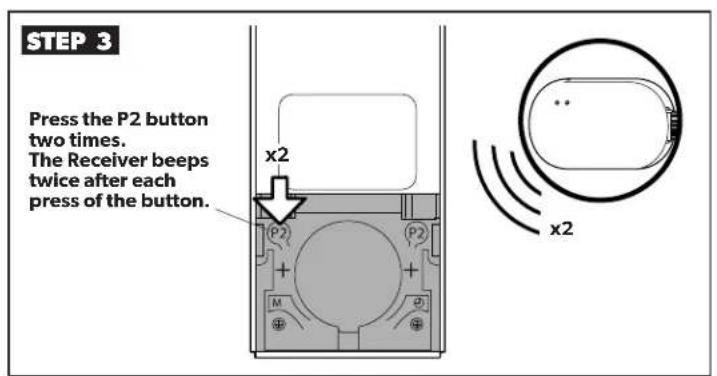
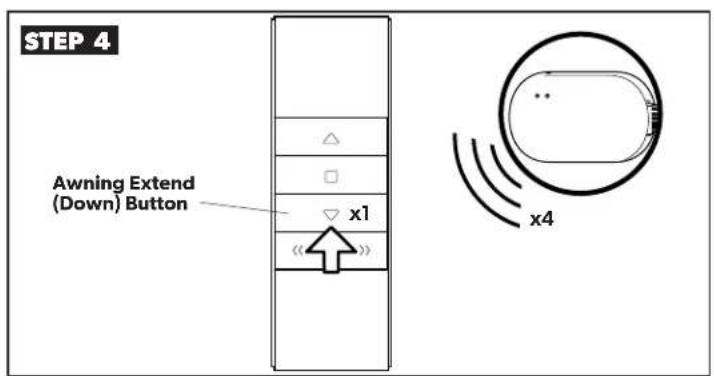
- Refer to Section "A. Opening And Closing The Awning" on page 3 to test the remote control.

When Step 4 is completed, proceed immediately to Section "C. Programming The Vibration Sensor" on page 5.
OPERATION
C. Programming The Vibration Sensor

Complete each programming step within four seconds of the previous step to keep the receiver in pairing mode. If the receiver resets, restart the programming process.
- When installing a vibration sensor, complete the steps in Section "B. Programming The Remote Control" immediately before beginning Step 1 of this procedure.
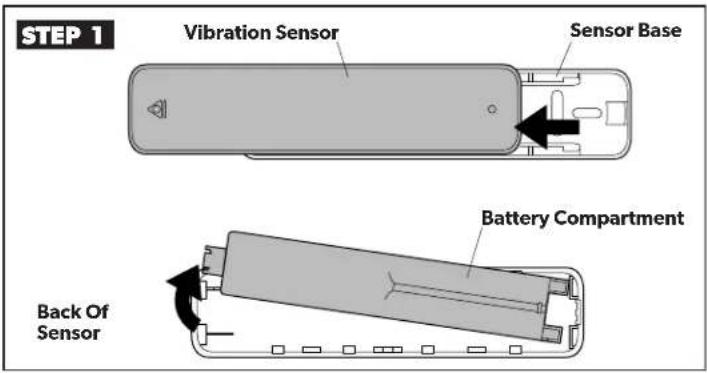
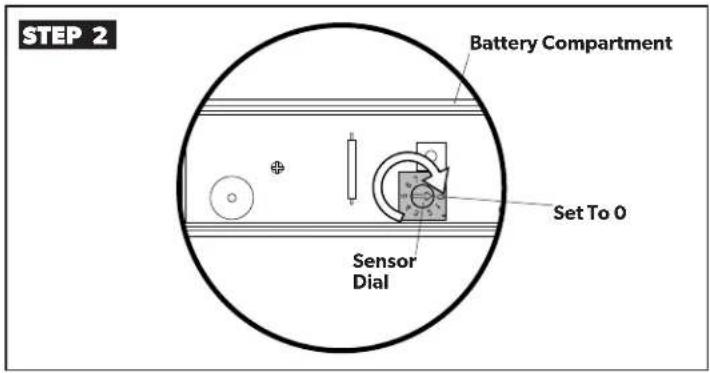
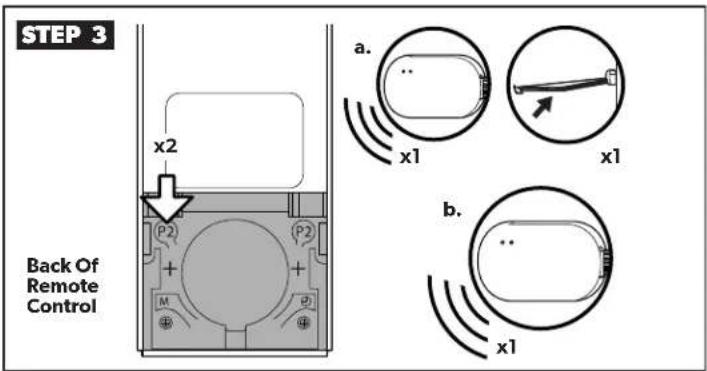
a. Press the P2 button once. The wireless receiver beeps once and the awning jogs.
b. Press the P2 button a second time. The receiver beeps once.
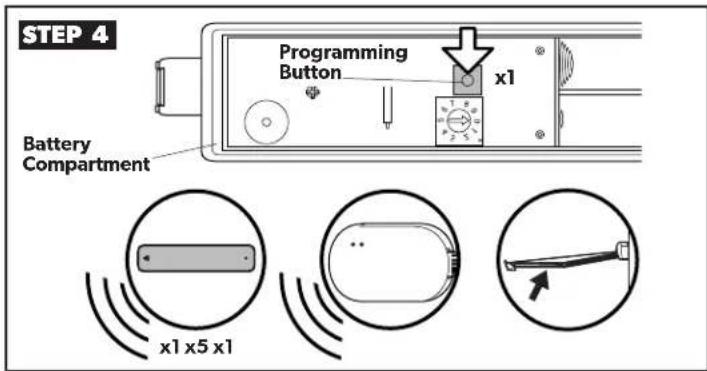
- Press the vibration sensor programming button. The sensor beeps once, the wireless receiver beeps five times, and the awning jogs.
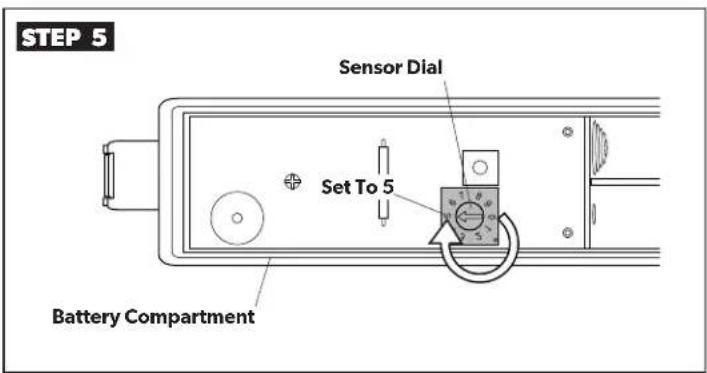
- Set the vibration sensor dial to the desired level of detection (see Section "A. Adjusting The Vibration Sensor" on page 9).
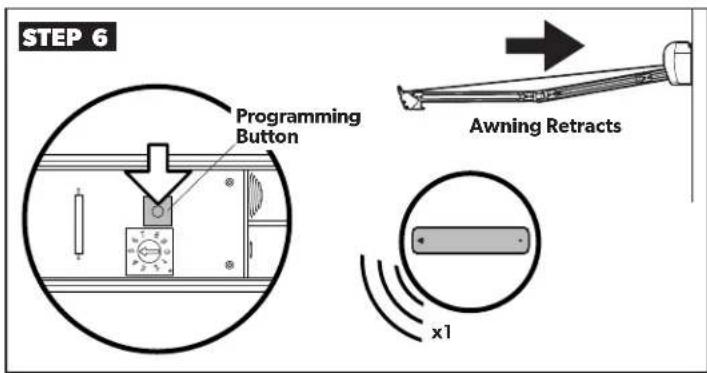
- Press the vibration sensor programming button once. The sensor beeps once and the awning retracts.
OPERATION
D. Resetting The Receiver
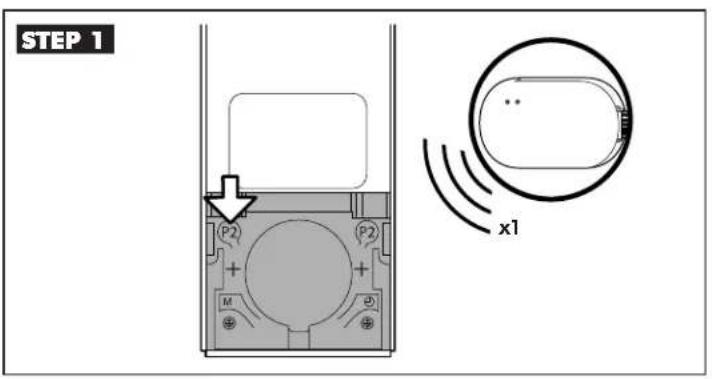
- Press the P2 button on the remote. The receiver beeps once.
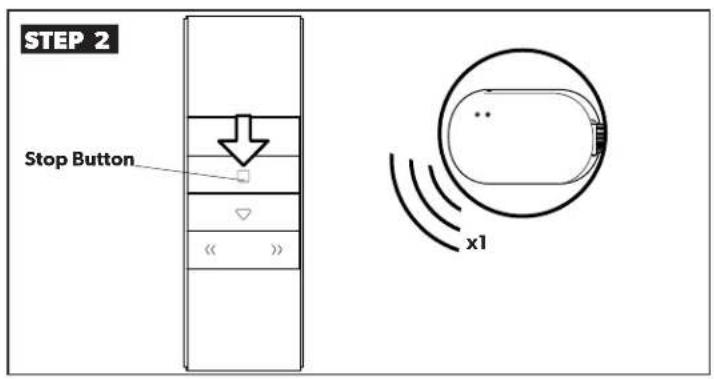
- Press the Stop Button on the remote. The receiver beeps once.
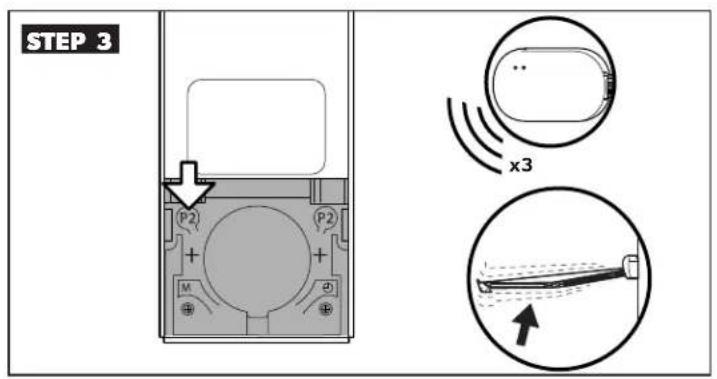
- Press the P2 button on the remote. The receiver beeps three times and the awning jogs.
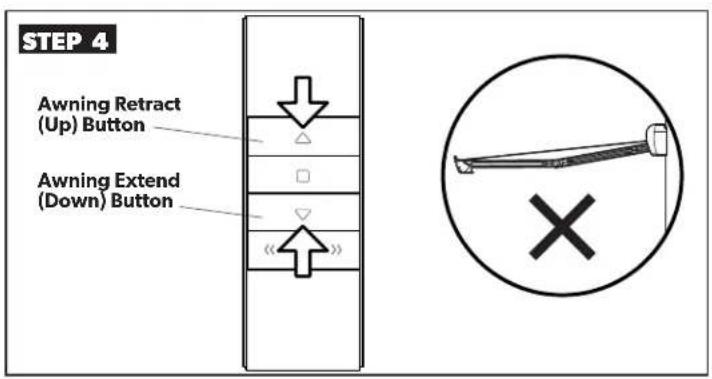
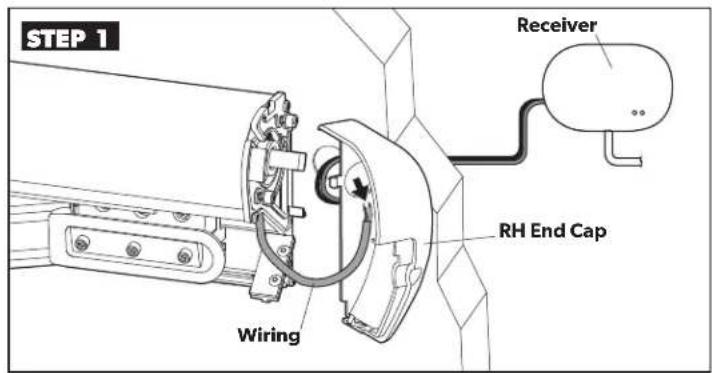
- On the remote, press the Up button, then the Down button.
- If the awning does not move, the receiver is reset.
- If the awning moves, repeat Steps 1 through 3 until the awning does not move when the Up and Down buttons are pressed.
- Refer to Section "B. Programming The Remote Control" on page 4 to reprogram the remote to the receiver.
E. Testing The Awning Before Travel
⚠ WARNING Failure to obey the following warnings could result in death or serious injury:
- IMPACT OR CRUSH HAZARD. Do NOT transport RV if awning fabric is torn or damaged, even if awning closes successfully. Damaged awning fabric could compromise awning's stability and could allow awning to extend quickly and unexpectedly during transit.
-
IMPACT OR CRUSH HAZARD. Verify ignition interlock is working correctly before traveling with RV. If awning responds to remote with ignition in ON position, accidental operation during transit could occur. The awning MUST be disabled, then serviced by a qualified service technician.
-
Inspect the awning for damage. If the fabric is torn, tie the lateral arm assemblies tightly before travel. Then contact a qualified service technician for repairs.
- Test the ignition interlock system by turning the ignition to the ON position. Attempt to retract the awning. If the awning operates, refer to "Troubleshooting" on page 14.
OPERATION
F. Closing The Awning Using An Auxiliary Power Method
⚠ WARNING ELECTRICAL SHOCK HAZARD. Disconnect power from product before accessing wiring connections. There may be issues mimicking a power failure with electric current still present, or power may return unexpectedly. Failure to obey this warning could result in death or serious injury.

Rule out simple causes for power failure BEFORE proceeding. Refer to "Troubleshooting" on page 14. After awning is closed manually, it will require service by a qualified service technician.
- Disconnect power to the RV, the receiver unit, and the awning.
- Unplug the motor connector from the RV wiring connector inside the RH end cap.
- Using 16 gauge wire leads, connect the positive (+) lead wire to the BLUE motor wire and the negative (−) lead wire to the BROWN motor wire. Secure using electrical tape.
- Connect the other end of the wire leads to the positive (+) and negative (−) terminals on an external 12 VDC power source.
- Disconnect the wire leads from the power source when the awning retracts fully.

If the awning does not retract, proceed to "G. Closing The Awning Manually" on page 8.
OPERATION
G. Closing The Awning Manually
WARNING PINCH HAZARD. Keep CLEAR of arm assemblies while closing awning. Arm assemblies will close against back rail. Failure to obey this warning could result in death or serious injury.

Read BEFORE proceeding with this section:
- Perform these steps ONLY if the awning did not retract after performing the steps in "E. Testing The Awning Before Travel" on page 6. Use a 3/8" wrench (or drill) and a flat-bladed screwdriver to complete steps.
- The awning may display up to a 4" gap when closed. To remove the gap, readjust the awning close limit after a qualified service technician has repaired the awning.
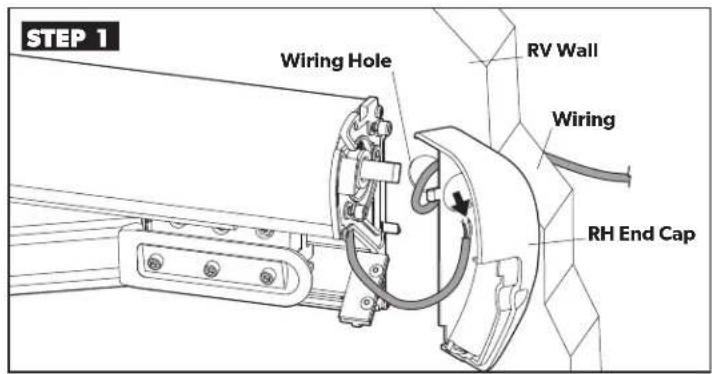
- Disconnect power to the RV, the receiver unit, and the awning.
- Unplug the motor connector from the RV wiring connector inside the RH end cap.
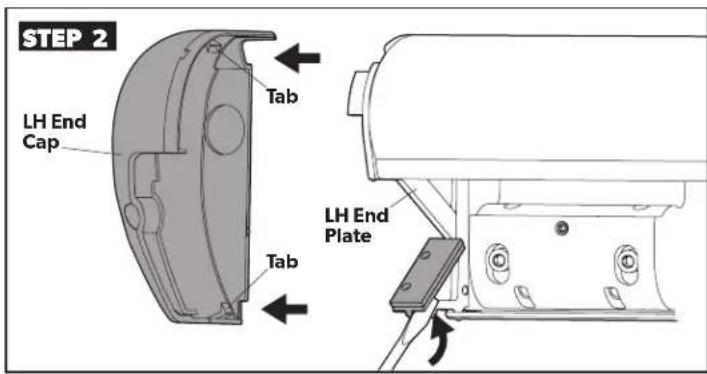
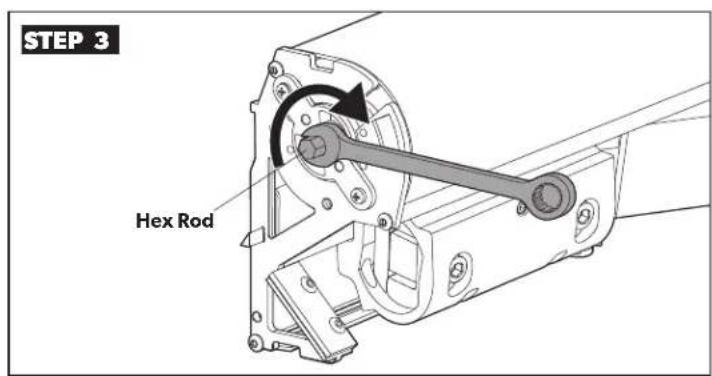
- Use a wrench to turn the hex rod until the awning is closed.

The awning may not close completely. Up to a 4" gap may exist between the lead rail and the awning case.
- Reinstall the LH end cap.
ADJUSTMENTS
A. Adjusting The Vibration Sensor
⚠ WARNING IMPACT OR CRUSH HAZARD. Keep your hands, arms, head, and torso clear of the awning hardware during periods of rain, wind, etc. These conditions may cause the vibration sensor to unexpectedly activate and retract the awning. Failure to obey this warning could result in death or serious injury.
NOTICE Failure to obey the following notices could damage product or property:
- Do NOT rely on the vibration sensor to prevent damage to the awning. The awning should ALWAYS be closed when unattended or when strong rain, wind, etc., is expected.
- Do NOT hang any items from, or block, the travel of the hardware arms or awning when the vibration sensor is installed.
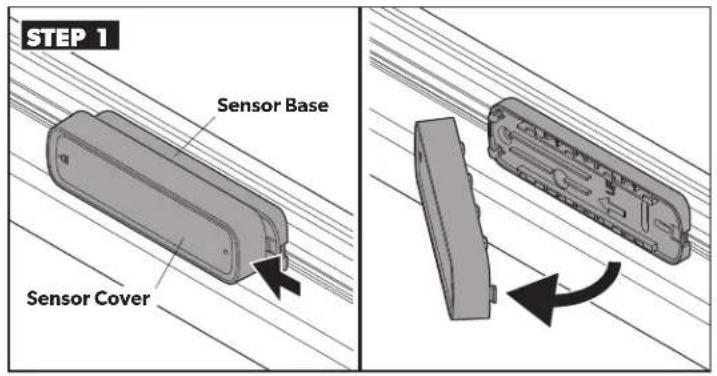
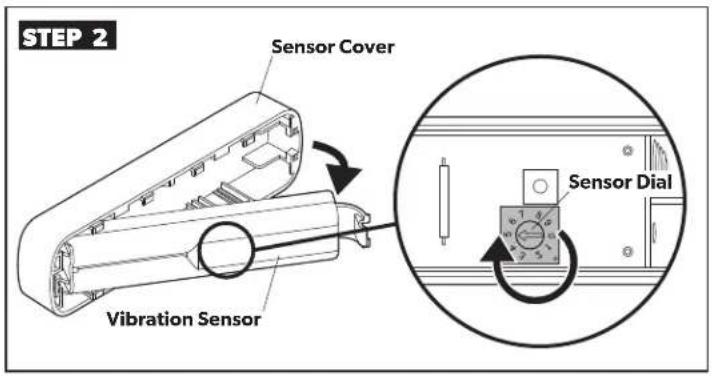
- To adjust the sensitivity of the vibration sensor, turn the dial to a setting between 1 (most sensitive) and 9 (least sensitive). Settings 0 and 5 are for programming only.
i After making adjustments, confirm that the vibration sensor is functioning correctly. See the installation manual for more details.
B. Adjusting The Awning Open/Close Limits
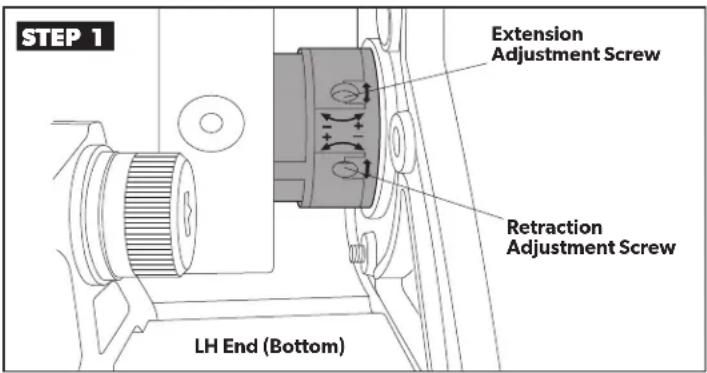
- To adjust the awning so the front rail fits tightly against the case when the awning is fully closed:
- Turn the retraction adjustment screw clockwise for less awning retraction.
- Turn the retraction adjustment screw counterclockwise for more awning retraction.

The motor should turn off and stop turning when the awning is fully closed. If the motor continues turning after the awning closes, damage to the motor or awning components may occur.
- To adjust the awning so the fabric is not overly taut or sagging when the awning is fully open:
- Turn the extension adjustment screw clockwise for less awning extension.
- Turn the extension adjustment screw counterclockwise for more awning extension.
MAINTENANCE
NOTICE
Failure to obey the following notices could damage product or property:
- Do NOT use insecticides or other sprays near the awning fabric. These could cause stains, and could adversely affect the fabric's ability to repel water.
- Do NOT expose the awning to adverse environmental conditions, corrosive agents, or other harmful conditions.
- Do NOT allow the corner of the entry door to contact the awning fabric. Otherwise, premature wear or tearing of awning fabric could occur.
- NEVER close the awning (for storage) when wet. The combination of moisture and dirt could result in mildew, discoloration, and stains. If it is necessary to roll up awning (temporarily) while wet, make sure you roll it out and let it dry (as soon as conditions allow) before rolling it up again.
- Do NOT allow dirt, leaves, or other debris to accumulate on the awning, which could cause abrasion and stains. Mildew could grow on dirt and organic debris, causing permanent discoloration, stains, and odors to the awning fabric.
- Do NOT use rechargeable batteries (NiMH, NiCD, etc.). Disposable Lithium or Alkaline batteries are recommended. Do not mix battery types.
- Make sure battery polarity is matched correctly to battery compartment.
MAINTENANCE
A. Changing The Batteries In The Remote
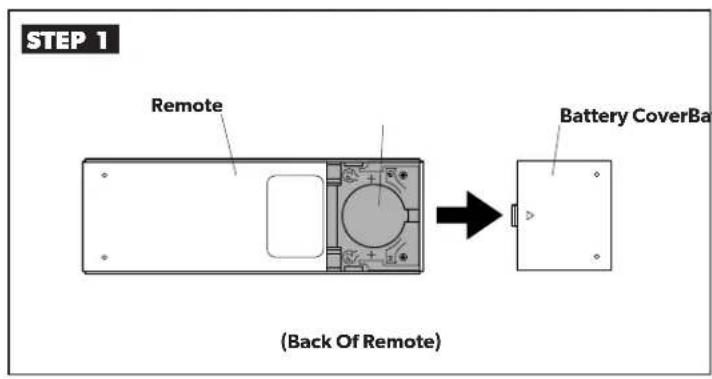
- Insert one CR2430 Li-MnO2 battery. Replace battery cover.
B. Changing The Batteries In The Vibration Sensor
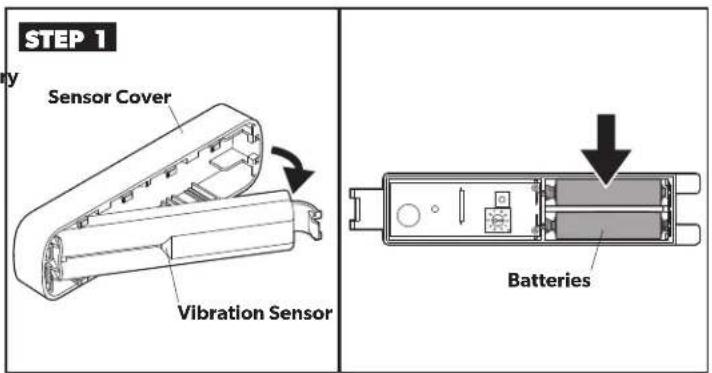
- Remove the vibration sensor from the sensor base on the lead rail and pull slide off the sensor cover.
- Insert two AAA disposable batteries. A short beep will emit from the sensor when the batteries are in place.
- Replace the sensor cover and reattach the vibration sensor.
C. Maintaining The Hardware
NOTICE Failure to obey the following notices could damage product or property:
- Do NOT use strong chemicals or abrasives to clean parts, as their protective surfaces will be damaged.
- Do NOT use silicone sprays near labels. Otherwise, the adhesive bond to product surfaces could weaken.
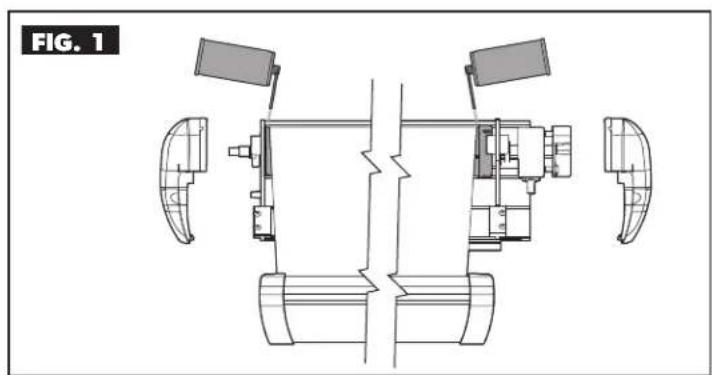
natural_image
Technical line drawing of a mechanical assembly with no visible text or symbols- Spray silicone lubricant on the moving parts of the awning.
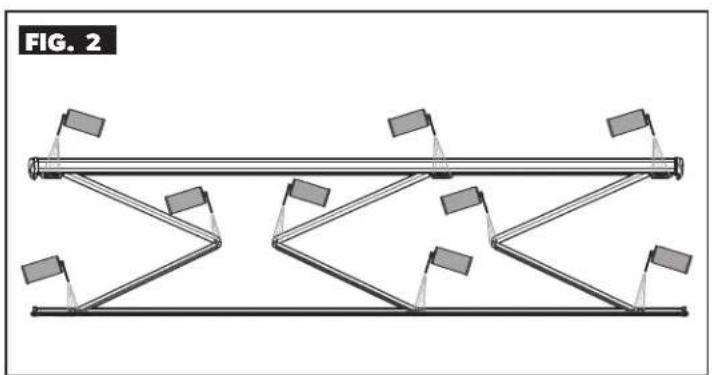
natural_image
Diagram of a mechanical linkage system with multiple arms and supports, labeled FIG. 2 (no text or symbols on the diagram itself)- Spray silicone lubricant at the joints of the arm assemblies.
MAINTENANCE
D. Maintaining The Fabric
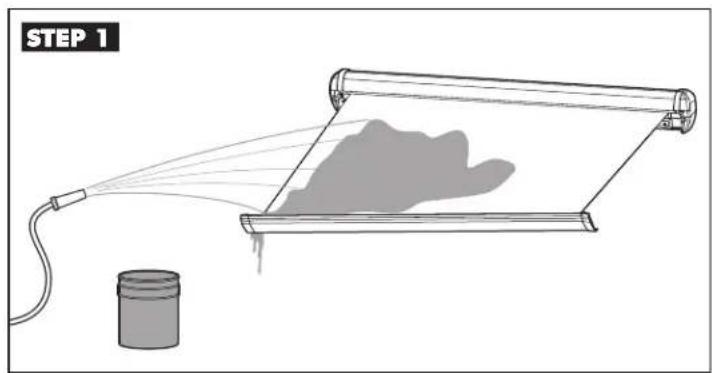
Cleaning The Awning Fabric
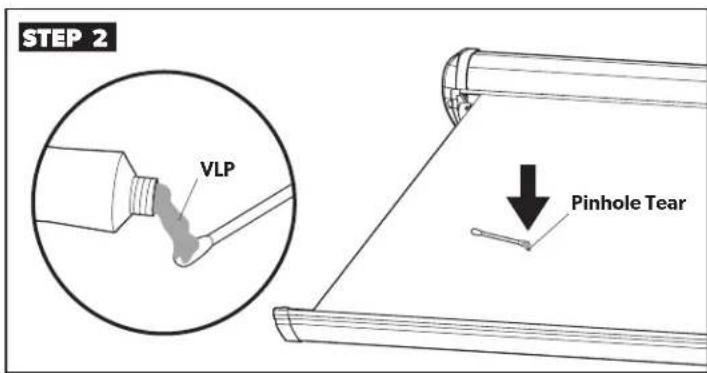
Repairing The Awning Fabric
NOTICE
Failure to obey the following notices cou
damage product or property:
- Do NOT use abrasive or corrosive cleaners, mildew removers, or hard bristle brushes on the awning fabric.
- Remove solution COMPLETELY from awning fabric. Bleach will degrade awning fabric if NOT completely rinsed off.

Wrinkling is a normal characteristic of a vinyl awning. To minimize wrinkling, leave the awning open during warm weather. If a slight "travel line" appears where the door roller (if installed) contacts the fabric, the integrity of the fabric will NOT be affected.
- Mix a cleaning solution of 1/4 cup dish soap and 1/4 cup bleach with five gallons of fresh water.
- Open the awning, apply the cleaning solution, then close the awning for five minutes.
- Open the awning and completely remove the solution from the top and bottom of the awning fabric, using clean water.

Rinse thoroughly. Bleach degrades the fabric.
- Repeat process as necessary. Make sure the awning fabric is dry before closing.
NOTICE
NEVER close (roll up) awning when vinyl liquid
patch (VLP) is wet. Otherwise, damage to other parts of the awning fabric (melting through layers) will occur.
• To repair a pinhole or a spot flaked off of the coating, apply a very small amount of VLP to a cotton swab.
- Gently roll the cotton swab around the pinhole. The VLP melts the coating (on the fabric) and fills in the pinhole so it blends with the vinyl color.
• Make sure the VLP is dry before closing the awning.

VLP is available from Dometic Corporation. Reference part number 3314216.000 when ordering.
A. Awning Motor And Remote
| PROBLEM CAUSE SOLUTION | ||
| Awning motor does not respond to awning remote. | Motor will not operate for approximately 60 seconds after awning is closed by vibration sensor. | Power receiver OFF then ON to temporarily bypass delay. |
| Remote batteries may be spent. | Press either the UP or DOWN button briefly to verify the LED lights momentarily (on remote). If LED does not light, install new battery. See Section “A. Changing The Batteries In The Remote” on page 11. | |
| Remote is not activated, programmed to receiver, or remote programming is corrupt. | If remote is added from a kit, see Section “B. Programming The Remote Control” on page 4. | |
| Receiver may need to be reset. See Section “D. Resetting The Receiver” on page 6. | ||
| Awning is disconnected from power source. Check all power connections. | ||
| RV or power source breaker is tripped, or fuse is blown. | Reset breaker, or replace fuse as necessary. If the issue persists, contact a qualified service technician. | |
| A power line switch is OFF, or ignition disconnect switch is ON. | Turn power line switch ON, or ignition switch OFF. | |
| RV battery has discharged. Recharge RV battery. | ||
| Awning motor is damaged or defective. | Close awning manually and contact a qualified service technician. | |
| Awning motor travels in wrong direction when UP or DOWN button is pressed. | Remote programming for motor rotation is incorrect. | The motor and remote will need to be reprogrammed to change the direction on the remote. See Section “B. Programming The Remote Control” on page 4. |
| Awning does not fully extend, or extends too far (fabric edge sags). | Awning out limit is set incorrectly. | See “B. Adjusting The Awning Open/Close Limits” on page 10 to reset the limit. |
| Awning closes slightly after stopping on extension. | This is a feature added to enhance fabric tension and appearance. | No action required. |
B. Vibration Sensor
| PROBLEM CAUSE SOLUTION | ||
| Awning does not automatically close when windy conditions are present. | Vibration sensor batteries are low. | Replace batteries. See Section “B. Changing The Batteries In The Vibration Sensor” on page 11. |
| Vibration sensor is not programmed to awning motor. | Program the vibration sensor. See Section “C. Programming The Vibration Sensor” on page 5. | |
| Sensitivity setting is too low. | Adjust to appropriate sensitivity level. See Section “A. Adjusting The Vibration Sensor” on page 9. | |
| Awning automatically closes during light breezes. | Sensitivity setting is too high. | |
| Awning automatically closes after 30 minutes without windy conditions. | Vibration sensor batteries are low. This is indicated by the vibration sensor beeping at regular intervals. | Replace batteries. See Section “B. Changing The Batteries In The Vibration Sensor” on page 11. |
| Awning automatically closes after one hour without windy conditions. | Vibration sensor is missing, or installed incorrectly on sensor base. | Install vibration sensor onto sensor base correctly. See vibration sensor instructions on how to replace the vibration sensor. |
| Vibration sensor batteries are dead. | Replace batteries. See Section “B. Changing The Batteries In The Vibration Sensor” on page 11. | |
| Vibration sensor is damaged or defective. | Replace vibration sensor. See vibration sensor instructions on how to replace the vibration sensor. | |
| Vibration sensor does not beep when new batteries are installed. | Vibration sensor batteries are installed incorrectly. | Install batteries to correct polarity (direction). |
WARRANTY
LIMITED ONE-YEAR WARRANTY AVAILABLE AT WWW.DOMETIC.COM/WARRANTY.
IF YOU HAVE QUESTIONS, OR TO OBTAIN A COPY OF THE LIMITED WARRANTY FREE OF CHARGE, CONTACT:
DOMETIC CORPORATION
CUSTOMER SUPPORT CENTER
1120 NORTH MAIN STREET
ELKHART, INDIANA, USA 46514
1-800-544-4881 OPT 3
- IMPORTANT SAFETY INSTRUCTIONS AND DOCUMENT SYMBOLS. 2
- OPERATION 3
- ADJUSTMENTS....9
- MAINTENANCE 10
- TROUBLESHOOTING 13
- WARRANTY 15
- REVISION D
- USA & CANADA
- SERVICE CENTER &
- DEALER LOCATIONS
- Visit:
- INTRODUCTION
- IMPORTANT SAFETY INSTRUCTIONS AND DOCUMENT SYMBOLS
- Recognize Safety Information
- Understand Signal Words
- WARNING
- CAUTION
- NOTICE
- Supplemental Directives
- U.S.A.
- CANADA
- General Safety Messages
- OPERATION
- Opening And Closing The Awning
- Programming The Remote Control
- Programming The Vibration Sensor
- Resetting The Receiver
- Testing The Awning Before Travel
- ⚠ WARNING Failure to obey the following warnings could result in death or serious injury:
- Closing The Awning Using An Auxiliary Power Method
- Closing The Awning Manually
- ADJUSTMENTS
- Adjusting The Vibration Sensor
- Adjusting The Awning Open/Close Limits
- MAINTENANCE
- Maintaining The Hardware
- NOTICE Failure to obey the following notices could damage product or property:
- Maintaining The Fabric
- WARRANTY
Brand : DOMETIC
Model : 9500E
Category : Uncategorized