
EDC704GEWA - Tumble drier ELECTROLUX - Free user manual and instructions
Find the device manual for free EDC704GEWA ELECTROLUX in PDF.


| Product Type | Heat Pump Condenser Tumble Dryer |
| Brand | Electrolux |
| Model | EDC704GEWA |
| Dimensions (H x W x D) | 850 x 596 x 570 mm (max 594 mm depth) |
| Max Depth with Door Open | 1030 mm |
| Adjustable Height | 850 mm + 15 mm (feet regulation) |
| Drum Volume | 104 L |
| Maximum Load | 7 kg |
| Voltage / Frequency | 220-230 V / 50 Hz |
| Total Power | 2250 W |
| Permitted Ambient Temperature | +5°C to +35°C |
| Programmes | Cottons, Mixed, Bedding, Synthetics, Energy Saver, Refresh, Denim, Sports, Easy Iron, Shirts, Wool, Delicates, Favourite |
| Options | Dryness Level (Extra Dry, Cupboard Dry, Iron Dry), Gentle Dry, Extra Anticrease, Time Dry (10 min - 2 h), Delay Start (30 min - 20 h) |
| Control Panel | Touch buttons (Time Dry, Start/Pause, Delay Start, Extra Anticrease, Gentle Dry, Dryness Level, On/Off) with knob and display |
| Child Lock | Yes (touch button deactivatable) |
| Favourite Programme Memory | Yes (can save custom programme and options) |
| Water Container Capacity | Approximately 3.5 L (draining kit optional) |
| Filter Type | Lint filter (clean after each cycle); heat exchanger filter (clean periodically) |
| Installation Options | Freestanding or under counter; stackable on washing machine with stacking kit |
| Safety Features | Overheat protection, door lock, child lock, auto shut-off in stand-by |
Frequently Asked Questions - EDC704GEWA ELECTROLUX
User questions about EDC704GEWA ELECTROLUX
0 question about this device. Answer the ones you know or ask your own.
Ask a new question about this device
Download the instructions for your Tumble drier in PDF format for free! Find your manual EDC704GEWA - ELECTROLUX and take your electronic device back in hand. On this page are published all the documents necessary for the use of your device. EDC704GEWA by ELECTROLUX.
USER MANUAL EDC704GEWA ELECTROLUX
- SAFETY INFORMATION......2
- SAFETY INSTRUCTIONS....5
- PRODUCT DESCRIPTION....6
- CONTROL PANEL....7
- PROGRAMME TABLE......8
- OPTIONS....9
- SETTINGS....10
- BEFORE FIRST USE....12
- DAILY USE....12
- HINTS AND TIPS.... 13
- CARE AND CLEANING....14
- TROUBLESHOOTING....17
- TECHNICAL DATA....18
- QUICK GUIDE....19
- NAME AND CONTENT OF HAZARDOUS SUBSTANCES IN PRODUCTS.....22
WE'RE THINKING OF YOU
Thank you for purchasing an Electrolux appliance. You've chosen a product that brings with it decades of professional experience and innovation. Ingenious and stylish, it has been designed with you in mind. So whenever you use it, you can be safe in the knowledge that you'll get great results every time. Welcome to Electrolux.
Visit our website:

Get usage advice, brochures, trouble shooter, service information:
www.electrolux.com
CUSTOMER CARE AND SERVICE
Always use original spare parts.
When contacting our Authorised Service Centre, ensure that you have the following data available: Model, PNC, Serial Number.
The information can be found on the rating plate.
⚠ Warning / Caution-Safety information
i General information and tips
Environmental information
Subject to change without notice.
1. ⚠ SAFETY INFORMATION
Before beginning the installation and use of this appliance, carefully read the supplied instructions. The manufacturer is not responsible for any injuries or damages that are the result of incorrect installation or
usage. Always keep the instructions in a safe and accessible location for future reference.
1.1 Children and vulnerable people safety

WARNING!
Risk of suffocation, injury or permanent disability.
- This appliance can be used by children aged from 8 years and above and persons with reduced physical, sensory or mental capabilities or lack of experience and knowledge if they have been given supervision or instruction concerning the use of the appliance in a safe way and understand the hazards involved.
- Children between 3 and 8 years of age and persons with very extensive and complex disabilities shall be kept away from the appliance unless continuously supervised.
- Children of less than 3 years of age should be kept away from the appliance unless continuously supervised.
- Do not let children play with the appliance.
- Keep all packaging away from children and dispose of it appropriately.
- Keep detergents away from children.
- Keep children and pets away from the appliance when the door is open.
- If the appliance has a child safety device, it should be activated.
- Children shall not carry out cleaning and user maintenance of the appliance without supervision.
1.2 General Safety
- Do not change the specification of this appliance.
- If the tumble dryer is put on top of a washing machine, use the stacking kit. The stacking kit, available from your authorized vendor, can be used only with the appliance specified in the instructions supplied with
the accessory. Read it carefully before installation (refer to the Installation leaflet).
- The appliance can be installed as freestanding or below a kitchen counter with correct space (refer to the Installation leaflet).
- Do not install the appliance behind a lockable door, a sliding door or a door with a hinge on the opposite side, that would prevent the appliance door from being fully open.
- The ventilation opening in the base must not be covered by a carpet, mat, or any floor covering.
- WARNING: The appliance must not be supplied through an external switching device, such as a timer, or connected to a circuit that is regularly switched on and off by a utility.
- Connect the mains plug to the mains socket only at the end of the installation process. Make sure that the mains plug is accessible after installation.
- If the mains power supply cable is damaged, it must be replaced by the manufacturer, its Authorised Service Centre or similarly qualified persons to avoid an electrical hazard.
- Do not exceed the maximum load of 7 kg (refer to the "Programme chart" chapter).
- Do not use the appliance if items have been soiled with industrial chemicals.
- Wipe away lint or packaging debris that has accumulated around the appliance.
- Do not run the appliance without a filter. Clean the lint filter before or after each use.
- Do not dry unwashed items in the tumble dryer.
- Items that have been soiled with substances such as cooking oil, acetone, alcohol, petrol, kerosene, spot removers, turpentine, waxes and wax removers should be washed in hot water with an extra amount of detergent before being dried in the tumble dryer.
- Items such as foam rubber (latex foam), shower caps, waterproof textiles, rubber backed articles and clothes or pillows fitted with foam rubber pads should not be dried in the tumble dryer.
- Fabric softeners, or similar products, should only be used as specified by the product manufacturer's instructions.
- Remove all objects from items that could be a source of fire ignition such as lighters or matches.
- WARNING: Never stop a tumble dryer before the end of the drying cycle unless all items are quickly removed and spread out so that the heat is dissipated.
- Before any maintenance operation, deactivate the appliance and disconnect the mains plug from the socket.
2. SAFETY INSTRUCTIONS
2.1 Installation
- Remove all the packaging.
- Do not install or use a damaged appliance.
- Follow the installation instructions supplied with the appliance.
• Always take care when moving the appliance as it is heavy. Always use safety gloves and enclosed footwear. - Do not install or use the appliance where the temperature can be lower than 5°C or higher than 35°C.
- The floor area on which the appliance is to be installed must be flat, stable, heat resistant and clean.
- Make sure that there is air circulation between the appliance and the floor.
• Always keep the appliance vertical when it is being moved. - The rear surface of the appliance must be put against a wall.
- When the appliance is in its permanent position, check if it is levelled correctly with the aid of a spirit level. If it is not, adjust the feet accordingly.
2.2 Electrical connection

WARNING!
Risk of fire and electric shock.
• The appliance must be earthed.
- Make sure that the parameters on the rating plate are compatible with the electrical ratings of the mains power supply.
• Always use a correctly installed shockproof socket.
- Do not use multi-plug adapters and extension cables.
- Do not pull the mains cable to disconnect the appliance. Always pull the mains plug.
- Do not touch the mains cable or the mains plug with wet hands.
• This appliance complies with the E.E.C. Directives.
2.3 Use

WARNING!
Risk of injury, electric shock, fire, burns or damage to the appliance.
• This appliance is for household use only.
- Do not dry damaged (torn, frayed) items that contain padding or fillings.
- Only dry fabrics which are suitable for drying in a tumble dryer. Follow the instructions on the fabric label.
- If you have washed your laundry with a stain remover start an extra rinse cycle before you start the dryer.
- Do not drink or prepare food with the condensed water/distilled water. It can cause health problems to people and pets.
- Do not sit or stand on the open door of the appliance.
- Do not dry dripping wet clothes in a tumble dryer.
2.4 Care and cleaning

WARNING!
Risk of injury or damage to the appliance.
3. PRODUCT DESCRIPTION
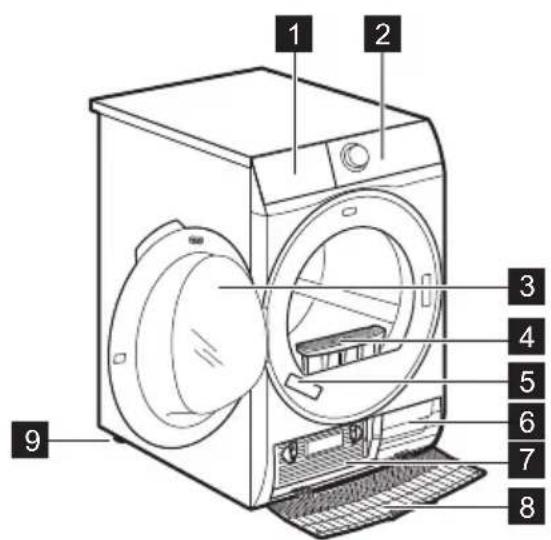

For ease of loading laundry or ease of installation the door is reversible. (see separate leaflet).
- Do not use water spray and steam to clean the appliance.
- Clean the appliance with a moist soft cloth. Only use neutral detergents. Do not use any abrasive products, abrasive cleaning pads, solvents or metal objects.
2.5 Disposal

WARNING!
Risk of injury or suffocation.
- Disconnect the appliance from the mains electrical and water supplies.
- Cut off the mains electrical cable close to the appliance and dispose of it.
- Remove the door catch to prevent children or pets from becoming trapped in the drum.
- Dispose of the appliance in accordance with local requirements for the disposal of Waste Electrical and Electronic Equipment (WEEE).
1 Water container
2 Control panel
3 Appliance door
4 Filter
5 Rating plate
6 Airflow slots
7 Heat Exchanger lid
8 Heat Exchanger cover
9 Adjustable feet
4. CONTROL PANEL
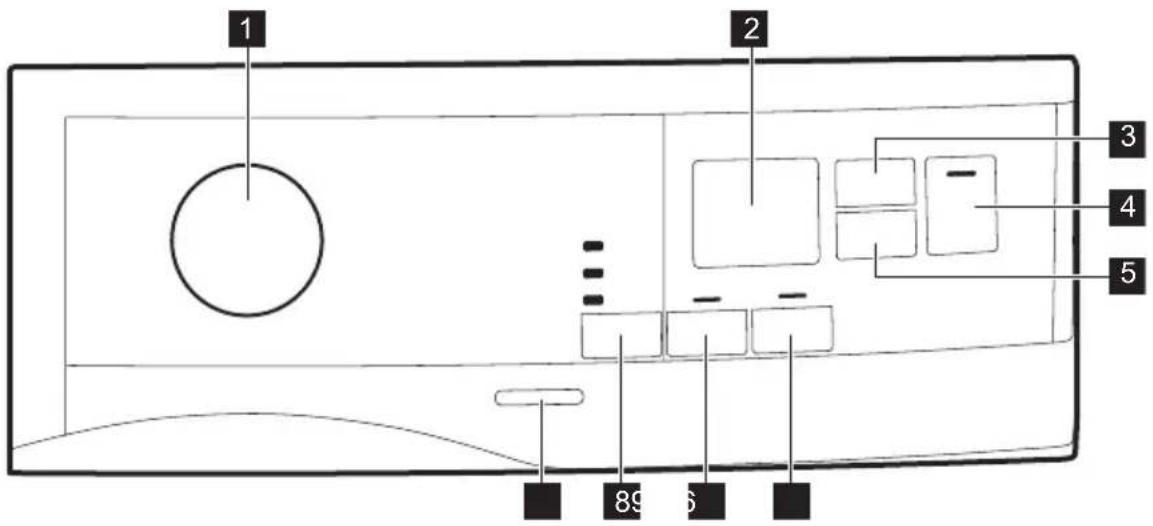
1 Programme knob
2 Display
3 Time Dry touch button
4 Start/Pause touch button
5 Delay Start touch button
6 Extra Anticrease touch button
7 Gentle Dry touch button
8 Dryness Level touch button
9 On/Off button

Press the touch buttons with your finger in the area with the symbol or name of the option. Do not wear gloves when you operate the control panel. Make sure that the control panel is always clean and dry.
4.1 Display
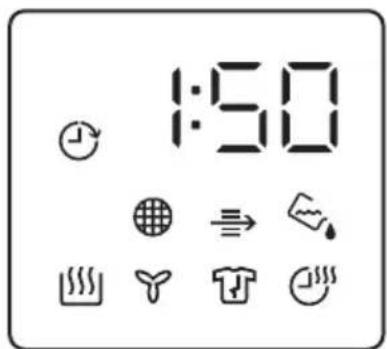
| Symbol on the display Symbol description | |
| time drying option on | |
| delay start option on | |
| indicator: check Heat Exchanger | |
| indicator: clean filter | |
| indicator: drain the water container | |
| indicator: drying phase | |
| indicator: cooling phase | |
| indicator: anti-crease phase | |
| child lock on | |
| wrong selection | |
| 2:00 | programme duration |
| :10-2:00 | time Drying duration |
| 1h-20h | delay start duration |
5. PROGRAMME TABLE
| Programme | Load^1) | Properties / Fabric type^2) |
| Favourite [HXX4] | Depends on a mem- orised pro- gramme | You can do your configuration of programme and options and memorise in the appliance memory (See chapter "Settings - Favourite ☆"). |
| Cottons 7 kg Cotton fabrics. | ||
| Mixed 3kg | Cotton and synthetic fabrics.Low temperature programme.Delicate programme with warm air. | |
| Bedding 3kg | Bed linen such as single and double sheets, pillowcases, du-vet cover. | |
| Synthetics 3,5 kg Synthetic and mixed fabrics. | ||
| Energy Saver 7 kg | Cycle to be used to dry cotton with "cotton cupboard" dryness level, with maximum energy sav-ing. | |
| Refresh 1kg Refreshing textiles that were in storage. | ||
| Programme | Load 1) | Properties / Fabric type2) |
| Denim 4 kg | Leisure clothing such as jeans, sweat-shirts of different material thicknesses (e.g. at the neck, cuffs and seams). / [IMAGE] | |
| Sports 2 kg | Sportswear, thin and light fabrics, microfiber, polyester. / [IMAGE] | |
| Easy Iron | 1 kg (or 5 shirts) | Easy care fabrics for which a minimum of ironing is necessary. The drying results can be different from one type of fabric to another. Shake the items before putting them in the appliance. When the programme has ended, immediately remove the items and put them on a hanger. / [IMAGE] |
| Shirts | 1,5kg (or 7 shirts)/ | Easy care fabrics for which a minimum of ironing is necessary. The drying results can be different from one type of fabric to the other. Shake the items before you put them in the appliance. When the programme is completed, Immediately remove the items and put them on a hanger. / [IMAGE] |
| Wool 1 kg | Woollen fabrics. Gentle drying for hand-wash-able woollens. Remove items immediately when the programme is completed. | |
| Delicates 4 kg | Delicate fabrics such as viscose, rayon, acrylic, and their blends. / [IMAGE] | |
1) The maximum weight refers to dry items.
2) For fabric mark meaning see chapter HINTS AND TIPS: Preparing the laundry.
6. OPTIONS
6.1 Dryness Level
This function helps to increase dryness of the laundry. There are 3 options:
- Extra Dry
- Cupboard Dry
- Iron Dry
6.2 Gentle Dry
With this option you can set a delicate drying programme that has a low temperature. Use this option with a
fabrics that have the symbol 📷 on the fabric label (e.g. acrylic, viscose).
6.3 Extra Anticrease
Extends the anti-crease phase by 60 minutes at the end of the drying cycle. This function reduces creases. The laundry can be removed during the anti-crease phase.
6.4 Time Dry
You can set the programme duration, from a minimum of 10 minutes to a maximum of 2 hours. The required duration is related to the quantity of laundry in the appliance.

We recommend that you set a short duration for small quantities of laundry or for only one item.
6.5 Options table
| Programmes1) | Dryness Level Gentle Dry | Extra Anti-crease | Time Dry |
 | |||
| Favourite ☆ | Depends on a memorised programme | ||
| Cottons ■ ■ ■ ■ ■ | |||
| Mixed ■ ■ ■ ■ | |||
| Bedding ■ ■ ■ ■ | |||
| Synthetics ■ ■ ■ ■ ■ ■ | |||
| Energy Saver ■ ■ | |||
| Refresh ■ | |||
| Denim | ■ ■ ■ ■ | ||
| Sports | ■ ■ | ||
| Easy Iron | ■ ■ ■ | ||
| Shirts | ■ ■ | ||
| Wool | ■ | ||
| Delicates | ■ ■ ■ | ||
1) Together with the programme you can set 1 or more options. To activate or deactivate them, press the related touch button.
7. SETTINGS
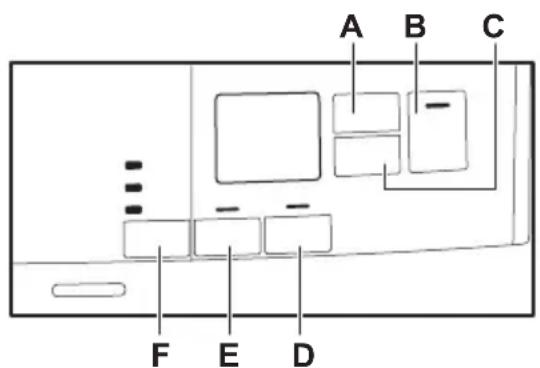
A. Time Dry touch button
B. Start/Pause touch button
C. Delay Start touch button
D. Extra Anticrease touch button
E. Gentle Dry touch button
F. Dryness Level touch button
7.1 Child lock function
This option prevents children playing with the appliance while a programme is operating. The touch buttons are locked.
Only the on/off button is unlocked.
Activating the child lock option:
- Press the on/off button to activate the appliance.
- Press and hold touch button (D) for a few seconds.
The child lock indicator comes on.

It is possible to deactivate the child lock option while a programme operates. Press and hold the same touch buttons until the child lock indicator goes off. The Child Lock function isn't available for 8 s after switching on the appliance.
7.2 Favourite

You can do your configuration of programme and options and memorise in the appliance memory.
To memorise your configuration:
- Press the on/off button to activate the appliance
- Set the programme and available options.
- Press the (E) button for some seconds.
The sound and the message on the display confirm that the configuration is memorised.
To activate your memorised configuration:
- Press the on/off button to activate the appliance.
- Use the programme knob to set Favourite ☆ position.
Previously memorised configuration of programme and options will be restore.
7.3 Adjustment of remaining laundry moisture

Every time you enter in the "Adjustment of remaining laundry moisture" mode, previously set degree of remaining moisture will change into next value (e.g. previously set -2 - will change into -1 -).
To change the default degree of remaining moisture:
- Press the on/off button to activate the appliance.
- Use the programme knob to set any programme.
- Wait approximately 8 seconds.
- Press and hold buttons (E) and (D) at the same time.
One of these indicators comes on:
$$ \begin{array}{l} \cdot - \square - \text { the maximum dryness } \ \cdot - 1 - \text { the more dry laundry } \ \cdot - 2 - \text { the standard dry laundry } \ \end{array} $$
- Press and hold buttons (E) and (D) again until the indicator of the correct level comes on.

If the display returns to the normal mode (the time of the selected programme from step 2. will be displayed), while setting the degree of remaining moisture, press and hold buttons (E) and (D) once again to enter to the "Adjustment of remaining laundry moisture" mode (previously set degree of remaining moisture will change into next value).
- After 5 s the display returns to normal mode.
7.4 Water container indicator
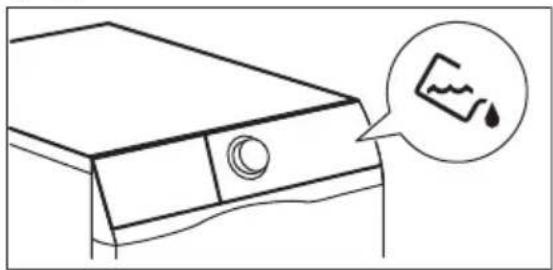
By default, the water container indicator is on. It comes on when the programme is completed or when it is necessary to empty the water container.

If a draining kit is installed (additional accessory), the appliance automatically drains the water from the water container. In this case we recommend that you deactivate the indicator of the water container.
Deactivating the water container indicator:
- Press the on/off button to activate the appliance.
- Wait approximately 8 seconds.
8. BEFORE FIRST USE
Before you use the appliance for the first time:
- Clean the tumble dryer drum with a moist cloth.
9. DAILY USE
9.1 Start a programme without delay start
- Prepare the laundry and load the appliance.

CAUTION!
Make sure that when you close the door, the laundry does not get caught between the appliance door and the rubber seal.
- Press the on/off button to activate the appliance.
-
Set the correct programme and options for the type of load. The display shows the programme duration.
-
Press and hold touch buttons (A) and (C) at the same time.
The display shows one of these 2 configurations:
- The display shows "Off". After 5 s the display returns to normal mode.
- The display shows "On". After 5 s the display returns to normal mode.
7.5 Buzzer on/off
To deactivate or activate the acoustic signals, press and hold for approximately 2 seconds touch buttons (E) and (F) at the same time.
- Start a 1 hour programme with moist laundry.

The drying time you see on the display, when the cotton programme is selected, is related to the load of 5 kg and standard conditions. Real drying time will depend on type of the load (quantity and composition), the room temperature and the humidity of your laundry after spin drying phase.
- Press the Start/Pause touch button. The programme starts.
9.2 Starting the programme with delay start
- Set the correct programme and options for the type of load.
- Press the delay start button again and again until the display shows the delay time you want to set.

You can delay the start of a programme from a minimum of 30 minutes to a maximum of 20 hours.
- Press the Start/Pause touch button.
The display shows the countdown of the delay start.
When the countdown is completed, the programme starts.
9.3 Change a programme
- Press the on/off button to deactivate appliance
- Press the on/off button to activate the appliance.
- Set the programme.
9.4 At the end of the programme
When the programme is completed:
- An intermittent acoustic signal operates.
- The display shows
- The indicator is on.

- The indicators 📋 Filter and 🔊 Tank may come on.
- The Start/Pause indicator is on.
The appliance continues to operate with the anti-crease phase for approximately 30 minutes or more if Extra Anticrease option was set (see chapter Option - Extra Anticrease).
10. HINTS AND TIPS
10.1 Preparing the laundry
- Close the zips.
- Close the fasteners of duvet covers.
- Do not dry ties or ribbons loose (e.g. apron ribbons). Tie them before you start a programme.
- Remove all items from pockets.
- Turn items with the internal layer made of cotton inside out. Cotton layer must be faced outwards.
• Always set the programme suitable for the type of laundry. - Do not put light and dark colours together.
The anti-crease phase reduces creasing.
You can remove the laundry before the anti-crease phase is completed. We recommend, for better results, that you remove the laundry when the phase is almost completed.
When the anti-crease phase is completed:
• The display still shows 0 : 0 0
- The indicator is off.
- The indicators 📋 Filter and ←Rank remain on.
- Start/Pause indicator goes off.
- Press the on/off button to deactivate the appliance.
- Open the appliance door.
- Remove the laundry.
- Close the appliance door.

Always clean the filter and empty the water container when a programme is completed.
9.5 Stand-by function
To reduce energy consumption, this function automatically deactivates the appliance:
• After 5 minutes if you do not start the programme.
• After 5 minutes from the end of the programme.
- Use suitable programme for cottons, jersey and knitwear to reduce shrinkage.
- Do not exceed the maximum load stated in the programmes chapter or shown on the display.
- Dry only the laundry that is suitable for tumble drying. Refer to the fabric label on the items.
- Do not dry large and small items together. Small items can be trapped inside the large items and remain wet.
| Fabric label Description | |
 | Laundry is suitable for tumble drying. |
 | Laundry is suitable for tumble drying at higher temperatures. |
 | Laundry is suitable for tumble drying at low temperatures only. |
 | Laundry is not suitable for tumble drying. |
11. CARE AND CLEANING
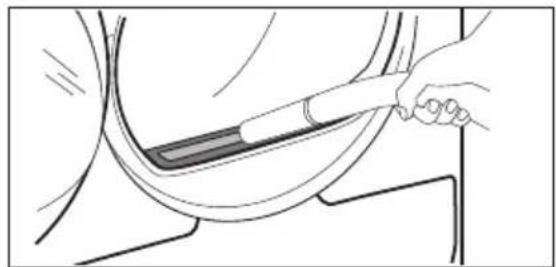
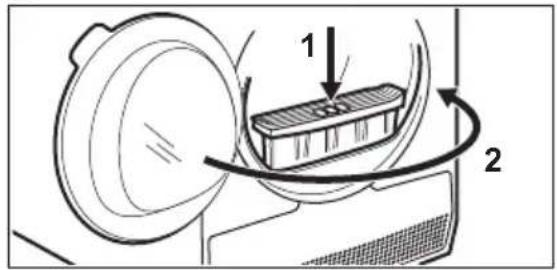
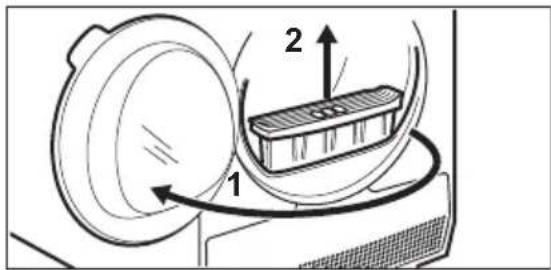
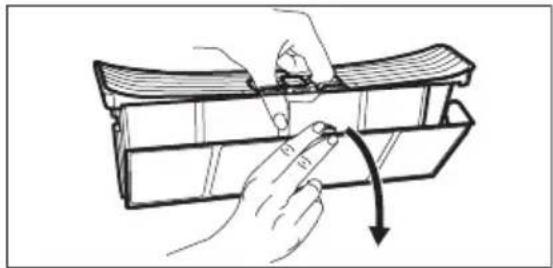
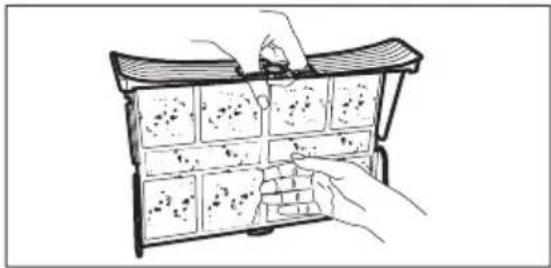
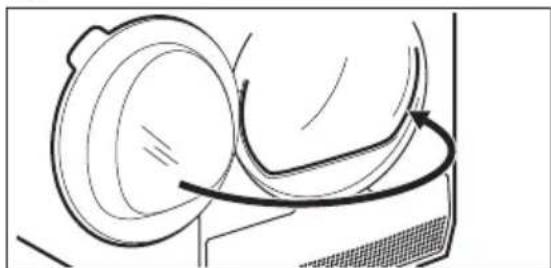
11.1 Cleaning the filter
1.2.
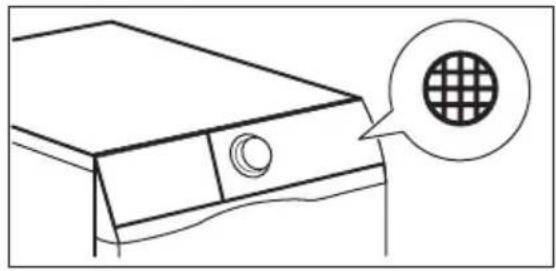
natural_image
Line drawing of a computer monitor with a circular icon showing a grid pattern (no text or symbols)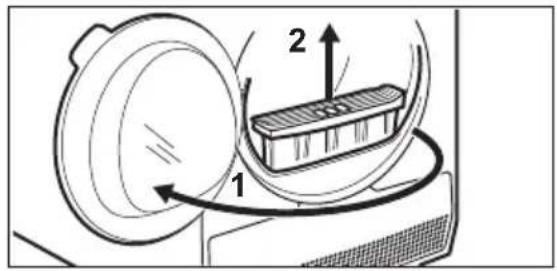
3.4.
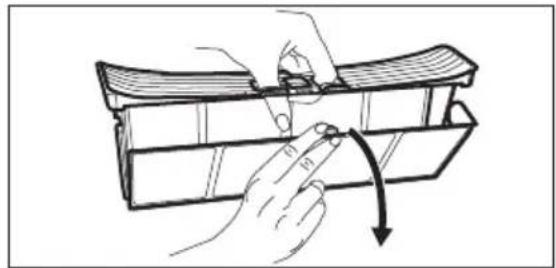
natural_image
Illustration of a hand holding a tool interacting with a mechanical component, showing a curved arrow indicating rotation (no text or symbols present)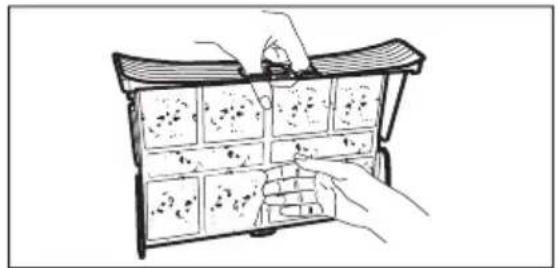
natural_image
Illustration of hands holding a tray with multiple small objects, no text or symbols present5.1)
natural_image
Line drawing of a hand holding a tool interacting with a curved object (no text or symbols)6.
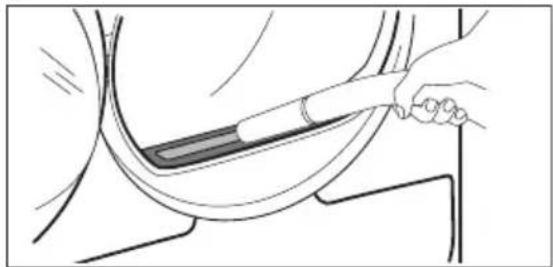
1) If necessary remove fluff from the filter socket and gasket. You can use a vacuum cleaner.
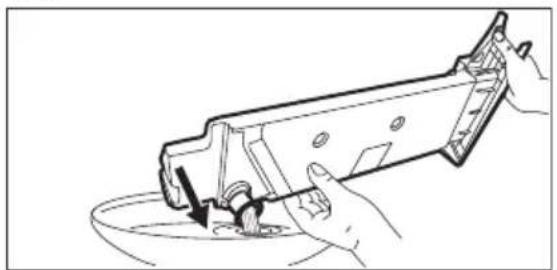
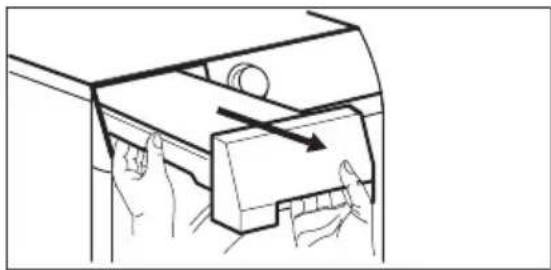
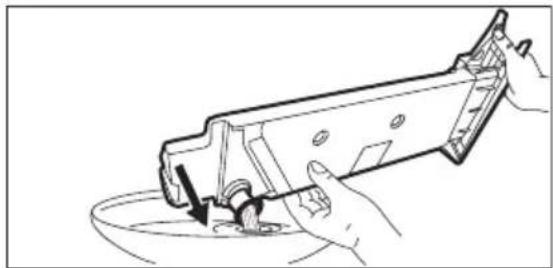
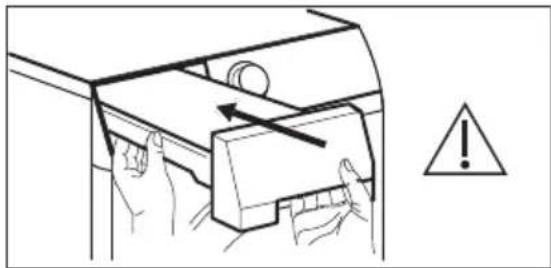
11.2 Emptying the water container
1.2.
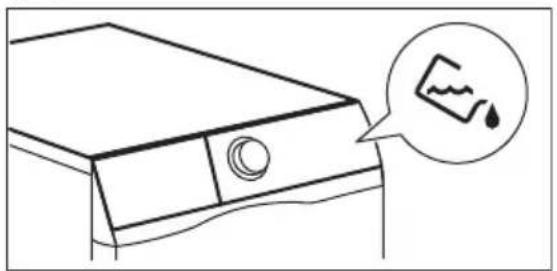
natural_image
Line drawing of a washing machine with a circular button and a speech bubble containing a graph symbol (no text or labels)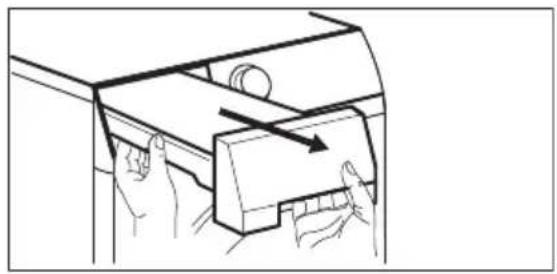
natural_image
Line drawing of a mechanical device with hands operating a component (no text or symbols)3.4.
natural_image
Line drawing of hands using a tool to clean or prepare a bowl (no text or symbols present)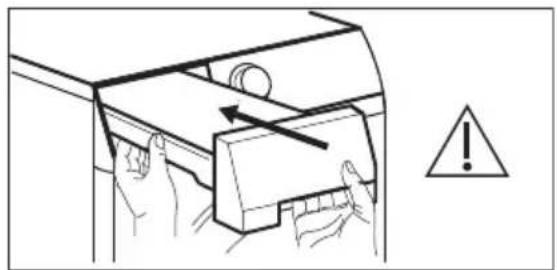
natural_image
Illustration of hands using a tool to adjust or install a component, with an exclamation mark and warning symbol (no text or labels)i
You can use the water from the water container as an alternative to distilled water (e.g. for steam ironing).
Before you use the water, remove dirt residues with a filter.
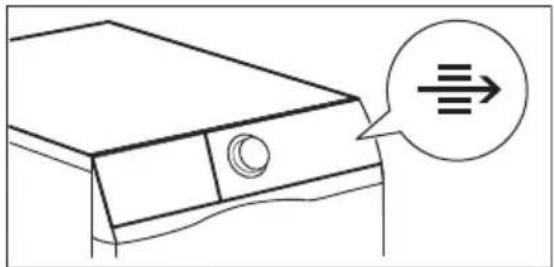
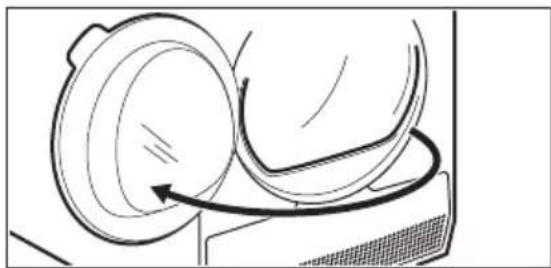
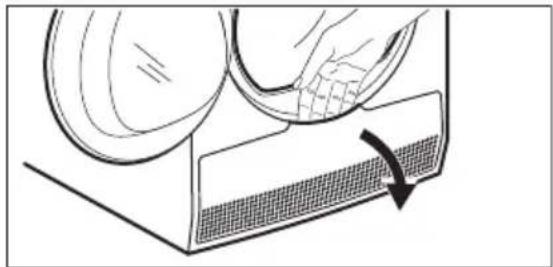
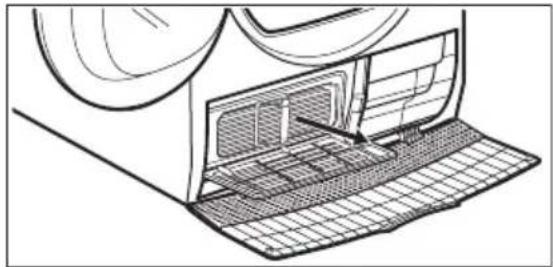
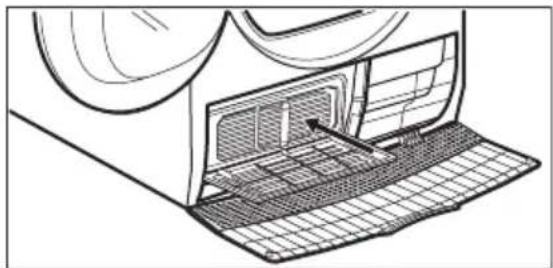
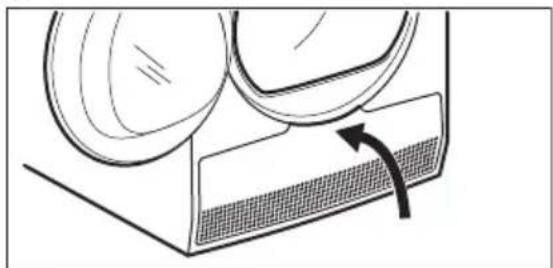
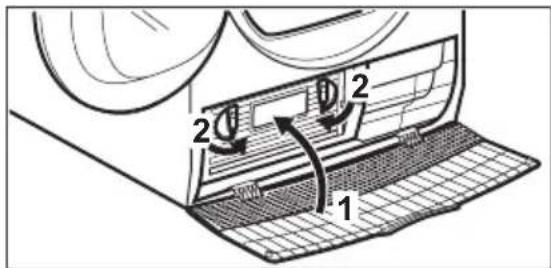
11.3 Cleaning the Heat Exchanger
1.2.
natural_image
Line drawing of a washing machine with a circular arrow indicating direction (no text or symbols)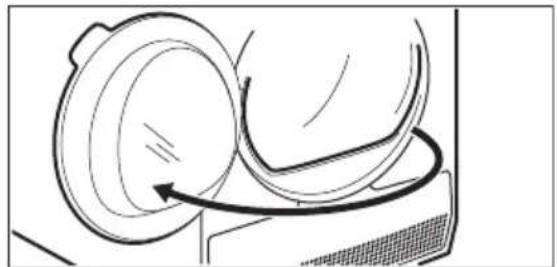
natural_image
Line drawing of a mechanical component with a curved arrow indicating motion (no text or symbols)3.4.
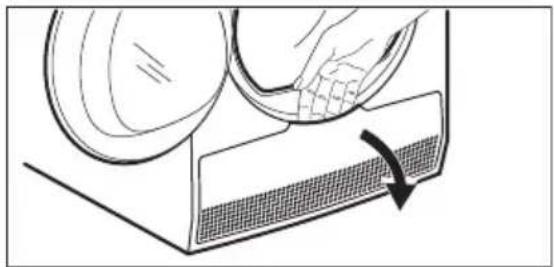
natural_image
Diagram showing a hand pressing down on a textured surface with an arrow indicating rotation (no text or symbols)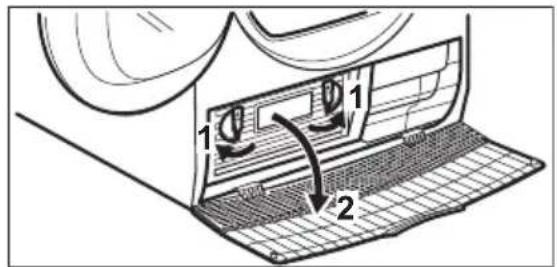
5.6.
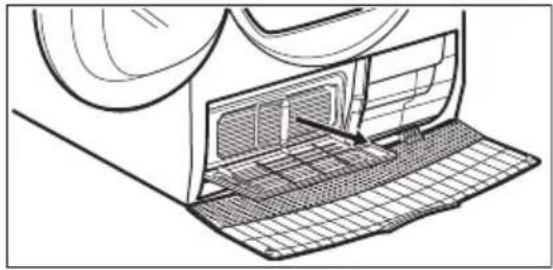
natural_image
Technical line drawing of a mechanical component with internal structure and mesh pattern (no text or symbols)7.8.
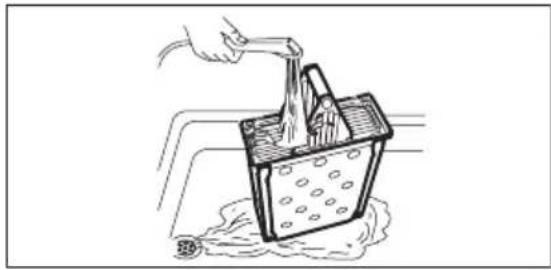
natural_image
Illustration of a hand pouring liquid into a container with bubbles, creating a splash (no text or symbols)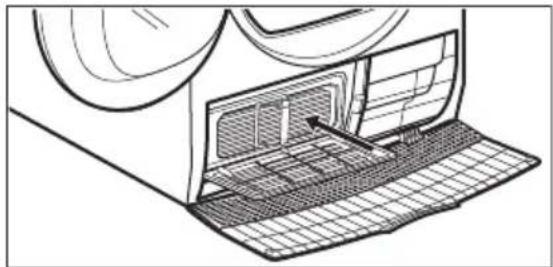
natural_image
Technical line drawing of a mechanical component with internal grid structure and an arrow indicating direction (no text or symbols)9.10.
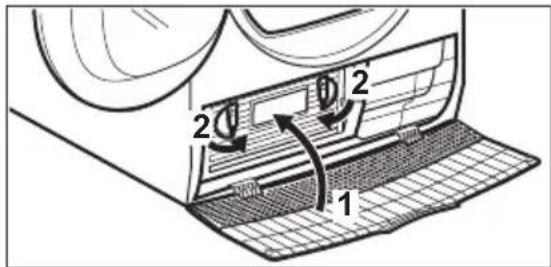
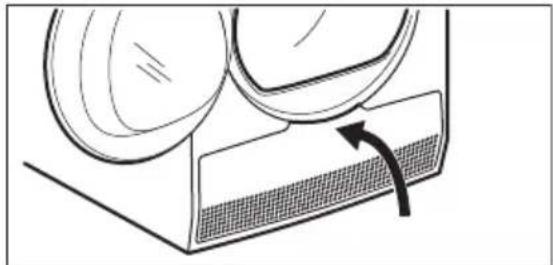
natural_image
Diagram of a mechanical component with a meshed base and curved arrows indicating motion (no text or symbols)11.4 Cleaning the drum

WARNING!
Disconnect the appliance before you clean it.
Use a standard neutral soap detergent to clean the inner surface of the drum and drum lifters. Dry the cleaned surfaces with a soft cloth.

CAUTION!
Do not use abrasive materials or steel wool to clean the drum.
11.5 Cleaning the control panel and housing
Use a standard neutral soap detergent to clean the control panel and housing.
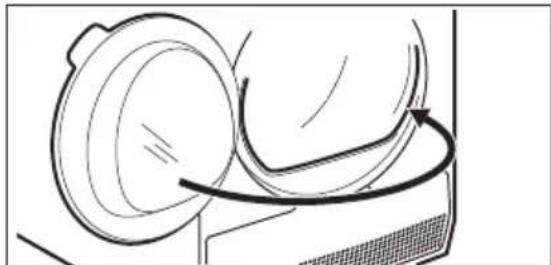
natural_image
Line drawing of a mechanical device with a curved arrow indicating motion or force (no text or symbols)Use a moist cloth to clean. Dry the cleaned surfaces with a soft cloth.

CAUTION!
Do not use furniture cleaning agents or cleaning agents which can cause corrosion.
11.6 Cleaning the airflow slots
Use a vacuum cleaner to remove fluff from the airflow slots.
12. TROUBLESHOOTING
| Problem Possible solution | |
| You cannot activate the appliance. Make sure that the mains plug is connected to the mains socket. | |
| Check fuse in fuse box (domestic installation). | |
| The programme does not start. Press Start/Pause. | |
| Make sure that the appliance door is closed. | |
| The appliance door does not close. Make sure that the installation of the filter is correct. | |
| Make sure that the laundry is not caught | between the appliance door and the rubber seal. |
| The appliance stops during operation. Make sure that the water container is empty. Press Start/Pause to start the programme again. | |
| Load is too small, increase the load or use the Time Drying programme. | |
| The cycle time is too long or unsatisfactory drying result.1) | Make sure that the weight of the laundry is suitable for the duration of the programme. |
| Make sure that the filter is clean. | |
| The laundry is too wet. Spin the laundry in the washing machine again. | |
| Ensure that the room temperature is higher than +5°C and lower than +35°C. Optimal room temperature is 19°C to 24°C. | |
| Set the Time Drying or the Extra Dry programme.2) | |
| The display shows — — — | If you want to set a new programme, deactivate and activate the appliance. |
| Make sure that the options are suitable for the programme. | |
| The display shows Error code (e.g. E51). Deactivate and activate the appliance. Start a new programme. If the problem occurs again, contact the Service centre. | |
1) After maximum 5 hours, the programme ends automatically.
2) It can happen that some area remains humid when drying big items (e.g. bed sheets).
12.1 If the drying results are not satisfactory
- The set programme was incorrect.
- The filter is clogged.
• The Heat Exchanger is clogged. - There was too much laundry in the appliance.
-
The drum is dirty.
-
Incorrect setting of the conductivity sensor (See chapter "Settings - Adjustment of the remaining laundry moisture degree" for better setting).
- The airflow slots are clogged.
- Room temperature is too low or too high ( optimal room temperature 19^ to 24^ )
13. TECHNICAL DATA
| Height x Width x Depth | 850 x 596 x 570 mm (maximum 594 mm) |
| Max. depth with the appliance door open | 1030 mm |
| Max. width with the appliance door open | 950 mm |
| Adjustable height 850 mm (+ 15 mm - feet regulation) | |
| Drum volume 104 l | |
| Maximum load volume 7 kg | |
| Voltage 220-230 V | |
| Frequency 50 Hz | |
| Total power 2250 W | |
| Type of use Household | |
| Permitted ambient temperature + 5°C to + 35°C | |
| Level of protection against ingress of sol-IPX4id particles and moisture ensured by the protective cover, except where the low voltage equipment has no protection against moisture | |
14. QUICK GUIDE
14.1 Daily use
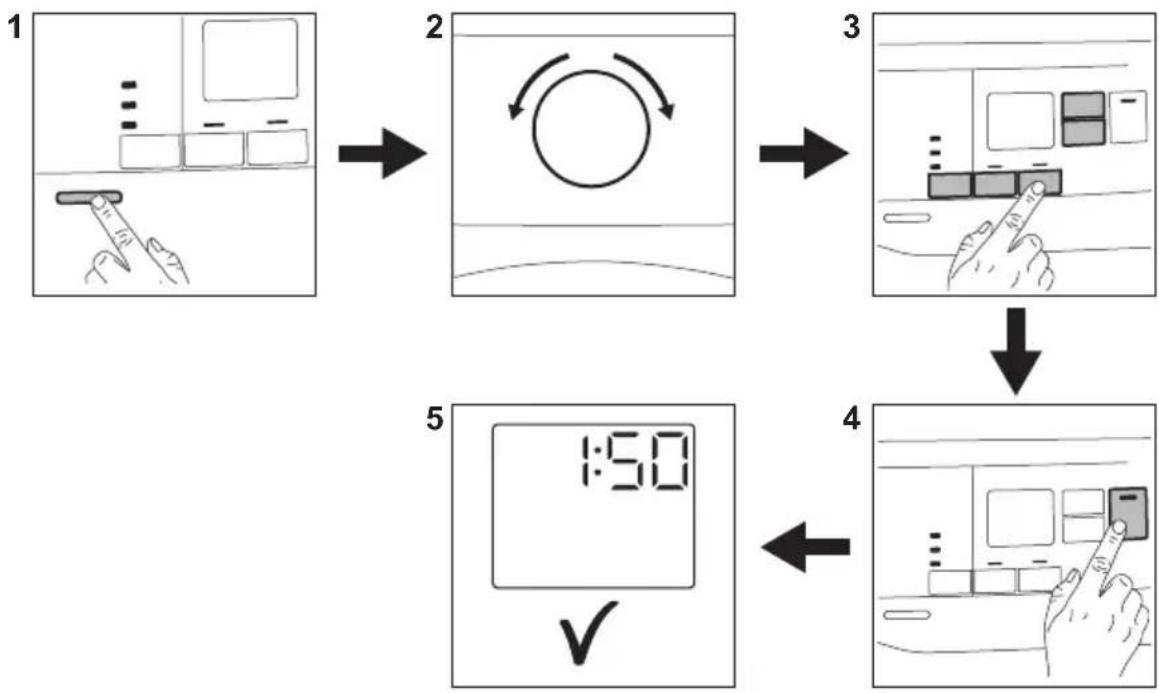
flowchart
graph TD
    A["1 Screen capture"] --> B["2 Rotation with circular arrow"]
    B --> C["3 Screen capture with hand pointing at a button"]
    C --> D["4 Screen capture with hand pointing at a button"]
    D --> E["5 Digital timer display with checkmark"]
- Push the On/Off button to turn on the appliance.
- Use the programme dial to set the programme.
- Together with the programme you can set 1 or more special options. To
activate or deactivate an option touch the relevant button.
- To start the programme, Touch the Start/Pause button.
- The appliance starts.
14.2 Cleaning the filter
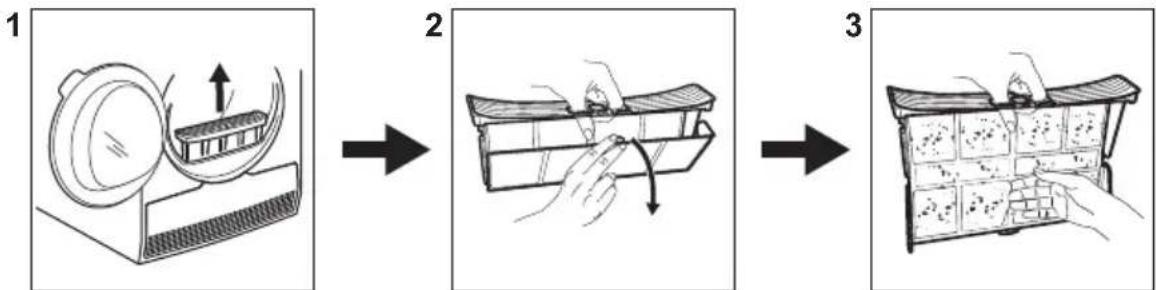
flowchart
graph LR
    A["Step 1: Cleaning with lid"] --> B["Step 2: Enabling with hand"]
    B --> C["Step 3: Cleaning with hand"]
At the end of each cycle the filter symbol
appears on the display and you must clean the filter.
14.3 Programme table
| Programme | Load 1) | Properties / Fabric type2) |
Favourite  | Depends on a mem- orised pro- gramme | You can do your configuration of programme and options and memorise in the appliance memory (See chapter "Settings - Favourite [XXSW] |
| Cottons 7 kg Cotton fabrics. | /  | |
| Mixed 3kg | Cotton and synthetic fabrics.Low temperature programme.Delicate programme with warm air. | |
| Bedding 3kg | Bed linen such as single and double sheets, pillowcases, du-vet cover. | |
| Synthetics 3,5 kg Synthetic and mixed fabrics. | /  | |
| Energy Saver 7 kg | Cycle to be used to dry cotton with "cotton cupboard" dryness level, with maximum energy sav-ing. | |
| Refresh 1kg Refreshing textiles that were in storage. | ||
| Denim 4 kg | Leisure clothing such as jeans,sweat-shirts of different material thicknesses (e.g. at the neck,cuffs and seams). | |
| Sports 2 kg | Sportswear, thin and light fab-rics, microfiber, polyester. | |
| Easy Iron | 1 kg (or 5 shirts) | Easy care fabrics for which a minimum of ironing is necessary.The drying results can be differ-ent from one type of fabric to an-other. Shake the items before putting them in the appliance.When the programme has ended, immediately remove the items and put them on a hanger. |
| Shirts | 1,5kg (or 7 shirts)/ | Easy care fabrics for which a minimum of ironing is necessary.The drying results can be differ-ent from one type of fabric to the other. Shake the items before you put them in the appliance.When the programme is comple-ted, Immediately remove the items and put them on a hanger. |
| Wool 1 kg | Woollen fabrics. Gentle drying for hand-wash-able woollens. Remove items immediately when the programme is completed. | |
| Delicates 4 kg | Delicate fabrics such as viscose, rayon, acrylic, and their blends. / [IMAGE] | |
1) The maximum weight refers to dry items.
2) For fabric mark meaning see chapter HINTS AND TIPS: Preparing the laundry.
15. ENVIRONMENTAL CONCERNS
Recycle materials with the symbol Put the packaging in relevant containers to recycle it. Help protect the environment and human health by recycling waste of electrical and electronic appliances. Do not dispose of appliances marked with the symbol with the household waste. Return the
product to your local recycling facility or contact your municipal office.
Being ensured permissible content limitation of some toxic chemicals (RoHS compliant).
RoHS
Compliant
Name and content of hazardous substances in products
| Part Name | Hazardous Substances | |||||
| Pb Hg | Cd Cr6+ | PBBs | PBDEs | |||
| Cabinet (including hinges) | X O O O O O | |||||
| Drum | O O O O O O | |||||
| Pump, fan & motor | X O O O O O | |||||
| Heat Pump system* | X O O O O O | |||||
| Air duct (including filter) | X O O O O O | |||||
| Control Panel | X O O O O O | |||||
| Door (including door lock) | X O O O O O | |||||
| Condenser & water tank | O O O O O O | |||||
| Worktop | O O O O O O | |||||
| Wirings (including power cord) | X O O O O O | |||||
Notes:
-
This table is compiled according to SJ/T11364-2014.
-
“O” means this kind of hazard substance content in all the homogenous material of this part is under the limitation regulated in GB/T26572-2011.
-
“X” means this kind of hazard substance content in at least in one homogenous material of this part is above the limitation regulated in GB/T26572-2011.
-
For these parts with “X” in the above table, there is no replacement solution due to technique limitation in the industry; however, this may change with the technique improvement.
-
The parts marked with * means that not applies to all models, the parts actuals depend on specific models.
- Under normal usage condition, the environment friendly usage period is 15 year.
目录
natural_image
Line drawing of a computer monitor with a circular grid pattern icon (no text or symbols)3.
4.
natural_image
Line drawing of a hand holding a curved object with an arrow indicating rotation (no text or symbols)5.1)
natural_image
Illustration of hands using a tool to adjust or install a grid of small objects (no text or symbols visible)6.
natural_image
Line drawing of a hand holding a tool interacting with a curved object (no text or symbols)11.2 排空水箱
- 2.
natural_image
Line drawing of a washing machine with a speech bubble showing a water drop symbol (no text or labels)3.
natural_image
Diagram of a mechanical device with hands operating a component, showing motion arrows (no text or symbols)4.
natural_image
Line drawing of a hand using a tool to clean or wash a cylindrical object into a bowl (no text or symbols)i
natural_image
Diagram of hands operating a mechanical device with an arrow indicating motion, accompanied by a warning symbol (no text or labels present)3.
natural_image
Line drawing of a mechanical component with a curved arrow indicating motion (no text or symbols)4.
natural_image
Diagram showing a hand pressing down on a mesh component with an arrow indicating rotation (no text or symbols)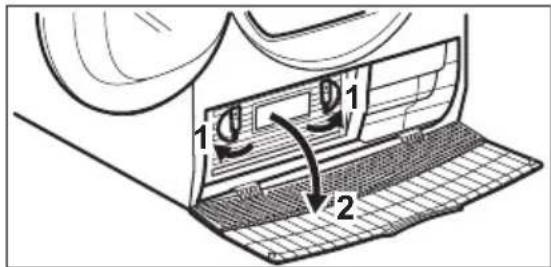
5.6.
natural_image
Technical line drawing of a mechanical component with internal structure and mesh grid (no text or symbols)7.
natural_image
Diagram of a car air vent system with mesh grid and airflow direction arrow (no text or labels)9.
natural_image
Diagram of a mechanical component with a meshed base and curved arrows indicating motion (no text or symbols)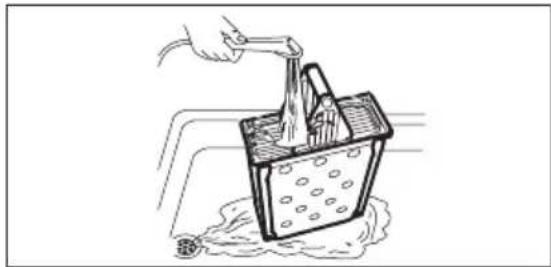
natural_image
Illustration of a hand using a tool to lift a container with liquid, creating a splash (no text or symbols)8.
10.
natural_image
Line drawing of a mechanical component with a curved arrow indicating motion (no text or symbols)11.4 清洁滚筒

警告!
请在清洁前断开本机电源。
flowchart
graph TD
    A["1: Start with grid boxes, hand cursor clicking timer"] --> B["2: Reset with circular arrow"]
    B --> C["3: Process with hand cursor clicking timer"]
    C --> D["4: Check hand cursor clicking timer"]
    D --> E["5: Display at 1:00: Time clock"]
flowchart
graph LR
    A["1: Bag being cut off"] --> B["2: Folding garment"]
    B --> C["3: Stacking with hand gesture"]
natural_image
Repeating pattern of gray geometric shapes on white background, no text or symbols present- WE'RE THINKING OF YOU
- CUSTOMER CARE AND SERVICE
- ⚠ SAFETY INFORMATION
- Children and vulnerable people safety
- WARNING!
- General Safety
- SAFETY INSTRUCTIONS
- Installation
- Electrical connection
- Use
- Care and cleaning
- PRODUCT DESCRIPTION
- Disposal
- CONTROL PANEL
- Display
- PROGRAMME TABLE
- OPTIONS
- Dryness Level
- Gentle Dry
- Extra Anticrease
- Time Dry
- Options table
- SETTINGS
- Child lock function
- Activating the child lock option:
- Favourite
- To memorise your configuration:
- To activate your memorised configuration:
- Adjustment of remaining laundry moisture
- Water container indicator
- Deactivating the water container indicator:
- BEFORE FIRST USE
- DAILY USE
- Start a programme without delay start
- CAUTION!
- Buzzer on/off
- Starting the programme with delay start
- Change a programme
- At the end of the programme
- HINTS AND TIPS
- Preparing the laundry
- Stand-by function
- CARE AND CLEANING
- Cleaning the filter
- Emptying the water container
- 1.2.
- 3.4.
- i
- Cleaning the Heat Exchanger
- Cleaning the drum
- Cleaning the control panel and housing
- Cleaning the airflow slots
- TROUBLESHOOTING
- If the drying results are not satisfactory
- TECHNICAL DATA
- QUICK GUIDE
- Daily use
- Cleaning the filter
- ENVIRONMENTAL CONCERNS
- 目录
- 排空水箱
- 清洁滚筒
Brand : ELECTROLUX
Model : EDC704GEWA
Category : Tumble drier