
MD-PM20J5WH - Microwave MIDEA - Free user manual and instructions
Find the device manual for free MD-PM20J5WH MIDEA in PDF.


| Product Type | Microwave Oven |
| Brand | Midea |
| Model | MD-PM20J5WH |
| Capacity | 20 liters (0.7 cu ft) |
| Microwave Power | 700 W |
| Voltage | 230 V / 50 Hz |
| Dimensions (W x D x H) | 440 x 358 x 258 mm |
| Weight | 10.5 kg |
| Control Type | Mechanical (Dials) |
| Display | None (manual timer) |
| Turntable Diameter | 255 mm |
| Functions | Defrost, Timer (up to 35 min), Power Levels (6) |
| Interior Light | Yes |
| Safety Features | Child lock, door interlock |
| Cleaning | Wipe with damp cloth, non-abrasive cleaners |
| Warranty | 1 year limited |
| Energy Consumption | 1050 W (input) / 700 W (output) |
| Repairability | Accessible fuse, replaceable turntable motor |
Frequently Asked Questions - MD-PM20J5WH MIDEA
User questions about MD-PM20J5WH MIDEA
0 question about this device. Answer the ones you know or ask your own.
Ask a new question about this device
Download the instructions for your Microwave in PDF format for free! Find your manual MD-PM20J5WH - MIDEA and take your electronic device back in hand. On this page are published all the documents necessary for the use of your device. MD-PM20J5WH by MIDEA.
USER MANUAL MD-PM20J5WH MIDEA
natural_image
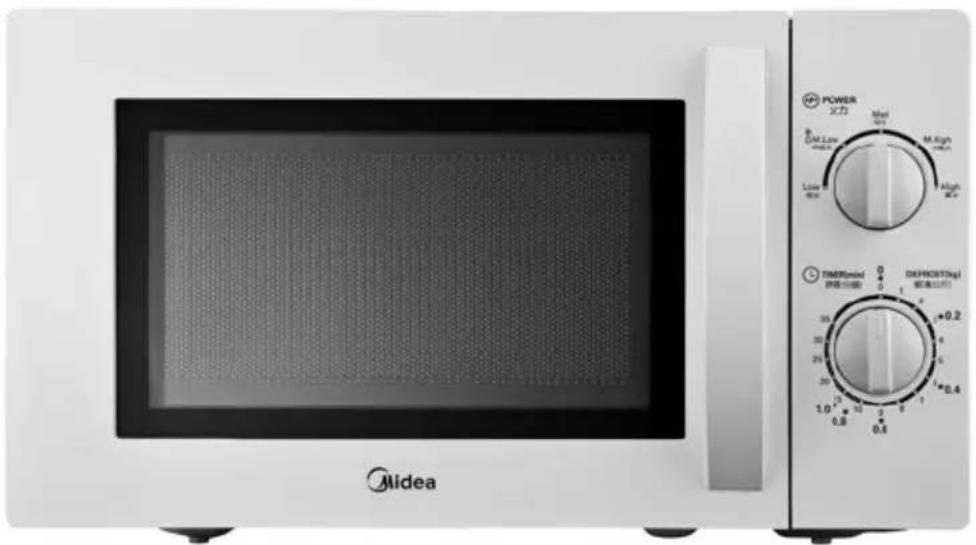
Exterior view of a Midea microwave oven with control knobs and a blank screen (no visible text or symbols on the main device body)natural_image
Line drawing of a three-pin electrical plug (no text or symbols)正確分極和接地插座
Microwave Oven Instruction Manual
natural_image
White Midea microwave oven with control knobs and a power interface (no visible text or symbols on the main body)Before using this microwave oven, please read this instruction manual carefully and then keep it properly.
Please Keep This Instruction Manual Properly
Precautions to avoid possible exposure to excessive amounts of microwave radiation:
(a) Do not attempt to operate the microwave oven with the door open as this will result in harmful exposure to microwave radiation. Ensure not to break or tamper with the safety interlock.
(b) Do not place any object at the front or by the sides of microwave oven's door, or allow any contaminant, detergent or food residue to gather in the sealed chamber.
(c) If the microwave oven door or door seal is damaged, please do not use it. No one except qualified maintenance personnel is allowed to repair the microwave oven.
Product Specifications
| Model No. | MM720CJ5 |
| Product name | Microwave Oven |
| RatedVoltage/Frequency | 110V~60Hz |
| Rated Input Power(Microwave) | 1050 |
| Rated Output Power(Microwave) | 700W |
| Oven Capacity 20L | |
| Turntable Diameter | 255mm |
| Product Dimensions (W x H x D) | 440 x 259 x 340mm |
| Net Weight | Approx 10.7 kg |
- Warning: Please do not heat liquid and food in a closed container to avoid possible explosion.
- Only qualified technicians are permitted to repair this appliance. Should you want to inspect, repair, or adjust this microwave oven, please contact the customer service center.
- Warning: Only children who have been taught on how to use the microwave oven correctly and understand the hazards it may cause if not used properly are allowed to operate this microwave oven individually without the supervision of an adult
- As with other electrical appliances, when the microwave oven is operated by a child, he/she must be guided by an adult alongside.
- Only microwave-safe containers are permitted to use in this microwave oven.
- The microwave oven must be cleaned regularly to remove any food residues.
- Please read all instructions for use before using this appliance.
- When heating food in a plastic or paper container, ensure to leave an opening to avoid possible fire.
- If you see smoke, cut off the power and shut the oven door to extinguish the flame.
- Do not cook the food for too long. When cooking food in the microwave oven, please pay attention if you are using paper, plastic, or other flammable utensils.
- Do not store items, in particularly flammable items such as bread, desserts, and paper products in the microwave oven. If the power cord is struck by lightning, the microwave oven may be turned on by itself.
- Before placing the food in a paper or plastic container (or bag) in the microwave oven chamber, please first remove the tie cord and metal handle.
- When installing or securing this microwave oven, please strictly follow the installation instructions.
- Some products, such as unpeeled fruits, water with oil or fat, sealed containers, closed glass jars, etc. may cause explosion in the microwave oven and should not be heated in it.
- When using this microwave oven, please use it in accordance with the regulated methods stated in the instruction manual. Do not use any corrosive chemicals or items that will generate steam in this microwave oven. This microwave oven is only good for heating or cooking food, and cannot be used for industrial or laboratory purposes.
- Do not use this microwave oven if its power cord or plug is damaged, and if it is malfunctioned, damaged or dropped on the floor.
-
Please do not store or use this appliance outdoor.
-
Please do not place this microwave oven near a water source or sink, use it underground or near a swimming pool.
- As the microwave oven's housing may be very hot while it is operating, please ensure to keep the power cord away from the heated surface and do not cover any of its vents.
- Please do not allow the power cord to dangle on the edge of table or counter.
- Failure to keep the oven clean may result in surface damage that may affect its service life and may even cause hazards.
- When heating the baby milk bottle or baby food can in a microwave oven, stir or shake it before use, try its temperature first and only feed the baby when the temperature is appropriate to avoid burns.
- To avoid the post hot liquid and drink from boiling abruptly or scalding, please stir the liquid first before placing it in the oven and stir it once more intermittently before removing the container.
- Without proper supervision, do not allow children, people with mobility difficulty, people with sensory and neurologically impaired, or inexperienced people to use this microwave oven to ensure their safety.
- Children should be monitored to ensure that they do not play with the oven.
- Unless otherwise instructed, please do not place the microwave oven in the kitchen cabinet.
- Please do not operate the microwave oven with other timer or remote control.
- Place the back of the oven against the wall.
Danger
Electric shock hazards
Touching certain components of the microwave oven may cause serious personal injury or death. Please do not attempt to disassemble the microwave oven.
Warning
Electric shock hazards
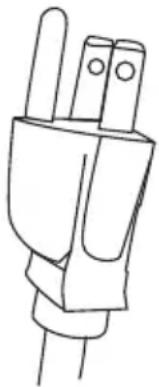
Improper grounding may cause electric shock. Do not insert the plug into the socket before the microwave oven has been properly installed and grounded.
natural_image
Line drawing of a hand gripping three pins (no text or symbols)A proper grounded 3-pin plug
This appliance must be grounded. In the event of power outage, the grounding device will provide a safe escape route for the current to reduce the risk of electric shock. This appliance is provided with a grounding conductive wire with a grounding plug. The plug must be inserted into a socket that is properly installed and grounded. If you do not fully understand the grounding guide or suspicious that the appliance is not properly grounded, please consult a qualified electrician or service personnel. If you must use an extension wire, it is mandatory to use the 3-wire extension wire and plug, and a 3-pin socket.
- Use a shorter power cord as a longer one will tend to entangle or cause people to trip over.
- If you use a longer wire fitting or extension wire, please follow the following guidelines:
1) The nominal rated power of the wire fitting or extension wire should at least be the same as the rated electrical power of the appliance.
2) The extension wire must be in grounded 3-wire cable.
3) Please organize the longer power cord properly, and prevent it from dangling on the table or counter to avoid children from pulling it or tripping over unintentionally.
Selection of Microwave Oven Utensils
Warning
Risk in personal injury
The tightly sealed containers can cause an explosion. The closed containers must be opened before heating and the plastic pouches must be perforated.
For further guidance on “microwave-safe materials or materials that should be avoided to use in microwave oven,” please see the following detail descriptions. If you have doubt on certain non-metallic utensils that are unsafe to use in microwave oven, please follow the following steps to test the suspicious containers.
Utensil testing:
- Heat the suspicious utensil in the microwave oven along with a microwave-safe glass filled with cold water (approx. 250ml).
- Heat for one minute using maximum power.
- Observe the utensil carefully. If the utensil gets hot, do not use it for microwave cooking.
- Do not heat more than one minute.
Microwave-safe utensils
| Utensils | Instructions for Use |
| Tableware | Use only microwave-safe utensils. Follow the manufacturer's guidelines. Do not use a cracked or chipped plate. |
| Glass jars | The lid must be removed when cooking. Use only to warm up the food. As most glass jars are non-heat resistant, they tend to break. |
| Glassware | Use only heat-resistant and microwave-safe glassware, and ensure that such glassware is free of a metal rim. |
| Microwave-safe cooking bags | Follow the manufacturer's guidelines. Do not bundle the cooking bag with a metal tie cord, and ensure to leave an opening to allow steam to escape. |
| Paper plates and cups | Use only short-time cooking or heating. Do not leave the microwave oven unattended during cooking. |
| Paper napkins (oil-absorbing material) | Use a paper napkin to cover the food for reheating and absorbing oil. Only use it for short-time cooking and there must be somebody to stand watching. |
| Water resistant paper | Use it as a splash cover or steam cover. |
| Plastic materials | Use only microwave-safe utensils. Follow the manufacturer's guidelines and only use the utensils with “microwave-safe” label. Some plastic containers will soften when the food inside has become hot. For “boiling bags” and tightly closed plastic bags, they should be unsealed or perforated. |
| Plastic wrap | Use only microwave-safe plastic wrap. Use it to cover food during cooking to retain the moisture. Do not allow the plastic wrap to come into contact with the food. |
| Thermometer | Use only a microwave-safe thermometer. |
| Waxed paper | Use it as a cover to prevent liquid from splashing and retaining the moisture. |
Materials that should be avoided in microwave oven
| Utensils | Instructions for Use |
| Aluminum trays | They may cause an arcing. |
| Food boxes with a metal handle | They may cause an arcing. |
| Metal cookware or utensil with a metal rim | Metal will shield the food from receiving the microwave energy, and the metal trim may cause an arcing. |
| Metal tie cord | It may cause an electric arc and possible fire. |
| Paper bags | They may cause the microwave oven to catch fire. |
| Styrofoam | When exposed to high temperatures, styrofoam may melt or contaminate the liquid. |
| Wooden utensils | When a wooden utensil is used in microwave oven, it will become dry, brittled or split. |
Correct Microwave Oven Installation
Remove the microwave oven and accessories from the packaging box.
Accessories include:
Glass turntable - 1pc
Turntable ring assembly
- 1pc
Instruction manual - 1pc
Warranty card - 1 sheet
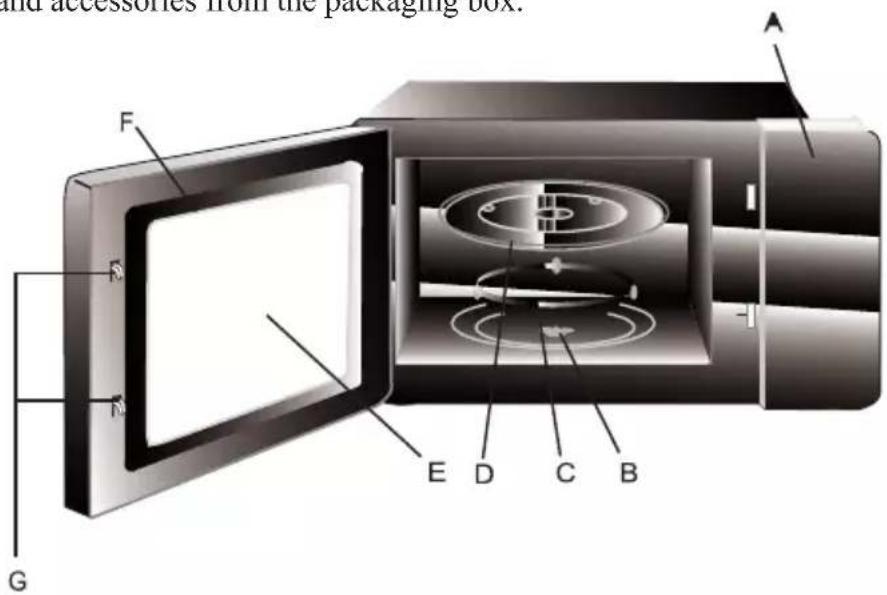
A) Control Panel
E) Viewing window
B) Shaft
F) Door assembly
C) Turntable ring assembly
G) Safety interlock system
D) Glass turntable
Turntable Installation Guides
Center (underneath)
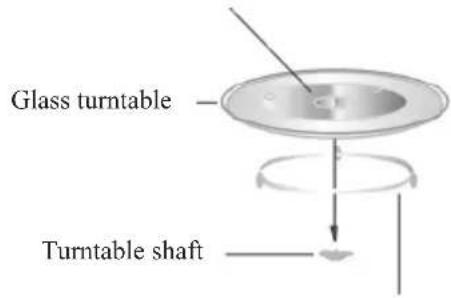
Turntable ring assembly
a. Do not turn the glass turntable upside down. Do not compress the glass turntable.
b. The glass turntable and Turntable ring assembly must always be used during cooking.
c. All food and food container must be placed on a glass turntable while cooking.
d. If the glass turntable or Turntable ring assembly is cracked or damaged, please contact the customer service center.
Microwave Installation Guides
Installation Descriptions
Counter installation
Remove all packaged items in the microwave oven. Do not remove the light brown duct cover installed in the chamber.
Inspect if the microwave oven is damaged, such as dents or door breakage. If the microwave oven is damaged, do not continue the installation.
Oven: Remove all protective film on the inner surface of the oven.
Installation
- The counter must have enough space for air inlets and air outlets.
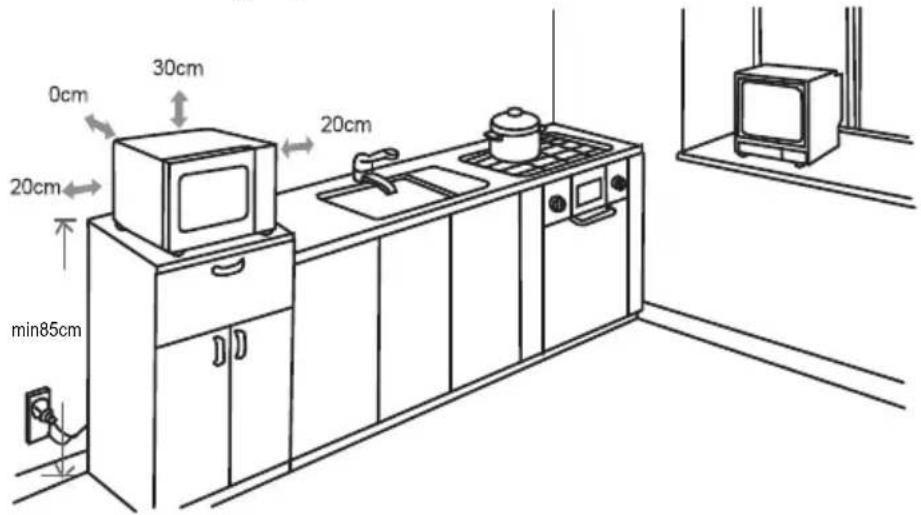
- It is prohibited to place the microwave oven on the floor.
- The minimum clearance between the microwave oven and any adjacent wall or object cannot be less than 20cm, while its back can be placed against the wall.
- Leave at least 30cm of space on top of the microwave oven.
- Please do not remove the legs at underneath of microwave oven.
- Blocking air inlets and/or air outlets can damage the microwave oven.
- Place the microwave oven far away from radio and TV as it will interfere the signal reception of radio or TV while operating.
- Please connect the microwave oven to the standard household power supply. Ensure that the voltage and frequency of power supply are consistent with those listed on the electrical label.
Warning
Do not install the microwave oven on the stove or other heating appliances. If the microwave oven is installed near or above a heat source, it can be easily damaged and will not be liable for maintenance service. Please beware that the accessible surface of microwave oven may be hot while it is operating.
Cleaning
- First disconnect the plug to cut off power supply. Wipe both inside and outside of microwave oven with a soft cloth dampened with a mild detergent, then clean the surfaces and wipe them dry. Cleaning should be performed at least once a week or several times if necessary. Wipe with a soft cloth and never use cleaning powder or a coarse rag to scrub. The oil stains found on top of the microwave oven's chamber caused by splashing, especially while cooking chicken or bacon, can be difficult to remove if left for several days, use a wet paper towel to wipe the oil stains.
2. Removable parts
(1) The glass turntable can be cleaned in the sink. Be careful not to crack or damage the edge as this may cause it to break during operation.
(2) Clean the turntable ring assembly frequently.
- To allow the microwave oven to achieve best performance and ensure safe operation, do not allow food residues to accumulate on the inner door panel and the door rim, and clean them carefully.
Operation Guides
CONTROL PANEL
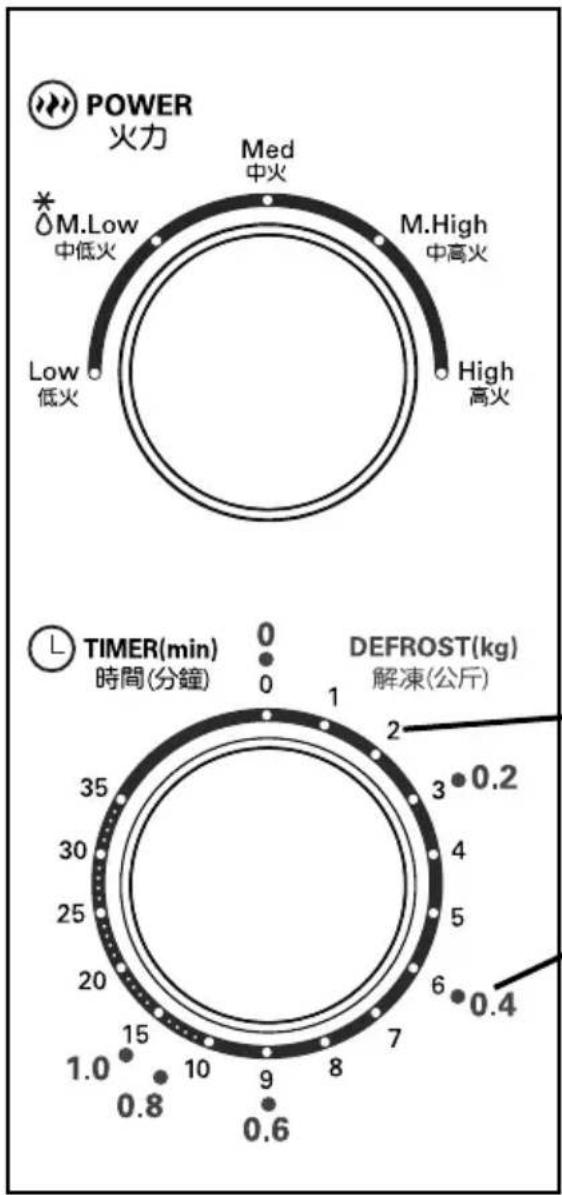
COOKING POWER CONTROL
Turn to select a cooking power level.
| Power | Power Output |
| Low | 17% |
| M.Low (defrost) | 33% |
| Med | 55% |
| M.High | 77% |
| High | 100% |
TIMER
Easy time setting by turning the knob to your desired cooking time up to 35 minute s.
DEFROST (kg)
Defrost guide by weight of defrost food.
OPERATION
Basic instructions for simple recipes as below:
General Cooking
- Set cooking power by turning the power knob to desired level.
- Rotate the Timer Knob to the desired cooking time.
- The microwave oven will automatically start and timer will count down to "0"
- When time is up, a signal bell will sound and the oven will automatically turn off.
Defrost Function
- Set cooking power by turning the power knob to M.Low (defrost)
- Rotate the Timer Knob to the weight of food as indicated on the defrost guide.
- The microwave oven will automatically start and timer will count down to "0".
- When time is up, a signal bell will sound and the oven will automatically turn off.
| Function/Power | Microwave Power | Application |
| Low | 17% | Soften ice cream |
| M.Low (Defrost) | 33% | Soup stew, soften butter or defrost |
| Med | 55% | Stew, fish |
| M.High | 77% | Rice, fish, chicken, ground meat |
| High | 100% | Reheat, milk, vegetables, beverage |
Attention :
- If you want to stop cooking before the end of the cooking time, turn the timer back to "0"
- When the oven door is opened, the operation of microwave oven will stop immediately.
- If the unit is not in use, always set the timer to "0"
- When removing food from the oven, please ensure that the oven power is switched off by turning the timer to "0".
- It is forbidden to run the unit without any food inside. It is very dangerous.
Be sure to unplug the appliance from the power supply.
- Clean the oven cavity with a slightly damp cloth after used.
- Clean the accessories with soapy water.
- The door frame seal and neighbouring parts must be cleaned carefully with a damp cloth.
Troubleshooting
| Normal Symptoms | |
| TV signals are interrupted by microwave oven | Radio and television signals may be interrupted while the microwave oven is running. This is very similar to interference caused by small household appliances such as blender, vacuum cleaner and electric fan. It is deemed a normal phenomenon. |
| Water vapor accumulates on the door and hot air exhausts out from the vent | During cooking, water vapor may be generated from the food itself. Most of the water vapor will be discharged from the exhaust vent, but some may accumulate on the colder places, such as the door. This is deemed to be a normal phenomenon. |
| Malfunctions | Possible Causes | Troubleshooting |
| Oven fails to operate | (1) Power cord is not properly inserted into the socket. | Disconnect the plug and reinsert it into the socket after 10 seconds. |
| (2) The fuse is broken or the circuit breaker trips. | Replace the fuse or reset the circuit breaker (only the company's professional personnel is allowed to perform the maintenance). | |
| (3) Socket failure. | Use other electrical appliances to test if the socket is functioning. | |
| No heating occurs | (4) The door is not closed properly. | Reclose the door. |
ENVIRONMENT
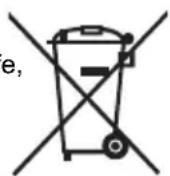
Do not throw away the appliance with the normal household waste at the end of its life, but hand it in at an official collection point for recycling. By doing this, you help preserving the environment.
IMPORTANT NOTICES
IN NO EVENT SHALL OUR COMPANY OR THE SUPPLIER BE LIABLE TO YOU OR ANY OTHER PARTY FOR ANY DIRECT, INDIRECT, GENERAL SPECIAL, INCIDENTAL, CONSEQUENTIAL, EXEMPLARY OR OTHER DAMAGES ARISING OUT OF THE USE OR INABILITY TO USE THE PRODUCT (INCLUDING, WITHOUT LIMITATION, DAMAGES FOR INJURY, LOSS OF PROPERTY, BUSINESS PROFITS, BUSINESS INTERRUPTION) OR FROM ANY BREACH OF WARRANTY, EVEN IF OUR COMPANY OR SUPPLIER HAS BEEN ADVISED OF THE POSSIBILITY OF SUCH DAMAGES. IN NO CASE SHALL OUR COMPANY OR SUPPLIER'S LIABILITY EXCEED THE AMOUNT YOU PAID FOR THE PRODUCT.
Specifications, designs and dimensions are subject to change without prior notice.
PN:16170000A77216
- Microwave Oven Instruction Manual
- Precautions to avoid possible exposure to excessive amounts of microwave radiation:
- Danger
- Warning
- Selection of Microwave Oven Utensils
- Utensil testing:
- Correct Microwave Oven Installation
- Turntable Installation Guides
- Microwave Installation Guides
- Installation
- Cleaning
- Removable parts
- Operation Guides
- CONTROL PANEL
- TIMER
- DEFROST (kg)
- OPERATION
- General Cooking
- Defrost Function
- Attention :
- Troubleshooting
- ENVIRONMENT
- IMPORTANT NOTICES
Brand : MIDEA
Model : MD-PM20J5WH
Category : Microwave