Video Doorbell 2K Pro - Doorbell eufy - Free user manual and instructions
Find the device manual for free Video Doorbell 2K Pro eufy in PDF.


| Product Type | Video Doorbell (Wired) |
| Brand | eufy Security |
| Model | Video Doorbell 2K Pro (Wired) / T8200 |
| FCC ID | 2AOKB-T8200 |
| IC | 23451-18200 |
| Video Resolution | 2K (2304 x 1296 @ 30fps) (typical) |
| Field of View | 160° diagonal (typical) |
| Power Source | Wired to existing doorbell transformer (16-24V AC) |
| Wi-Fi | 2.4 GHz 802.11 b/g/n |
| Audio | Two-way audio |
| Night Vision | Yes, IR LEDs |
| Mounting | Surface mount with included bracket and 15° wedge (optional) |
| Compatible Chime | Doorbell Chime T8740 (included), up to 4 chimes |
| App | eufySecurity (iOS & Android) |
| Voice Assistant | Compatible with Amazon Alexa, Google Assistant (likely) |
| Weather Resistance | IP65 (typical for outdoor) |
| Operating Temperature | -20°C to 50°C (-4°F to 122°F) (typical) |
| Warranty | 12-month limited |
| What's in Box | Doorbell, mounting bracket, 15° wedge, chime, power connector, jumper, screws, detaching pin, quick start guide |
Frequently Asked Questions - Video Doorbell 2K Pro eufy
User questions about Video Doorbell 2K Pro eufy
0 question about this device. Answer the ones you know or ask your own.
Ask a new question about this device
Download the instructions for your Doorbell in PDF format for free! Find your manual Video Doorbell 2K Pro - eufy and take your electronic device back in hand. On this page are published all the documents necessary for the use of your device. Video Doorbell 2K Pro by eufy.
USER MANUAL Video Doorbell 2K Pro eufy
Video Doorbell 2K Pro (Wired)
eufy
SECURITY
natural_image
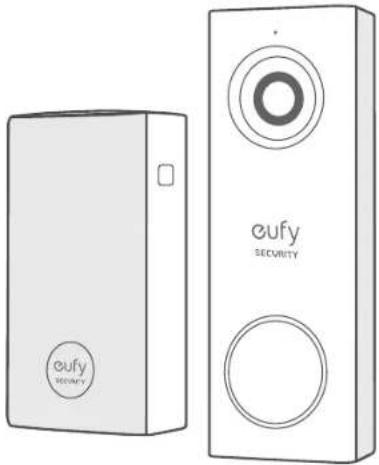
Line drawing of two eufy Security devices, one rectangular and one vertical, with no visible text or symbols on the devices themselves.Anker Innovations Limited. All rights reserved, eufy Security and eufy Security Logo are trademarks of Anker Innovations Limited, registered in the United States and other countries. All other trademarks are the property of their respective owners.
51005002330 V01
Table of Contents
What's in the Box 01
What's Required for Installation 02
How the System Works 02
EufySecurity App Installation 03
Video Doorbell Installation 04
Safety
Customer Service 17
15
What's in the Box
Video Doorbell 2K Pro
(Wired)
Model: 18202
FCC ID: 2AOKB-T8200
IC:23451-18202
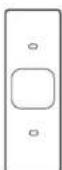
Screw Hole
Positioning-Card
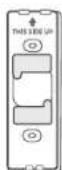
Mounting Bracket
(Attached to 15°
Mounting Wedge
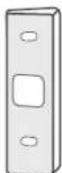
15° Mounting
Wedge
(Optional)
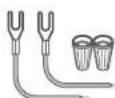
Extension Wires and
Wire Nuts (Optional)
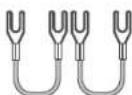
Jumper for Existing
Chime (The second one is
optional)
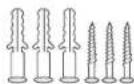
Screw Packs (Spare
screws and anchors are
included)

Doorbell
Detaching Pin
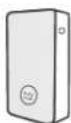
Doorbell Chime
Model: T8740

Doorbell Chime
Power connector
(The pin type may vary in
different regis

Quick Start Guide
What's Required for Installation
Phillips-Head Screwdriver
Power Drill with 1/4" (6.35mm) Drill Bit
How the System Works
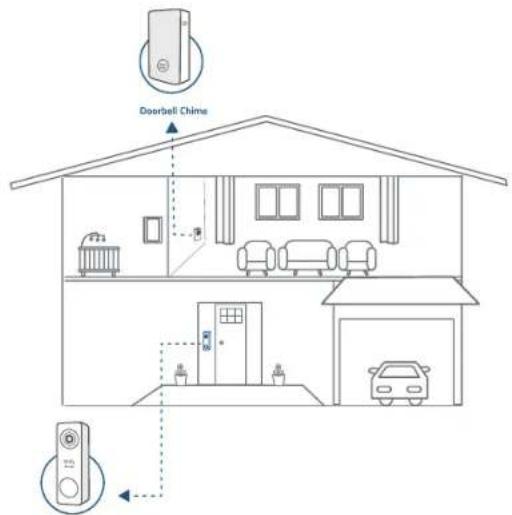
The Video Doorbell system includes 2 parts. One is the video doorbell at your porch. The other is the electronic chime plugged on indoor power socket. The video doorbell is powered by existing doorbell wires. In order to get sufficient power from the doorbell circuit, user needs to bypass the existing doorbell chime on the circuit.
English 02
01 English
EufySecurity App Installation
Search keyword "EufySecurity" on App Store or Google Play and install the App on your phone.


Register and login to the App. Add video doorbell and scan the QR code for later installation process.
The QR code can be found on the back of the documentation folder or on the back of the video doorbell.
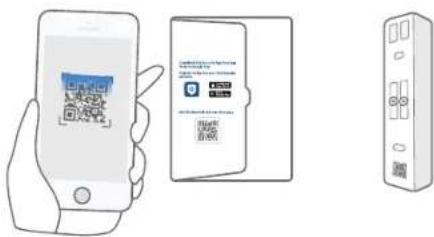
Tips:
Follow these steps to complete the setup on the eufy Security Video Doorbell
Step 1. Scan the QR Code.
Step 2. Physical installation.
Step 3. Go to the App and finish the system setup.
03 English
Video Doorbell Installation
Note: Make sure you have installed the EufySecurity App and scan the QR code before start handling the doorbell installation.
Step 1
Ring the existing doorbell, make sure it's working and locate the place of your existing chimes in the house.
Step 2
Shut off the doorbell power supply. If you're not sure, shut off the main power supply in your house. Turn the lights in your home on / off to make sure the electricity in your house is properly shut off.
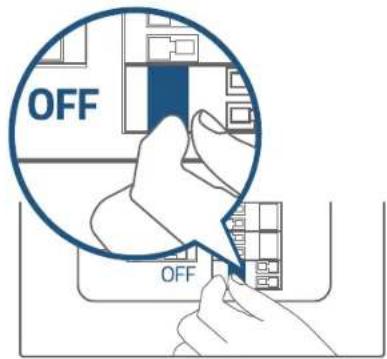
Note: Always be careful when handling electricity wiring. If you're not comfortable to do it yourself, do consult a qualified electrician.
English 04
Step 3
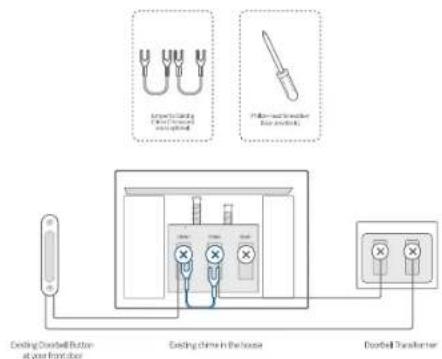
Find the doorbell chime in your house, then remove the cover and find the screw terminals with TRANS and FRONT markings. Use the provided jumper for existing chime to connect the two terminals. This is to bypass the doorbell chime and will not affect the normal operation of the circuit.
Note:
- The video doorbell requires user to bypass the existing chime first to get sufficient power. Without this step, the video doorbell will still be able to power on but will operate unstably.
- In most cases, the existing doorbell circuit looks like below chart. Find the existing doorbell chime in your house, remove the cover and take a photo of the wire connection in case you need to reconnect it.
- Use the provided jumper to connect FRONT and TRANS terminals to bypass the chime on the circuit. Do not remove the original wire connecting to the chime. If your doorbell chime has different markings or you have multiple chimes, refer to the help session in the App for the custom wiring instructions or consult a qualified electrician.
- When the jumper is in place, the existing chime will not sound anymore.
What are required: Jumper for existing chime / Phillips-Head Screwdriver
05 English
Step 4
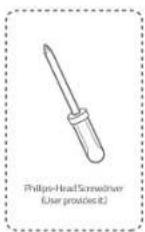
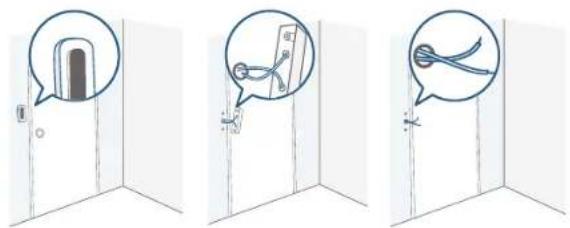
Remove the existing doorbell button at the front door. Pull the two wires out carefully when removing the old doorbell. Straighten the wire ends if necessary.
What's required: Phillips-Head Screwdriver
English 06
Step 5
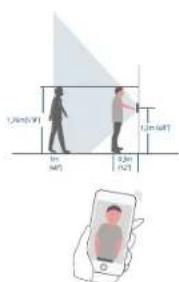
Determine the mounting position of the doorbell. Consider the below factors:
- Check if you can reuse the existing holes and anchors on the wall or door frame.
- If you are drilling the mounting holes for the first time the recommended mounting height is 48" from the ground.
If you are mounting the doorbell on a wooden wall or board, do NOT drill holes. Skip to Step7 and
use screws directly to mount the Mounting Bracket.
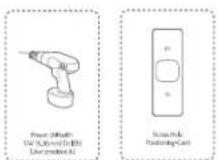
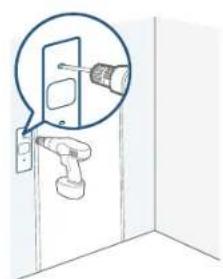
If your wall is stucco, brick or concrete, you need to drill holes. Use the Screw Hole Positioning-Card
to mark the position and drill holes with 1/4" (6.35mm) drill bit.
What are required: Power Drill with 1/4" (6.35mm) Drill Bit / Screw Hole Positioning-Card
natural_image
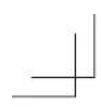
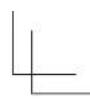
Diagram of a door with a screwdriver inserted, showing the installation and assembly (no text or symbols)Optional: Use the 15° mounting wedge as a supplementary mounting bracket if you wish to see more on a specific side.
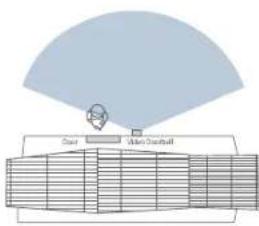
Without 15 ^st Mounting wedge
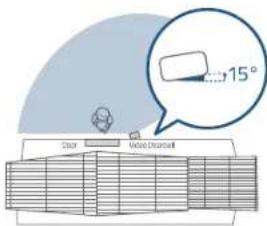
With 15" Mounting wedge
Step 6
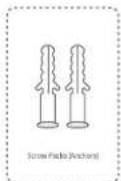
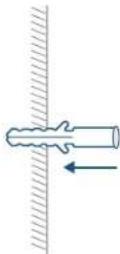
Use the anchors provided when installing in materials such as stucco, brick, or concrete. There is no need to use anchor if you were installing on wooden doorframe.
What's required: Anchors
07 English
English 08
Step 7
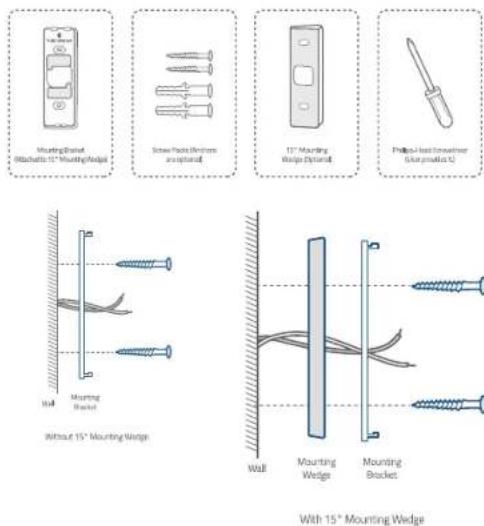
Lead the two doorbell wires through the central square hole on the bracket before start mounting.
Insert the two screws provided through the screw holes or through the 15° mounting wedge(Install the mounting bracket to the 15° mounting wedge in prior), and fasten the screws tightly.
What are required: Mounting Bracket / Screw Packs / 15° Mounting Wedge(Optional) / Phillips-Head Screwdriver
Step 8
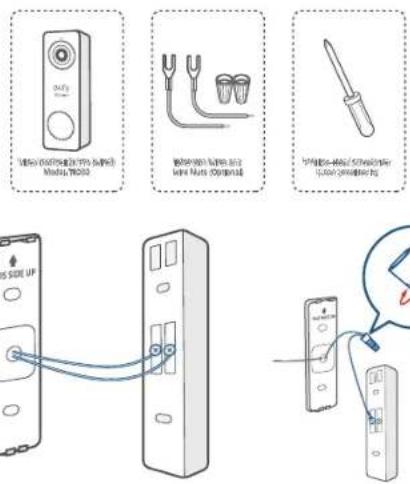
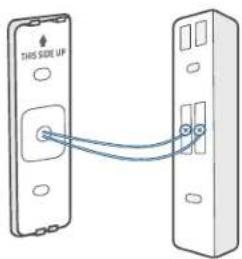
Connect the wires to the two terminals at the back of the doorbell, then tighten the terminal screws. Wire can connect to any terminal as the electric current is alternating current.
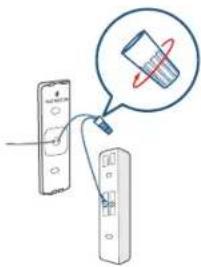
Note: To prevent short-circuit, make sure the wires are not touching each other after connecting them to the terminals. If the wires are too short, use the extension wires and wire nuts provided to make them longer. Use electrical wiring tape to secure the connection if the wall doesn't have space for wire nuts.
What are required: Extension Wires and Wire Nuts (Optional) / Video doorbell / Philips-Head Screwdriver
09 English
English 10
Step 9
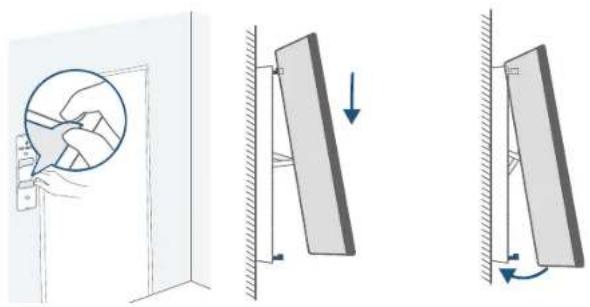
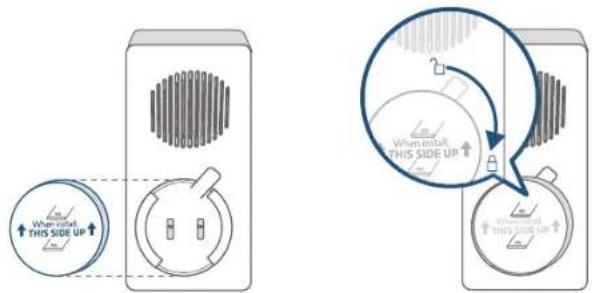
There are 2 thermal conductive pads on the mounting bracket. They're used to conduct heat from video doorbell to the metal bracket. Remove the films on the thermal conductive pads before you mount the doorbell.
Hook the doorbell on top of the mounting bracket and then snap the doorbell bottom to the bracket. You may hear a "click" sound.
natural_image
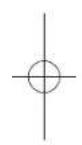
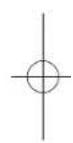
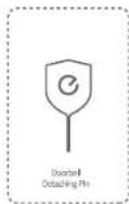
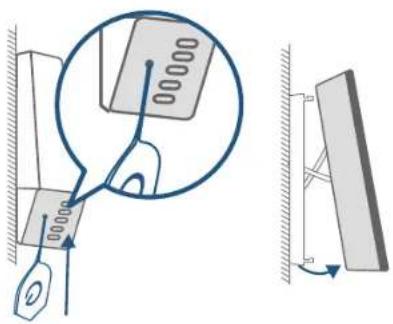
Diagram showing three different mechanical or structural states: a circular component, a vertical panel with downward arrows indicating rotation, and a right-angle view of a rectangular panel with rotational arrows (no text or symbols present)Use the doorbell detaching pin provided if you wish to detach the doorbell from the mounting Bracket. Press and hold the hole on the bottom of the doorbell and then lift its bottom to take it off.
The detaching pin has magnet pad on the black-color side. Stick it on iron surface where you can find it easily.
Note: The oval holes are speaker holes. Only press the round hole to detach the doorbell.
What's required: Doorbell detaching pin
11 English
English 12
Step 10
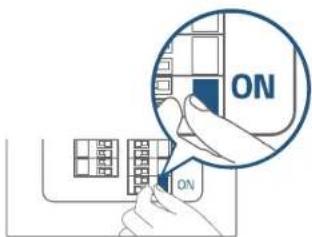
Switch the doorbell or master circuit breaker to ON.
Step 11
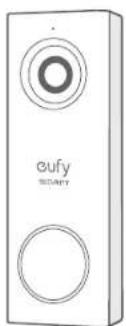
Wait until the doorbell ring flashes yellow. Then follow the on-screen instructions in EufySecurity App to connect the video doorbell to your home Wi-Fi.
natural_image
White rectangular device with circular cutouts and 'eufy' branding (no additional text or symbols)13 English
Step 12
Follow the on-screen instructions in EufySecurity App. Install the doorbell power connector to the doorbell chime and then pair it to your video doorbell.
Note: One video doorbell can link up to 4 electronic chimes. Use the volume and music buttons on the side of the electronic chime to adjust the volume and ringtone.
What are required: Doorbell chime / Doorbell chime power connector
![Doorbell China Model T8/40 Doorbell China Power connector [The path type may vary in different regions]](/content/2026/05/824251/images/da3208e79d0f6a5b548f75a4e0ad5e328f89904695f00ba22e4d31302d74b6ca.jpg)
English 14
Safety
FCC Statement
This device complies with Part 15 of the FCC Rules. Operation is subject to the following two conditions: (1) this device may not cause harmful interference, and (2) this device must accept any interference received, including interference that may cause undesired operation.
Warning: Changes or modifications not expressly approved by the party responsible for compliance could void the user's authority to operate the equipment.
Note: This equipment has been tested and found to comply with the limits for a Class B digital device, pursuant to Part 15 of the FCC Rules. These limits are designed to provide reasonable protection against harmful interference in a residential installation.
This equipment generates uses and can radiate radio frequency energy and, if not installed and used in accordance with the instructions, may cause harmful interference to radio communications. However, there is no guarantee that interference will not occur in a particular installation. If this equipment does cause harmful interference to radio or television reception, which can be determined by turning the equipment off and on, the user is encouraged to try to correct the interference by one or more of the following measures: (1) Reorient or relocate the receiving antenna. (2) Increase the separation between the equipment and receiver. (3) Connect the equipment into an outlet on a circuit different from that to which the receiver is connected. (4) Consult the dealer or an experienced radio/TV technician for help.
FCC Radio Frequency Exposure Statement
The device has been evaluated to meet general RF exposure requirements. The device can be used in fixed/mobile exposure condition. The min separation distance is 20cm.
Notice: Shielded cables
All connections to other computing devices must be made using shielded cables to maintain compliance with FCC regulations.
The following importer is the responsible party
Company Name: POWER MOBILE LIFE, LLC
Address: 400 108th Ave NE Ste 400, Bellevue, WA 98004-5541
Telephone:1-800-988-7973
(1) this device may not cause interference, and
(2) this device must accept any interference, including interference that may cause undesired operation of the device."
Please note that your rights under applicable law governing the sale of consumer goods remain unaffected by the warranties given in this Limited Warranty.
This Class B digital apparatus complies with Canadian ICE5-003.
When using the product, maintain a distance of 20cm from the body to ensure compliance with RF exposure requirements.
12-month limited warranty
- Call Us
United States +1 (800) 988 7973 Mon-Fri 9AM-5PM (PT)
United Kingdom +44 (0) 1604 936 200 Mon-Fri 6AM-11AM (GMT)
Germany +49 (0) 69 9579 7960 Mon-Fri 6:00-11:00
- Email Us
Customer Support: support@eufylife.com
Anker Innovations Limited
Room 1318-19, Hollywood Plaza, 610 Nathan Road, Mongkok, Kowloon, Hong Kong

@EufyOfficial

@EufyOfficial

eufyofficial
17 English