
MW-1115 - Microwave Infiniton - Free user manual and instructions
Find the device manual for free MW-1115 Infiniton in PDF.


| Product Type | Solo Microwave |
| Brand | Infiniton |
| Model | MW-1115 |
| Capacity | 20 liters |
| Dimensions (W x D x H) | 455 x 330 x 265 mm |
| Weight | 10.5 kg |
| Power Supply | 230 V ~ 50 Hz |
| Microwave Power | 700 W |
| Power Levels | 5 levels |
| Timer | Up to 30 minutes |
| Defrost Function | Yes, by weight or time |
| Clock Function | Yes |
| Child Lock | Yes |
| Interior Light | Yes |
| Turntable | Yes, 255 mm diameter |
| Door Type | Side-opening with handle |
| Control Type | Knob + push buttons |
| Display | LED digital display |
| Cleaning | Wipe interior and exterior with damp cloth |
| Safety Features | Door interlock, child lock |
| Accessories Included | Glass turntable, roller ring, user manual |
| Spare Parts Availability | Contact Infiniton customer service |
| Manual Languages | English, Spanish, Portuguese, and more |
| Manual Pages | 48 |
Frequently Asked Questions - MW-1115 Infiniton
User questions about MW-1115 Infiniton
0 question about this device. Answer the ones you know or ask your own.
Ask a new question about this device
Download the instructions for your Microwave in PDF format for free! Find your manual MW-1115 - Infiniton and take your electronic device back in hand. On this page are published all the documents necessary for the use of your device. MW-1115 by Infiniton.
USER MANUAL MW-1115 Infiniton
natural_image
Exterior view of a INFINITON grill oven with control knobs and a mesh chamber (no visible text or symbols on the main body)Read these instructions carefully before using your microwave oven, And keep it carefully.
If you follow the instructions, your oven will provide you with many years of good service.
SAVE THESE INSTRUCTIONS CAREFULLY
PRECAUTIONS TO AVOID POSSIBLE EXPOSURE TO EXCESSIVE MICROWAVE ENERGY
(a) Do not attempt to operate this oven with the door open since this can result in harmful exposure to microwave energy. It is important not to break or tamper with the safety interlocks.
(b) Do not place any object between the oven front face and the door or allow soil or cleaner residue to accumulate on sealing surfaces.
(c) WARNING: If the door or door seals are damaged, the oven must not be operated until it has been repaired by a competent person.
ADDENDUM
If the apparatus is not maintained in a good state of cleanliness, its surface could be degraded and affect the lifespan of the apparatus and lead to a dangerous situation.
Specifications
| Model: | MW-1115 |
| Rated Voltage: | 230V~50Hz |
| Rated Input Power(Microwave): | 1050W |
| Rated Output Power(Microwave): | 700W |
| Rated Input Power(Grill): | 1000W |
| Oven Capacity: | 20L |
| Turntable Diameter: | ∅255mm |
| External Dimensions: | 440x354x259mm |
| Net Weight: | Approx. 11.2 kg |
IMPORTANT SAFETY INSTRUCTIONS WARNING
To reduce the risk of fire, electric shock, injury to persons or exposure to excessive microwave oven energy when using your appliance, follow basic precautions, including the following:
- Warning: Liquids and other foods must not be heated in sealed containers since they are liable to explode.
- Warning: It is hazardous for anyone other than a competent person to carry out any service or repair operation that involves the removal of a cover which gives protection against exposure to microwave energy.
-
This appliance can be used by children aged from 8 years and above and persons with reduced physical, sensory or mental capabilities or lack of experience and knowledge if they have been given supervision or instruction concerning use of the appliance in a safe way and understand the hazards involved. Children shall not play with the appliance. Cleaning and user maintenance shall not be made by children unless they are older than 8 and supervised.
-
Keep the appliance and its cord out of reach of children less than 8 years.
-
Only use utensils that are suitable for use in microwave .ovens
-
The oven should be cleaned regularly and any food deposits should be removed.
-
Read and follow the specific:"PRECAUTIONS TO AVOID POSSIBLE EXPOSURE TO EXCESSIVE MICROWAVE ENERGY".
-
When heating food in plastic or paper containers,
keep an eye on the oven due to the possibility of ignition.
-
If smoke is emitted, switch off or unplug the appliance and keep the door closed in order to stifle any flames.
-
Do not overcook food.
-
Do not use the oven cavity for storage purposes. Do not store items, such as bread, cookies, etc. inside the oven.
-
Remove wire twist-ties and metal handles from paper or plastic containers/bags before placing them in the oven.
-
Install or locate this oven only in accordance with the installation instructions provided.
-
Eggs in their shell and whole hard-boiled eggs should not be heated in microwave ovens since they may explode, even after microwave heating has ended.
-
This appliance is intended to be used in household and similar applications such as:
-staff kitchen areas in shops, offices and other working environments;
-by clients in hotels, motels and other residential type environments;
-farm houses;
-bed and breakfast type environments.
-
If the supply cord is damaged, it must be replaced by the manufacturer, its service agent or similarly qualified persons in order to avoid a hazard.
-
Do not store or use this appliance outdoors.
-
Do not use this oven near water, in a wet basement or near a swimming pool.
-
The temperature of accessible surfaces may be high when the appliance is operating. The surfaces are liable to get hot during use. Keep cord away from heated
surface, and do not cover any vents on the oven.
- Do not let cord hang over edge of table or counter.
- Failure to maintain the oven in a clean condition could lead to deterioration of the surface that could adversely affect the life of the appliance and possibly result in a hazardous situation.
- The contents of feeding bottles and baby food jars shall be stirred or shaken and the temperature checked before consumption, in order to avoid burns.
- Microwave heating of beverages can result in delayed eruptive boiling, therefore care must be taken when handling the container.
- The appliance is not intended for use by persons (including children) with reduced physical, sensory or mental capabilities, or lack of experience and knowledge, unless they have been given supervision or instruction concerning use of the appliance by a person responsible for their safety.
- Children should be supervised to ensure that they do not play with the appliance.
- The appliances are not intended to be operated by means of an external timer or separate remote-control system.
- Accessible parts may become hot during use. Young children should be kept away.
- Steam cleaner is not to be used.
- During use the appliance becomes hot. Care should be taken to avoid touching heating elements inside the oven.
- Only use the temperature probe recommended for this oven. (for ovens provided with a facility to use a
temperature-sensing probe.)
- WARNING: The appliance and its accessible parts become hot during use. Care should be taken to avoid touching heating elements. Children less than 8 years of age shall be kept away unless continuously supervised.
- The microwave oven must be operated with the decorative door open. (for ovens with a decorative door.)
- The rear surface of appliance shall be placed against a wall.
- The microwave oven must not be placed in a cabinet.
- The microwave oven is intended for heating food and beverages. Drying of food or clothing and heating of warming pads, slippers, sponges, damp cloth and similar may lead to risk of injury, ignition or fire.
READ CAREFULLY AND KEEP FOR FUTURE REFERENCE
To Reduce the Risk of Injury to Persons Grounding Installation
DANGER
Electric Shock Hazard Touching some of the internal components can cause serious personal injury or death. Do not disassemble this appliance.
WARNING
Electric Shock Hazard Improper use of the grounding can result in electric shock. Do not plug into an outlet until appliance is properly installed and grounded.
This appliance must be grounded. In the event of an electrical short circuit, grounding reduces the risk of electric shock by providing an escape wire for the electric current. This appliance is equipped with a cord having a grounding wire with a grounding plug. The plug must be plugged into an outlet that is properly installed and grounded.
Consult a qualified electrician or serviceman if the grounding instructions are not completely understood or if doubt exists as to whether the appliance is properly grounded. If it is necessary to use an extension cord, use only a 3-wire extension cord.
- A short power-supply cord is provided to reduce the risks resulting from becoming entangled in or tripping over a longer cord.
- If a long cord set or extension cord is used:
1) The marked electrical rating of the cord set or extension cord should be at least as great as the electrical rating of the appliance. 2) The extension cord must be a grounding-type 3-wire cord. 3) The long cord should be arranged so that it will not drape over the counter top or tabletop where it can be pulled on by children or tripped over unintentionally.
CLEANING
Be sure to unplug the appliance from the power supply.
- Clean the cavity of the oven after using with a slightly damp cloth.
- Clean the accessories in the usual way in soapy water.
- The door frame and seal and neighbouring parts must be cleaned carefully with a damp cloth when they are dirty.
- Do not use harsh abrasive cleaners or sharp metal scrapers to clean the oven door glass since they can scratch the surface, which may result in shattering of the glass.
- Cleaning Tip---For easier cleaning of the cavity walls that the food cooked can touch: Place half a lemon in a bowl, add 300ml (1/2 pint) water and heat on 100% microwave power for 10 minutes. Wipe the oven clean using a soft, dry cloth.
UTENSILS
CAUTION
Personal Injury Hazard
It is hazardous for anyone other than a competent person to carry out any service or repair operation that involves the removal of a cover which gives protection against exposure to microwave energy.
See the instructions on "Materials you can use in microwave oven or to be avoided in microwave oven." There may be certain non-metallic utensils that are not safe to use for microwaving. If in doubt, you can test the utensil in question following the procedure below.
Utensil Test:
- Fill a microwave-safe container with 1 cup of cold water (250ml) along with the utensil in question.
- Cook on maximum power for 1 minute.
- Carefully feel the utensil. If the empty utensil is warm, do not use it for microwave cooking.
- Do not exceed 1 minute cooking time.
Materials you can use in microwave oven
| Utensils | Remarks |
| Aluminum foil | Shielding only. Small smooth pieces can be used to cover thin parts of meat or poultry to prevent overcooking. Arcing can occur if foil is too close to oven walls. The foil should be at least 2.5cm away from oven walls. |
| Browning dish | Follow manufacturer's instructions. The bottom of browning dish must be at least 5mm above the turntable. Incorrect usage may cause the turntable to break. |
| Dinnerware | Microwave-safe only. Follow manufacture's instructions. Do not use cracked or chipped dishes. |
| Glass jars | Always remove lid. Use only to heat food until just warm. Most glass jars are not heat resistant and may break. |
| Glassware | Heat-resistant oven glassware only. Make sure there is no metallic trim. Do not use cracked or chipped dishes. |
| Oven cooking bags | Follow manufacturer's instructions. Do not close with metal tie. Make slits to allow steam to escape. |
| Paper plates and cups | Use for short-term cooking/warming only. Do not leave oven unattended while cooking. |
| Paper towels | Use to cover food for reheating and absorbing fat. Use with supervision for a short-term cooking only. |
| Parchment paper | Use as a cover to prevent splattering or a wrap for steaming. |
| Plastic | Microwave-safe only. Follow the manufacturer's instructions. Should be labeled "Microwave Safe". Some plastic containers soften, as the food inside gets hot. "Boiling bags" and tightly closed plastic bags should be slit, pierced or vented as directed by package. |
| Plastic wrap | Microwave-safe only. Use to cover food during cooking to retain moisture. Do not allow plastic wrap to touch food. |
| Thermometers | Microwave-safe only (meat and candy thermometers). |
| Wax paper | Use as a cover to prevent splattering and retain moisture. |
Materials to be avoided in microwave oven
| Utensils | Remarks |
| Aluminum tray | May cause arcing. Transfer food into microwave-safe dish. |
| Food carton with metal handle | May cause arcing. Transfer food into microwave-safe dish. |
| Metal or metal-trimmed utensils | Metal shields the food from microwave energy. Metal trim may cause arcing. |
| Metal twist ties | May cause arcing and could cause a fire in the oven. |
| Paper bags | May cause a fire in the oven. |
| Plastic foam | Plastic foam may melt or contaminate the liquid inside when exposed to high temperature. |
| Wood | Wood will dry out when used in the microwave oven and may split or crack. |
SETTING UP YOUR OVEN
Names of Oven Parts and Accessories
Remove the oven and all materials from the carton and oven cavity.
Your oven comes with the following accessories:
| Glass tray | 1 |
| Turntable ring assembly | 1 |
| Instruction Manual | 1 |
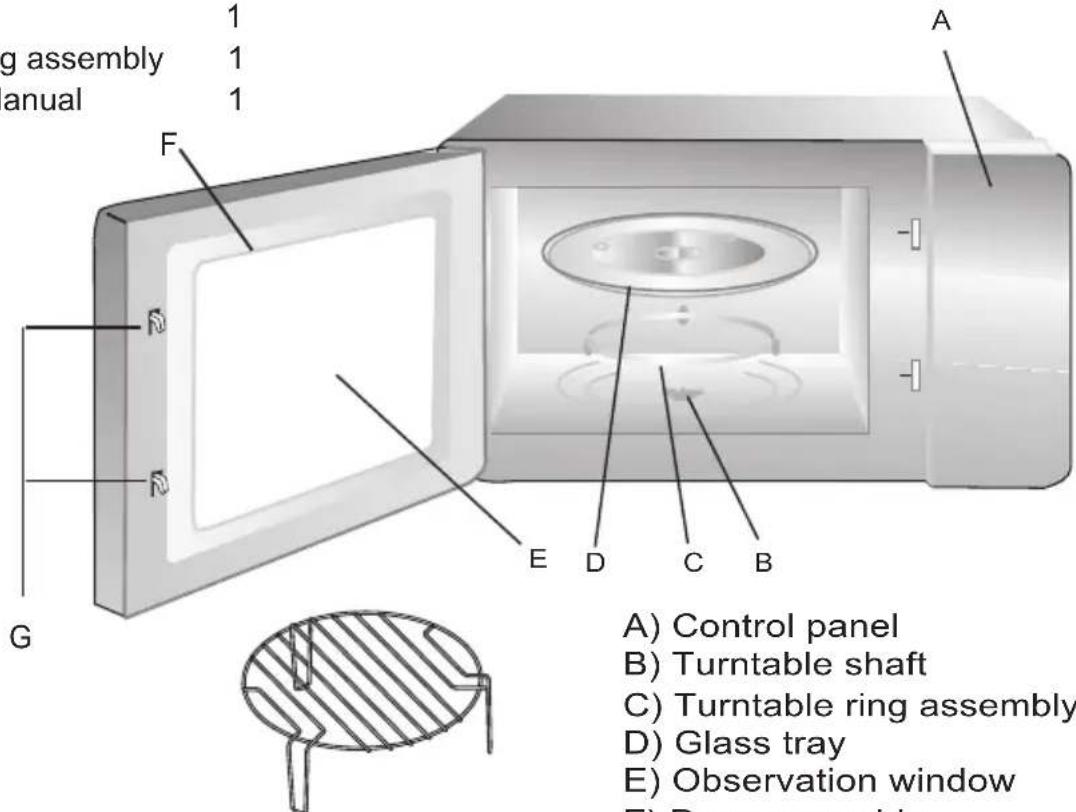
Grill Rack( Only be used in grill function and be placed on the glass tray )
A) Control panel
B) Turntable shaft
C) Turntable ring assembly
D) Glass tray
E) Observation window
F) Door assembly
G) Safety interlock system
Turntable Installation
Hub (underside)
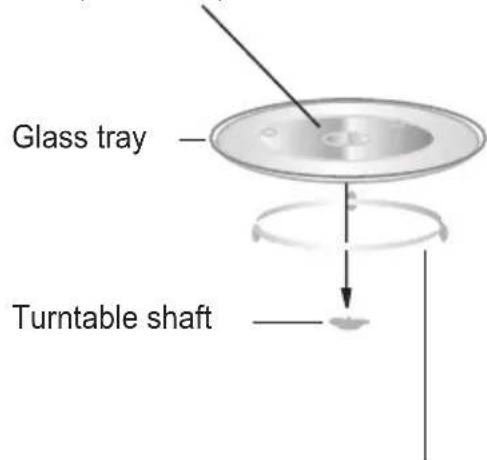
Turntable ring assembly
a. Never place the glass tray upside down. The glass tray should never be restricted.
b. Both glass tray and turntable ring assembly must always be used during cooking.
c. All food and containers of food are always placed on the glass tray for cooking.
d. If glass tray or turntable ring assembly cracks or breaks, contact your nearest authorized service center.
Countertop Installation
Remove all packing material and accessories. Examine the oven for any damage such as dents or broken door. Do not install if oven is damaged.
Cabinet: Remove any protective film found on the microwave oven cabinet surface. Do not remove the light brown Mica cover that is attached to the oven cavity to protect the magnetron.
Installation
- Select a level surface that provide enough open space for the intake and/or outlet vents.
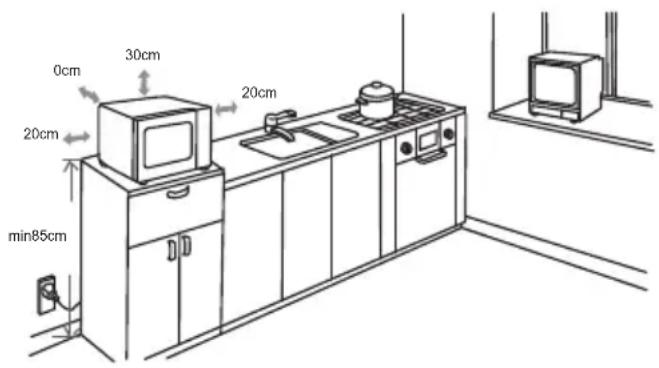
(1) The minimum installation height is 85cm.
(2) The rear surface of appliance shall be placed against a wall.
Leave a minimum clearance of 30cm above the oven, a minimum clearance of 20cm is required between the oven and any adjacent walls.
(3) Do not remove the legs from the bottom of the oven.
(4) Blocking the intake and/or outlet openings can damage the oven.
(5) Place the oven as far away from radios and TV as possible. Operation of microwave oven may cause interference to your radio or TV reception.
2. Plug your oven into a standard household outlet. Be sure the voltage and the frequency is the same as the voltage and the frequency on the rating label.
WARNING: Do not install oven over arange cooktop or other heat-producing appliance. If installed near or over a heatsource, the oven could be damaged and the warranty would be void.
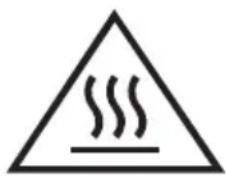
The accessible surface may be hot during open
OPERATION
Control Panel and Features Operation Instructions
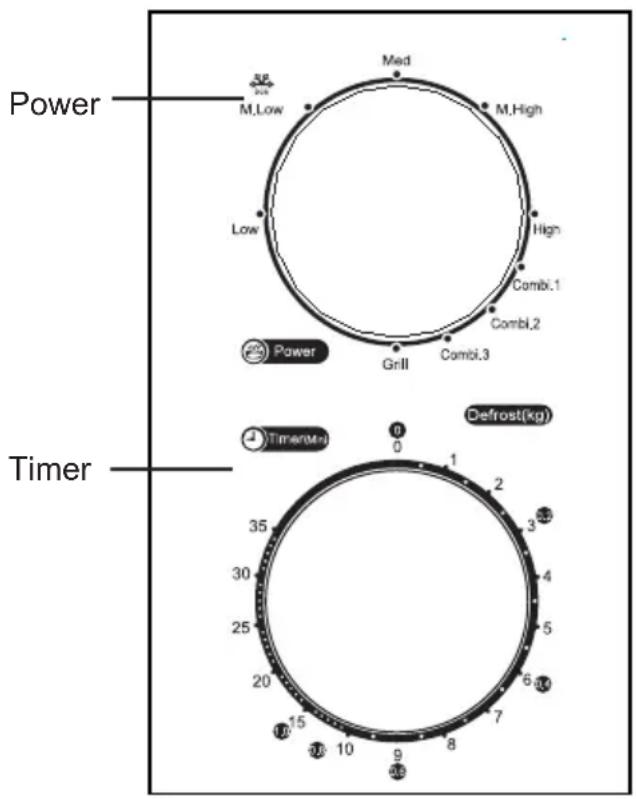
- To set cooking power by turning the power knob to desired level.
- To set the time of cooking by turning the timer knob to desired time per your food cooking guide.
- The microwave oven will automatically start cooking after power level and time are set.
- After the cooking time is up, the unit will "Dong" to stop.
- If the unit is not in use, always set time to "0".
| Function/Power | Output | Application |
| Low | 17% micro. | Soften ice cream |
| Med. Low (Defrost) | 33% micro. | Soup stew, soften butter or defrost |
| Med. | 55% micro. | Stew, fish |
| Med. High | 77% micro. | Rice, fish, chicken, ground meat |
| High | 100% micro. | Reheat, milk, boil water, vegetables, beverage |
| Function/Power | Output | Application |
| Combi.1 | 80% grill 20% micro. | Sausage, Lamb, Kabobs, Seafood, Steak |
| Combi.2 | 70% grill 30% micro. | Chicken pieces, Chicken breasts, Pork chops |
| Combi.3 | 60% grill 40% micro. | Whole chicken |
| Grill | 100% grill | Baken bread, Slice food |
Notice: When removing food from the oven, please ensure that the oven power is switched off by turning the clock switch to 0 (zero). Failure to do so, and operating the microwave oven without food in it, can result in overheating and damage to the magnetron.
Trouble shooting
| Normal | |
| Microwave oven interfering TV reception | Radio and TV reception may be interfered when microwave oven operating. It is similar to the interference of small electrical appliances, like mixer, vacuum cleaner, and electric fan.It is normal. |
| Dim oven light | In low power microwave cooking, oven light may become dim. It is normal. |
| Steam accumulating on door, hot air out of vents | In cooking, steam may come out of food. Most will get out from vents. But some may accumulate on cool place like oven door. It is normal. |
| Oven started accidentally with no food in. | It is forbidden to run the unit without any food inside.It is very dangerous. |
| Trouble | Possible Cause | Remedy |
| Oven can not be started. | (1) Power cord not plugged in tightly. | Unplug. Then plug again after 10 seconds. |
| (2) Fuse blowing or circuit breaker works. | Replace fuse or reset circuit breaker (repaired by professional personnel of our company) | |
| (3) Trouble with outlet. | Test outlet with other electrical appliances. | |
| Oven does not heat. | (4) Door not closed well. | Close door well. |
natural_image
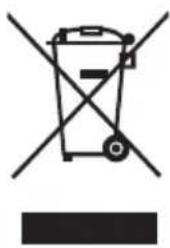
Symbol of a trash bin crossed with no text or labels, accompanied by a black rectangular block below (no readable text or symbols)According to Waste of Electrical and Electronic Equipment (WEEE) directive, WEEE should be separately collected and treated. If at any time in future you need to dispose of this product please do NOT dispose of this product with household waste. Please send this product to WEEE collecting points where available.
INFINITON
Horno Microondas
MW-1115
natural_image
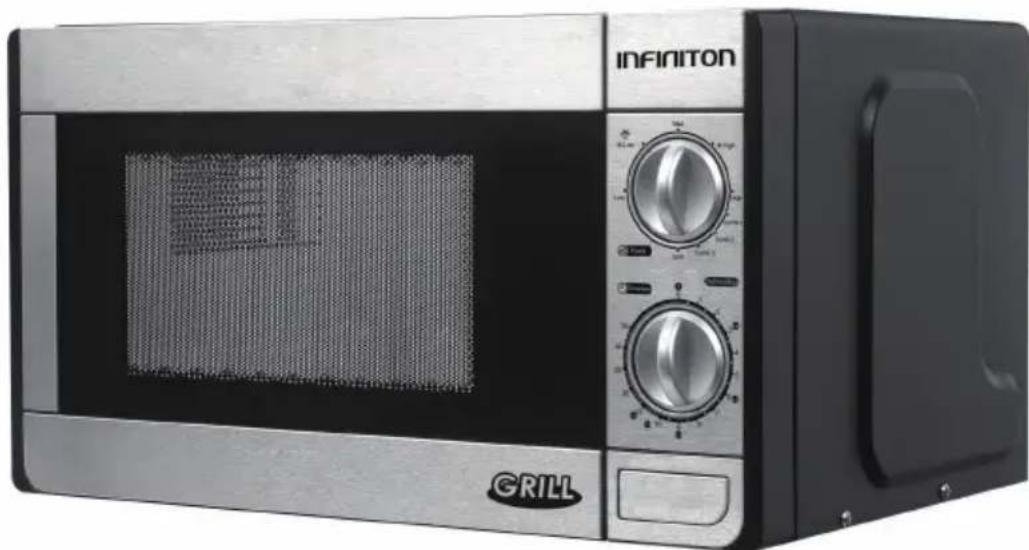
Exterior view of a INFINITON grill oven with control knobs and a mesh chamber (no visible text or symbols on the main body)natural_image
Exterior view of a modern kitchen oven with Infiniton branding and GRILL branding (no visible text or symbols on main body)
- PRECAUTIONS TO AVOID POSSIBLE EXPOSURE TO EXCESSIVE MICROWAVE ENERGY
- ADDENDUM
- IMPORTANT SAFETY INSTRUCTIONS WARNING
- To Reduce the Risk of Injury to Persons Grounding Installation
- DANGER
- WARNING
- CLEANING
- UTENSILS
- CAUTION
- Personal Injury Hazard
- Utensil Test:
- SETTING UP YOUR OVEN
- Names of Oven Parts and Accessories
- Turntable Installation
- Countertop Installation
- Installation
- OPERATION
- Control Panel and Features Operation Instructions
- INFINITON
- Horno Microondas
- MW-1115
Brand : Infiniton
Model : MW-1115
Category : Microwave