
HSD 8460 - DVD player XORO - Free user manual and instructions
Find the device manual for free HSD 8460 XORO in PDF.


| Product Type | DVD Player |
| Brand | Xoro |
| Model | HSD 8460 |
| Dimensions (approx.) | 430 x 250 x 40 mm |
| Weight (approx.) | 2.0 kg |
| Power Supply | AC 100-240 V, 50/60 Hz |
| Power Consumption | < 15 W (standby < 1 W) |
| Disc Formats Supported | DVD, DVD±R/RW, CD, CD-R/RW, MP3, JPEG |
| Video Output | HDMI, Composite (RCA), Component (YUV) |
| Audio Output | Stereo (RCA), Coaxial, Optical |
| USB Port | Yes, for media playback |
| Region Code | Region 2 (can be changed) |
| Remote Control | Included |
| Care & Cleaning | Wipe with a soft, dry cloth; avoid solvents |
| Safety | Do not open; no user-serviceable parts inside |
| Spare Parts & Repairability | Contact Xoro support or authorized service center |
| Warranty | 2 years (check local regulations) |
Frequently Asked Questions - HSD 8460 XORO
User questions about HSD 8460 XORO
0 question about this device. Answer the ones you know or ask your own.
Ask a new question about this device
Download the instructions for your DVD player in PDF format for free! Find your manual HSD 8460 - XORO and take your electronic device back in hand. On this page are published all the documents necessary for the use of your device. HSD 8460 by XORO.
USER MANUAL HSD 8460 XORO
FREE TO CHOOSE INNOVATIONS
XORO®
H3D 8460/ H3D8470
natural_image
Black XORD DVD player with circular graphic design (no text or symbols on device body)natural_image
Green recycling symbol with four chasing arrows forming a triangle (no text or labels)natural_image
Circular logo with a green spiral design on a light yellow background (no text or symbols)Hinweis:
natural_image
Diagram of a battery pack with an open lid and internal components, showing battery arrangement (no text or symbols)Vorderseite

Bedienelemente
natural_image
Pure electrical circuit lines without any symbolsTasten

natural_image
Silhouette of a small airplane transforming into a larger aircraft (no text or symbols)flowchart
graph TD
    A["DISC"] --> B["USB"]
Chrominanz (C): 0,286 Vp-p (75 Ohm)
YUV 0,7 Vp-p (75 Ohm)
Audio DAC: 96 kHz / 24 Bit
Accessories / Features 9
Quick Start Guide 10
Insert Batteries into Rote Control 10
Control Elements
Front Side 11
Rear Side 12
Connection
Video Outputs 13
Audio Outputs 14
Remote Control
Buttons 15
Playback
Title / Menu / Pause / Stop / Fast playback / Stepwise / Slow 16
Angle / Audio / Chapter or Track / Clear 17
Repeat / A-B Segment playback / Volume / Mute 18
Zoom / Information 19
Search / Subtitle / USB button 20
Program / HD resolution / PBC 21
JPEG Files 22
Music 23
MPEG-1, MPEG-2 or MPEG-4 video files 25
USB 26
Setup
General Setup 27
Audio 28
Video 29
Preference Setup 30
Troubleshooting 31
Specification 33
Glossary 34
Limited Warranty 37
Safety Information


The lightning flash with an arrowhead symbol within an equilateral triangle is intended to alert the user of the presence of uninsulated "dangerous voltage" within the product's enclosure that may be of sufficient magnitude to constitute a risk of electric shock to persons.
The exclamation point within an equilateral triangle is intended to alert the user of the presence of important operating and maintenance (servicing) instructions in the literature accompanying the appliance.
THIS DEVICE COMPLIES WITH PART 15 OF THE FCC RULES. OPERATION IS SUBJECT TO THE FOLLOWING TWO CONDITIONS: (1) THIS DEVICE MAY NOT CAUSE HARMFUL INTERFERENCE, AND (2) THIS DEVICE MUST ACCEPT ANY INTERFERENCE RECEIVED. INCLUDING INTERFERENCE THAT MAY CAUSE UNDESIRED OPERATION.
User Manual
- All the safety and operating instructions should be read before the product is operated.
- Retain Instructions - The safety and operating instructions should be retained for future reference.
- All warnings on the product and in the operating instructions should be adhered to.
- All operating and use instructions should be followed.
Laser
This Digital Video Disc Player employs a Laser System of the class 1.
- Make sure the device is shut down prior to opening player lid.
- Do not open the appliance. Do not attempt to dismantle the appliance.
- In order to avoid any danger: Have service work only carried out by the manufacturer or an authorized service workshop.
- Visible laser radiation when open and interlocks defeated.
- Use of controls or adjustments or performance of procedures other than those specified herein may result in hazardous radiation exposure.
Operation
- Playing of Video DVD or Video CD
- Playing of Audio-CD
- Playing of Audio-, Picture and Video files from Disc
- Playing of Audio-, Picture and Video files from USB storages
- Convert Audio-CD's without copy protection into MP3 Format and store them on USB Flash disc.
- No other operation are allowed.
Power Supply
- Never touch the plug with wet hands.
- If you want to pull the plug out of the plug socket, always pull directly on the plug. Never pull on the cable as it could tear.
- Make sure that the power cable is not bent, caught or run over and that it does not come into contact with heat sources.
- Make sure that the power cable is not wound around the device while in operation.
- Never place the machine on the power cable while it is being operated.
- Only use extension cables that are designed for the power consumption level of the machine.
- Keep the appliance away from rain and any moisture.
- Only operate the machine if the electrical voltage stated on the type plate beneath the machine agrees with the voltage on your plug socket. The wrong voltage can destroy the machine.
- Do not stand vases etc. on the appliance. Water could seep into the appliance.
- Do not open the appliance.
- Pull out the mains plug if the appliance is not to be used over a longer period of time.
- Take care that nobody can trip over the power supply cable.
Disc Compatibility
- Depending on the conditions of the recording equipment or the CD-R/RW (or DVD -R, DVD +R, DVD -RW, DVD +RW) disc itself, some CD-R/RW (or DVD -R, DVD +R, DVD -RW, DVD +RW) discs cannot be played on the unit.
- Do not attach any seal or label to either side (the labelled side or the recorded side) of a disc.
- Do not use irregularly shaped CDs (e.g., Heart shaped or octagonal) since they may result in malfunctions.
- Some playback operations of DVDs and Video CDs may be intentionally programmed by software manufacturers. This unit plays DVDS and Video CDs according to disc content designed by the software manufacturer, therefore some playback features may not be available or other functions may be added.
USB Port
Due to the legal requirements of CE-conformity, the customer is asked to only connect USB-Sticks to the USB port.
Operation and Position
- During playback, the disc rotates very fast. Do not open or do not move the player during playback. Otherwise the disc can be damaged.
- Do not connect accessories on the player which are not defined by the manufacture.
- Do not place this product on an unstable cart, stand, tripod, bracket, or table. The product may fall, causing serious injury to a child or adult, and serious damage to the product. Use only with a cart, stand, tripod, bracket, or table recommended by the manufacturer, or sold with the product.
- Any mounting of the product should follow the manufacturer's instructions, and should use a mounting accessory recommended by the manufacturer.
- A product and cart combination should be moved with care. Quick stops, excessive force, and uneven surfaces may cause the product and cart combination to overturn.
- The player is able to show a still image on the TV screen or monitor over an unlimited period of time. This can cause damage to the screen. It is therefore advisable to activate the screen saver. Or switch the player off, if the device is not in use.
- Do not uses the player permanent in the 4:3 mode. This can cause damage to the screen.
- Do not increase the volume when the player is just playing very quiet sections. This cold damage the speaker if very loud passages starts all of a sudden after the quiet section.
- Place only CDs or DVDs into the tray.
- Switch the player off by the Off/On switch if it is not going to used for a longer period of time.
- Disconnect the main plug during thunderstorms.
- Slots and openings in the cabinet are provided for ventilation and to ensure reliable operation of the product and to protect it from overheating, and these openings must not be blocked or covered.
- The openings should never be blocked by placing the product on a bed, sofa, rug, or other similar surface.
- This product should not be placed in a built-in installation such as a bookcase or rack unless proper ventilation is provided or the manufacturer's instructions have been adhered to.
- Protect the device against weather influences, moistures and high temperature.
- Never spill liquid of any kind on the product.
- Do not expose the device and the remote control to direct sunlight.
- The DVD-loader offers a certified (technical) life expectancy of 50.000 hours.
Defect
-
Servicing - Do not attempt to service this product yourself as opening or removing covers may expose you to dangerous voltage or other hazards. Refer all servicing to qualified service personnel.
-
Damage Requiring Service - Unplug this product from the wall outlet and refer servicing to qualified service personnel under the following conditions:
a. When the power-supply cord or plug is damaged.
b. If liquid has been spilled, or objects have fallen into the product.
c. If the product has been exposed to rain or water.
e. If the product has been dropped or damaged in any way.
d. If the product does not operate normally by following the operating instructions. Adjust only those controls that are covered by the operating instructions as an improper adjustment of other controls may result in damage and will often require extensive work by a qualified technician to restore the product to its normal operation.
-
When the product exhibits a distinct change in performance this indicates a need for service.
-
When replacement parts are required, be sure the service technician has used replacement parts specified by the manufacturer or have the same characteristics as the original part. Unauthorized substitutions may result in fire, electric shock, or other hazards.
-
Please read in the section Troubleshooting our service address and phone number.
Recycling Information
Recycling of electronic devices
This product is designed and manufactured with high quality materials and components which can be recycled and reused.
This symbol means that electrical and electronic equipment, at their end-of-life, should be disposed of separately from your household waste.
Please, dispose of this equipment at your local community waste collection/recycling centre. In the European Union there are separate collection systems for used electrical and electronic product. Please, help us to conserve the environment we live in!
natural_image
Symbol of a trash bin crossed with no text or labels, accompanied by a black rectangular block below (no readable text or symbols)Recycling of paper and carton
The material recycling symbol on the carton and user manual denotes that they are recyclable. Dispose them not with the normal household waste.

natural_image
Green recycling symbol with four chasing arrows forming a triangle (no text or labels)Recycling of plastic parts
The material recycling symbol on the plastic parts denotes that they are recyclable. Dispose them not with the normal household waste.

Green Dot
natural_image
Circular logo with a green spiral design on a light yellow background (no text or symbols)When opening the package of this Portable-DVD player please make sure that the following accessories are included:
• HSD 8460 or HSD 8470
• Remote Control with Batteries
- AV cable
- User Manual
Notes:
• If any item should be damaged or missing, please contact your dealer without delay.
- Keep the packaging materials, you may need them to transport your player in the future.
• Always transport or send the player in its original packing.
• Do not change or modify any components of the device or accessories.
Features
- MPEG-4 DVD Player
- HDMI port
• Upscaling to 1080p
• USB connector on the front panel
• CVBS Video RCA jack
• Coaxial digital audio out
• Stereo RCA Audio output
Languages: Germany
Standard Settings
TV System: PAL
Video output: HDMI with off
Aspect Ratio: 4:3 PS
Quick Start Guide
-
Connect the power adapter (supplied with the player) to the side input and to a wall outlet.
-
Press the STAND-BY button (Please refer No. 6).
-
Press the OPEN/CLOSE button (Please refer No. 4).
-
Inserting a DVD disc (Please refer No. 1 - Disc Loader). Align the center of the DVD disc with the center of the disc guide.
-
Then press the OPEN/CLOSE button again (Please refer No. 5).
-
In general, the DVD already inserted into the player will start reading automatically. If not, press the PLAY button (Please refer No. 5).
-
When you want to stop, press the STOP button (Please refer No. 5).
-
If you want to playback content from USB flash storage, please put the USB flash storage into the USB plug (No. 3) of the DVD player. Press the USB button on the remote control and choose the option USB and press the ENTER button. The player changes into the USB mode.
-
To power off the unit, press the POWER button on the remote control or the STAND-BY button (Please refer No. 6). The device goes into Stand-By mode.
Insert batteries and Operation radius
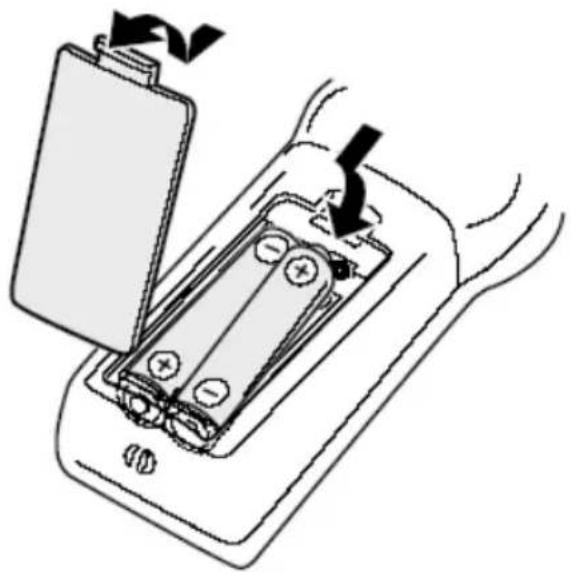
- Open the battery cover of the remote control.
• Insert the battery into the receptacle and insert the receptacle into the remote.
• Please uses only batteries of the type AAA/R03 (1.5 V)
- Please pay attention to the right polarity, which are given with the label + or -.
- Close the battery cover of the remote control.
- For the best results, aim the remote towards at the player, screwing window. Stay within 5 metre and angles of 60 degrees or less.
• Under normal use the battery will last for one year.
- Remove battery during storage or when you are not using the DVD player for a long time.evice, please disconnect the power plug from the wall outlet.
natural_image
Diagram of a battery pack with an open lid and internal battery, showing charge distribution (no text or symbols)Front Panel
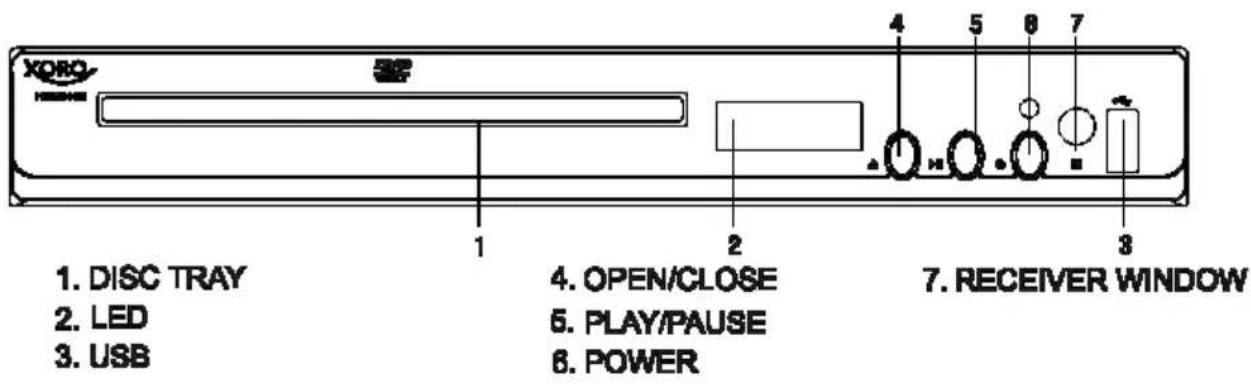
Control elements
- DVD Loader
- LED display
- USB connector
- OPEN / CLOSE button
- PLAY / PAUSE button
- STANDBY button
- Infra-red sensor
Notes:
• Before you plug the power cord into the AC outlet, please check to make sure that all of the connections have been properly completed. Plug the power cord carefully into the outlet.
- When the unit is initially powered, a brief surge of electricity may cause interference with other electronic equipment on the same circuit. If this occur, connect the unit to an outlet on different circuit.
• Due to the legal requirements of CE-conformity, the customer is asked to only connect USB-Sticks to the USB port.
- USB-Sticks are supported until a sizes of 32 GB. Due to the multitude of different USN-Sticks a complete support can not be warranted.
- Please uses only FAT / FAT32 file system for USB-Sticks. The NTFS file system is not supported and this media will be ignored.
Rear Panel

Control Elements
- HDMI video and audio output
- Coaxial digital audio output (electrical)
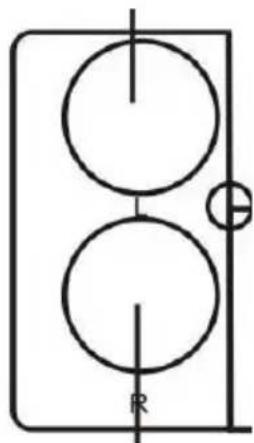
- Right Audio Output (Stereo RCA)
- CVBS video output
- Left Audio Output (Stereo RCA)
The HSD 8460/ HSD8470 provides different ways to output video and audio signals.
Video Output
Connecting with a VIDEO (CVBS) cable
The video (CVBS) cable transmits the signals for brightness (Y-signal) and colour (C-signal) in a combined way. You should only use this connection if no other connection type can be used. Plug a cable into the VIDEO (CVBS) socket on the rear side of your DVD player. The other side of the cable must be connected to the VIDEO input socket of the TV-set (usually labelled "VIDEO IN" or "AV IN". Please also refer to your TV set's user manual). As VIDEO (CVBS) does not transmit sound, you also must add an audio connection.
Insert one end of the supplied audio (Cinch [RCA]) cable into the white/red Cinch [RCA] socket L/R AUDIO OUT at the back of the DVD player and the other end into the audio input socket (usually white/red) on the TV set (usually labelled "AUDIO IN" or "AV IN". Please also refer to your TV set's user manual)
Switch on the TV set and select the s-video input or the respective channel number. For channel number and input selection please also refer to your TV operating instructions.
Connecting with a HDMI Cable
HDMI is a digital transmission technology for both audio and video. Connect the DVD player and display with a HDMI-HDMI cable. Please note that some TV set can not support RAW audio. In this case, please set the DVD player audio digital output to PCM.
If your TV set is not equipped with HDMI, but with DVI input, you can use a conversion cable or an adapter to DVI.
As DVI does not transmit sound, you also must add an audio connection. Insert one end of an audio (Cinch [RCA]) cable into the white/red Cinch [RCA] socket ML/MR AUDIO OUT at the back of the DVD player and the other end into the audio input socket (usually white/red) on the TV set (usually labelled "AUDIO IN" or "AV IN". Please also refer to your TV set's user manual)
You can choose in the settings "Resolution" by the option "System Settings" the resolution which you want or which the TV set supports.
Switch on the TV set and select the HDMI or DVI input. For input selection please also refer to your TV operating instructions.
Connection
Audio Output
Digital Output
This player contains a Dolby Digital or MPEG2 decoder. This enables the playback of DVD recorded in Dolby Digital, MPEG1/2 audio or linear PCM without an external decoder supports. When the player is connected to an AV amplifier with 5.1 channel input connectors, theatre quality audio could be enjoyed at your home at the time of playing disc recorded in Dolby digital, MPEG1/2 audio or linear PCM.
The "S/PDIF" specifications allow several different types of cables and connectors which must match the device being used. Key words for the electrical type are "coaxial" and "RCA jack." The other type is called "optical" with the word "TOSLINK" often used.
- Insert the audio plug into the orange socket on the rear side of the device (right from the HDMI jack), marked with the label "COAXIAL".
- Plug the Audio jack into the corresponding socket on your playback device or your amplifier.
- Choose on the amplifier the correspondent input (coaxial).
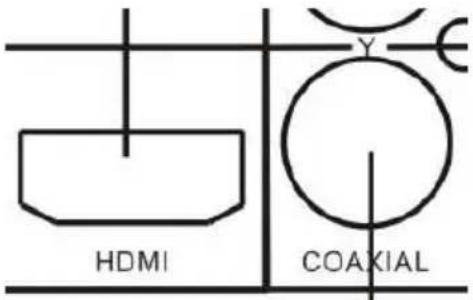
Notes:
- The cable is not part of the accessories.
- Choose right audio setting for this player according to your audio system requirement after connection is made.
- If the type of the speaker connected does not satisfy the channels recorded in a MPEG-2 or Linear PCM disc, the disc will not be played in all channels but only in 2 channels (i.e. even if the front speakers and the centre speakers are connected, a disc recorded in 5.1 channels will be played only in 2 channels.
Caution for the coaxial digital audio output connector:
Do not connect an amplifier with a Coaxial digital input connector which does not contain the Dolby digital or MPEG audio decoder otherwise it may be harmful to your ears and damage your speakers.
Stereo Analogue Output
Insert one end of the audio (Cinch [RCA]) cable into the white/red Cinch [RCA] socket L/R AUDIO OUT at the back of the DVD player and the other end into the audio input socket (usually white/red) on the amplifier set (usually labelled "AUX IN" or "Stereo IN". Please also refer to your Amplifier user manual). Switch on the Amplifier and select the AUX or Stereo input.
natural_image
Pure electrical circuit lines without any symbols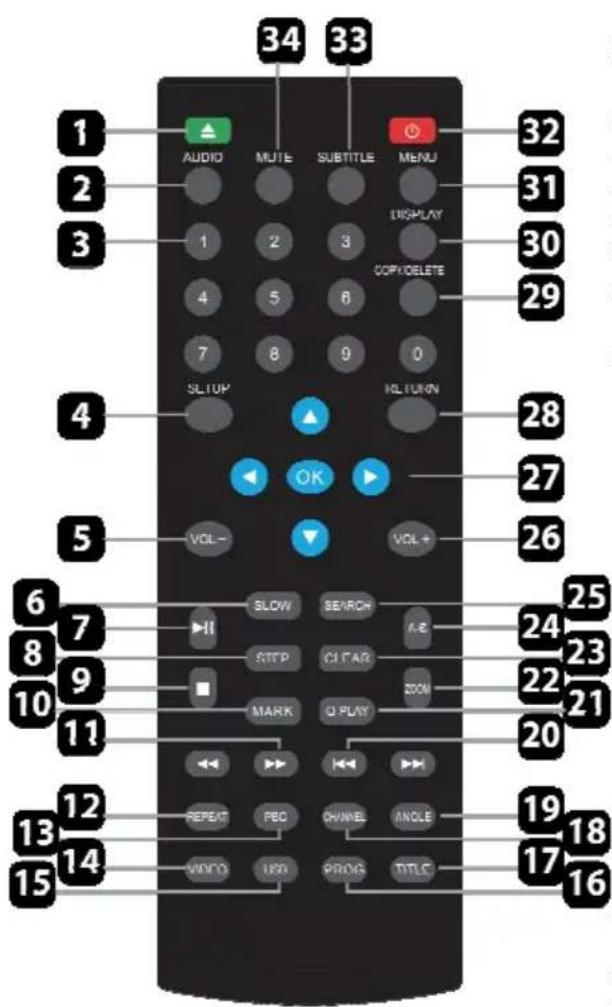
Buttons of the remote control:
- OPEN / CLOSE button
- AUDIO: Choose a audio language of the DVD disc.
- Numeric buttons 0 .. 9
- SETUP Open the setup of the DVD Player
- Volume-button (Vol-)
- SLOW: Set the playback in Slow motion
- Play/Pause button (>||)
- STEP Go through the playback, frame by frame.
- STOP: Stop the playback
- Mark: Setup a returning point in the Playback
- Fast backward button Fast forward button
- REPEAT button: Repeat the current chapter
- PBC button: Open/Close PBC playback.
- Video Select a VIDEO Output
- USB Select the USB Input
- PROGRAM create a playback program of different files.
- Titel Return to the Menu of the DVD Disc.
- Channel: Switch channel output
- Angel: Switch between different video angles
- Skip backward / forward between chapters
- Q-Play: Skip to the content of a Program or mark
- ZOOM button
- CLEAR Clear the content of a program or mark
- A—B Segment button (A-B)
- SEARCH: Search directly for a segment of the playback
- Volume button (VOL+)
- Navigation and OK button
- RETURN :Go back in the disc menu.
- Copy/Delete: Copy and/or delete files on a USB unit.
- DISPLAY: Information (time/title/chapter)
- MENU: open the Menu for Playback
- STANDBY (power) Turn on/off the DVD Player
- Subtitle: Select a subtitle language of the Playback
- MUTE Activate/deactivate the audio
How to start playback from the MENU screen
A title is generally a distinct section of a DVD disc. For example the main feature could be title 1, a documentary describing how the film was made could be title 2, and cast interviews could be title 3. Each title is assigned a reference number enabling you to locate it easily.
- Insert a Video-DVD disc into the loader and close them.
- Press TITLE or to access the menu screen.
- Press navigation or the number buttons to select the title.
- Press the PLAY button.
- The DVD video player will start playback from the title selected.

Titel 1

Titel 2
Titel 3
Titel 4
Note:
You also can input the assigned number of the title to select it directly.
How to pause playback?
Press one times PLAY/PAUSE button during playback, and the player goes into pause mode. Press the PLAY button to continue the playback.
How to stop playback?
Press the STOP button. The player is pre-stopped. Two times pressing STOP and the player stops completely.
Fast Forward or Fast Backward
Press << or >> during playback on the remote control and the DVD player changes the speed of playback. The playback speed becomes double the normal speed. The playback speed changes, each time you press the REV or FWD button.
$$ \text { Normal } \longrightarrow x 2 \longrightarrow x 4 \longrightarrow x 8 \longrightarrow x 1 6 \longrightarrow x 3 2 \longrightarrow \text { Normal } $$
Note:
The function is invalid on some DVD discs.
Stepwise playback
Press the STEP button during playback and the player goes into pause mode. Pressing again the STEP button the player shows the next frame. Each pressing of the STEP button the player shows frame after frame. Press the PLAY button and the stepwise playback is cancelled. The player restarts the normal playback.
Slowmotion playback
Press SLOW button to enter Slow Motion Playback mode. Slow Motion Playback has six speeds: x1/2, x1/4, x1/5, x1/8, x1/16. Press PLAY/PAUSE button to resume normal playback.
How to change the camera angle?
Press the ANGLE button while playing back a scene recorded with multiple angles.
You may only press the ANGLE button when the angle icon is flashing on the DVD display. Press the corresponding number of your desired angle.
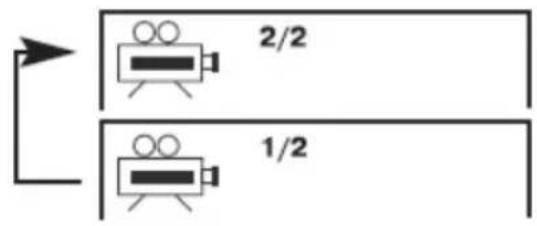
Note:
The angle function will not work on DVD video discs that does not contain recorded with multiple angles.
How to change the Audio languages?
Press the AUDIO button repeatedly during playback to hear a different audio channel.
By playback of a Video-DVD or a MPEG-4 file with multi-audio you can change the audio track respectively the audio languages.
Chapter / Track
A chapter is a segment of a title such as a scene in a film or one interview in a series. Each chapter is assigned a chapter number, enabling you to locate the chapter you want. Depending on the disc, chapters may not be recorded.
When a title on a disc has more than one chapter |<< or >>| a disc has more than one track, you can move to another chapter/track as follows:
- Press |<< or >>| or briefly during playback to select the next (or previous) chapter/track or to return to the beginning of the current chapter/track.
- Press |<< or >>| twice briefly to step back to the previous chapter/track.
- To go directly to any chapter during DVD playback, input the chapter/track number.
Notes:
- By AUDIO-CD or MP3 disc the next or previous track will be selected.
- By JPEG disc the next or previous picture will be showed.
- By MPEG-1/2/4 disc the next or previous movie will be started.
Clear
To delete incorrect input by Program playback or by the search function you can press the CLEAR button.
REPEAT
You can play a title/chapter/all/track on a disc repeatedly. Press REPEAT during playback to select a desired repeat mode. Depend on the kind of disc (Video-DVD, VCD or Data files) you have different Repeat modes.
DVD Video Discs - "Repeat Chapter / Title / All / Off"
Chapter: repeats the current chapter. Chapter
Title: repeats the current title.
All: repeats all the tracks on a disc.
Off: does not play repeatedly.
MPEG-4, MPEG-1, MPEG-2, JPEG discs - "Single / Folder / All / Off"
One: repeats the current track.
Folder: repeats all tracks in the folder.
All: repeats all files on the medium
Off: does not play repeatedly.
Music disc - Single / All / Off
Single: repeats the current track.
Folder: repeats the current folder.
Off: does not play repeatedly.
Notes:
- On a Video CD with PBC, you must set PBC to Off to use the repeat function.
- If you press SKIP/NEXT (|<< or >>|) once during playback, the repeat function will be cancelled.
Howto Repeat a specific Segment
To repeat a specific segment you can use the A-B repeat function. The function is by pressing A-B available.
- Press the A-B button at the beginning of the segment in which you want to repeat playback (point A) (To be set SHIFT on).
- Press the A-B button again at the end of the segment (point B) The DVD video player will automatically return to point A and start to repeat playback of the selected segment (AB).
- Press the A-B button to cancel the A-B repeat function The DVD video player will resume to normal playback.
Change the Volume
For changing the volume, please press the VOL - for decreasing the or VOL + for increasing the volume level.
Mute
You can mute the player by pressing the MUTE button. The sound switches off. A sign will displayed on the screen. To activate the sound, press again the MUTE button.
ZOOM
This DVD video player allows you to zoom into a picture as well as shift the zoom point.
Press ZOOM during normal playback. The player magnifies in the center of the picture. If you press during zoom playback, the zoom point shifts.

natural_image
Silhouette of an airplane transforming into a simplified airplane (no text or symbols)Pressing more than one time the ZOOM button the Zoom function changes in the following sequences': Normal -> x2 -> -> x3 -> x4 -> x1/2 -> x1/3 -> x1/4 -> Normal
Note:
Zoom may not work on some disc.
Checking the operational status
An On Screen Display (OSD) indicator will be displayed at the upper part TV screen when certain functions are executed, or when pressing the OSD button on the remote control. The OSD indicator is a user friendly interface designed to display the status of playback type. When a different disc is loaded (DVD, CD, Music ready); the OSD indicator bar will be different.
The OSD bar will appear automatically if it is activated by pressing the DISPLAY button, Press the DISPLAY again and a new status bar will appear. Press DISPLAY a third time and the OSD bar will disappear. When OSD indicator bar appears, press other button, the OSD indicator bar will disappear automatically.
By pressing the DISPLAY button again the following picture is shown by Video -DVD:
- Active sound track
- Format of sound track DD 5.1 CH (channel)
- Subtitle (not included in this example) (OFF)
- More aspects (in this example there are no aspects activate at moment)
By MPEG-4 video files the information is a bit different than with a video DVD. Important information for a ISO Data disk with MPEG-4 files are:

- Disc Format (here CDROM)
- Number of tracks and which one is just played
- With or without sound
- Running time
PLAYBACK
Search
The on-screen menu enables comfortable access to any sections of a medium. To do this, proceed as follows:
- Press the button SEARCH button and select the rubric which you need by pressing the DOWN button on the navigation cross.
- Press the PLAY button to select track or chapter and insert with the numeric buttons the track or chapter which you want to start. The player starts from the insert point. Press SEARCH again to exit the search mode.
- If you want to start from a special time index than choose the option TT Time by using the DOWN button until the option is highlighted with yellow. Press the PLAY button to activate them. Insert with the numeric buttons the time index. The player starts automatically from this time index. Press the SEARCH button again to exit the search function.
Selecting Subtitles
You have the option to select a preferred subtitle from those included on the DVD video disc by pressing the SUB/MP3 button.
• Press the SUB/MP3 button during playback.
• Press the SUB/MP3 button during playback until the subtitles disappears.
USB
If you want to playback pictures, music or video from USB storage, please insert the USB flash storage into the USB jack on the front side of the player. Press USB button and the DVD Player appears a menu on the screen. Choose by using the navigation button UP or DOWN the kind of media, USB and press the ENTER button to activate them. The player reads the content from the storage and displays them in the file browser.
If there is no disc in the loader and you connect a storage (USB) to the plug, than the storage will be recognizes automatically. If not, please press the USB button.

flowchart
graph TD
    A["DISC"] --> B["USB"]
The player shows after in the file browser the supported content on the screen.
Security Notes:
If you want disconnect the USB flash media, press at first the USB button and change to "DVD". When the DVD loader is active than you can disconnect the USB flash media.
Due to the legal requirements of CE-conformity, the customer is asked to only connect USB-Sticks to the USB port.
Playing in Favorite Order
Press the PROG button. The Program menu displays on the screen.
Using the numbered button, select the items you want in the order you want them programmed in.
Single track number with digit „0“ in front, for example „05“.
Move the cursor by pressing the navigation buttons to select PLAY.
To resume normal playback from programmed playback, please press the PROG button again and navigate to the STOP field in the program menu and confirm by ENTER.
- Program menu can be activated only when a disc is in the player.
- When the program menu appears, the setup menu setting is forbidden.
HD Resolution
If you have connected the device using an HDMI or a 3-pin component cable, you can also use the upscaling feature of the device. Support will be an output up to 1080p. To change the resolution, you can press the button Video button without visiting the actual setup menu. The change sequence is
$$ 5 7 6 p - > 7 2 0 p - > 1 0 8 0 i - > 1 0 8 0 p $$
When changing to higher resolutions of 576p a security prompt appears on the screen. If your TV supports 720p or more, so you can confirm this.
If the change in time but no image (black) appears, press the VIDEO button until a picture is visible.
PBC
Playback control is available for Video CD (VCD) version 2.0 disc formats. PBC allows you to interact with the system via menus, search functions, or other typical computer-like operations. Moreover, still pictures of high resolution can be played if they are included in the disc. Video CDs not equipped with PBC (Version 1.1) operate in the same way as audio CDs.
Please press the PBC button for activating or deactivating the PBC function by VCD.
PLAYBACK
You can use your DVD player to watch photos, video or listen to songs it there are on a disc or USB memory. Once the content is loaded, a browser with a file or folder listing on the screen.
Change the navigation key to RIGHT up to the bottom line and there you can change the file filter.
The left thumbnail filter only music files, images, and the mean only the right filter video files.
The pictures must have the JPEG format.
Playback JPEG files
Navigation in the file browser
- Press UP or DOWN to select a folder or a file.
- Press PLAY to open a folder or start the playback of the selected file.
• To see the next page in the file browser, please press the |<< or >>| navigation button. The player scrolls the next entries in the file browser.
• To select tracks from 1 to 9, press corresponding numeric buttons(1-9) when selecting tracks of 10 and above 10, press numeric buttons(0-9) continuously. eg: track 109, press numeric buttons 1-0-9.
Playback or Slideshow
The pictures will be displayed in a style of a slideshow, when you choose a file and press the PLAY button on the remote control. Every pictures appears a few second on the screen and than the next picture started.
Pause
If you want to watch on picture a longer time, please press the PAUSE/STEP button during the playback or slideshow. The viewing paused by the actually picture. If you want go ahead with the playback, than press the PLAY button.
Stop
If you want to cancelled the playback, press the STOP button. The DVD-Player changes the view into the file browser.
Zoom
Press the ZOOM button during playback a picture and the player increases the view of the picture. If you press more than one time the ZOOM button, the player zoom-in or zoom-out the pictures. The sequence is
$$ \text { Normal } \longrightarrow x 2 \longrightarrow \longrightarrow x 3 \longrightarrow x 4 \longrightarrow x 1 / 2 \longrightarrow x 1 / 3 \longrightarrow x 1 / 4 \longrightarrow \text { Normal } $$
Playback JPEG files
Thumbnail Preview
When a picture stop, press the PBC button, the screen displays small pictures. Up to 6 small pictures are displayed per screen. To view the next 6 pictures, press the >>| button or the RIHGT button to go forward and the |<< button or the LEFT button to go to the previous page.
Transition effects during a Slideshow
When playing JPEG pictures, press the Program button to choose the pictures switched mode. There are 17 switch modes; Press Program repeatedly to activate the function and choose the required switch mode: Spread from Up to Down, Spread from Down to Left, Spread from Left to Right, Spread from Right to Left, Spread from Left Up to Right Down, Spread from Right Up to Left Down, Spread Left Down to Right Up, Spread from Right Down to Left Up, Spread from Center to Up / Down, Fold from Up / Down to Center, Fold from Left / Right to Center, Horizontal Shutter, Vertical Shutter, Fold from the Corners to the Center, Random Play, Off.
Playing back Music files
Inser the disc on the tray or plug the external memory to the port and the content will be start automatically (Audio-CD) or displayed in the file browser.
Navigation in the file browser
- Press UP or DOWN to select a folder or a file.
- Press PLAY to open a folder or start the playback of the selected file.
• To see the next page in the file browser, please press the |<< or >>| navigation button. The player scrolls the next entries in the file browser.
Playback
When you choose a file and press the PLAY button on the remote control, the next music starts to playback.
Note:
You can uses also fast rewind, fast forward, stepwise playback or the repetition functions during the playback of music files.
Pause
If you press the PAUSE/STEP button during the playback or slideshow, the playback paused. If you want go ahead with the playback, than press the PLAY button again.
Stop
If you want to cancelled the playback, press the STOP button and the player stops the playback and go back to the file browser.
Note:
By compressed music files with a low bit rate of less than 96 kbps the duration time or elasped time could be wrong displayed on the screen. These wrong information have not any influence on the playback quality.
MPEG-1, MPEG-2 and MPEG-4 files
Using this DVD Player you can play MPEG-1, MPEG-2 and MPEG-4 disc. Insert a disc into the DVD loader and close the tray. The player shows all supported file formats in the file browser.
Navigation in the file browser
- Press UP or DOWN to select a folder or a file.
- Press PLAY to open a folder contents or start the video file.
• To see the next page in the file browser, please press the |<< or >>| navigation button. The player scrolls the next entries in the file browser. - To select tracks from 1 to 9, press corresponding numeric buttons(1-9) when selecting tracks of 10 and above 10, press numeric buttons(0-9) continuously. eg: track 109, press numeric buttons 1-0-9
MPEG-4 disc compatibility with this player is limited as follows:
- Available resolution size of the MPEG-4 file is under 720x576 (W x H) pixel.
- The file name of the MPEG-4 subtitle is available by 10 characters.
- If there is impossible code to express in the MPEG-4 file, it may be displayed as " _ " mark on the display.
- If the number of the screen frame is over 30 per second, this unit may not operate normally.
- If the video and audio structure of recorded file is not interleaved, either video or audio is outputted.
- Playable MPEG-4 file ".avi ", ".mpg ", ".mpeg".
- Different MPEG-4 codices are supported. There must be encoded with are MPEG-4 part 2 (MPEG-4 SP/ASP) standard.
- No video files with a codec VC-1, H.264 or any container of MP4, MKV, 3GP or QT care not supported by the player.
- Unterstütze Audioformate in den MPEG-x Dateien sind:
• MPEG-4: PCM, MP3, WMA
• MPEG-1/2: MP2 / MPA
• Sampling Frequency: 8 - 48 kHz (MP3) or 32 - 48 kHz (WMA)
• Bit rate: 8 bis 320 kbps (MP3) or 32—192 kbps (WMA)
Playback
When you choose a file and press the PLAY button on the remote control, the next music starts to playback.
Pause
If you press the PLAY/PAUSE button during the playback or slideshow, the playback paused. If you want go ahead with the playback, than press the PLAY button again.
MPEG-1, MPEG-2 and MPEG-4 files
Stop
If you want to cancelled the playback, press the STOP button and the player stops the playback completely and go back to the file browser.
Audio language
If the MPEG-4 file includes two different audio tracks, than you can change the audio track by pressing the AUDIO button.
Subtitles
You can display MPEG-4 subtitles during playback of the MPEG-4 video if the file name for the subtitle is similar to the video file name:
- Movie.avi
• Movie.ger.srt
• Movie.eng.srt
By pressing the SUB button you can switch to a second subtitle or to disappear the subtitle displaying.
Notes:
- Following subtitle formats are supported: Sub Station Alpha (ssa), Sami (smi), Micro DVD (sub), Subrip (srt) and Subviewer Version 2 (sub).
- Up to 40 characters can be displayed in one line.
- Two lines with subtitles are supported.
- If any subtitle can not display on the screen, so the reason may a wrong subtitle format or a wrong file notation.
USB & Card Reader
USB Port
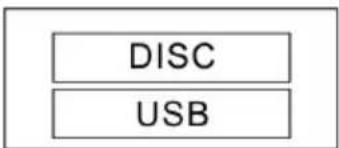
When you want to uses the USB port, please connect the USB storage into the USB port. Press one time the USB button on the remote control and the player appears a menu on the screen where you can choose the option USB. Press PLAY button to start the option. The stored content from the USB memory appears in the file browser.
flowchart
graph TD
    A["DISC"] --> B["USB"]
Note:
Before you want to disconnect the USB memory from the USB port, you need to change into the DVD loader by pressing one or more time the DVD/USB button.
Navigation in the file browser and Playback functions
From USB storages or from memory card you have the same operation for navigation like from data disc. Depend on the content (JPEG, Music or Video files) which is stored on the external media, the operation are slightly different.
Supported formats from USB Flash Memory
You can playback from USB storage the same kind of contents as from disc. For example, MPEG-4 videos, MPEG-1 and MPEG-2 videos, JPEG pictures and music files (compressed music formats).
Supported Media
The DVD Player supports different types and different sizes of USB Flash Memories. Up to 32 GB can be supported.
Note:
If you disconnect the USB Flash when the USB is active, than the USB Flash could be damage.
General Setup
General Setup:
-
Press the ▲/▼/◄/► buttons on the Remote Control to open the 'General' menu.
-
Eight submenus

will appear (read more about the sub-menus later in this paragraph), press the ▲/▼ buttons on the Remote Control to circle between the sub-menus.
- Press the ◀/▶ buttons to leave/enter a sub-menu
- When you enter a sub-menu, a number of options will appear for the entered sub-menu.
- To leave the opened menu, press the ◀ button twice.
→ TV Shape - Set the aspect ratio of the DVD Player.
→ OSD Language - Select a language for the OSD setup.
→ Caption - Display closed captions (if available).
→ Screen Saver - Select a screen saver for when the TV display goes into standby.
→ HDCD - Select a output audio signal.
→ Last Memory - Resume the memorized playback.
→ LINK/CEC Sync - Activate/deactivate syncing and control of several devices via HDMI protocol.
Audio Setup
Audio Setup:
- Press the

buttons on the Remote Control to open the 'Audio' menu.
- Two submenus will appear

(read more about the sub-menus later in this paragraph), press the ▲/▼ buttons on the Remote Control to circle between the sub-menus.
- Press the ◀/▶ buttons to leave/enter a sub-menu
- When you enter a sub-menu, a number of options will appear for the entered sub-menu.
- To leave the opened menu, press the ◀ button twice.
→ Speaker Setup - Select the stereo output.
LT/RT: Switch between left/right audio channel.
Stereo: Select to play the audio via the two front speakers of the TV.
→ Digital Audio Setup - Set HDMI as the audio output.
Video Setup
Video Setup:
-
Press the ▲/▼/◄/► buttons on the Remote Control to open the 'Video' menu.
-
Six submenus

will appear (read more about the sub-menus later in this paragraph), press the ▲/▼ buttons on the Remote Control to circle between the sub-menus.
- Press the ◀/▶ buttons to leave/enter a sub-menu
- When you enter a sub-menu, a number of options will appear for the entered sub-menu.
- To leave the opened menu, press the ◀ button twice.
→ Sharpness - Set the sharpness of the video picture.
→ Brightness - Set the brightness of the video picture.
→ Contrast - Set the contrast of the video picture.
→ Gamma - Set the gamma of the video picture.
→ Hue - Set the hue of the video picture.
→ Saturation - Set the saturation of the video picture.
Preference Setup
Preference Setup:
- Press the ▲/▼/◄/► buttons on the Remote Control to open the 'Preference' menu.
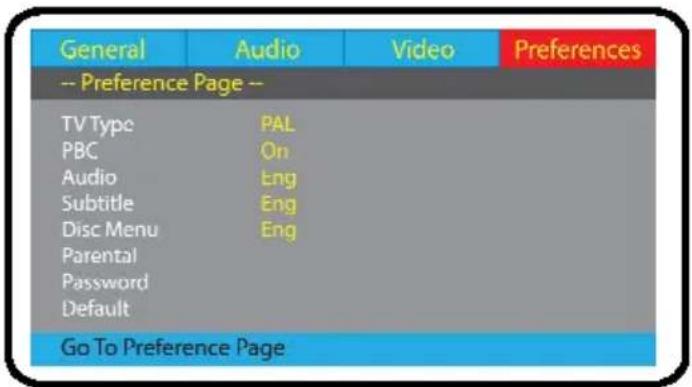
- Eight submenus will appear (read more about the sub-menus later in this paragraph), press the ▲/▼ buttons on the Remote Control to circle between the sub-menus.
- Press the ◀/▶ buttons to leave/enter a sub-menu
- When you enter a sub-menu, a number of options will appear for the entered sub-menu.
- To leave the opened menu, press the ◀ button twice.
→ TV Type - Select the color system (PAL/NTSC/Auto) of your TV.
→ PBC - Select if the playback of the disc starts directly or to enter the disc meny when playing a VCD disc. meny vid uppspelning av en VCD-skiva.
→ Audio - Select a language of the audio (if available).
→ Subtitle - Select a subtitle language (if available).
→ Disc Menu - Set the language for the menu of the DVD disc (if available).
→ Parental - Set the parental level of the DVD disc (if available).
→ Password - Open the sub menu for the password settings.
Note: The default password is '8806'.
→ Default - Reset the settings to the factory settings.
Check the following guide for the possible cause of a problem before contacting service. Technical Support of Xoro/MAS:
| Symptom Correction | |
| No power | Check if AC adapter of power is connected securely.If powered with the battery, check if it is exhausted. |
| No sound | Ensure that the equipment is connected properlyEnsure that the input settings for the TV and stereo system are proper.Please make sure, that the audio track exists on the disc. |
| No picture | Ensure that the equipment is connected properlyEnsure that the LCD is on. |
| No playback | Condensation had formed, please wait 1 or 2 hours to allow the player dry outWrong disc, please use only DVD, CD or ISO Data discThe disc may be dirty and require cleaning.Ensure that the disc is installed with the label side up.The disc has too mny scratches.The DVD+/-RW should be finalized.Wrong region code by the Video-DVDCancel the parental lock function or change the parental lock level. (The Pre-set password is 8806). |
| Interference or scrolling | Check TV type is correct: PAL/NTSC.Adjust the vertical hold on your TV. |
| No subtitles | Subtitles appear only with disc which contain themWrong MPEG-4 subtitle formatPlease rename the MPEG-4 subtitle to the same movie file name (for example movie.avi and movi.srt) |
| No remote control | Check the batteries in the remote controlAre the polarities correct?Batteries are depleted. Please uses new one.Point the remote control unit at the Infrared sensor and operate.Remove the obstacles between the remote control and the Infred snesorOperate the remote control unit at a distance of not more than 5 meters from the Infrared sensor. |
| Language can not be changed | There is only one language on the on the disc recor-ded.Choose in the Title menu of the Video DVD the langua-ge which do you want. |
| Angle can not be chan-ged | The angles may be recorded for only specific sciences and are not normally everytime available. |
| No key operation | Turn the unit off and then back to on after a couple of minutes. |
| Forget the password The | master password is 8806. Please insert the password by the Preference setup settings and the option Password |
Power
Inlet: AC 110-240 V \~ 50 / 60 Hz
Power Consumption: < 15 W
Power Consumption in Stand-By mode < 1 W
Operating Condition
Temperature: -5^ +40^ C
Humidity: 5 \~ 90 % (non condensation)
Orientation: Horizontal
Video:
Video DAC: 148 MHz / 12 Bit
TV System: PAL / NTSC
Output Level: 1 ± 0.2 Vp-p (75 Ohm)
Horizontal Resolution: up to 1080 Lines
Signal-to-Noise Ratio: ≥ 60 dB
Audio
Audio DAC: 96 kHz / 24 Bit
Frequency: 20 Hz - 20 kHz CD
20 Hz - 48 kHz DVD
Output level: 1.8 ± 0,2 Vrms (1KHz 0dB)
Harmonic Distortion: ≥ 40 dB (JIS-A 1KHz, typical
Dynamic Area: ≥ 80 dB (JIS-A 1KHz, typical)
Signal-to-Noise Ratio: ≥ 80 dB (JIS-A 1KHz, typical)
USB
Type: Version 2.0
Capacity USB Up to 32 GB
Device
Dimension: 190 x 43 x 260 mm
Weight: 0.9 kg
Video Outputs: HDMI, CVBS
Audio Outputs: Stereo RCA, Coaxial digital RCA
Others: USB
Aspect ratio: 4:3 and 16:9
Full Frame refers to programs developed for TV display with an aspect ratio of 4:3. Widescreen refers to programs developed for screens with an aspect ratio of 16:9.
If a widescreen program is displayed on a 4:3 screen, the picture will have black borders on top and bottom.
CD
A CD (Compact Disc) is a metal-coated plastic disc. It has a diameter of 12 cm and a thickness of about 1,2 mm. It was developed by Sony and Philips in 1985. The advantages are digital storage of music enabling very natural sound reproduction. Beyond this, the data is stored more compact, the handling is easy. The long lifetime of the media and the fact that usage does not decrease quality made the CD the ideal storage media.
In the meantime, 12 different storage media have been developed from the first CD. The mostly used are CD-DA (Compact Disc - Digital Audio), CD-ROM (Compact Disc - Read Only Memory), and the DVD (Digital Versatile Disc). One can store about 74 to 80 minutes of music on a CD (-DA). This is equal to 650 to 700 MB.
Signal transmission is performed touch less with a laser beam. The CD is being read from the middle to the outer side. The data or music is recorded in a spiral from the middle to the outer side.
A CD has pits and lands, the distance is about 1.6 mm. The laser light created by a laser diode passes different mirrors and prisms and then is focused by a lens to a laser beam. This laser beam scans the data spiral of the CD. On the pits, the laser beam is reflected in another direction and is detected by a photocell. The photocell transmits the signal to a microprocessor, which converts the digital data to an audio signal. The rest is done by the sound system.
CVBS
Composite Video Interface. The video signal is transmitted via a single signal line. CVBS should only be used, if your playback device does not offer other interfaces for connection with you Xoro TV set, as CVBS due to technical reasons delivers worst quality of all available interfaces (please also refer to YUV, S-Video, SCART and RGB). The CVBS interface can easily be identified from the yellow colour of the RCA jack.
Component-Signal
please refer to YUV
Contrast
Means the range of luminance between the brightest and the darkest pixel which can be displayed.
CVBS
Composite Video Interface. The video signal is transmitted via a single signal line. CVBS should only be used, if your playback device does not offer other interfaces for connection with you Xoro TV set, as CVBS due to technical reasons delivers worst quality of all available interfaces (please also refer to YUV, S-Video, SCART and RGB). The CVBS interface can easily be identified from the yellow colour of the RCA jack.
DVD
The DVD (Digital Versatile Disk) was introduced in 1995 and is a storage media with a large capacity.
While a standard CD can store 650 MB of data, the DVD can store up to 9 GB. Especially when it comes to video playback, a large storage capacity is important. Beyond its high capacity, the con-
sumer enjoys high quality video and audio. A DVD can store up to 8 different audio streams, so in best case, the movie can be watched in 8 different languages.
GUI
Graphic User Interface. See OSD.
HDCD
Pacific Microsonics has developed a digital audio technology using the full potential of a CD. The HDCD process (High Definition Compatible Digital) is a patented coding and decoding process transporting the complete details of a high resolution “master recording” to a CD. There were several attempts to improve the sound quality of CD’s, but none which could be compared to HDCD process.
Hosiden-connector
4-pin connector for S-Video connections.
Interlaced
The picture is created by writing two half pictures with a 1 line set-off on the screen. This is standard on conventional 50 Hz TV sets.
JPEG CD
On a JPEG-CD are the picture in JPEG format with support of different resolutions which are stored on a CD-R, CD-RW, DVD-R, DVD-RW, DVD+R or DVD+RW. Please create the disc by burning only in a single-session mode.
LPCM
LPCM stands for: Linear Pulse Code Modulation.
Digital, uncompressed audio recording. Standard on Audio-CDs.
MP3
MPEG 1 Layer 3 Codec, or short MP3, was developed in 1987 by Fraunhofer Institut für Integrierte Schaltungen and was a revolution in audio compression. In 1992 it became part of MPEG-1 video format. As MP3 offered high quality audio at incredible small file size, it became an won standard. With this codec one can compress audio files to about 1 MB / minute.
MPEG-4
MPEG-4 is a standard used primarily to compress audio and video (AV) digital data. Introduced in late 1998, it is the designation for a group of audio and video coding standards and related technology agreed upon by the ISO/IEC Moving Picture Experts Group (MPEG). The uses for the MPEG-4 standard are web (streaming media) and CD distribution, conversation (videophone), and broadcast television, all of which benefit from compressing the AV stream. MPEG-4 absorbs many of the features of MPEG-1 and MPEG-2 and other related standards.
By MPEG-4 could be used a lot of different audio compression method. Most popular are MP3 and AC3.
NTSC
Widespread TV standard, especially in US and Asia. 525 (480 viewable) Lines and 60 Hz refresh rate. Describes the way the video information (brightness, colour, refresh rate etc.) is transmitted. Within Europe, this video standard only appears on imported media (like US DVDs).
OSD
The OSD (On Screen Display) is all the menus and options shown on the screen.
PAL
European TV standard. PAL stands for Phase Alternation Line; refresh rate: 50 Hz, Resolution: 625 Lines, 576 visible lines. Describes the way the video information (brightness, colour, refresh rate etc.) is transmitted.
PBC
PBC stands for playback control. This function can be used to show a menu on Video CD's (if contained on the VCD). One can move in this menu with the arrow keys and select the desired function with "enter".
Pro Logic®
Dolby Pro Logic ^® is a matrix decoder for decoding the four surround sound channels contained in the stereo track of Dolby Surround ^® encoded programs (e.g. VHS movies or TV shows). Dolby Surround is a matrix coding system mixing four channels (left, center, right, surround) to a stereo track. A Pro Logic decoder separates these four channels during playback. Without Pro Logic decoder, the program only has stereo sound
Progressive Scan
Progressive Scan writes a whole picture in one step, while the normal interlaced TV-picture is composed of two half pictures. It delivers a significantly enhanced picture, especially when used on vide beamers, PC monitors or LCD TV.
RGB
Red Green Blue. Describes the way of transmission and display of video signals. The three in TV systems used colours red, green and blue are transmitted separately. When used for connection between playback device and TV set, it delivers a quality similar to YUV.
S/PDIF
S/PDIF (Sony/Philips Digital Interface) is a digital transmission standard for audio data. S/PDIF can transmit audio files from one source to another without having to leave the digital transmission which would result in worse quality.
Super Video CD (SVCD)
SVCD stands for Super Video CD. SVCD's are very similar to VCD's, one can store 35 – 60 minutes of high quality video with up to 2 Stereo audio tracks and 4 different subtitles.
Video CD(VCD)
VCD stands for "Video Compact Disc". VCD's are similar to normal CDs. They contain movies with sound. A VCD can store 74 to 80 minutes of video with stereo sound. For the storage of audio and video, MPEG-1 is used.
In case the products delivered are not free from defects in material or workmanship, MAS Electronic AG has the right to either repair or replace the defective product at its choice. MAS Electronic AG manufactures and repairs goods using components which are new or equivalent to new in accordance with industry standards and prac-

Technically unlimited
MAS
Elektronik AG
tice. The warranty for wearing parts (e.g. rechargeable batteries) is limited to 6 months. In case the device is equipped with internal data storage (e.g. hard disc drive, Flash drive), the customer is responsible to backup his data before sending the device. MAS Elektronik AG is not liable for any data loss on returned devices. MAS Electronic AG reserves the right to reset returned devices to factory defaults. Please note your personal settings for this reason.
MAS Electronic AG is not liable for any accessories not belonging to original package content such as DVDs, hard disc drives, Flash storage devices, batteries, etc. This limited warranty covers the warranty requirements set by authorities in your country.
This limited warranty only is valid in the coThis limited warranty does not cover finishes, accessories or batteries, nor does it cover damage resulting from accident, misuse, abuse, dirt, water, battery leakage, tampering, servicing performed or attempted by unauthorized service agencies. This limited warranty does not cover damages resulting from firmware upgrades. Only in case of firmware upgrades needed to add functions promised at time of purchase, such damages are covered by this limited warranty. For a correct and frictionless completion of warranty or repairs you need a RMA No. You may obtain a RMA on the internet at www.mas.de/FAQ or by telephone.
Please send the device in its original packing material, all standard accessories and a copy of the invoice, a description of defect and the RMA No. to following address. Please note the RMA number clear and in large numbers on the outer package.
Perform repairs never even through, please let this always qualified personnel. Contact the service technician if the following faults:
- If the power supply or power cable is defective.
- If objects have fallen into the unit.
- If the device has come into contact with water.
- If the unit does not work use.
- If the unit has been dropped and if the product has power fluctuations.
Use original spare parts and accessories. Unauthorized substitutions may result in short circuits or fires and other mishaps.
FREE TO CHOOSE INNOVATIONS

XORO by MAS Elektronik AG
Weidegrund 3
21614 Buxtehude
Deutschland
Telefon: 04161 800 24 24
natural_image
Recycling symbol with three arrows forming a triangle (no text or labels)


- XORO®
- H3D 8460/ H3D8470
- Hinweis:
- Vorderseite
- Bedienelemente
- Tasten
- Control Elements
- Connection
- Remote Control
- Playback
- Setup
- Troubleshooting 31
- Safety Information
- User Manual
- Laser
- Operation
- Power Supply
- Disc Compatibility
- USB Port
- Operation and Position
- Defect
- Recycling Information
- Recycling of electronic devices
- Recycling of paper and carton
- Recycling of plastic parts
- Green Dot
- Notes:
- Features
- Standard Settings
- Quick Start Guide
- Insert batteries and Operation radius
- Front Panel
- Rear Panel
- Video Output
- Connecting with a VIDEO (CVBS) cable
- Connecting with a HDMI Cable
- Audio Output
- Digital Output
- Stereo Analogue Output
- Buttons of the remote control:
- How to start playback from the MENU screen
- How to pause playback?
- How to stop playback?
- Fast Forward or Fast Backward
- Stepwise playback
- Slowmotion playback
- How to change the camera angle?
- How to change the Audio languages?
- Chapter / Track
- Clear
- REPEAT
- DVD Video Discs - "Repeat Chapter / Title / All / Off"
- MPEG-4, MPEG-1, MPEG-2, JPEG discs - "Single / Folder / All / Off"
- Music disc - Single / All / Off
- Howto Repeat a specific Segment
- Change the Volume
- Mute
- ZOOM
- Checking the operational status
- Search
- Selecting Subtitles
- USB
- Security Notes:
- Playing in Favorite Order
- HD Resolution
- PBC
- Playback JPEG files
- Navigation in the file browser
- Playback or Slideshow
- Pause
- Stop
- Thumbnail Preview
- Transition effects during a Slideshow
- Playing back Music files
- Note:
- MPEG-1, MPEG-2 and MPEG-4 files
- MPEG-4 disc compatibility with this player is limited as follows:
- Audio language
- Subtitles
- USB & Card Reader
- Navigation in the file browser and Playback functions
- Supported formats from USB Flash Memory
- Supported Media
- General Setup
- General Setup:
- Audio Setup
- Audio Setup:
- Video Setup
- Video Setup:
- Preference Setup
- Preference Setup:
- Power
- Operating Condition
- Video:
- Audio
- Device
- Aspect ratio: 4:3 and 16:9
- CD
- CVBS
- Component-Signal
- Contrast
- DVD
- GUI
- HDCD
- Hosiden-connector
- Interlaced
- JPEG CD
- LPCM
- MP3
- MPEG-4
- NTSC
- OSD
- PAL
- Pro Logic®
- Progressive Scan
- RGB
- S/PDIF
- Super Video CD (SVCD)
- Video CD(VCD)
- XORO by MAS Elektronik AG
Brand : XORO
Model : HSD 8460
Category : DVD player