
FA310 - Network card / adapter NETGEAR - Free user manual and instructions
Find the device manual for free FA310 NETGEAR in PDF.


| Type of Product | Network Card / Adapter |
| Brand | NETGEAR |
| Model | FA310TX |
| Form Factor | PCI expansion card |
| Interface | RJ-45 connector for 10BASE-T or 100BASE-TX |
| Data Rate | 10/100 Mbps (auto-sensing) |
| Standards Compliance | IEEE 802.3u 100BASE-TX, IEEE 802.3i 10BASE-T |
| Operating System Support | Windows 95, Windows 98, Windows NT, NetWare |
| Bus Type | PCI (bus mastering capable) |
| Operating Voltage | +5V ± 5% |
| Maximum Current | 630 mA |
| Dimensions | 5.125 x 2.813 in (13.02 x 7.15 cm) |
| Weight | 0.20 lb (90 g) |
| Operating Temperature | 0° to 40°C |
| Operating Humidity | 10% to 90% noncondensing |
| Regulatory Compliance | CE commercial, FCC Part 15 Class B, EN 55022 Class B, Canada ICES-003 Class B |
| Package Contents | Network card, Drivers and Diagnostics disk, Category 5 UTP cable (with model FA310TXC), installation guide |
| Installation Requirements | Available PCI slot, PC with Windows 95/98 or other OS, proper cable |
| Warranty | Limited lifetime warranty (first year replacement, thereafter repair/replacement with registration) |
| Handling Precautions | Ground yourself to avoid static, handle by edges, do not touch components |
Frequently Asked Questions - FA310 NETGEAR
User questions about FA310 NETGEAR
0 question about this device. Answer the ones you know or ask your own.
Ask a new question about this device
Download the instructions for your Network card / adapter in PDF format for free! Find your manual FA310 - NETGEAR and take your electronic device back in hand. On this page are published all the documents necessary for the use of your device. FA310 by NETGEAR.
USER MANUAL FA310 NETGEAR
natural_image
Abstract illustration of a human head with glasses standing beside a large gear, surrounded by geometric blocks (no text or symbols)
Start Here
Instructions in this guide are for users of Windows ^® 95 and Windows 98 who are installing the Model FA310TX Network Card. For instructions on installing and verifying the Windows network driver, refer to “Install the Windows Network Driver” on the other side of this guide.
These three easy steps are provided in this guide for installing your Model FA310TX Network Card:
- Verify Package Contents
- Install the Network Card
- Connect the Network Cables
As a last step, be sure to register your NETGEAR product.

Note: If you are using other network operating systems: Insert the Drivers and Diagnostics Disk in Drive A, type the command A:\HELP, press [Enter] to execute the program, press [Enter] again to pass the opening screen, select the name of the operating system, press [Enter], and then follow the instructions on the screen.

Verify Package Contents
Unpack the contents of the package and make sure that you have everything.
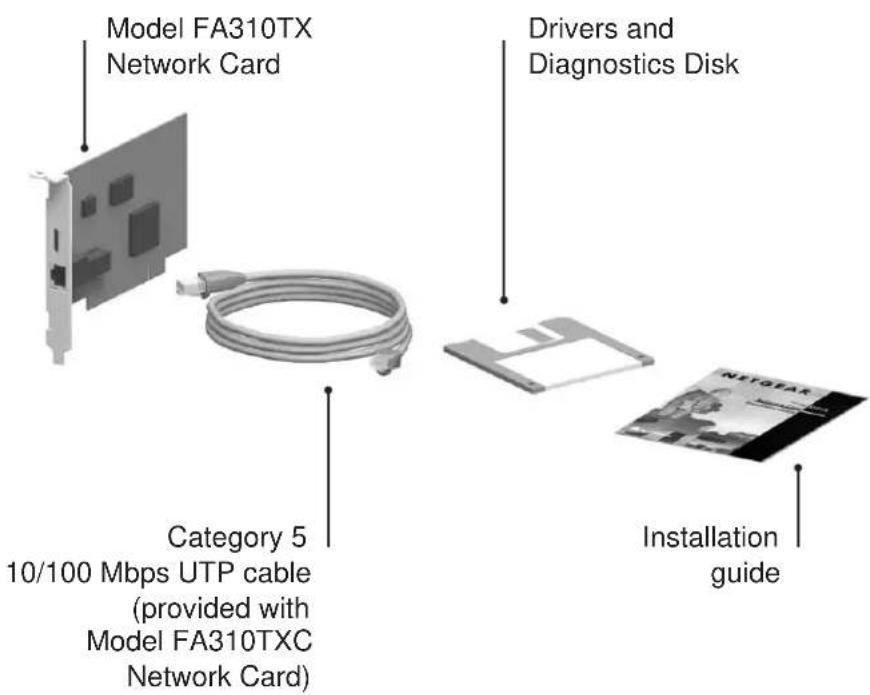
9014FA
Verify PC Requirements
The instructions given in this guide are for using the NETGEAR™ Model FA310TX Network Card in a PC that has a Microsoft® Windows operating system.
You must have a PC with a PCI expansion slot that has bus mastering capability.

Install the Network Card

Note: Touch a grounded metal object to free yourself of static electricity before you handle the network card.
-
Turn the power off and unplug the power cord from your computer.
-
Remove the PC cover.
-
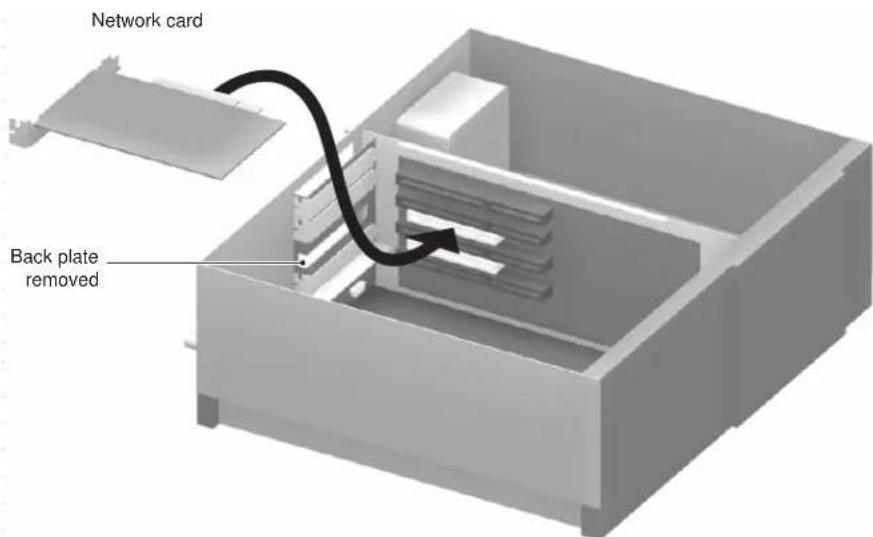
Choose an available PCI slot (PCI slots are the shorter slots) and remove the corresponding back plate from the PC chassis.
-
Insert the network card into the PCI expansion slot.

Note: To avoid damaging any components on the network card, handle it by the edges, using your thumbs to push it securely into the PCI slot. Make sure the network card is fully inserted into the slot to prevent the PC operating system from freezing at startup.
- Fasten the network card to the rear of the computer chassis by tightening the screw that is on the PC.
- Replace the PC cover and reconnect the power cord to the PC.
7983FB

Connect the Network Cables
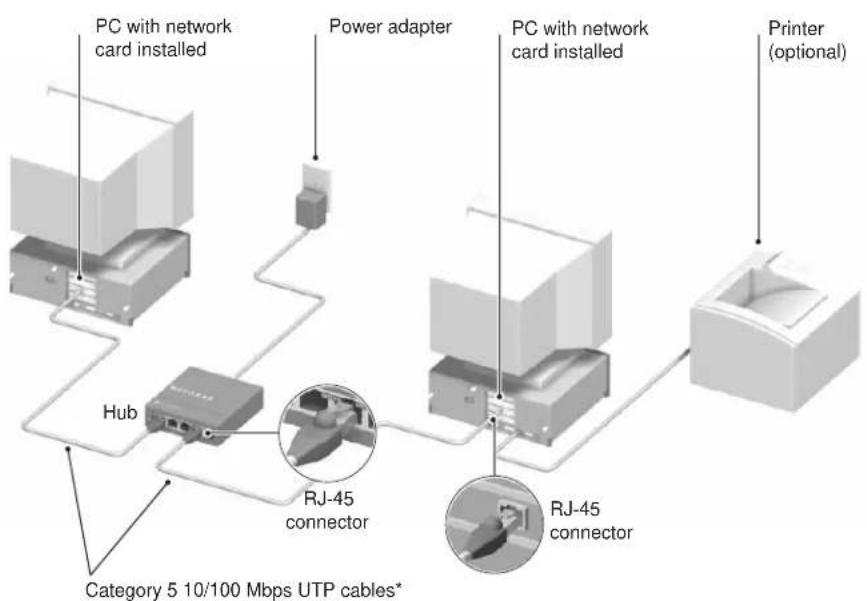
Using the appropriate UTP cable, connect any port on a network hub to the port on the network card.

Note: One of the ports on NETGEAR hubs is switchable between Normal (MDI-X) and Uplink (MDI) with a Normal/Uplink push button. If you are using this switchable port on a NETGEAR hub to connect to a PC or the network card, make sure the Normal/Uplink push button is set to Normal.
flowchart
graph TD
    A["PC with network card installed"] --> B["Power adapter"]
    B --> C["PC with network card installed"]
    C --> D["Printer (optional)"]
    E["Hub"] --> F["RJ-45 connector"]
    F --> G["RJ-45 connector"]
    G --> H["Category 5 10/100 Mbps UTP cables*"]
*Use the cables provided or any Category 5 UTP cable. Maximum length = 100 meters (300 feet)

Install the Windows 95 Network Driver
This guide provides instructions for installing the Windows Network Driver. The steps given are for users of Windows 95. However, because all versions of Windows 95 might not respond the same, windows that are different from those shown in these instructions might open but prompt you for the same information, or windows might open in a different order than shown in these instructions.
If you are using Windows 98, read these instructions thoroughly for an overview of the steps that are necessary for the installation of the software driver. Follow the instructions given by the Windows 98 Installation Wizard to install the driver.

Note: You must install the network card (instructions on other side of this guide) before installing the network driver.
You need to have the Windows CD-ROM and the FA310TX Drivers and Diagnostics Disk ready to use in the installation process.
If you have not yet named your PC and your network, before you proceed with the installation steps, decide on a name for your network and for each PC. When the “Network” window opens, it prompts you to “... provide computer and workgroup names....” Click on “OK.” The second “Network” window opens and prompts you for the names. Enter a name (a different one-word name for each computer) in the “Computer name” entry field; enter a workgroup name (the name of your entire network) in the “Workgroup” entry field. Click on “OK” or “Close.”

Note: If the “Insert Disk” window opens and the “Please insert the disk labeled Windows...” message appears at any time during the installation process, insert the Windows CD-ROM in Drive D (the CD-ROM drive) and click on “OK.” Then follow the next step in the instructions.
1. Turn on the power to the computer and start Windows 95.
The new hardware is found, and the driver is automatically loaded.
2.
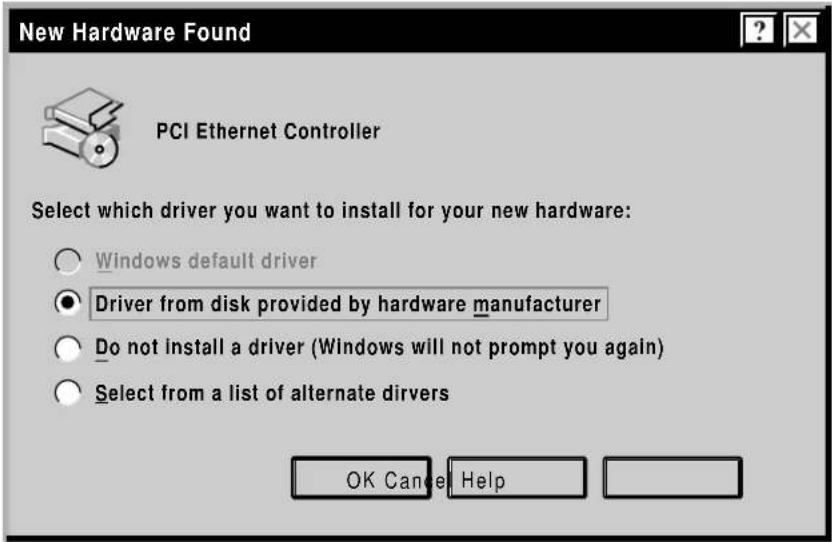
Select "Driver from disk provided by hardware manufacturer," and then click on "OK."
If a different "New Hardware Found" window opens that prompts you to click on "Next," doing so opens the "Update Device Driver Wizard" window in Step 3.
3.
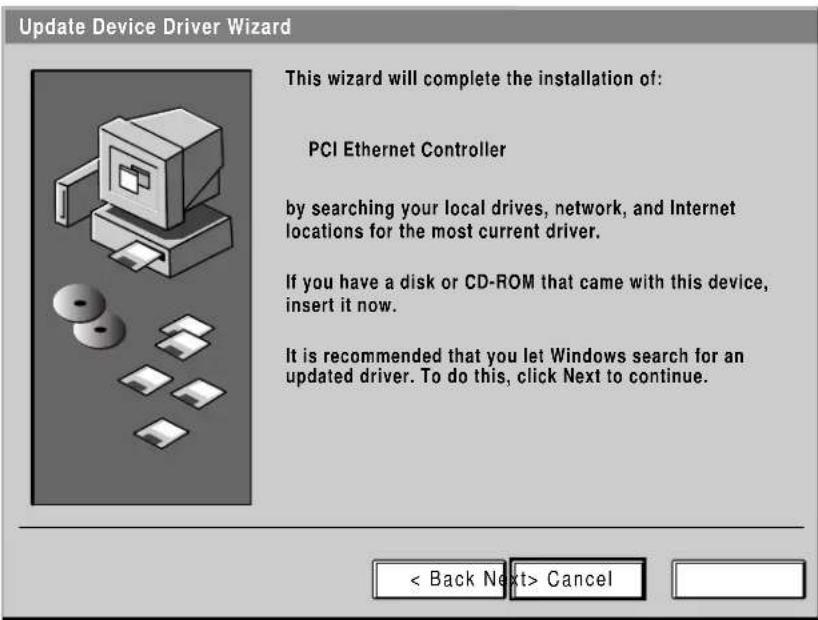
Insert the FA310TX Drivers and Diagnostics Disk in Drive A, and then click on "Next."
4.
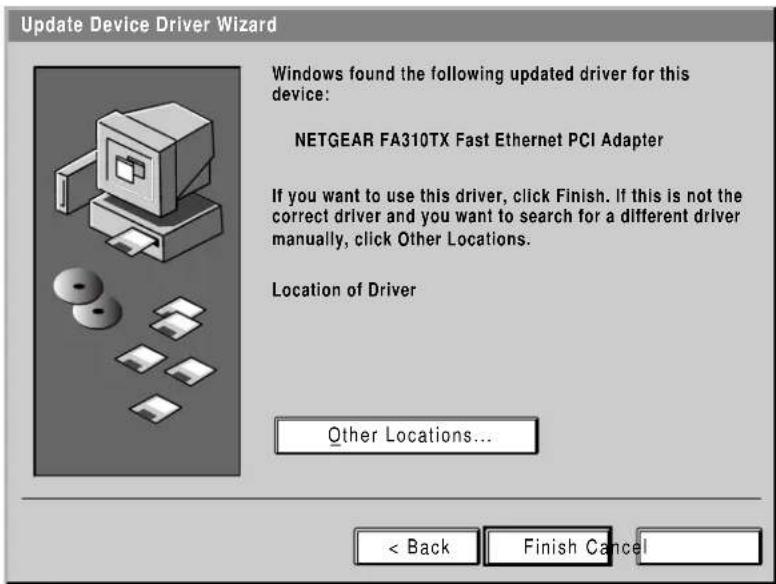
Click on "Finish."
5.
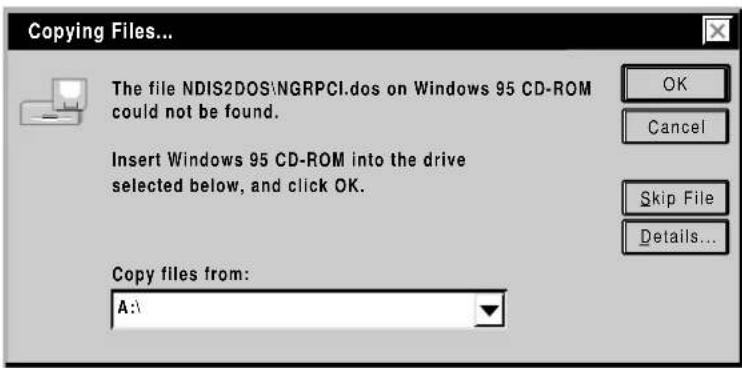
Type A:\ in the "Copy files from" entry field and click on "OK."
6.
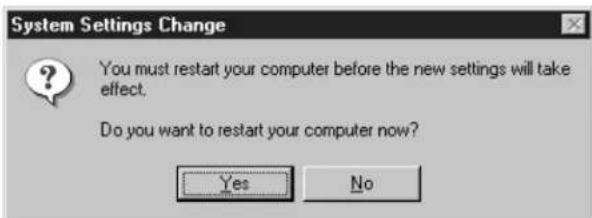
Remove the Drivers and Diagnostics Disk from the floppy drive, remove the Windows 95 CD-ROM from the CD drive (if you have inserted it), and then click on "Yes."
Restarting your system is necessary to enable your PC to finish setting up your new hardware.
- Proceed to "Verify Installation."

Verify Installation
1.
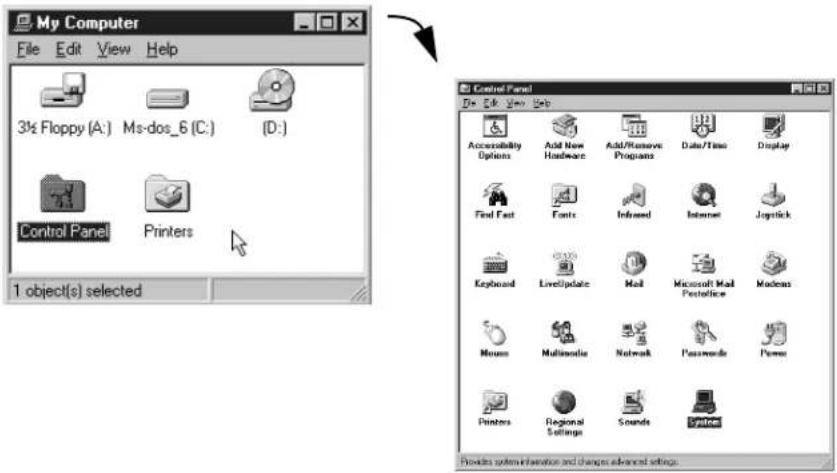
Double-click on "My Computer" on the desktop, double-click on "Control Panel," and then double-click on "System."
2.
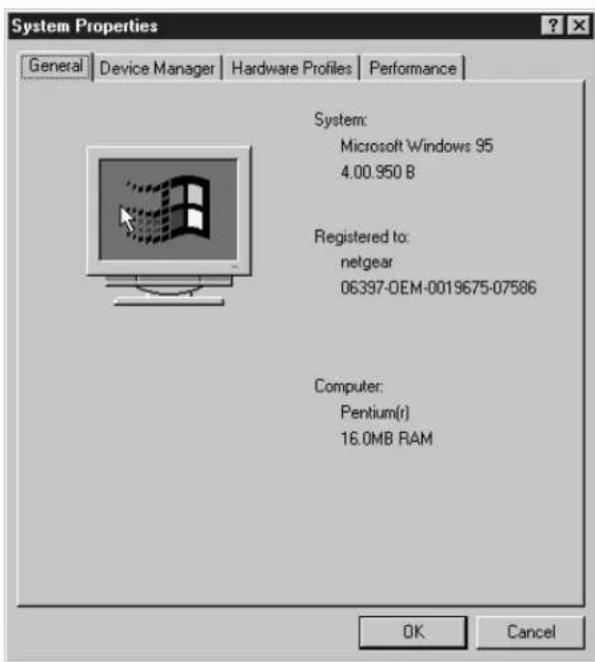
Click on "Device Manager."
3.
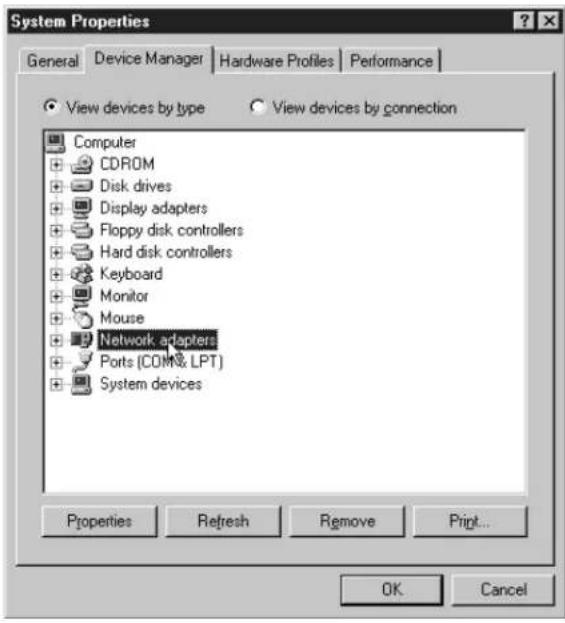
Double-click on "Network adapters."
4.
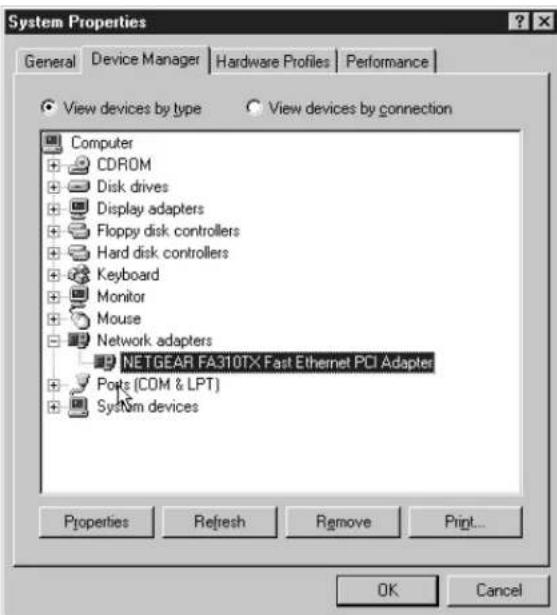
If there is a problem with the installation of the driver, an exclamation point appears next to “NETGEAR FA310TX Fast Ethernet PCI Adapter.” If there is an exclamation point, double-click on “NETGEAR FA310TX Fast Ethernet PCI Adapter.” The “Properties” window opens, and a message regarding the status of the device is displayed in the window. Continue to click on “OK” or click on the “X” in the right hand corner to close any open windows and return to Windows 95.
| Model FA310TX Network Card | |
| Standards Compatibility | IEEE 802.3u, 100BASE-TX Fast EthernetIEEE 802.3i, 10BASE-T EthernetNetWare tested and approvedMicrosoft Windows, Windows 95, Windows NT®compatiblePCI Plug-and-Play compatible |
| DC operating voltage +5V +/- 5% | @ 630 mA maximum |
| Physical Specifications | |
| Dimensions 5.125 x 2.813 in. | 13.02 x 7.15 cm |
| Weight .20 lb (90 g) | |
| Environmental Specifications | |
| Operating temperature 0 | ° to 40°C |
| Operating humidity 10% to 90% noncondensing | |
| Agency Compliance | CE mark, commercial |
| FCC, Part 15, Class B | |
| EN 55 022 (CISPR 22), Class B | |
| Canada ICES-003, Class B | |
| Interface Options | RJ-45 connector for 10BASE-T or 100BASE-T Ethernet interface |

Hardware Warranty Information
Thank you for selecting NETGEAR products.
Subject to the provisions described below, this NETGEAR product is protected by a limited lifetime warranty from defects in material and workmanship.
Should a product fail to perform as described above within the first year following the original date of purchase, NETGEAR will ship a replacement for the failed product upon return of the defective product.
Products that fail after the first year following the original date of purchase will be repaired or replaced with the same or functionally equivalent, product by NETGEAR, at its discretion, free of charge provided you (1) have, within 30 days of the original date of purchase, completed and returned the Owner Registration Cards which accompanied the products when shipped, (2) return the failed product to NETGEAR designated repair facility with shipping charge prepaid, and (3) provide NETGEAR with proof of the original date of purchase. Repaired or replacement products will be returned to you with shipping charges prepaid.
Replacement products may be refurbished or contain refurbished materials. If NETGEAR, by its sole determination, is unable to repair or replace the defective product, it will refund the depreciated purchase price of the product.
This warranty does not apply if, in the judgement of NETGEAR, the product fails due to damage from shipment, handling, storage, accident, abuse or misuse, or if it has been used or maintained in a manner not conforming to product manual instructions, has been modified in any way, or has had any serial number removed or defaced. Repair by anyone other than NETGEAR or an approved agent will void this warranty. The maximum liability of NETGEAR under this warranty is limited to the purchase price of the product covered by the warranty.
Prior to returning any defective product, the end customer or the reseller from whom the end customer originally purchased the product must obtain a Return Materials Authorization (RMA) number from NETGEAR. All defective products should be returned to NETGEAR with shipping charges prepaid. NETGEAR will not accept collect shipments.
EXCEPT AS SPECIFICALLY PROVIDED IN THIS AGREEMENT OR AS REQUIRED BY LAW, THE WARRANTIES AND REMEDIES STATED ABOVE ARE EXCLUSIVE AND IN LIEU OF ALL OTHERS, ORAL OR WRITTEN, EXPRESS OR IMPLIED. ANY AND ALL OTHER WARRANTIES, INCLUDING IMPLIED WARRANTIES OF MERCHANTABILITY, FITNESS FOR A PARTICULAR PURPOSE AND NONINFRINGEMENT OF THIRD PARTY RIGHTS ARE EXPRESSLY EXCLUDED. NETGEAR SHALL NOT UNDER ANY CIRCUMSTANCES BE LIABLE TO ANY PERSON FOR ANY SPECIAL, INCIDENTAL, INDIRECT OR CONSEQUENTIAL DAMAGES, INCLUDING WITHOUT LIMITATION, DAMAGES RESULTING FROM USE OR MALFUNCTION OF THE PRODUCTS, LOSS OF PROFITS OR REVENUES OR COSTS OF REPLACEMENT GOODS, EVEN IF NETGEAR IS INFORMED IN ADVANCE OF THE POSSIBILITY OF SUCH DAMAGES.
IMPORTANT!
Please register online. YOU MUST REGISTER TO OBTAIN TECHNICAL SUPPORT.
PLEASE RETAIN PROOF OF PURCHASE and this warranty information.
To get product support, or to obtain product information and NETGEAR product documentation, direct your Web browser to the Web page at:
http://www.NETGEAR.com
To register online, direct your Web browser to the Web page at:
http://www.gearguy.com/pub/registration
If you do not have access to the World Wide Web, you can print a registration card and mail it to NETGEAR customer service. The card is included on your Drivers and Diagnostics disk as a Microsoft Word document file called register.doc Download the file, print the form, and fill in the information. Then mail the completed form to:
NETGEAR, Inc.
P.O. Box 58185
Santa Clara, CA 95052-9916

Compliance Information
© 2000 by NETGEAR, Inc. All rights reserved.
Trademarks
NETGEARTM is a trademark of NETGEAR, Inc. Windows® is a registered trademark of Microsoft Corporation. Other brand and product names are trademarks or registered trademarks of their respective holders. Information is subject to change without notice.
Statement of Conditions
In the interest of improving internal design, operational function, and/or reliability, NETGEAR reserves the right to make changes to the products described in this document without notice.
NETGEAR does not assume any liability that may occur due to the use or application of the product(s) or circuit layout(s) described herein.
Certificate of the Manufacturer/Importer
It is hereby certified that the Model FA310TX Network Card has been suppressed in accordance with the conditions set out in the BMPT-AmtsblVfg 243/1991 and Vfg 46/1992. The operation of some equipment (for example, test transmitters) in accordance with the regulations may, however, be subject to certain restrictions. Please refer to the notes in the operating instructions.
Federal Office for Telecommunications Approvals has been notified of the placing of this equipment on the market and has been granted the right to test the series for compliance with the regulations.
Federal Communications Commission (FCC) Compliance Notice: Radio Frequency Notice

Note: Modifications to this device change it from the original state it was in when tested and may alter the device so that it no longer complies with FCC testing limitations for Class B digital devices. According to FCC regulations, the user could be prohibited from operating this equipment if it is modified.
This device complies with Part 15 of the FCC Rules. Operation is subject to the following two conditions:
- This device may not cause harmful interference.
- This device must accept any interference received, including interference that may cause undesired operation.
Note: This equipment has been tested and found to comply with the limits for a Class B digital device, pursuant to Part 15 of the FCC Rules. These limits are designed to provide reasonable protection against harmful interference in a residential installation. This equipment generates, uses, and can radiate radio frequency energy and, if not installed and used in accordance with the instructions, may cause harmful interference to radio communications. However, there is no guarantee that interference will not occur in a particular installation. If this equipment does cause harmful interference to radio or television reception, which can be determined by turning the equipment off and
on, the user is encouraged to try to correct the interference by one or more of the following measures:
- Reorient or relocate the receiving antenna.
- Increase the separation between the equipment and receiver.
- Connect the equipment into an outlet on a circuit different from that to which the receiver is connected.
- Consult the dealer or an experienced radio/TV technician for help.
Declaration of Conformity
NETGEAR Model FA310TX Network Card

Tested to comply with FCC Standards
FOR HOME OR OFFICE USE
EN 55 022 Statement
This is to certify that the Model FA310TX Network Card is shielded against the generation of radio interference in accordance with the application of Council Directive 89/336/EEC, Article 4a. Conformity is declared by the application of EN 55 022 Class B (CISPR 22).
Compliance is dependent upon the use of shielded data cables.
Canadian Department of Communications Radio Interference Regulations
This digital apparatus (Model FA310TX Network Card) does not exceed the Class B limits for radio-noise emissions from digital apparatus as set out in the Radio Interference Regulations of the Canadian Department of Communications.
4500 Great America Parkway
Santa Clara, CA 95054
USA
Phone: 1-888-NETGEAR
E-mail: support@NETGEAR.com

Support Information
Defective or Damaged Merchandise
Defective or damaged merchandise can be returned to your point-of-purchase representative.
Internet/World Wide Web
To get product support, to register your product online, or to obtain product information and NETGEAR product documentation, direct your Web browser to:
http://www.NETGEAR.com
Customer Support
You can contact Customer Support at the following toll free numbers:
Phone
Australia 1800-787-638 Korea 00308-11-0319
Austria 00800-06384327 Netherlands 0800-023-0981
(00800-0-NETGEAR) New Zealand 00800-1233-4566
Denmark 808-82179 Norway 800-12041
Canada 1-888-NETGEAR Singapore 001-800-1233-4566
Finland 0800-111-036 Sweden 0200-298-298
France 0800-77-17-53 Switzerland 00800-0638-4327
Germany 00800-06384327
(00800-0-NETGEAR) United Kingdom 020-7216-0014
Hong Kong 001-800-1233-4566 United States 1-888-NETGEAR
Japan 0120-66-5402 All Other Countries +1 801-236-8499
(00800-0-NETGEAR)


- Start Here
- Verify Package Contents
- Verify PC Requirements
- Install the Network Card
- Connect the Network Cables
- Install the Windows 95 Network Driver
- Turn on the power to the computer and start Windows 95.
- Verify Installation
- 1.
- 2.
- Hardware Warranty Information
- IMPORTANT!
- Compliance Information
- Trademarks
- Statement of Conditions
- Certificate of the Manufacturer/Importer
- Federal Communications Commission (FCC) Compliance Notice: Radio Frequency Notice
- Declaration of Conformity
- EN 55 022 Statement
- Canadian Department of Communications Radio Interference Regulations
- Support Information
- Defective or Damaged Merchandise
- Internet/World Wide Web
- Customer Support
- Phone
Brand : NETGEAR
Model : FA310
Category : Network card / adapter