
MIDI - Module audio électronique 2hp - Free user manual and instructions
Find the device manual for free MIDI 2hp in PDF.


| Product Type | Eurorack Module |
| Brand | 2hp |
| Model | MIDI |
| Format | 2 HP |
| Depth | 47 mm (Skiff Friendly) |
| Power Supply | +12V: 27mA, -12V: 3mA |
| Input | USB Mini B (MIDI) |
| Outputs | 2 CV (0-5V, 12-bit), 2 Gate (0-5V) |
| MIDI Compatibility | Class compliant (Mac/PC/Linux) |
| Operating Modes | Monophonic, Duophonic, Dual Monophonic, Quad Trigger/Gate |
| LED Indicators | CV1, CV2, Gate1, Gate2, MIDI Status |
| Clock Output | Selectable PPQN (1, 4, 8, 24) in Monophonic mode |
| CC Output | CC1 on MIDI channels 5-8 (Monophonic mode) |
| Gate Options | Note gate, Start/Stop, Clock (depending on mode and MIDI channel) |
| Quad Mode Triggers | Trigger/gate for notes C1, D1, E1, F1 |
| Installation | Standard Eurorack power cable (red stripe -12V) |
| Resolution | 12-bit for CV outputs |
| Weight | Approx. 30 g |
Frequently Asked Questions - MIDI 2hp
User questions about MIDI 2hp
0 question about this device. Answer the ones you know or ask your own.
Ask a new question about this device
Download the instructions for your Module audio électronique in PDF format for free! Find your manual MIDI - 2hp and take your electronic device back in hand. On this page are published all the documents necessary for the use of your device. MIDI by 2hp.
USER MANUAL MIDI 2hp
MIDI is a plug and play solution for interfacing with your computer or MIDI hardware. Four modes provide monophonic, duophonic, dual mono, and quad trigger operation.
MIDI clock, CC messages, and note on messages are all easily accessible between the four modes. The status LED provides clear indication of MIDI data being received by the module. Class compliant MIDI device on Mac/PC/Linux. Get connected with MIDI.
- USB mini connector
- 2 CV outputs (12 bit resolution)
- 2 Gate outputs
- MIDI Clock
- Class compliant MIDI device on Mac/PC/Linux
- MIDI monitor status LED
Table of Contents
Installation/Specifications 4
MIDI 5
General Functions Overview 6
Changing Modes 7
Modes 7
Monophonic Mode 7
Duophonic Mode 10
Dual Monophonic Mode 10
Quad Trigger/Gate Mode 10
Installation
To install, locate 2 HP of space in your Eurorack case and confirm the positive 12 volts and negative 12 volts sides of the power distribution lines. Plug the connector into the power distribution board of your case, keeping in mind that the red band corresponds to negative 12 volts. In most systems, the negative 12 volt supply line is at the bottom. The power cable should be connected to the MIDI with the red band facing the front of the module.
Specifications
Format: 2 HP Eurorack module
Depth: 47mm (Skiff Friendly)
Max Current: +12V = 27mA
-12V = 3mA
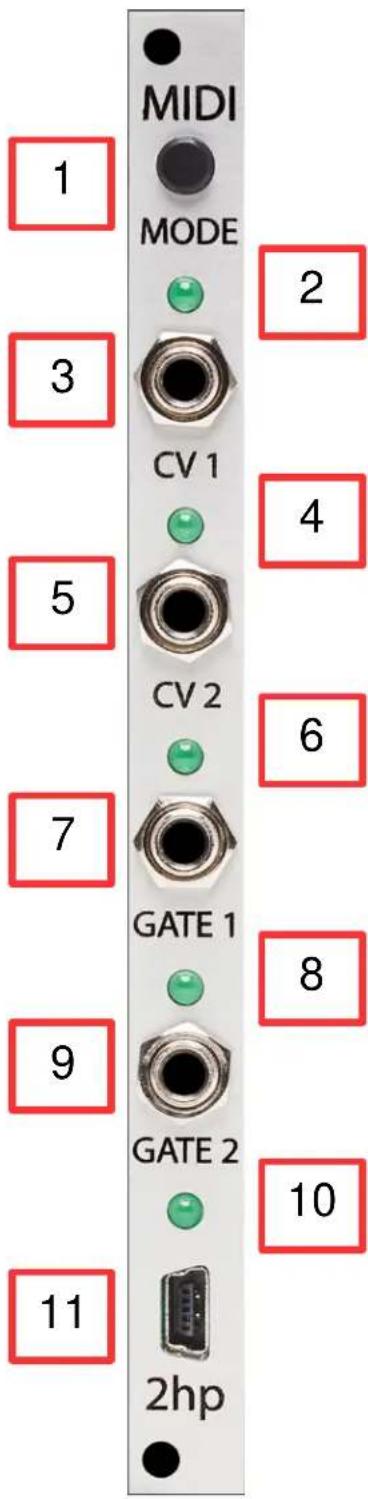
1. MODE BUTTON:
Manual selection of the four modes
2. CV 1 LED:
LED indication of the signal present at the CV 1 output
3. CV 1:
Configurable control voltage output
Range: 0V - 5V
4. CV 2 LED:
LED indication of the signal present at the CV 2 output
5. CV 2:
Configurable control voltage output
Range: 0V - 5V
6. GATE 1 LED:
LED indication of the signal present at the GATE 1 output
7. GATE 1:
Configurable gate output
Range: 0V - 5V
8. GATE 2 LED:
LED indication of the signal present at the GATE 2 output
9. GATE 2:
Configurable gate output
Range: 0V - 5V
10. MIDI STATUS LED:
LED indication of MIDI communication between devices
11. USB MINI CONNECTOR:
Connection for computer interfacing
Changing Modes
To change modes, press and hold the Mode Button until all LEDs illuminate. Press the Mode Button again to navigate to the desired mode.
CV 1 LED = Monophonic Mode
CV 2 LED = Duophonic Mode
Gate 1 LED = Dual Monophonic Mode
Gate 2 LED = Quad Trigger/Gate Mode
Once the desired mode has been navigated to, press and hold the Mode Button until all LEDs illuminate.
Release the Mode Button and the desired mode will be selected.
Modes
MONOPHONIC MODE (CV 1 LED)
Monophonic Mode has different functionality based on the currently selected MIDI channel
MIDI Channel 1, 13, 14, 15, and 16
• CV 1 - 1V/Octave note output
• CV 2 - Velocity output
- Gate 1 - Gate output
○ Voltage is high from Note-On message until Note-Off message
• Gate 2 - 1 PPQN MIDI Clock output
MIDI Channel 2
• CV 1 - 1V/Octave note output
• CV 2 – Velocity output
- Gate 1 - Gate output
○ Voltage is high from Note-On message until Note-Off message
• Gate 2 - 4 PPQN MIDI Clock output
MIDI Channel 3
• CV 1 - 1V/Octave note output
• CV 2 – Velocity output
- Gate 1 - Gate output
○ Voltage is high from Note-On message until Note-Off message
• Gate 2 - 8 PPQN MIDI Clock output
MIDI Channel 4
• CV 1 - 1V/Octave note output
• CV 2 - Velocity output
- Gate 1 - Gate output
- Voltage is high from Note-On message until Note-Off message
• Gate 2 - 24 PPQN MIDI Clock output
MIDI Channel 5
• CV 1 - 1V/Octave note output
- CV 2 - CC 1
- Gate 1 - Gate output
○ Voltage is high from Note-On message until Note-Off message
• Gate 2 - 1 PPQN MIDI Clock output
MIDI Channel 6
• CV 1 - 1V/Octave note output
- CV 2 - CC 1
- Gate 1 - Gate output
o Voltage is high from Note-On message until Note-Off message
• Gate 2 - 4 PPQN MIDI Clock output
MIDI Channel 7
• CV 1 - 1V/Octave note output
- CV 2 - CC 1
- Gate 1 - Gate output
○ Voltage is high from Note-On message until Note-Off message
• Gate 2 - 8 PPQN MIDI Clock output
MIDI Channel 8
• CV 1 - 1V/Octave note output
- CV 2 - CC 1
- Gate 1 - Gate output
○ Voltage is high from Note-On message until Note-Off message
• Gate 2 - 24 PPQN MIDI Clock output
MIDI Channel 9
• CV 1 - 1V/Octave note output
- CV 2 - Gate output
o Voltage is high from Note-On message until Note-Off message
• Gate 1 - MIDI Start & MIDI Stop messages
• Gate 2 - 1 PPQN MIDI Clock output
MIDI Channel 10
• CV 1 - 1V/Octave note output
- CV 2 - Gate output
- Voltage is high from Note-On message until Note-Off message
• Gate 1 - MIDI Start & MIDI Stop messages
• Gate 2 - 4 PPQN MIDI Clock output
MIDI Channel 11
• CV 1 - 1V/Octave note output
- CV 2 - Gate output
○ Voltage is high from Note-On message until Note-Off message
• Gate 1 - MIDI Start & MIDI Stop messages
• Gate 2 - 8 PPQN MIDI Clock output
MIDI Channel 12
• CV 1 - 1V/Octave note output
- CV 2 - Gate output
- Voltage is high from Note-On message until Note-Off message
• Gate 1 - MIDI Start & MIDI Stop messages
• Gate 2 - 24 PPQN MIDI Clock output
It is important to note that MIDI channels 1, 13, 14, 15 and 16 have the same functionality
DUOPHONIC MODE (CV 2 LED)
Duophonic Mode has the same functionality for all MIDI channels
The newest Note-On & Note-Off messages will be emitted from the CV/Gate pair with the oldest data
• CV 1 - 1V/Octave note output
- CV 2 - Gate output
- Voltage is high from Note-On message until Note-Off message
• Gate 1 - 1V/Octave note output
• Gate 2 - Gate output
- Voltage is high from Note-On message until Note-Off message
DUAL MONOPHONIC MODE (GATE 1 LED)
Data sent on MIDI Channels 1 or 3-16 will be emitted from the CV 1 and Gate 1 outputs
Data sent on MIDI Channel 2 will be emitted from the CV 2 and Gate 2 outputs
• CV 1 - 1V/Octave note output
- CV 2 - Gate output
- Voltage is high from Note-On message until Note-Off message
• Gate 1 - 1V/Octave note output
- Gate 2 - Gate output
- Voltage is high from Note-On message until Note-Off message
QUAD TRIGGER/GATE MODE (GATE 2 LED)
Data sent on MIDI Channels 1 or 3-16 will emit as 6ms trigger signals from all outputs
Data sent on MIDI Channels 2 will emit as gate signals from all outputs Voltage is high from receipt of Note-On message until Note-Off message
• CV 1 – Trigger/Gate output for Note #36 (C1)
• CV 2 - Trigger/Gate output for Note #38 (D1)
• Gate 1 - Trigger/Gate output for Note #40 (E1)
• Gate 2 - Trigger/Gate output for Note #41 (F1)
- TABLE OF CONTENTS
- INSTALLATION
- SPECIFICATIONS
- MODE BUTTON
- CV 1 LED
- CV 1
- CV 2 LED
- CV 2
- GATE 1 LED
- GATE 1
- GATE 2 LED
- GATE 2
- MIDI STATUS LED
- USB MINI CONNECTOR
- CHANGING MODES
- MODES
- MONOPHONIC MODE (CV 1 LED)
- MIDI CHANNEL 1, 13, 14, 15, AND 16
- MIDI CHANNEL 2
- MIDI CHANNEL 3
- MIDI CHANNEL 4
- MIDI CHANNEL 5
- MIDI CHANNEL 6
- MIDI CHANNEL 7
- MIDI CHANNEL 8
- MIDI CHANNEL 9
- MIDI CHANNEL 10
- MIDI CHANNEL 11
- MIDI CHANNEL 12
- DUOPHONIC MODE (CV 2 LED)
- DUAL MONOPHONIC MODE (GATE 1 LED)
- QUAD TRIGGER/GATE MODE (GATE 2 LED)
Brand : 2hp
Model : MIDI
Category : Module audio électronique