
MB12-SCN02 - Charger HONEYWELL - Free user manual and instructions
Find the device manual for free MB12-SCN02 HONEYWELL in PDF.


| Product Type | Battery Charger |
| Brand | Honeywell |
| Model | MB12-SCN02 |
| Input Voltage | 100-240 V AC, 50/60 Hz |
| Output Voltage | 12 V DC |
| Output Current | 2 A |
| Dimensions (L x W x H) | 10 x 6 x 4 cm |
| Weight | 150 g |
| Cable Length | 1.5 m |
| Compatible Batteries | 12 V lead-acid or lithium-ion |
| Charging Modes | Automatic, trickle, maintenance |
| Overcharge Protection | Yes |
| Short Circuit Protection | Yes |
| Reverse Polarity Protection | Yes |
| Operating Temperature | 0°C to 40°C |
| Storage Temperature | -20°C to 60°C |
| Certifications | CE, RoHS |
| Maintenance | Keep dry and clean; inspect cables periodically |
| Safety Instructions | Use in well-ventilated area; avoid water contact |
| Repairability | User-serviceable: no; contact certified technician |
Frequently Asked Questions - MB12-SCN02 HONEYWELL
User questions about MB12-SCN02 HONEYWELL
0 question about this device. Answer the ones you know or ask your own.
Ask a new question about this device
Download the instructions for your Charger in PDF format for free! Find your manual MB12-SCN02 - HONEYWELL and take your electronic device back in hand. On this page are published all the documents necessary for the use of your device. MB12-SCN02 by HONEYWELL.
USER MANUAL MB12-SCN02 HONEYWELL
Multi-Bay Scanner Charging Station
Quick Start Guide
Overview
The MB4-SCN02 and MB12-SCN02 are multi-bay charging stations for use with the 8680i Wearable Mini-Mobile Computer. With a standard capacity battery (BAT-SCN03) installed, the 8680i is capable of 3000 scans and stays powered for 8 hours. With a high capacity battery (BAT-SCN02) installed, the 8680i is capable of 8000 scans and stays powered for 10 hours.
The scanner's battery is not fully charged when shipped. The scanner should be charged for a minimum of 4 hours before initial use to ensure optimal performance.
Unpack your charging station
After you open the shipping carton containing the product, take the following steps:
- Check for damage during shipment. Report damage immediately to the carrier who delivered the carton.
- Make sure the items in the carton match your order.
- Save the shipping container for later storage or shipping.
Power
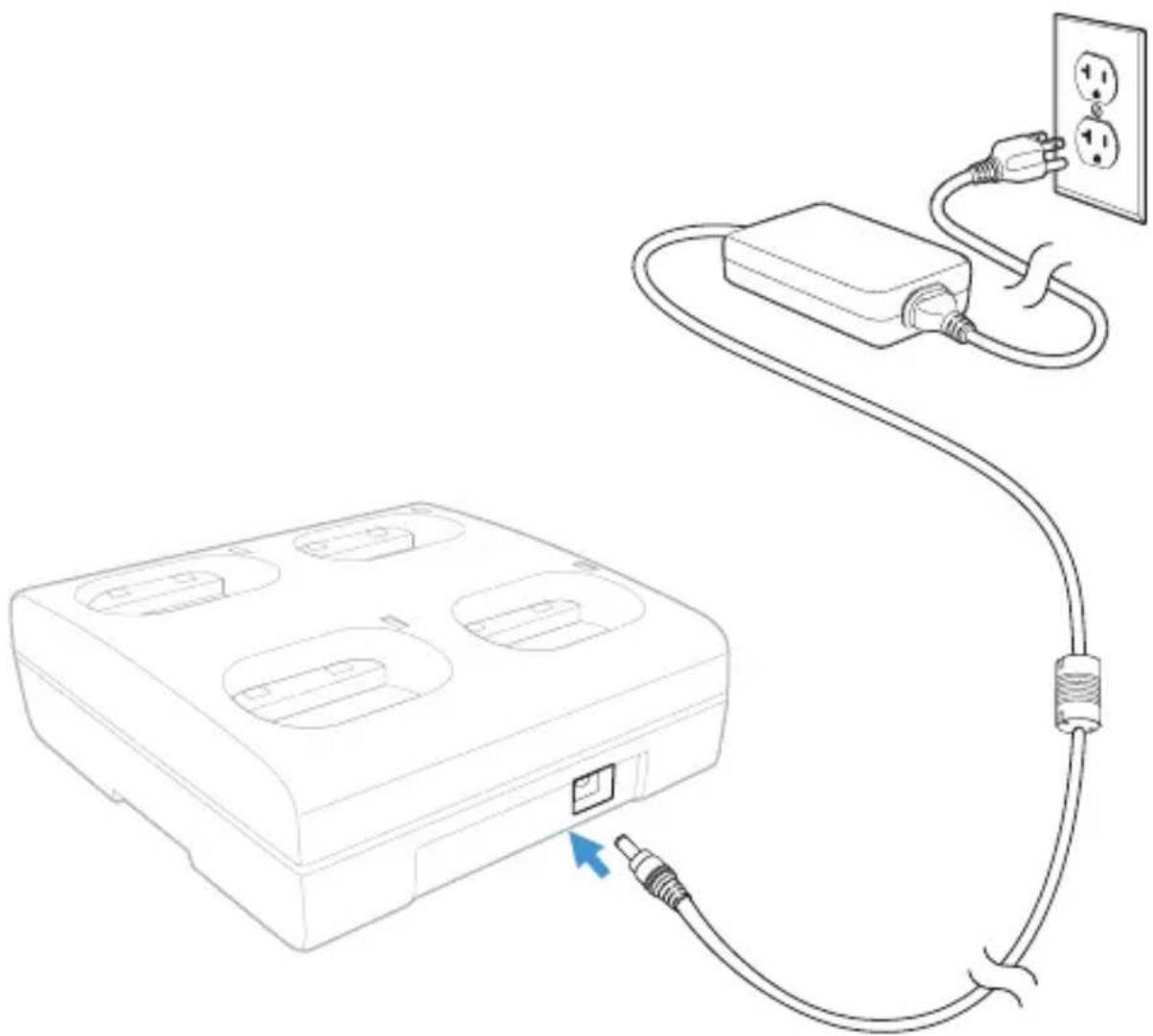
MB4-SCN02:
Use only a UL Listed power supply, qualified by Honeywell, with an output rated at 12VDC and 3A with the device. The power supply input rating is 100-240V, 50/60Hz, and 1.5A. Operating temperature -4^ to 104^ (-20°C to 40°C).
natural_image
Line drawing of a device with an electrical outlet connected to a power strip, showing wiring and a separate housing (no text or symbols)MB12-SCN02:
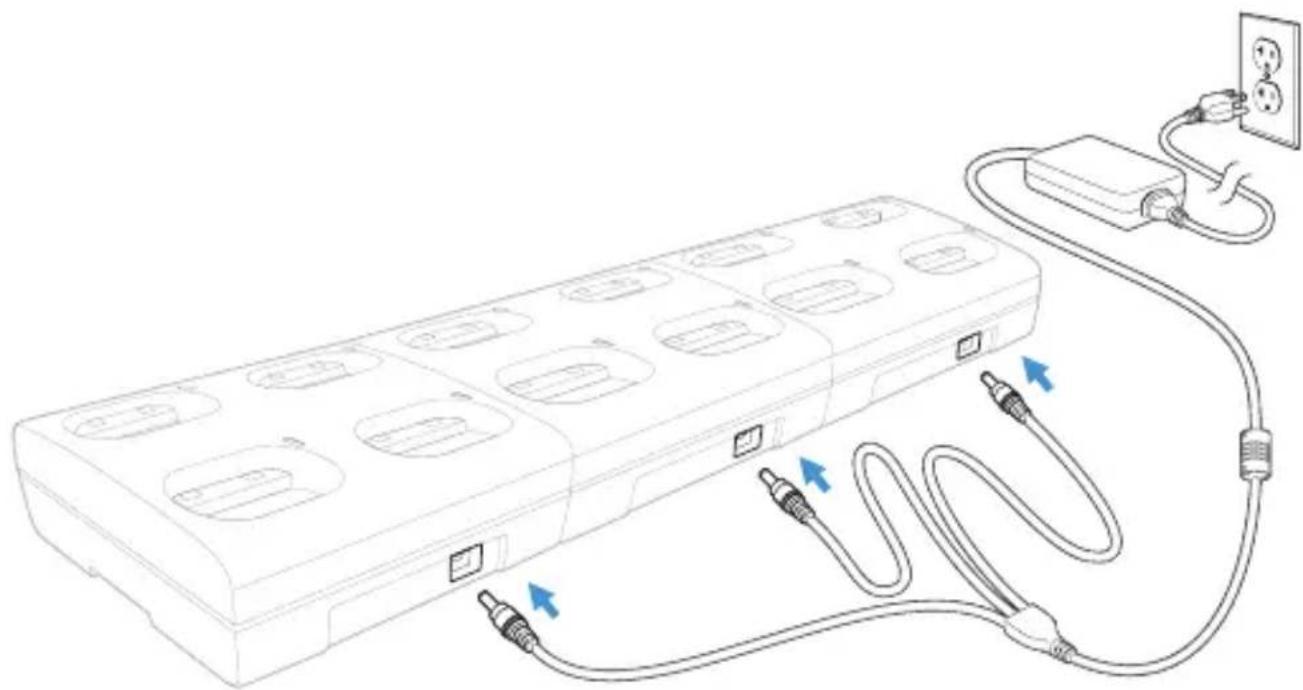
Use only a UL Listed power supply, qualified by Honeywell, with an output rated at 12VDC and 8.5A with the device. The power supply input rating is 85-264V, 47/63Hz. Operating temperature -4^ to 104^ (-20°C to 40°C).
natural_image
Line drawing of a multi-chamber electrical plug connected to a power outlet, with no text or symbols present.Charging a Scanner
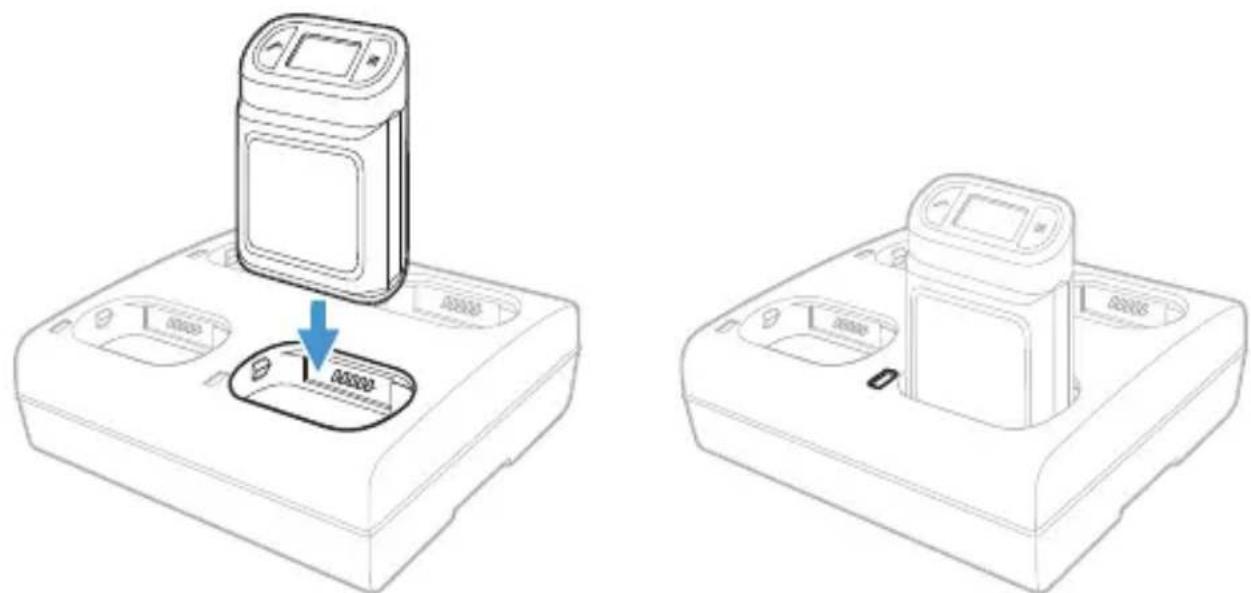
Line the scanner's contacts up with the contacts in the charging pocket. Firmly press the scanner straight down into the battery charging pocket. The status LED to the left of the pocket lights up in white when the scanner is properly inserted.
natural_image
Line drawings of a mobile phone device with a control panel and indicator lights, shown from two different angles (no text or symbols present)It is important that scanners are inserted into the charging pocket correctly. Inserting the scanner incorrectly could result in damage to the scanner or the charger.
When the 8680i is placed in a charging pocket, the charger begins charging the battery. There is a slight delay while the charger evaluates the condition of the battery before charging begins.
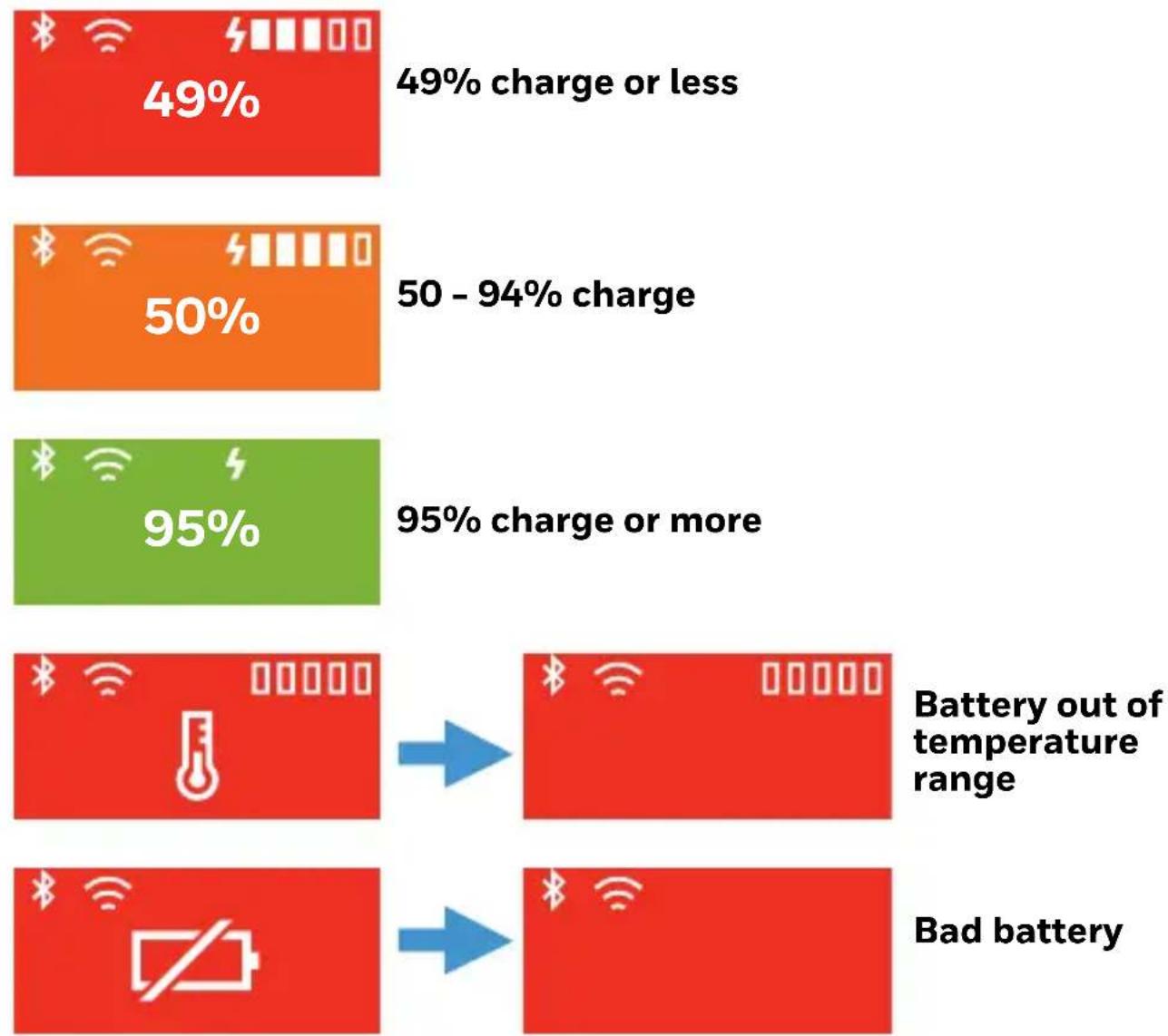
While charging, the user display shows the battery charge level. The following indicators may also appear:
other
| Charge Range | Percentage | | ------------ | ---------- | | Charge or less | 49% | | 50 - 94% | 50% | | Charge or more | 95% | Battery out of temperature range Bad batteryMount a 4-Bay Charger
Note:Mounting information applies only to the 4-bay MB4-SCNO2 battery charger. It does not apply to the 12-bay MB12-SCNO2 battery charger.
The 4-bay charger should be on a dry, stable surface and can be mounted on a flat, horizontal surface such as a desktop or workbench. When choosing a location, always keep in mind:
- The mounting location must allow users easy access to the power connector.
- The charger should be oriented so that users can easily insert and remove scanners and see the user displays.
Option 1
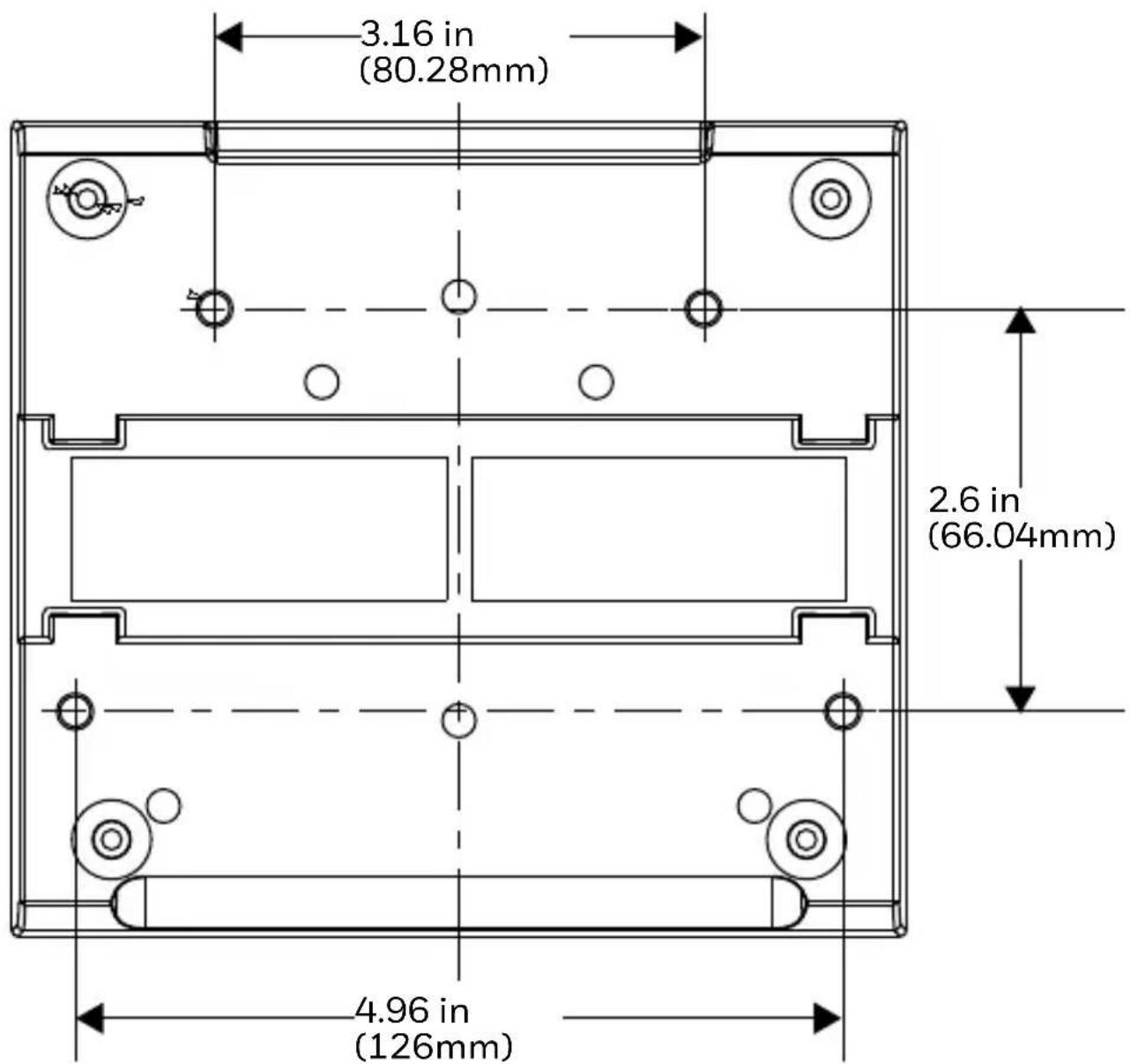
Use the four SL-B M3.5 x 8 screws to mount the charger to a flat, horizontal surface.
other
| Dimension | Value | | ----------------- | ------- | | Total Width | 3.16 in (80.28mm) | | Total Height | 2.6 in (66.04mm) | | Total Height | 4.96 in (126mm) |Option 2
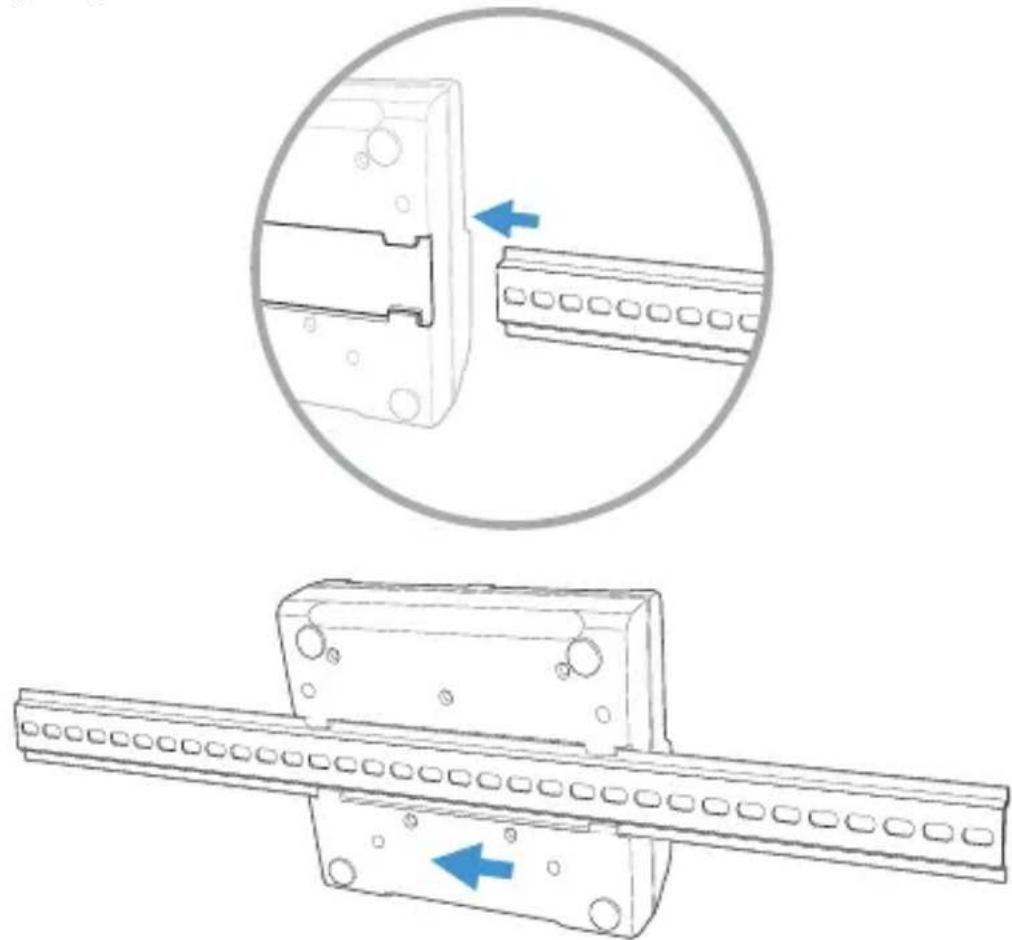
The DIN rail slot on the bottom panel enables secure mounting to a charge rack.
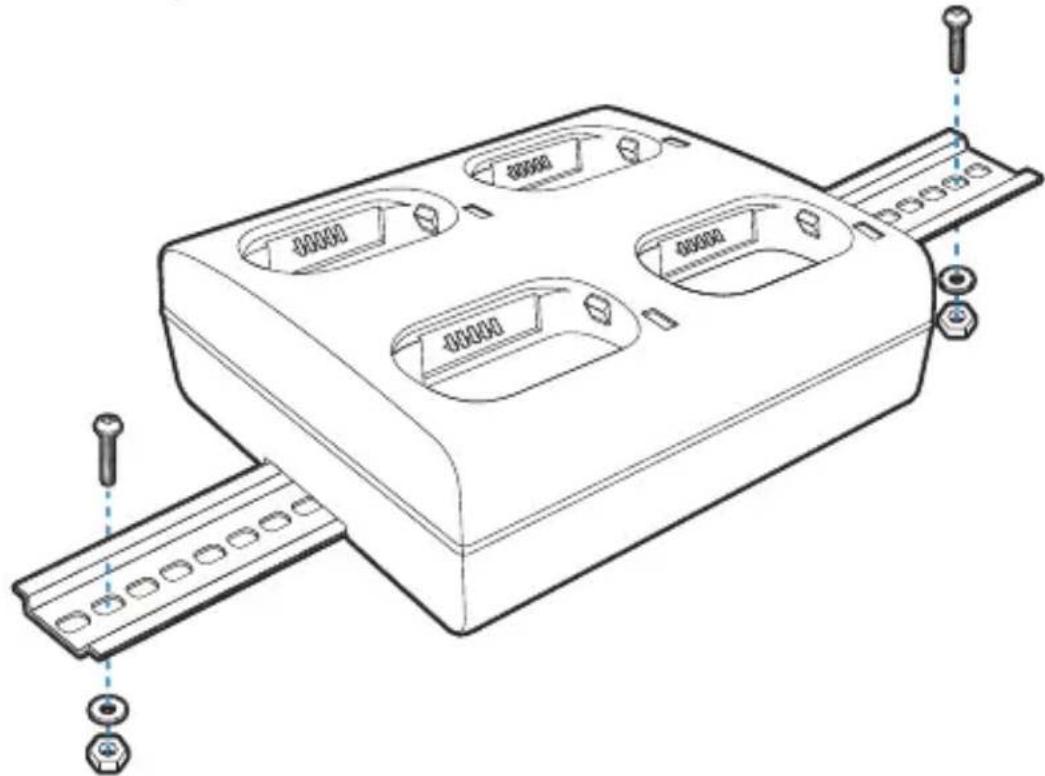
Hardware Required
• DIN rail
• 3/16 in. dia. x 5/8 in. long pan head screw
- 1/2 in. OD x 7/32 in. ID x 3/64 in. thick flat washer
• 3 / 1 6 in . dia . nut
Installation
- Slide the DIN rail into the DIN rail slot on the bottom of the charging station.
natural_image
Technical line drawing showing two mechanical assembly steps: top view with a bracket and arrow indicating direction, bottom view with a rod and arrow indicating movement (no text or symbols)- Using the appropriate hardware above, secure the DIN rail to the charge rack.
natural_image
Technical line drawing of a mechanical housing component with mounting holes and internal compartments (no text or symbols)Cautions and Warnings

There is a danger of explosion if the batteries are incorrectly replaced. Use only Honeywell lithium ion battery packs, model numbers BAT-SCN02 or BAT-SCN03 in this device. Use of any non-Honeywell battery may result in damage not covered by the warranty. Dispose of used batteries according to the recycle program for batteries as directed by the governing agency for the country where the batteries are to be discarded.

Use the provided AC power supply only. Using any other type of AC power supply is prohibited.
Do not disassemble or perform modifications to the charging station. There are no user serviceable components in the charging station.
Support
To search our knowledge base for a solution or to log into the Technical Support portal and report a problem, go to www.hsmcontactsupport.com.
User Documentation
For the user guide and other documentation, go to www.honeywellaidc.com.
Limited Warranty
For warranty information, go to www.honeywellaidc.com and click Get Resources > Product Warranty.
Patents
For patent information, see www.hsmpats.com.
Disclaimer
Honeywell International Inc. (“HII”) reserves the right to make changes in specifications and other information contained in this document without prior notice, and the reader should in all cases consult HII to determine whether any such changes have been made. The information in this publication does not represent a commitment on the part of HII.
HII shall not be liable for technical or editorial errors or omissions contained herein; nor for incidental or consequential damages resulting from the furnishing, performance, or use of
this material. HII disclaims all responsibility for the selection and use of software and/or hardware to achieve intended results.
This document contains proprietary information that is pro- tected by copyright. All rights are reserved. No part of this docu- ment may be photocopied, reproduced, or translated into another language without the prior written consent of HII.
Copyright © 2018 Honeywell International Inc. All rights reserved.
