
32LN536B - Monitor LG - Free user manual and instructions
Find the device manual for free 32LN536B LG in PDF.


| Product Type | LED TV / Monitor |
| Brand | LG |
| Model | 32LN536B |
| Display Size | 32 inches (81 cm) |
| Resolution | 1920 x 1080 (Full HD) |
| Backlight Type | LED |
| Dimensions (with stand) | 738 x 497 x 207 mm |
| Dimensions (without stand) | 738 x 449 x 79 mm |
| Weight (with stand) | 7.0 kg |
| Weight (without stand) | 6.4 kg |
| Power Consumption | 80 W (typical) |
| Power Supply | AC 100-240V, 50/60 Hz |
| Connectivity | HDMI, Component, Composite, USB, CI Slot, Euro Scart, Optical Audio Out, Headphone Out, Antenna In |
| Audio Decoding | Dolby Digital, MPEG, HE-AAC |
| Remote Control | Yes (batteries included) |
| VESA Mount Standard | 200 x 100 mm |
| Wall Mount Screw Size | M4 |
| Included Accessories | Remote control, batteries, power cord, stand, screws, cable holder |
| Operating Temperature | 0 °C to 40 °C |
| Storage Humidity | Less than 85% |
Frequently Asked Questions - 32LN536B LG
User questions about 32LN536B LG
0 question about this device. Answer the ones you know or ask your own.
Ask a new question about this device
Download the instructions for your Monitor in PDF format for free! Find your manual 32LN536B - LG and take your electronic device back in hand. On this page are published all the documents necessary for the use of your device. 32LN536B by LG.
USER MANUAL 32LN536B LG
Printing specification
| Drawn Approved | Checked | ||
| Signature | Mi-Ra Woo Jong-Ok Kin | Ye-Na Park | |
| MMM/DD/YYYY | Feb/18/2012 Feb/18/2012 | Feb/18/2012 |
- Model Description
| :Model name ZA/LA6130-ZB | :Brang Name 67688516 | :Part number | |
| :2nd E 3rd Suffix / LA6130 (1304-REV01) | :Product name | (Revision number) |
- Printing Specification
| :1. The size (F&Mat)m (B5) | |
| 2. Printing colors | : • Cover (Black) |
| : • In silcelor (Black) | |
| 3. Stock (Paper) | : • Covered, Snow white paper 150 g/m2 |
| : • In silcoated, wood-free paper 60 g/m2 | |
| :4. Rifting method | |
| :5. Bredent binding | |
| :6. Leningation/POL/CZE/SLK/ROM/BUL/EST/LIT/LAT/SER/CRO/ALB/BOS/MAK/RUS (16) | |
| :7. Number of pages | |
| NOTE | *This part contains Eco-hazardous substances (Pb, Cd, Hg, Cr6+, PBB, PBDE, etc.) within LG standard level,Details should be followed Eco-SCM management standard[LG(56)-A-2524].Especially, Part should be followed and controlled the following specification.(1) Eco-hazardous substances test report should be submitted when Part certification test and First Mass Production.(2) Especially, Don't use or contain lead(Pb) and cadmium(Cd) in ink. |
- Origin Notification
| :LGEKtedUGKBPakhtLERS | Printed in Korea | Printed in Mexico |
| :LGEKtedUGEMAI :LGESY | Printed in Poland | Printed in China |
| :LGEKted in Egypt | PrintedUGEMXco | Printed in ThailandGETH |
| :LGEKtedUGENA | Printed in China :LGEVN | Printed in Vietnam |
| :LGEKtedUGERAnesLGEWR | Printed in Russia | Printed in Poland |
- Changes
| 10 | ||||
| 9 | ||||
| 8 | ||||
| 7 | ||||
| 6 | ||||
| 5 | ||||
| 4 | ||||
| 3 | ||||
| 2 | ||||
| 1 | APR/25/2013 | Mira Woo | EKLD401668 | Manual drawing update- Add the LA643 model / Add the MSW240 Wall mount bracket / Modify 3D supported mode / Modify Mute image in remote control / Change 47LA61 weight |
| Rev. Number | MMM/DD/YYYY | Signature | ECO Number | Change Contents |
Pagination sheet
:Part number
MFL67688516
(1304-REV01)(Revision number)
:Total pages
440 pages
other
| Label | Column 1 | Column 2 | Column 3 | Column 4 | |---|---|---|---|---| | Front Cover (ENG) P/No. A-2 ... A-47 Blank | 0 | 0 | 0 | 0 | | ENG Cover | 2 | ... | ... | ... | | HUN Cover | 2 | ... | ... | ... | | POL Cover | 2 | ... | ... | ... | | CZE Cover | 2 | ... | ... | ... | | SLK Cover | 2 | ... | ... | ... | | ROM Cover | 2 | ... | ... | ... | | BUL Cover | 2 | ... | ... | ... | | EST Cover | 2 | ... | ... | ... | | LIT Cover | 2 | ... | ... | ... | The image contains only four rows of data: the top row is empty (only one row filled), the middle row is empty (one row filled), the bottom row is empty (one row filled). The values for the rows are explicitly labeled as 'A'.
OWNER'S MANUAL
LED TV
*LG LED TV applies LCD screen with LED backlights.
Please read this manual carefully before operating your set and retain it for future reference.
LA643*
LA61**
LN54**
LN53**
P/NO : MFL67688516(1304-REV01)
Printed in Korea
TABLE OF CONTENTS
A-3 SETTING UP THE TV
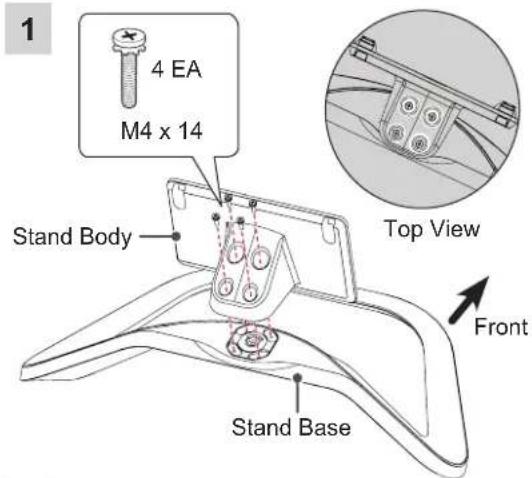
A-3 Attaching the stand
A-5 Tidying cables
A-6 MAKING CONNECTIONS
A-6 Antenna Connection
A-9 Satellite dish Connection
A-10 HDMI Connection
A-14 MHL Connection
A-19 Component Connection
A-21 Composite Connection
A-23 Headphone Connection
A-26 Audio Connection
A-26 - Digital optical audio connection
A-30 USB Connection
A-32 CI module Connection
A-35 Euro Scart Connection
COMMON
LANGUAGE LIST
English
Magyar
Polski
Česky
Slovenčina
Română
Български
Eesti
Lietuvių k.
Latviešu
Srpski
Hrvatski
Shqip
Bosanski
Македонски
Русский
LANGUAGE
B-1 SPECIFICATIONS
COMMON
SETTING UP THE TV
Image shown may differ from your TV.
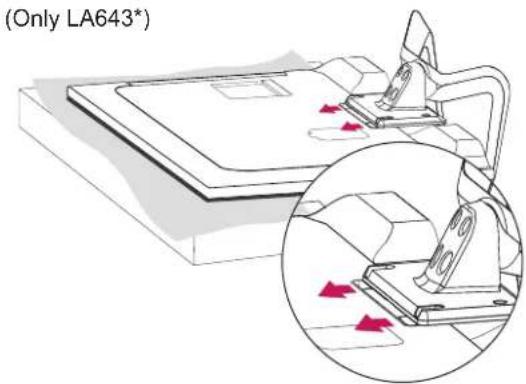
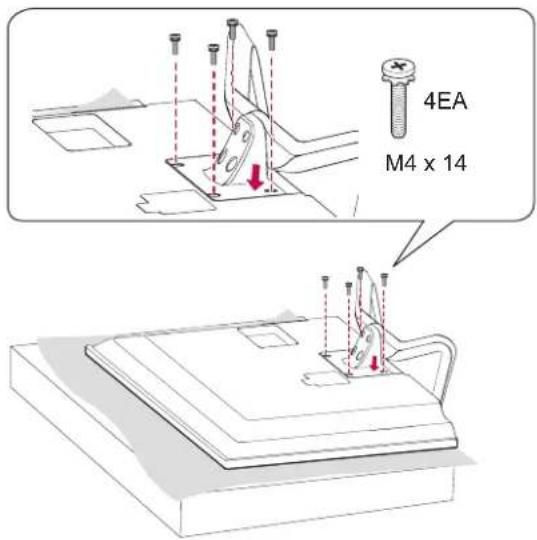
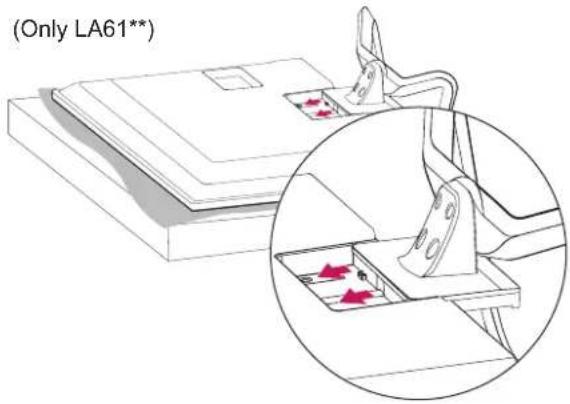
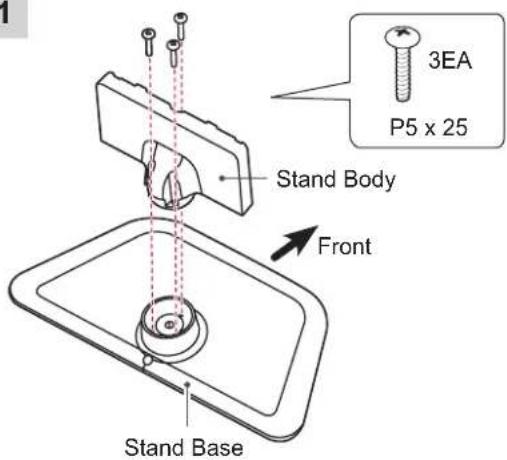
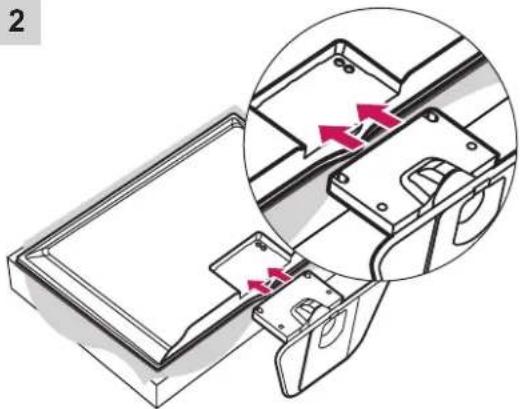
Attaching the stand
LA643*/LA61**
3
(Only LA643*)
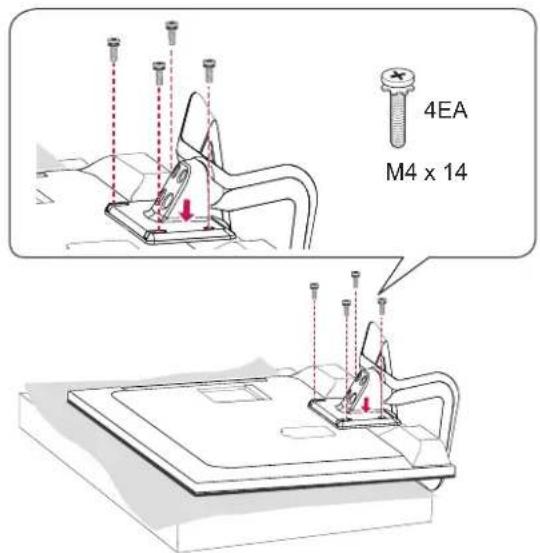
2
(Only LA61**)
LN54/53**
1
natural_image
Technical illustration of a mechanical assembly with highlighted internal components and directional arrows (no text or symbols)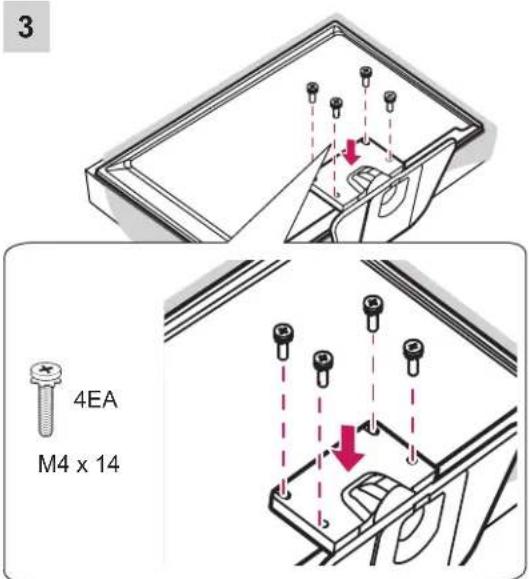

CAUTION
- When attaching the stand to the TV set, place the screen facing down on a cushioned table or flat surface to protect the screen from scratches.
- Make sure that the screws are inserted correctly and fastened securely. (If they are not fastened securely enough, the TV may tilt forward after being installed.) Do not use too much force and over tighten the screws; otherwise screw may be damaged and not tighten correctly.

NOTE
- Remove the stand before installing the TV on a wall mount by performing the stand attachment in reverse.
Tidying cables
(Only LA643*/LA61**)
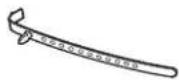
1 Use Cable Holder to neatly secure and position cables together.
2 Fix the Cable Management firmly to the TV.
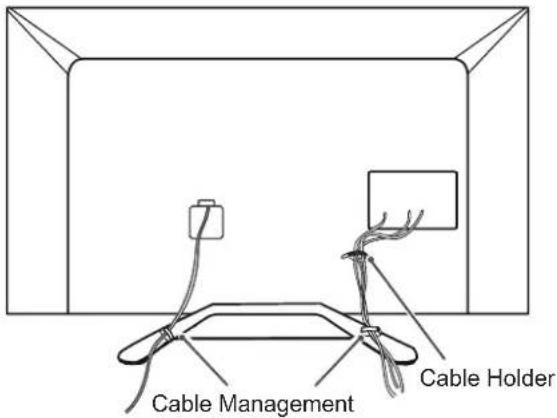
(Only LN54/53**)
1 Use Cable Holder to neatly secure and position cables together.
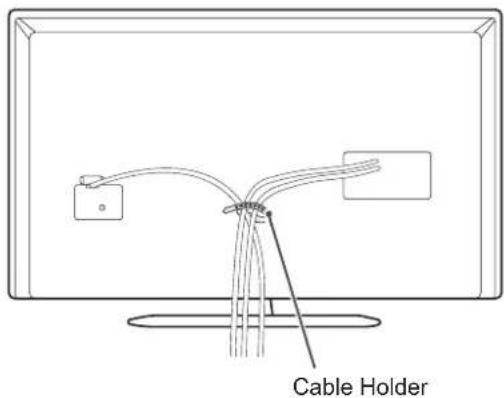

CAUTION
- Do not move the TV by holding the cable holder, as the cable holders may break, and injuries and damage to the TV may occur.
MAKING CONNECTIONS
This section on MAKING CONNECTIONS mainly uses diagrams for the 47LN5400 models.
Antenna Connection
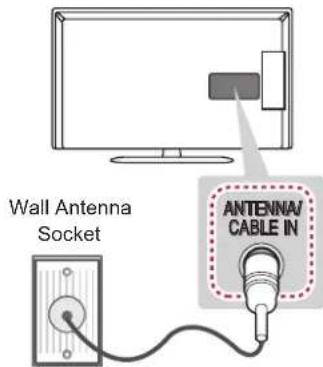
English
Connect the TV to a wall antenna socket with an RF cable (75 Ω).

NOTE
- Use a signal splitter to use more than 2 TVs.
- If the image quality is poor, install a signal amplifier properly to improve the image quality.
- If the image quality is poor with an antenna connected, try to realign the antenna in the correct direction.
- An antenna cable and converter are not supplied.
• Supported DTV Audio: MPEG, Dolby Digital, Dolby Digital Plus, HE-AAC
Magyar
Satellite dish Connection
(Only satellite models)
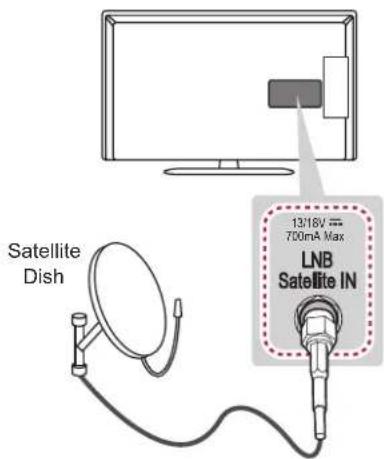
English
Connect the TV to a satellite dish to a satellite socket with a satellite RF cable (75 Ω).
Magyar
Transmits the digital video and audio signals from an external device to the TV. Connect the external device and the TV with the HDMI cable as shown.

NOTE
- It is recommended to use the TV with the HDMI connection for the best image quality.
- Use the latest High Speed HDMI™ Cable with CEC (Customer Electronics Control) function.
- High Speed HDMI™ Cables are tested to carry an HD signal up to 1080p and higher.
- Supported HDMI Audio format : Dolby Digital, PCM (Up to 192 KHz, 32 KHz / 44.1 KHz / 48 KHz / 88 KHz / 96 KHz / 176 KHz / 192 KHz)
- DTS Not supported.
- If you use DVI to HDMI cable for PC, you have to use external speaker for PC audio sound.
Magyar
Mobile High-definition Link (MHL) is an interface for transmitting digital audiovisual signals from mobile phones to television sets.

NOTE
- Connect the mobile phone to the HDMI IN (MHL) 2 or HDMI IN 2 (MHL) port to view the phone screen on the TV.
- The MHL passive cable is needed to connect the TV and a mobile phone.
• This only works for the MHL-enabled phone. - Some applications can be operated by the remote control.
- Remove the MHL passive cable from the TV when:
- The MHL function is disabled
- Your mobile device is fully charged in standby mode
Magyar
Component Connection
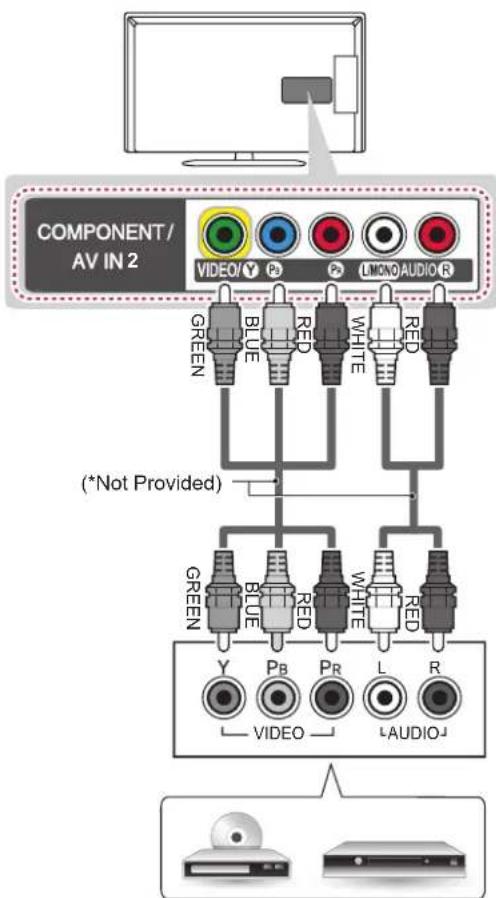
DVD/ Blu-Ray / HD Cable Box
English
Transmits analog video and audio signals from an external device to the TV. Connect the external device and the TV with a component cable as shown.
NOTE
- If cables are not installed correctly, it could cause this image to display in black and white or with distorted colours.
Magyar
Composite Connection
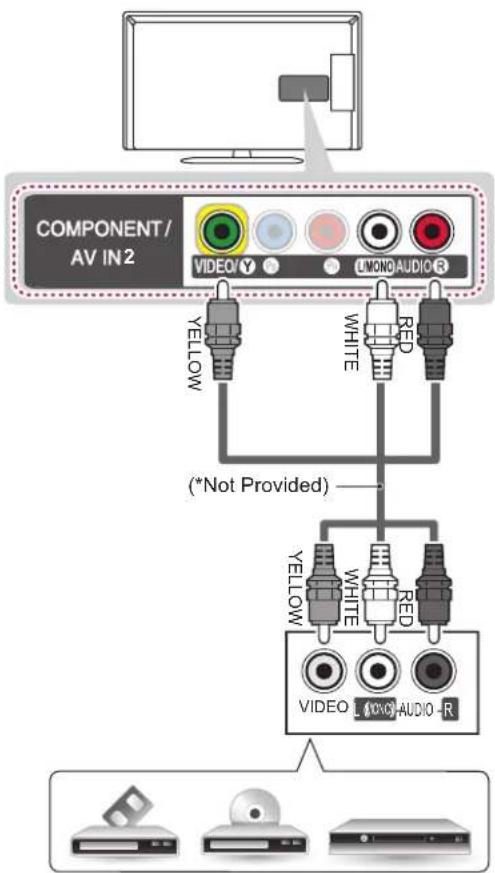
VCR/ DVD/ Blu-Ray / HD Cable Box
English
Transmits analog video and audio signals from an external device to the TV. Connect the external device and the TV with the composite cable as shown.
Magyar
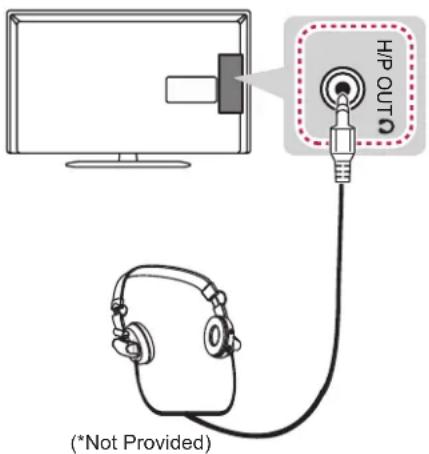
Headphone Connection
(Only LA643*/LA61**)
English
Transmits the headphone signal from the TV to an external device. Connect the external device and the TV with the headphone as shown.
NOTE
• AUDIO menu items are disabled when connecting a headphone.
- When changing AV MODE with a headphone connected, the change is applied to video but not to audio.
- Optical Digital Audio Out is not available when connecting a headphone.
• Headphone impedance: 16 Ω
• Max audio output of headphone: 9mW to 15 mW
• Headphone jack size: 0.35 cm
Magyar
flowchart
graph TD
    A["Monitor"] --> B["OPTICAL DIGITAL AUDIO OUT"]
    B --> C["(Not Provided)"]
    C --> D["Optical Audio IN"]
Digital Audio System
English
You may use an external audio system instead of the built-in speaker.
Digital optical audio connection
Transmits a digital audio signal from the TV to an external device. Connect the external device and the TV with the optical audio cable as shown.

NOTE
- Do not look into the optical output port. Looking at the laser beam may damage your vision.
• Audio with ACP (Audio Copy Protection) function may block digital audio output.
Magyar
English
Connect a USB storage device such as a USB flash memory, external hard drive, or a USB memory card reader to the TV and access the MY MEDIA menu to use various multimedia files.
Magyar
View the encrypted (pay) services in digital TV mode. This feature is not available in all countries.
NOTE
- Check if the CI module is inserted into the PCMCIA card slot in the right direction. If the module is not inserted properly, this can cause damage to the TV and the PCMCIA card slot.
- If the TV does not display any video and audio when CI+ CAM is connected, please contact to the Terrestrial/Cable/Satellite Service Operator.
Magyar
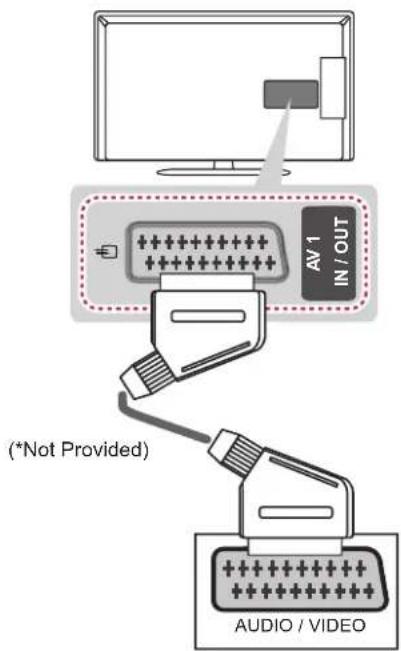
Euro Scart Connection
English
Transmits the video and audio signals from an external device to the TV set. Connect the external device and the TV set with the euro scart cable as shown.
| Current input mode\Output Type | AV1(TV Out ^1 ) |
| Digital TV Digital TV | |
| Analogue TV, AV | Analogue TVComponent |
| HDMI |
1 TV Out : Outputs Analogue TV or Digital TV signals.

NOTE
- Any Euro scart cable used must be signal shielded.
- When watching digital TV in 3D imaging mode, only 2D out signals cannot be output through the SCART cable. (Only 3D models)
Magyar
Connect various external devices to the TV and switch input modes to select an external device. For more information of external device's connection, refer to the manual provided with each device.
Available external devices are: HD receivers, DVD players, VCRs, audio systems, USB storage devices, PC, gaming devices, and other external devices.

NOTE
- The external device connection may differ from the model.
- Connect external devices to the TV regardless of the order of the TV po
- If you record a TV program on a DVD recorder or VCR, make sure to connect the TV signal input cable to the TV through a DVD recorder or VCR. For more information of recording, refer to the manual provided with the connected device.
- Refer to the external equipment's manual for operating instructions.
- If you connect a gaming device to the TV, use the cable supplied with the gaming device.
- In PC mode, there may be noise associated with the resolution, vertical pattern, contrast or brightness. If noise is present, change the PC output to another resolution, change the refresh rate to another rate or adjust the brightness and contrast on the PICTURE menu until the picture is clear.
- In PC mode, some resolution settings may not work properly depending on the graphics card.
Magyar
Theorem 1.2. (Theorem of [3.6]). Let be a finite field and let (x) be the set of all elements of such that x (x) . Then
- -
[Non-Text]
[Non-Text]
[Non-Text]
[Non-Text]
[Non-Text]
[Non-Text]
[Non-Text]
[Non-Text]
[Non-Text]
[Non-Text]
[Non-Text]
[Non-Text]
[Non-Text]
[Non-Text]
[Non-Text]
[Non-Text]
[Non-Text]
[Non-Text]
[Non-Text]
[Non-Text]
[Non-Text]
[Non-Text]
[Non-Text]
[Non-Text]
[Non-Text]
[Non-Text]
[Non-Text]
[Non-Text]
[Non-Text]
[Non-Text]
[Non-Text]
[Non-Text]
[Non-Text]
[Non-Text]
[Non-Text]
[Non-Text]
[Non-Text]
[Non-Text]
[Non-Text]
[Non-Text]
[Non-Text]
|
| |
[Non-Text]
[Non-Text]
OWNER'S MANUAL
LED TV
*LG LED TV applies LCD screen with LED backlights.
Please read this manual carefully before operating your set and retain it for future reference.
TABLE OF CONTENTS
3 LICENSES
3 OPEN SOURCE SOFTWARE NOTICE
4 SAFETY INSTRUCTIONS
10 - Viewing 3D Imaging (Only 3D models)
12 INSTALLATION PROCEDURE
12 ASSEMBLING AND PREPARING
12 Unpacking
14 Separate purchase
15 Parts and buttons
16 Lifting and moving the TV
17 Mounting on a table
19 Mounting on a wall
20 REMOTE CONTROL
22 USING THE USER GUIDE
23 MAINTENANCE
23 Cleaning your TV
23 - Screen, frame, cabinet and stand
23 - Power cord
24 TROUBLESHOOTING
24 EXTERNAL CONTROL DEVICE SETUP

WARNING
- If you ignore the warning message, you may be seriously injured or there is a possibility of accident or death.

CAUTION
- If you ignore the caution message, you may be slightly injured or the product may be damaged.

NOTE
- The note helps you understand and use the product safely. Please read the note carefully before using the product.
LICENSES
Supported licenses may differ by model. For more information about licenses, visit www.lg.com.

Manufactured under license from Dolby Laboratories. "Dolby" and the double-D symbol are trademarks of Dolby Laboratories.

The terms HDMI and HDMI High-Definition Multimedia Interface, and the HDMI logo are trademarks or registered trademarks of HDMI Licensing LLC in the United States and other countries.

ABOUT DIVX VIDEO: DivX® is a digital video format created by DivX, LLC, a subsidiary of Rovi Corporation. This is an official DivX Certified® device that plays DivX video. Visit divx.com for more information and software tools to convert your files into DivX video.
ABOUT DIVX VIDEO-ON-DEMAND: This DivX Certified® device must be registered in order to play purchased DivX Video-on-Demand (VOD) movies. To obtain your registration code, locate the DivX VOD section in your device setup menu. Go to vod.divx.com for more information on how to complete your registration.
"DivX Certified® to play DivX® video up to HD 1080p, including premium content."
"DivX®, DivX Certified® and associated logos are trademarks of Rovi Corporation or its subsidiaries and are used under license."
"Covered by one or more of the following U.S. patents : 7,295,673; 7,460,668; 7,515,710; 7,519,274"
OPEN SOURCE SOFTWARE NOTICE
To obtain the source code under GPL, LGPL, MPL and other open source licenses, that is contained in this product, please visit http://opensource.lge.com.
In addition to the source code, all referred license terms, warranty disclaimers and copyright notices are available for download.
LG Electronics will also provide open source code to you on CD-ROM for a charge covering the cost of performing such distribution (such as the cost of media, shipping and handling) upon email request to opensource@lge.com. This offer is valid for three (3) years from the date on which you purchased the product.
SAFETY INSTRUCTIONS
Please read these safety precautions carefully before using the product.

WARNING
- Do not place the TV and/or remote control in the following environments:
- A location exposed to direct sunlight
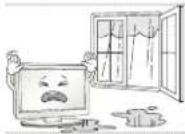
- An area with high humidity such as a bathroom
- Near any heat source such as stoves and other devices that produce heat
- Near kitchen counters or humidifiers where they can easily be exposed to steam or oil
- An area exposed to rain or wind
- Near containers of water such as vases
Otherwise, this may result in fire, electric shock, malfunction or product deformation.
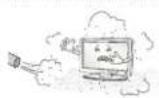
- Do not place the product where it might be exposed to dust.
This may cause a fire hazard.
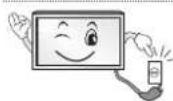
- Mains Plug is the TV connecting/disconnecting device to AC mains electric supply.
This plug must remain readily attached and operable when TV is in use.
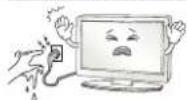
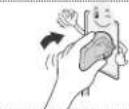
- Do not touch the power plug with wet hands. Additionally, if the cord pin is wet or
covered with dust, dry the power plug completely or wipe dust off.
You may be electrocuted due to excess moisture.
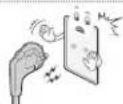
• Make sure to connect Mains cable to compliant AC mains socket with Grounded
earth pin. (Except for devices which are not grounded on earth.)
Otherwise possibility you may be electrocuted or injured.
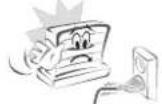
- Insert power cable plug completely into wall socket otherwise if not secured
completely into socket, fire ignition may break out.
- Ensure the power cord does not come into contact with hot objects such as a
heater.
This may cause a fire or an electric shock hazard.
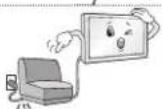
- Do not place a heavy object, or the product itself, on power cables.
Otherwise, this may result in fire or electric shock.
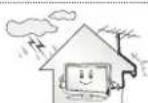
- Bend antenna cable between inside and outside building to prevent rain from
flowing in.
This may cause water damaged inside the Product and could give an electric
shock.
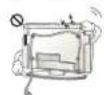
- When mounting TV onto wall make sure to neatly install and isolate cabling from
rear of TV as to not create possibility of electric shock/fire hazard.
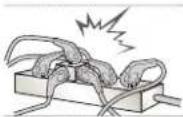 | ·Do not plug too many electrical devices into a single multiple electrical outlet. Otherwise, this may result in fire due to over-heating. |
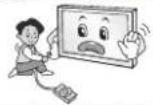 | ·Do not drop the product or let it fall over when connecting external devices. Otherwise, this may result in injury or damage to the product. |
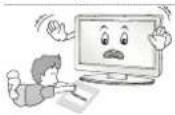 | ·Keep the anti-moisture packing material or vinyl packing out of the reach of children.Anti-moisture material is harmful if swallowed. If swallowed by mistake, force the patient to vomit and visit the nearest hospital. Additionally, vinyl packing can cause suffocation. Keep it out of the reach of children. |
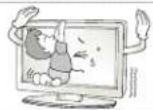 | ·Do not let your children climb or cling onto the TV. Otherwise, the TV may fall over, which may cause serious injury. |
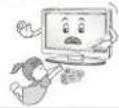 | ·Dispose of used batteries carefully to ensure that a small child does not consume them.Please seek Doctor- Medical Attention immediately if child consumes batteries. |
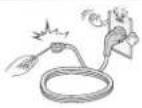 | ·Do not insert any metal objects/conductors (like a metal chopstick/cutlery/screwdriver) between power cable plug and input Wall Socket while it is connected to the input terminal on the wall. Additionally, do not touch the power cable right after plugging into the wall input terminal.You may be electrocuted.(Depending on model) |
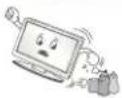 | ·Do not put or store inflammable substances near the product.There is a danger of combustion/explosion or fire due to careless handling of the inflammable substances. |
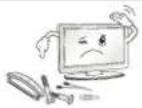 | ·Do not drop metallic objects such as coins, hair pins, chopsticks or wire into the product, or inflammable objects such as paper and matches. Children must pay particular attention.Electrical shock, fire or injury can occur. If a foreign object is dropped into the product, unplug the power cord and contact the service centre. |
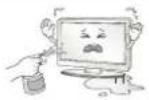 | ·Do not spray water on the product or scrub with an inflammable substance (thinner or benzene). Fire or electric shock accident can occur. |
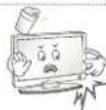
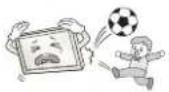 | ·Do not allow any impact, shock or any objects to fall into the unit, and do not drop anything onto the screen.You may be injured or the product can be damaged. |
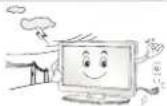 | ·Never touch this product or antenna during a thunder or lighting storm.You may be electrocuted. |
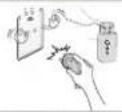 | ·Never touch the wall outlet when there is leakage of gas, open the windows and ventilate.It may cause a fire or a burn by a spark. |
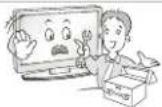
- Do not disassemble, repair or modify the product at your own discretion.
Fire or electric shock accident can occur.
Contact the service centre for check, calibration or repair.
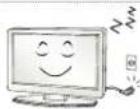
- If any of the following occur, unplug the product immediately and contact your local service centre.
- The product has been impacted by shock
- The product has been damaged
- Foreign objects have entered the product
- The product produced smoke or a strange smell
This may result in fire or electric shock.
- Unplug the TV from AC mains wall socket if you do not intend to use the TV for a long period of time.
Accumulated dust can cause fire hazard and insulation deterioration can cause electric leakage/shock/fire.
Apparatus shall not be exposed to dripping or splashing and no objects filled with liquids, such as vases, shall be placed on the apparatus.

CAUTION
natural_image
Illustration of three cartoon scenes: a house with a smiling face, a smiling house with a digital microphone, and a computer monitor (no text or symbols)• Install the product where no radio wave occurs.
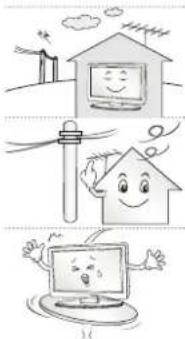
- There should be enough distance between an outside antenna and power lines to keep the former from touching the latter even when the antenna falls. This may cause an electric shock.
- Do not install the product on places such as unstable shelves or inclined surfaces. Also avoid places where there is vibration or where the product cannot be fully supported. Otherwise, the product may fall or flip over, which may cause injury or damage to the product.
- If you install the TV on a stand, you need to take actions to prevent the product from overturning. Otherwise, the product may fall over, which may cause injury.
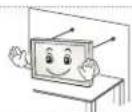
- If you intend to mount the product to a wall, attach VESA standard mounting interface (optional parts) to the back of the product. When you install the set to use the wall mounting bracket (optional parts), fix it carefully so as not to drop.
- Only use the attachments / accessories specified by the manufacturer.
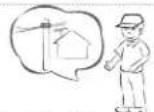
- When installing the antenna, consult with a qualified service technician. If not installed by a qualified technician, this may create a fire hazard or an electric shock hazard.
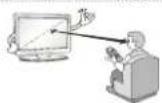
- We recommend that you maintain a distance of at least 2 to 7 times the diagonal screen size when watching TV. If you watch TV for a long period of time, this may cause blurred vision.
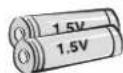
- Only use the specified type of battery. This could cause damage to the remote control.
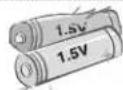
- Do not mix new batteries with old batteries. This may cause the batteries to overheat and leak.
- Batteries should not be exposed to excessive heat. For example, keep away from direct sunlight, open fireplace and electric heaters.
- Do not place non-rechargeable batteries in charging device.
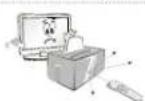
- Make sure there are no objects between the remote control and its sensor.
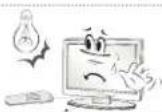
- Signal from Remote Control can be interrupted due to external/internal lighting eg Sunlight, fluorescent lighting. If this occurs turn off lighting or darken viewing area.
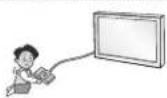
- When connecting external devices such as video game consoles, make sure the connecting cables are long enough. Otherwise, the product may fall over, which may cause injury or damage the product.
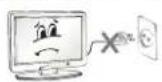
- Do not turn the product On/Off by plugging-in or unplugging the power plug to the wall outlet. (Do not use the power plug for switch.) It may cause mechanical failure or could give an electric shock.
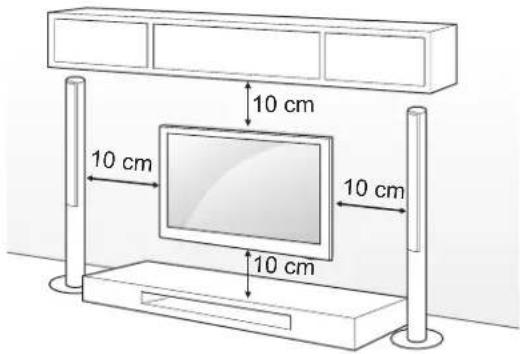
- Please follow the installation instructions below to prevent the product from overheating.
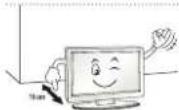
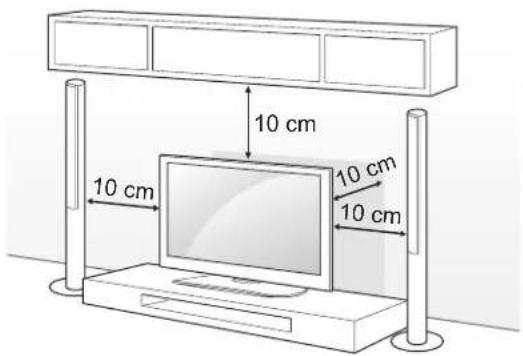
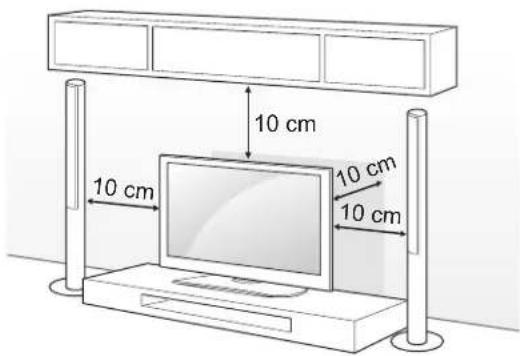
- The distance between the product and the wall should be more than 10 cm.
- Do not install the product in a place with no ventilation (e.g., on a bookshelf or in a cupboard).
- Do not install the product on a carpet or cushion.
- Make sure the air vent is not blocked by a tablecloth or curtain. Otherwise, this may result in fire.
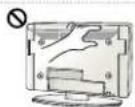
- Take care not to touch the ventilation openings when watching the TV for long periods as the ventilation openings may become hot. This does not affect the operation or performance of the product.
- Periodically examine the cord of your appliance, and if its appearance indicates damage or deterioration, unplug it, discontinue use of the appliance, and have the cord replaced with an exact replacement part by an authorized servicer.
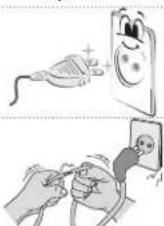
- Prevent dust collecting on the power plug pins or outlet. This may cause a fire hazard.
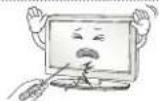
- Protect the power cord from physical or mechanical abuse, such as being twisted, kinked, pinched, closed in a door, or walked upon. Pay particular attention to plugs, wall outlets, and the point where the cord exits the appliance.
- Do not press strongly upon the panel with a hand or sharp object such as nail, pencil or pen, or make a scratch on it, as it may cause damage to screen.
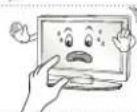
- Avoid touching the screen or holding your finger(s) against it for long periods of time. Doing so may produce some temporary or permanent distortion/damage to screen.
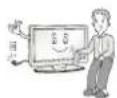
- When cleaning the product and its components, unplug the power first and wipe it with a soft cloth. Applying excessive force may cause scratches or discolouration. Do not spray with water or wipe with a wet cloth. Never use glass cleaner, car or industrial shiner, abrasives or wax, benzene, alcohol etc., which can damage the product and its panel. Otherwise, this may result in fire, electric shock or product damage (deformation, corrosion or breakage).
- As long as this unit is connected to the AC wall outlet, it is not disconnected from the AC power source even if you turn off this unit by SWITCH.
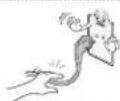
- When unplugging the cable, grab the plug and unplug it, by pulling at the plug. Don't pull at the cord to unplug the power cord from the power board, as this could be hazardous.
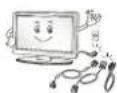
- When moving the product, make sure you turn the power off first. Then, unplug the power cables, antenna cables and all connecting cables. The TV set or power cord may be damaged, which may create a fire hazard or cause electric shock.
| When moving or unpacking the product, work in pairs because the product is heavy. Otherwise, this may result in injury. | |
| Contact the service centre once a year to clean the internal parts of the product. Accumulated dust can cause mechanical failure. | |
| Refer all servicing to qualified service personnel. Servicing is required when the apparatus has been damaged in any way, such as power supply cord or plug is damaged, liquid has been spilled or objects have fallen into the apparatus, the apparatus has been exposed to rain or moisture, does not operate normally, or has been dropped. | |
| If the product feels cold to the touch, there may be a small “flicker” when it is turned on. This is normal, there is nothing wrong with product. | |
| The panel is a high technology display product with resolution of two million to six million pixels. You may see tiny black dots and/or brightly coloured dots (red, blue or green) at a size of 1 ppm on the panel. This does not indicate a malfunction and does not affect the performance and reliability of the product. This phenomenon also occurs in third-party products and is not subject to exchange or refund. | |
| You may find different brightness and colour of the panel depending on your viewing position(left/right/top/down). This phenomenon occurs due to the characteristic of the panel. It is not related with the product performance, and it is not malfunction. |
| • Displaying a still image (e.g., broadcasting channel logo, on-screen menu, scene from a video game) for a prolonged time may cause damage to the screen, resulting in retention of the image, which is known as image sticking. The warranty does not cover the product for image sticking. Avoid displaying a fixed image on your television's screen for a prolonged period (2 or more hours for LCD, 1 or more hours for Plasma). Also, if you watch the TV at a ratio of 4:3 for a long time, image sticking may occur on the borders of the panel. This phenomenon also occurs in third-party products and is not subject to exchange or refund. |
| • Generated Sound“Cracking” noise: A cracking noise that occurs when watching or turning off the TV is generated by plastic thermal contraction due to tempera-ture and humidity. This noise is common for products where thermal deformation is required. Electrical circuit humming/panel buzzing: A low level noise is generated from a high-speed switching circuit, which supplies a large amount of current to operate a product. It varies depending on the product.This generated sound does not affect the performance and reliability of the product. |
Viewing 3D Imaging (Only 3D models)

WARNING
Viewing Environment
- Viewing Time - When watching 3D contents, take 5 - 15 minute breaks every hour. Viewing 3D contents for a long period of time may cause headache, dizziness, fatigue or eye strain.
Those that have a photosensitive seizure or chronic illness
- Some users may experience a seizure or other abnormal symptoms when they are exposed to a flashing light or particular pattern from 3D contents.
- Do not watch 3D videos if you feel nausea, are pregnant and/or have a chronic illness such as epilepsy, cardiac disorder, or blood pressure disease, etc.
- 3D Contents are not recommended to those who suffer from stereo blindness or stereo anomaly. Double images or discomfort in viewing may be experienced.
- If you have strabismus (cross-eyed), amblyopia (weak eyesight) or astigmatism, you may have trouble sensing depth and easily feel fatigue due to double images. It is advised to take frequent breaks than the average adult.
- If your eyesight varies between your right and left eye, revise your eyesight prior to watching 3D contents.
Symptoms which require discontinuation or refraining from watching 3D contents
- Do not watch 3D contents when you feel fatigue from lack of sleep, overwork or drinking.
- When these symptoms are experienced, stop using/watching 3D contents and get enough rest until the symptom subsides.
- Consult your doctor when the symptoms persist. Symptoms may include headache, eyeball pain, dizziness, nausea, palpitation, blurriness, discomfort, double image, visual inconvenience or fatigue.

CAUTION
Viewing Environment
- Viewing Distance
- Maintain a distance of at least twice the screen diagonal length when watching 3D contents. If you feel discomfort in viewing 3D contents, move further away from the TV.
Viewing Age
- Infants/Children
- Usage/ Viewing 3D contents for children under the age of 6 are prohibited.
- Children under the age of 10 may overreact and become overly excited because their vision is in development (for example: trying to touch the screen or trying to jump into it. Special monitoring and extra attention is required for children watching 3D contents.
- Children have greater binocular disparity of 3D presentations than adults because the distance between the eyes is shorter than one of adults. Therefore they will perceive more stereoscopic depth compared to adults for the same 3D image.
- Teenagers
- Teenagers under the age of 19 may react with sensitivity due to stimulation from light in 3D contents. Advise them to refrain from watching 3D contents for a long time when they are tired.
- Elderly
- The elderly may perceive less 3D effect compared to the youth. Do not sit closer to the TV than the recommended distance.
Cautions when using the 3D glasses
- Make sure to use LG 3D glasses. Otherwise, you may not be able to view 3D videos properly.
- Do not use 3D glasses instead of your normal glasses, sunglasses or protective goggles.
- Using modified 3D glasses may cause eye strain or image distortion.
- Do not keep your 3D glasses in extremely high or low temperatures. It will cause deformation.
- The 3D glasses are fragile and are easily scratched. Always use a soft, clean piece of cloth when wiping the lenses. Do not scratch the lenses of the 3D glasses with sharp objects or clean/wipe them with chemicals.

NOTE
• Image shown may differ from your TV.
- Your TV's OSD (On Screen Display) may differ slightly from that shown in this manual.
- The available menus and options may differ from the input source or product model that you are using.
- New features may be added to this TV in the future.
- The TV can be placed in standby mode in order to reduce the power consumption. And the TV should be turned off if it will not be watched for some time, as this will reduce energy consumption.
- The energy consumed during use can be significantly reduced if the level of brightness of the picture is reduced, and this will reduce the overall running cost.
INSTALLATION PROCEDURE
1 Open the package and make sure all the accessories are included.
2 Attach the stand to the TV set.
3 Connect an external device to the TV set.
4 Make sure the network connection is available.
You can use the TV network functions only when the network connection is made. (Depending on model)
ASSEMBLING AND PREPARING
Unpacking
Check your product box for the following items. If there are any missing accessories, contact the local dealer where you purchased your product. The illustrations in this manual may differ from the actual product and item.

CAUTION
- Do not use any unapproved items to ensure the safety and product life span.
- Any damage or injuries caused by using unapproved items are not covered by the warranty.
- Some models have a thin film attached on to the screen and this must not be removed.

NOTE
- The items supplied with your product may vary depending on the model.
- Product specifications or contents of this manual may be changed without prior notice due to upgrade of product functions.
- For an optimal connection, HDMI cables and USB devices should have bezels less than 10 mm thick and 18 mm width. Use an extension cable that supports USB 2.0 if the USB cable or USB memory stick does not fit into your TV's USB port.
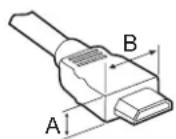
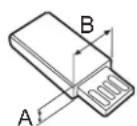
^* A ≤ 10 mm
*B ≤ 18 mm
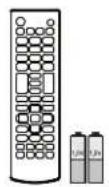
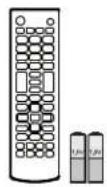
Remote control, batteries (AAA)
(See p. 20, 21) Owner's manu
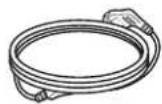
Power Cord
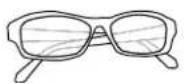
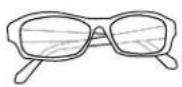
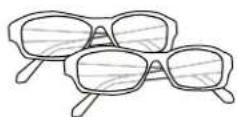
Cinema 3D Glasses
The number of 3D glasses may differ depending on the model or country. (Only LA643*/LA61**)

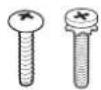
Stand Screws
3EA, P5 x 25 4EA, M4 x 14 (Only LN54/53**) (See p. A-4)


Desk-mount Cable
2EA (Only 32/42/47LA643 ^ , 32/42/47LA61 ^* ) (See p. 18)

natural_image
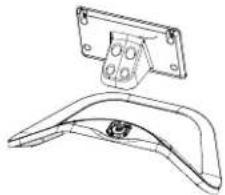
Technical line drawing of a mechanical bracket component (no text or symbols)Stand Body / Stand Base
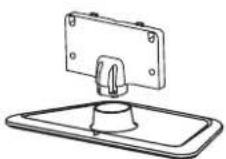
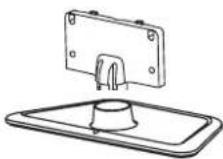
(Only LA643*/LA61**) (See p. A-3)
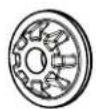
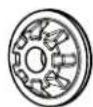
Wall mount inner spacers
4EA (Only LA643*) (See p. 19)
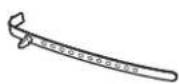
Cable holder
(Depending on model) (See p. A-5)
Stand Screws
8EA, M4 x 14 (Only LA643*/LA61**) (See p. A-3)
Desk-mount Screw
(2EA : Only 32/42/47LA643 ^ , 32/42/47LA61 ^ ) (1EA : Only LN54/53 ^* ) (See p. 18)
Bracket Screw
2EA, M4 x 8 (Only 32/42LA643 ^ , 32/42LA61 ^ ) 2EA, P4 x 8 (Only 47LA643 ^ , 47LA61 ^** ) (See p. 18)
Stand Body / Stand Base
(Only LN54/53 ^** ) (See p. A-4)
Separate purchase
Separate purchase items can be changed or modified for quality improvement without any notification. Contact your dealer to buy these items. These devices only work with certain models.
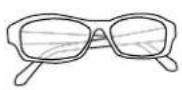
AG-F***
Cinema 3D glasses
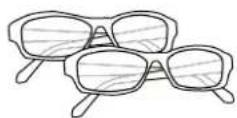
AG-F***DP
Dual play glasses
LG Audio Device
| Compatibility | LA643*/LA61** LN54/53** | |
| AG-F***Cinema 3D glasses | • | |
| AG-F***DPDual play glasses | •(Depending on model) | |
| LG Audio Device | • | • |
The model name or design may be changed depending on the upgrade of product functions, manufacturer's circumstances or policies.
Parts and buttons
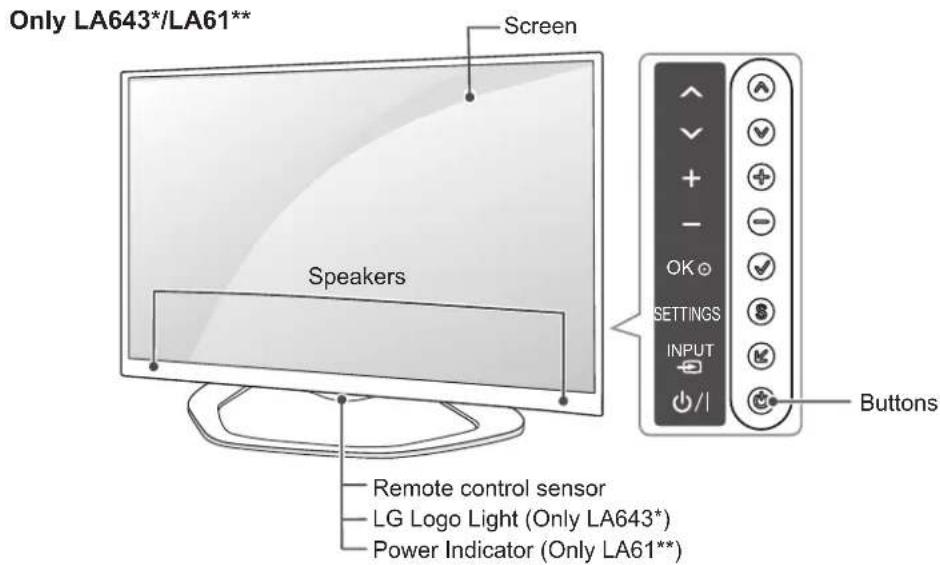
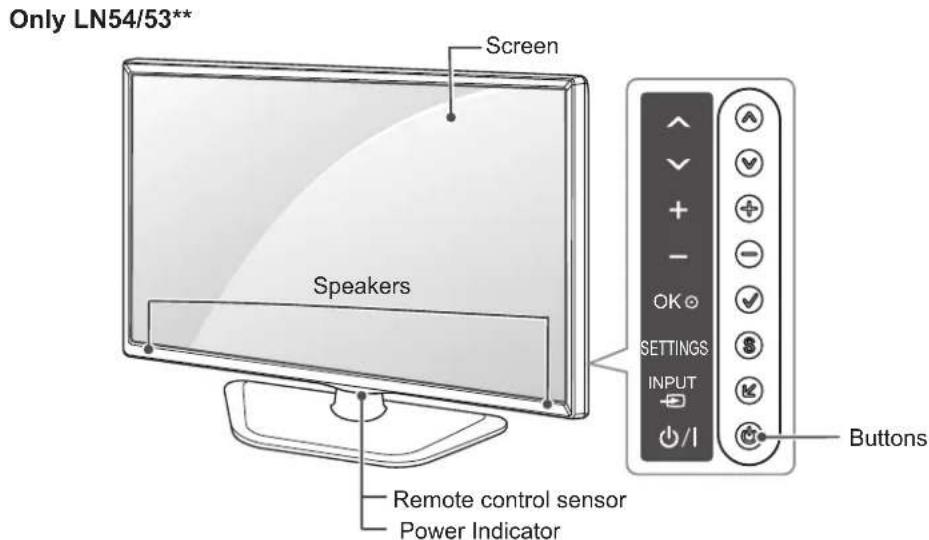
| Button Description | |
| ^√ | Scrolls through the saved programmes. |
| + - | Adjusts the volume level. |
| OK ⊙ | Selects the highlighted menu option or confirms an input. |
| SETTINGS Accesses the main menu, or saves your input and exits the menus. | |
| INPUT ⊙ | Changes the input source. |
| ∅/ I | Turns the power on or off. |
NOTE
- You can set the LG Logo Light or Power Indicator Light to on or off by selecting OPTION in the main menus.
Lifting and moving the TV
Please note the following advice to prevent the TV from being scratched or damaged and for safe transportation regardless of its type and size.

CAUTION
- Avoid touching the screen at all times, as this may result in damage to the screen.
- It is recommended to move the TV in the box or packing material that the TV originally came in.
- Before moving or lifting the TV, disconnect the power cord and all cables.
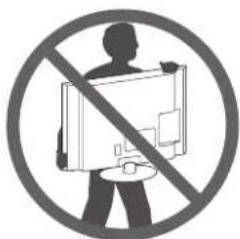
- When holding the TV, the screen should face away from you to avoid damage.
natural_image
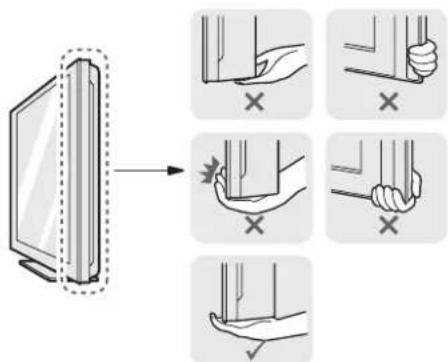
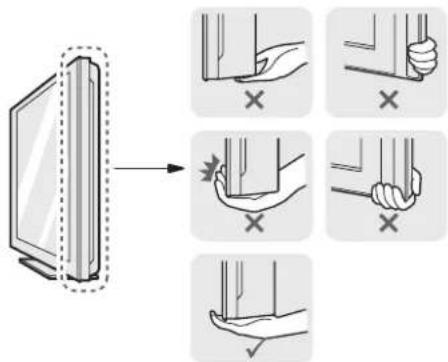
Prohibition sign showing a person holding a device, crossed out by a diagonal line (no text or symbols)- Hold the top and bottom of the TV frame firmly. Make sure not to hold the transparent part, speaker, or speaker grill area.
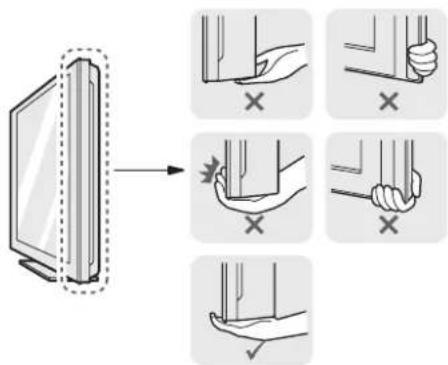
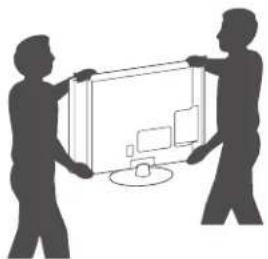
- When transporting a large TV, there should be at least 2 people.
- When transporting the TV by hand, hold the TV as shown in the following illustration.
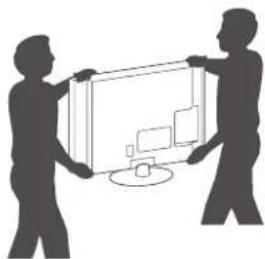
natural_image
Silhouette of two people holding a large rectangular device with a computer monitor inside (no text or symbols)- When transporting the TV, do not expose the TV to jolts or excessive vibration.
- When transporting the TV, keep the TV upright, never turn the TV on its side or tilt towards the left or right.
- Do not apply excessive pressure to cause flexing/bending of frame chassis as it may damage screen.
Mounting on a table
1 Lift and tilt the TV into its upright position on a table.
- Leave a 10 cm (minimum) space from the wall for proper ventilation.
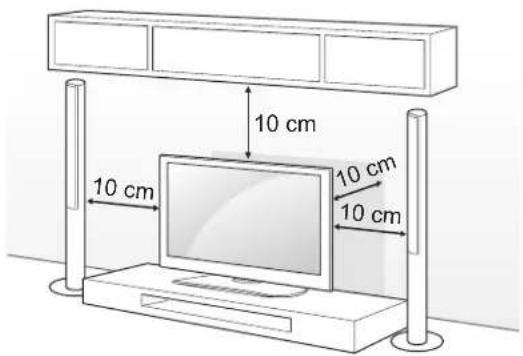
2 Connect the power cord to a wall outlet.

CAUTION
- Do not place the TV near or on sources of heat, as this may result in fire or other damage.
Using the Kensington security system
(This feature is not available for all models.) Image shown may differ from your TV. The Kensington security system connector is located at the rear of the TV. For more information of installation and using, refer to the manual provided with the Kensington security system or visit http://www.kensington.com.
Connect the Kensington security system cable between the TV and a table.
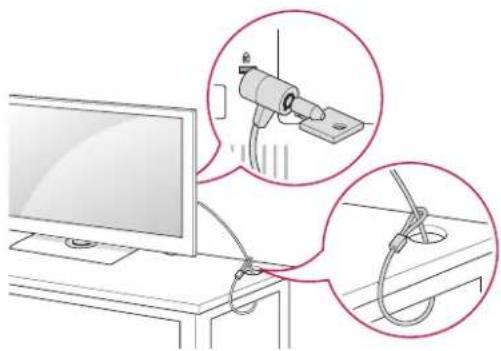
natural_image
Illustration of a computer monitor connected to a cable with two magnified insets showing mechanical components (no text or symbols)Adjusting the angle of the TV to suit view
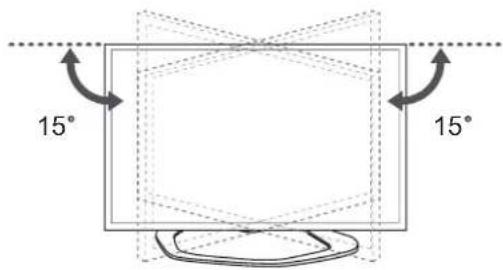
(Only LA643*/LA61**)
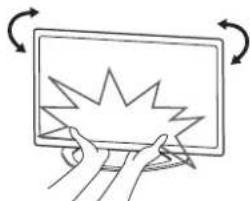
Swivel 15 degrees to the left or right and adjust the angle of the TV to suit your view.
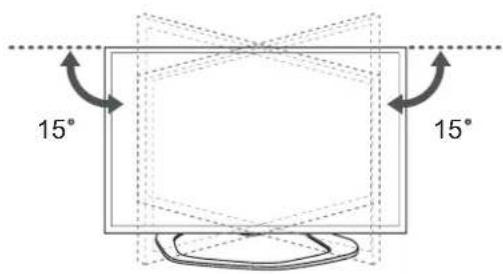

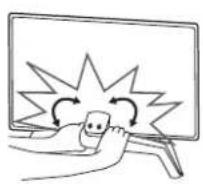
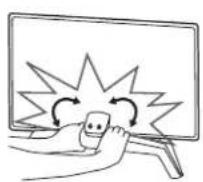
CAUTION
- When adjusting the angle adof the product, watch out for your fingers.
» Personal injury may occur if hands or fingers are pinched. If the product is tilted too much, it may fall, causing damage or injury.
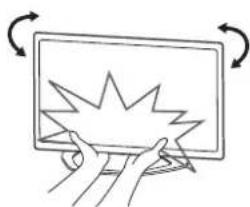
natural_image
Hand holding a computer monitor with a starburst graphic on the screen, surrounded by curved arrows indicating rotation (no text or symbols)Securing the TV to a table
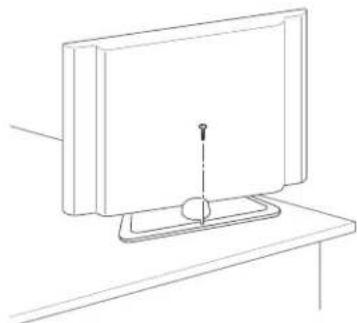
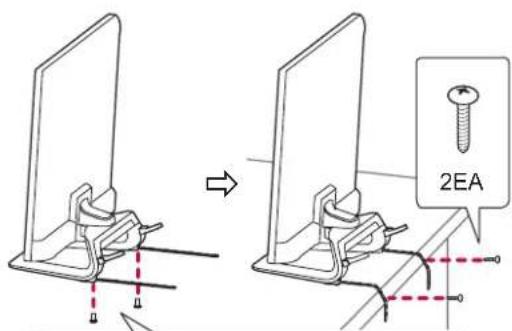
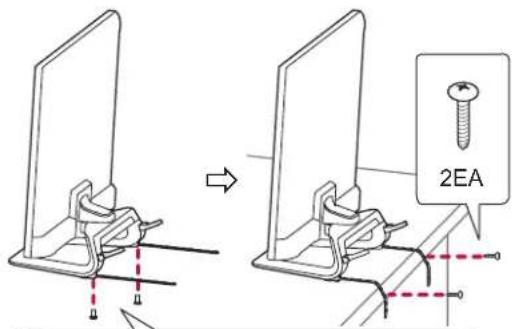
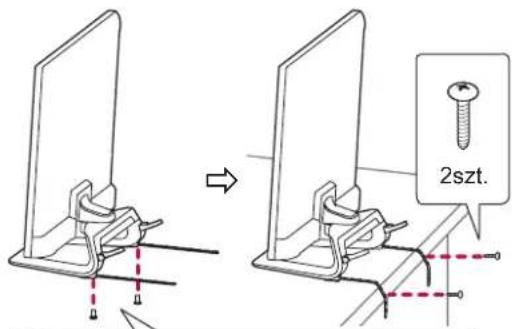
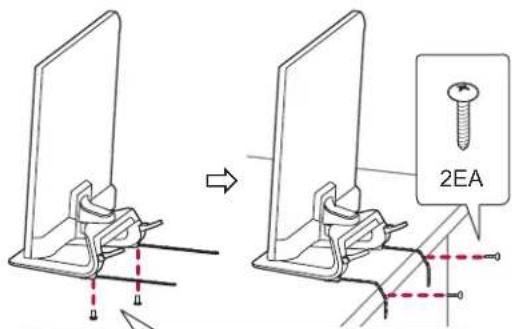
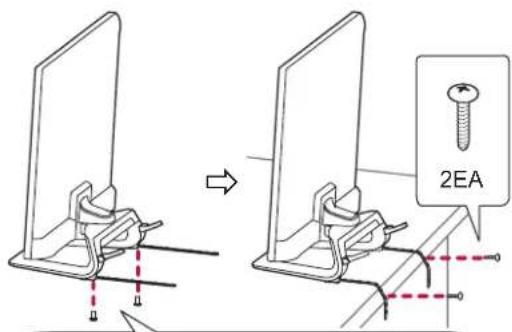
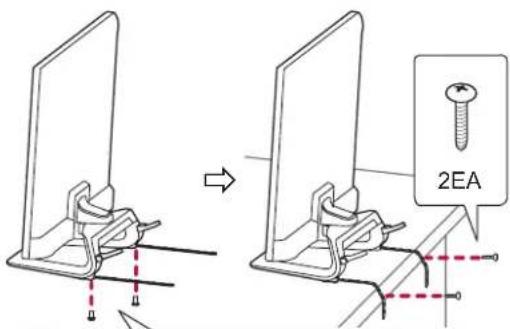
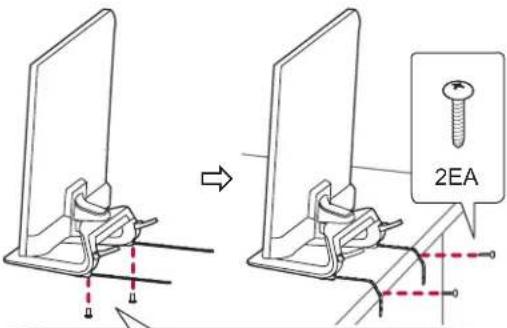
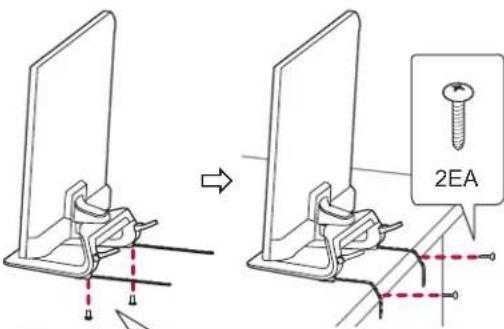
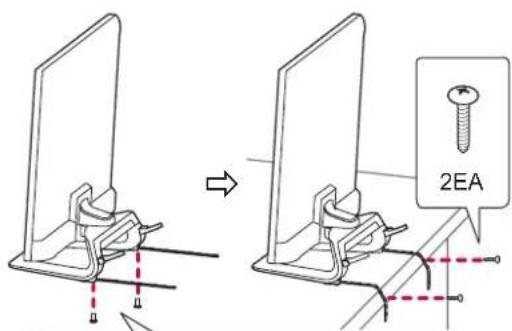
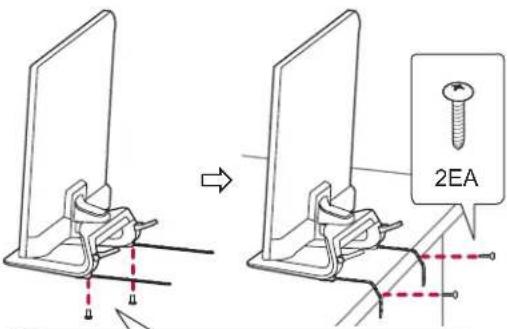
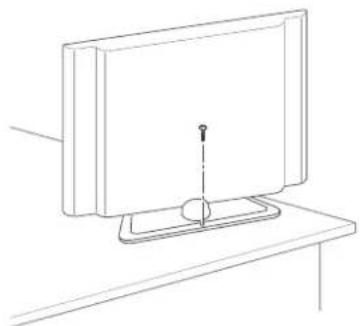
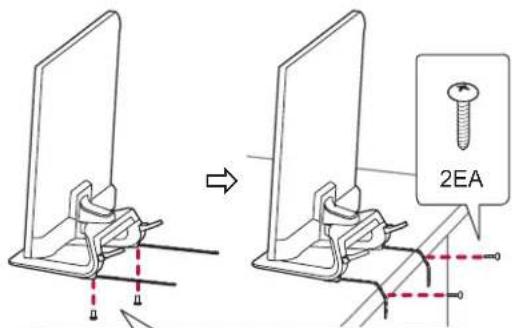
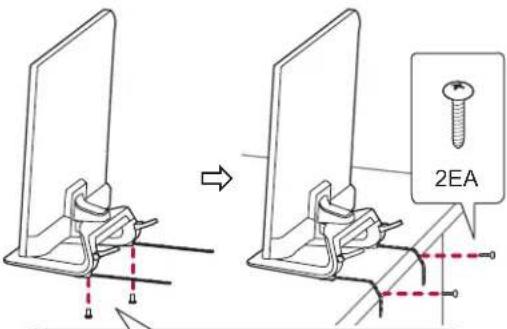
Fix the TV to a table to prevent from tilting forward, damage, and potential injury.
To secure the TV to a table, insert and tighten the supplied screw on the rear of the stand.
(Only LN54/53**)
natural_image
Line drawing of a monitor with a screw and stand on top (no text or symbols)(Only 32/42/47LA643*, 32/42/47LA61**)

M4 × 8
(Only 32/42LA643*, 32/42LA61**)
2EA
P4 × 8
(Only 47LA643*, 47LA61**)

CAUTION
(Only 32/42/47LA643*, 32/42/47LA61**)
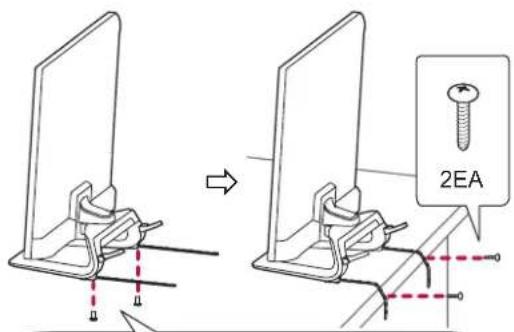
How to fix the TV to a table
- Connect the Desk-mount Cables to the Stand Base using the Bracket Screws.
- Fix the Desk-mount Cables to a table using the Desk-mount Screws.
- Once the TV is fixed, move the table close to the wall. Children may go in, causing injuries.

WARNING
- To prevent TV from falling over, the TV should be securely attached to the floor/wall per installation instructions. Tipping, shaking, or rocking the TV may cause injury.
Securing the TV to a wall
(This feature is not available for all models.)
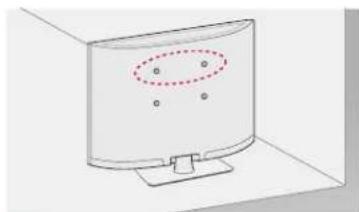
natural_image
Simple line drawing of a computer monitor with a dotted oval highlighting the screen area (no text or symbols)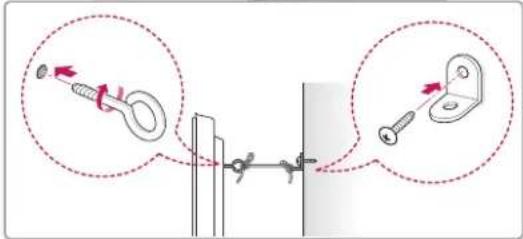
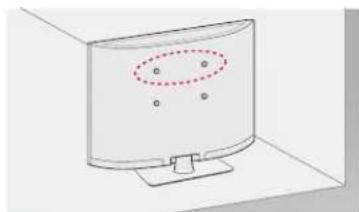
1 Insert and tighten the eye-bolts, or TV brackets and bolts on the back of the TV.
- If there are bolts inserted at the eye-bolts position, remove the bolts first.
2 Mount the wall brackets with the bolts to the wall.
Match the location of the wall bracket and the eye-bolts on the rear of the TV.
3 Connect the eye-bolts and wall brackets tightly with a sturdy rope.
Make sure to keep the rope horizontal with the flat surface.

CAUTION
• Make sure that children do not climb on or hang on the TV.

NOTE
- Use a platform or cabinet that is strong and large enough to support the TV securely.
- Brackets, bolts and ropes are not provided. You can obtain additional accessories from your local dealer.
Mounting on a wall
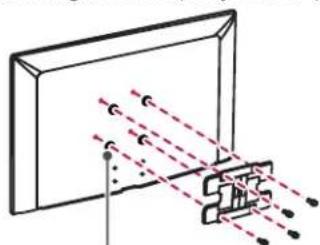
Attach an optional wall mount bracket at the rear of the TV carefully and install the wall mount bracket on a solid wall perpendicular to the floor. When you attach the TV to other building materials, please contact qualified personnel.
LG recommends that wall mounting be performed by a qualified professional installer.
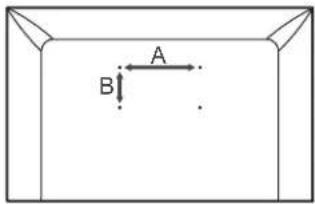
Make sure to use screws and wall mount bracket that meet the VESA standard. Standard dimensions for the wall mount kits are described in the following table.
Separate purchase(Wall Mounting Bracket)
| Model | 32LA61**32LN54**32LN53** | 32LA643*42LA61**37/39/42LN54** |
| VESA (A x B) 200 x 100 200 x 200 | ||
| Standard screw | M4 | M6 |
| Number of screws | 4 | 4 |
| Wall mount bracket | LSW130B | LSW230BMSW240 |
| Model | 42/47/55LA643*47LA61**47/50LN54** | |
| VESA (A x B) 400 x 400 | ||
| Standard screw | M6 | |
| Number of screws | 4 | |
| Wall mount bracket | LSW430BMSW240 | |
| Wall mount bracket | |||
| LSW130B | LSW230B | LSW430B | MSW240 |

CAUTION
- Disconnect the power first, and then move or install the TV. Otherwise electric shock may occur.
- If you install the TV on a ceiling or slanted wall, it may fall and result in severe injury. Use an authorized LG wall mount and contact the local dealer or qualified personnel.
- Do not over tighten the screws as this may cause damage to the TV and void your warranty.
- Use the screws and wall mounts that meet the VESA standard. Any damages or injuries by misuse or using an improper accessory are not covered by the warranty.

NOTE
- Use the screws that are listed on the VESA standard screw specifications.
- The wall mount kit includes an installation manual and necessary parts.
- The wall mount bracket is not provided. You can obtain additional accessories from your local dealer.
- The length of screws may differ depending on the wall mount. Make sure to use the proper length.
- For more information, refer to the manual supplied with the wall mount.
- When attaching a third-party wall mounting bracket to the TV, insert the wall mount inner spacers into the TV wall mount holes to move your TV in vertical angle. Please make sure not to use the spacers for LG wall mounting bracket. (Only LA643*)
natural_image
Diagram of a device with light rays passing through a panel, showing no text or symbolsWall Mount Inner Spacer
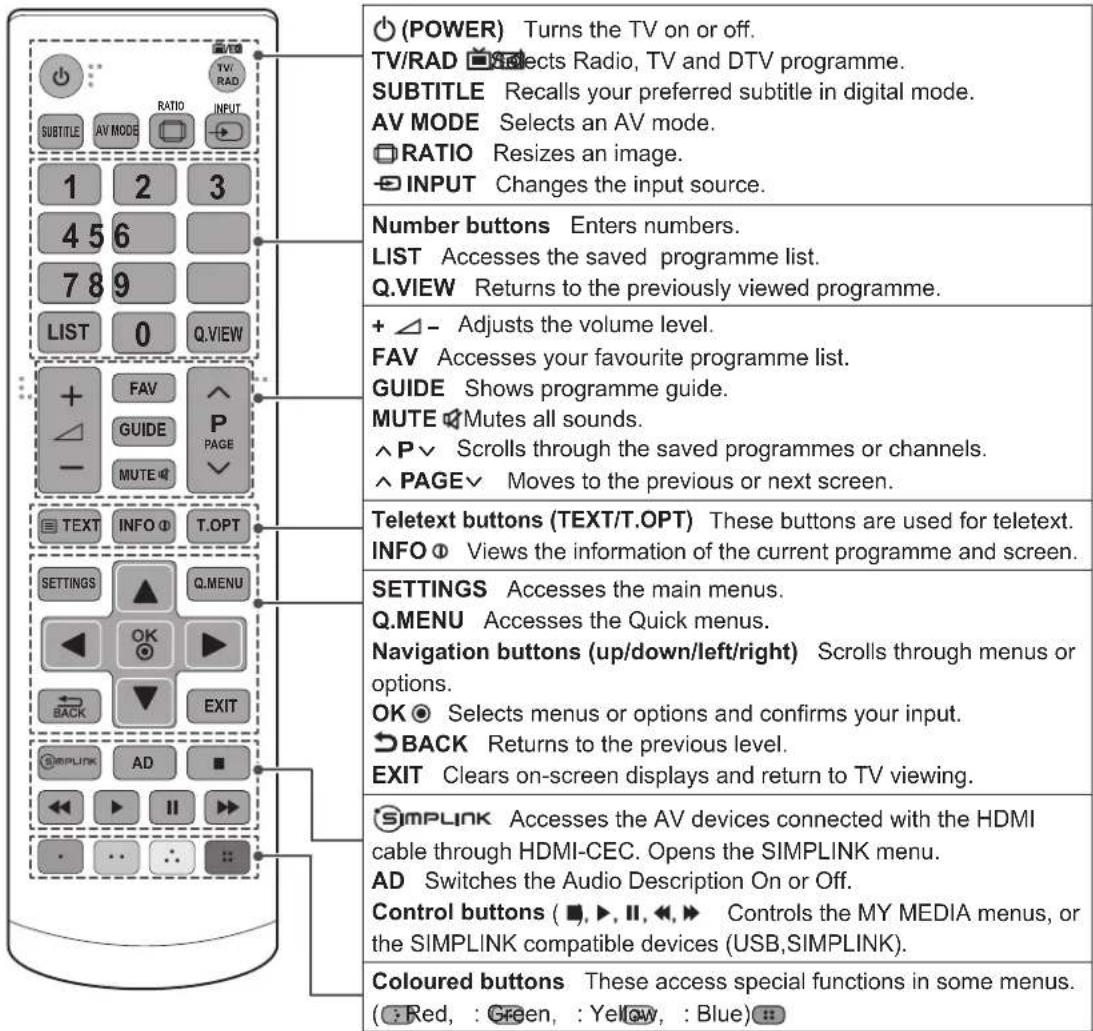
REMOTE CONTROL
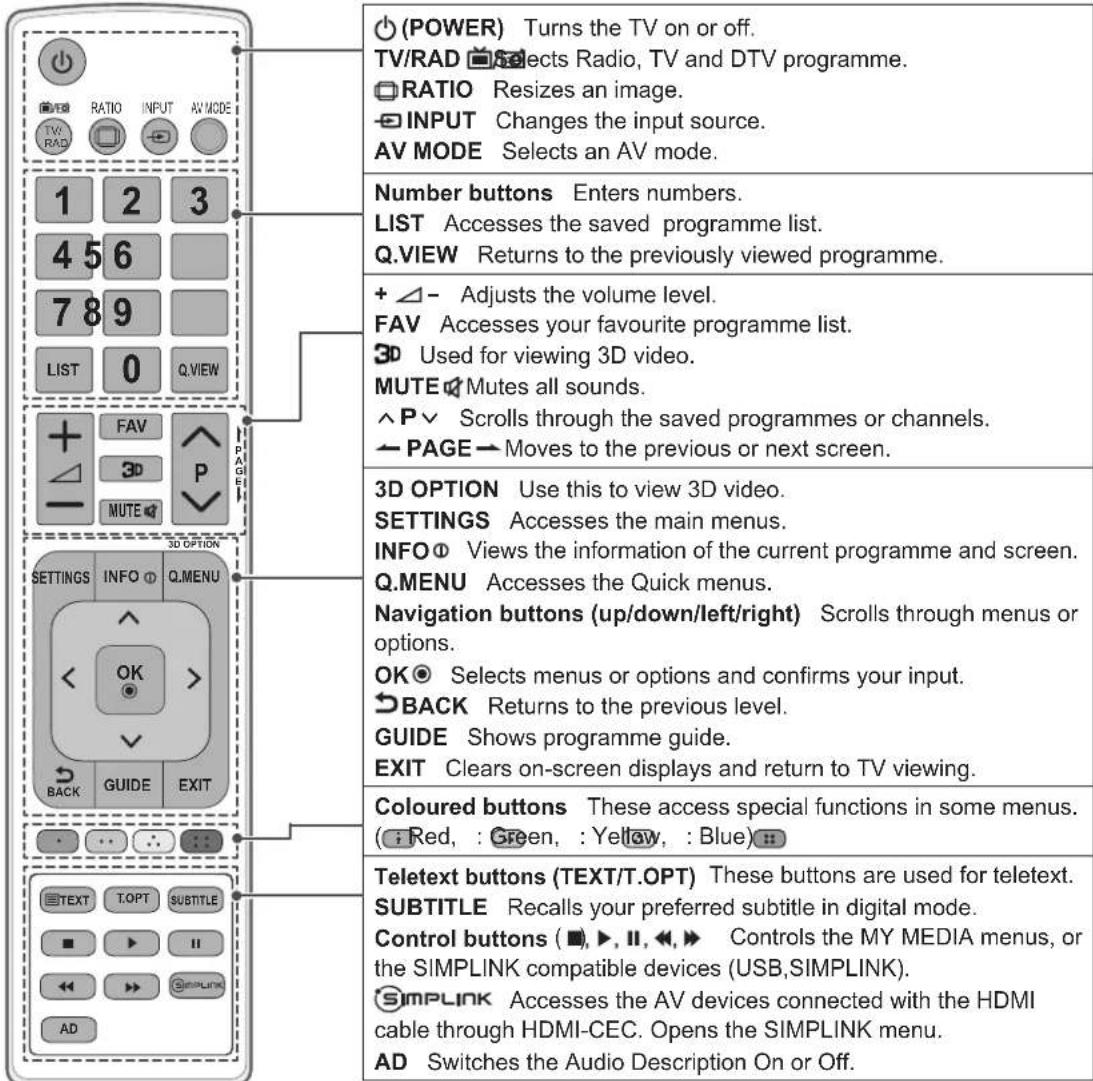
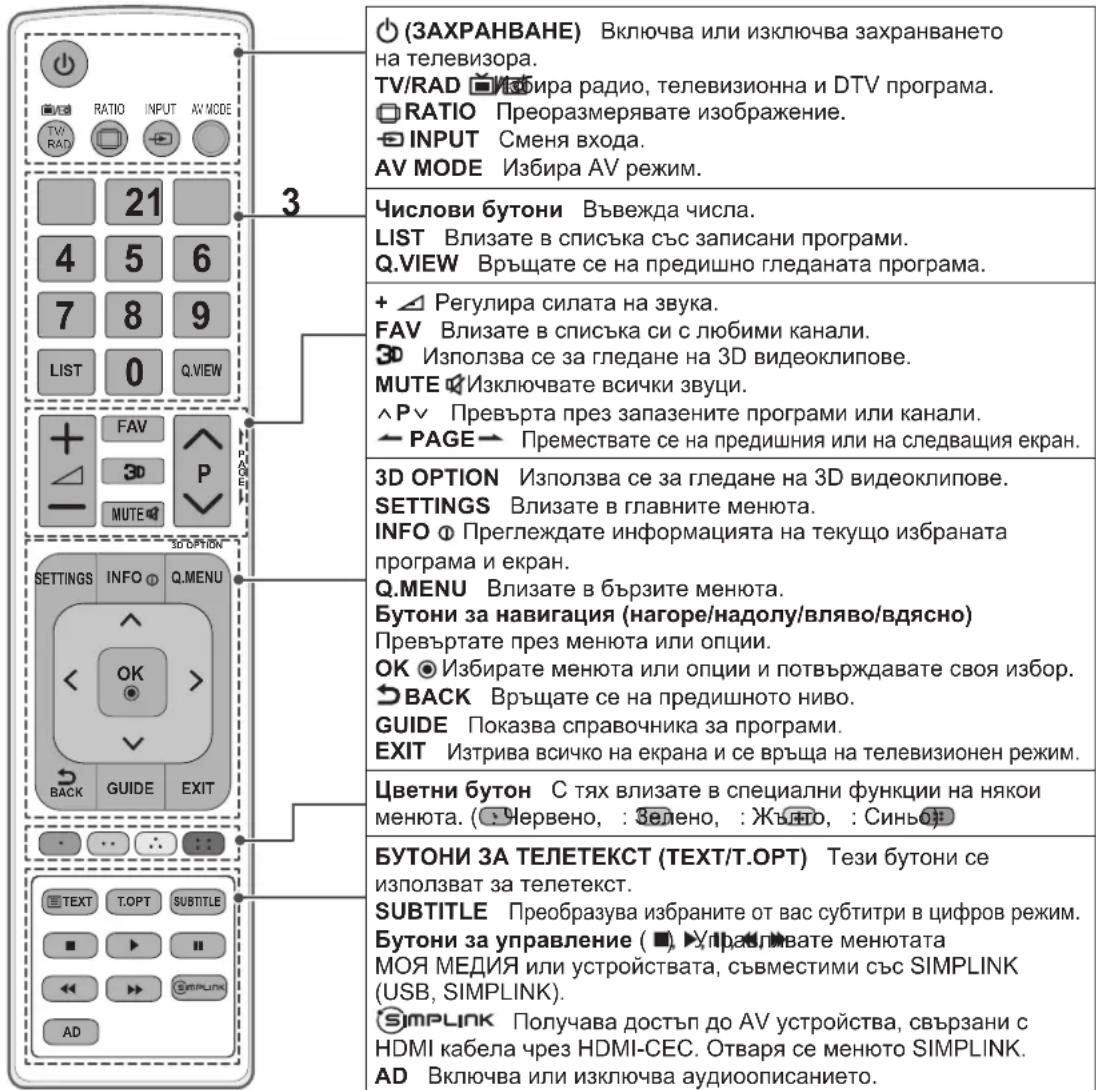
The descriptions in this manual are based on the buttons on the remote control.
Please read this manual carefully and use the TV correctly.
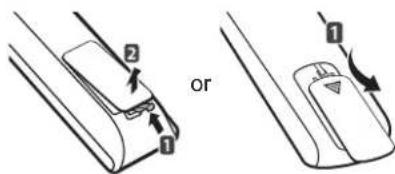
To replace batteries, open the battery cover, replace batteries (1.5 V AAA) matching the and ends to the label inside the compartment, and close the battery cover.
To remove the batteries, perform the installation actions in reverse.

CAUTION
- Do not mix old and new batteries, as this may damage the remote control.
Make sure to point the remote control toward the remote control sensor on the TV. (Only LA643*, LA61**)
(Only LN54/53**)
USING THE USER GUIDE
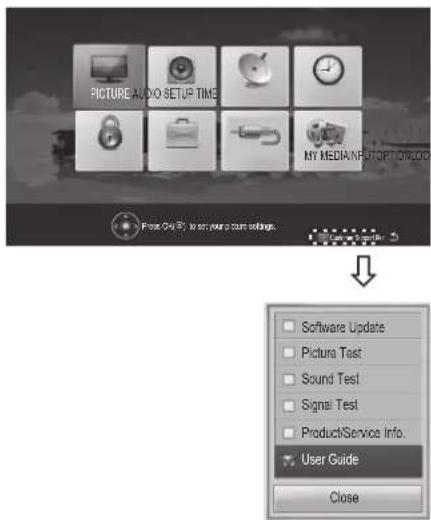
User Guide allows you to more easily access the detailed TV information.
1 Press SETTINGS to access the main menus.
2 Press the RED button to access the Customer Support menus.
3 Press the Navigation buttons to scroll to User Guide and press OK.
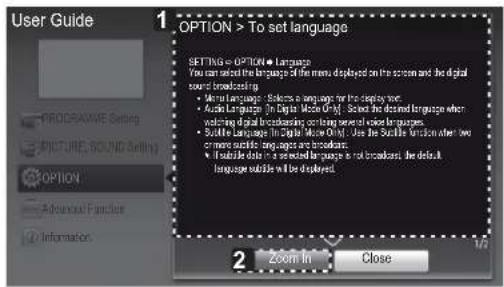
![SETTING → OPTION → Language You can select the language of the menu displayed on the screen and the digital sound broadcasting. • Menu Language : Selects a language for the display text. • Audio Language [In Digital Mode Only] : elect the desired language when watching digital broadcasting containing several voice languages. • Subtile Language [In Digital Mode Only] : Use the Subtile function when two or more subtle languages are broadcast; • If subtile data in a selected language is not broadcast, the default language subtitle will be displayed.](/content/2026/05/821288/images/04f764552edad06a180e929dc8a6c204c9c18f9dc6fc94e1c590f9a5097e8b83.jpg)
1 Shows the description of the selected menu. You can use ^/√ to move between pages.
2 Zooms in or out the screen.
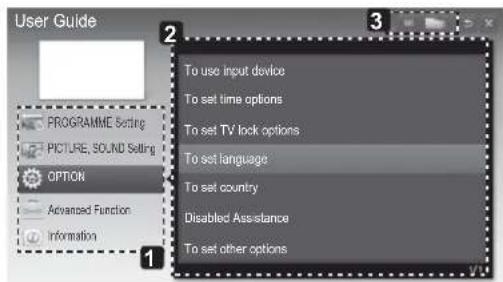
1 Allows to select the category you want.
2 Allows to select the item you want.
You can use ^/√ to move between pages.
3 Allows to browse the description of the function you want from the index.
MAINTENANCE
Cleaning your TV
Clean your TV regularly to keep the best performance and to extend the product lifespan.

CAUTION
- Make sure to turn the power off and disconnect the power cord and all other cables first.
- When the TV is left unattended and unused for a long time, disconnect the power cord from the wall outlet to prevent possible damage from lightning or power surges.
Screen, frame, cabinet and stand
- To remove dust or light dirt, wipe the surface with a dry, clean, and soft cloth.
- To remove major dirt, wipe the surface with a soft cloth dampened in clean water or a diluted mild detergent. Then wipe immediately with a dry cloth.

CAUTION
- Avoid touching the screen at all times, as this may result in damage to the screen.
- Do not push, rub, or hit the screen surface with your fingernail or a sharp object, as this may result in scratches and image distortions.
- Do not use any chemicals as this may damage the product.
- Do not spray liquid onto the surface. If water enters the TV, it may result in fire, electric shock, or malfunction.
Power cord
Remove the accumulated dust or dirt on the power cord regularly.
TROUBLESHOOTING
| Problem Solution | |
| Cannot control the TV with the remote control. | Check the remote control sensor on the product and try again.Check if there is any obstacle between the product and the remote control.Check if the batteries are still working and properly installed ( ‡ to , ‡ to ). |
| No image display and no sound is produced. | Check if the product is turned on.Check if the power cord is connected to a wall outlet.Check if there is a problem in the wall outlet by connecting other products. |
| The TV turns off suddenly. | Check the power control settings. The power supply may be interrupted.Check if the Automatic Standby or Off Time feature is activated in the TIME settings.If there is no signal while the TV is on, the TV will turn off automatically after 15 minutes of inactivity. |
| When connecting to the PC (HDMI), ‘No signal’ or ‘Invalid Format’ is displayed. | Turn the TV off/on using the remote control.Reconnect the HDMI cable.Restart the PC with the TV on. |
EXTERNAL CONTROL DEVICE SETUP
To obtain the external control device setup information, please visit www.lg.com
HASZNÁLATI ÚTMUTATÓ
LED TV
The terms HDMI and HDMI High-Definition Multimedia Interface, and the HDMI logo are trademarks or registered trademarks of HDMI Licensing LLC in the United States and other countries.
natural_image
Illustration of three cartoon scenes: a house with a smiling face, a small robot, and a computer monitor (no text or symbols)natural_image
Three grayscale images showing vertical streaks against a cloudy sky, no text or symbols presentnatural_image
Technical line drawing of a mechanical bracket component (no text or symbols)natural_image
Prohibition sign showing a person holding a TV with a diagonal line (no text or symbols)natural_image
Silhouette of two people holding a large screen with a computer monitor (no text or symbols visible)natural_image
Illustration of a computer setup with two magnified views showing mechanical components (no text or symbols present)natural_image
Illustration of a hand holding a computer monitor with a starburst graphic on the screen (no text or symbols)natural_image
Line drawing of a monitor mounted on a stand with a small screen and pointer (no text or symbols)(Csak 32/42/47LA643*, 32/42/47LA61**)

M4 × 8
(Csak 32/42LA643*, 32/42LA61**)
P4 x 8
(Csak 47LA643*, 47LA61**)
2EA

FIGYELEM
(Csak 32/42/47LA643*, 32/42/47LA61**)
natural_image
Diagram of a flat-screen TV with a dotted circular overlay and stand (no text or symbols)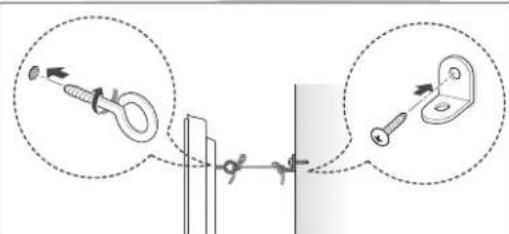
natural_image
Diagram of a device with light rays passing through a screen (no text or symbols)natural_image
Illustration of three cartoon-style houses with different expressions and symbols, no text or labels present.natural_image
Three grayscale images showing vertical streaks against a cloudy sky, framed within a dark border (no text or symbols)natural_image
Technical line drawing of a mechanical component with mounting bracket and curved base (no text or symbols)natural_image
Prohibition sign showing a person holding an electronic device (no text or symbols)natural_image
Silhouette of two people holding a large screen with a computer monitor (no text or symbols visible)natural_image
Illustration of a computer monitor connected to a cable with two magnified insets showing mechanical components (no text or symbols present)natural_image
Hand holding a computer monitor with a starburst graphic on the screen, surrounded by curved arrows indicating rotation (no text or symbols)natural_image
Line drawing of a monitor with a stand and pointer, placed on a table (no text or symbols)(Tylko modele 32/42/47LA643*, 32/42/47LA61**)

M4 × 8
(Tylko modele 32/42LA643*, 32/42LA61**)
P4 x 8
(Tylko modele 47LA643*, 47LA61**)

PRZESTROGA
natural_image
Simple line drawing of a computer monitor with a dotted oval highlight on the screen (no text or symbols)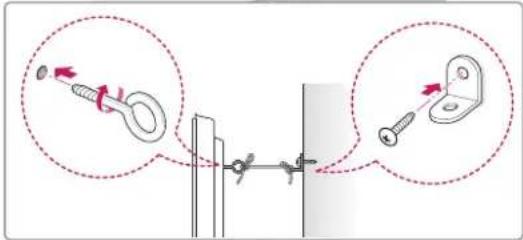
natural_image
Diagram of a projector with light rays passing through a screen (no text or symbols)natural_image
Illustration of three cartoon scenes: a house with a smiling face, a house with a thermometer and a computer monitor, and a computer monitor with a smiling face (no text or symbols)natural_image
Three grayscale close-up panels showing vertical streaks against a cloudy sky (no text or symbols)natural_image
Technical line drawing of a mechanical bracket assembly (no text or symbols)natural_image
Prohibition sign showing a person holding an electronic device, crossed out by a diagonal line (no text or symbols)natural_image
Silhouette of two people holding a large screen with a computer monitor (no text or symbols visible)natural_image
Illustration of a computer setup with two magnified views showing mechanical components (no text or symbols present)natural_image
Hand holding a blank screen with a starburst graphic, no text or symbols presentnatural_image
Line drawing of a monitor with a stand and pointer, no text or symbols present(Pouze 32/42/47LA643*, 32/42/47LA61**)

M4 × 8
(Pouze 32/42LA643*, 32/42LA61**)
P4 × 8
(Pouze 47LA643*, 47LA61**)


UPOZORNĚNÍ
(Pouze 32/42/47LA643*, 32/42/47LA61**) Jak upevnit televizor na stolek
natural_image
Simple line drawing of a computer monitor with a dotted oval highlighting the screen area (no text or symbols)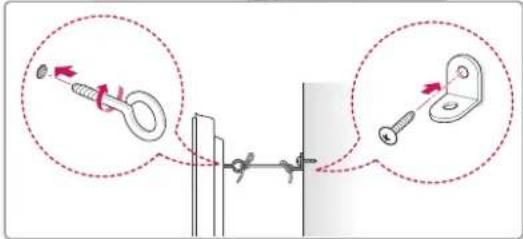
natural_image
Diagram of a mechanical assembly with dashed lines indicating alignment or force directions (no text or symbols)natural_image
Illustration of three cartoon scenes: a house with a smiling face, a smiling house with a digital microphone, and a computer monitor with a happy expression (no text or symbols)natural_image
Three grayscale close-up photos showing vertical streaks against a cloudy sky (no text or symbols)natural_image
Technical line drawing of a mechanical bracket component (no text or symbols)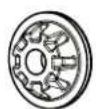
Okuliare Cinema 3D
(len modely 32/42LA643*,
32/42LA61**)
2EA, P4 x 8
(len modely 47LA643*,
47LA61**)
AG-F***
Okuliare Cinema 3D
AG-F***DP
Okuliare Dual Play
natural_image
Silhouette of two people holding a large screen with a computer monitor (no text or symbols visible)natural_image
Prohibition sign showing a person holding an electronic device, crossed out by a diagonal line (no text or symbols)Umiestnenie na stôl
1 Zdvihnite televízor, položte ho na stôl a upravte ho do zvislej polohy.
natural_image
Illustration of a computer setup with two magnified views showing mechanical components (no text or symbols present)natural_image
Illustration of a hand holding a blank tablet with a starburst graphic on the screen (no text or symbols)Pripevnenie televízora k stolu
natural_image
Line drawing of a computer monitor with a stand and base, no text or symbols present(len modely 32/42/47LA643*, 32/42/47LA61**)

M4 × 8
(len modely 32/42LA643*, 32/42LA61**)
P4 × 8
(len modely 47LA643*, 47LA61**)

UPOZORNENIE
(len modely 32/42/47LA643*, 32/42/47LA61**) Pripevnenie televízora k stolu
natural_image
Simple line drawing of a curved monitor with a dotted oval highlighting the screen area (no text or symbols)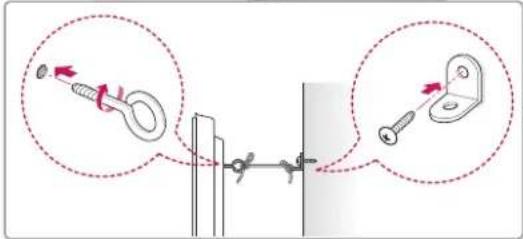
natural_image
Diagram of light rays passing through a rectangular medium with a detector or sensor array (no text or symbols)The terms HDMI and HDMI High-Definition Multimedia Interface, and the HDMI logo are trademarks or registered trademarks of HDMI Licensing LLC in the United States and other countries.

natural_image
Illustration of a house with a smiling computer and a smiling house, connected by a fan and wind turbine (no text or symbols)natural_image
Three grayscale close-up photos showing vertical structures against a cloudy sky (no text or symbols)- The items supplied with your product may vary depending on the model.
- Product specifications or contents of this manual may be changed without prior notice due to upgrade of product functions.
- For an optimal connection, HDMI cables and USB devices should have bezels less than 10 mm thick and 18 mm width. Use an extension cable that supports USB 2.0 if the USB cable or USB memory stick does not fit into your TV's USB port.
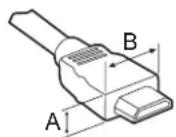
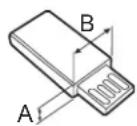
^* A ≤ 10 mm
*B ≤ 18 mm
natural_image
Technical line drawing of a mechanical bracket component (no text or symbols)natural_image
Silhouette of two people holding a large rectangular device with monitor and tower (no text or symbols)natural_image
Prohibition sign showing a person holding a TV with a diagonal line (no text or symbols)Montarea pe o masă
natural_image
Illustration of a computer monitor connected to a cable with two magnified insets showing mechanical components (no text or symbols present)natural_image
Hand holding a blank screen with a starburst graphic, surrounded by curved arrows (no text or symbols)natural_image
Line drawing of a computer monitor with a stand and screen (no text or symbols)(Doar 32/42/47LA643*, 32/42/47LA61**)

M4 × 8
(Doar 32/42LA643*, 32/42LA61**)
P4 × 8
(Doar 47LA643*, 47LA61**)
2EA

ATENTIE
(Doar 32/42/47LA643*, 32/42/47LA61**)
natural_image
Simple line drawing of a computer monitor with a dotted oval highlight on the screen (no text or symbols)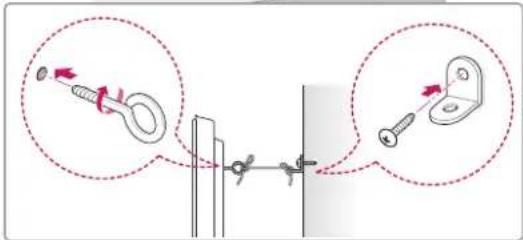
natural_image
Diagram of a mechanical assembly with dashed lines indicating alignment or force directions (no text or symbols)The terms HDMI and HDMI High-Definition Multimedia Interface, and the HDMI logo are trademarks or registered trademarks of HDMI Licensing LLC in the United States and other countries.

HD
natural_image
Illustration of a house with a smiling computer monitor and a wind turbine, no text or symbols present.natural_image
Three grayscale images showing vertical streaks against a cloudy sky, no text or symbols presentnatural_image
Symbol of a person holding a device inside a circle, crossed out by a diagonal line (no text or numbers present)natural_image
Silhouette of two people holding a large screen with a computer monitor (no text or symbols visible)natural_image
Illustration of a computer monitor connected to a mechanical device and a hanging hook, with two magnified insets showing the same components (no text or symbols present)natural_image
Illustration of a hand holding a computer monitor with a starburst graphic on the screen (no text or symbols)<Отзад> <Отпред>
natural_image
Line drawing of a monitor with a stand and a vertical line, no text or symbols present(само за 32/42/47LA643*, 32/42/47LA61**)

M4 × 8
(само за 32/42LA643*, 32/42LA61**)
2EA
P4 × 8
(само за 47LA643*, 47LA61**)

ВНИМАНИЕ
(само за 32/42/47LA643*, 32/42/47LA61**)
natural_image
Illustration of a computer monitor with a dotted oval highlighting the screen area (no text or symbols)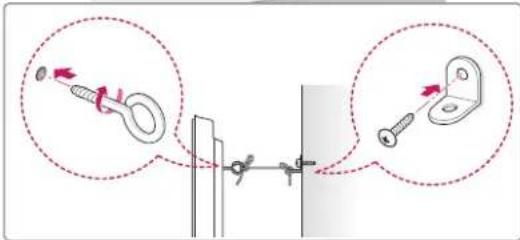
natural_image
Diagram of a mechanical assembly with dashed lines indicating alignment or motion (no text or symbols)Make sure to point the remote control toward the remote control sensor on the TV. (само за LA643*, LA61**)
User Guide allows you to more easily access the detailed TV information.
The terms HDMI and HDMI High-Definition Multimedia Interface, and the HDMI logo are trademarks or registered trademarks of HDMI Licensing LLC in the United States and other countries.

natural_image
Illustration of three cartoon scenes: a house with a smiling face, a smiling house with a windmill, and a computer monitor (no text or symbols)natural_image
Silhouette of two people holding a large screen with a computer monitor (no text or symbols visible)natural_image
Illustration of a computer monitor connected to a cable with two magnified insets showing mechanical components (no text or symbols)natural_image
Two hand-drawn diagrams showing a computer monitor with a starburst effect and a hand holding a pen, both with arrows indicating rotation (no text or symbols)Teleri lauale kinnitamine
natural_image
Line drawing of a monitor with a stand and a key inserted, mounted on a table (no text or symbols)(Ainult 32/42/47LA643*, 32/42/47LA61**)

M4 × 8
(Ainult 32/42LA643*, 32/42LA61**)
P4 x 8
(Ainult 47LA643*, 47LA61**)


ETTEVAATUST
(Ainult 32/42/47LA643*, 32/42/47LA61**)
natural_image
Simple line drawing of a computer monitor with a dotted oval highlight on the screen (no text or symbols)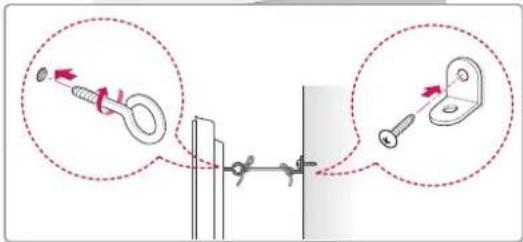
natural_image
Diagram of a mechanical assembly with dashed lines indicating alignment or projection (no text or symbols)Seinakinnituse sisemine vaheröngas
KAUGJUHTIMISPULT
The terms HDMI and HDMI High-Definition Multimedia Interface, and the HDMI logo are trademarks or registered trademarks of HDMI Licensing LLC in the United States and other countries.

HD
7,295,673; 7,460,668; 7,515,710; 7,519,274"
PASTABA DËL ATVIROJO KODO PROGRAMINËS IRANGOS
natural_image
Illustration of three cartoon scenes: a house with a smiling face, a smiling house with a microphone and a computer monitor, and a windmill in the sky (no text or symbols)natural_image
Technical line drawing of a mechanical bracket assembly (no text or symbols)Stovo korpusas / pagrindas
natural_image
Prohibition sign showing a person holding an electronic device, crossed out by a diagonal line (no text or symbols)natural_image
Silhouette of two people holding a large screen with a computer monitor (no text or symbols visible)natural_image
Illustration of a computer setup with a mechanical device and two magnified views showing the same components (no text or symbols present)natural_image
Illustration of a hand holding a blank screen with a starburst graphic, surrounded by curved arrows (no text or symbols)natural_image
Line drawing of a monitor with a screw and stand (no text or symbols)(Tik 32/42/47LA643*, 32/42/47LA61**)

M4 × 8
(Tik 32/42LA643*, 32/42LA61**)
P4 × 8
(Tik 47LA643*, 47LA61**)
2EA

DÈMESIO
(Tik 32/42/47LA643*, 32/42/47LA61**)
natural_image
Simple line drawing of a computer monitor with a dotted oval highlight on the screen (no text or symbols)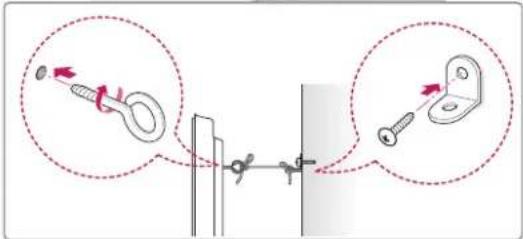
natural_image
Pure technical diagram showing light rays passing through a rectangular panel with no text or symbols24 PROBLÉMU NOVĚRŠANA
24 ĀRĒJO VADĪBAS IERĪČU IESTATĪŠANA

BRĪDINĀJUMS
The terms HDMI and HDMI High-Definition Multimedia Interface, and the HDMI logo are trademarks or registered trademarks of HDMI Licensing LLC in the United States and other countries.

natural_image
Illustration of three cartoon scenes: a house with a smiling face, a smiling house with a digital microphone, and a computer monitor with a happy expression (no text or symbols)natural_image
Three grayscale close-up photos showing vertical streaks against a cloudy sky (no text or symbols)natural_image
Technical line drawing of a mechanical bracket component (no text or symbols)natural_image
Prohibition sign showing a person holding a TV with a diagonal line (no text or symbols)natural_image
Silhouette of two people holding a large screen with a computer monitor (no text or symbols visible)natural_image
Illustration of a computer monitor connected to a mechanical device and a hanging hook, with two magnified insets showing the same components (no text or symbols present)natural_image
Illustration of a hand holding a blank screen with a starburst effect, surrounded by curved arrows (no text or symbols)
natural_image
Line drawing of a computer monitor with a stand and screen (no text or symbols)(tikai modelim 32/42/47LA643*, 32/42/47LA61**)

M4 × 8
(tikai modelim 32/42LA643*, 32/42LA61**)
P4 × 8
(tikai modelim 47LA643*, 47LA61**)
2EA

UZMANĪBU!
(tikai modelim 32/42/47LA643*, 32/42/47LA61**) Kā piestiprināt televizoru pie galda
natural_image
Simple line drawing of a computer monitor with a dotted oval highlight on the screen (no text or symbols)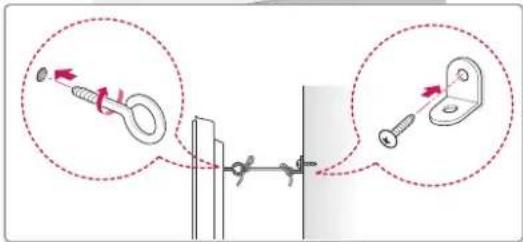
natural_image
Diagram of a mechanical or optical setup with dashed lines and dots, no visible text or symbolsThe terms HDMI and HDMI High-Definition Multimedia Interface, and the HDMI logo are trademarks or registered trademarks of HDMI Licensing LLC in the United States and other countries.

HD
O DIVX VIDEO FORMATU: LLC® je digitalni video format koji je kreirala kompanija DivX, LLC, koja predstavlja ćerku-kompaniju korporacije Rovi. Ovo zvanični DivX Certified® uređaj koji reprodukuje DivX video zapise. Više informacija i softverske alatke za konvertovanje datoteka u DivX video zapise potražite na lokaciji divx.com.
O DIVX VOD (VIDEO-ON-DEMAND) SADRŽAJIMA: Ovaj DivX Certified® uređaj mora se registrovati da bi mogao da reprodukuje kupljene DivX Video-on-Demand (VOD) filmove. Da biste dobili kôd za registraciju, pronađite odeljak DivX VOD u meniju za podešavanje uređaja. Više informacija o obavljanju registracije potražite na lokaciji vod.divx.com.
7,295,673; 7,460,668; 7,515,710; 7,519,274"
NAPOMENA O SOFTVERU SA OTVORENIM KODOM
Da biste dobili izvorni kod pod GPL, LGPL, MPL i drugim licencama otvorenog izvornog koda koje su sadržane u ovom proizvodu, posetite http://opensource.lge.com.
Pored izvornog koda, možete da preuzmete i sve navedene uslove licence, odricanja od garancije i obaveštenja o autorskim pravima.
Kompanija LG Electronics takođe pruža mogućnost slanja izvornog koda na CD-ROM-u, pod uslovom da pokrijete te troškove (koji obuhvataju cenu medija i troškove slanja i isporuke), za šta je neophodno da pošaljete zahtev kompaniji LG Electronics na e-adresu: opensource@lge.com. Ova ponuda važi tri (3) godine od datuma kupovine proizvoda.
BEZBEDNOSNA UPUTSTVA
natural_image
Illustration of three cartoon houses with different expressions and symbols (no text or labels)natural_image
Three grayscale close-up photos showing vertical streaks against a cloudy sky (no text or symbols)- Čvrsto držite gornji i donji deo okvira televizora. Vodite računa da ne držite providni deo, zvučnik ili rešetku zvučnika.
- Transport velikog televizora treba da obavljaju najmanje 2 osobe.
- U slučaju ručnog transporta, televizor držite na način prikazan na sledećoj slici.
natural_image
Silhouette of two people holding a large screen with a computer monitor (no text or symbols visible)- Prilikom transporta televizor ne izlažite udarcima ili prejakim vibracijama.
- Prilikom transporta televizor držite uspravno. Nikad ga ne okrećite na bok i ne naginjite ga nalevo ili nadesno.
- Ne pritiskajte postolje okvira jer bi se uvijanjem mogao oštetiti ekran.
Montiranje na sto
1 Podignite i postavite u uspravan položaj na stolu.
- Ostavite prostor od najmanje 10 cm od zida zbog odgovarajuće ventilacije.
natural_image
Illustration of a computer monitor connected to a cable with two magnified insets showing mechanical components (no text or symbols present)Podešavanje ugla televizora radi komfornijeg gledanja
(samo za modele LA643*/LA61**)
Okrenite televizor za 15 stepeni nalevo ili nadesno da biste podesili ugao radi komfornijeg gledanja.

OPREZ
- Kada podešavate ugao uređaja, vodite računa da ne priklještite prste.
» Možete se povrediti ukoliko priklještite prste ili šake. Uređaj može pasti i oštetiti se ili izazvati povredu ukoliko je previše nagnut.
natural_image
Illustration of a hand holding a blank board with a starburst graphic, no text or symbols presentPričvršćivanje televizora za sto
Pričvrstite televizor za sto da biste sprečili naginjanje prema napred, oštećenje i predupredili nastanak povreda.
Da biste pričvrstili televizor za, umetnite i pritegnite isporučeni zavrtanj na zadnjoj strani postolja. (samo za modele LN54/53**)
natural_image
Line drawing of a computer monitor with a stand and base, no text or symbols present(samo za modele 32/42/47LA643*, 32/42/47LA61**)

M4 × 8
(samo za modele 32/42LA643*, 32/42LA61**)
P4 × 8
(samo za modele 47LA643*, 47LA61**)

OPREZ
(samo za modele 32/42/47LA643*, 32/42/47LA61**) Montiranje televizora na sto
- Povežite kablove za montiranje na sto sa osnovom postolja koristeći zavrtnje za nosač.
- Zatim pričvrstite kablove za sto pomoću zavrtanja za montiranje na sto.
- Kada postavite televizor, premestite sto što bliže zidu. Deca se mogu zavući pod sto i povrediti.

UPOZORENJE
natural_image
Simple line drawing of a curved monitor with a dotted oval highlighting the screen area (no text or symbols)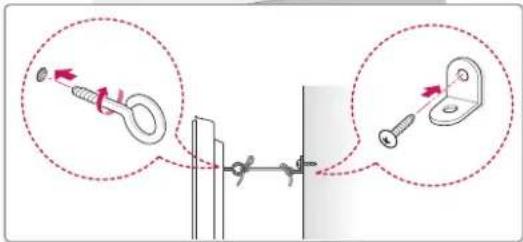
1 Umetnite i pričvrstite zavrtnje s ušicom ili nosače televizora i zavrtnje na zadnjoj strani televizora.
natural_image
Diagram of a mechanical assembly with dashed lines indicating alignment or force directions (no text or symbols)The terms HDMI and HDMI High-Definition Multimedia Interface, and the HDMI logo are trademarks or registered trademarks of HDMI Licensing LLC in the United States and other countries.

natural_image
Illustration of two scenes: a house with a smiling face and smoke, and a smiling house with a thermometer emitting steam (no text or symbols)natural_image
Illustration of three cartoon scenes: a mouse holding a magnifying glass, hands adjusting a device, and a computer monitor with a sad face (no text or symbols)- Nemojte dopustiti da se prašina skuplja na kontaktima utikača ili zidne utičnice. To bi moglo dovesti do opasnosti od požara.
- Kabel napajanja zaštitite od fizičkog ili mehaničkog habanja, zakretanja, uvijanja; nemojte ga pritiskati, zaglavljivati vratima ili hodati po njemu. Naročito pazite na priključke, zidne utičnice i mjesto na kojem kabel izlazi iz uređaja.
- Nemojte jače pritiskati ekran rukom niti oštrim predmetom poput čavla, olovke ili kemijske olovke, odnosno nemojte ga ogrepsti.
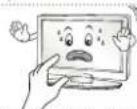
- Izbjegavajte dodirivanje LCD ekrana i ne držite dugo prste na njemu. To bi moglo prouzročiti privremena izobličenja na zaslonu.
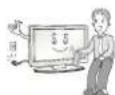
- Pri čišćenju proizvoda i komponenti od kojih se sastoji prvo iskopčajte uređaj iz napajanja, a zatim ga obrišite mekom krpom. Korištenje pretjeranog pritiska može dovesti do grebanja ili gubitka boje. Nemojte špricati uređaj vodom niti ga brisati mokrom kripicom. Nikada nemojte koristiti sredstvo za pranje stakla, sredstvo za laštenje automobila ni industrijsko sredstvo za laštenje, abrazivna sredstva niti vosak, benzen, alkohol i slično, jer ta sredstva mogu oštetiti proizvod i sam ekran. U suprotnom može doći do požara, strujnog udara ili oštećenja proizvoda (deformacije, korozije ili lomljenja).
- Sve dok je uređaj priključen na AC mrežnu utičnicu, nije iskopčan iz AC napajanja, bez obzira na to jeste li ga isključili pomoću PREKIDAČA.
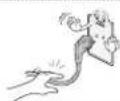
- Pri iskopčavanju napajanja uhvatite utikač i isključite napajanje. Ako žica unutar kabela napajanja izgube kontakt, to može dovesti do požara.
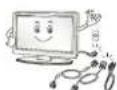
- Pri premještanju proizvoda svakako ga prvo isključite. Potom iskopčajte kabele napajanja i antenske kabele te sve spojne kabele. Televizor ili kabel napajanja možda je oštećen, što može prouzročiti opasnost od požara ili strujni udar.
natural_image
Technical line drawing of a mechanical bracket assembly (no text or symbols)Tijelo postolja /
baza postolja
(Samo modeli LA643*/LA61**)
(Pogledajte str. A-3)
natural_image
Prohibition sign showing a person holding an open box, crossed out by a diagonal line (no text or symbols)- Čvrsto držite gornji i donji dio televizora. Pazite da ga ne držite za prozirne dijelove, zvučnik ili otvor zvučnika.
natural_image
Silhouette of two people holding a large rectangular device with a computer monitor inside (no text or symbols)- Televizor prilikom prenošenja nemojte izlagati trzajima ni jakim vibracijama.
- Kada prenosite televizor, držite ga uspravno, nemojte ga polagati na bok niti naginjati lijevo ili desno.
- Nemojte koristiti preveliku silu jer biste savijanjem/uvijanjem postolja okvira mogli oštetiti zaslon.
Postavljanje na stol
1 Podignite i nagnite televizor u uspravan položaj na stolu.
- Ostavite (minimalno) 10 cm prostora do zida radi odgovarajuće ventilacije.
natural_image
Illustration of a computer setup with a mechanical device and two magnified views showing the same components (no text or symbols present)Podešavanje kuta televizora za optimalno gledanje
(Samo modeli LA643*/LA61**)
natural_image
Two hand-drawn diagrams showing a device interacting with a screen, each with a starburst graphic and rotation arrows (no text or symbols)Pričvršćivanje televizora za stol
natural_image
Line drawing of a monitor with a stand and pointer, no text or symbols present(Samo modeli 32/42/47LA643*, 32/42/47LA61**)

M4 × 8
(Samo modeli 32/42LA643*, 32/42LA61**)
P4 × 8
(Samo modeli 47LA643*, 47LA61**)
2EA

OPREZ
(Samo modeli 32/42/47LA643*, 32/42/47LA61**) Pričvršćivanje televizora za stol
- Vijcima nosača pričvrstite kabele koji se montiraju na stol na bazu postolja.
- Vijcima koji se montiraju na stol pričvrstite kabele koji se montiraju na stol.
- Nakon što pričvrstite televizor, povucite stol prema zidu. U protivnom bi se djeca mogla zavlačiti iza stola i ozlijediti se.

UPOZORENJE
- Kako se televizor ne bi prevrnuo, treba ga u skladu s uputama za montiranje čvrsto pričvrstiti za pod/zid. Naginjanje, protresanje ili njihanje uređaja može prouzročiti ozljede.
Montiranje televizora na zid
(ova značajka nije dostupna na svim modelima)
natural_image
Simple line drawing of a computer monitor with a dotted oval highlighting the screen area (no text or symbols)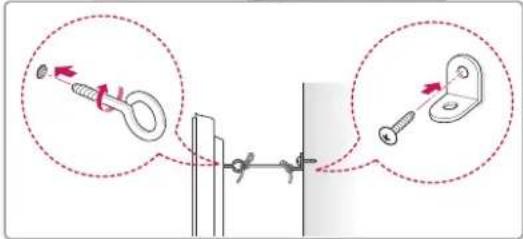
1 Umetnite i pričvrstite okaste vijke ili nosače za televizor i vijke na stražnjoj strani televizora.
- Ako se na mjestu za okaste vijke nalaze neki drugi vijci, izvadite ih.
2 Pričvrstite zidni nosač za zid vijcima.
Pritom poštujte lokacije zidnog nosača i okastih
vijaka na stražnjoj strani televizora.
3 Povežite okaste vijke i nosače čvrsto uz pomoć jačeg užeta.
Uže mora biti postavljeno vodoravno u odnosu na ravnu površinu.

OPREZ
natural_image
Pure technical diagram showing light rays passing through a rectangular frame with no text or symbolsUnutarnji odstojnik za montažu na zid
DALJINSKI UPRAVLJAČ
The terms HDMI and HDMI High-Definition Multimedia Interface, and the HDMI logo are trademarks or registered trademarks of HDMI Licensing LLC in the United States and other countries.

natural_image
Illustration of a house with a smiling computer monitor and a smiling house with a wind turbine, both surrounded by clouds (no text or symbols)- Instalojeni produktin aty ku nuk ka valë radioje.
natural_image
Three grayscale close-up photos showing vertical streaks against a cloudy sky (no text or symbols)natural_image
Technical line drawing of a mechanical component with mounting bracket and curved base (no text or symbols)natural_image
Prohibition sign showing a person holding a device inside a circle (no text or symbols)natural_image
Silhouette illustration of two people holding a large rectangular device with a monitor inside (no text or symbols)natural_image
Illustration of a computer monitor connected to a cable with two magnified insets showing mechanical components (no text or symbols present)natural_image
Two hand-drawn diagrams showing a computer monitor with starburst effect and rotation arrows (no text or symbols)natural_image
Line drawing of a monitor mounted on a table with a screwdriver inserted (no text or symbols)(Vetëm 32/42/47LA643*, 32/42/47LA61**)

M4 × 8
(Vetëm 32/42LA643*, 32/42LA61**)
P4 x 8
(Vetëm 47LA643*, 47LA61**)

KUJDES
(Vetëm 32/42/47LA643*, 32/42/47LA61**)
natural_image
Simple line drawing of a computer monitor with a dotted oval highlight on the screen (no text or symbols)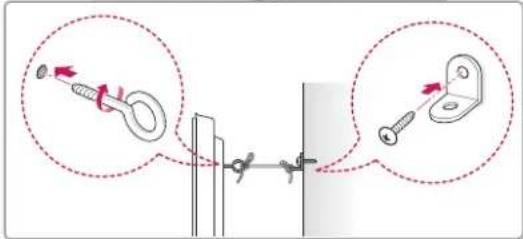
natural_image
Diagram of a projector with light paths and focal points, showing no text or symbolsThe terms HDMI and HDMI High-Definition Multimedia Interface, and the HDMI logo are trademarks or registered trademarks of HDMI Licensing LLC in the United States and other countries.

INFORMACIJE O DIVX VIDEU: DivX® je digitalni video format koji je kreirala kompanija DivX, LLC, podružnica kompanije Rovi Corporation. Ovo je zvanični DivX Certified® uređaj koji reproducira DivX video. Posjetite stranicu divx.com kako biste pronašli više informacija i softverske alate za konvertiranje datoteka u DivX video.
O OPCIJI DIVX VIDEO NA ZAHTJEV: Ovaj uređaj sa oznakom DivX Certified® mora se registrirati kako bi mogao reproducirati filmove kupljene putem opcije DivX Video-on-Demand (VOD). Da biste pribavili registracijski kôd, pronađite odjeljak DivX VOD u izborniku postavljanja uređaja. Idite na vod.divx.com za više informacija o okončavanju procesa registriranja.
"DivX Certified® za reproduciranje DivX® videa do rezolucije HD 1080p, uključujući premium sadržaj."
"DivX®, DivX Certified® i srodni logotipi su zaštićeni znakovi kompanije Rovi Corporation ili njenih podružnica i koriste se pod licencom."
"Obuhvaćeno jednim ili više sljedećih patenata SAD: 7,295,673; 7,460,668; 7,515,710; 7,519,274"
NAPOMENA O SOFTVERU OTVORENOG KODA
Da biste pribavili izvorni kôd pod GPL, LGPL, MPL i drugim licencama za otvoreni kôd, koje su sadržane u ovom proizvodu, molimo posjetite stranicu http://opensource.lge.com.
Pored izvornog koda, za preuzimanje su dostupne i sve spomenute licencne odredbe, odricanja od garancije i obavijesti o autorskim pravima.
natural_image
Illustration of three cartoon houses with different expressions and symbols (no text or labels)- Instalirajte uređaj na mjestu na kom nema radijskih valova.
- Između vanjske antene i kablova za napajanje treba biti dovoljno prostora kako antena ne bi dodirivala kable čak i u slučaja pada antene. To može izazvati strujni udar.
- Nemojte instalirati uređaj na mjestima kao što su nestabilne police ili nagnute površine. Također izbjegavajte mjesta na kojima ima vibracija ili tamo gdje uređaj nema puni oslonac. U suprotnom, uređaj može pasti ili se prevrnuti i time izazvati povrede ili oštećenja na proizvodu.
natural_image
Technical line drawing of a mechanical bracket component (no text or symbols)Tijelo postolja /
Osnova postolja
(Samo LA643*/LA61**) (Pogledajte str. A-3)
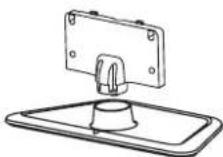
Tijelo postolja /
Osnova postolja
(Samo LN54/53**)
(Pogledajte str. A-4)
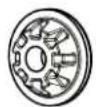
natural_image
Prohibition sign showing a person holding an electronic device, crossed out by a diagonal line (no text or symbols)- Kada vršite transport velikog TV uređaja, trebale bi biti prisutne najmanje dvije osobe.
- Prilikom ručnog transportiranja TV-a, držite ga kao što je prikazano na sljedećoj ilustraciji.
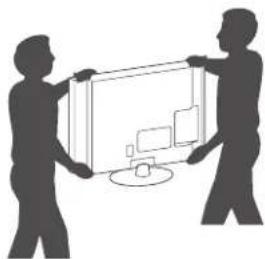
natural_image
Silhouette of two people holding a large rectangular device with a monitor inside (no text or symbols visible)- Prilikom transporta, televizor ne izlažite udarcima ili prejakim vibracijama.
- TV prilikom transporta držite uspravno; nikada ga nemojte okretati na stranu ili naginjati ulijevo ili udesno.
- Nemojte pritiskati postolje okvira jer biste savijanjem mogli oštetiti ekran.
Montiranje na sto
1 Podignite i postavite TV u uspravan položaj na stolu.
- Ostavite prostor od (najmanje) 10 cm od zida zbog odgovarajuće ventilacije.
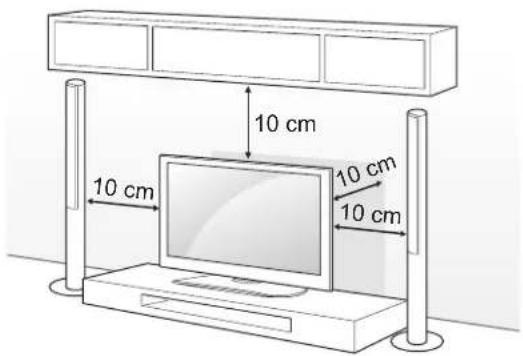
natural_image
Illustration of a computer monitor connected to a cable with two magnified insets showing mechanical components (no text or symbols)Podešavanje ugla TV-a za ugodnije gledanje
(Samo LA643*/LA61**)
Zakrenite TV uređaj 15 stepeni ulijevo ili udesno i podesite ugao radi lakšeg gledanja.
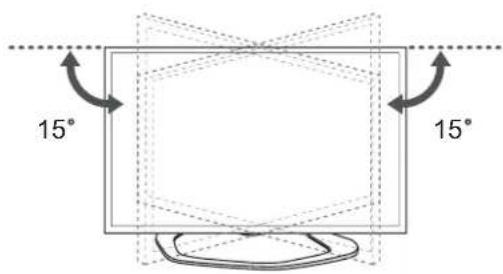

OPREZ
natural_image
Hand holding a computer monitor with a starburst graphic on the screen (no text or symbols)natural_image
Line drawing of a computer monitor with a stand and indicator lights (no text or symbols)(Samo 32/42/47LA643*, 32/42/47LA61**)
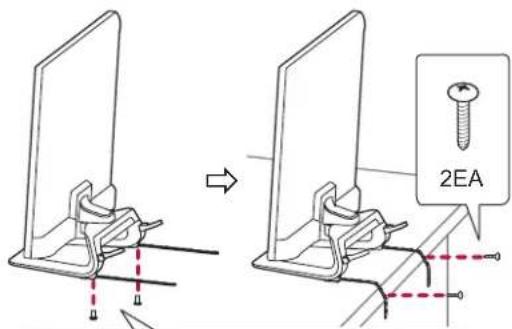

M4×8
(Samo 32/42LA643*, 32/42LA61**)
P4 × 8
(Samo 47LA643*, 47LA61**)


OPREZ
(Samo 32/42/47LA643*, 32/42/47LA61**)
natural_image
Simple line drawing of a computer monitor with a dotted oval highlight on the screen (no text or symbols)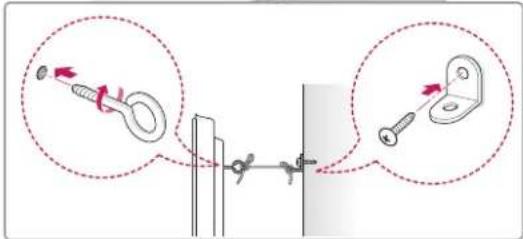
natural_image
Pure technical diagram showing alignment of a rectangular object with internal components and dashed lines indicating alignment (no text or symbols)The terms HDMI and HDMI High-Definition Multimedia Interface, and the HDMI logo are trademarks or registered trademarks of HDMI Licensing LLC in the United States and other countries.

natural_image
Illustration of three cartoon houses with different expressions and symbols, no text or labels present.natural_image
Three grayscale images showing vertical streaks against a cloudy sky, framed within a dark border (no text or symbols)natural_image
Prohibition sign showing a person holding an electronic device, crossed out by a diagonal line (no text or symbols)natural_image
Silhouette of two people holding a large screen with a computer monitor (no text or symbols visible)natural_image
Illustration of a computer monitor connected to a cable with a magnified inset showing the device and cable attachment (no text or symbols present)natural_image
Two hand-drawn diagrams showing a computer monitor with starburst graphics and a hand holding a pen, both with rotation arrows (no text or symbols)<Задна страна> <Предна страна>
natural_image
Line drawing of a computer monitor with a stand and base (no text or symbols)(Camo 32/42/47LA643*, 32/42/47LA61**)
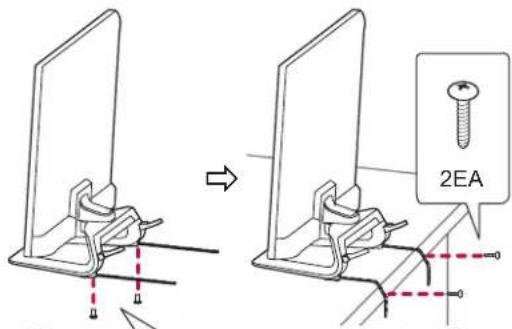

M4 × 8
(Camo 32/42LA643*, 32/42LA61**)
P4 × 8
(Camo 47LA643*, 47LA61**)


ВНИМАНИЕ
(Camo 32/42/47LA643*, 32/42/47LA61**)
natural_image
Line drawing of a computer monitor with a dotted oval highlight on the screen (no text or symbols)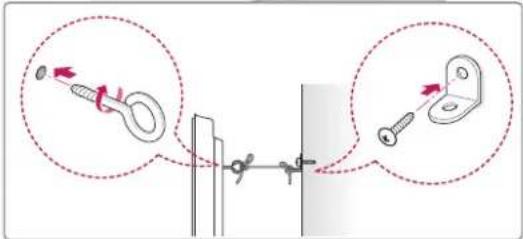
natural_image
Diagram of a mechanical assembly with dashed lines indicating alignment or force directions (no text or symbols)7,295,673; 7,460,668; 7,515,710; 7,519,274»
natural_image
Illustration of a smart home with a smiling computer monitor and a house, accompanied by an electric fan (no text or symbols)natural_image
Three grayscale images showing vertical streaks against a cloudy sky, no text or symbols presentnatural_image
Silhouette of two people holding a large rectangular device with monitor and tower (no text or symbols)natural_image
Prohibition sign showing a person holding a device, crossed out by a diagonal line (no text or symbols)Установка на столе
natural_image
Illustration of a computer monitor connected to a cable with two magnified insets showing mechanical components (no text or symbols present)natural_image
Two hand-drawn diagrams showing a computer monitor with starburst graphics and directional arrows, no text or symbols present.natural_image
Line drawing of a monitor mounted on a stand, no text or symbols present
M4 × 8
natural_image
Line drawing of a computer monitor with a dotted oval highlight on the screen (no text or symbols)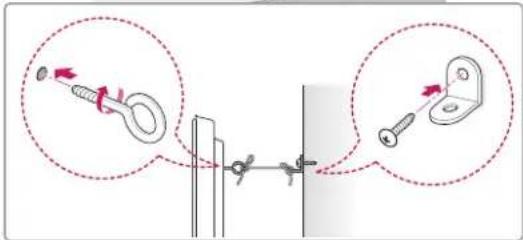
natural_image
Diagram of a mechanical assembly with alignment lines and dots, no text or symbols presentProduct specifications may be changed without prior notice due to upgrade of product functions.
| MODELS | 32LA643* 42LA643* 47LA643* | ||
| 32LA643V-ZB 42LA643V-ZB 47LA643V-ZB | |||
| Dimensions(W x H x D) | With stand (mm) 743 x 518 x 241 973 x 652 | x 294 1086 x 711 x 327 | |
| Without stand(mm) 743 x 461 x 36.4 973 x 5 | 91 x 36.3 1086 x 654 x 36.3 | ||
| Weight | With stand (kg) 9.2 14.2 17.5 | ||
| Without stand (kg) 8 0 12.4 15.0 | |||
| Power consumption 90 W | 110 W | 120 W | |
| Power requirement | AC 100-240 V~ 50 / 60 Hz | AC 100-240 V~ 50 / 60 Hz | |
| MODELS | 55LA643* | ||
| 55LA643V-ZB | |||
| Dimensions(W x H x D) | With stand (mm) | 1260 x 821 x 343 | |
| Without stand(mm) | 1260 x 753 x 36.3 | ||
| Weight | With stand (kg) | 24.2 | |
| Without stand (kg) | 21.5 | ||
| Power consumption | 140 W | ||
| Power requirement | AC 100-240 V~ 50 / 60 Hz | ||
| MODELS | 32LA61** | 42LA61** | |
| 32LA613S-ZA | 42LA613S-ZA | ||
| 32LA613V-ZA | 42LA613V-ZA | ||
| 32LA6130-ZB | 42LA6130-ZB | ||
| 32LA6134-ZB | 42LA6134-ZB | ||
| 32LA6136-ZB | 42LA6136-ZB | ||
| 32LA613S-ZB | 42LA613S-ZB | ||
| 32LA613V-ZB | 42LA613V-ZB | ||
| 32LA613V-ZF | 42LA613V-ZF | ||
| 32LA613V-ZG | 42LA613V-ZG | ||
| 32LA6150-ZB | 42LA6150-ZB | ||
| 32LA6154-ZB | 42LA6154-ZB | ||
| 32LA6156-ZB | 42LA6156-ZB | ||
| 32LA615S-ZA | 42LA615S-ZA | ||
| 32LA615S-ZB | 42LA615S-ZB | ||
| 32LA615V-ZA | 42LA615V-ZA | ||
| 32LA615V-ZB | 42LA615V-ZB | ||
| 32LA615V-ZE | 42LA615V-ZE | ||
| 32LA615V-ZF | 42LA615V-ZF | ||
| 32LA616V-ZG | 42LA616V-ZG | ||
| Dimensions(W x H x D) | With stand (mm) 733 x 499 x 242 964 x 631 | x 294 | 1076 x 695 x 327 |
| Without stand(mm) 733 x 444 x 78.0 | 964 x 573 x 78.0 | 1076 x 637 x 79.4 | |
| Weight | With stand (kg) 7.6 | 11.8 | 15.0 |
| Without stand (kg) 6.4 10.0 12.8 | |||
| Power consumption 80 W | 110 W | 130 W | |
| Power requirement | AC 100-240 V~ 50 / 60 Hz | AC 100-240 V~ 50 / 60 Hz | |
| MODELS | 32LN54** 37LN54** 39LN54** | ||
| 32LN5400-ZA | 37LN5400-ZA | ||
| 32LN5403-ZA | 37LN5403-ZA | ||
| 32LN5404-ZA | 37LN5404-ZA | ||
| 32LN5405-ZA | 37LN5405-ZA | ||
| 32LN5406-ZA | 37LN5406-ZA | ||
| 32LN540B-ZA | 37LN540B-ZA | ||
| 32LN540R-ZA | 37LN540R-ZA | ||
| 32LN540S-ZA | 37LN540S-ZA | ||
| 32LN540U-ZA | 37LN540U-ZA | ||
| 32LN540U-ZB | 37LN540U-ZB | ||
| 32LN541U-ZB | 37LN541U-ZB | ||
| 32LN540V-ZA | 37LN540V-ZA | ||
| 32LN541V-ZC | 37LN541V-ZC | ||
| 32LN542V-ZD | 37LN542V-ZD | ||
| Dimensions(W x H x D) | With stand (mm) 738 x 497 x 207 849 x 561 x 236 894 x 587 x 236 | ||
| Without stand(mm) 738 x 449 x 79.0 849 x 512 x 79.0 894 x 537 x 79.0 | |||
| Weight | With stand (kg) 7.0 9.1 9.7 | ||
| Without stand (kg) 6.4 8.0 8.6 | |||
| Power consumption 80 W 100 W 100 W | |||
| Power requirement | AC 100-240 V~ 50 / 60 Hz | AC 100-240 V~ 50 / 60 Hz | |
| MODELS | 42LN54** 47LN54** 50LN54** | ||
| 42LN5400-ZA | 47LN5400-ZA | ||
| 42LN5403-ZA | 47LN5403-ZA | ||
| 42LN5404-ZA | 47LN5404-ZA | ||
| 42LN5405-ZA | 47LN5405-ZA | ||
| 42LN5406-ZA | 47LN5406-ZA | ||
| 42LN540B-ZA | 47LN540B-ZA | ||
| 42LN540R-ZA | 47LN540R-ZA | ||
| 42LN540S-ZA | 47LN540S-ZA | ||
| 42LN540U-ZA | 47LN540U-ZA | ||
| 42LN540U-ZB | 47LN540U-ZB | ||
| 42LN541U-ZB | 47LN541U-ZB | ||
| 42LN540V-ZA | 47LN540V-ZA | ||
| 42LN541V-ZC | 47LN541V-ZC | ||
| 42LN542V-ZD | 47LN542V-ZD | ||
| Dimensions(W x H x D) | With stand (mm) 968 x 629 x 236 1080 x 694 x 264 1136 x 727 x 264 | ||
| Without stand(mm) 968 x 579 x 79.0 1080 x 642 x 80.5 1136 x 673 x 82.1 | |||
| Weight | With stand (kg) | 10.7 | 14.7 |
| Without stand (kg) 9.6 | 13.4 | 14.2 | |
| Power consumption | 110 W | 130 W | |
| Power requirement | AC 100-240 V~ 50 / 60 Hz | AC 100-240 V~ 50 / 60 Hz | |
| MODELS | 32LN53** | |
| 32LN536B-ZA32LN536B-ZB32LN536B-ZG32LN536U-ZA32LN536U-ZB32LN536U-ZG | ||
| Dimensions(W x H x D) | With stand (mm) 738 x 497 x 207 | |
| Without stand(mm) 738 x 449 x 79.0 | ||
| Weight | With stand (kg) 7.0 | |
| Without stand (kg) 6.4 | ||
| Power consumption 80 W | ||
| Power requirement | AC 100-240 V~ 50 / 60 Hz | |
| CI Module Size (W x H x D) 100.0 mm x 55.0 mm x 5.0 mm | |
| Environment condition | Operating Temperature 0 °C to 40 °C |
| Operating Humidity Less than 80 % | |
| Storage Temperature -20 °C to 60 °C | |
| Storage Humidity Less than 85 % | |
| Satellite Digital TV ^1 | Digital TV ^2 | Digital TV Analogue TV | ||
| Television system DVB-T | DVB-CDVB-S/S2 | DVB-T/T2DVB-CDVB-S/S2 | DVB-TDVB-C | PAL/SECAM B/G/D/K,PAL I/I',SECAM L/L ^3 |
| Programme coverage | VHF, UHFC-Band, Ku-Band | VHF, UHF | VHF: E2 to E12, UHF :E21 to E69, CATV: S1 toS20, HYPER: S21 to S47 | |
| Maximum number of storable programmes | 6,000 1,500 | |||
| External antenna impedance | 75 Ω | |||
1 Only satellite models
2 Only DVB-T2 support models
3 Except for DVB-T2 support models
HDMI-DTV supported mode
| Resolution | Horizontal Frequency (kHz) | Vertical Frequency (Hz) |
| 720x480 | 31.469 | 59.94 |
| 31.5 | 60 | |
| 720x576 31.25 50 | ||
| 1280x720 | 37.5 | 50 |
| 44.96 | 59.94 | |
| 45 | 60 | |
| 1920x1080 | 33.72 | 59.94 |
| 33.75 | 60 | |
| 28.125 | 50 | |
| 26.97 | 23.97 | |
| 27 | 24 | |
| 33.716 | 29.976 | |
| 33.75 | 30.00 | |
| 56.25 | 50 | |
| 67.43 | 59.94 | |
| 67.5 | 60 | |
HDMI-PC supported mode
| Resolution | Horizontal Frequency (kHz) | Vertical Frequency (Hz) |
| 640x350 31.468 70.09 | ||
| 720x400 31.469 70.08 | ||
| 640x480 31.469 59.94 | ||
| 800x600 37.879 60.31 | ||
| 1024x768 48.363 60.00 | ||
| 1152x864 54.348 | 60.053 | |
| 1360x768 47.712 | 60.015 | |
| 1280x1024 | 63.981 | 60.020 |
| 1920x1080 67.5 | 60.00 |
Component port connecting information
| Component ports on the TV | Y | P_B | P_R |
| Video output ports on DVD player | Y | P_B | P_R |
| Y B-Y R-Y | |||
| Y Cb Cr | |||
| Y Pb Pr | |||
| Signal Component | |||
| 480i/576i O | |||
| 480p/576p O | |||
| 720p/1080i O | |||
| 1080p | O(50 Hz / 60 Hz only) | ||
3D supported mode
(Only 3D models)
• Video, which is input as below media contents is switched into the 3D screen automatically.
- The method for 3D digital broadcast may differ depending on the signal environment. If video is not switched automatically into 3D, manually convert the settings to view 3D images.
| Input Signal Resolution | Horizontal Frequency (kHz) | Vertical Frequency (Hz) | Playable 3D video format | ||
| HDMI | 720p | 1280X720 | 37.5 50 | Side by Side(half), Top and Bottom | |
| 45 60 | |||||
| 75 50 | Frame packing | ||||
| 89.9 / 90 59.94 / 60 | |||||
| 1080i | 1920X1080 | 28.125 50 | Side by Side(half), Top and Bottom | ||
| 33.7 60 | |||||
| 1080p | 1920X1080 | 27 24 | Side by Side(half), Top and Bottom | ||
| 33.7 30 | |||||
| 53.95 / 54 23.98 / 24 Frame packing | |||||
| 56.3 50 | Side by Side(half), Top and Bottom, Single frame sequential | ||||
| 67.5 60 | |||||
| DTV | 720p | 1280X720 37.5 50 | Side by Side, Top and Bottom | ||
| 1080i | 1920X1080 | 28.125 50 | |||
| USB | 1080p | 1920X1080 | 33.75 | 30 | Side by Side, Top and Bottom, MPO(Photo) |
| DLNA | 1080p | 1920X1080 | 33.75 | 30 | Side by Side, Top and Bottom |
|
(No text)
____ ____
[Non-Text]
[Non-Text]
[Non-Text]
[Non-Text]
[Non-Text]
[Non-Text]
[Non-Text]
[Non-Text]
[Non-Text]
[Non-Text]
[Non-Text]
[Non-Text]
[Non-Text]
[Non-Text]
[Non-Text]
[Non-Text]
[Non-Text]
[Non-Text]
[Non-Text]
[Non-Text]
[Non-Text]
[Non-Text]
[Non-Text]
[Non-Text]
[Non-Text]
[Non-Text]
[Non-Text]
[Non-Text]
[Non-Text]
[Non-Text]
[Non-Text]
[Non-Text]
[Non-Text]
[Non-Text]
[Non-Text]
[Non-Text]
[Non-Text]
[Non-Text]
[Non-Text]
[Non-Text]
[Non-Text]
[Non-Text]
(No text to output)
[Non-Text]
|
[Non-Text]
[Non-Text]
|
Theorem 1.2. (Theorem of [3.6]). Let be a finite field and let (x) be the set of all elements of such that x (x) . Then
- -
[Non-Text]
[Non-Text]
[Non-Text]
[Non-Text]
[Non-Text]
[Non-Text]
[Non-Text]
[Non-Text]
[Non-Text]
[Non-Text]
[Non-Text]
[Non-Text]
[Non-Text]
[Non-Text]
[Non-Text]
[Non-Text]
[Non-Text]
[Non-Text]
[Non-Text]
[Non-Text]
[Non-Text]
[Non-Text]
[Non-Text]
[Non-Text]
[Non-Text]
[Non-Text]
[Non-Text]
[Non-Text]
[Non-Text]
[Non-Text]
[Non-Text]
[Non-Text]
[Non-Text]
[Non-Text]
[Non-Text]
[Non-Text]
[Non-Text]
[Non-Text]
[Non-Text]
[Non-Text]
[Non-Text]
|
| |
[Non-Text]
[Non-Text]

LG
Life's Good
Please contact LG First.
If you have any inquiries or comments,
please contact LG customer information centre.
Record the model number and serial number of the TV.
Refer to the label on the back cover and quote this information to your dealer when requiring any service.
MODEL
SERIAL

Digital Video
Broadcasting
LG Customer Information Centre
| Country | LG Service | Country | LG Service |
| Österreich | 0 810 144 131 09 | Naderland 45 | 4 |
| Belgie | 015 200 255 80 | Nâge 40 | |
| Luxemburg | 0032 15 200255 | Pôská 54 54 | 54 |
| България | 07001 54 54 80 | Portugal 54 | |
| Česká Rep. | 810 555 810 031 | Ranaba 542 | |
| Danmark | 8088 5758 085 | Sibvelsko | |
| Suomi | 0800 0 54 54 9 | España 234 | |
| France | 3220 dis4 LG ou tapez | Sverige | 0770 54 54 54 |
| Deutschland | 01803 11 54 11 0 | Srivica 3 543 | |
| Еллаба | 801 11 200 900,210 4800 564 | United Kingdom | 0844 847 5454 |
| Россия | 8 800 200 7676 | ||
| Magyarország | 06 40 54 54 54 | Веди 9990 | |
| Éire | 0818 27 6955 0 | Украївіз 3 000 | |
| Italia | 199600099 | Казахстан | 8 8000 805 805,2255(GSM) |
| Беларусь | 8 820 0071 1111 | ||
| Latvija | 80200201 8 800 | Узбекистан | |
| Lietuva | 880008081 | Кыргызстан | 8 0000 710 005 |
www.lg.com
- Printing specification
- Pagination sheet
- OWNER'S MANUAL
- LED TV
- TABLE OF CONTENTS
- A-3 SETTING UP THE TV
- A-6 MAKING CONNECTIONS
- LANGUAGE LIST
- B-1 SPECIFICATIONS
- SETTING UP THE TV
- Attaching the stand
- CAUTION
- NOTE
- Tidying cables
- MAKING CONNECTIONS
- Antenna Connection
- English
- Magyar
- Satellite dish Connection
- Component Connection
- Composite Connection
- Headphone Connection
- Digital optical audio connection
- Euro Scart Connection
- LICENSES
- OPEN SOURCE SOFTWARE NOTICE
- SAFETY INSTRUCTIONS
- INSTALLATION PROCEDURE
- ASSEMBLING AND PREPARING
- REMOTE CONTROL
- USING THE USER GUIDE
- MAINTENANCE
- TROUBLESHOOTING
- EXTERNAL CONTROL DEVICE SETUP
- WARNING
- LICENSES
- OPEN SOURCE SOFTWARE NOTICE
- SAFETY INSTRUCTIONS
- Viewing 3D Imaging (Only 3D models)
- Viewing Environment
- Those that have a photosensitive seizure or chronic illness
- Symptoms which require discontinuation or refraining from watching 3D contents
- Viewing Age
- Cautions when using the 3D glasses
- INSTALLATION PROCEDURE
- ASSEMBLING AND PREPARING
- Unpacking
- Separate purchase
- Parts and buttons
- Lifting and moving the TV
- Mounting on a table
- Using the Kensington security system
- Adjusting the angle of the TV to suit view
- Securing the TV to a table
- Securing the TV to a wall
- Mounting on a wall
- REMOTE CONTROL
- USING THE USER GUIDE
- MAINTENANCE
- Cleaning your TV
- Screen, frame, cabinet and stand
- Power cord
- TROUBLESHOOTING
- EXTERNAL CONTROL DEVICE SETUP
- HASZNÁLATI ÚTMUTATÓ
- FIGYELEM
- PRZESTROGA
- UPOZORNĚNÍ
- Umiestnenie na stôl
- Pripevnenie televízora k stolu
- UPOZORNENIE
- Montarea pe o masă
- ATENTIE
- ВНИМАНИЕ
- Teleri lauale kinnitamine
- ETTEVAATUST
- KAUGJUHTIMISPULT
- PASTABA DËL ATVIROJO KODO PROGRAMINËS IRANGOS
- Stovo korpusas / pagrindas
- DÈMESIO
- PROBLÉMU NOVĚRŠANA
- ĀRĒJO VADĪBAS IERĪČU IESTATĪŠANA
- BRĪDINĀJUMS
- UZMANĪBU!
- NAPOMENA O SOFTVERU SA OTVORENIM KODOM
- BEZBEDNOSNA UPUTSTVA
- Montiranje na sto
- Podešavanje ugla televizora radi komfornijeg gledanja
- OPREZ
- Pričvršćivanje televizora za sto
- UPOZORENJE
- Postavljanje na stol
- Podešavanje kuta televizora za optimalno gledanje
- Pričvršćivanje televizora za stol
- Montiranje televizora na zid
- DALJINSKI UPRAVLJAČ
- KUJDES
- NAPOMENA O SOFTVERU OTVORENOG KODA
- Podešavanje ugla TV-a za ugodnije gledanje
- Установка на столе
- 3D supported mode
- (Only 3D models)
- LG
- Life's Good
Brand : LG
Model : 32LN536B
Category : Monitor