H004 - Headphones Techmade - Free user manual and instructions
Find the device manual for free H004 Techmade in PDF.


User questions about H004 Techmade
0 question about this device. Answer the ones you know or ask your own.
Ask a new question about this device
Download the instructions for your Headphones in PDF format for free! Find your manual H004 - Techmade and take your electronic device back in hand. On this page are published all the documents necessary for the use of your device. H004 by Techmade.
USER MANUAL H004 Techmade
Multimedia Headphones
User Manual
Wireless headphones with microphone and function key designed to fit comfortably in any type of ear thanks to padded ear pads. Equipped with USB port for charging and function button to control playback of music or answer calls.
natural_image
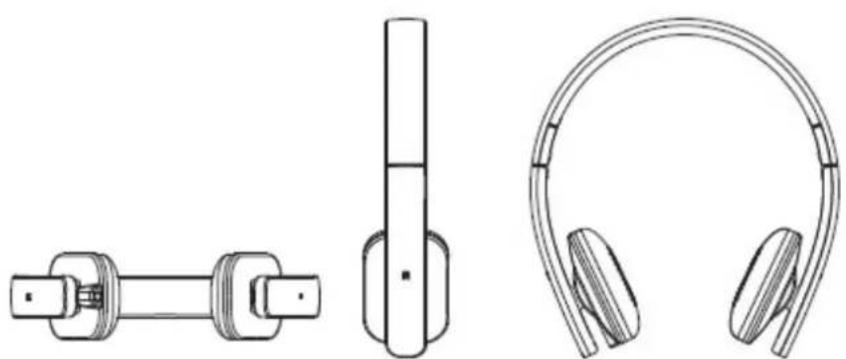
Technical line drawings of three electronic components: a shaft, vertical bar, and headband (no text or symbols)- / #: Volume Down / Previous Song
▶/ +: Next Song /Volume Up
▶/:Play & Pause / Call pick-up & hang-up
“⏻”:Press and hold for 2.5 seconds to turn the headphone ON or OFF
SPECIFICATION
Model: H004
Bluetooth specification: Bluetooth V3.0 + EDR
Transmission distance : IO 10M ( It varied when the environmental factors and the connected Bluetooth devices are different )
USB charging voltage: DC 5V/500mAh
Built-in battery: Lithium battery, 250mAh
Output power: 30mW
Frequency response: 20Hz-20KHz
Sensitivity: 105db ( AT 1KHZ+3db )
BLUETOOTH OPERATION
-
Press and hold power button to turn on the headphones. The blue indicator light will flash to detect Bluetooth enabled devices near you. The blue indicator light will go out if no Bluetooth device is detected within 5 minutes.
-
Pair the headphone with the desired Bluetooth device.
-
Play/Pause as desired by pressing /▶
-
To answer an incoming phone call while using the headphones, press the / button once. To end the phone call, re-press the / button. Press the / twice to dial the last number dialed.
- Turn on the headphone
- Insert a 3.5mm audio cable into the AUX jack on the back of the headphone. Connect the 3.5mm cable to any audio device with a port.
- Press the /button to play or pause music.
- The headphone has a built-in Lithium battery. The battery is rechargeable.
- Use the micro-USB cable to charge the headphone. The red indicator light will illuminate when the battery is low.
The red indicator light will go out when the headphone is fully charged.
COMPATIBILITY
Devices equipped with Bluetooth 2.1 or higher.
TROUBLESHOOTING
| PROBLEM | TROUBLESHOOTING |
| Failure to connect or pair the headphones to an audio device | 1. Confirm the device you wish to pair with the headphone has Bluetooth capabilities2. Check battery life, headphones may need to be charged3. Inspect whether the headphone is in the status of searching for Bluetooth device.4. There may be too many Bluetooth enabled devices in the area, please turn off Bluetooth function on devices you do not want to pair with the headphones. |
| The sound is too low or distorted | 1. Inspect the volume of the Bluetooth equipment and adjust the volume.2. The battery life is low, please charge the headphones. |
| Discontinuous music | 1. Move the paired Bluetooth device closer to the headphones.2. Make sure there are no obstacles between the Bluetooth device and the headphones. |
| The indicator light for Bluetooth mode is not on | 1. The battery life is too low. Please charge the headphones and try again.2. Restart the headphones by powering off and turning back on. |
Caution
- To protect your hearing, you should not exceed 50% of the maximum volume of your audio device, always make sure to turn down the volume before using it and to limit the use of headphones to one hour or less per day. The use of headphones at high volumes (greater than 85dB) or for extended periods of time (more than an hour a day) can cause permanent hearing damage. They can be gradual and lack of warning signs,
so have your hearing checked and a medical examination are the only way to diagnose hearing damage if you notice the following symptoms: buzz or hum and difficulty understanding speech.
- Do not use headphones when they could cause distractions and pose a danger (while driving, cycling, walking or operating machine tools)
- Do not immerse or expose the headset to liquid.
- Avoid sudden volume peaks with unknown audio systems.
- Keep the headset out of reach of children due to the presence of small parts that could pose a choking hazard.
Contact your regular doctor or audiologist if your hearing problems, excessive production of ear wax or any discomfort after use.
text_image
CE RoHS COMPLIANTFor details contact customer service info@techmade.eu
Made in China
The TECHMADE products are guaranteed for 2 years for all malfunctions and manufacturing defects.
For any information please talk to your dealer or visit www.techmade.eu
Product imported from TECHMADE Srl – Via Libertà 25 – 80055 Portici (NA).
Tel. +39 0823 609112 PBX Fax +39 0823 214667 e-mail: info@techmade.eu