
Avail PM601 - Massage device OMRON - Free user manual and instructions
Find the device manual for free Avail PM601 OMRON in PDF.


| Product Type | Wireless Dual Channel TENS & Microcurrent Device |
| Model | PM601 (REF HV-F601T-Z) |
| Brand | Omron |
| Primary Functions | TENS (Transcutaneous Electrical Nerve Stimulation) and Microcurrent therapy for pain relief |
| Number of Channels | Independent dual channel (supports up to two devices simultaneously) |
| Modes | 9 modes: Steady, Acupuncture Like, Knead, Tap, Recommended for Lower Back/Shoulder/Joint/Arm/Leg, Microcurrent |
| Control | Via Omron TENS app (iOS/Android) over Bluetooth® Low Energy |
| Power Source | Rechargeable lithium-ion battery (3.7 V, approx. 295 mAh) + AC adapter (Input AC 120 V, 60 Hz) |
| Battery Life | Approx. 6 uses per charge (30 min each); up to 500 cycles over lifetime |
| Charging Time | Approx. 8 hours |
| Maximum Output Voltage | 42.5 V (during 500 Ω load) |
| Intensity Levels | 20 levels |
| Pulse Frequency | Approx. 0.2 to 108 Hz (TENS) |
| Pulse Duration | TENS: 100 μsec or less; Microcurrent: 2.5 sec |
| Session Time | TENS: 5-60 min; Microcurrent: 30-180 min |
| Weight (Device) | Approx. 1.5 oz (42 g) |
| Weight (Large Pad) | Approx. 0.9 oz (25 g) |
| Weight (Medium Pad) | Approx. 0.7 oz (20 g) |
| Weight (Charger) | Approx. 3.5 oz (100 g) |
| Dimensions (Device) | Approx. 2.3" × 2.8" × 0.6" (60 × 72 × 15.5 mm) |
| Dimensions (Charger) | Approx. 6.2" × 3.5" × 0.8" (158 × 90 × 20.5 mm) |
| Dimensions (Large Pad) | Approx. 8.6" × 3.3" × 0.4" (220 × 83.5 × 9.3 mm) |
| Dimensions (Medium Pad) | Approx. 7" × 3.1" × 0.4" (180 × 79.5 × 9.3 mm) |
| Wireless Communication | Bluetooth® Low Energy (2.4 GHz, <20 dBm) |
| IP Rating | Device: IP22; Charger: IP21; AC adapter: IP21 |
| Service Life | Device, Charger, AC adapter: 5 years; Pads: up to 30 uses (30 min/use) |
| Operating Temperature | 50 to 104 °F (10 to 40 °C) |
| Storage Temperature | 32 to 104 °F (0 to 40 °C) |
| Warranty | 1 year for device; 30 days for pads |
| Included Accessories | 2 devices, 2 pads (1 large, 1 medium), storage case with pad holder, charger, AC adapter, instruction manual |
| Replaceable Parts | Large pad (PMWPAD-L), Medium pad (PMWPAD-M), AC adapter (HHP-AM01) |
| Cleaning | Wipe device and pads with soft cloth moistened with water or neutral detergent; air-dry adhesive side |
| Safety Certifications | FCC Part 15 & 18, IEC 60601-1-2 (EMC), Class II equipment |
| Contraindications | Do not use with cardiac pacemakers, implanted defibrillators, or other electronic implants; not for pregnant women, infants, or children |
Frequently Asked Questions - Avail PM601 OMRON
User questions about Avail PM601 OMRON
0 question about this device. Answer the ones you know or ask your own.
Ask a new question about this device
Download the instructions for your Massage device in PDF format for free! Find your manual Avail PM601 - OMRON and take your electronic device back in hand. On this page are published all the documents necessary for the use of your device. Avail PM601 by OMRON.
USER MANUAL Avail PM601 OMRON
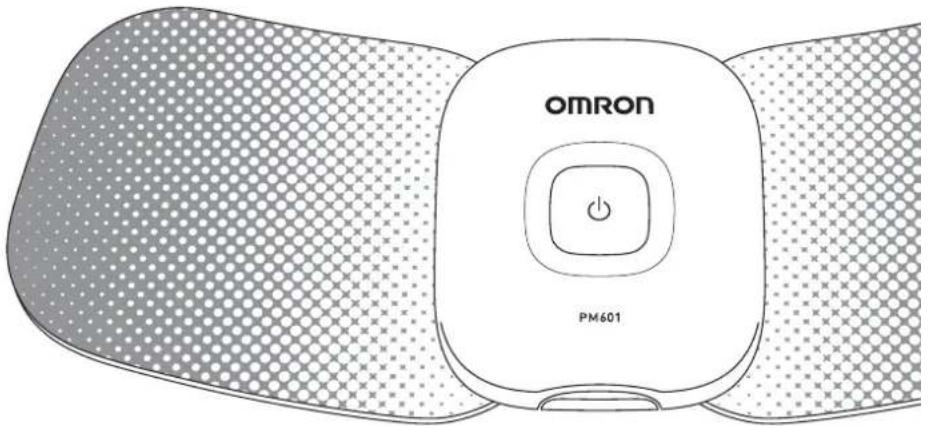
Wireless Dual Channel TENS
PM601
Instruction Manual
All for Healthcare
TABLE OF CONTENTS
Introduction 2
Safety Instructions 2
Intended Use....2
Contraindication....3
Receiving and Inspection....3
Symbols Glossary....4
Important Safety Information 5
Warnings 5
Cautions....7
Adverse Reactions....9
How the Device Works....10
Know Your Device 11
Package Contents 11
Part Names And Functions on the Device.... 12
Usage of Storage Case And Pad Holder 13
Part Names And Functions of the Omron TENS App .... 14
Operating Instructions 16
Preparing for Use 16
Get Started with Your Therapy....19
Other App Features 28
How to Control And Reduce Your Pain....29
After Daily Use 30
Storage And Removing....30
Cleaning And Disposal 31
Appendix 32
Reset the Device....32
Troubleshooting....33
Accessories....37
Specifications 39
Limited Warranty....40
Regulatory Compliance Information 42
FCC Statement 42
Important Information Regarding Electro Magnetic
Compatibility (EMC) 43
INTROduCTION
Thank you for purchasing the Omron ^® Avail ^TM .
Avail is a wireless, independent dual channel wearable electrotherapy device that is designed to alleviate chronic muscle and joint pain on multiple body locations. It delivers TENS (Transcutaneous Electrical Nerve Stimulation) technology and microcurrent therapy through the simple, convenient control of the Omron TENS iOS or Android app. Premium, contouring pads allow for discreet and convenient placement on multiple pain locations on the body.
TENS is a safe and drug-free treatment for pain that has been used for over 30 years by medical professionals such as physical therapists and chiropractors.
Notes:
- Keep this instruction manual in a convenient place or store with the device for future reference.
- Register your product online at www.register-omron.com. You can also register your product via the Omron app.
- Keep your purchase receipt as proof of purchase for warranty coverage.
- The illustrations used in this manual are images.
SAFETY INSTRuCTIONS
This instruction manual provides you with important information about this device. To ensure the safe and proper use of this device, read and understand all of the safety and operating instructions. If you do not understand these instructions or have any questions, contact 1-800-634-4350 before attempting to use this device.
INTENdEd uSE
The Avail ^TM is intended for the relief of pain associated with sore or aching muscles of the lower back, arms, legs, shoulders or feet due to strain from exercise or normal household work activities.
When used for the symptomatic relief and management of chronic, intractable pain and relief of pain associated with arthritis, use the Tap, Shoulder, Arm or Leg mode of stimulation.
Environment of Use: Clinic, hospital and home environments. Patient Population: Adult
INTROduCTION
CONTRAINDICATION
Do not use this device if you have a cardiac pacemaker, implanted defibrillator or other implanted metallic or electronic device. Such use could cause electric shock, burns, electrical interference or death.
RECEIVING AND INSPECTION
Remove this device from the packaging and inspect all package contents for damage. If there is any damage, DO NOT USE and contact Omron Healthcare Customer Service at 1-800-634-4350.
SAVE THESE INSTRuCTIONS
SYMBOLS GLOSSARY
For symbol information, visit: OmronHealthcare.com/symbols-glossary
| ▲WARNING | Indicates a potentially hazardous situation which, if not avoided, could result in death or serious injury. | |
| ▲CAuTION | Indicates a potentially hazardous situation which, if not avoided, may result in minor or moderate injury to the user or patient or damage to the equipment or other property. | |
 | Type BF applied part. (Pads) | |
 | Class II equipment. | |
 | Catalogue number. | |
 | Consult instructions for use. | |
 | This product should not be used by persons with medical implants, e.g. heart pacemakers, artificial heart, lung or other electronic life support systems. | |
 | IP classification is degrees of protection provided by enclosures in accordance with IEC 60529. This device is protected against solid foreign objects of diameter 12 mm such as a finger and greater, and against vertically falling water drops which may cause issues during a normal operation. | |
 | ||
 | ||
 | IP classification is degrees of protection provided by enclosures in accordance with IEC 60529. This device is protected against solid foreign objects of diameter 12 mm such as a finger and greater, and against oblique falling water drops which gives trouble to normal operation. | |
 | ||
| FCC | Tested to comply with FCC (Federal Communications Commission) standards. | |
IMPORTANT SAFETY INFORMATION
WARNINGS
⚠ Keep this device and the pads out of the reach of infants, toddlers and children.
▲ Keep out of the reach of young children because the AC adapter cord could cause strangulation.
Consult with your physician before using this device, because the device may cause lethal rhythm disturbances to the heart in susceptible individuals.
▲ If you have had medical or physical treatment for your pain, consult with your physician before using this device.
▲ If you are in the care of a physician, consult with your physician before using this device.
If your pain does not improve, becomes more than mild, or continues for more than five days, stop using the device and consult with your physician.
Do not place this device across your chest or near your heart because the introduction of electrical current into the chest may cause rhythm disturbances to your heart, which could be lethal.
Do not place the pads near or on cancerous lesions, diseased skin, open wounds, rashes, swollen, red, infected or inflamed areas or skin eruptions such as phlebitis, thrombophlebitis and varicose veins.
Do not place the pads over your neck because this could cause severe muscle spasms resulting in closure of your airway, difficulty in breathing, or adverse effects on heart rhythm or blood pressure.
Do not place the pads on or near the head, mouth, face, heart or genitals.
Do not use this device when bathing, showering, sleeping, during exercise, while sweating or in high humidity.
Do not apply stimulation while driving, operating machinery, or during any activity in which electrical stimulation can put you at risk of injury.
Do not use this device on infants, toddlers, children, pregnant women, persons incapable of expressing their thoughts or on persons unable to operate the device by themselves.
Do not use this device while using another TENS device.
IMPORTANT SAFETY INFORMATION
Do not apply stimulation in the presence of electric monitoring equipment such as cardiac monitors and ECG alarms because the equipment may not operate properly when the device is in use.
▲ Never bend or fold the pads.
▲ If you have any serious illness, consult with your physician before using this device.
Apply the pads only to normal, intact, clean, healthy skin of adult patients.
For Hospitals and Clinics: Operation in close proximity (e.g. 1 m) to a shortwave or microwave therapy ME equipment may produce instability to the stimulator output.
For Hospitals and Clinics: Simultaneous connection of a patient to high frequency surgical equipment and this device may result in bums at the site of the stimulator electrodes and possible damage to the stimulator.
Do not place the storage case within 2 inches (approx. 5 cm) to any person who is using pacemakers or implantable cardioverter defibrillators (ICDs). Magnets are embedded in the storage case so that magnetism may affect pacemakers or ICDs.
Do not place the charger within 6 inches (approx. 15 cm) to any person who is using pacemakers or implantable cardioverter defibrillators (ICDs). The charger emits electromagnetic fields, which may affect pacemakers or ICDs.
Data Transmission/Remote Control
This product emits radio frequencies (RF) in the 2.4 GHz band. DO NOT use this product in locations where RF is restricted, such as on an aircraft. For further information on potential restrictions refer to documentation on the Bluetooth usage by the FCC.
Battery Handling and Usage
⚠ To prevent the risk of overheating, fire or explosion:
- Do not puncture, crush, disassemble or modify the device.
- Do not throw the device into fire.
- Do not recharge, use, or leave the device in any high temperature environment such as in a location near a fire or in direct sunlight.
The device contains a built-in rechargeable Lithium-Ion battery which must be disposed of properly. Dispose of the device according to applicable local government regulations.
Do not disassemble the device by yourself.
IMPORTANT SAFETY INFORMATION
CAuTIONS
△ TENS is not effective for pain of central origin, including headache.
⚠ TENS is not a substitute for pain medications and other pain management therapies.
⚠ TENS devices have no curative value.
⚠ TENS is a symptomatic treatment and, as such, suppresses the sensation of pain that would otherwise serve as a protective mechanism.
⚠ Effectiveness is highly dependent upon patient selection by a practitioner qualified in the management of pain patients.
Do not use this device to treat one region for extended periods of time. The long-term effects of electrical stimulation are unknown.
⚠️ If you experience any skin irritation or redness after a session, do not continue stimulation in that area of the skin.
⚠️ If you have suspected or diagnosed heart disease, you should follow precautions recommended by your physician.
⚠️ If you have suspected or diagnosed epilepsy, you should follow precautions recommended by your physician.
⚠ Use caution if you have a tendency to bleed internally, such as following an injury or fracture.
Consult with your physician prior to using the device after a recent surgical procedure because stimulation may disrupt the healing process.
⚠ Use caution if stimulation is applied over the menstruating uterus.
⚠ Use caution if stimulation is applied over areas of skin that lack normal sensation.
⚠ Use this device only with components provided in the Avail™ packaging and accessories recommended by the manufacturer. (Refer to page 11 and 37)
⚠ Place the pads at least 1 inch apart. Do not place the adhesive surface of the pads on the spine.
⚠ Do not apply the pads with wet hands, and do not apply the pads that are wet.
⚠ Pads are for Single Patient Use Only. Never share the pads with another person.
IMPORTANT SAFETY INFORMATION
Do not overlap or put the pads on top of each other because therapy may weaken or stop.
Do not leave the pads placed on the skin after treatment.
Do not apply any lotion, cream or ointment to the pads.
⚠️ Never attempt to modify the device.
The pads should not touch any metal object such as a belt buckle or necklace.
⚠ To avoid damage to the adhesive surface of the pads, only put the pads on the skin or the plastic pad holder.
△ Always place clean pads in accordance with illustrations provided (Refer to pages 20 - 24, Pad Placement).
⚠️ If the device is not functioning properly or you feel discomfort, immediately stop using the device.
⚠ Before use, inspect the cord for open wires or any damage. If damaged, do not use and replace immediately.
⚠ Clean and dry affected area so it is free of all lotions, oils and sweat.
⚠ Clean or change the pad when it loses adhesion.
Do not put any metal object, such as coin, clip or other metal on the charger.
⚠ Do not put the pad on your body where it cannot be reached by your own hand.
Do not place the storage case within 2 inches (approx. 5 cm) to any magnetic memory devices such as key cards or credit cards. Magnets are embedded in the storage case so that it may lose data stored on a magnetic memory.
Data Transmission/Remote Control
Do not place integrated circuit cards, magnets, metal objects, or other devices that emit electromagnetic fields near this device while the device is controlled remotely. This may result in the incorrect operation of your device and smartphone.
IMPORTANT SAFETY INFORMATION
AdVERSE REACTIONS
- You may experience skin irritation and burns beneath the stimulation electrodes applied to your skin.
- You may experience headache and other painful sensations during or following the application of electrical stimulation near your eyes and to your head and face.
- You should stop using the device and should consult with your physician if you experience adverse reactions from the device.
HOW THE dDEVICE WORKS
TENS therapy suggests that electrical stimulation therapy may work in several ways:
- The gentle electrical pulses move through the skin to nearby nerves to block or shut out the pain message from reaching the brain from the source of the pain.
- The gentle electrical pulses increase the production of the body's natural pain killer, such as endorphins.
- Furthermore, it is thought that electrical stimulation improves blood circulation.
About Microcurrent Therapy
Microcurrent is a therapy that applies extremely small electrical currents to the nerves using electrodes placed on the skin.
Recommended Session Time
| Recommended 1 session | Max minutes per session | Max times per day | |
| TENS 30 minutes 60 | minutes 3 times per day | ||
| MICROCURRENT 30 | minutes 180 min | nutes Unlimited | |
KNOW YOuR dDEVICE
PACKAGE CONTENTS
Devices Pads
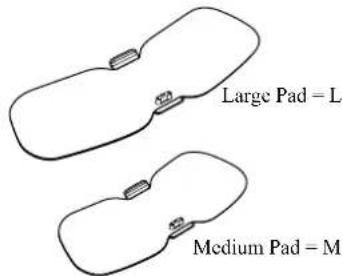
Storage Case and Pad Holder
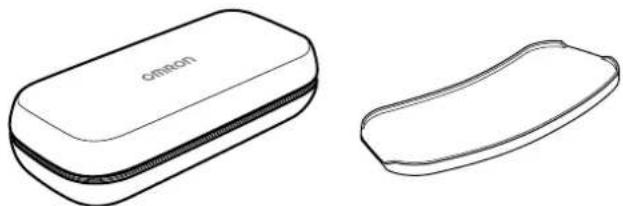
natural_image
Line drawings of two types of eyeglasses, one open and one closed, with no text or symbols present.Instruction Manual Charger AC Adapter
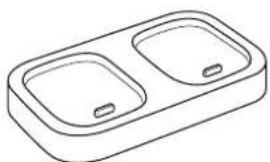
natural_image
Line drawing of a rectangular basin with two internal compartments (no text or symbols)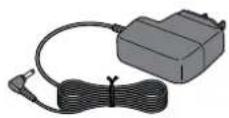
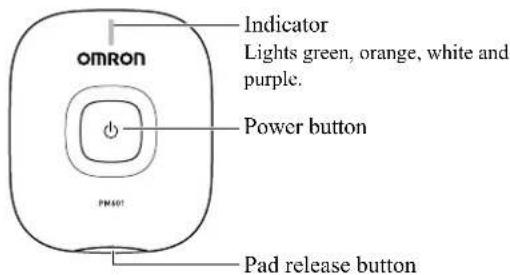
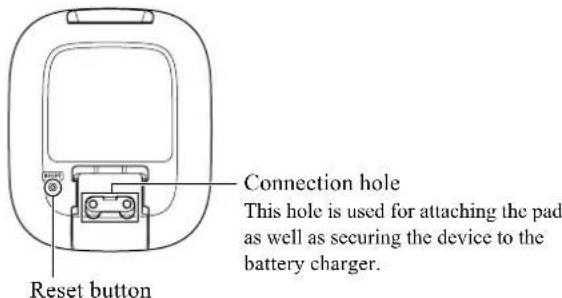
PART NAMES AND Functions ON THE dDEVICE
Front
Back
Display of Indicator Lights
| Indication Description | |
| Blinks green slowly (every 1 second) | The power is turned on and waiting for pairing or connecting to smartphone. |
| Blinks green quickly (every 0.5 seconds) | Before selecting the therapy setting. |
| Lit green The device is connected to smartphone. | |
| Blinks orange | Battery is being recharged.(When the battery is fully charged, the indicator light will go off.) |
| Lit orange Battery is depleted. | |
| Blinks white Therapy session is live. | |
| Blinks purple The device is damaged. Refer to page 35 on Troubleshooting. | |
uSAGE OF STORAGE CASE AND PAd HOLdER
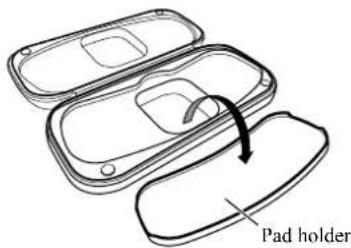
- Open the storage case.
- Remove the pad holder from the storage case and plastic bag.
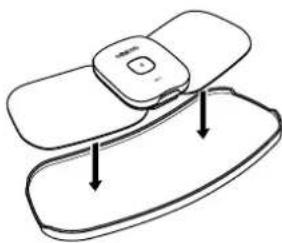
natural_image
Line drawing of a device with two rounded rectangular parts and downward arrows indicating motion or movement (no text or symbols)- Attach the pad to the pad holder.
For more details, refer to "Storing the Pads on the Pad Holder" on page 30.
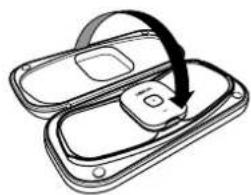
natural_image
Diagram of a device with a curved arrow indicating rotation or movement (no text or symbols)- Place the pad holder back into the storage case.
- Close the storage case.
PART NAMES AND FUNCTIONS OF THE OMRON TENS APP
Therapy Setting Screen
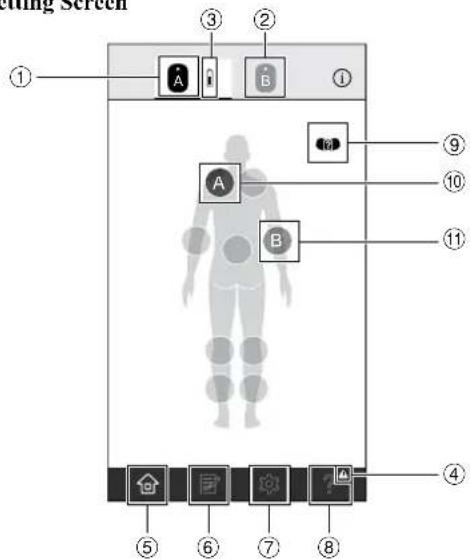
Screen design may be changed. View of the screen may be slightly different depending on the smartphone type.
| 1 | Tap to make the first connected device active. You can select a treatment area that the first connected device will be placed. | |
| 2 | Tap to make the second connected device active. You can select a treatment area that the second connected device will be placed. | |
| 3 | Battery charge is full. | |
| Battery charge is about half full. | ||
| Battery charge is close to low. | ||
| 4 | Displayed when there is any notification. | |
| 5 | Tap to show the therapy setting screen. | |
| 6 | Tap to show the pain diary screen to record your pain level or view your pain history. | |
| 7 | Tap to show the settings screen. | |
| 8 | Tap to show the help information. | |
| 9 | Tap to show the proper pad placement. | |
| 10 | Indicates the area that the first connected device will be placed. | |
| 11 | Indicates the area that the second connected device will be placed. |
PART NAMES AND FUNCTIONS OF THE OMRON TENS APP
Session Screen
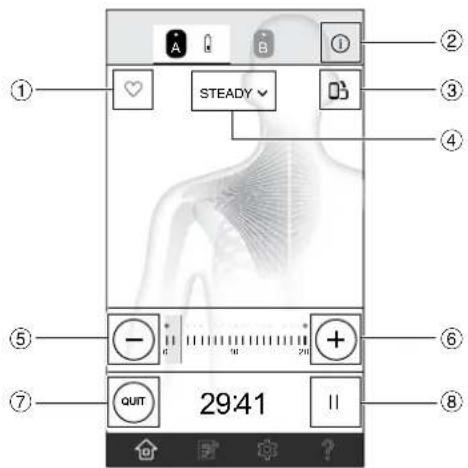
Screen design may be changed. View of the screen may be slightly different depending on the smartphone type.
| 1 | Tap to save your favorite therapy setting. When tapped, it will change to “ ♥” indicates that this setting is not favorite. “ ♥” indicates that this setting is favorite. | |
| 2 | i(For iPhone) | Tap to show the caption for app’s display. To close caption, tap “ ✗”. |
| i(For Android) | ||
| 3 | Tap to switch view orientation. | |
| 4 | Tap to change the mode. | |
| 5 | Tap to decrease intensity. | |
| 6 | Tap to increase intensity. | |
| 7 | Tap to quit the session. | |
| 8 | || | Tap to pause the session. To restart, tap “ ▶ |
OPERATING INSTRuCTIONS
PREPARING FOR uSE
Before using the device, inspect these items and ensure that:
- The pads are not damaged.
- The devices are intact and working.
- The AC adapter is not broken or damaged.
For the First Time Use:
- Recharge the battery to full.
- Install the Omron TENS app and open it.
- Turn on the device and pair it to your smartphone by using the app.
- Attach the device onto the pad.
- Select your body treatment area and place the pad on your skin.
- Select a mode and your therapy time, then start a session.
After the First Time Use:
- Open the Omron TENS app.
- Turn on the device.
- Select your body treatment area and place the pad on your skin.
- Select a mode and your therapy time, then start a session.
Notes:
- Once fully charged, the battery will last for approximately 6 uses at 1 time per day for 30 minutes. Once the battery has been depleted, it takes about 8 hours to charge.
- If the device is not being used for more than 3 months, recharge it.
- The battery may not be charged at all under extreme environmental conditions such as high heat or cold temperatures.
STEP 1 - RECHARGING THE BATTERY
- Connect the AC adapter plug to the AC adapter jack on the charger.
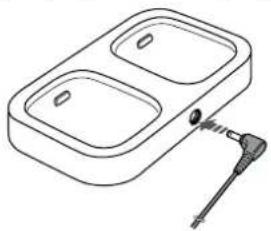
natural_image
Line drawing of a dual-bout appliance with a cable inserted into one side (no text or symbols)PREPARING FOR USE
STEP 1 - RECHARGING THE BATTERY (continued)
- Insert the AC adapter into an outlet.
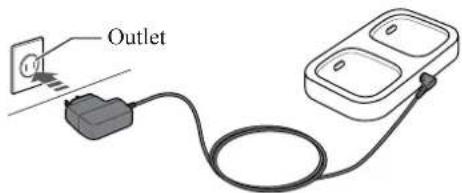
Note: Only use the AC adapter and charger provided with this device for recharging.
-
Set the device on the charger to initiate charging.
-
When charging the battery, the indicator blinks in orange.
- When the battery is fully charged, the indicator light will go off.
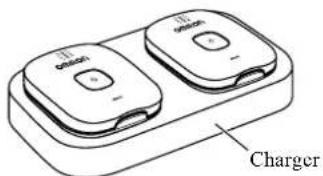
- Once the battery is fully charged, unplug the AC adapter and remove the devices from the charger.
Battery Life
The rechargeable battery will last for up to 500 uses when fully charged and under the following conditions: new battery was fully charged and used one time per a day in normal temperatures. Battery life depends on usage and storage conditions.
Note: See the specifications section on page 38 for temperature to be used during battery charging.
STEP 2 - INSTALLING THE APP
Install and set up the Omron TENS app.
- Make sure the Bluetooth ^® in your smartphone is turned on.
- Download and install the free "Omron TENS" app on your smartphone.


- Open the app on your smartphone.
PREPARING FOR uSE
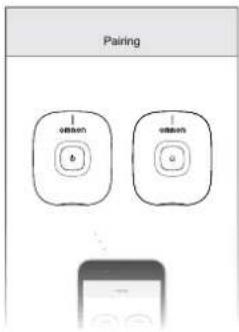
STEP 3 - PAIRING THE dDEVICE TO YOuR SMARTPHONE
- Turn on the device, following the app instructions.
- Confirm the device is paired successfully.
When the device is successfully paired to the smartphone, there will be a steady green indicator light on the device.
Which One Is Device A?
The device that is connected first will be referred to as device "A" on the app. The second device that is connected will be referred to as device "B".
STEP 4 - ATTACHING THE dDEVICE ONTO THE PAd
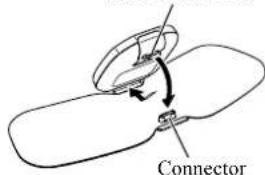
For first time use, remove the pad from the sealed plastic bag and attach the device. Do not remove the plastic film at this time.
- Attach the connector to the connection hole and push the device until it clicks into place.
Connection holes
GET STARTEd WITH YOuR THERAPY
STEP 1 - SELECTING A TREATMENT AREA
Before Use
- Open the Omron TENS app.
- Confirm the device(s) is connected.
- Make sure to always keep the smartphone near you during the session.
Treatment Area Selection
- Tap on one of the suggested locations to select the area you are going to place the pad.
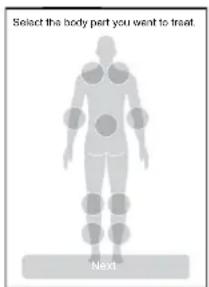
GET STARTEd WITH YOuR THERAPY
STEP 2 - PAd PLACEMENT
Clean and dry treatment area so it is free of all lotions, oils and sweat. The pad should be applied only to normal, intact, clean, healthy skin that is not experiencing any swelling or inflammation.
Before therapy, make sure that the pads stick to the skin.
For optimal therapy:
⚠️ If using both devices at once,
make sure that the pads are at least 1 inch apart.
Do not overlap the pads or put them on top of each other.
Use the medium pad if the treatment area is so slender that the large pad is overlapped.
Do not apply any lotion, cream or ointment to the pads.
⚠ Clean and dry affected area so it is free of all lotions, oils and sweat.
⚠ Pads are for Single Patient Use Only. Never share the pads with another person.
Do not put the pad on your body where it cannot be reached by your own hand.
- Check to make sure that the pad is not peeling off during treatment sessions.
- Do not use the pads after expiration date.
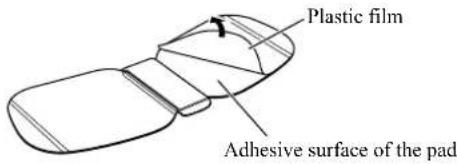
Removing the Plastic Film
For the first time use, remove and discard the plastic film from the back of the pad.
When a location is tapped, the “” on will be displayed. Tap it to show how to place the pad on your body.
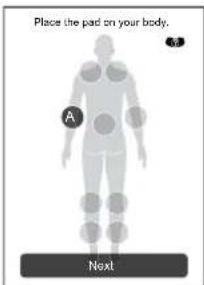
GET STARTED WITH YOUR THERAPY
STEP 2 - PAD PLACEMENT (continued)
natural_image
Simple line drawing of a human torso with a circular button labeled 'D' (no text or symbols beyond the label)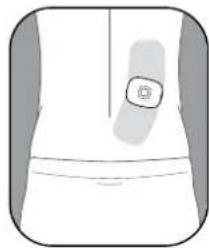
natural_image
Simple line drawing of a garment sleeve with a button (no text or symbols)LOWER BACK
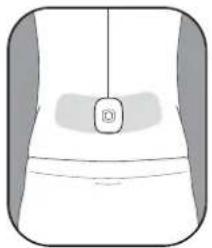
Place the pad on the lower back according to your pain.
For optimal therapy, place the pad on the muscle of the lower back. Do not place the adhesive surface of the pad on the spine.
natural_image
Line drawing of a person wearing an arm with a sensor on the hip area (no text or symbols)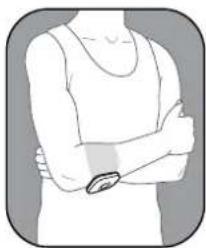
natural_image
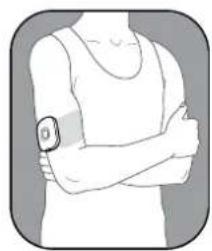
Illustration of a person's arm with arms crossed (no text or symbols)JOINT
(ELBOW)
Place so that the pad is on either side of the joint with pain.
GET STARTED WITH YOUR THERAPY
STEP 2 - PAD PLACEMENT (continued)
natural_image
Simple line drawing of a human lower body with a circular icon on the upper right (no text or symbols)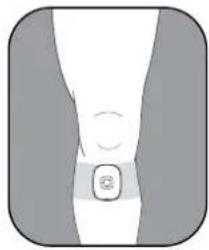
natural_image
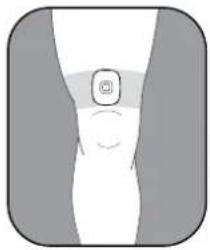
Simple line drawing of a human leg with a circular button and curved line, no text or symbols present.JOINT
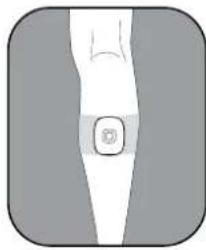
(KNEE)
Place so that the pad is above the knee or below the joint with pain.
natural_image
Illustration of a human leg with a small circular icon on the lower right (no text or symbols)LEG
(CALF)
Place so that the pad is on the calf where you feel pain.
GET STARTED WITH YOUR THERAPY
STEP 2 - PAD PLACEMENT (continued)
natural_image
Illustration of a human torso with a circular object on the shoulder area (no text or symbols)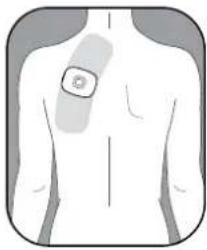
natural_image
Human torso with a highlighted surgical area on the chest (no text or symbols)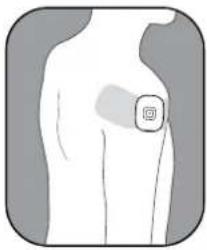
natural_image
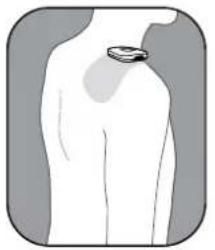
Illustration of a human torso with a highlighted circular area on the chest (no text or symbols)SHOULDER
Place so that pad is on the shoulder where you feel pain.
Do not place this device across your chest or near your heart because the introduction of electrical current into the chest may cause rhythm disturbances to your heart.
GET STARTEd WITH YOuR THERAPY
▲ NEVER APPLY THE PADS TO THESE BODY AREAS:

Do not place the pads on or near the head, mouth or face.

Do not place the pads over your neck because this could cause severe muscle spasms resulting in closure of the airway, difficulty in breathing, or adverse effects on heart rhythm or blood pressure.

Do not use near the heart.

Do not place the pads on both sides of the chest cavity simultaneously (lateral or front and back), or across your chest because the introduction of electrical current may cause rhythm disturbances.
GET STARTEd WITH YOuR THERAPY
STEP 3 - SELECTING A THERAPY
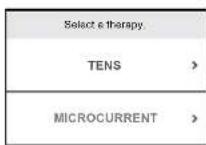
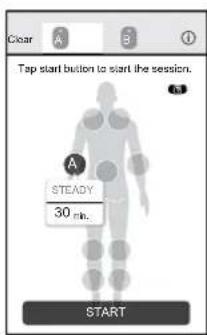
- Tap "TENS" or "MICROCURRENT" to select a therapy.
Notes:
- If you have already saved favorite settings, "FAVORITE" is displayed. To use your favorite setting, tap it and select a setting.
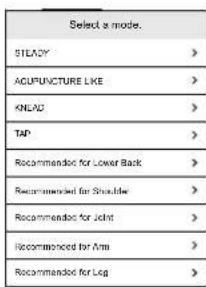
- If you selected "TENS", you will then select a mode. Scroll through the list and select a mode. Refer to "9 MODES IN TENS AND MICROCURRENT" on page 26 for more detail.
- Select your session time.
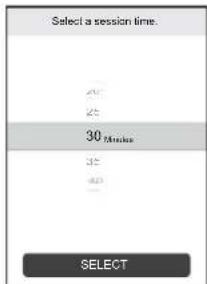
Swipe vertically to select the time. TENS: 5 to 60 minutes MICROCURRENT: 30 to 180 minutes
-
Tap "SELECT".
-
Tap "START" to start your session. If you want to clear the therapy setting, tap "Clear".
Note: If the session did not start, check to make sure that:
• The device is not turned off.
- The pad is either not placed on your skin or not placed properly.
- The device and the pad are correctly attached.
GET STARTEd WITH YOuR THERAPY
9 MOdES IN TENS AND MICROCuRRENT
| Mode What does the therapy deliver? | |
| STEADY Continuous pulsations at the same rate. | |
| ACUPUNCTURE LIKE Low rate | pulsations which mimic a massage. |
| KNEAD Medium rate pulsations | which mimic a massage. |
| TAP Low to medium rate tapping sensations. | |
| Recommended for Lower Back | High rate to low tingling sensations, followed by tapping. With higher intensity, you may feel kneading or massage-like sensations. |
| Recommended for Shoulder Low to medium rate tapping and pulsations. | |
| Mode What does the therapy deliver? | |
| Recommended for Joint Medium | to high rate tapping. Followed by tingling and pulsations. |
| Recommended for Arm Low to medium | medium rate tapping. Followed by tingling and pulsations. |
| Recommended for Leg Low to medium | medium rate tapping. Followed by tingling and pulsing sensations. |
| MICROCURRENT | Applies extremely small electrical currents to nerves. |
Any of the modes can be used on body parts or pains described in the instruction manual of this device.
GET STARTEd WITH YOuR THERAPY
STEP 4 - STARTING A SESSION
-
The session screen opens and then you can select your intensity level.
-
On the screen, tap “+” or “−” to increase or decrease the intensity to a comfortable level.
• The session time starts to count down. - Tap “|” to pause the session. Press it again to restart the session.
- If you want to stop or interrupt the session, tap "QUIT".
- White light on the device blinks during the session.
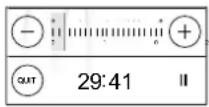
- When the session finishes, press the ⏻(power) button on the device to turn off it.
Notes:
- If your smartphone cannot operate during the session, turn off the device or take off the pads immediately.
- When the battery is depleted, the indicator will light up orange and the power will turn off shortly. Recharge the battery fully.
- If the pad is removed from your body during the session, the session will automatically be terminated.
OTHER APP FEATuRES
dIARY Function
To register your pain level in the pain diary:
- Tap the “☐” icon in the menu bar.
- Select a body part that is aching.
-
Select from the various face icons on the app screen, then tap "OK".
-
To cancel the registration, tap "Cancel".
• To add multiple body parts, repeat this step. - Tap "Register" to add this record to your pain history.
FAVORITE FuNCTION
You can register your favorite session (mode and time) during the session. You can choose "FAVORITE" to repeat your favorite session.
- To save the current session, tap “♡”. The symbol will then change to “♥”.
- If you want to delete the current session from your favorite list, tap “♥”. The symbol will then change to “♥”
duAL SCREEN FUNCTION
To change view orientation:
- Tap the “☐” icon to change your smartphone screen to landscape view.
- Landscape view displays a dual screen that allows for the control of 2 therapy sessions on 1 screen.
SESSION LOG
You can check your therapy's history of:
- Session time (round up to the nearest minute)
- Treatment area
• Date and time of starting the session - Mode (tap each item to view the mode histories)
To view the history:
- Tap ⚙️.
- Tap "Session Log".
HOW TO CONTROL AND REduCE YOuR PAIN
When Should a Session Start?
Use Avail ^TM as soon as your pain begins. Start with one session.
Recommended Duration of Use
Start with one 30-minute session for TENS and MICROCURRENT. Always turn the device off with the pads still on your skin. In the pain diary screen, rate your pain. A rating of 1 indicates less pain whereas a rating of 10 indicates a high amount of pain. Stop session if pain has reduced or stopped.
| 1 session | Max minutes/session | Max times/day | |
| TENS | 30 minutes | 60 minutes | 3 times per day |
| MICROCURRENT 30 minutes 180 m minutes Unlimited | |||
Do not use this device to treat one region for extended periods of time. The long-term effects of electrical stimulation are unknown.
- When a session is completed, remove the pads from your body and dry them before starting the next session. If the pads are not dried, their adhesive power may be reduced.
When to Stop Using the Device?
Stop using the device if you experience an adverse reaction (skin irritation/redness/burns, headache or other painful sensation) or if you feel any unusual discomfort.
Remember that the device does not cure your pain or the original cause of the pain. It provides temporary relief or reduction of pain so that you can control your life and activities better.
AFTER dAILY uSE
STORAGE AND REMOVING
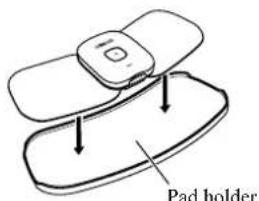
STORING THE PAdS ON THE PAd HOLdER
• In between uses, keep the pads on the pad holder in the pad case.
- Do not keep the device in areas subject to direct sunlight, high or low temperatures, humid areas, near fire, vibration, or shock.
▲ Never bend or fold the pads.
Storage temperature 32 to 104 °F (0 to 40 °C), 30 to 80 % relative humidity.
• Make sure the device has been turned off.
▲ Keep this device and pads out of the reach of infants, toddlers and children.
Note: With proper storage and use, you may extend the life of your pads.
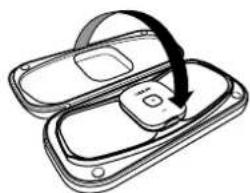
- Place the pad onto the pad holder. A pad can be placed onto the both sides of the pad holder.
- Place the pad holder onto the storage case.
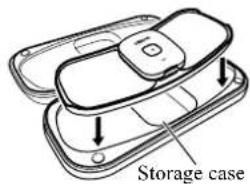
- Close the storage case.
natural_image
Diagram of a device with an open lid and a curved arrow indicating rotation or movement (no text or symbols)REMOVING THE dDEVICE
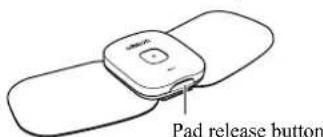
If the device needs to be recharged, remove the device from the pad.
- Press the pad release button to remove the device from the pad.
CLEANING AND DISPOSAL
With proper storage and use, you may extend the life of your pad to 30 uses. The life of the pads may vary due to skin and storage conditions.
Cleaning the Pads
When the pad has become dirty or soiled:
- Remove the device from the pad before cleaning the pads.
-
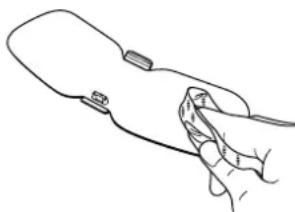
If you want to clean the ADHESIVE side of the pads, wipe the surface with a soft cloth moistened with water. If you want to clean the NON-ADHESIVE side of the pads, wipe the surface with a soft cloth moistened with water or a neutral det with a dry soft cloth to remove extra
-
Wiping adhesive side of the pads with a soft cloth moistened with water may reduce their adhesive power.
-
Do not wash the pads with running water.
-
Dry the pads and let the adhesive surface air-dry completely. Do not wipe with a tissue paper or cloth.
natural_image
Line drawing of a hand holding a device (no text or symbols)Pads can be purchased by calling 1-800-634-4350 or visit OmronHealthcare.com.
Cleaning the Device
- Turn the device off.
-
Wipe the surface with a soft cloth moistened with water or a neutral detergent, then wipe the surface with a dry soft cloth to remove extra water.
-
Do not use chemicals (like thinner, benzene).
- Do not let water get into the internal area of the device.
Disposal
- Dispose of the device and battery in accordance with local government regulations.
APPENdIX
RESET THE dDEVICE
To reset the device, follow the steps below:
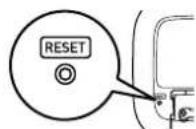
- Reset the Device
Press the reset button on the back of the device.
- Reset the Bluetooth Information in Your Smartphone
2-1. Open "Settings" of your smartphone's Operating System (OS)*.
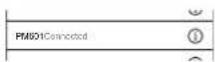
2-2. Tap "Bluetooth" and find "PM601", then tap ⓘ.
2-3. Tap "Forget This Device".
- Reset the App Settings
3-1. Open the Omron TENS app and tap ⚙ to open the settings.
3-2. Tap "Forget All Devices".
*This section explains the steps using iOS 10 as an example. If you're using an another OS, refer to your smartphone's instructions.
Try step 1 if any of the following situations occur:
- There is no response when the device's power button is pressed.
- You want to clear all the information stored in your device.
- You changed the smartphone to new one.
- You received another person's device that was paired with his/her smartphone.
Try step 1 and 2 if the following situation occurs:
• The Omron TENS app was uninstalled and installed again.
Try step 1, 2 and 3 if any of the following situations occur:
- The device was lent to someone and it was returned to you after being used.
- The Omron TENS app is unresponsive even after it is reinstalled.
TROuBLESHOOTING
| If this happens... Possible causes... Try this solution... | ||
| The intensity is not felt.The intensity level is too weak. | Are the pads stacked together or do pads overlap? | Check placement of pads.Refer to “Pad Placement” on page 20. |
| Was TENS therapy selected? | If “MICROCURRENT” is selected, you will not feel any intensity. | |
| Is the intensity setting too low? | Open the app and tap “+”. | |
| Is the adhesive surface of the pad damaged? | Replace the pad. | |
| The skin turns red or feels irritated. | Is the therapy duration too long? | Shorten session to less than 30 minutes. |
| Are the pads placed properly on the body? | Refer to “Pad Placement” on page 20 and place correctly. | |
| Is the adhesive surface of the pad worn out? | Replace the pad. | |
| If this happens... Possible causes... Try this solution... | ||
| The device's power cannot be turned on. | Are the batteries depleted? | Recharge the battery fully. |
| Is the indicator light on orange? | ||
| The device cannot be recharged. | Is the battery charger connected properly? | Check if the AC adapter is properly connected to the charger.Check if the AC adapter is connected to a power outlet. |
| Is the device properly placed on the charger? | Place the device properly on the charger.Make sure there are no foreign objects on the charger area. | |
| Is the device under high heat or cold temperatures? | Under high heat or cold temperatures, the battery may be stopped recharging so that it may take more time to be fully charged. | |
TROuBLESHOOTING
| If this happens... Possible causes... Try this solution... | ||
| Power cut off during use. | Is the battery charge extremely low? | Recharge the battery fully. |
| Is the indicator light on orange? | ||
| The device power will automatically turn off 10 minutes after:• the therapy is complete• the pad has been removed from your body• the therapy has been paused | Check if the therapy has already finished or been paused.Check if the pad is placed on your body correctly. | |
| The adhesive side of the pad does not stick to skin. | Have you removed the transparent film from the adhesive surface of the pad? | Peel off the film on the adhesive surface of the pad. |
| Is the pad wet? Or is your skin wet? | Air dry the adhesive surface of the pad or skin. | |
| If this happens... Possible causes... Try this solution... | ||
| The adhesive side of the pad does not stick to skin. | The adhesive surface of the pad may be damaged. | Replace the pad. |
| Is there too much hair on your skin? | Shave the immediate area for proper pad adhesion. | |
| Were the pads stored under high temperature, high humidity or direct sunshine? | Replace the pad. | |
| Unable to tap “START” button. | Are the pads properly placed on the body? | Refer to “Pad Placement” on page 20 and place correctly. |
| Is the device properly attached to the pad? | Remove the device from the pad, then attach the device to the pad properly. | |
| Have you removed the transparent film from the adhesive surface of the pad? | Peel off the film from the adhesive surface of the pad. | |
TROuBLESHOOTING
| If this happens... Possible causes... Try this solution... | ||
| Unable to tap “START” button. | The pad may be damaged. | Replace the pad. |
| Is the device power on? | Turn on the device and connect to the app. | |
| The devices, the charger or the AC adapter are abnormally hot when charging the battery. | The devices, the charger or the AC adapter may be damaged. | Unplug the AC adapter from the charger immediately. Remove the device from the charger immediately. |
| Connection failure. The device is too far from the smartphone. The device might not be properly placed within the smartphone’s transmission range. | If there are no causes of transmission interference found near the device, move the device within 16 ft. (5 m) of the smartphone and try again. | |
| Was the Omron TENS app uninstalled and installed again? | ||
| If this happens... Possible causes... Try this solution... | ||
| Connection failure. Had | the device been connected with another smartphone? | Refer to “Reset the Device” on page 32 and follow step 1-3. |
| Reset button was pressed accidentally. | Do the following steps:1. Open the Omron TENS app and tap “Not now”.2. Tap 📄o open the settings.3. Tap “Forget All Devices”.4. Pair the device again. | |
| Purple light on the device is blinking. | Are there any abnormalities in the device? | Stop using the device immediately, and contact Customer Service. |
TROuBLESHOOTING
If the issue is not resolved, follow the steps below.
- Open the Omron TENS app.
- Tap? or ?
- Tap "Contact Us".
- Select an issue and type the detail of your problem.
- Tap "Send E-mail". Your email client app automatically opens.
- Send email.
- Our support stuff will respond to your email as soon as possible.
If you are not able to perform the above steps successfully, please contact us at 1-800-634-4350.
ACCESSORIES
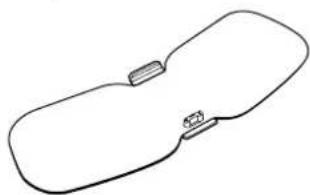
Large Pad (PMWPAD-L) Medium Pad (PMWPAD-M) AC Adapter (HHP-AM01)
Approx. 8.6" (W) × 3.3" (H) × 0.4" (D) (220 × 83.5 × 9.3 mm)
Approx. 7" (W) × 3.1" (H) × 0.4" (D) (180 × 79.5 × 9.3 mm)
natural_image
Simple line drawing of a rounded rectangular shape with two small protrusions on one side (no text or symbols)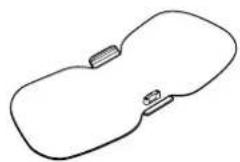
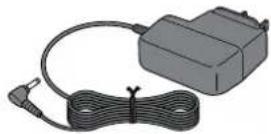
To order, visit: OmronHealthcare.com
SPECIFICATIONS
| Product Name Avail | TM |
| Model # PM601 | REF HV-F601T-Z |
| Power Source AC adapter | (INPUT AC 120 V, 60 Hz)1 Lithium-ion battery (3.7 V; Approx. 295 mAh) |
| Rechargeable Battery Will last for 500 uses under the following conditions: new battery, fully charged, used 1 time/day in temperatures of 73.4 °F (23 °C) | |
| Frequency Approx. 0.2 to | 108 Hz |
| PULSE Duration TENS: | 100 μsec or lessMICROCURRENT: 2.5 sec |
| Maximum Output Voltage | 42.5 V (during 500 Ω load) |
| Power Control 20 intensity levels | |
| Operating Temperature, Humidity, Air Pressure (When using product) | 50 to 104 °F (10 to 40 °C),30 to 80 % RH, 700 to 1060 hPa(non-condensing) |
| Transportation and Storage Between Uses Temperature, Humidity | 32 to 104 °F (0 to 40 °C),30 to 80 % RH(non-condensing) |
| Temperature During Battery Charging | 41 to 95 °F (5 to 35 °C)(non-condensing) |
| TransportationTemperature, Humidity | -4 to 140 °F (-20 to 60 °C),10 to 90 % RH (non-condensing) |
| Weight Device: Approx. 1.5 oz (42 g)Pad-L: Approx. 0.9 oz (25 g)Pad-M: Approx. 0.7 oz (20 g)Charger: Approx. 3.5 oz (100 g) | |
| Outer Dimension Device: | Approx. 2.3" (W) × 2.8" (H) × 0.6" (D) (60 × 72 × 15.5 mm)Charger: Approx. 6.2" (W) × 3.5" (II) × 0.8" (D) (158 × 90 × 20.5 mm)Pad-L: Approx. 8.6" (W) × 3.3" (II) × 0.4" (D) (220 × 83.5 × 9.3 mm)Pad-M: Approx. 7" (W) × 3.1" (II) × 0.4" (D) (180 × 79.5 × 9.3 mm) |
| Classification of ME Equipment | Internally powered (operating) / Class II (charging) / Continuous operation |
| IP classification Device: IP22 | Charger: IP21AC adapter: IP21 |
| Transmission Method | Bluetooth® low energy technology |
SPECIFICATIONS
| Wireless Communication | Frequency range: 2.4 GHz (2400 - 2483.5 MHz) Modulation: GFSK Effective radiated power: <20 dBm |
| Durable Period (Service Life) | Device: 5 years Pad: 30 times (30 minutes/use) Charger: 5 years AC adapter: 5 years |
| Auto Power Off The device | power will automatically turn off 10 minutes after: • the therapy is complete • the pad has been removed from your body • the therapy has been paused |
Note: These specifications are subject to change without notice.
About a wireless communication interference
This Product operates in the unlicensed ISM band at 2.4 GHz. In case this Product is used around the other wireless devices including microwave and wireless LAN, which operate same frequency band of this Product, there is a possibility that interference occurs between this Product and such other devices. If such interference occurs, please stop the operation of other devices or relocate this Product before using this Product or do not use this Product around the other wireless devices.
To confirm the latest list of the compatible smartphones and OS, visit:
OmronHealthcare.com
LIMITEd WARRANTY
Your Av a if™ device is warranted to be free from defects in materials and workmanship appearing within 1 year from the date of purchase, when used in accordance with the instructions provided. The pads supplied with the device are warranted for 30 days. The above warranties extend only to the original retail purchaser. We will, at our discretion, replace without charge any unit covered by the above warranty. Replacement is our only responsibility and your only remedy under the above warranties.
To obtain warranty service, contact Customer Service by calling 1-800-634-4350 for the address of the Inspection Center and shipping and handling charges that may apply. Enclose the Proof of Purchase. Include a letter, with your name, address, phone number, and description of the specific problem. Pack the product carefully to prevent damage in transit. Because of possible loss in transit, we recommend insuring the product with return receipt requested.
LIMITEd WARRANTY
THIS WARRANTY GIVES YOU SPECIFIC LEGAL RIGHTS, AND YOU MAY HAVE OTHER RIGHTS THAT VARY FROM STATE TO STATE (OR BY COUNTRY OR PROVINCE). THE FOREGOING IS THE SOLE WARRANTY PROVIDED BY OMRON IN CONNECTION WITH THIS PRODUCT, AND OMRON HEREBY DISCLAIMS ANY OTHER WARRANTIES, EXPRESS OR IMPLIED, INCLUDING IMPLIED WARRANTIES OF MERCHANTABILITY AND FITNESS FOR A PARTICULAR PURPOSE. IMPLIED WARRANTIES AND OTHER TERMS THAT MAY BE IMPOSED BY LAW, IF ANY, ARE LIMITED IN DURATION TO THE PERIOD OF THE ABOVE EXPRESS WARRANTY. SOME STATES (COUNTRIES AND PROVINCES) DO NOT ALLOW LIMITATIONS ON HOW LONG AN IMPLIED WARRANTY LASTS, SO THE ABOVE LIMITATION MAY NOT APPLY TO YOU. OMRON SHALL NOT BE LIABLE FOR LOSS OF USE OR ANY OTHER SPECIAL, INCIDENTAL, CONSEQUENTIAL OR INDIRECT COSTS, EXPENSES OR DAMAGES. SOME STATES (COUNTRIES AND PROVINCES) DO NOT ALLOW THE EXCLUSION OR LIMITATION OF INCIDENTAL OR CONSEQUENTIAL DAMAGES, SO THE ABOVE EXCLUSION OR LIMITATION MAY NOT APPLY TO YOU.
This warranty provides you with specific legal rights, and you may have other rights that vary by jurisdiction. Because of special local requirements, some of the above limitations and exclusions may not apply to you.
FOR CUSTOMER SERVICE
Visit our website at: OmronHealthcare.com
Call toll free: 1-800-634-4350
REGULATORY COMPLIANCE INFORMATION
FCC STATEMENT
FCC CAUTION
Changes or modifications not expressly approved by the party responsible for compliance could void the user's authority to operate the equipment.
Note:
This equipment has been tested and found to comply with the limits for a Class B digital device, pursuant to part 15 of the FCC Rules. These limits are designed to provide reasonable protection against harmful interference in a residential installation. This equipment generates, uses and can radiate radio frequency energy and, if not installed and used in accordance with the instructions, may cause harmful interference to radio communications. However, there is no guarantee that interference will not occur in a particular installation. If this equipment does cause harmful interference to radio or television reception, which can be determined by turning the equipment off and on, the user is encouraged to try to correct the interference by one or more of the following measures:
- Reorient or relocate the receiving antenna.
- Increase the separation between the equipment and receiver.
- Connect the equipment into an outlet on a circuit different from that to which the receiver is connected.
- Consult the dealer or an experienced radio/TV technician for help.
This device complies with Part 15 and Part 18 of FCC Rules. Operation is subject to the following two conditions: (1) this device may not cause harmful interference, and (2) this device must accept any interference received, including interference that may cause undesired operation.
This transmitter must not be co-located or operated in conjunction with any other antenna or transmitter.
This equipment complies with FCC radiation exposure limits set forth for an uncontrolled environment and meets the FCC radio frequency (RF) Exposure Guidelines. This equipment has very low levels of RF energy that are deemed to comply without testing of specific absorption ratio (SAR).
IMPORTANT INFORMATION REGARdING ELECTRO MAGNETIC COMPATIBILITY (EMC)
With the increased number of electronic devices such as PC's and mobile (cellular) telephones, medical devices in use may be susceptible to electromagnetic interference from other devices. Electromagnetic interference may result in incorrect operation of the medical device and create a potentially unsafe situation.
Medical devices should also not interfere with other devices.
In order to regulate the requirements for EMC (Electro Magnetic Compatibility) with the aim to prevent unsafe product situations, the IEC60601-1-2 standard has been implemented. This standard defines the levels of immunity to electromagnetic interferences as well as maximum levels of electromagnetic emissions for medical devices.
Medical devices manufactured for OMRON Healthcare conform to this IEC60601-1-2:2014 standard for both immunity and emissions. Nevertheless, special precautions need to be observed:
- The use of accessories and cables other than those specified by OMRON, with the exception of cables sold by OMRON as replacement parts for internal components, may result in increased emission or decreased immunity of the device.
- The medical devices should not be used adjacent to or stacked with other equipment. In case adjacent or stacked use is necessary, the medical device should be observed to verify normal operation in the configuration in which it will be used.
- Do not use mobile (cellular) telephones and other devices, which generate strong electrical or electromagnetic fields, near the medical device. This may result in incorrect operation of the unit and create a potentially unsafe situation. Recommendation is to keep a minimum distance of 30~cm (12 inches). Verify correct operation of the device in case the distance is shorter.
During the immunity tests described below the device operated normally.
IMPORTANT INFORMATION REGARDING ELECTRO MAGNETIC COMPATIBILITY (EMC)
The PM601 is intended for use in the electromagnetic environment specified below. The customer or the user of the PM601 should assure that it is used in such environment.
| Electromagnetic emissions IEC60601-1-2 | ||
| Emissions test Compliance | Electromagnetic environment - guidance | |
| RF emissionsCISPR 11 | Group 1 | The PM601 uses RF energy only for its internal function. Therefore, its RF emissions are very low and are not likely to cause any interference in nearby electronic equipment. |
| RF emissionsCISPR 11 | Class B | The PM601 is suitable for use in all establishments, including domestic establishments and those directly connected to the public low-voltage power supply network that supplies buildings used for domestic purposes |
| Harmonic emissionsIEC 61000-3-2 | not applicable | |
| Voltage fluctuations/flicker emissionsIEC 61000-3-3 | not applicable | |
IMPORTANT INFORMATION REGARdING ELECTRO MAGNETIC COMPATIBILITY (EMC)
| Electromagnetic immunity IEC60601-1-2 | |||
| Immunity test IEC 60601 Test level Compliance level | Electromagnetic environment –guidance | ||
| Electrostatic discharge, ESD (IEC 61000-4-2) | Contact discharge: ±8 kVAir discharge: ±15 kV | Contact discharge: ±8 kVAir discharge: ±15 kV | The relative humidity should be at least 5 %. |
| Electrical fast transients / bursts (IEC 61000-4-4) | Power supply lines: ±2 kVLonger input / output lines: ±1 kV | Power supply lines: ±2 kVLonger input / output lines: N/A | Mains power quality should be that of a typical home, commercial or hospital environment. |
| Surges on AC mains lines (IEC 61000-4-5) | Common mode: ±2 kVDifferential mode: ±1 kV | Common mode: N/ADifferential mode: ±1 kV | Mains power quality should be that of a typical home, commercial or hospital environment. |
IMPORTANT INFORMATION REGARdING ELECTRO MAGNETIC COMPATIBILITY (EMC)
| Electromagnetic immunity IEC60601-1-2 | |||
| Immunity test IEC 60601 Test level Compliance level | Electromagnetic environment –guidance | ||
| Voltage dips, short interruptions and voltage variations on power supplyIEC 61000-4-11 | 0 % U_T for 0.5 cycle0 % U_T for 1 cycle70 % U_T for 25 cycles0 % U_T for 5 s | 0 % U_T for 0.5 cycle0 % U_T for 1 cycle70 % U_T for 25 cycles0 % U_T for 5 s | Mains power quality should be that of a typical home, commercial or hospital environment. If user requires continued operation during power mains interruption insure that batteries are installed and charged. Insure that battery life exceeds longest anticipated power outrages or provide an additional uninterruptible power source. |
| Power frequency (50/ 60 Hz) magnetic fieldIEC 61000-4-8 | 30 A/m 30 A/m | Magnetic fields from common appliances are not expected to affect the device. | |
| Note: U_T is the A.C. mains voltage prior to application of the test level. | |||
IMPORTANT INFORMATION REGARdING ELECTRO MAGNETIC COMPATIBILITY (EMC)
| Electromagnetic immunity IEC60601-1-2 | |||
| Immunity test IEC 60601 Test level Compliance level | Electromagnetic environment –guidance | ||
| Conducted RFIEC 61000-4-6 | 3 V rms150 kHz to 80 MHz | 3 V rms150 kHz to 80 MHz | Portable and mobile RF communications equipment should be used no closer to any part of the PM601 including cables, than the recommended separation distance calculated from the equation appropriate to the frequency of the transmitter.Recommended separation distance d = 1.16 150 kHz to 80 MHz |
| 6 V rmsThe ISM bands and the amateur radio bands between 150 kHz to 80 MHz | 6 V rmsThe ISM bands and the amateur radio bands between 150 kHz to 80 MHz | d = 0.58 150 kHz to 80 MHz(The ISM bands and the amateur radio bands) | |
| Radiated RFIEC 61000-4-3 | 10 V/m80 MHz to 2.7 GHzIEC 60601-1-2:2014 Table 9(Up to 28 V/m at certain frequencies) | 10 V/m80 MHz to 2.7 GHzIEC 60601-1-2:2014 Table 9(Up to 28 V/m at certain frequencies) | d = 0.35 80 MHz to 800 MHz d = 0.7 800 MHz to 2.7 GHz |
IMPORTANT INFORMATION REGARDING ELECTRO MAGNETIC COMPATIBILITY (EMC)
| Electromagnetic immunity IEC60601-1-2 | |||
| Immunity test | IEC 60601 Test level | Compliance level | Electromagnetic environment –guidance |
| Where P is the maximum output power rating of the transmitter in watts (W) according to the transmitter manufacturer and d is the recommended separation distance in meters (m).Field strengths from fixed RF transmitters as determined by an electromagnetic site survey, *2) should be less than the compliance level in each frequency range.Interference may occur in the vicinity of equipment marked with the following symbol: [IMAGE] | |||
| Note 1: At 80 MHz and 800 MHz, the higher frequency range applies.Note 2: These guidelines may not apply in all situations. Electromagnetic propagation is affected by absorption and reflection from structures, objects, and people. | |||
| *2) Field strengths from fixed transmitters, such as base stations for radio (cellular/ cordless) telephones and land mobile radio, AM and FM radio broadcast, and TV broadcast cannot be predicted theoretically with accuracy. To assess the electromagnetic environment due to fixed RF transmitters, an electromagnetic site survey should be considered. If the measured field strength in the location in which the PM601 is used exceeds the applicable RF compliance level above, the PM601 should be observed to verify normal operation. If abnormal performance is observed, additional measures may be necessary, such as reorienting or relocating the PM601. | |||
IMPORTANT INFORMATION REGARdING ELECTRO MAGNETIC COMPATIBILITY (EMC)
| Recommended separation distance between portable and mobile RF communications equipment and the PM601 | ||||
| The PM601 is intended for use in an electromagnetic environment in which radiated RF disturbances are controlled. The customers or the users of the PM601 can help prevent electromagnetic interference by maintaining a minimum distance between portable and mobile RF communications equipment (transmitters) and the PM601 as recommended below, according to the maximum output power of the communications equipment. | ||||
| Output Power of Transmitter in Watt | Separation distance according to frequency of transmitter in meter | |||
| 150 kHz to 80 MHz d = 1.16 d = 0.58 | 80 MHz to 800 MHz d = 0.35 | 800 MHz to 2.7 GHz d = 0.7 | ||
| 0.01 0.12 0.06 0.04 0.07 | ||||
| 0.1 | 0.37 | 0.18 | 0.11 | 0.22 |
| 1 | 1.16 | 0.58 | 0.35 | 0.7 |
| 10 | 3.67 | 1.8 | 1.1 | 2.2 |
| 100 | 11.6 | 5.8 | 3.5 | 7.0 |
| For transmitters rated at a maximum output power not listed above, the recommended separation distance d in meters (m) can be estimated using the equation applicable to the frequency of the transmitter, where P is the maximum output power rating of the transmitter in watts (W) according to the transmitter manufacturer.Note: At 80 MHz and 800 MHz, the separation distance for the higher frequency range appliesNote: These guidelines may not apply in all situations. Electromagnetic propagation is affected by absorption and reflection from structures, objects, and people. | ||||
Bluetooth®
The Bluetooth ^® word mark and logos are registered trademarks owned by
Bluetooth SIG, Inc. and any use of such marks by
OMRON HEALTHCARE Co., Ltd. is under license.
Other trademarks and trade names are those of their respective owners.
Apple and the Apple logo are trademarks of Apple Inc., registered in the U.S.
and other countries. App Store is a service mark of Apple Inc.
Android and the Google Play logo are trademarks of Google Inc.
Manufactured for :
OMRON HEALTHCARE Co., Ltd.
53, Kunotsubo, Terado-cho, Muko,
Kyoto, 617-0002 JAPAN
Distributed by:
OMRON HEALTHCARE, INC.
1925 West Field Court,
Lake Forest, IL 60045 U.S.A.
OmronHealthcare.com
© 2017 OMRON HEALTHCARE, INC.
Made in China
For questions call: 1-800-634-4350
Pads are for Single Patient Use Only.
OmronHealthcare.com
3125420-0E


- TABLE OF CONTENTS
- Know Your Device 11
- Operating Instructions 16
- After Daily Use 30
- Appendix 32
- Regulatory Compliance Information 42
- INTROduCTION
- SAFETY INSTRuCTIONS
- INTENdEd uSE
- CONTRAINDICATION
- RECEIVING AND INSPECTION
- SAVE THESE INSTRuCTIONS
- SYMBOLS GLOSSARY
- IMPORTANT SAFETY INFORMATION
- WARNINGS
- Data Transmission/Remote Control
- Battery Handling and Usage
- CAuTIONS
- AdVERSE REACTIONS
- HOW THE dDEVICE WORKS
- About Microcurrent Therapy
- KNOW YOuR dDEVICE
- PACKAGE CONTENTS
- PART NAMES AND Functions ON THE dDEVICE
- uSAGE OF STORAGE CASE AND PAd HOLdER
- PART NAMES AND FUNCTIONS OF THE OMRON TENS APP
- OPERATING INSTRuCTIONS
- PREPARING FOR uSE
- For the First Time Use:
- After the First Time Use:
- Notes:
- STEP 1 - RECHARGING THE BATTERY
- STEP 1 - RECHARGING THE BATTERY (continued)
- Battery Life
- STEP 2 - INSTALLING THE APP
- STEP 3 - PAIRING THE dDEVICE TO YOuR SMARTPHONE
- Which One Is Device A?
- STEP 4 - ATTACHING THE dDEVICE ONTO THE PAd
- GET STARTEd WITH YOuR THERAPY
- STEP 1 - SELECTING A TREATMENT AREA
- Before Use
- Treatment Area Selection
- STEP 2 - PAd PLACEMENT
- Removing the Plastic Film
- LOWER BACK
- JOINT
- SHOULDER
- ▲ NEVER APPLY THE PADS TO THESE BODY AREAS:
- STEP 3 - SELECTING A THERAPY
- STEP 4 - STARTING A SESSION
- OTHER APP FEATuRES
- dIARY Function
- FAVORITE FuNCTION
- duAL SCREEN FUNCTION
- SESSION LOG
- HOW TO CONTROL AND REduCE YOuR PAIN
- When Should a Session Start?
- Recommended Duration of Use
- When to Stop Using the Device?
- AFTER dAILY uSE
- STORAGE AND REMOVING
- STORING THE PAdS ON THE PAd HOLdER
- REMOVING THE dDEVICE
- CLEANING AND DISPOSAL
- Cleaning the Pads
- Cleaning the Device
- Disposal
- APPENdIX
- RESET THE dDEVICE
- TROuBLESHOOTING
- ACCESSORIES
- Large Pad (PMWPAD-L) Medium Pad (PMWPAD-M) AC Adapter (HHP-AM01)
- About a wireless communication interference
- LIMITEd WARRANTY
- FOR CUSTOMER SERVICE
- REGULATORY COMPLIANCE INFORMATION
- FCC STATEMENT
- FCC CAUTION
- Note:
- IMPORTANT INFORMATION REGARdING ELECTRO MAGNETIC COMPATIBILITY (EMC)
- Bluetooth®
Brand : OMRON
Model : Avail PM601
Category : Massage device