
GT1379 - Measurement Workzone - Free user manual and instructions
Find the device manual for free GT1379 Workzone in PDF.


User questions about GT1379 Workzone
0 question about this device. Answer the ones you know or ask your own.
Ask a new question about this device
Download the instructions for your Measurement in PDF format for free! Find your manual GT1379 - Workzone and take your electronic device back in hand. On this page are published all the documents necessary for the use of your device. GT1379 by Workzone.
USER MANUAL GT1379 Workzone
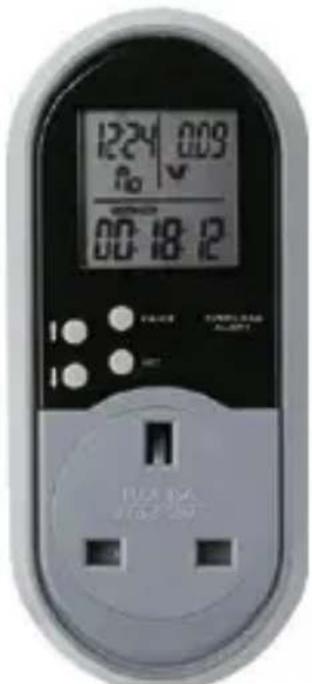
Power meter User's Guide
text_image
1224 009 R0 V 00:18:12 POWER POWER ALABETH 10.5kΩ 10.5kΩAfter Sales Support
Now you have purchased a Workzone™ product you can rest assured in the knowledge that as well as your 3 year parts and labour warranty you have the added peace of mind of dedicated helplines and web support.
text_image
AFTER SALES SUPPORT UK / N.IRELAND HELPLINE NO 0800 328 6020 REP. IRELAND HELPLINE NO 00800 4467 5888 E-MAIL SUPPORT info@dariolondon.com MODEL NUMBER: GT137903 Introduction
04-08 Safety Information
06-07 Battery information
08-10 Before Operation
08 Insertion of batteries
09 Unusual display
09-10 Setting the time
10 Changing the time format
11-15 Operating elements and LCD display
16-22 Operation
16-20 Entry of the power prices
21-22 Setting the overload warning
23-25 Overview of the displays
26-27 Technical data
28 Cleaning and care
28-29 Disposal
29 Conformity declaration
30-31 Warranty
32 Warranty card
IntroductionContents
Congratulations on choosing to buy a Workzone™ product.
By doing so you now have the assurance and peace of mind that comes with purchasing a product made by one of Europe's leading manufacturers.
All products brought to you by Workzone™ are manufactured to the highest standards of performance and safety, and, as part of our philosophy for customer service and satisfaction, are backed by our comprehensive 3 Year Warranty.
We hope you will enjoy using your purchase for many years to come.
Helpline No. UK/Northern Ireland 0800 328 6020
Rep. Ireland 00800 4467 5888
€-mail Support info@dariolondon.com
Model Number: GTI379
02
Helpline No. UK/Northern Ireland 0800 328 6020
Rep. Ireland 00800 4467 5888
€-mail Support info@dariolondon.com
Model Number: GTI379
03
Safety Instructions
Before you operate your power meter, please note the following points:
• Cautio
The meter should only be used pursuant to IEC 664 in installation category II (CAT II), i.e. its temporary voltage must not exceed 2500 V. The power supply for residential areas and industrial areas generally belong to this category.
- With the power meter, only those functions described in these operating instructions are permitted to be carried out.
• The device is exclusively designed for private use. - Prior to initial operation, please read these operating instructions carefully and particularly pay attention to the safety instructions in the next section.
- If possible, keep the operating instructions ready to hand near the device.
- If you should pass the device on to other persons, please also provide them with these operating instructions.
Safety Instructions
- Risk of electrical shock! The device operates with hazardous voltage.
• Children are frequently not aware of the hazards caused by electrical devices. Therefore, do not allow children to handle the device unsupervised.
• The device must be kept out of reach of children.
The power meter is not a toy! Improper use could cause an electric shock which may cause an injury or even death!
• Do not use the power meter outdoors. - Do not use the device in damp areas. Keep a minimum distance of 1 metre away from sources of moisture, such as sinks, etc.
- The device must not come into contact with dripping or spray water, or other liquids. Risk of electric shock!
- Only connect the device to a properly installed and fused 230 V socket.
- Never plug in several power meters in sequence and respectively, do not connect the device to similar devices.
• Do not carry out any changes to the device.
Helpline No. UK/Northern Ireland 0800 328 6020 Rep. Ireland 00800 4467 5888
€-mail Support info@dariolondon.com
Model Number: GTI379
04
Helpline No. UK/Northern Ireland 0800 328 6020 Rep. Ireland 00800 4467 5888
€-mail Support info@dariolondon.com
Model Number: GTI379
05
Safety Instructions Safety Instructions
- Do not operate the device if it displays visible damage. Repair must exclusively be carried out by qualified specialist personnel. If required, contact our Service Centre, see Warranty conditions.
Battery information
- The power meter operates using 2 batteries (button cells) sized LR-44 or AG-1 3 (these batteries are included).
• Never recharge batteries! Explosion hazard!
Keep batteries away from children, do not throw into fire, short circuit or dismantle.
• Clean battery and device contacts prior to insertion, if required.
- Immediately remove depleted batteries from the device! Increased risk of leakage!
- Do not expose batteries to any extreme conditions, e.g. on radiators! Increased risk of leakage!
Avoid contact with skin, eyes and mucous membranes. In case of contact with battery acid, immediately rinse the affected area with plenty of clear water and immediately contact a doctor.
• Always replace all batteries at the same time.
Only use batteries of the same type, do not use
different types or used and new batteries together.
• Immediately contact a doctor, if a battery should be swallowed.
- Batteries are not permitted to be disposed of with household waste. Every consumer is legally obligated to dispose of batteries properly.
CAUTIO
Prior to initial use, remove the black protective strip from the battery compartment.
Helpline No. UK/Northern Ireland 0800 328 6020 Rep. Ireland 00800 4467 5888
€-mail Support info@dariolondon.com
Model Number: GTI379
06
Helpline No. UK/Northern Ireland 0800 328 6020 Rep. Ireland 00800 4467 5888
€-mail Support info@dariolondon.com
Model Number: GTI379
07
Before Operation
Insertion of the batteries
- If applicable, disconnect the power meter from the power source.
- Pull the battery holder (reverse side, above the plug) straight out of the power meter.
- Insert the batteries (1.5 V button cells, size LR-44 or AG-13), as shown on the battery holder. Pay attention to the correct polarity (+ / -) when inserting.
- Line up the battery holder for mounting onto the power meter (angled edges together).
- Insert both of the contacts on the battery holder into the slits on the mount and press the battery holder into the power meter. NOTE: If you should not use the device for an extensive period of time, remove the batteries from the device, in order to avoid premature depletion and possible leakage.
Before Operation
Unusual display
If an unusual display should be shown, or not respond to the pressing of the buttons, an initialisation needs to take place.
- Pull the battery holder (reverse side, above plug) straight out of the power meter.
- Press the SET button and keep it pressed down while you re-insert the battery holder with the batteries.
Setting the time
- Press the SET button. The display for hours will flash.
- Set the hour with the arrow up/arrow down buttons.
- Press the SET button. The minute display will flash.
- Set the minutes with the arrow up/arrow down buttons.
- Press the SET button. The display for the day of the week will flash.
- Set the day of the week using the arrow up/arrow down buttons.
- Press the SET button, in order to save the entry.
Helpline No. UK/Northern Ireland 0800 328 6020
Rep. Ireland 00800 4467 5888
€-mail Support info@dariolondon.com
Model Number: GTI379
08
Helpline No. UK/Northern Ireland 0800 328 6020 Rep. Ireland 00800 4467 5888
€-mail Support info@dariolondon.com
Model Number: GTI379
9
Before Operation Operating elements and LCD display
Hint: for fast-forward/fast-reverse, keep the arrow button pressed in for setting.
Change time format
(24-hour display <-> 12-hour display)
- Kee arrow u button pressed down for 3 seconds.
text_image
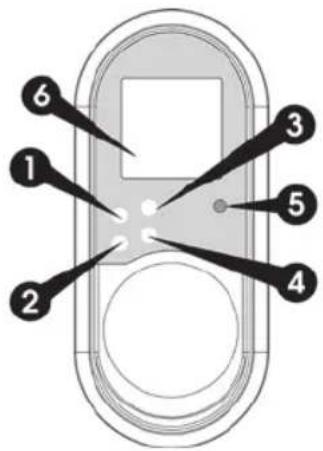
1 2 3 4 5 61 Arrow up
• Switches between two time formats: Time with seconds and time with day of the week.
• Increases the value being set.
Helpline No. UK/Northern Ireland 0800 328 6020
Rep. Ireland 00800 4467 5888
€-mail Support info@dariolondon.com
Model Number: GTI379
10
Helpline No. UK/Northern Ireland 0800 328 6020
Rep. Ireland 00800 4467 5888
E-mail Support info@dariolondon.com
Model Number: GTB79
II
Operating elements and LCD display
2 Arrow down
- Switches the display: Voltage and frequency, amperes and frequency, max. amperes and frequency, watts with the power factor * max. watts, overload, depending on the set value (W or A).
- Select. - Reduces the setting value.
* The power factor (0.20 to 1.00) is a yardstick for how effectively the electrical energy is being utilised. A higher power factor represents the use of the electrical energy and ultimately also the higher degree of efficiency.
3 PRICE
• Switches the display: Total consumption time (TOTAL TIME), power price RP (PRICE KWh €), power price DP (PRICE KWh 2 €), total price (TOTAL €), total consumption KWh.
Operating elements and LCD display
4 SET
- Within the time format: Switch to entry mode for time, minutes and day of the week.
- Within the voltage and frequency display: Switch to entry mode of the overload value (W or A).
• Jump to the next entry position.
5 OVERLOAD
• Illuminates red, if the set overload value is exceeded.
Helpline No. UK/Northern Ireland 0800 328 6020 Rep. Ireland 00800 4467 5888
€-mail Support info@dariolondon.com
Model Number: GTI379
12
Helpline No. UK/Northern Ireland 0800 328 6020 Rep. Ireland 00800 4467 5888
€-mail Support info@dariolondon.com
Model Number: GTI379
13
Operating elements and LCD display
text_image
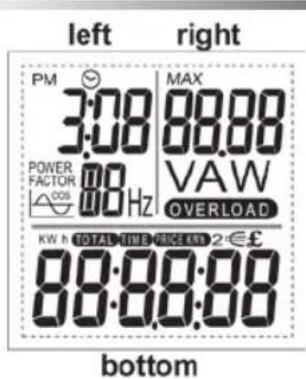
left right PM MAX 3:00 88.00 POWER FACTOR VAW COS 80 Hz OVERLOAD KW h TOTAL TIME PRICE KIN 2€£ 88:00:00 bottom6 LCD-Display
• ■ Display of time, day of the week, power factor and frequency.
Serves to enter the start time (start of measurement) with the regular power price (RP).
Serves to enter the start time (start of measurement) with the discounted power price (DP).
Operating elements and LCD display
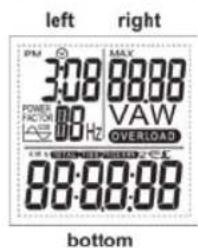
- Field right: Display of volts, amperes, max. amperes, watts, max. watts, overload, depending on the set value (W or A).
Serves to enter the overload value for watts or amperes.
- F bott Display of total consumption period (TOTAL TIME), power price RP (PRICE KWh €), power price DP (PRICE KWh 2 €), total price
(TOTAL €), total consumption KWh.
Serves to enter the 1st power price (RP, regular power price) and the 2nd power price (DP, discounted power price).
Helpline No. UK/Northern Ireland 0800 328 6020 Rep. Ireland 00800 4467 5888
€-mail Support info@dariolondon.com
Model Number: GTI379
14
Helpline No. UK/Northern Ireland 0800 328 6020 Rep. Ireland 00800 4467 5888
E-mail Support info@dariolondon.com
Model Number: GTB79
15
Operation
Entry of the power prices
(regular power price RP and discounted power price DP)
IMPORTANT INSTRUCTIONS: A correct measurement with entry of the regular and discounted power price can only take place if the current time is set (see BEFORE OPERATION). The conversion of the time from summer time to winter time/winter time to summer time must be carried out manually and is only required for the current time. If you do not press a button for 60 s during entry, the display will return to the starting position.
If only one power price should consistently apply in your household, then only the entry of the power price is necessary:
- For this, carry out the settings that are described under points 1 to 5.
- Then page 4 button repeatedly, until your reach the starting display:
Operation
• Time with seconds/day of the week. voltage (V) and total consumption (KWh).
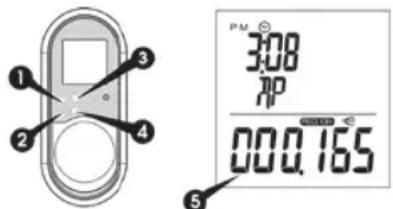
text_image
PM 3:08 7P 000.165- Press th 3 PRIC button twice.
• The field at the bottom displays Price kWh €. - Press the 4 SE button once.
- The field at the bottom show PRICE K' € in six numbers. he first number 5 flashes.
- Press the 1 arrow up / 2 arrow down button, in order to carry out the entry for the first number.
NOTE: If the zero is to remain, go to step 4.
- Confirm the entry and switch to the next number with the 4 SET button.
Helpline No. UK/Northern Ireland 0800 328 6020
Rep. Ireland 00800 4467 5888
€-mail Support info@dariolondon.com
Model Number: GTI379
16
Helpline No. UK/Northern Ireland 0800 328 6020 Rep. Ireland 00800 4467 5888
€-mail Support info@dariolondon.com
Model Number: GTI379
17
Operation
- Repeat steps 3 and 4 for all numbers.
• The decimal point represents the comma.
- After you have confirmed the last number, in the field left, the display flashes for hours. The time is identified with the letters RP.
- Enter the start time (start of measurement in hours and minutes) with the regular power price (RP).
-
The setting takes place with the 1 arrow up / 2 arrow down buttons and by confirmation with the 4 SET button.
-
After you have confirmed the RP time with the 4 SET button, you reach the entry for the second price (DP).
- The field bottom shows PRICE KWh 2 € in six figures. The first number flashes.
- Repeat the entry for the discounted power price (DP), as described under points 3 to 5.
Operation
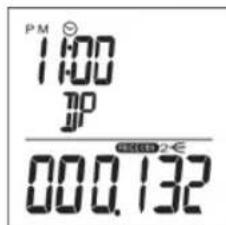
text_image
PM 1:00 JP 00.0.132- After you have confirmed the last number, the display for the hours flashes in the field on the left. The time is identified with the letters DP.
- Enter the start time here (start of measurement in hours and minutes) with the discounted power price (DP) (see point 7).
- After you have confirmed the DP time with the 4 SET button, you reach the starting display:
- Time with seconds/day of the week, voltage (V) and total consumption (KWh).
Your power meter is now ready to use. Connect the device to a properly installed and fused 230 V socket.
Helpline No. UK/Northern Ireland 0800 328 6020 Rep. Ireland 00800 4467 5888
€-mail Support info@dariolondon.com
Model Number: GTI379
18
Helpline No. UK/Northern Ireland 0800 328 6020 Rep. Ireland 00800 4467 5888
E-mail Support info@dariolondon.com
Model Number: GTB79
19
Operation
Now connect the consumer/consumers (using a power outlet strip to the power meter.
Note that the total output of the connected consumers must not exceed 3120 watts.
If required, delete the values for total consumption (KWh), total consumption time (TOTAL TIME) and the price, by pressing and holding the 3 PRICE button for 3 seconds.
Operation
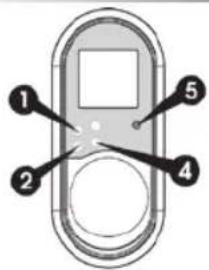
text_image
Diagram of a device with numbered components labeled 1 through 5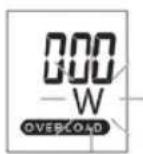
Setting the overload warning
(OVERLOAD)
- If required, switch over to the display of time, frequency (Hz) and voltage (V) by pressing the
2 arrow up button.
- This step is only necessary if, in the display on the left, the time with seconds and days of the week are shown.
- Press th 4 SE button once.
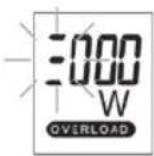
- The display on the right shows 000 with a flashing W (watts) and the lettering, OVERLOAD.
Helpline No. UK/Northern Ireland 0800 328 6020
Rep. Ireland 00800 4467 5888
€-mail Support info@dariolondon.com
Model Number: GTI379
20
Helpline No. UK/Northern Ireland 0800 328 6020 Rep. Ireland 00800 4467 5888
€-mail Support info@dariolondon.com
Model Number: GTB79
21
Operation
- Press the 1 arrow up or 2 arrow down button, in order to select the watts (W) or amperes (A) overload warning.
- Press t 4S button, in order to reach the entry mode.
- The display on the right shows a flashing placeholder for the first number.
- With the pre-selection for watts (W), the numbers 1, 2 or 3 can be entered (possible maximum entry is 3999).
-
With the pre-selection for amperes (A), only the number 1 can be entered (maximum possible entry is 19.99).
-
The setting takes place with the 1 arrow up / 2 arrow down buttons and by confirming with the 4 SET button.
• After entering the last number, the set value remains in the display.
NOTE: If the set value is exceeded, OVERLOAD flashes in the display and the OVERLOAD display 5 illuminates red.
Delete the setting by overwriting or by pressing and holding the 2 arrow down button for 3 seconds.
Overview of the displays
text_image
left right PM MAX 3:08 88:00 POWER 0.0Hz VAW FACTOR 0.0Hz OVERLOAD bottomField left
Repeatedly press arrow up button: Display switches between time with seconds and time with day of the week.
Field right
Repeatedly press arrow down button:
Display of the voltage number (V) and frequency display (Hz) in field left.
Display of amperes (A) number. Display of the max. amperes number (A).
Helpline No. UK/Northern Ireland 0800 328 6020 Rep. Ireland 00800 4467 5888
€-mail Support info@dariolondon.com
Model Number: GTI379
22
Helpline No. UK/Northern Ireland 0800 328 6020 Rep. Ireland 00800 4467 5888
E-mail Support info@dariolondon.com
Model Number: GTB79
23
Overview of the displays
Display of the watt number (W) and the power factor in the field left.
Display of the max. amperes number (A).
Display of the set value for the overload warning amperes (A).
If the overload warning for watts (W) has been entered, this will be displayed.
Field bottom
Repeatedly press PRICE button:
Display of the total consumption time.
NOTE: The display of the total consumption time takes place up to 99:59:59 (hh:mm:ss) in second intervals. After that, the display changes to hhhh:mm and counts the total consumption time in minute intervals. The maximum display of the total consumption time is 9999 hours and 59 minutes (approx. 416 days).
Display of the regular price (RP) for KWh.
Display of the discounted price (DP) for KWh.
Overview of the displays
Display of the price for the power used (TOTAL €).
Display of the total consumption (KWh).
Helpline No. UK/Northern Ireland 0800 328 6020
Rep. Ireland 00800 4467 5888
€-mail Support info@dariolondon.com
Model Number: GTI379
24
Helpline No. UK/Northern Ireland 0800 328 6020
Rep. Ireland 00800 4467 5888
€-mail Support info@dariolondon.com
Model Number: GTI379
25
Technical data
Input/output voltage: 220VAC-240VAC \~ 50 Hz
Power input: max. 13 A / 3120 W
Voltage display: 190 V - 276 V
Frequency display: 40 - 70 Hz
Power input display: 0.0 - 16 A
Display start from: 0.02 A
Effective power display: 0 - 3.999 W
Resolution: 1 W
Consumption measurement: 0,00 - 9.999,99 KWh
Display duration: up to 9.999 h 59'
Technical data
Measurement precision
Volts: ± 3 % of the
measured value
Amperes: ± 3 % of the measured value
/ ± 0,04 A
Watts: ± 5 % of the measured value
/ ± 10 W
KWh: ± 5 % of the measured value
/ ± 0,1 KWh
Conditions for use
Temperature:
+5°C to +40°C
Relative humidity:
max. 90 %
Only use in enclosed rooms.
Do not use outside.


Helpline No. UK/Northern Ireland 0800 328 6020
Rep. Ireland 00800 4467 5888
€-mail Support info@dariolondon.com
Model Number: GTI379
26
Helpline No. UK/Northern Ireland 0800 328 6020
Rep. Ireland 00800 4467 5888
€-mail Support info@dariolondon.com
Model Number: GTI379
27
Cleaning and care
Always disconnect the power meter from the power source when it is to be cleaned.
The device must not be rinsed or immersed in liquids.
Use a soft, dry cloth for cleaning.
Disposal
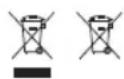
When the device has become obsolete, please dispose of it properly. Do not throw it into household waste, but rather, give it to a collection centre for electrical and electronic devices.
Remove the batteries beforehand and give these to a collection centre for batteries!
In the interest of environmental protection, please also ensure the appropriate recycling of packaging material. Packaging is a raw material and can be recycled.
Disposal
The responsible authority will be pleased to inform you about addresses and opening times of collection centres.
Conformity declaration
The conformity of the product with the prescribed standards is guaranteed.
The complete conformity declaration can be found on the Internet at www.gt-support.de.
Helpline No. UK/Northern Ireland 0800 328 6020 Rep. Ireland 00800 4467 5888
€-mail Support info@dariolondon.com
Model Number: GTI379
28
Helpline No. UK/Northern Ireland 0800 328 6020 Rep. Ireland 00800 4467 5888
€-mail Support info@dariolondon.com
Model Number: GTI379
29
Warranty
The appliance has been manufactured with the greatest care.
The warranty period is three years from the date of purchase. Please retain the sales receipt as proof of purchase as without it the warranty claim cannot be processed.
During the warranty period, the sales receipt and the completed warranty card with a description of the fault must be returned once you have contacted the service centre by phone. A new appliance will be returned.
This guarantee is in addition to your statutory rights. Your statutory rights are not affected.
This warranty does not apply in cases of damage caused by accident, improper use, abuse and force majeure.
This warranty will be invalidated if the appliance is tampered with in any way whatsoever.

Warranty
For warranty claims, please first contact us by telephoning the service centre free phone number or email:
Dario London Service Centre
PO Box 70
Chislehurst
BR7 5YH
UK
UK: 0800 328 6020
Ireland: 00800 4467 5888
info@dariolondon.com
If the appliance has to be returned to us, it must be packed correctly as we cannot accept any responsibility for damage caused in transit.
Helpline No. UK/Northern Ireland 0800 328 6020 Rep. Ireland 00800 4467 5888
€-mail Support info@dariolondon.com
Model Number: GTI379
30
Helpline No. UK/Northern Ireland 0800 328 6020 Rep. Ireland 00800 4467 5888
€-mail Support info@dariolondon.com
Model Number: GTI379
31

text_image
WORKZONE® ♦ PROFESSIONAL TOOLS ♦POWER METER GT1379
3 YEAR WARRANTY CARD
Name
Address
Email ____ Tel ____
No
Model No. ____
Location of purchase
Please send your completed Warranty Card to:
UK + Ireland
Dario London Service Centre
PO Box 70, Chislehurst, BR7 5YH
UK
UK: 0800 328 6020
Ireland: 00800 4467 5888
E42199 09/09