
Isilon X200 - NAS DELL - Free user manual and instructions
Find the device manual for free Isilon X200 DELL in PDF.


| Product Type | Network Attached Storage (NAS) |
| Brand | Dell (EMC Isilon) |
| Model | Isilon X200 |
| Form Factor | 2U rackmount |
| Drive Bays | 12 x 3.5" SATA |
| Storage Capacity per Node | Up to 11 TB SATA |
| Memory | 24 GB RAM |
| Network Interfaces | 2 x 10 Gigabit Ethernet |
| Supported Protocols | NFS v3, SMB v1, DAV |
| Operating System | EMC Isilon OneFS |
| Data Protection | N+1 and N+2:1 |
| Performance (Read/Write) | Up to 200 MB/s combined per node |
| Scalability | Scale-out by adding nodes |
| Typical Use Case | Media transcoding, IPTV, content delivery |
| Power Supply | Dual redundant (hot-swappable) |
| Weight | Approx. 25 kg |
| Dimensions (H x W x D) | 88.9 x 482.6 x 660.4 mm |
| Operating Temperature | 5°C to 35°C |
| Noise Level | Approx. 50 dBA |
| Included Accessories | Power cords, rackmount kit |
| File System | OneFS (distributed) |
Frequently Asked Questions - Isilon X200 DELL
User questions about Isilon X200 DELL
0 question about this device. Answer the ones you know or ask your own.
Ask a new question about this device
Download the instructions for your NAS in PDF format for free! Find your manual Isilon X200 - DELL and take your electronic device back in hand. On this page are published all the documents necessary for the use of your device. Isilon X200 by DELL.
USER MANUAL Isilon X200 DELL
EMC Isilon and Elemental provide best-in-class, massively scalable solutions for IPTV transcoding and on-demand content delivery for broadcast media workflows. The world's top on-demand service providers rely on EMC Isilon scale out NAS and Elemental Server GPU-based video transcoding solutions to simplify and accelerate their workflows.
June 2013
ELEMENTAL

Copyright © 2013 EMC Corporation. All Rights Reserved.
EMC believes the information in this publication is accurate as of its publication date. The information is subject to change without notice.
The information in this publication is provided “as is.” EMC Corporation makes no representations or warranties of any kind with respect to the information in this publication, and specifically disclaims implied warranties of merchantability or fitness for a particular purpose.
Use, copying, and distribution of any EMC software described in this publication requires an applicable software license.
For the most up-to-date listing of EMC product names, see EMC Corporation Trademarks on EMC.com.
EMC2, EMC, the EMC logo, Isilon, OneFS, and SmartConnect are registered trademarks or trademarks of EMC Corporation in the United States and other countries.
VMware is a registered trademark or trademarks of VMware, Inc. in the United States and/or other jurisdictions. All other trademarks used herein are the property of their respective owners.
Part Number H11206.1
Table of Contents
Executive summary 4
Business case....4
Solution overview 4
Key results/recommendations 4
Elemental Server configuration ....5
Configuration 5
Sizing....7
Executive summary
Business case
Elemental® and EMC® Isilon® work with top service providers to convert media content for on-demand viewing on PCs, tablets, and mobile devices. Solutions from Elemental employ the massively parallel architecture of graphics processing units (GPUs) to perform accelerated video processing and encoding. Elemental reduces the number of systems needed to support the transcoding of thousands of hours of content compared to CPU-only solutions.
Service providers are faced with a number of issues as the market shifts from broadcast media content consumption to a widening array of on-demand viewing options:
- Content must be available anywhere, at any time, for any device.
• Massive libraries of legacy feature films and broadcast content require conversion. - Valuable content must be secured and managed.
Transcoding workflows must be highly parallelized in order to prepare fresh content for on-demand delivery in a timely manner. Service providers responsible for driving new revenue from broadcast content in on-demand markets must rely on efficiencies of scale. Above all, the solutions for on-demand content creation must be cost-effective.
Solution overview
Elemental® Server is a scalable, GPU-based video processing system. Each node in an Elemental Server array is capable of converting up to 12 unique high definition or 32 mobile video files into hundreds of output files simultaneously, at data rates faster than real-time. Elemental delivers the highest quality encoding using codecs designed specifically for the GPU. Elemental Server is a Linux-based system featuring web-based administration, REST/XML APIs, and standardized SMB or NFS connectivity to high-performance EMC Isilon scale-out NAS. EMC Isilon and Elemental Server combine to provide a scalable, fault-tolerant infrastructure for media content conversion and delivery to your content delivery network.
Key results/ recommendations
The world's top broadcast, streaming media, and production companies trust EMC Isilon to store content and drive performance-hungry media workflows. Elemental and EMC Isilon have partnered to provide a state-of-the-art compute layer for on-demand transcoding workflows built on the EMC Isilon family of scale-out NAS products. Like EMC Isilon, Elemental Server is built on a modular appliance platform that easily scales to meet the demands of your business to:
- Deploy high-density, multi-format video conversion.
- Scale out network-attached storage capacity and bandwidth through the simple addition of EMC Isilon nodes.
- Scale parallel GPU-based video processing power through the simple addition of Elemental Server systems.
Elemental Server configuration
Configuration
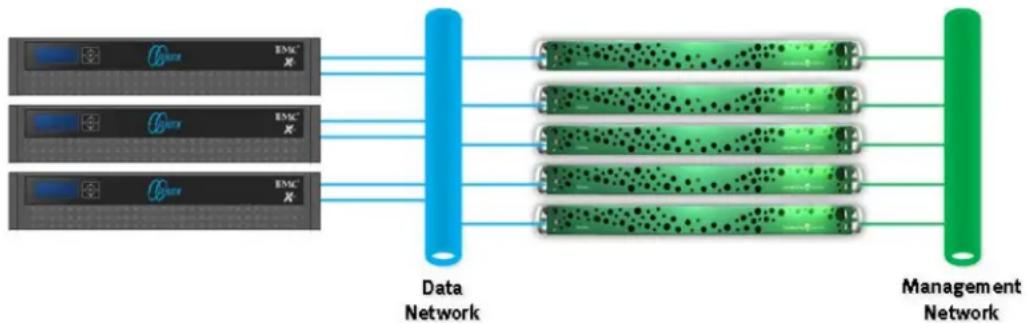
Elemental Server is typically deployed in a clustered configuration consisting of a management node and one or more worker nodes. The management node of the cluster acts as a gateway to balance new jobs from the REST/XML interface, watch folders, or web interface evenly across the cluster. The management node may also store an XML file to automate the configuration of new worker nodes as they are added to the Elemental Server cluster. Communication from the Elemental Server management node to the worker nodes is carried over a dedicated management network interface. The Elemental Server cluster connects to EMC Isilon NAS over a dedicated interface on the "data network" as shown below in figure 1.
flowchart
graph LR
    A["ERM device"] --> B["Data Network"]
    C["ERM device"] --> B
    D["ERM device"] --> B
    E["ERM device"] --> B
    B --> F["Management Network"]
    style A fill:#f9f,stroke:#333
    style C fill:#f9f,stroke:#333
    style D fill:#f9f,stroke:#333
    style E fill:#f9f,stroke:#333
    style F fill:#ccf,stroke:#333
Figure 1. Elemental Server clustered network configuration
Elemental Server version 1.9 uses standard SMB and NFS mounts when connecting to EMC Isilon NAS over the data network. Optionally, Elemental Server may connect to EMC Isilon using DAV. DAV is only used in workflow conditions where bandwidth scalability is not critical to the workflow. The EMC Isilon DAV protocol complies with Class 1 and 2 of the DAV specification (RFC 2518). However, all DAV clients need to go through a single node. DAV compliance is NOT met if you go through SmartConnect™, or via 2 or more node IPs. DAV is an excellent protocol choice for a mixed protocol workflow, where SMB2 shares or NFS v3 exports are used as the input locations during the transcode job and a DAV is used to post a low-bitrate H.264 output file directly to a web enabled URL.
Elemental Server's current implementation of SAMBA mounts SMB shares from EMC Isilon storage using the SMB v1 by default. SMB v1 performance when mounting Isilon is limited to about 50 Megabits per second. The transcode performance using and SMB mount on Elemental Server is roughly equivalent to the performance of a workflow utilizing the internal RAID 1 SATA storage of the Elemental Server appliance.
For best performance, EMC Isilon storage is mounted on the Elemental Server systems using the NFS protocol via the 'mounts' section of the Elemental Server web 'settings' configuration page. When specifying the mount points to be used in transcode jobs, use the syntax server:/ifs/export where 'server' is the full qualified domain name of an EMC Isilon SmartConnect zone and /ifs/export is the full path configured in the EMC Isilon NFS export settings. The EMC Isilon SmartConnect service automatically balances network connections from the Elemental
Server cluster across to individual nodes in the EMC Isilon storage cluster. For the best performance and reliability, mount the EMC Isilon cluster from an NFS export using the SmartConnect Advanced application. SmartConnect Advanced allows for the dynamic allocation of IP addresses to different nodes in the NAS cluster.
SmartConnect Advanced automatically initiates a failover of active NFS connections in the event of a hardware failure. SmartConnect Advanced also rebalances active NFS connections across the EMC Isilon cluster to ensure an even distribution of active Elemental Server client connections on each node. This NFS client rebalancing is possible without disconnecting the active client connections. To learn more about SmartConnect configuration and the SmartConnect Advanced feature, please consult the EMC Isilon SmartConnect White Paper.
In addition to specifying the SmartConnect load balancing name for the EMC Isilon cluster, specify the local mount point for the Elemental Server. Simply provide a name to /data/mnt prefix in the web UI and Elemental Server automatically creates the mount point. The path specified for this mount point is used when specifying media input and output locations in Elemental Server transcode job templates.
Elemental Server mounts NFS volumes via /etc/fstab using the following mount parameters:
nfs tcp, rw, async, rdirplus, rsize=32768, wsize=32768, nfsvers=3, bg, retrans=0 0 0
The Elemental Server mount parameters specify that the features will be used when mounting an NFS export from EMC Isilon storage:
• The NFS protocol uses TCP rather than UDP.
• The NFS mount has read/write access.
• Data communication is asynchronous.
- Performance during metadata retrieval in directories with thousands of files is accelerated by combing the LOOKUP, ACCESS, GETATTR, and READDIR calls into a single READDIRPLUS call.
• Data reads and writes to the NFS mount in 32 KB chunks.
- The NFS v3 protocol is employed.
- The mount is run in the background during startup, to prevent Elemental Server from hanging in the event the network is unavailable.
- NFS retransmission attempts are set to 0, as they are not needed when using NFS over TCP.
The configuration settings for SMB shares and NFS exports require no customization when integrating Elemental Server in your workflow. When using SMB, ensure that a local user account is specified, on the cluster that matches the credentials specified for the Elemental Server SMB mount, as Elemental Server does not currently offer Microsoft Active Directory integration via the web UI. No advanced SMB parameters are required. The NFS mount parameters defined by Elemental Server are fully compatible with the default settings for a new NFS export created via the EMC Isilon OneFS web UI.
The default EMC Isilon "concurrency" data access pattern is well suited to the highly concurrent data access pattern of scalable transcode workflows. Please ensure that the default IO optimization settings are in place for the OneFS directory that is
mounted on the Elemental Server by selecting "properties" for the subfolder from the EMC Isilon web UI filesystem explorer page.
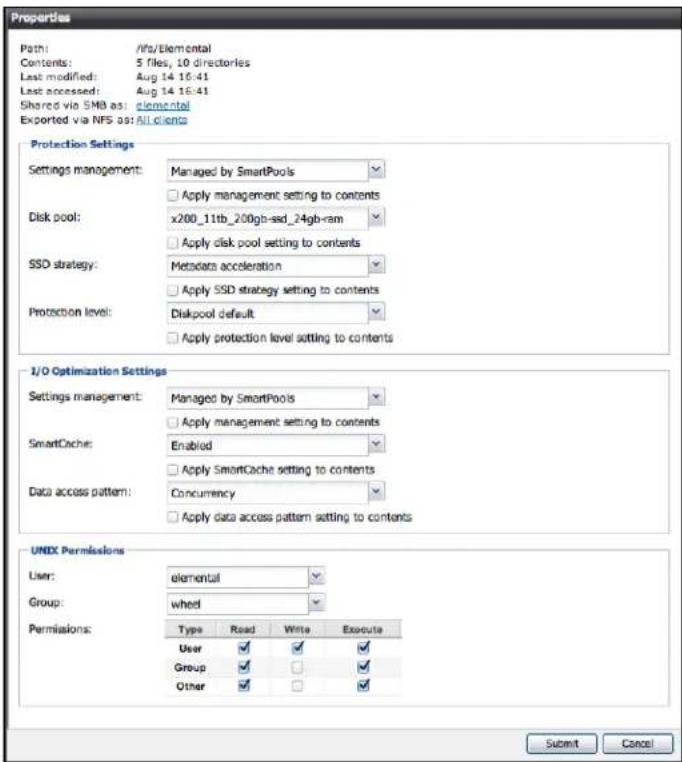
Figure 2. Default I/O optimization settings
Some throughput performance improvement is gained by changing the protection level from the Diskpool default setting of N+2:1 (the cluster can survive 2 disk failures in any node of a full node failure before going read-only) to N+1 on X200 and S200 clusters containing less than 5 nodes. Care should be taken to ensure that the protection level is increased once the cluster grows in size, as an N+1 data protection setting can extend rebuild times past an acceptable 24 hour window of safety on clusters larger than 12 nodes. Further, the N+1 data protection level should not be used on EMC Isilon models containing 36 drive bays such at the NL and X400 series nodes.
The EMC Isilon OneFS® operating system allows SMB shares to be mounted as NFS exports simultaneously, allowing seamless integration of Windows and UNIX/Linux applications in your workflow. Please consult the document EMC Isilon Multiprotocol Data Access with a Unified Security Model for SMB and NFS for more information about identity mapping and simultaneous access to the same filesystem using SMB and NFS.
Sizing
The read/write throughput generated by each Elemental Server appliance is highly variable. The bandwidth requirements for Elemental Server are highly variable and "bursty" as the appliance reads files into memory.
A single 10 Gigabit Ethernet enabled Elemental Server appliance with 1024 GPU cores can generate up to 200 Megabytes per second of combined read/write NFS v3 traffic when running the standard throughput benchmark test profile created by the default Elemental Server install. Using this throughput benchmark test as a general guideline, Figure 3 demonstrates example sizing ratios for an EMC Isilon cluster against a scalable Elemental Server installation.
| EMC I silon Node Type Elemental Servers per EMC I silon node | |
| S200 6.9 TB SAS/200GB SSD,48 GB RAM & 10GbE | 6 |
| X400 32TB SATA/400GB SSD,48 GB RAM & 10GbE | 5 |
| X200 11TB SATA/200GB SSD,24 GB RAM & 10GbE | 3 |
Figure 3. Example sizing ratios
Performance characteristics of any transcode workflow will vary widely based on input codec type, output codec type, and complexity of the content video. Because of the infinite configuration and integration options available in the EMC Isilon product family, it is important to ensure that your workflow is sized appropriately with your storage environment. Please contact your local EMC Isilon sales representative to learn more about sizing and configuration options for the EMC Isilon family of scale-out storage.

Brand : DELL
Model : Isilon X200
Category : NAS